buttons VOLVO S60 2006 User Guide
[x] Cancel search | Manufacturer: VOLVO, Model Year: 2006, Model line: S60, Model: VOLVO S60 2006Pages: 132, PDF Size: 2.33 MB
Page 115 of 132
Never attempt to play a disc which is damaged in any way.
When not in use, the discs should be stored in their covers. Avoid storing discs in excessive heat, direct sunlight or
dusty locations.
pg. 179 Audio
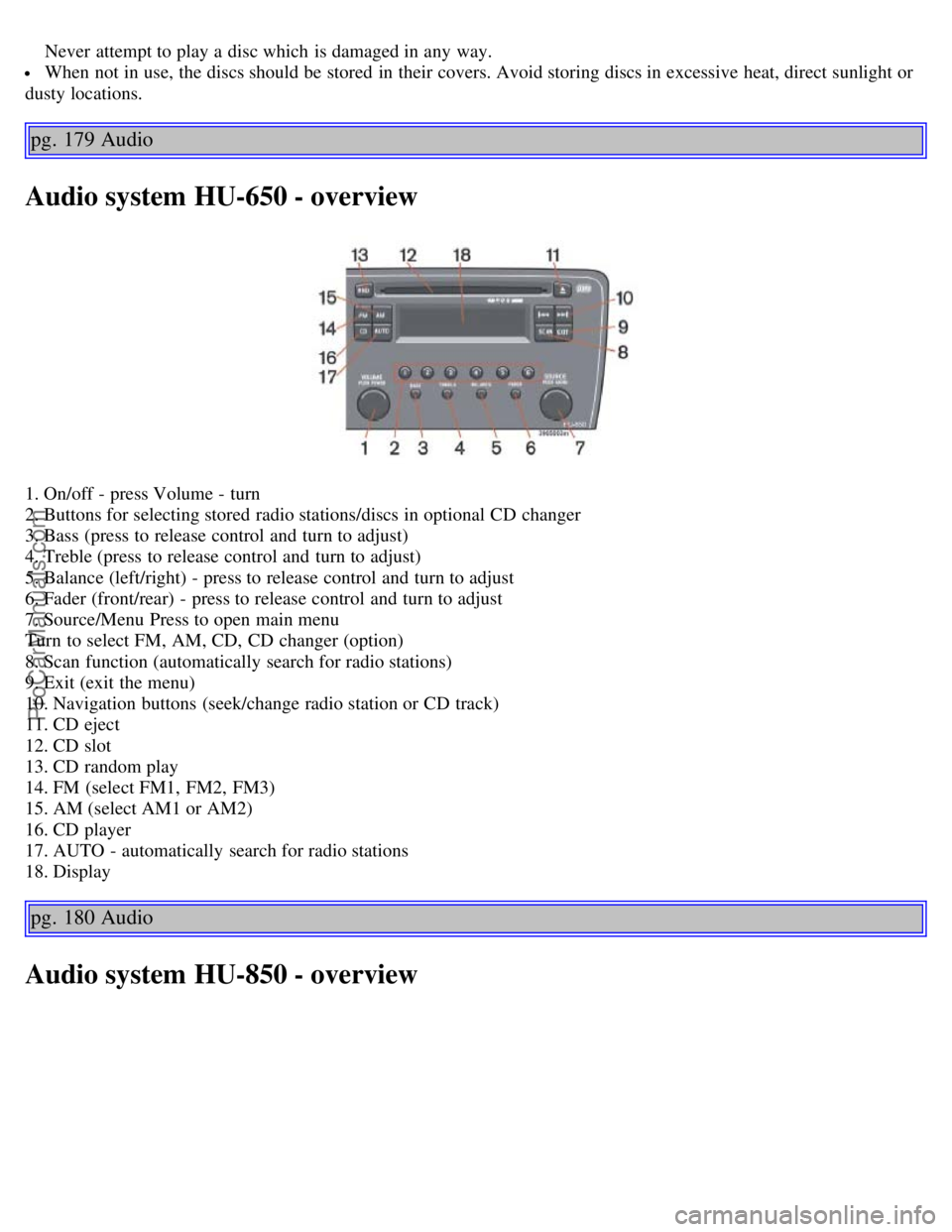
Audio system HU-650 - overview
1. On/off - press Volume - turn
2. Buttons for selecting stored radio stations/discs in optional CD changer
3. Bass (press to release control and turn to adjust)
4. Treble (press to release control and turn to adjust)
5. Balance (left/right) - press to release control and turn to adjust
6. Fader (front/rear) - press to release control and turn to adjust
7. Source/Menu Press to open main menu
Turn to select FM, AM, CD, CD changer (option)
8. Scan function (automatically search for radio stations)
9. Exit (exit the menu)
10. Navigation buttons (seek/change radio station or CD track)
11. CD eject
12. CD slot
13. CD random play
14. FM (select FM1, FM2, FM3)
15. AM (select AM1 or AM2)
16. CD player
17. AUTO - automatically search for radio stations
18. Display
pg. 180 Audio
Audio system HU-850 - overview
ProCarManuals.com
Page 116 of 132
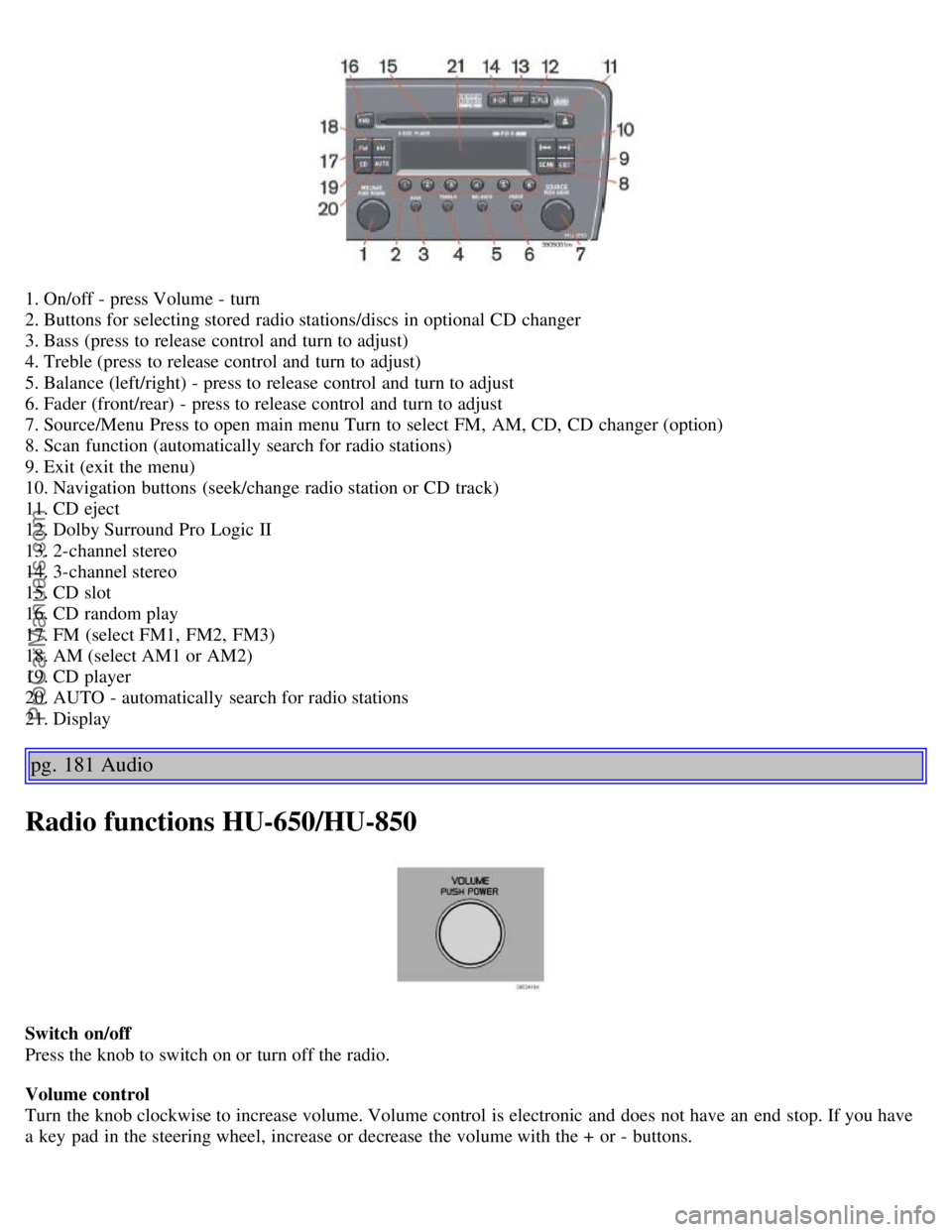
1. On/off - press Volume - turn
2. Buttons for selecting stored radio stations/discs in optional CD changer
3. Bass (press to release control and turn to adjust)
4. Treble (press to release control and turn to adjust)
5. Balance (left/right) - press to release control and turn to adjust
6. Fader (front/rear) - press to release control and turn to adjust
7. Source/Menu Press to open main menu Turn to select FM, AM, CD, CD changer (option)
8. Scan function (automatically search for radio stations)
9. Exit (exit the menu)
10. Navigation buttons (seek/change radio station or CD track)
11. CD eject
12. Dolby Surround Pro Logic II
13. 2-channel stereo
14. 3-channel stereo
15. CD slot
16. CD random play
17. FM (select FM1, FM2, FM3)
18. AM (select AM1 or AM2)
19. CD player
20. AUTO - automatically search for radio stations
21. Display
pg. 181 Audio
Radio functions HU-650/HU-850
Switch on/off
Press the knob to switch on or turn off the radio.
Volume control
Turn the knob clockwise to increase volume. Volume control is electronic and does not have an end stop. If you have
a key pad in the steering wheel, increase or decrease the volume with the + or - buttons.
ProCarManuals.com
Page 118 of 132

Selecting a sound source
The sound source (e.g. AM, FM, etc.) can be selected in two ways:
Use the sound source buttons (see the center illustration above).
Turn the SOURCE knob (see illustration above) to select a sound source (AM1, AM2, FM1, FM2, FM3, or CD).
Press the knob to select the AM or FM band of your choice.
The sound source selected will be shown in the display.
Scan
Press the SCAN button to start the station scan function. When a station is found, scanning stops for approximately 10
seconds, after which scanning will continue.
Press the SCAN or SOURCE button when a station has been found if you would like to listen to that station and to
discontinue the scan function.
Station seek up/down
Press
or to start the seek function. The radio seeks the next audible station and tunes it in. Repeat the procedure
to continue the seek function.
Manual station search
Press
or and hold it down. MAN will be shown in the display. The radio scans slowly in the selected direction
and will increase the scanning speed after a few seconds. Release the button when the desired frequency appears in the
display.
The frequency can be fine-tuned by short presses on the
or keys.
The system will remain in manual search mode for 5 seconds after the button is released, after which it will return to
seek mode.
pg. 183 Audio
Steering wheel key pad (option)
If the vehicle is equipped with the key pad in the steering wheel press the right or left arrow to switch between preset
stations.
ProCarManuals.com
Page 119 of 132
Storing stations
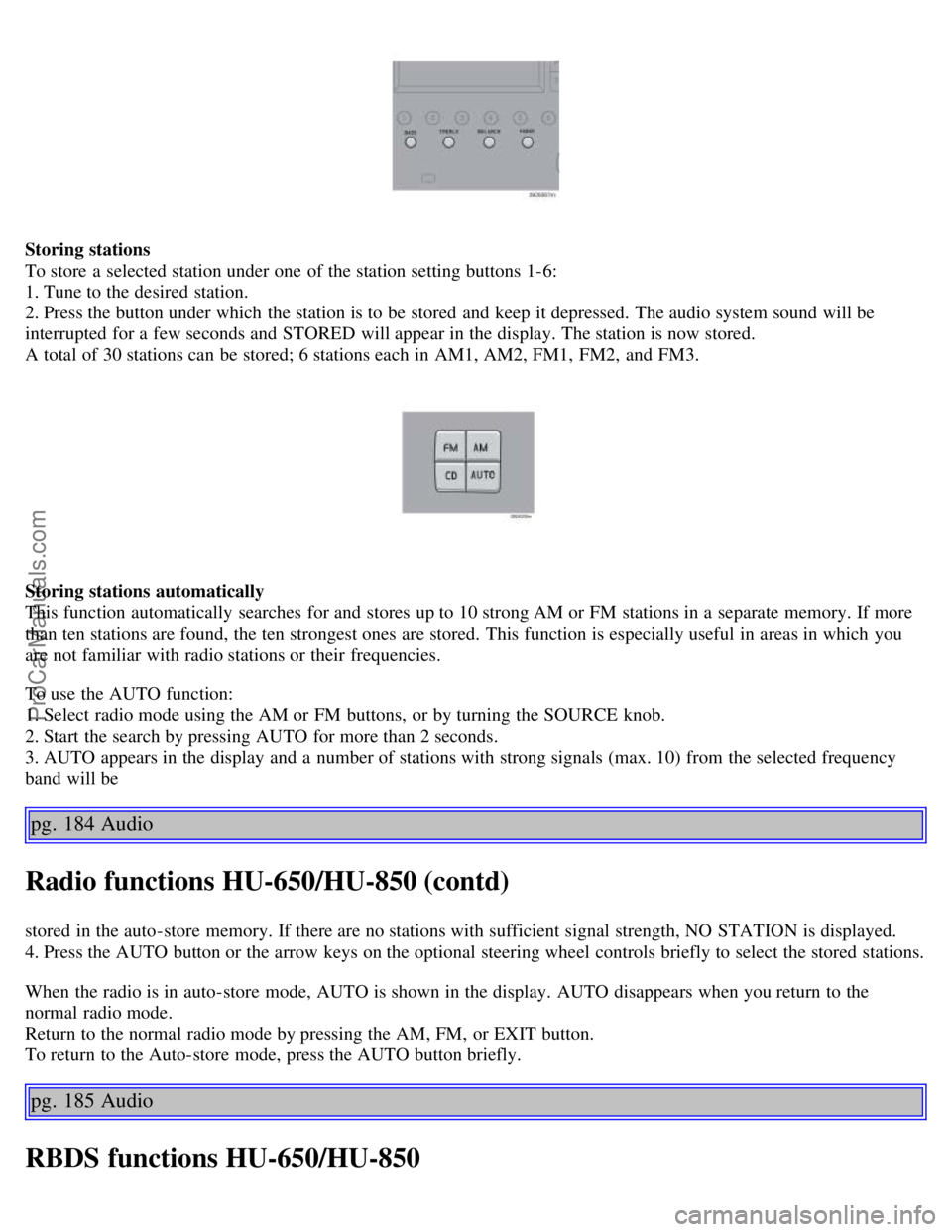
To store a selected station under one of the station setting buttons 1-6:
1. Tune to the desired station.
2. Press the button under which the station is to be stored and keep it depressed. The audio system sound will be
interrupted for a few seconds and STORED will appear in the display. The station is now stored.
A total of 30 stations can be stored; 6 stations each in AM1, AM2, FM1, FM2, and FM3.
Storing stations automatically
This function automatically searches for and stores up to 10 strong AM or FM stations in a separate memory. If more
than ten stations are found, the ten strongest ones are stored. This function is especially useful in areas in which you
are not familiar with radio stations or their frequencies.
To use the AUTO function:
1. Select radio mode using the AM or FM buttons, or by turning the SOURCE knob.
2. Start the search by pressing AUTO for more than 2 seconds.
3. AUTO appears in the display and a number of stations with strong signals (max. 10) from the selected frequency
band will be
pg. 184 Audio
Radio functions HU-650/HU-850 (contd)
stored in the auto-store memory. If there are no stations with sufficient signal strength, NO STATION is displayed.
4. Press the AUTO button or the arrow keys on the optional steering wheel controls briefly to select the stored stations.
When the radio is in auto-store mode, AUTO is shown in the display. AUTO disappears when you return to the
normal radio mode.
Return to the normal radio mode by pressing the AM, FM, or EXIT button.
To return to the Auto-store mode, press the AUTO button briefly.
pg. 185 Audio
RBDS functions HU-650/HU-850
ProCarManuals.com