buttons VOLVO S60 2006 Owners Manual
[x] Cancel search | Manufacturer: VOLVO, Model Year: 2006, Model line: S60, Model: VOLVO S60 2006Pages: 132, PDF Size: 2.33 MB
Page 22 of 132
LOW - FILL
OIL*Check the oil level and top up if necessary. See page 143
2) OIL
LEVEL
LOW -
STOP
SAFELY*Stop as soon as possible and switch off the engine, check the oil level and top up if necessary. See page
143
2) OIL
LEVEL
LOW -
STOP
ENGINE*Stop as soon as possible and switch off the engine, check the oil level and top up if necessary. See page
143
2) OIL
LEVEL
LOW - SEE
MANUAL*
Stop as soon as possible and switch off the engine, check the oil level and top up if necessary. See page
143
* These messages apply to R-line models only.
1) Yellow warning symbol, see page 25.
2) Red warning symbol, see page 25.
pg. 29 Instruments and controls
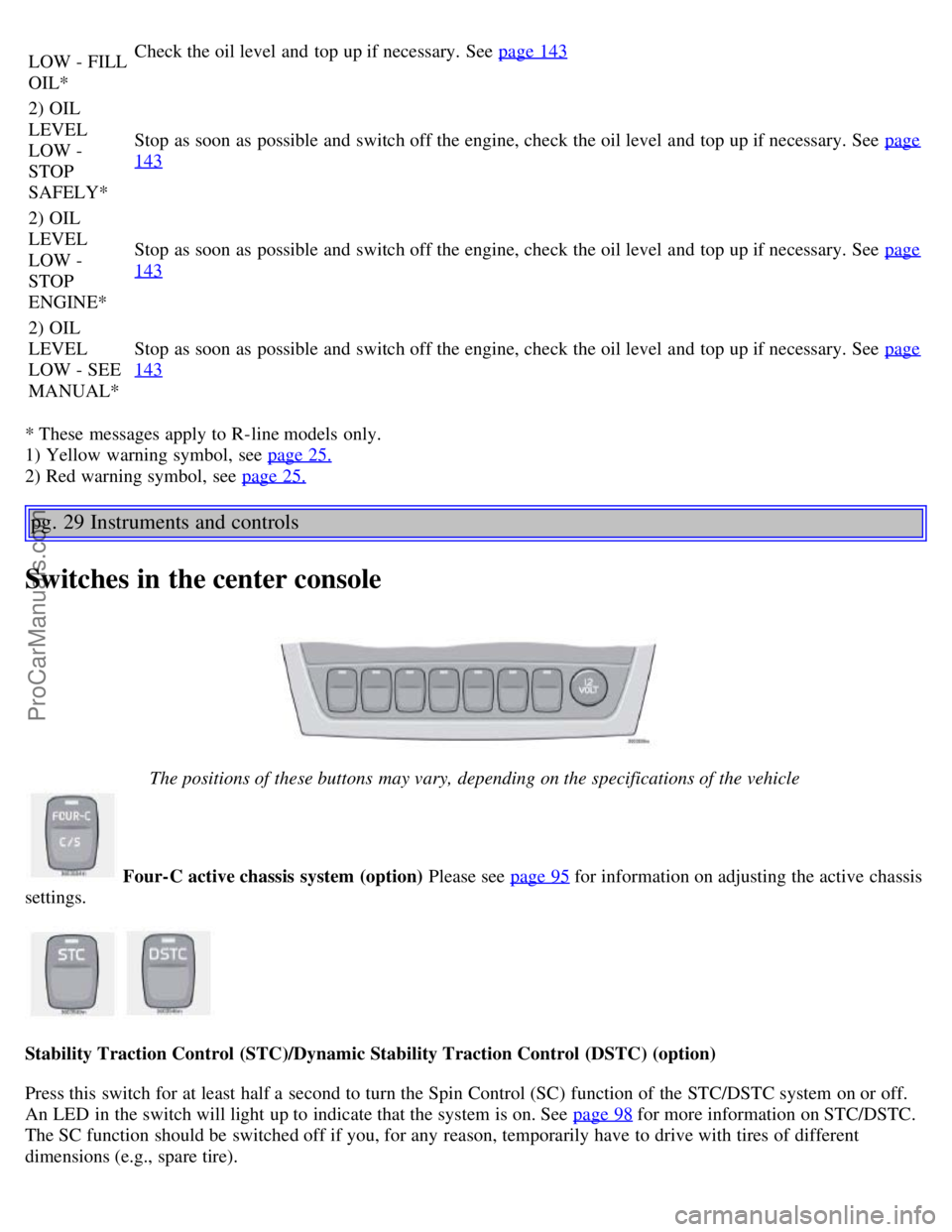
Switches in the center console
The positions of these buttons may vary, depending on the specifications of the vehicle
Four-C active chassis system (option)
Please see page 95 for information on adjusting the active chassis
settings.
Stability Traction Control (STC)/Dynamic Stability Traction Control (DSTC) (option)
Press this switch for at least half a second to turn the Spin Control (SC) function of the STC/DSTC system on or off.
An LED in the switch will light up to indicate that the system is on. See page 98
for more information on STC/DSTC.
The SC function should be switched off if you, for any reason, temporarily have to drive with tires of different
dimensions (e.g., spare tire).
ProCarManuals.com
Page 34 of 132

Auxiliary sockets
These 12 volt sockets can be used to plug in certain accessories such as cellular telephones, etc. The key must be in
position I (or higher) for the auxiliary socket to function.
The auxiliary sockets can also be used for cigarette lighters, which are available at your Volvo retailer.
NOTE: The cover should be folded down when the auxiliary socket is not in use.
Ashtrays
Volvo cars in North America do not have an ashtray in the front seat as standard equipment. If you want to have an
ashtray in the front seat, please contact your Volvo retailer.
pg. 42 Instruments and controls
Electrically operated windows
The electrically operated windows are controlled by buttons in the arm rests. The ignition switch must be ON *
(ignition key in position I, II or the engine running) for the electrically operated windows to function.
To lower: Press down the front edge of the button to the first detent ("stop").
To raise: Lightly pull up the front edge of the button to the first detent ("stop").
* The electrically operated windows will also function after the ignition has been switched off as long as neither of the
front doors has been opened.
Auto up/down function (front doors only):
Either front door window can be opened or closed automatically.
Auto down: Press the front part of the button as far down as possible and release it immediately. To stop the window
at any time, pull the button up.
Auto up: Pull the front part of the button up as far as possible and release it immediately. To stop the window at any
time, press the button down.
A - front windows, B - rear windows
NOTE: The electrically operated windows in the front seat have an overload protecting circuit breaker which reverses
movement of the electrically operated windows to their starting points if they are obstructed in any way. Thereafter the
windows will operate normally again.
WARNING!
Always remove the ignition key when the vehicle is unattended.
Make sure that childrens' hands are clear before raising the windows.
Never leave children unattended in the car.
ProCarManuals.com
Page 35 of 132
Cutout switch for rear windows
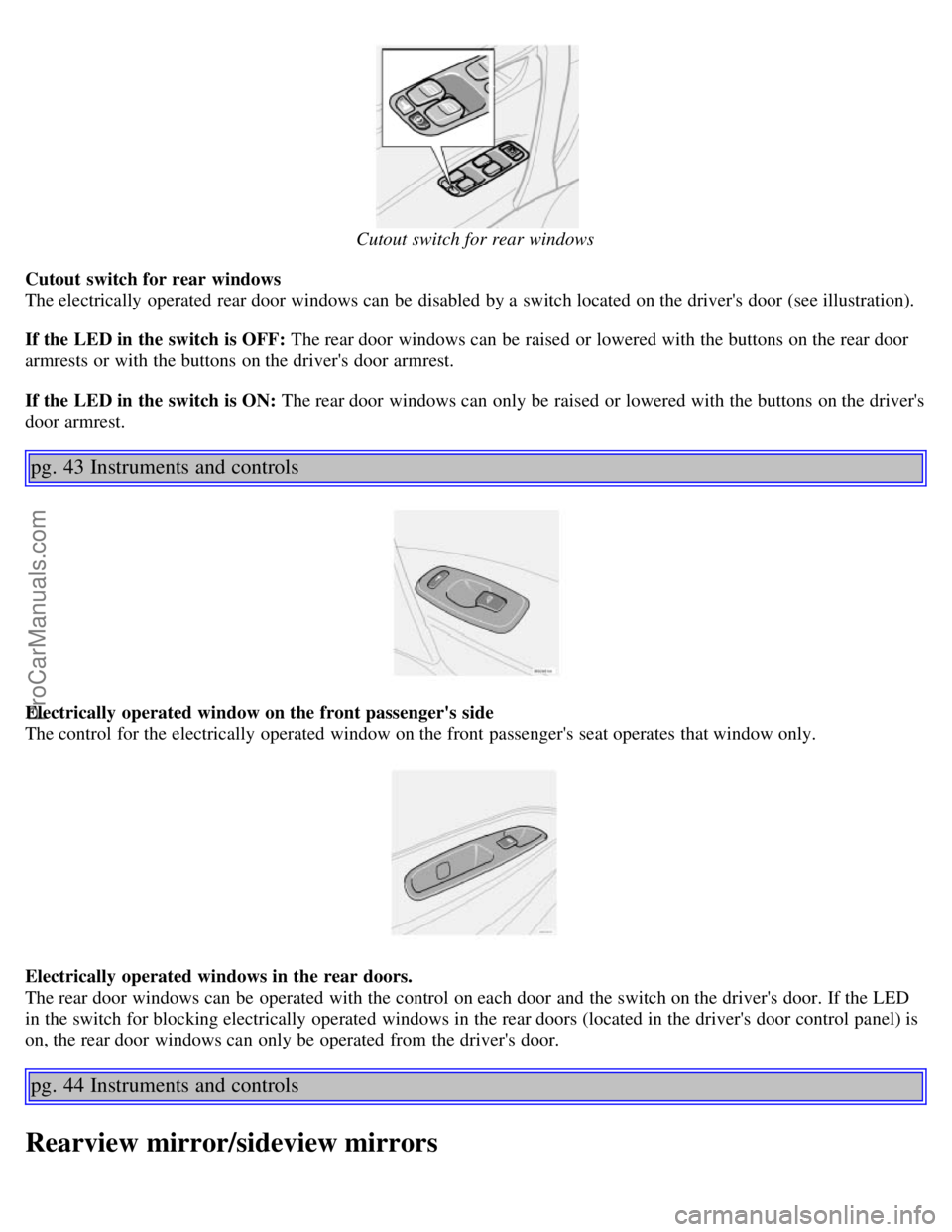
Cutout switch for rear windows
The electrically operated rear door windows can be disabled by a switch located on the driver's door (see illustration).
If the LED in the switch is OFF: The rear door windows can be raised or lowered with the buttons on the rear door
armrests or with the buttons on the driver's door armrest.
If the LED in the switch is ON: The rear door windows can only be raised or lowered with the buttons on the driver's
door armrest.
pg. 43 Instruments and controls
Electrically operated window on the front passenger's side
The control for the electrically operated window on the front passenger's seat operates that window only.
Electrically operated windows in the rear doors.
The rear door windows can be operated with the control on each door and the switch on the driver's door. If the LED
in the switch for blocking electrically operated windows in the rear doors (located in the driver's door control panel) is
on, the rear door windows can only be operated from the driver's door.
pg. 44 Instruments and controls
Rearview mirror/sideview mirrors
ProCarManuals.com
Page 48 of 132
WARNING!
Because the driver's seat can be adjusted with the ignition off, children should never be left unattended in the car.
Movement of the seat can be STOPPED at any time by pressing any button on the power seat control panel.
Do not adjust the seat while driving. The seat should be adjusted so that the brake pedal can be depressed fully. In
addition, position the seat as far rearward as comfort and control allow.
The seat rails on the floor must not be obstructed in any way when the seat is in motion.
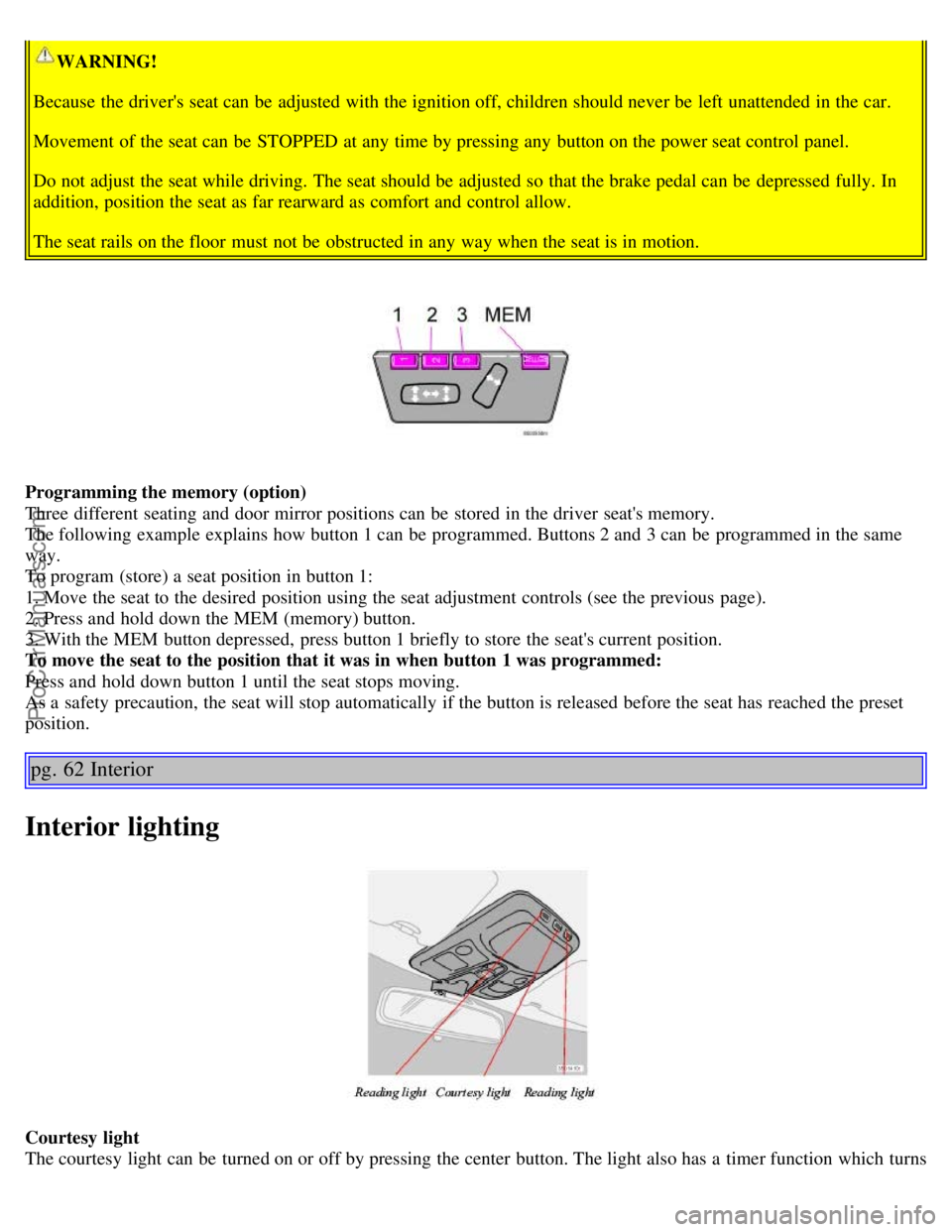
Programming the memory (option)
Three different seating and door mirror positions can be stored in the driver seat's memory.
The following example explains how button 1 can be programmed. Buttons 2 and 3 can be programmed in the same
way.
To program (store) a seat position in button 1:
1. Move the seat to the desired position using the seat adjustment controls (see the previous page).
2. Press and hold down the MEM (memory) button.
3. With the MEM button depressed, press button 1 briefly to store the seat's current position.
To move the seat to the position that it was in when button 1 was programmed:
Press and hold down button 1 until the seat stops moving.
As a safety precaution, the seat will stop automatically if the button is released before the seat has reached the preset
position.
pg. 62 Interior
Interior lighting
Courtesy light
The courtesy light can be turned on or off by pressing the center button. The light also has a timer function which turns
ProCarManuals.com
Page 49 of 132
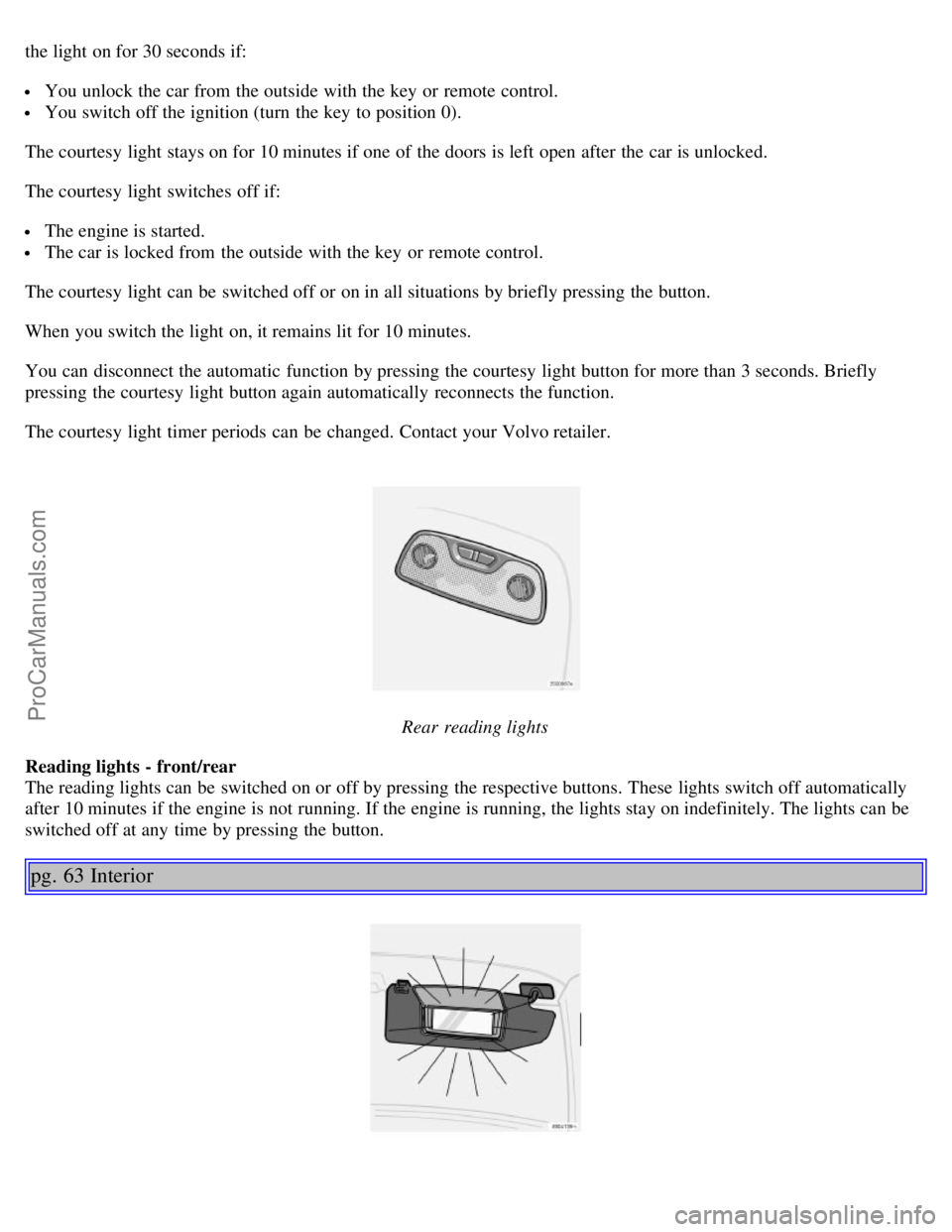
the light on for 30 seconds if:
You unlock the car from the outside with the key or remote control.
You switch off the ignition (turn the key to position 0).
The courtesy light stays on for 10 minutes if one of the doors is left open after the car is unlocked.
The courtesy light switches off if:
The engine is started.
The car is locked from the outside with the key or remote control.
The courtesy light can be switched off or on in all situations by briefly pressing the button.
When you switch the light on, it remains lit for 10 minutes.
You can disconnect the automatic function by pressing the courtesy light button for more than 3 seconds. Briefly
pressing the courtesy light button again automatically reconnects the function.
The courtesy light timer periods can be changed. Contact your Volvo retailer.
Rear reading lights
Reading lights - front/rear
The reading lights can be switched on or off by pressing the respective buttons. These lights switch off automatically
after 10 minutes if the engine is not running. If the engine is running, the lights stay on indefinitely. The lights can be
switched off at any time by pressing the button.
pg. 63 Interior
ProCarManuals.com
Page 54 of 132
WARNING!
Never use the transmitter to lock the doors from inside the car
Doing so would ACTIVATE:
the break-in alarm, which would sound if one of the doors were opened
the optional interior motion and inclination alarm sensors.
Doing so would DEACTIVATE:
the moonroof and interior courtesy light controls.
the central locking buttons on the front door armrests, although the interior door handles would still function to
allow occupants to leave the car.
Disabled features would remain disabled until the remote were used again to unlock the car.
In addition, locking an occupied vehicle would hinder rapid access to the occupants in an accident or emergency.
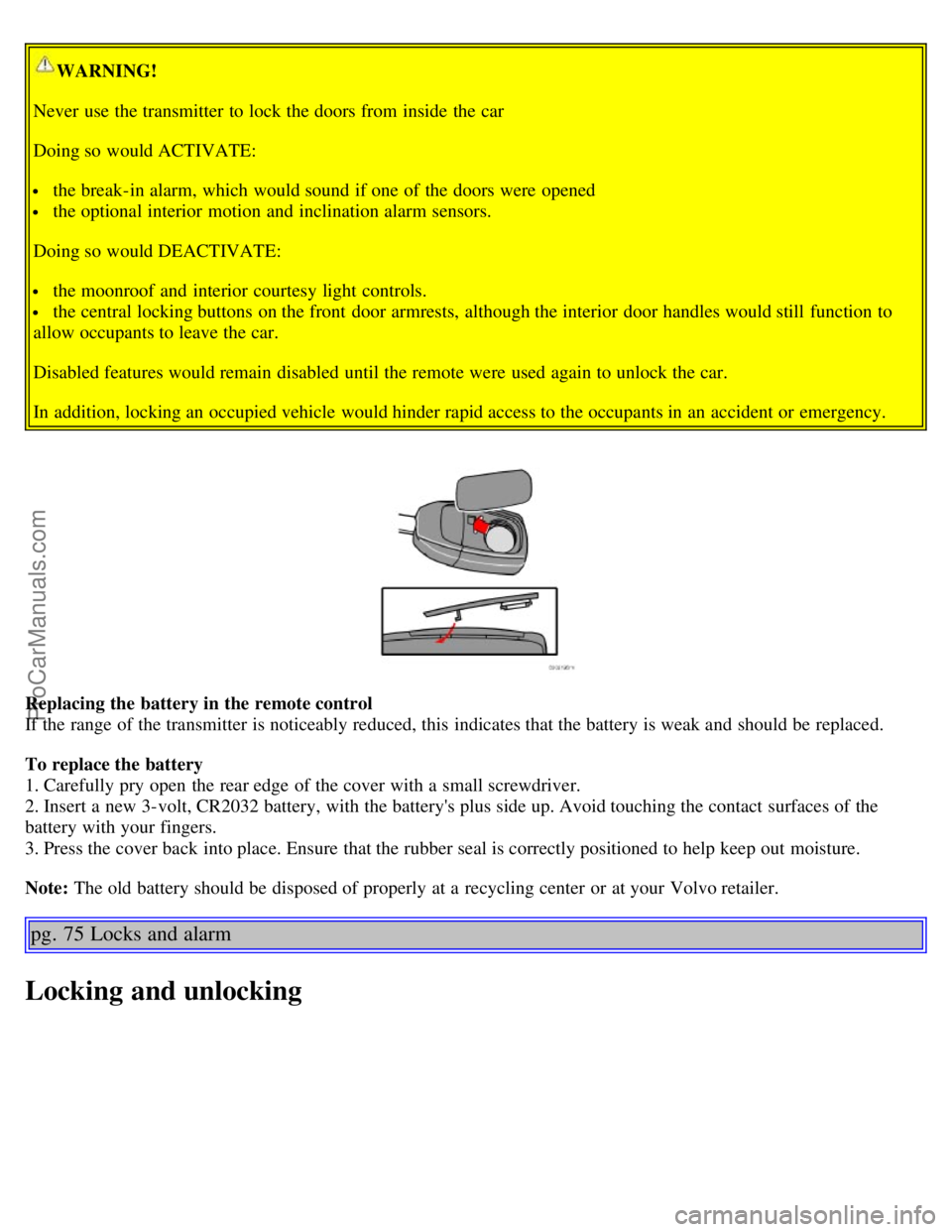
Replacing the battery in the remote control
If the range of the transmitter is noticeably reduced, this indicates that the battery is weak and should be replaced.
To replace the battery
1. Carefully pry open the rear edge of the cover with a small screwdriver.
2. Insert a new 3-volt, CR2032 battery, with the battery's plus side up. Avoid touching the contact surfaces of the
battery with your fingers.
3. Press the cover back into place. Ensure that the rubber seal is correctly positioned to help keep out moisture.
Note: The old battery should be disposed of properly at a recycling center or at your Volvo retailer.
pg. 75 Locks and alarm
Locking and unlocking
ProCarManuals.com
Page 57 of 132
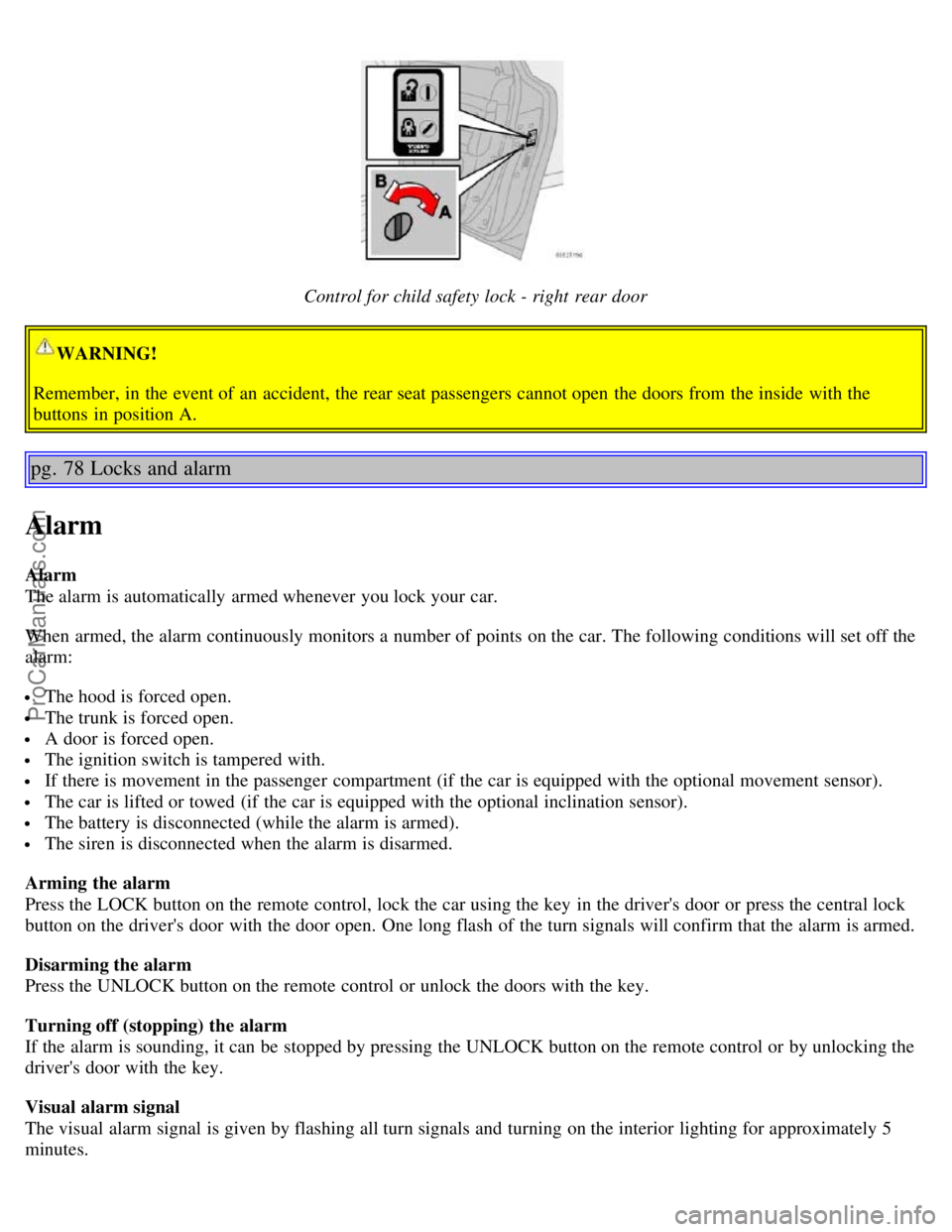
Control for child safety lock - right rear door
WARNING!
Remember, in the event of an accident, the rear seat passengers cannot open the doors from the inside with the
buttons in position A.
pg. 78 Locks and alarm
Alarm
Alarm
The alarm is automatically armed whenever you lock your car.
When armed, the alarm continuously monitors a number of points on the car. The following conditions will set off the
alarm:
The hood is forced open.
The trunk is forced open.
A door is forced open.
The ignition switch is tampered with.
If there is movement in the passenger compartment (if the car is equipped with the optional movement sensor).
The car is lifted or towed (if the car is equipped with the optional inclination sensor).
The battery is disconnected (while the alarm is armed).
The siren is disconnected when the alarm is disarmed.
Arming the alarm
Press the LOCK button on the remote control, lock the car using the key in the driver's door or press the central lock
button on the driver's door with the door open. One long flash of the turn signals will confirm that the alarm is armed.
Disarming the alarm
Press the UNLOCK button on the remote control or unlock the doors with the key.
Turning off (stopping) the alarm
If the alarm is sounding, it can be stopped by pressing the UNLOCK button on the remote control or by unlocking the
driver's door with the key.
Visual alarm signal
The visual alarm signal is given by flashing all turn signals and turning on the interior lighting for approximately 5
minutes.
ProCarManuals.com
Page 58 of 132
Audible alarm signal
An audible alarm signal is given by a battery powered siren. One alarm cycle lasts for 25 seconds.
"Panic" button
In an emergency situation, this feature can be used to attract attention.
Activate the "panic" button by pressing the red button on the remote control (see illustration on page 73
) for at least 3
seconds or by pressing this button twice within 3 seconds. The turn signals will flash, and the car's horn will sound.
The function can be turned off by pressing any of the buttons on the remote control or will stop automatically after 25
seconds. When a button is pressed, there is a 5 second delay before the panic alarm is deactivated.
NOTE: This button will NOT unlock the car.
pg. 79 Locks and alarm
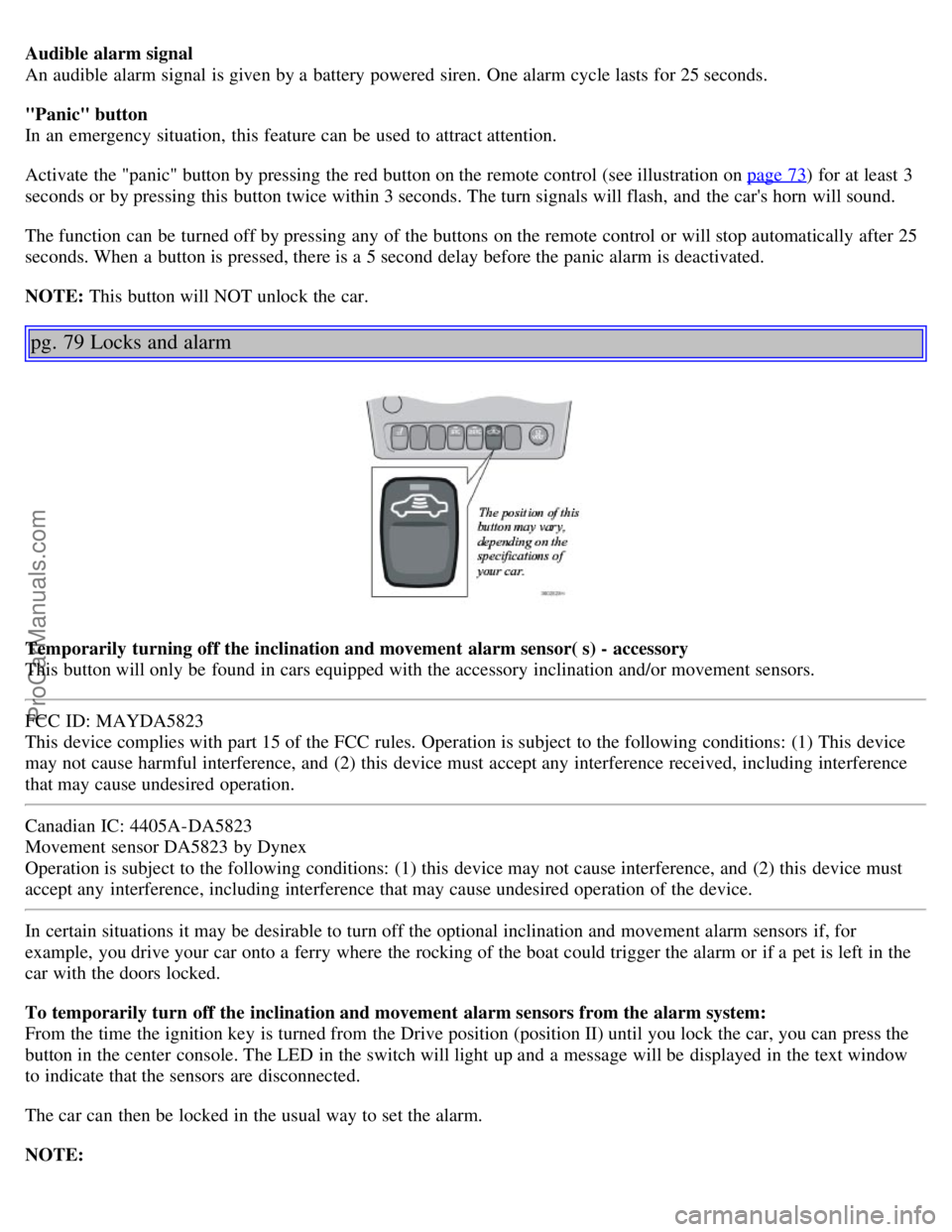
Temporarily turning off the inclination and movement alarm sensor( s) - accessory
This button will only be found in cars equipped with the accessory inclination and/or movement sensors.
FCC ID: MAYDA5823
This device complies with part 15 of the FCC rules. Operation is subject to the following conditions: (1) This device
may not cause harmful interference, and (2) this device must accept any interference received, including interference
that may cause undesired operation.
Canadian IC: 4405A-DA5823
Movement sensor DA5823 by Dynex
Operation is subject to the following conditions: (1) this device may not cause interference, and (2) this device must
accept any interference, including interference that may cause undesired operation of the device.
In certain situations it may be desirable to turn off the optional inclination and movement alarm sensors if, for
example, you drive your car onto a ferry where the rocking of the boat could trigger the alarm or if a pet is left in the
car with the doors locked.
To temporarily turn off the inclination and movement alarm sensors from the alarm system:
From the time the ignition key is turned from the Drive position (position II) until you lock the car, you can press the
button in the center console. The LED in the switch will light up and a message will be displayed in the text window
to indicate that the sensors are disconnected.
The car can then be locked in the usual way to set the alarm.
NOTE:
ProCarManuals.com
Page 73 of 132
NOTE:
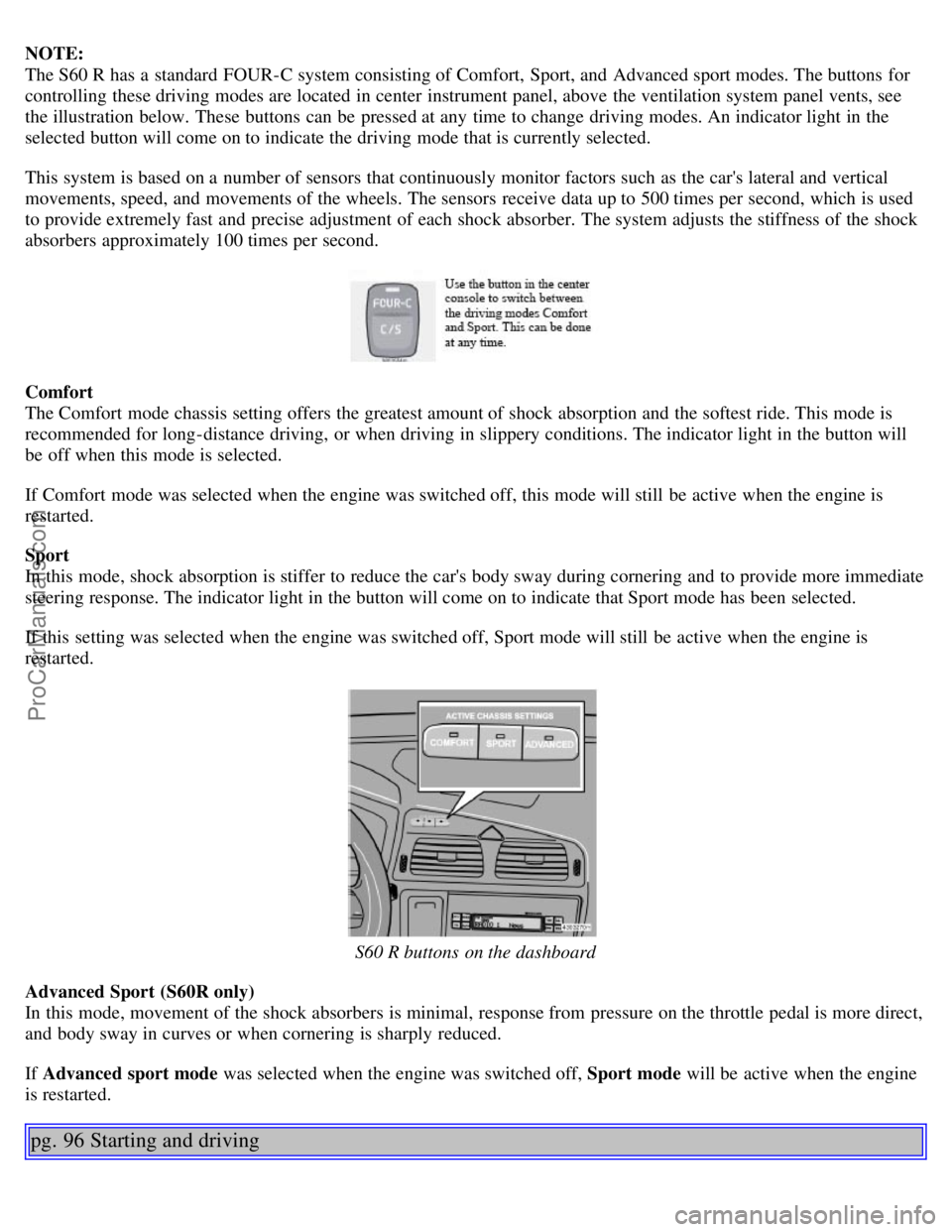
The S60 R has a standard FOUR-C system consisting of Comfort, Sport, and Advanced sport modes. The buttons for
controlling these driving modes are located in center instrument panel, above the ventilation system panel vents, see
the illustration below. These buttons can be pressed at any time to change driving modes. An indicator light in the
selected button will come on to indicate the driving mode that is currently selected.
This system is based on a number of sensors that continuously monitor factors such as the car's lateral and vertical
movements, speed, and movements of the wheels. The sensors receive data up to 500 times per second, which is used
to provide extremely fast and precise adjustment of each shock absorber. The system adjusts the stiffness of the shock
absorbers approximately 100 times per second.
Comfort
The Comfort mode chassis setting offers the greatest amount of shock absorption and the softest ride. This mode is
recommended for long-distance driving, or when driving in slippery conditions. The indicator light in the button will
be off when this mode is selected.
If Comfort mode was selected when the engine was switched off, this mode will still be active when the engine is
restarted.
Sport
In this mode, shock absorption is stiffer to reduce the car's body sway during cornering and to provide more immediate
steering response. The indicator light in the button will come on to indicate that Sport mode has been selected.
If this setting was selected when the engine was switched off, Sport mode will still be active when the engine is
restarted.
S60 R buttons on the dashboard
Advanced Sport (S60R only)
In this mode, movement of the shock absorbers is minimal, response from pressure on the throttle pedal is more direct,
and body sway in curves or when cornering is sharply reduced.
If Advanced sport mode was selected when the engine was switched off, Sport mode will be active when the engine
is restarted.
pg. 96 Starting and driving
ProCarManuals.com
Page 114 of 132
2 0 0 6
VOLVO S60
Audio
pg. 177 Audio
Introduction 178
Audio system HU -650 - overview179
Audio system HU -850 - overview180
Radio functions HU -650/HU-850181
RBDS functions HU -650/HU-850185
HU -650 - CD player188
HU -850 - internal CD changer189
External CD changer (option)190
Dolby Surround Pro Logic II - HU -850 only191
Audio systems - specifications193
HomeLink® Universal Transceiver (option )194
pg. 178 Audio
Introduction
The audio system in your car is operated with the buttons and knobs in the system's front panel. Certain functions,
such as adjusting the volume, changing radio stations or tracks on a CD, etc, can also be controlled with the optional
steering wheel-mounted keypad.
The audio system is available in two versions:
HU-650
Features: AM/FM radio, single-disc CD player, 4x25W output, six speakers.
HU-850
Features: AM/FM radio, integrated 6-disc CD changer, 4x50W or 4x70W output plus 25W Dolby Pro Logic II, eleven
speakers. A subwoofer mounted under the floor in the cargo area is available as an option. Consult your Volvo retailer.
Compact disc care
Keep the discs clean. Wipe them with a soft, clean, lint-free cloth, working from the center outwards. If necessary,
dampen the cloth with a neutral soap solution. Dry thoroughly before using.
Never use cleaning spray or antistatic liquid. Use only cleaners specifically made for CDs.
Use discs of the correct size only (3.5" discs should never be used). The discs should conform to the norms
EN60908 (IEC60908).
Do not put tape or labels on the disc itself.
Volvo does not recommend the use of plastic outer rings on the disc.
Condensation may occur on discs/optical components of the changer in cold winter weather. The disc can be dried
with a clean, lint-free cloth. Optical components in the CD changer may, however, take up to one hour to dry off.
ProCarManuals.com