display VOLVO S60 2006 Owner's Manual
[x] Cancel search | Manufacturer: VOLVO, Model Year: 2006, Model line: S60, Model: VOLVO S60 2006Pages: 132, PDF Size: 2.33 MB
Page 103 of 132
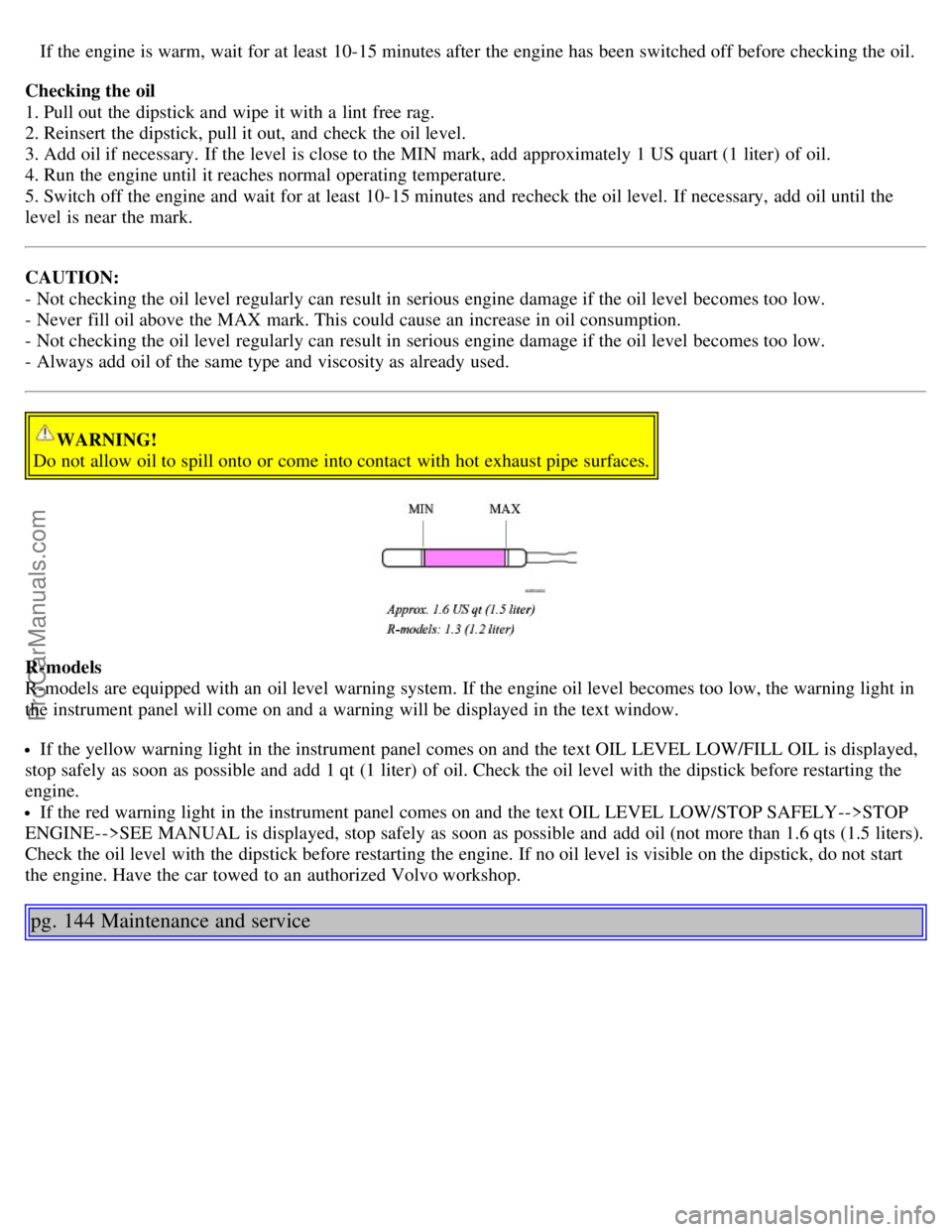
If the engine is warm, wait for at least 10-15 minutes after the engine has been switched off before checking the oil.
Checking the oil
1. Pull out the dipstick and wipe it with a lint free rag.
2. Reinsert the dipstick, pull it out, and check the oil level.
3. Add oil if necessary. If the level is close to the MIN mark, add approximately 1 US quart (1 liter) of oil.
4. Run the engine until it reaches normal operating temperature.
5. Switch off the engine and wait for at least 10-15 minutes and recheck the oil level. If necessary, add oil until the
level is near the mark.
CAUTION:
- Not checking the oil level regularly can result in serious engine damage if the oil level becomes too low.
- Never fill oil above the MAX mark. This could cause an increase in oil consumption.
- Not checking the oil level regularly can result in serious engine damage if the oil level becomes too low.
- Always add oil of the same type and viscosity as already used.
WARNING!
Do not allow oil to spill onto or come into contact with hot exhaust pipe surfaces.
R-models
R-models are equipped with an oil level warning system. If the engine oil level becomes too low, the warning light in
the instrument panel will come on and a warning will be displayed in the text window.
If the yellow warning light in the instrument panel comes on and the text OIL LEVEL LOW/FILL OIL is displayed,
stop safely as soon as possible and add 1 qt (1 liter) of oil. Check the oil level with the dipstick before restarting the
engine.
If the red warning light in the instrument panel comes on and the text OIL LEVEL LOW/STOP SAFELY-->STOP
ENGINE-->SEE MANUAL is displayed, stop safely as soon as possible and add oil (not more than 1.6 qts (1.5 liters).
Check the oil level with the dipstick before restarting the engine. If no oil level is visible on the dipstick, do not start
the engine. Have the car towed to an authorized Volvo workshop.
pg. 144 Maintenance and service
ProCarManuals.com
Page 115 of 132
Never attempt to play a disc which is damaged in any way.
When not in use, the discs should be stored in their covers. Avoid storing discs in excessive heat, direct sunlight or
dusty locations.
pg. 179 Audio
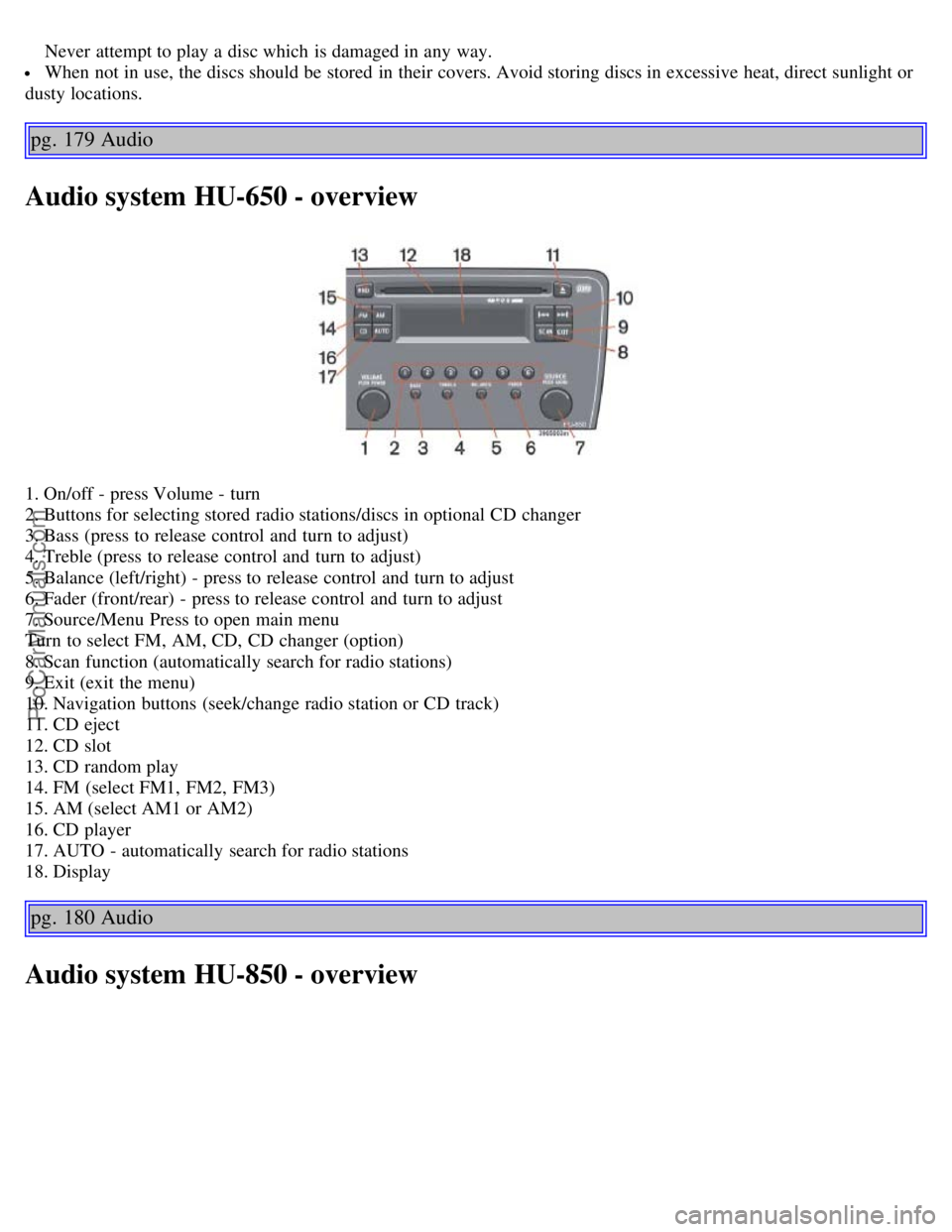
Audio system HU-650 - overview
1. On/off - press Volume - turn
2. Buttons for selecting stored radio stations/discs in optional CD changer
3. Bass (press to release control and turn to adjust)
4. Treble (press to release control and turn to adjust)
5. Balance (left/right) - press to release control and turn to adjust
6. Fader (front/rear) - press to release control and turn to adjust
7. Source/Menu Press to open main menu
Turn to select FM, AM, CD, CD changer (option)
8. Scan function (automatically search for radio stations)
9. Exit (exit the menu)
10. Navigation buttons (seek/change radio station or CD track)
11. CD eject
12. CD slot
13. CD random play
14. FM (select FM1, FM2, FM3)
15. AM (select AM1 or AM2)
16. CD player
17. AUTO - automatically search for radio stations
18. Display
pg. 180 Audio
Audio system HU-850 - overview
ProCarManuals.com
Page 116 of 132
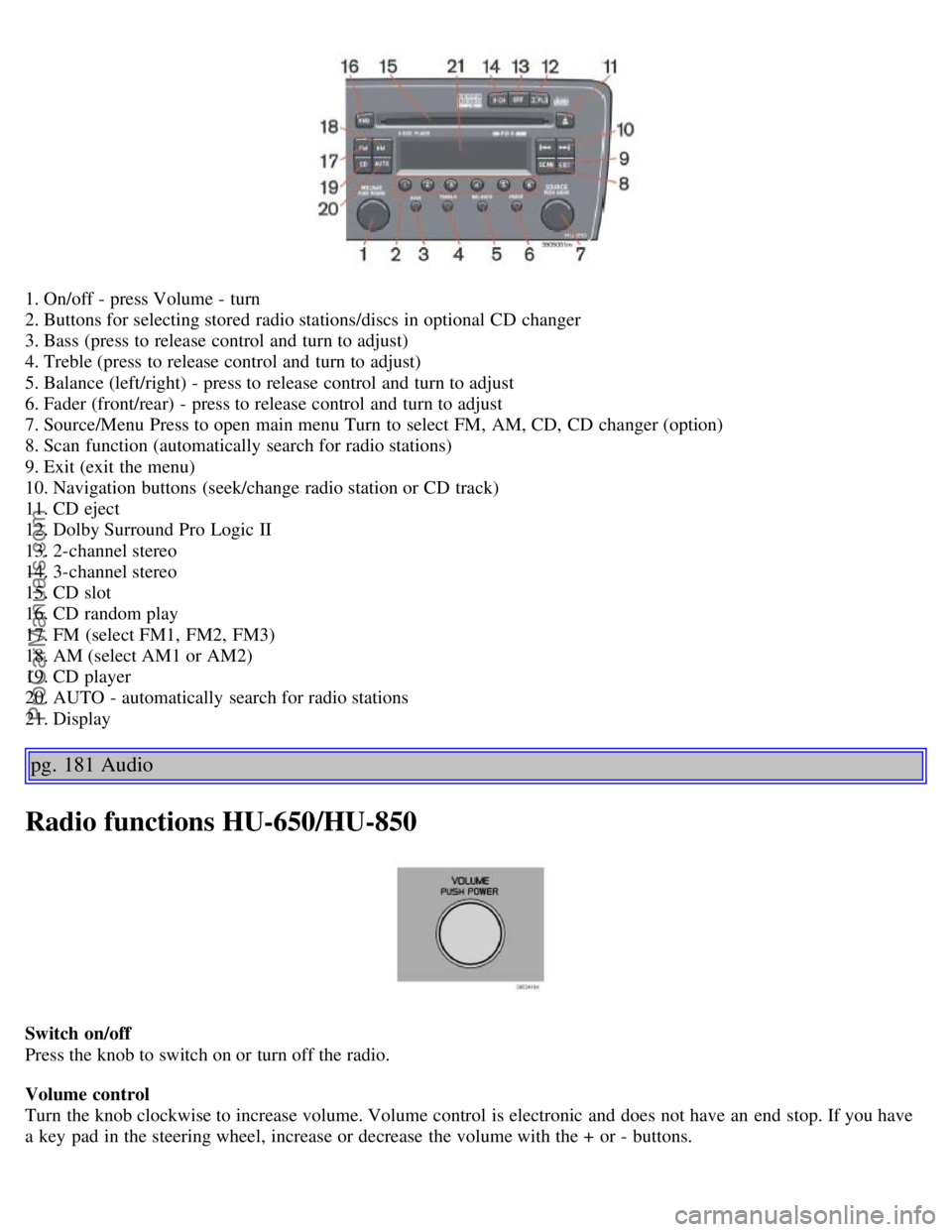
1. On/off - press Volume - turn
2. Buttons for selecting stored radio stations/discs in optional CD changer
3. Bass (press to release control and turn to adjust)
4. Treble (press to release control and turn to adjust)
5. Balance (left/right) - press to release control and turn to adjust
6. Fader (front/rear) - press to release control and turn to adjust
7. Source/Menu Press to open main menu Turn to select FM, AM, CD, CD changer (option)
8. Scan function (automatically search for radio stations)
9. Exit (exit the menu)
10. Navigation buttons (seek/change radio station or CD track)
11. CD eject
12. Dolby Surround Pro Logic II
13. 2-channel stereo
14. 3-channel stereo
15. CD slot
16. CD random play
17. FM (select FM1, FM2, FM3)
18. AM (select AM1 or AM2)
19. CD player
20. AUTO - automatically search for radio stations
21. Display
pg. 181 Audio
Radio functions HU-650/HU-850
Switch on/off
Press the knob to switch on or turn off the radio.
Volume control
Turn the knob clockwise to increase volume. Volume control is electronic and does not have an end stop. If you have
a key pad in the steering wheel, increase or decrease the volume with the + or - buttons.
ProCarManuals.com
Page 118 of 132

Selecting a sound source
The sound source (e.g. AM, FM, etc.) can be selected in two ways:
Use the sound source buttons (see the center illustration above).
Turn the SOURCE knob (see illustration above) to select a sound source (AM1, AM2, FM1, FM2, FM3, or CD).
Press the knob to select the AM or FM band of your choice.
The sound source selected will be shown in the display.
Scan
Press the SCAN button to start the station scan function. When a station is found, scanning stops for approximately 10
seconds, after which scanning will continue.
Press the SCAN or SOURCE button when a station has been found if you would like to listen to that station and to
discontinue the scan function.
Station seek up/down
Press
or to start the seek function. The radio seeks the next audible station and tunes it in. Repeat the procedure
to continue the seek function.
Manual station search
Press
or and hold it down. MAN will be shown in the display. The radio scans slowly in the selected direction
and will increase the scanning speed after a few seconds. Release the button when the desired frequency appears in the
display.
The frequency can be fine-tuned by short presses on the
or keys.
The system will remain in manual search mode for 5 seconds after the button is released, after which it will return to
seek mode.
pg. 183 Audio
Steering wheel key pad (option)
If the vehicle is equipped with the key pad in the steering wheel press the right or left arrow to switch between preset
stations.
ProCarManuals.com
Page 119 of 132
Storing stations
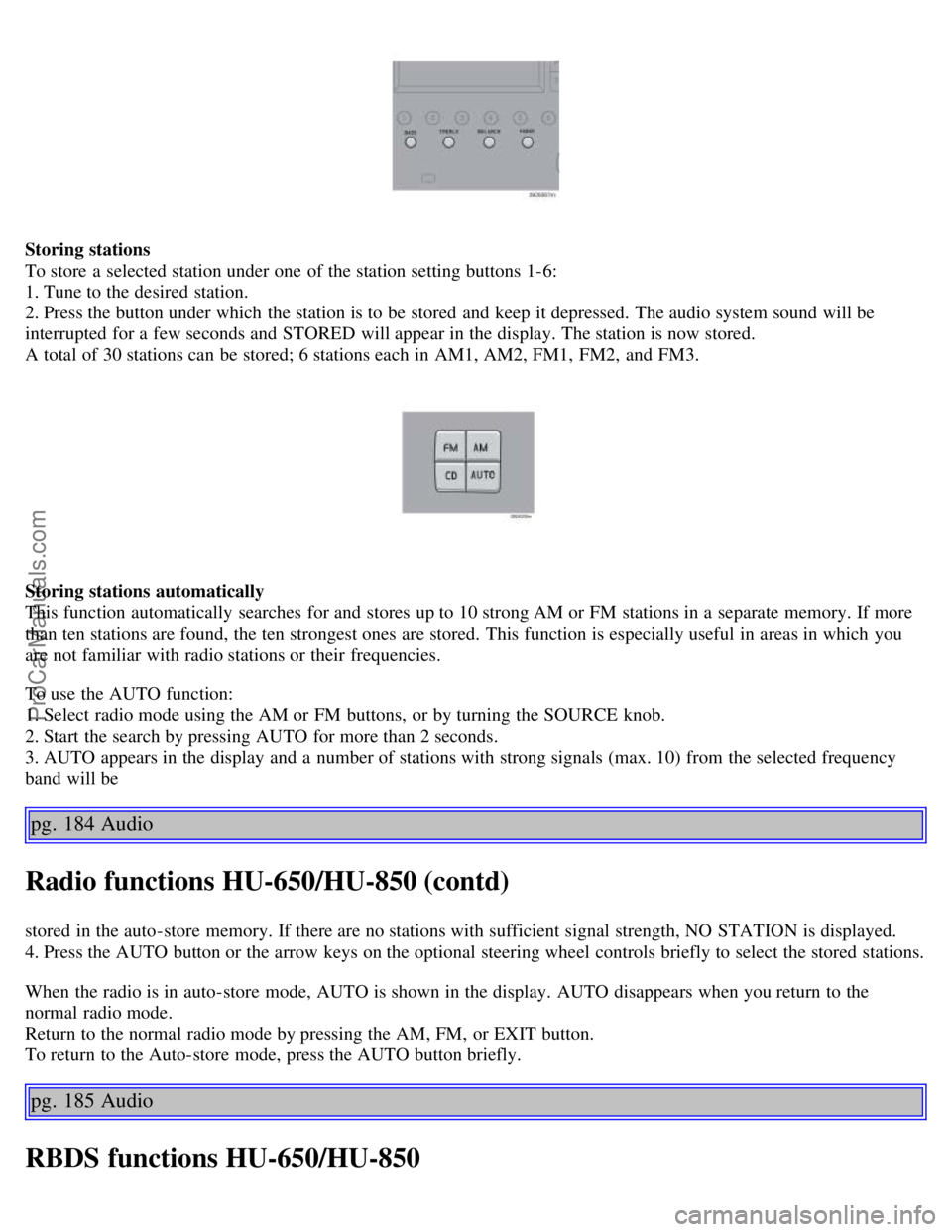
To store a selected station under one of the station setting buttons 1-6:
1. Tune to the desired station.
2. Press the button under which the station is to be stored and keep it depressed. The audio system sound will be
interrupted for a few seconds and STORED will appear in the display. The station is now stored.
A total of 30 stations can be stored; 6 stations each in AM1, AM2, FM1, FM2, and FM3.
Storing stations automatically
This function automatically searches for and stores up to 10 strong AM or FM stations in a separate memory. If more
than ten stations are found, the ten strongest ones are stored. This function is especially useful in areas in which you
are not familiar with radio stations or their frequencies.
To use the AUTO function:
1. Select radio mode using the AM or FM buttons, or by turning the SOURCE knob.
2. Start the search by pressing AUTO for more than 2 seconds.
3. AUTO appears in the display and a number of stations with strong signals (max. 10) from the selected frequency
band will be
pg. 184 Audio
Radio functions HU-650/HU-850 (contd)
stored in the auto-store memory. If there are no stations with sufficient signal strength, NO STATION is displayed.
4. Press the AUTO button or the arrow keys on the optional steering wheel controls briefly to select the stored stations.
When the radio is in auto-store mode, AUTO is shown in the display. AUTO disappears when you return to the
normal radio mode.
Return to the normal radio mode by pressing the AM, FM, or EXIT button.
To return to the Auto-store mode, press the AUTO button briefly.
pg. 185 Audio
RBDS functions HU-650/HU-850
ProCarManuals.com
Page 120 of 132
Radio Broadcast Data System - RBDS
This feature, which may not be available in your area, functions only with FM broadcasts. The radio in your car is
equipped with an advanced system allowing information from broadcasters to be transmitted visually, as text, together
with the audio signal. This information is then decoded by the radio and made available for several new and unique
features.
The RBDS or Radio Broadcast Data System operates in the FM band only, and the information transmitted is supplied
exclusively by participating broadcasters. Volvo has no control over the accuracy of the data or information.
Coverage by local broadcasters may be limited at this time, but as the technology and benefits grow, you will find the
radio in your car is equipped to take advantage of this system.
PI (Program Information) Seek:
When an FM station has been stored as a preset, the radio also stores RBDS program information if it is available.
When the preset is selected at a later time, the radio tries to access updated program information. In weak signal areas,
there may be a delay before the station becomes audible. During this delay, "PI seek" will be displayed and there will
be no sound.
PI seek can be interrupted by pressing EXIT.
Radio text
Certain RBDS stations broadcast program information, which can be shown in the display. The text will be shown
twice in the display.
To start this function:
Press the FM button for several seconds.
To deactivate this function:
Press FM briefly.
Station information will be shown twice in the display.
Alarm
Alarms bulletins are transmitted automatically by certain RBDS stations. The function cannot be deactivated.
"Alarm!" is shown in the radio display when an alarm message is sent. The function is used to warn motorists of
serious accidents, etc.
pg. 186 Audio
Program type/station format -PTY
The PTY function allows you to find stations whose programs suit your taste. Use the PTY function to select among
the different station formats shown in the list.
To select a station format:
1. Select radio mode using the FM button, or by turning the SOURCE knob.
2. Turn the SOURCE knob, select PTY and press SOURCE.
3. Turn the SOURCE knob, select a station format from the list and press SOURCE to confirm the selected station
format. The PTY (station format) of the selected station is now shown in the display.
NOTE: Not all RBDS radio stations have PTY designations.
Station formats Format Display text
ProCarManuals.com
Page 125 of 132
High beam headlights34
High beam indicator24
Hoisting the car139
Home safe lighting34
HomeLink® Universal Transceiver194
Hood - opening141
I
Ignition switch86
Immobilizer (start inhibitor)72
Indicator and warning symbols24 , 25
Inflation pressure tables116
Inflation pressure, checking115
Inspection, preparing for138
Instrument panel24
Integrated booster cushion19
Interior57
Interior lighting62
Introductioni
ISOFIX/LATCH anchors20
J
Jack126
Jack, location of70
Jump starting102
K
Keylockii
, 85
Keys71
Kickdown91
L
LATCH (ISOFIX) anchors20
Lighting panel32
Load carriers106
Locking steering wheel86
Locking the car75
Locks71
Long distance trips108
Long loads - carrying69
Low beam bulb, changing151
Low beam headlights34
M
Maintenance service136
Maintenance, periodic137
Malfunction indicator light27
Manual transmission89
Messages in the display28
ProCarManuals.com