lights VOLVO S60 2007 User Guide
[x] Cancel search | Manufacturer: VOLVO, Model Year: 2007, Model line: S60, Model: VOLVO S60 2007Pages: 200, PDF Size: 4.03 MB
Page 67 of 200
Selecting Defroster automatically switches recirculation off.
Timer mode activation: (vehicles with the Interior Air Quality system have no timer mode) Press and hold the
recirculation button for at least 3 seconds to activate a recirculation timer mode. The amber LED in the recirculation
button will flash 5 times to show that the timer mode is being activated. In timer mode, each time the recirculation
button is pressed, the climate control system will recirculate the air in the passenger compartment for 5- 12 minutes,
depending on the outside air temperature, and then revert back to fresh air.
Timer mode deactivation: Press and hold the recirculation button for 3 seconds. The amber LED in the recirculation
button will illuminate steadily for 5 seconds to show a return to "normal" mode.
In normal mode, when the recirculation button is pressed, the climate control
pg. 77 Climate
Electronic climate control, ECC
system will recirculate the air in the passenger compartment until the recirculation button is pressed again.
Timer mode memory: If the vehicle is turned off while timer mode is active, timer mode will still be active when
the vehicle is restarted.
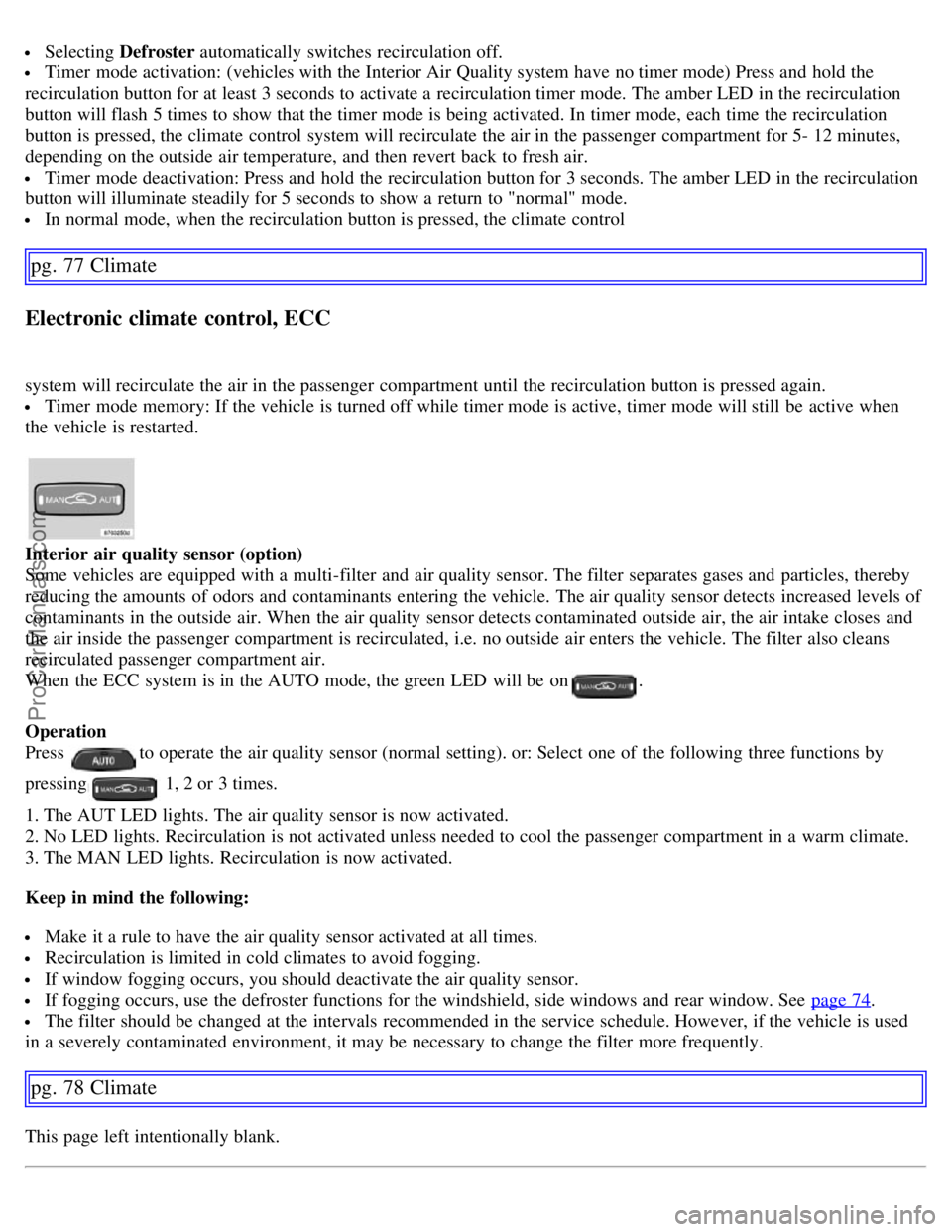
Interior air quality sensor (option)
Some vehicles are equipped with a multi-filter and air quality sensor. The filter separates gases and particles, thereby
reducing the amounts of odors and contaminants entering the vehicle. The air quality sensor detects increased levels of
contaminants in the outside air. When the air quality sensor detects contaminated outside air, the air intake closes and
the air inside the passenger compartment is recirculated, i.e. no outside air enters the vehicle. The filter also cleans
recirculated passenger compartment air.
When the ECC system is in the AUTO mode, the green LED will be on
.
Operation
Press
to operate the air quality sensor (normal setting). or: Select one of the following three functions by
pressing
1, 2 or 3 times.
1. The AUT LED lights. The air quality sensor is now activated.
2. No LED lights. Recirculation is not activated unless needed to cool the passenger compartment in a warm climate.
3. The MAN LED lights. Recirculation is now activated.
Keep in mind the following:
Make it a rule to have the air quality sensor activated at all times.
Recirculation is limited in cold climates to avoid fogging.
If window fogging occurs, you should deactivate the air quality sensor.
If fogging occurs, use the defroster functions for the windshield, side windows and rear window. See page 74.
The filter should be changed at the intervals recommended in the service schedule. However, if the vehicle is used
in a severely contaminated environment, it may be necessary to change the filter more frequently.
pg. 78 Climate
This page left intentionally blank.
ProCarManuals.com
Page 72 of 200
Because the driver's seat can be adjusted with the ignition off, children should never be left unattended in the
vehicle.
Movement of the seat can be STOPPED at any time by pressing any button on the power seat control panel.
Do not adjust the seat while driving. The seat should be adjusted so that the brake pedal can be depressed fully. In
addition, position the seat as far rearward as comfort and control allow.
The seat rails on the floor must not be obstructed in any way when the seat is in motion.
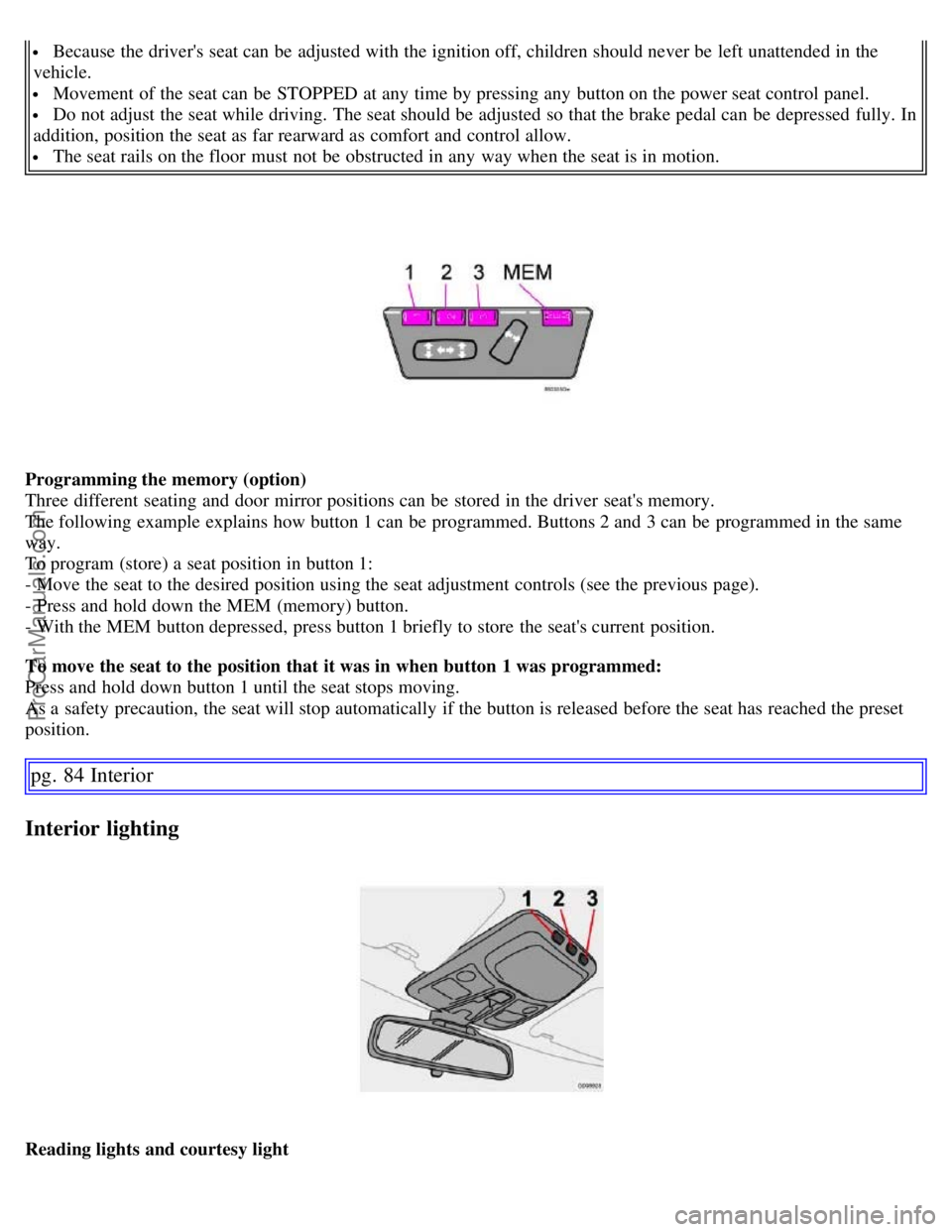
Programming the memory (option)
Three different seating and door mirror positions can be stored in the driver seat's memory.
The following example explains how button 1 can be programmed. Buttons 2 and 3 can be programmed in the same
way.
To program (store) a seat position in button 1:
- Move the seat to the desired position using the seat adjustment controls (see the previous page).
- Press and hold down the MEM (memory) button.
- With the MEM button depressed, press button 1 briefly to store the seat's current position.
To move the seat to the position that it was in when button 1 was programmed:
Press and hold down button 1 until the seat stops moving.
As a safety precaution, the seat will stop automatically if the button is released before the seat has reached the preset
position.
pg. 84 Interior
Interior lighting
Reading lights and courtesy light
ProCarManuals.com
Page 73 of 200
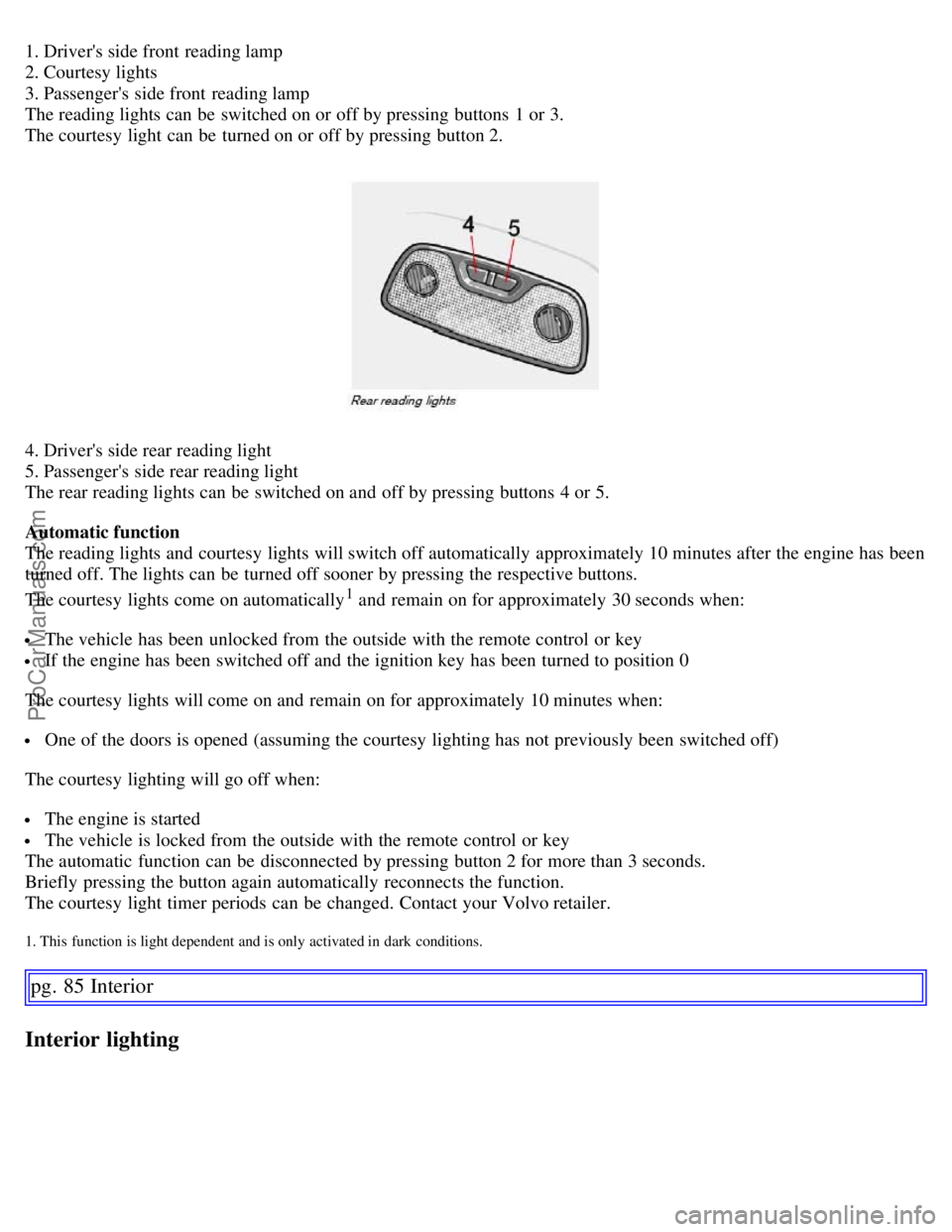
1. Driver's side front reading lamp
2. Courtesy lights
3. Passenger's side front reading lamp
The reading lights can be switched on or off by pressing buttons 1 or 3.
The courtesy light can be turned on or off by pressing button 2.
4. Driver's side rear reading light
5. Passenger's side rear reading light
The rear reading lights can be switched on and off by pressing buttons 4 or 5.
Automatic function
The reading lights and courtesy lights will switch off automatically approximately 10 minutes after the engine has been
turned off. The lights can be turned off sooner by pressing the respective buttons.
The courtesy lights come on automatically
1 and remain on for approximately 30 seconds when:
The vehicle has been unlocked from the outside with the remote control or key
If the engine has been switched off and the ignition key has been turned to position 0
The courtesy lights will come on and remain on for approximately 10 minutes when:
One of the doors is opened (assuming the courtesy lighting has not previously been switched off)
The courtesy lighting will go off when:
The engine is started
The vehicle is locked from the outside with the remote control or key
The automatic function can be disconnected by pressing button 2 for more than 3 seconds.
Briefly pressing the button again automatically reconnects the function.
The courtesy light timer periods can be changed. Contact your Volvo retailer.
1. This function is light dependent and is only activated in dark conditions.
pg. 85 Interior
Interior lighting
ProCarManuals.com
Page 83 of 200
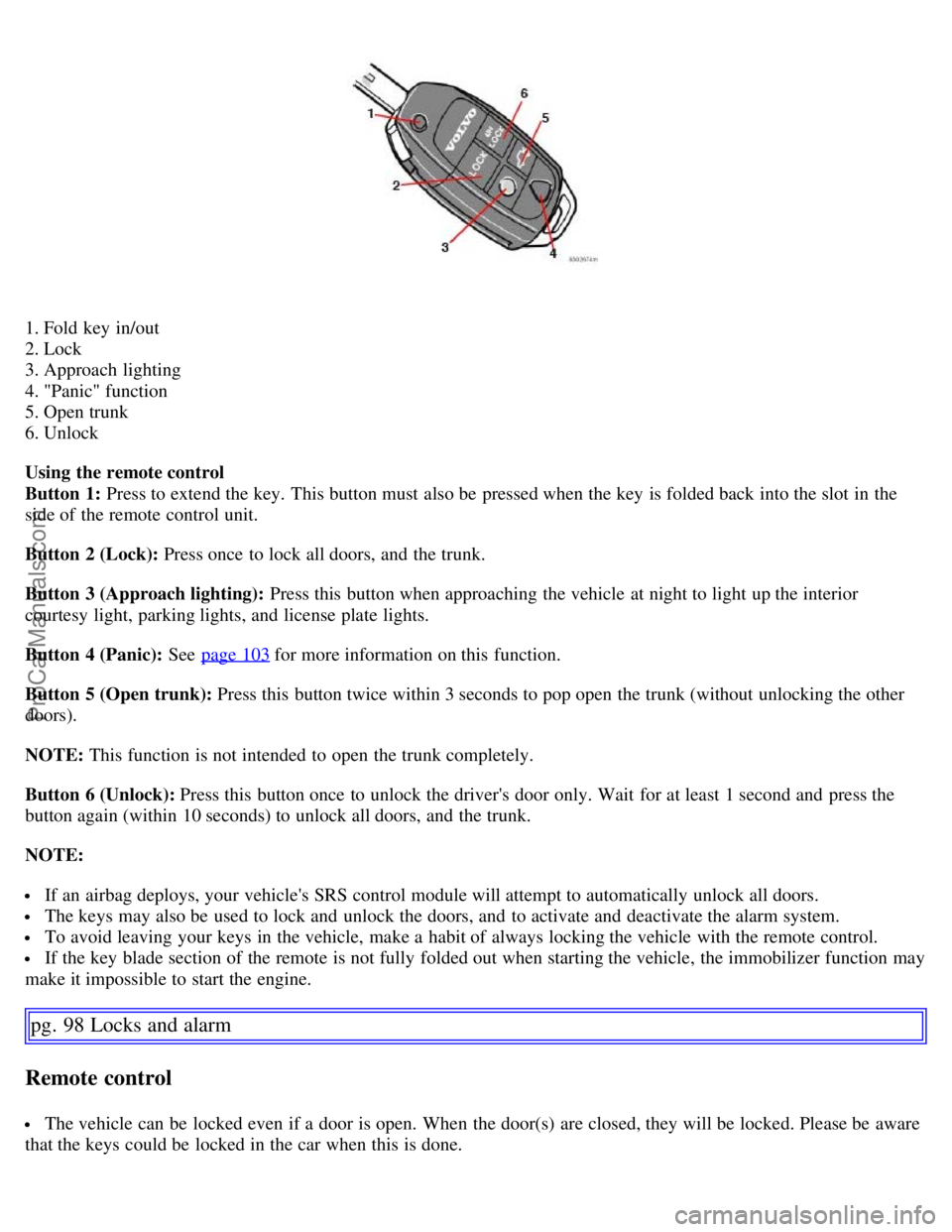
1. Fold key in/out
2. Lock
3. Approach lighting
4. "Panic" function
5. Open trunk
6. Unlock
Using the remote control
Button 1: Press to extend the key. This button must also be pressed when the key is folded back into the slot in the
side of the remote control unit.
Button 2 (Lock): Press once to lock all doors, and the trunk.
Button 3 (Approach lighting): Press this button when approaching the vehicle at night to light up the interior
courtesy light, parking lights, and license plate lights.
Button 4 (Panic): See page 103
for more information on this function.
Button 5 (Open trunk): Press this button twice within 3 seconds to pop open the trunk (without unlocking the other
doors).
NOTE: This function is not intended to open the trunk completely.
Button 6 (Unlock): Press this button once to unlock the driver's door only. Wait for at least 1 second and press the
button again (within 10 seconds) to unlock all doors, and the trunk.
NOTE:
If an airbag deploys, your vehicle's SRS control module will attempt to automatically unlock all doors.
The keys may also be used to lock and unlock the doors, and to activate and deactivate the alarm system.
To avoid leaving your keys in the vehicle, make a habit of always locking the vehicle with the remote control.
If the key blade section of the remote is not fully folded out when starting the vehicle, the immobilizer function may
make it impossible to start the engine.
pg. 98 Locks and alarm
Remote control
The vehicle can be locked even if a door is open. When the door(s) are closed, they will be locked. Please be aware
that the keys could be locked in the car when this is done.
ProCarManuals.com
Page 96 of 200
off, the gear selector must be in the (P)ark position before the key can be removed from the ignition switch.
When starting in cold weather, the transmission may shift up at slightly higher engine speeds than normal until the
automatic transmission fluid reaches normal operating temperature.
WARNING!
An extra mat on the driver's floor can cause the accelerator pedal to catch. Check that the movement of the
accelerator pedal is not impeded. No more than one protective floor covering may be used at one time.
WARNING!
Always place the gear selector in Park or in reverse on models with a manual transmission, and apply the parking
brake before leaving the vehicle. Never leave the vehicle unattended with the engine running.
Always open garage doors fully before starting the engine inside a garage to ensure adequate ventilation. The
exhaust gases contain carbon monoxide, which is invisible and odorless but very poisonous
1. If two of the keys to your vehicle are close together, e.g. on the same key ring, when you try to start the vehicle, this could cause interference in
the immobilizer system and result in the vehicle not starting. If this should occur, remove one of the keys from the key ring before trying to start
the vehicle again.
pg. 112 Starting and driving
Starting the vehicle
CAUTION!
Automatic transmission
The engine should be idling when you move the gear selector. Never accelerate until after you feel the transmission
engage! Accelerating immediately after selecting a gear will cause harsh engagement and premature transmission
wear.
Selecting P or N when idling at a standstill for prolonged periods of time will help prevent overheating of the
automatic transmission fluid.
Do not race a cold engine immediately after starting.
Ignition switch and steering wheel lock
0 - Locked position:
Remove the key to lock the steering wheel
1.
WARNING!
Never turn the key to position O while driving or when the vehicle is being towed.
I - Intermediate position
2 - "radio position" : Certain accessories, radio, etc. on, daytime running lights off.
II - Drive position: The key position when driving. The vehicle's entire electrical system is connected.
III - Start position: Release the key when the engine starts.
ProCarManuals.com
Page 106 of 200
problem should occur in one of these circuits, it is still possible to stop the vehicle with the other brake circuit.
If the brake pedal must be depressed farther than normal and requires greater foot pressure, the stopping distance will
be longer.
A warning light in the instrument panel will light up to warn the driver that a fault has occurred.
If this light comes on while driving or braking, stop immediately and check the brake fluid level in the reservoir.
NOTE: Press the brake pedal hard and maintain pressure on the pedal - do not pump the brakes.
WARNING!
If the fluid level is below the MIN mark in the reservoir or if a "Brake failure - Service urgent" message is displayed
in the text window: DO NOT DRIVE. Have the vehicle towed to a Volvo retailer and have the brake system
inspected.
NOTE: When the vehicle is at a standstill and the engine is idling, e.g. at a traffic light and the brake pedal is
depressed, the pedal may go down slightly. This is a normal function of the power-assisted brake system.
Power brakes function only when the engine is running
The power brakes utilize vacuum pressure which is only created when the engine is running. Never let the vehicle roll
to a stop with the engine switched off.
If the power brakes are not working, the brake pedal must be pressed approximately four times harder than usual to
make up for the lack of power assistance. This can happen for example when towing your vehicle or if the engine is
switched off when the vehicle is rolling. The brake pedal feels harder than usual.
Water on brake discs and brake pads affects braking
Driving in rain and slush or passing through an automatic car wash can cause water to collect on the brake discs and
pads. This will cause a delay in braking effect when the pedal is depressed. To avoid such a delay when the brakes are
needed, depress the pedal occasionally when driving through rain, slush etc. This will remove the water from the
brakes. Check that brake application feels normal. This should also be done after washing or starting in very damp or
cold weather.
Severe strain on the brake system
The brakes will be subject to severe strain when driving in mountains or hilly areas or towing. Vehicle speed is usually
slower, which means that the cooling of the brakes is less efficient than when driving on level roads. To reduce the
strain on the brakes, shift into a lower gear and let the engine help with the braking. Do not forget that, if you are
towing a trailer, the brakes will be subjected to a greater than normal load.
pg. 123 Starting and driving
Brake system
Anti-lock brakes (ABS)
If the warning lamp lights up there is a malfunction of the ABS system (the standard braking system will however
function) and the vehicle should be driven cautiously to a Volvo retailer for inspection. The Anti-lock Braking System
(ABS) helps to improve vehicle control (stopping and steering) during severe braking conditions by limiting brake
lockup. When the system "senses" impending lockup, braking pressure is automatically modulated in order to help
prevent lockup, which could lead to a skid.
The system performs a self -diagnostic test when the engine is started and when the vehicle first reaches a speed
of approximately 12 mph (20 km/h). The brake pedal will pulsate several times and a sound may be audible from the
ABS control module. This is normal.
To obtain optimal effect from the ABS system, constant pressure should be kept on the brake pedal. Do not pump the
ProCarManuals.com
Page 107 of 200
brake pedal.
The switching of the ABS modulator will be audible and the brake pedal will pulsate during braking. Please be aware
that ABS does not increase the absolute braking potential of the vehicle. While control will be enhanced, ABS will not
shorten stopping distances on slippery surfaces.
ABS with EBD (Electronic Brake Force Distribution)
EBD is an integrated part of the ABS system. EBD regulates the hydraulic pressure to the rear brakes to help provide
optimal braking capacity. The brake pedal will pulsate during braking, which is normal.
If the BRAKE and ABS warning lights come on at the same time, this could indicate a fault in the brake system.
- Stop the vehicle in a suitable place and switch off the engine.
- Restart the engine.
- If both warning lights go off, no further action is required.
- If both lights are still on after the engine has been restarted, switch off the engine again and check the brake fluid
level (see page 173
for the location of the brake fluid reservoir).
WARNING!
If the fluid level is below the MIN mark in the reservoir or if a "Brake failure - Service urgent" message is displayed
in the text window: DO NOT DRIVE. Have the vehicle towed to a Volvo retailer and have the brake system
inspected.
- If the brake fluid level is above the MIN mark, drive carefully to an authorized Volvo retailer and have the brake
system inspected.
Emergency Brake Assistance (EBA)
The EBA function is designed to provide full brake effect immediately in the event of sudden, hard braking. The
system is activated by the speed with which you depress the brake pedal.
NOTE:
When the EBA system is activated, the brake pedal will go down and pressure in the brake system immediately
increases to the maximum level. You must maintain full pressure on the brake pedal in order to utilize the system
completely. There will be no braking effect if the pedal is
pg. 124 Starting and driving
Brake system
released. EBA is automatically deactivated when the brake pedal is released.
When the vehicle has been parked for some time, the brake pedal may sink more than usual when the engine is
started. This is normal and the pedal will return to its usual position when it is released.
pg. 125 Starting and driving
Stability system
Stability Traction Control (STC)/ Dynamic Stability Traction Control (DSTC)
The stability system consists of a number of functions designed help reduce wheel spin, counteract skidding, and to
generally help improve directional stability.
NOTE: A pulsating sound will be audible when the system is actively operating and is normal.
ProCarManuals.com
Page 118 of 200
Check state of the battery's charge.
Examine tires carefully (the spare tire as well), and replace those that are worn. Check tire pressures.
The brakes, front wheel alignment, and steering gear should be checked by your Volvo retailer only.
Check all lights, including high beams.
Reflective warning triangles are legal requirement in some countries.
Have a word with your Volvo retailer if you intend to drive in countries where it may be difficult to obtain the
correct fuel.
Consider your destination. If you will be driving through an area where snow or ice are likely to occur, consider
snow tires.
1. To prevent injury from contact with hot surfaces, do not inspect your vehicle's transmission fluid yourself. Have your vehicle's transmission fluid
level inspected by a qualified Volvo service technician.
pg. 138 Starting and driving
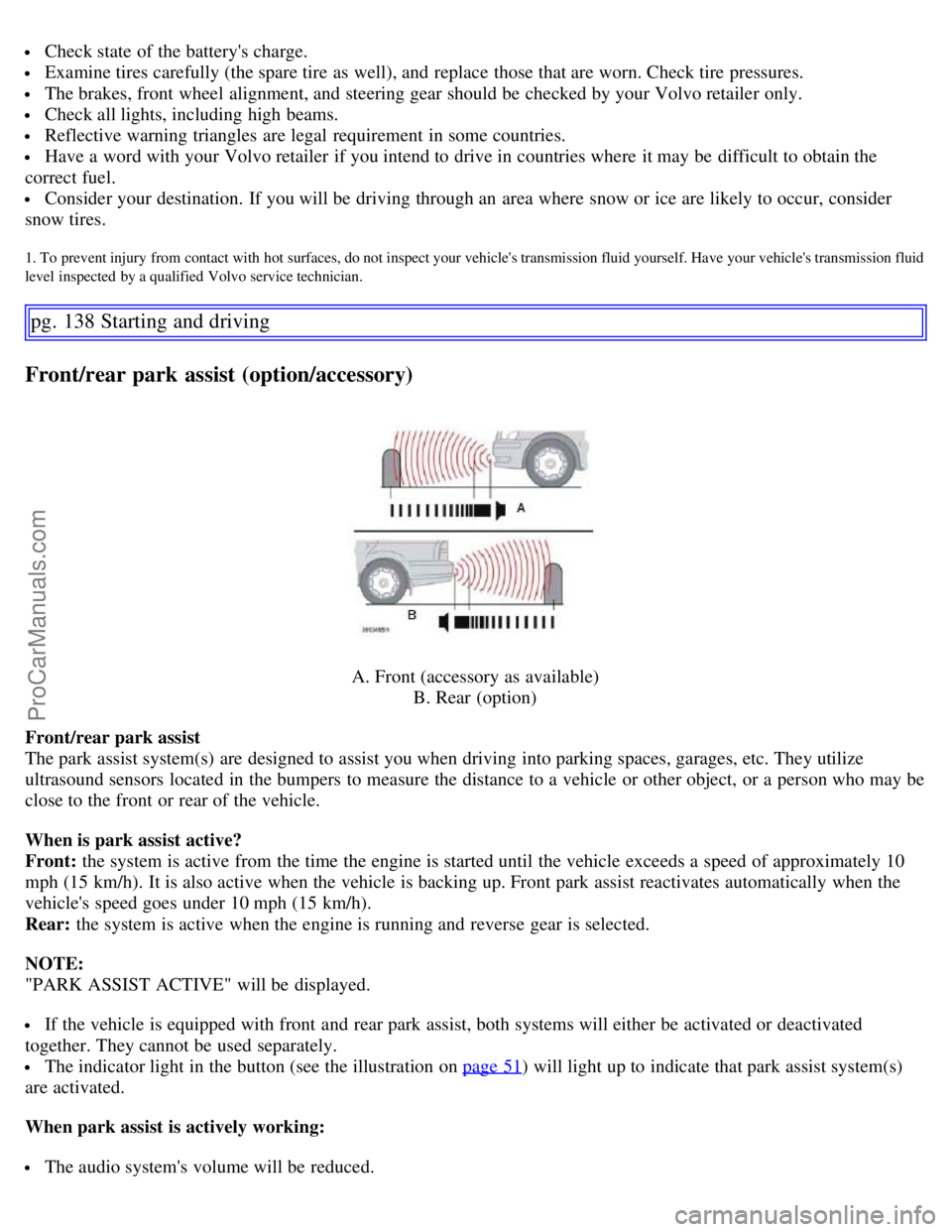
Front/rear park assist (option/accessory)
A. Front (accessory as available) B. Rear (option)
Front/rear park assist
The park assist system(s) are designed to assist you when driving into parking spaces, garages, etc. They utilize
ultrasound sensors located in the bumpers to measure the distance to a vehicle or other object, or a person who may be
close to the front or rear of the vehicle.
When is park assist active?
Front: the system is active from the time the engine is started until the vehicle exceeds a speed of approximately 10
mph (15 km/h). It is also active when the vehicle is backing up. Front park assist reactivates automatically when the
vehicle's speed goes under 10 mph (15 km/h).
Rear: the system is active when the engine is running and reverse gear is selected.
NOTE:
"PARK ASSIST ACTIVE" will be displayed.
If the vehicle is equipped with front and rear park assist, both systems will either be activated or deactivated
together. They cannot be used separately.
The indicator light in the button (see the illustration on page 51) will light up to indicate that park assist system(s)
are activated.
When park assist is actively working:
The audio system's volume will be reduced.
ProCarManuals.com
Page 119 of 200
An intermittent signal will be audible from the speakers to indicate that you are approaching a person, object,
parked vehicle, etc. The signals begin when the distance between the bumper and the object is:
Rear: approximately 5 feet (1.5 meters)
Front : approximately 2.5 ft (0.8 meters)
At a distance of approximately 1 foot (30 cm), the signal will become constant. If objects are close to both the front
and rear bumpers, the signal will alternate between the front and rear speakers.
Deactivating the system(s)
- Press the Park assist button on the center console (see page 51
) to temporarily deactivate the system(s).
- The indicator light in the button will go out when the system(s) have been deactivated.
- If the vehicle is equipped with front and rear park assist, both systems will be deactivated by pressing the button.
Park assist will be automatically reactivated the next time the engine is started.
NOTE: It may be necessary to deactivate one or both of the park assist systems in certain cases.
Rear park assist : towing a trailer, carrying bicycles in a rear-mounted carrier, etc, could trigger the rear park assist
system's sensors.
Front park assist : it may not be possible to combine auxiliary headlights and front park assist since these lights
could trigger the system's sensors.
pg. 139 Starting and driving
Front/rear park assist (option/accessory)
Faults in the system
If the yellow warning symbol illuminates and a message is shown in the information display, the system is not
functioning properly. Consult a Volvo retailer or authorized service technician.
Cleaning the sensors
For the system to function properly, the sensors in the front and/or rear bumpers should be kept clean. They can be
cleaned with car washing detergent and a sponge.
WARNING!
These systems are designed to be a supplementary aid when parking the vehicle. They are not, however, intended to
replace the driver's attention and judgement.
CAUTION!
In certain circumstances, the park assist system may give unexpected warning signals that can be caused by external
sound sources that use the same ultrasound frequencies as the system. This may include such things as the horns of
other vehicles, wet tires on asphalt, pneumatic brakes, motorcycle exhaust pipes, etc. This does not indicate a fault in
the system.
pg. 140 Starting and driving
This page left intentionally blank.
ProCarManuals.com
Page 128 of 200
NOTE: Self supporting run flat tires are only available in conjunction with TPMS.
If a self supporting run flat tire should lose inflation pressure, the yellow TPMS warning symbol (
) in the
instrument panel lights up to alert the driver, and a message will be shown in the text window in the instrument panel.
If this occurs, reduce vehicle speed to a maximum of 50 mph (80 km/h). The vehicle can be driven approximately 50
miles (80 km), or somewhat farther if the vehicle is not heavily loaded. The tire should be replaced as soon as
possible.
Hard braking and sudden steering maneuvers should be avoided.
In certain cases, it may be difficult to see which self supporting run flat tire is defective.
To determine which tire is damaged, check the inflation pressure of all four tires.
WARNING!
Only specially trained persons should mount self supporting run flat tires.
If self supporting run flat tires are mounted, the vehicle must be equipped with a Tire Pressure Monitoring
System.
After a low pressure warning has been displayed, do not exceed 50 mph (80 km/ h).
Avoid severe cornering and hard braking, and minimize the distance traveled before replacing the self supporting
run flat tire.
Self supporting run flat tires cannot be repaired. They must be replaced if damaged or punctured.
pg. 151 Wheels and tires
Tire designations
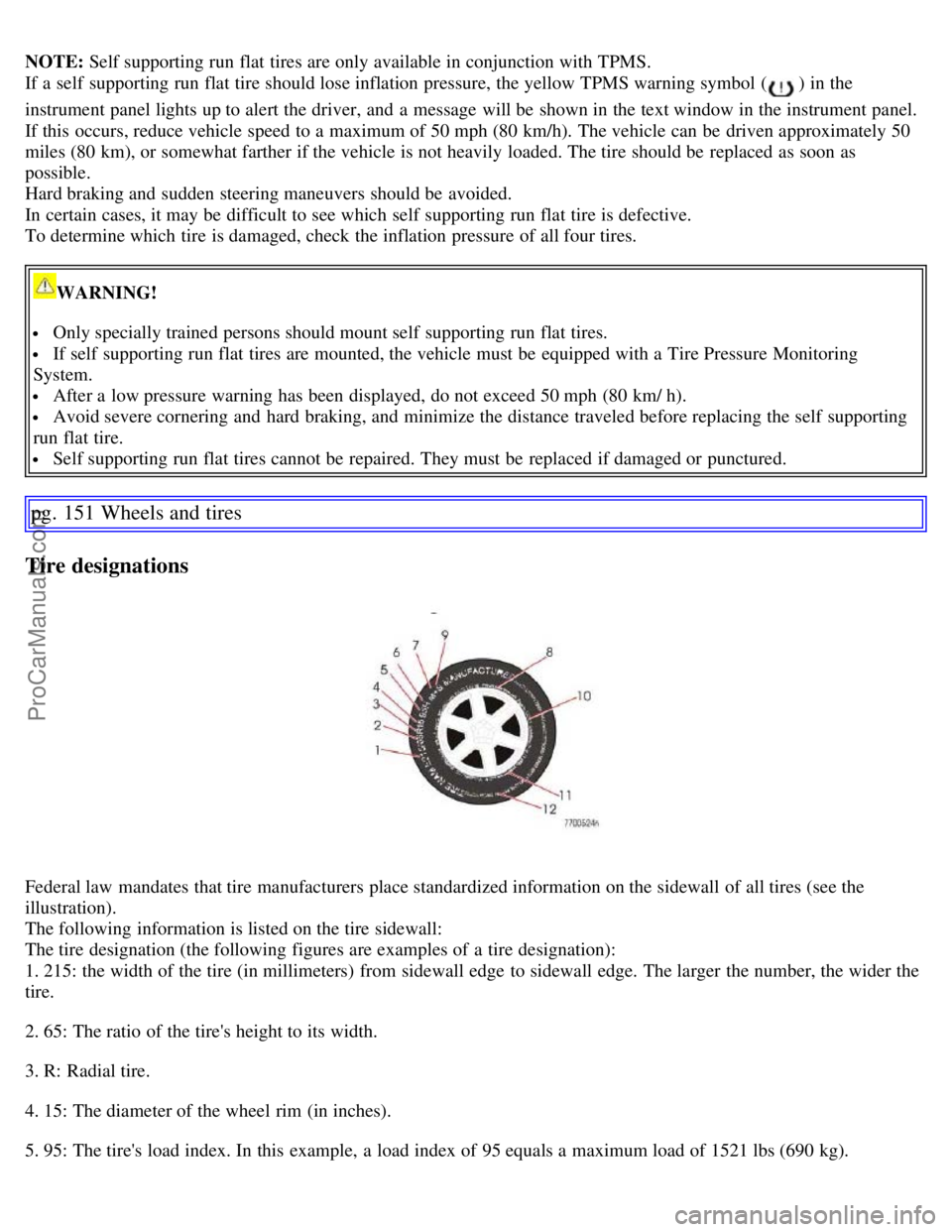
Federal law mandates that tire manufacturers place standardized information on the sidewall of all tires (see the
illustration).
The following information is listed on the tire sidewall:
The tire designation (the following figures are examples of a tire designation):
1. 215: the width of the tire (in millimeters) from sidewall edge to sidewall edge. The larger the number, the wider the
tire.
2. 65: The ratio of the tire's height to its width.
3. R: Radial tire.
4. 15: The diameter of the wheel rim (in inches).
5. 95: The tire's load index. In this example, a load index of 95 equals a maximum load of 1521 lbs (690 kg).
ProCarManuals.com