turn signal VOLVO S60 2007 User Guide
[x] Cancel search | Manufacturer: VOLVO, Model Year: 2007, Model line: S60, Model: VOLVO S60 2007Pages: 200, PDF Size: 4.03 MB
Page 160 of 200
Installing the new bulb:
- Insert the new bulb into the holder by pressing it in and turning it clockwise.
- Reinsert the bulb holder in the headlight housing and twist it clockwise until it seats properly.
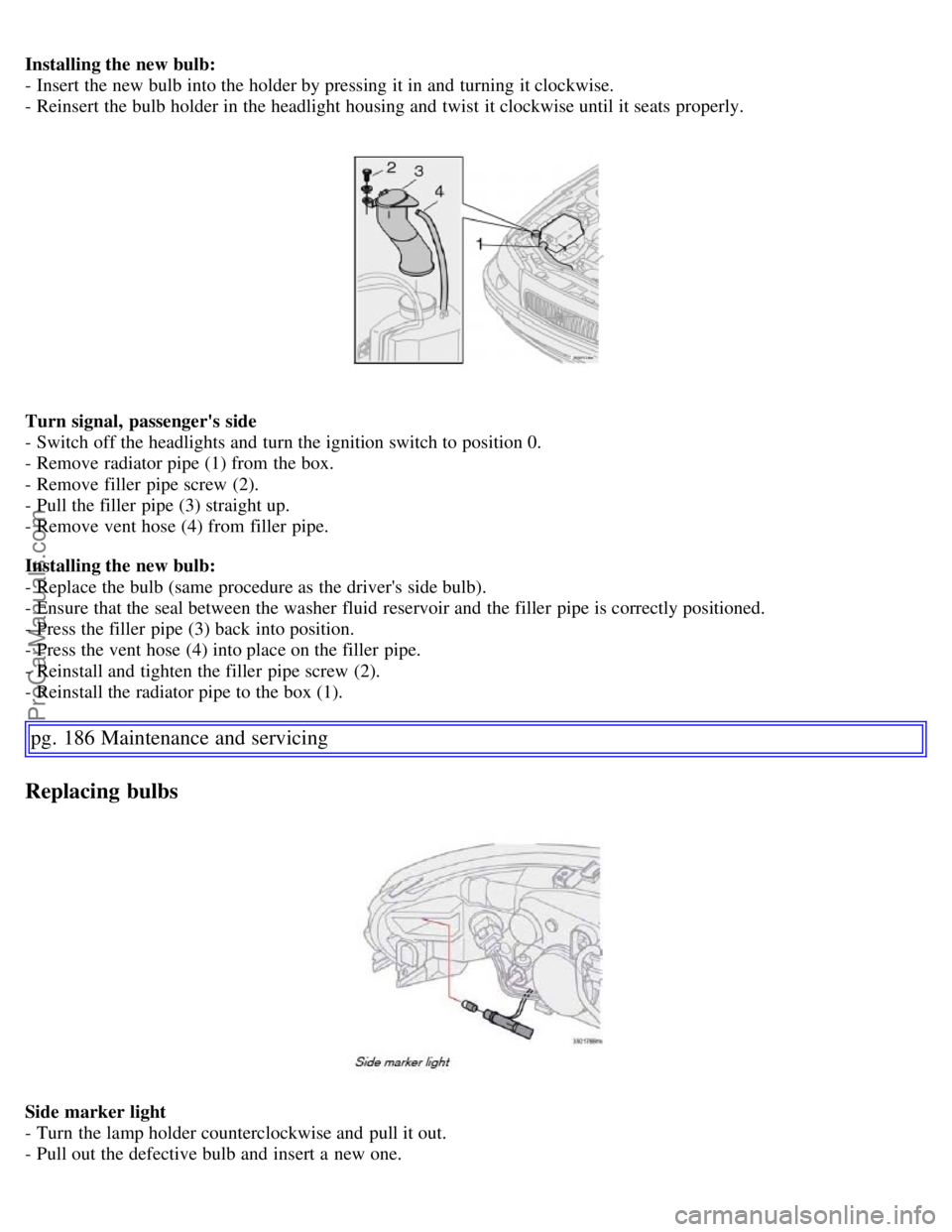
Turn signal, passenger's side
- Switch off the headlights and turn the ignition switch to position 0.
- Remove radiator pipe (1) from the box.
- Remove filler pipe screw (2).
- Pull the filler pipe (3) straight up.
- Remove vent hose (4) from filler pipe.
Installing the new bulb:
- Replace the bulb (same procedure as the driver's side bulb).
- Ensure that the seal between the washer fluid reservoir and the filler pipe is correctly positioned.
- Press the filler pipe (3) back into position.
- Press the vent hose (4) into place on the filler pipe.
- Reinstall and tighten the filler pipe screw (2).
- Reinstall the radiator pipe to the box (1).
pg. 186 Maintenance and servicing
Replacing bulbs
Side marker light
- Turn the lamp holder counterclockwise and pull it out.
- Pull out the defective bulb and insert a new one.
ProCarManuals.com
Page 162 of 200
NOTE: If the message indicating a burned out bulb remains in the information display after the bulb has been
replaced, consult an authorized Volvo retailer or workshop.
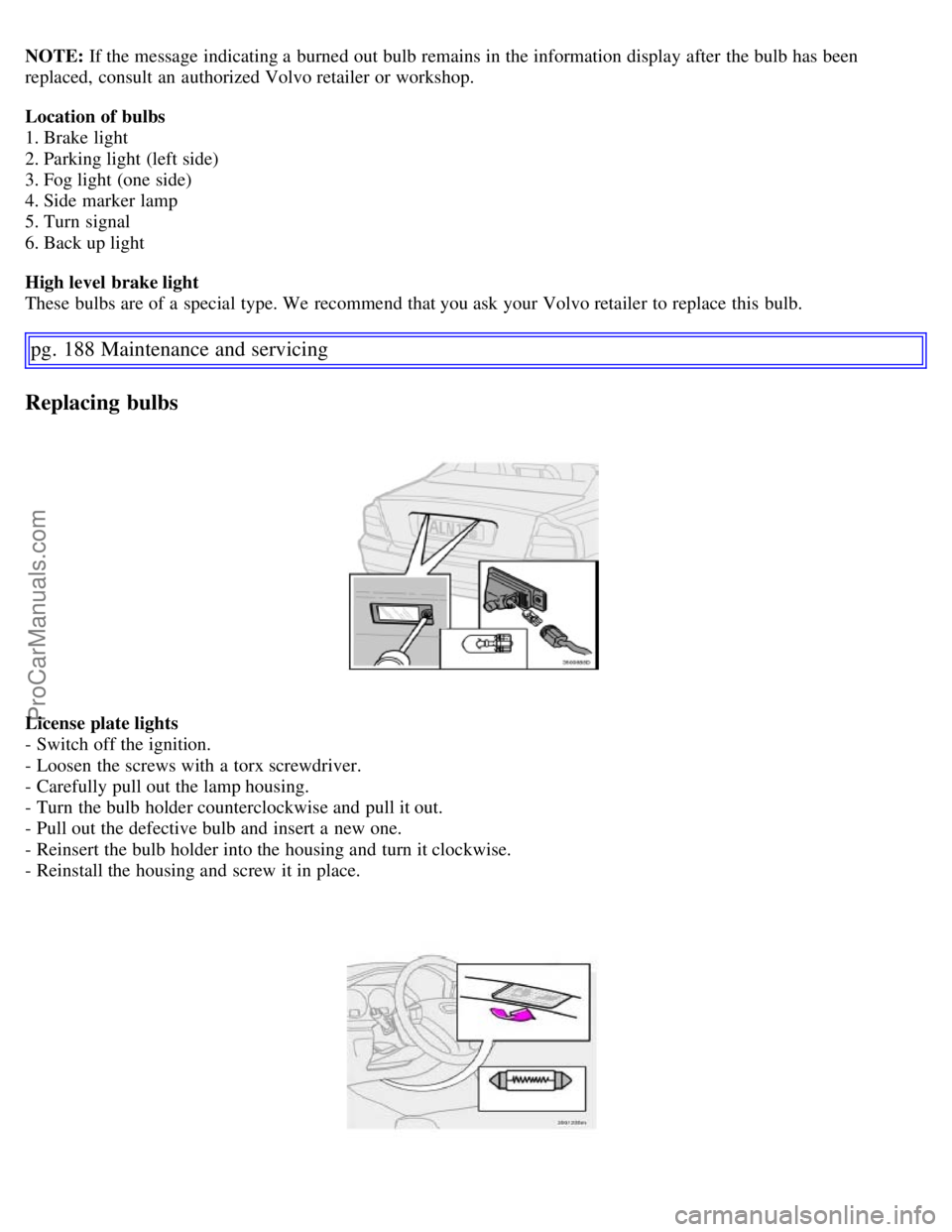
Location of bulbs
1. Brake light
2. Parking light (left side)
3. Fog light (one side)
4. Side marker lamp
5. Turn signal
6. Back up light
High level brake light
These bulbs are of a special type. We recommend that you ask your Volvo retailer to replace this bulb.
pg. 188 Maintenance and servicing
Replacing bulbs
License plate lights
- Switch off the ignition.
- Loosen the screws with a torx screwdriver.
- Carefully pull out the lamp housing.
- Turn the bulb holder counterclockwise and pull it out.
- Pull out the defective bulb and insert a new one.
- Reinsert the bulb holder into the housing and turn it clockwise.
- Reinstall the housing and screw it in place.
ProCarManuals.com
Page 169 of 200
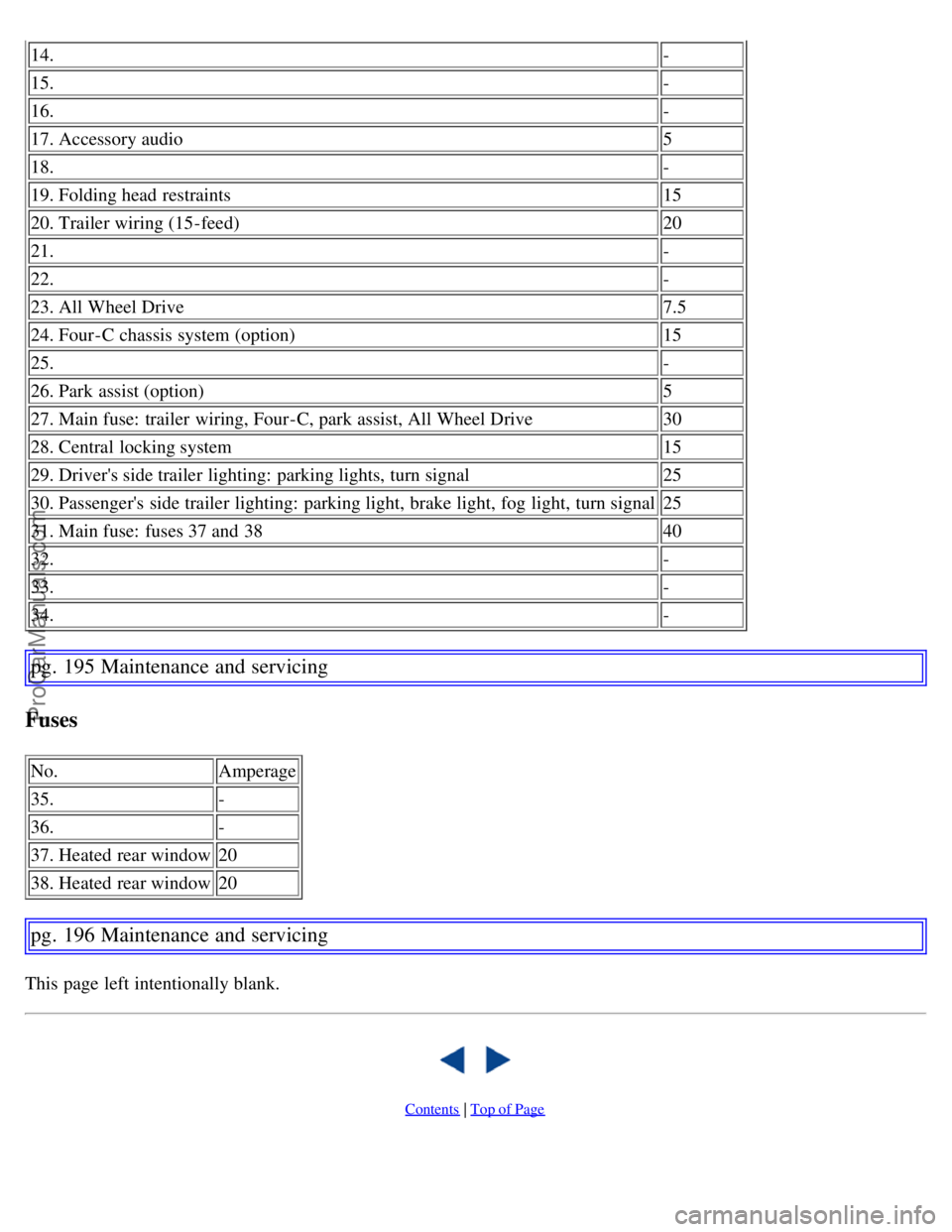
14.-
15.-
16. -
17. Accessory audio 5
18. -
19. Folding head restraints 15
20. Trailer wiring (15-feed) 20
21. -
22. -
23. All Wheel Drive 7.5
24. Four-C chassis system (option) 15
25. -
26. Park assist (option) 5
27. Main fuse: trailer wiring, Four-C, park assist, All Wheel Drive 30
28. Central locking system 15
29. Driver's side trailer lighting: parking lights, turn signal 25
30. Passenger's side trailer lighting: parking light, brake light, fog light, turn signal 25
31. Main fuse: fuses 37 and 38 40
32. -
33. -
34. -
pg. 195 Maintenance and servicing
Fuses
No.Amperage
35. -
36. -
37. Heated rear window 20
38. Heated rear window 20
pg. 196 Maintenance and servicing
This page left intentionally blank.
Contents | Top of Page
ProCarManuals.com
Page 175 of 200
Suspension
Rear suspension
Individual rear wheel suspension with longitudinal support arms, double link arms and track rods.
Front suspension
Spring strut suspension with integrated shock absorbers and control arms linked to the support frame. Power-assisted
rack and pinion steering. Safety type steering column.
pg. 207 Specifications
Electrical system
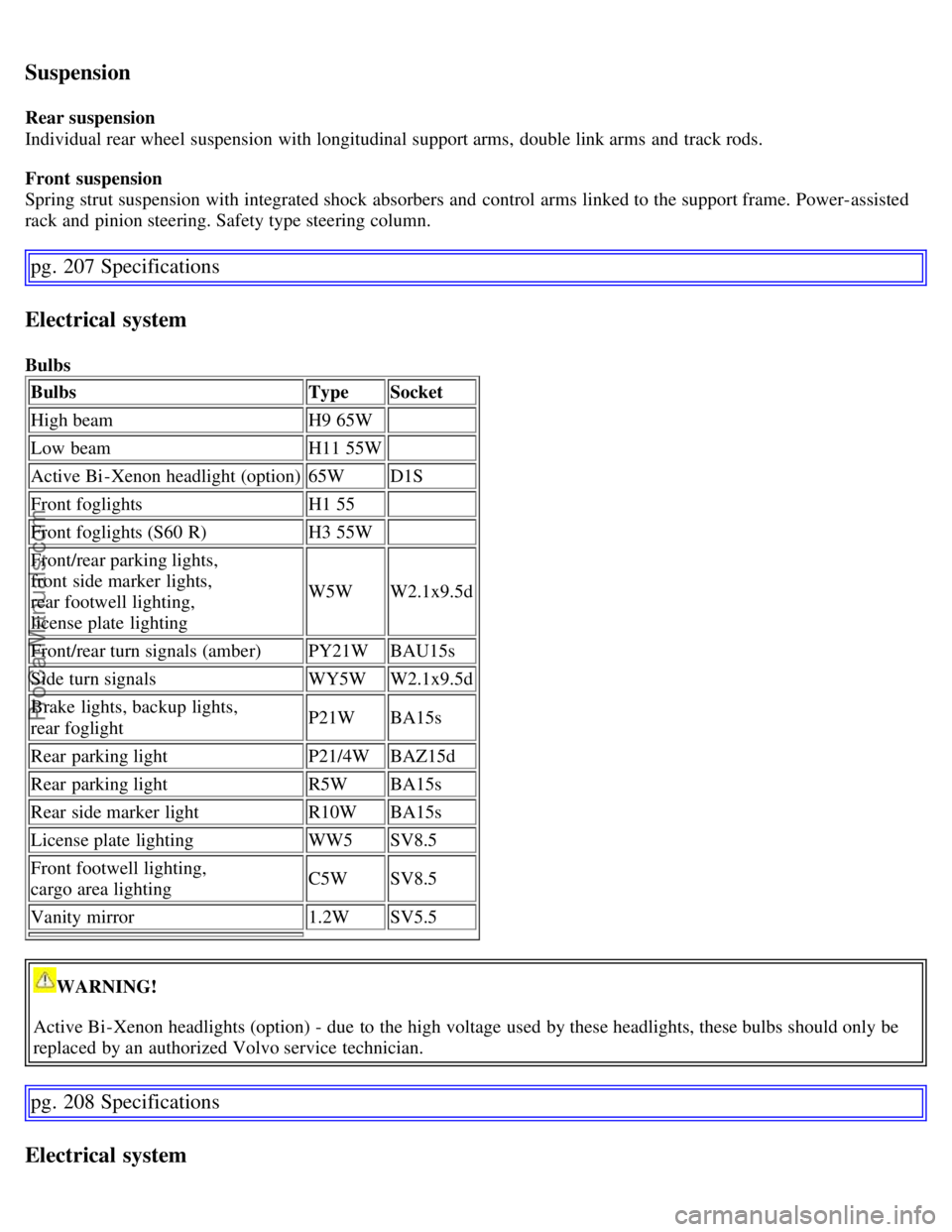
BulbsBulbs TypeSocket
High beam H9 65W
Low beam H11 55W
Active Bi -Xenon headlight (option) 65WD1S
Front foglights H1 55
Front foglights (S60 R) H3 55W
Front/rear parking lights,
front side marker lights,
rear footwell lighting,
license plate lighting W5W
W2.1x9.5d
Front/rear turn signals (amber) PY21WBAU15s
Side turn signals WY5WW2.1x9.5d
Brake lights, backup lights,
rear foglight P21W
BA15s
Rear parking light P21/4WBAZ15d
Rear parking light R5WBA15s
Rear side marker light R10WBA15s
License plate lighting WW5SV8.5
Front footwell lighting,
cargo area lighting C5W
SV8.5
Vanity mirror 1.2WSV5.5
WARNING!
Active Bi -Xenon headlights (option) - due to the high voltage used by these headlights, these bulbs should only be
replaced by an authorized Volvo service technician.
pg. 208 Specifications
Electrical system
ProCarManuals.com
Page 183 of 200
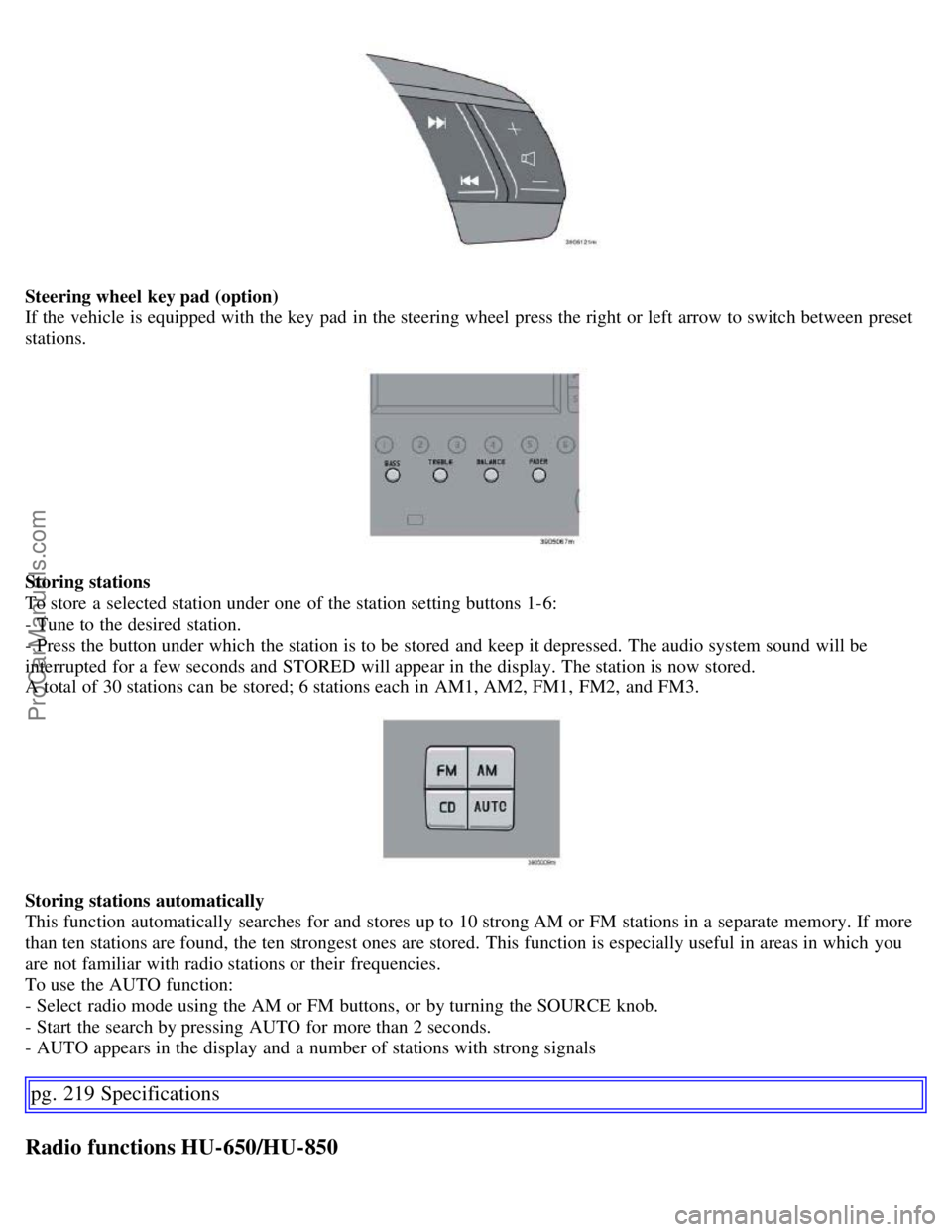
Steering wheel key pad (option)
If the vehicle is equipped with the key pad in the steering wheel press the right or left arrow to switch between preset
stations.
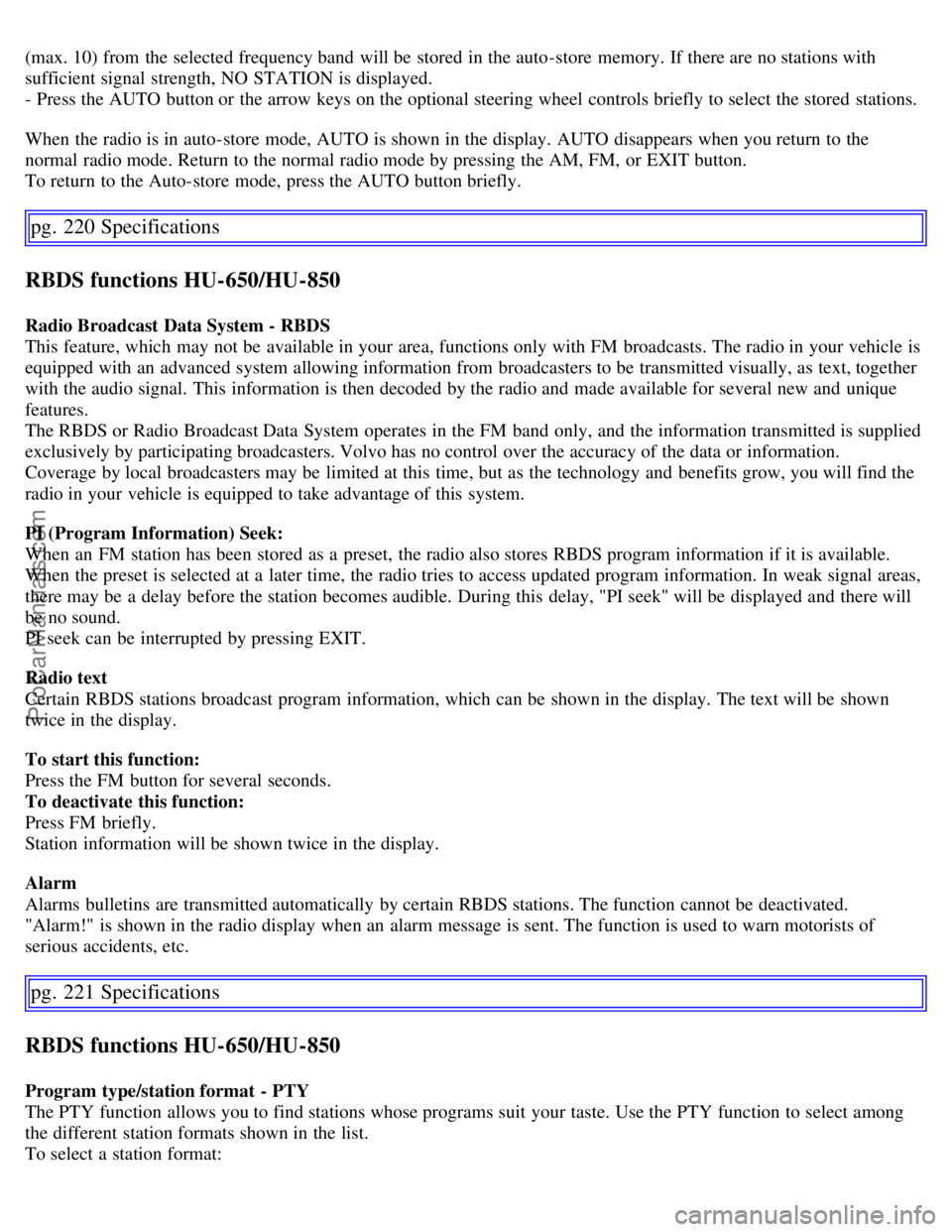
Storing stations
To store a selected station under one of the station setting buttons 1-6:
- Tune to the desired station.
- Press the button under which the station is to be stored and keep it depressed. The audio system sound will be
interrupted for a few seconds and STORED will appear in the display. The station is now stored.
A total of 30 stations can be stored; 6 stations each in AM1, AM2, FM1, FM2, and FM3.
Storing stations automatically
This function automatically searches for and stores up to 10 strong AM or FM stations in a separate memory. If more
than ten stations are found, the ten strongest ones are stored. This function is especially useful in areas in which you
are not familiar with radio stations or their frequencies.
To use the AUTO function:
- Select radio mode using the AM or FM buttons, or by turning the SOURCE knob.
- Start the search by pressing AUTO for more than 2 seconds.
- AUTO appears in the display and a number of stations with strong signals
pg. 219 Specifications
Radio functions HU-650/HU-850
ProCarManuals.com
Page 184 of 200
(max. 10) from the selected frequency band will be stored in the auto-store memory. If there are no stations with
sufficient signal strength, NO STATION is displayed.
- Press the AUTO button or the arrow keys on the optional steering wheel controls briefly to select the stored stations.
When the radio is in auto-store mode, AUTO is shown in the display. AUTO disappears when you return to the
normal radio mode. Return to the normal radio mode by pressing the AM, FM, or EXIT button.
To return to the Auto-store mode, press the AUTO button briefly.
pg. 220 Specifications
RBDS functions HU-650/HU-850
Radio Broadcast Data System - RBDS
This feature, which may not be available in your area, functions only with FM broadcasts. The radio in your vehicle is
equipped with an advanced system allowing information from broadcasters to be transmitted visually, as text, together
with the audio signal. This information is then decoded by the radio and made available for several new and unique
features.
The RBDS or Radio Broadcast Data System operates in the FM band only, and the information transmitted is supplied
exclusively by participating broadcasters. Volvo has no control over the accuracy of the data or information.
Coverage by local broadcasters may be limited at this time, but as the technology and benefits grow, you will find the
radio in your vehicle is equipped to take advantage of this system.
PI (Program Information) Seek:
When an FM station has been stored as a preset, the radio also stores RBDS program information if it is available.
When the preset is selected at a later time, the radio tries to access updated program information. In weak signal areas,
there may be a delay before the station becomes audible. During this delay, "PI seek" will be displayed and there will
be no sound.
PI seek can be interrupted by pressing EXIT.
Radio text
Certain RBDS stations broadcast program information, which can be shown in the display. The text will be shown
twice in the display.
To start this function:
Press the FM button for several seconds.
To deactivate this function:
Press FM briefly.
Station information will be shown twice in the display.
Alarm
Alarms bulletins are transmitted automatically by certain RBDS stations. The function cannot be deactivated.
"Alarm!" is shown in the radio display when an alarm message is sent. The function is used to warn motorists of
serious accidents, etc.
pg. 221 Specifications
RBDS functions HU-650/HU-850
Program type/station format - PTY
The PTY function allows you to find stations whose programs suit your taste. Use the PTY function to select among
the different station formats shown in the list.
To select a station format:
ProCarManuals.com
Page 200 of 200
Turn signal, rear187
Turn signals55
Type designations198
U
Uniform Tire Quality Grading155
, 159
Unlocking the car100
Unlocking the trunk100
Use of Additives107
V
Valet key96
Valet locking50
Vanity mirror85
Vanity mirror bulb, changing189
Vehicle Event Data168
Vehicle Identification Number (VIN)199
Vehicle loading153
Vehicle weights201
VIN (Vehicle Identification Number)199
Volvo and the environment4
W
W - Winter117
, 119
Warning symbol in center of dashboard45
Warranties168
Washer fluid reservoir173, 176
Washing the car162
Waxing163
Weight distribution114
Weights201
Windshield washer fluid reservoir176
Windshield wipers56
Winter/Wet driving mode136
Contents | Top of Page
ProCarManuals.com