reset VOLVO S60 2007 Owners Manual
[x] Cancel search | Manufacturer: VOLVO, Model Year: 2007, Model line: S60, Model: VOLVO S60 2007Pages: 200, PDF Size: 4.03 MB
Page 4 of 200
In addition to continuous environmental refinement of conventional gasoline-powered internal combustion engines,
Volvo is actively looking at advanced technology alternative-fuel vehicles.
When you drive a Volvo, you become our partner in the work to lessen the vehicle's impact on the environment.
To reduce your vehicle's environmental impact, you can:
Maintain proper air pressure in your tires. Tests have shown decreased fuel economy with improperly inflated tires.
Follow the recommended maintenance schedule in your Warranty and Service Records Information booklet.
Drive at a constant speed.
See an authorized Volvo retailer as soon as possible for inspection if the check engine (malfunction indicator) lamp
illuminates, or stays on after the vehicle has started.
Properly dispose of any vehicle-related waste such as used motor oil, used batteries, brake pads, etc.
When cleaning your vehicle, use Volvo's own vehicle care products, all of which have systematically been adapted
to the environment.
pg. 5 Introduction
Important warnings
Accessory Installation
We strongly recommend that Volvo owners install only genuine, Volvo-approved accessories, and that accessory
installations be performed only by the factory-trained technicians at your authorized Volvo retailer.
Genuine Volvo accessories are tested to ensure compatibility with the performance, safety, and emission systems in
your vehicle. Additionally, your authorized Volvo retailer knows where accessories may and may not be safely
installed in your Volvo. In all cases, please consult your authorized Volvo retailer before installing any accessory in or
on your vehicle.
Accessories that have not been approved by Volvo may or may not be specifically tested for compatibility with your
vehicle. Additionally, an inexperienced installer may not be familiar with some of your vehicle's systems.
Any of your vehicle's performance and safety systems could be adversely affected if you install accessories that
Volvo has not tested, or if you allow accessories to be installed by someone unfamiliar with your vehicle.
Damage caused by unapproved or improperly installed accessories may not be covered by your new vehicle
warranty. See your Warranty and Service Records Information booklet for more warranty information. Volvo assumes
no responsibility for death, injury, or expenses that may result from the installation of non-genuine accessories.
Driver Distraction
Driver distraction results from driver activities that are not directly related to controlling the vehicle in the driving
environment. Your new Volvo is, or can be, equipped with many feature-rich entertainment and communication
systems. These include hands-free cellular telephones, navigation systems, and multipurpose audio systems. You may
also own other portable electronic devices for your own convenience. When used properly and safely, they enrich the
driving experience. Improperly used, any of these could cause a distraction.
For all of these systems, we want to provide the following warning that reflects the strong Volvo concern for your
safety:
Never use these devices or any feature of your vehicle in a way that distracts you from the task of driving safely.
Distraction can lead to a serious accident.In addition to this general warning, we offer the following guidance
regarding specific newer features that may be found in your vehicle:
Never use a hand -held cellular telephone while driving. Some jurisdictions prohibit cellular telephone use by a
driver while the vehicle is moving.
If your vehicle is equipped with a navigation system, set and make changes to your travel itinerary only with the
vehicle parked.
Never program your audio system while the vehicle is moving. Program radio presets with the vehicle parked, and
ProCarManuals.com
Page 5 of 200
use your programmed presets to make radio use quicker and simpler.
Never use portable computers or personal digital assistants while the vehicle is moving.
A driver has a responsibility to do everything possible to ensure his or her own safety and the safety of passengers in
the vehicle and others sharing the roadway. Avoiding distractions is part of that responsibility.
pg. 6 Introduction
This page left intentionally blank.
pg. 7 Introduction
Contents
Safety
Instruments and controls
Climate control
Interior
Locks and alarm
Starting and driving
Wheels and tires
Vehicle care
Maintenance and service
Specifications
Audio
Index
pg. 8 Introduction
This page left intentionally blank.
Contents | Top of Page
ProCarManuals.com
Page 37 of 200
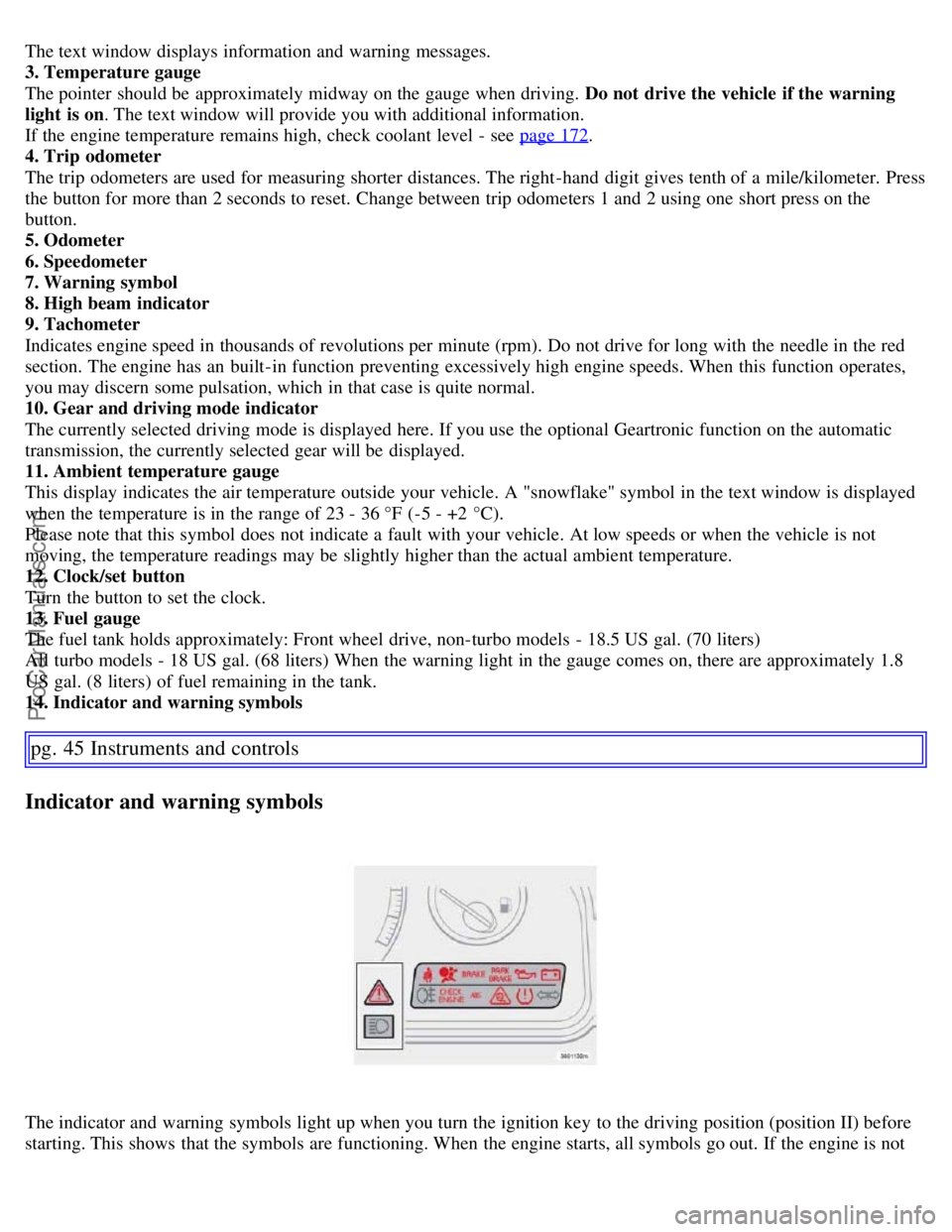
The text window displays information and warning messages.
3. Temperature gauge
The pointer should be approximately midway on the gauge when driving. Do not drive the vehicle if the warning
light is on. The text window will provide you with additional information.
If the engine temperature remains high, check coolant level - see page 172
.
4. Trip odometer
The trip odometers are used for measuring shorter distances. The right-hand digit gives tenth of a mile/kilometer. Press
the button for more than 2 seconds to reset. Change between trip odometers 1 and 2 using one short press on the
button.
5. Odometer
6. Speedometer
7. Warning symbol
8. High beam indicator
9. Tachometer
Indicates engine speed in thousands of revolutions per minute (rpm). Do not drive for long with the needle in the red
section. The engine has an built-in function preventing excessively high engine speeds. When this function operates,
you may discern some pulsation, which in that case is quite normal.
10. Gear and driving mode indicator
The currently selected driving mode is displayed here. If you use the optional Geartronic function on the automatic
transmission, the currently selected gear will be displayed.
11. Ambient temperature gauge
This display indicates the air temperature outside your vehicle. A "snowflake" symbol in the text window is displayed
when the temperature is in the range of 23 - 36 °F (-5 - +2 °C).
Please note that this symbol does not indicate a fault with your vehicle. At low speeds or when the vehicle is not
moving, the temperature readings may be slightly higher than the actual ambient temperature.
12. Clock/set button
Turn the button to set the clock.
13. Fuel gauge
The fuel tank holds approximately: Front wheel drive, non-turbo models - 18.5 US gal. (70 liters)
All turbo models - 18 US gal. (68 liters) When the warning light in the gauge comes on, there are approximately 1.8
US gal. (8 liters) of fuel remaining in the tank.
14. Indicator and warning symbols
pg. 45 Instruments and controls
Indicator and warning symbols
The indicator and warning symbols light up when you turn the ignition key to the driving position (position II) before
starting. This shows that the symbols are functioning. When the engine starts, all symbols go out. If the engine is not
ProCarManuals.com
Page 41 of 200
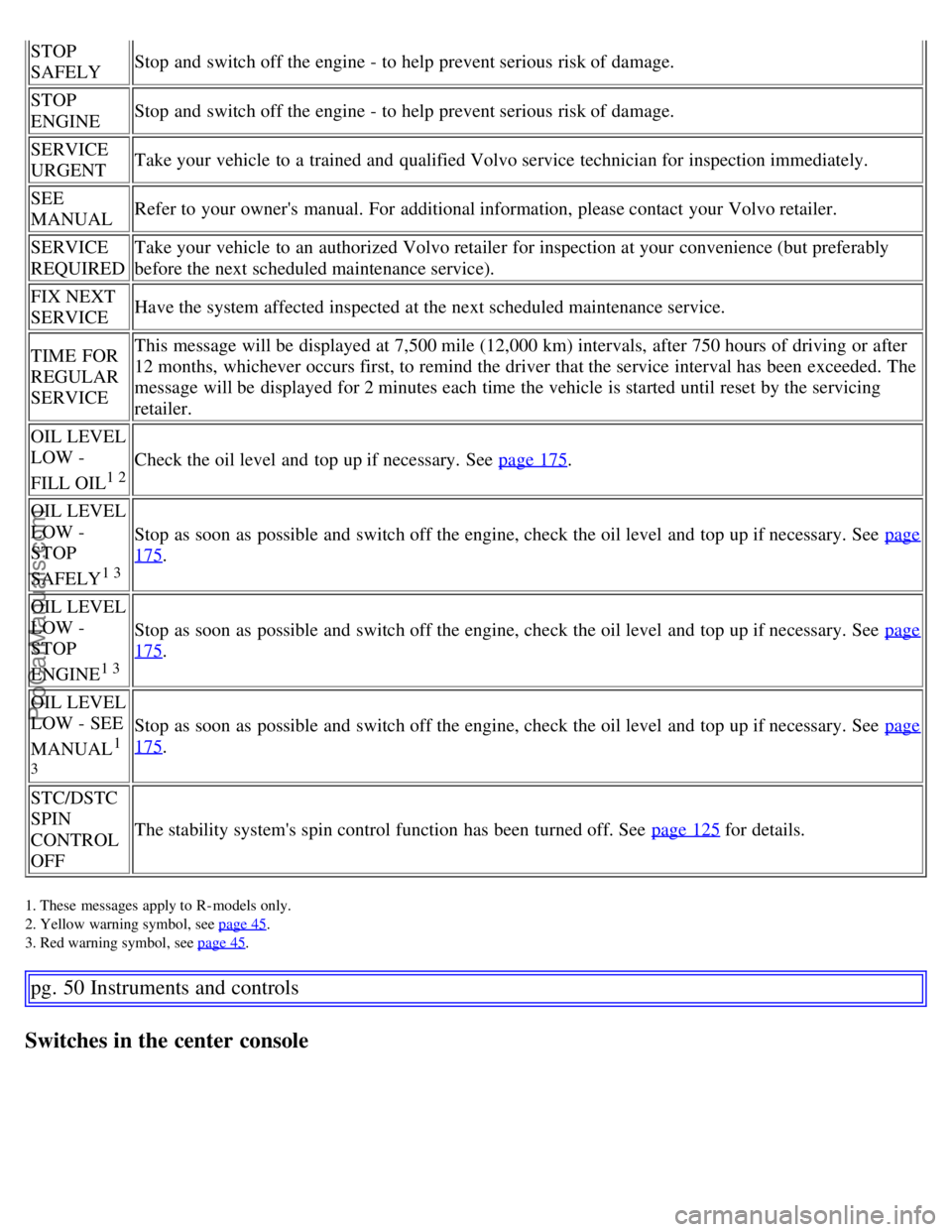
STOP
SAFELYStop and switch off the engine - to help prevent serious risk of damage.
STOP
ENGINE Stop and switch off the engine - to help prevent serious risk of damage.
SERVICE
URGENT Take your vehicle to a trained and qualified Volvo service technician for inspection immediately.
SEE
MANUAL Refer to your owner's manual. For additional information, please contact your Volvo retailer.
SERVICE
REQUIRED Take your vehicle to an authorized Volvo retailer for inspection at your convenience (but preferably
before the next scheduled maintenance service).
FIX NEXT
SERVICE Have the system affected inspected at the next scheduled maintenance service.
TIME FOR
REGULAR
SERVICE This message will be displayed at 7,500 mile (12,000 km) intervals, after 750 hours of driving or after
12 months, whichever occurs first, to remind the driver that the service interval has been exceeded. The
message will be displayed for 2 minutes each time the vehicle is started until reset by the servicing
retailer.
OIL LEVEL
LOW -
FILL OIL
1 2
Check the oil level and top up if necessary. See page 175.
OIL LEVEL
LOW -
STOP
SAFELY
1 3
Stop as soon as possible and switch off the engine, check the oil level and top up if necessary. See page
175.
OIL LEVEL
LOW -
STOP
ENGINE
1 3
Stop as soon as possible and switch off the engine, check the oil level and top up if necessary. See page
175.
OIL LEVEL
LOW - SEE
MANUAL
1
3
Stop as soon as possible and switch off the engine, check the oil level and top up if necessary. See page
175.
STC/DSTC
SPIN
CONTROL
OFF The stability system's spin control function has been turned off. See page 125
for details.
1. These messages apply to R- models only.
2. Yellow warning symbol, see page 45
.
3. Red warning symbol, see page 45
.
pg. 50 Instruments and controls
Switches in the center console
ProCarManuals.com
Page 50 of 200
pg. 59 Instruments and controls
Trip computer
Trip computer
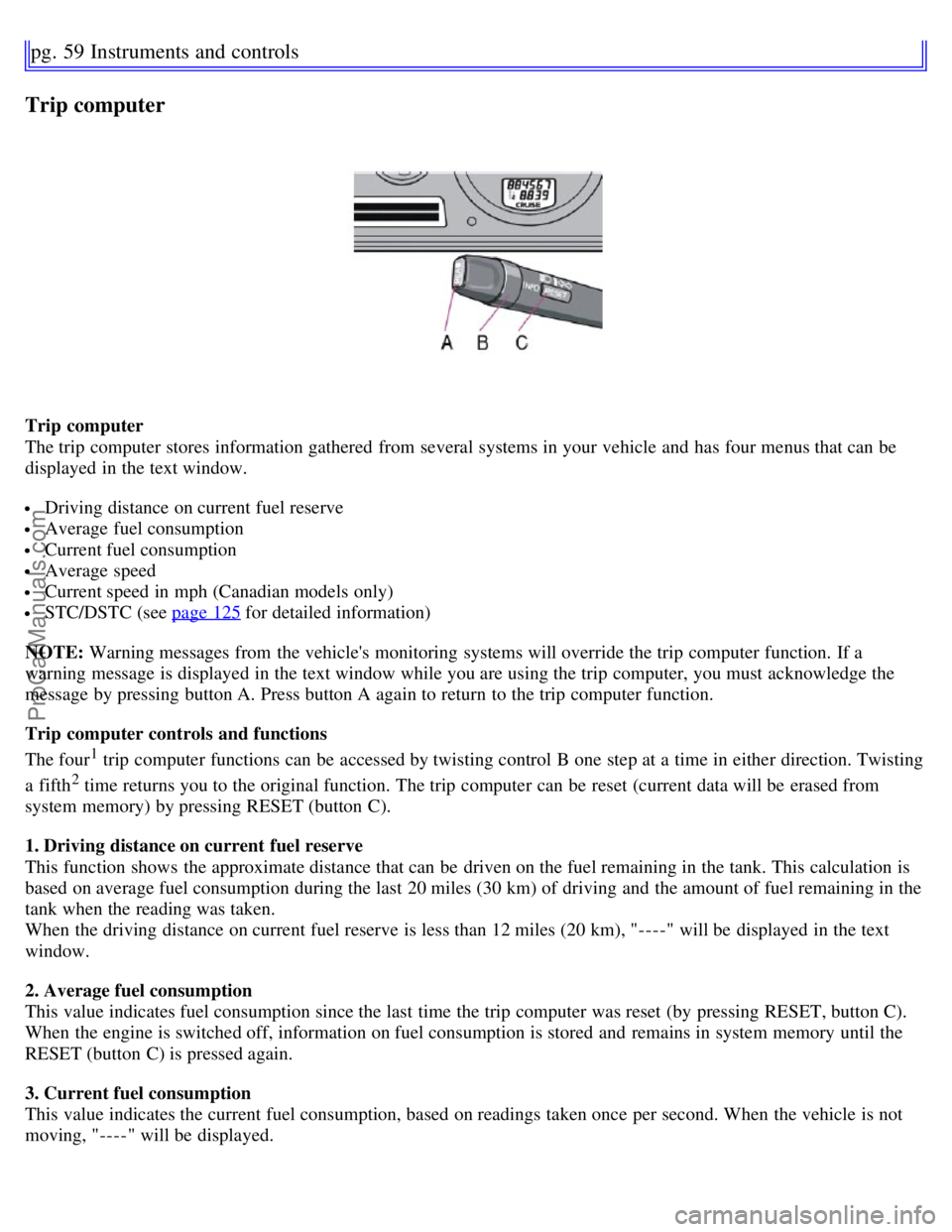
The trip computer stores information gathered from several systems in your vehicle and has four menus that can be
displayed in the text window.
Driving distance on current fuel reserve
Average fuel consumption
Current fuel consumption
Average speed
Current speed in mph (Canadian models only)
STC/DSTC (see page 125 for detailed information)
NOTE: Warning messages from the vehicle's monitoring systems will override the trip computer function. If a
warning message is displayed in the text window while you are using the trip computer, you must acknowledge the
message by pressing button A. Press button A again to return to the trip computer function.
Trip computer controls and functions
The four
1 trip computer functions can be accessed by twisting control B one step at a time in either direction. Twisting
a fifth
2 time returns you to the original function. The trip computer can be reset (current data will be erased from
system memory) by pressing RESET (button C).
1. Driving distance on current fuel reserve
This function shows the approximate distance that can be driven on the fuel remaining in the tank. This calculation is
based on average fuel consumption during the last 20 miles (30 km) of driving and the amount of fuel remaining in the
tank when the reading was taken.
When the driving distance on current fuel reserve is less than 12 miles (20 km), "----" will be displayed in the text
window.
2. Average fuel consumption
This value indicates fuel consumption since the last time the trip computer was reset (by pressing RESET, button C).
When the engine is switched off, information on fuel consumption is stored and remains in system memory until the
RESET (button C) is pressed again.
3. Current fuel consumption
This value indicates the current fuel consumption, based on readings taken once per second. When the vehicle is not
moving, "----" will be displayed.
ProCarManuals.com
Page 51 of 200
4. Average speed
This value indicates average speed since the last time the trip computer was reset (by pressing RESET, button C).
When the engine is switched off, information on average speed is stored and remains in system memory until the
RESET (button C) is pressed again.
5. Current speed in miles per hour (Canadian models only)
This function provides the driver with an instantaneous conversion of the vehicle's current speed from km/h to mph.
NOTE: Trip computer readings may vary slightly depending on the circumference of the tires on the vehicle and
driving style.
1. Five functions on Canadian models.
2. A sixth time on Canadian models.
pg. 60 Instruments and controls
Cruise control
Cruise control
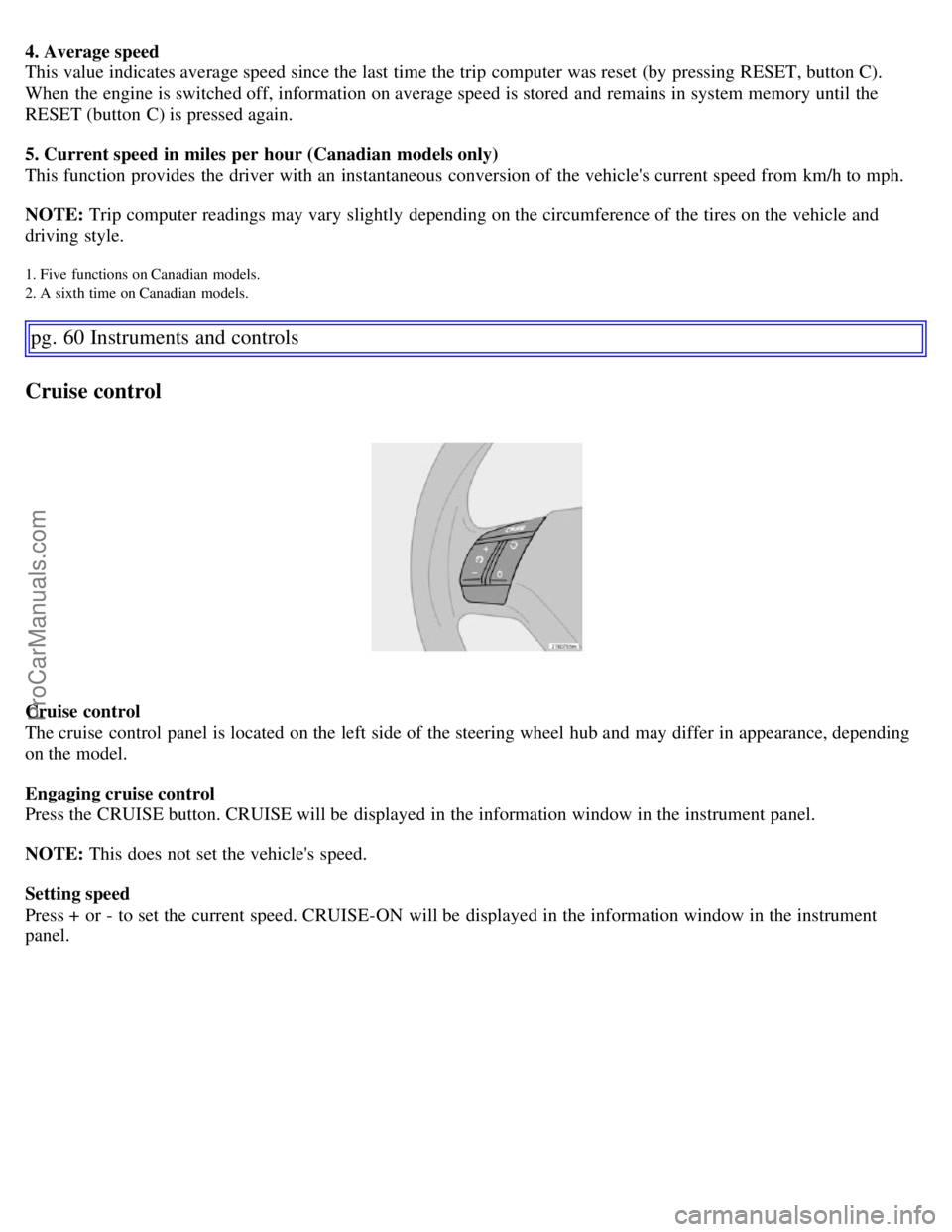
The cruise control panel is located on the left side of the steering wheel hub and may differ in appearance, depending
on the model.
Engaging cruise control
Press the CRUISE button. CRUISE will be displayed in the information window in the instrument panel.
NOTE: This does not set the vehicle's speed.
Setting speed
Press + or - to set the current speed. CRUISE-ON will be displayed in the information window in the instrument
panel.
ProCarManuals.com
Page 72 of 200
Because the driver's seat can be adjusted with the ignition off, children should never be left unattended in the
vehicle.
Movement of the seat can be STOPPED at any time by pressing any button on the power seat control panel.
Do not adjust the seat while driving. The seat should be adjusted so that the brake pedal can be depressed fully. In
addition, position the seat as far rearward as comfort and control allow.
The seat rails on the floor must not be obstructed in any way when the seat is in motion.
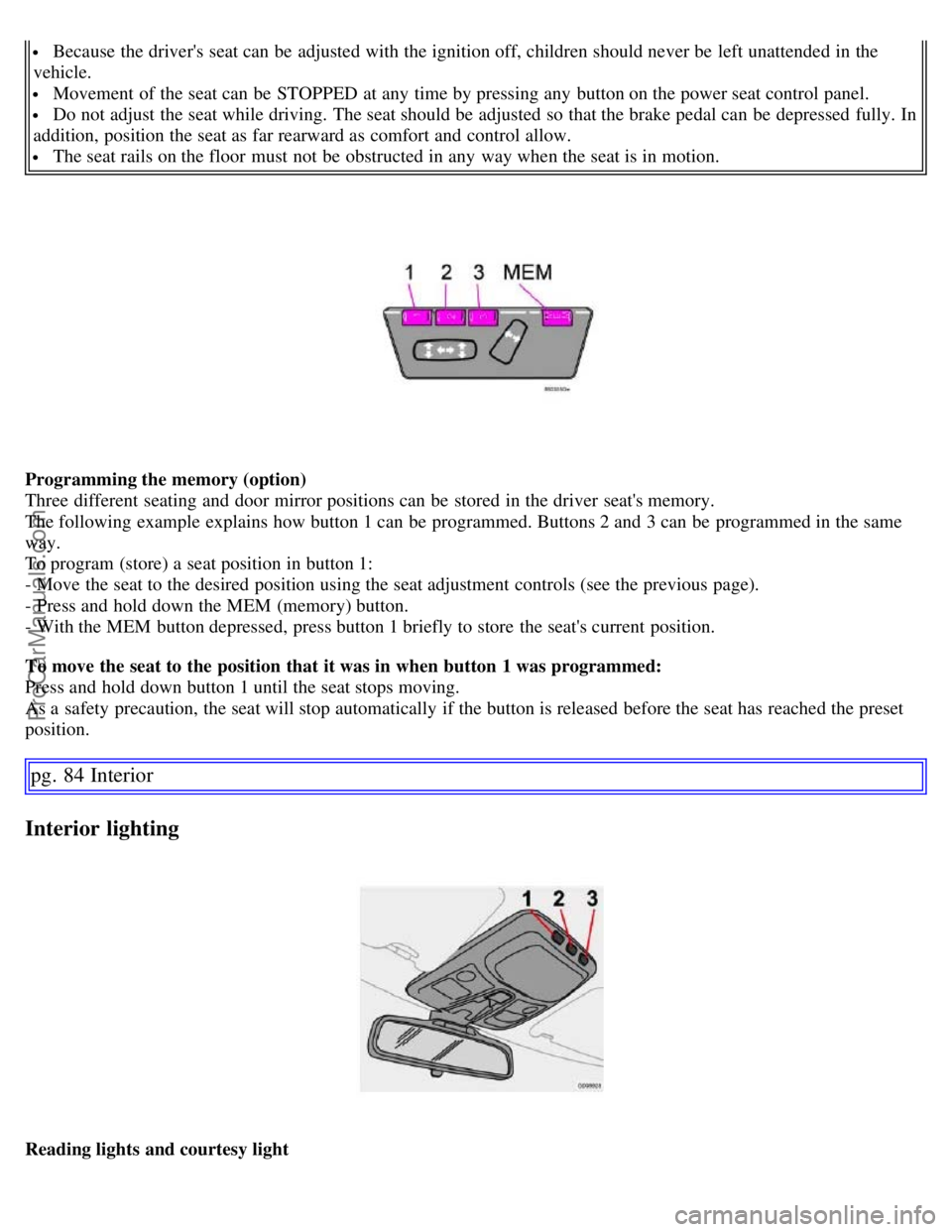
Programming the memory (option)
Three different seating and door mirror positions can be stored in the driver seat's memory.
The following example explains how button 1 can be programmed. Buttons 2 and 3 can be programmed in the same
way.
To program (store) a seat position in button 1:
- Move the seat to the desired position using the seat adjustment controls (see the previous page).
- Press and hold down the MEM (memory) button.
- With the MEM button depressed, press button 1 briefly to store the seat's current position.
To move the seat to the position that it was in when button 1 was programmed:
Press and hold down button 1 until the seat stops moving.
As a safety precaution, the seat will stop automatically if the button is released before the seat has reached the preset
position.
pg. 84 Interior
Interior lighting
Reading lights and courtesy light
ProCarManuals.com
Page 108 of 200
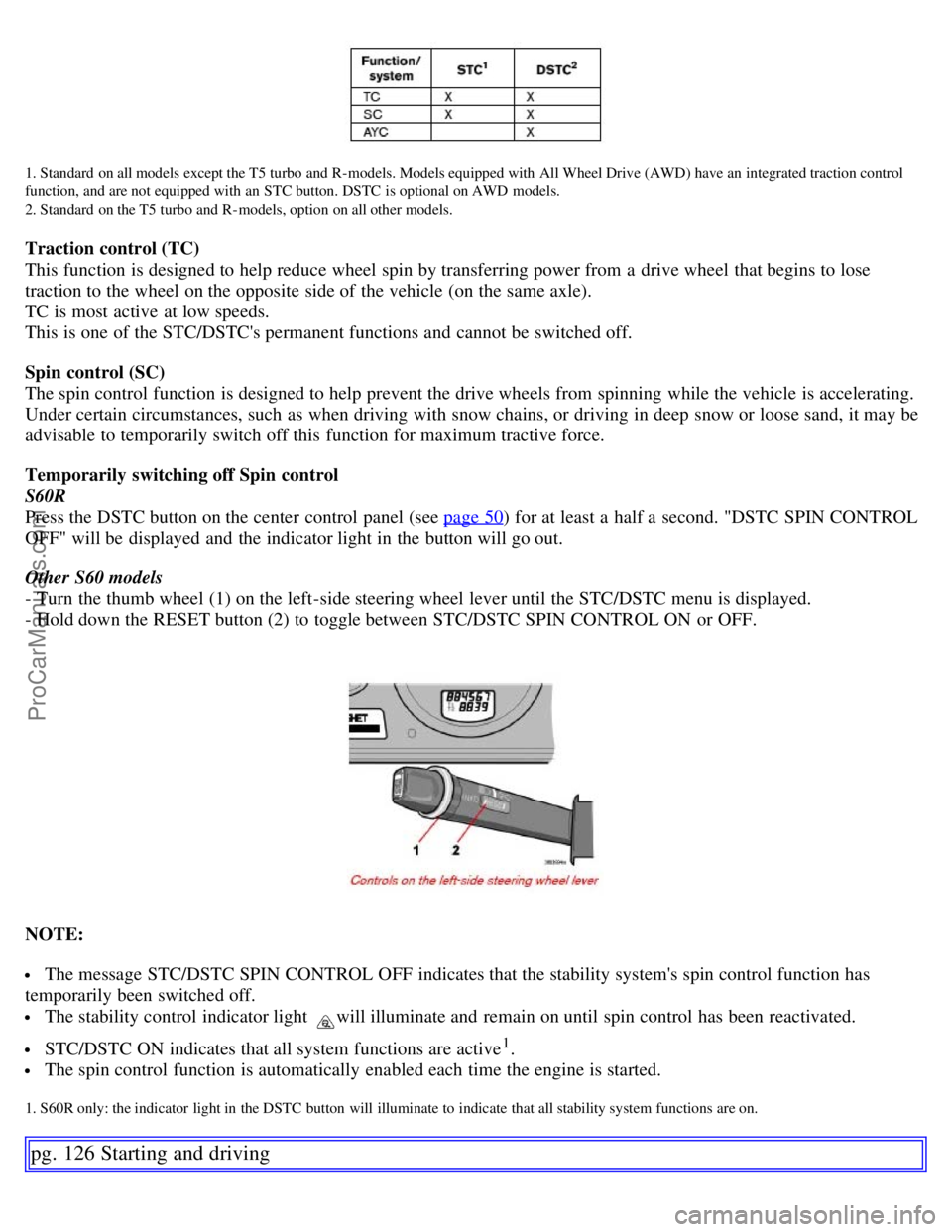
1. Standard on all models except the T5 turbo and R- models. Models equipped with All Wheel Drive (AWD) have an integrated traction control
function, and are not equipped with an STC button. DSTC is optional on AWD models.
2. Standard on the T5 turbo and R- models, option on all other models.
Traction control (TC)
This function is designed to help reduce wheel spin by transferring power from a drive wheel that begins to lose
traction to the wheel on the opposite side of the vehicle (on the same axle).
TC is most active at low speeds.
This is one of the STC/DSTC's permanent functions and cannot be switched off.
Spin control (SC)
The spin control function is designed to help prevent the drive wheels from spinning while the vehicle is accelerating.
Under certain circumstances, such as when driving with snow chains, or driving in deep snow or loose sand, it may be
advisable to temporarily switch off this function for maximum tractive force.
Temporarily switching off Spin control
S60R
Press the DSTC button on the center control panel (see page 50
) for at least a half a second. "DSTC SPIN CONTROL
OFF" will be displayed and the indicator light in the button will go out.
Other S60 models
- Turn the thumb wheel (1) on the left-side steering wheel lever until the STC/DSTC menu is displayed.
- Hold down the RESET button (2) to toggle between STC/DSTC SPIN CONTROL ON or OFF.
NOTE:
The message STC/DSTC SPIN CONTROL OFF indicates that the stability system's spin control function has
temporarily been switched off.
The stability control indicator light will illuminate and remain on until spin control has been reactivated.
STC/DSTC ON indicates that all system functions are active1.
The spin control function is automatically enabled each time the engine is started.
1. S60R only: the indicator light in the DSTC button will illuminate to indicate that all stability system functions are on.
pg. 126 Starting and driving
ProCarManuals.com
Page 183 of 200
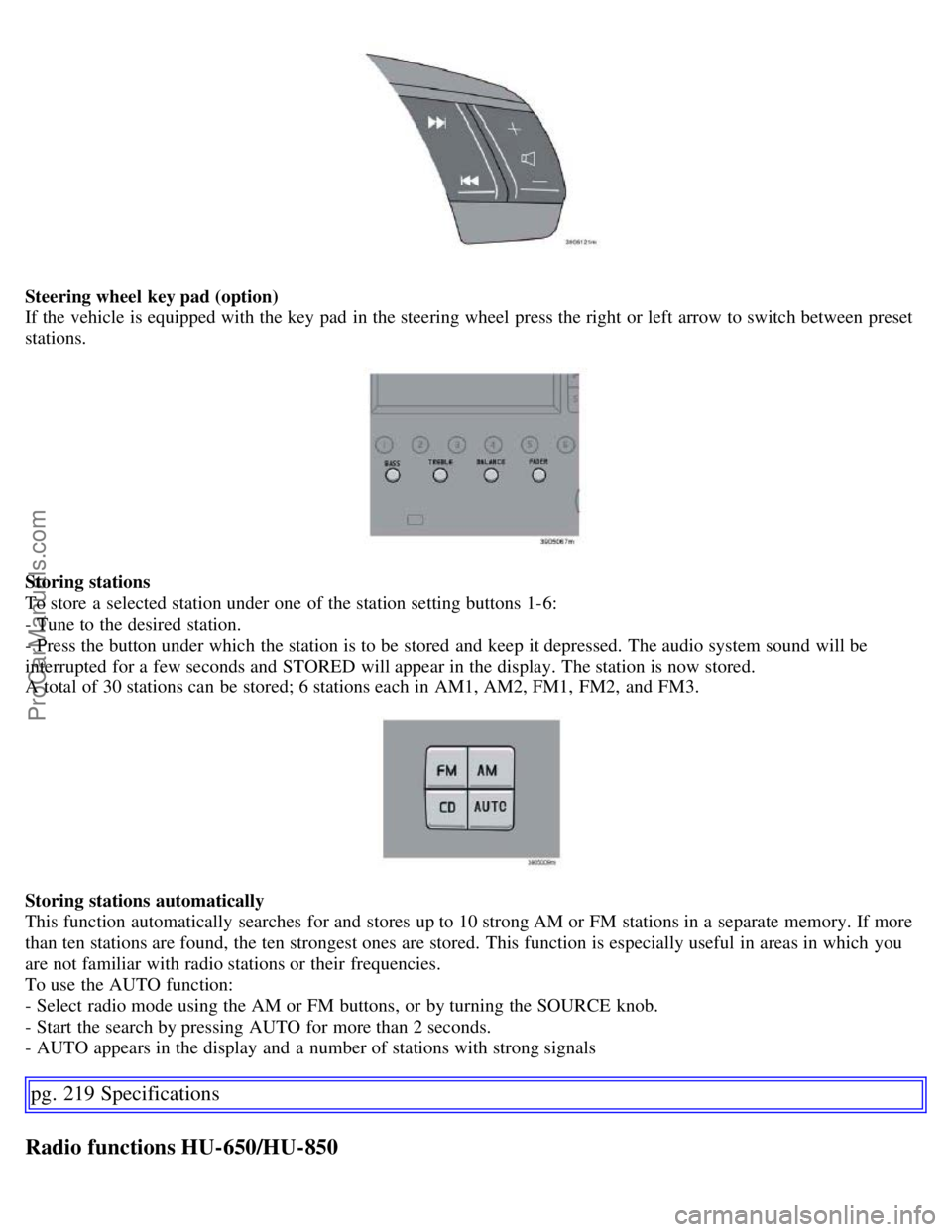
Steering wheel key pad (option)
If the vehicle is equipped with the key pad in the steering wheel press the right or left arrow to switch between preset
stations.
Storing stations
To store a selected station under one of the station setting buttons 1-6:
- Tune to the desired station.
- Press the button under which the station is to be stored and keep it depressed. The audio system sound will be
interrupted for a few seconds and STORED will appear in the display. The station is now stored.
A total of 30 stations can be stored; 6 stations each in AM1, AM2, FM1, FM2, and FM3.
Storing stations automatically
This function automatically searches for and stores up to 10 strong AM or FM stations in a separate memory. If more
than ten stations are found, the ten strongest ones are stored. This function is especially useful in areas in which you
are not familiar with radio stations or their frequencies.
To use the AUTO function:
- Select radio mode using the AM or FM buttons, or by turning the SOURCE knob.
- Start the search by pressing AUTO for more than 2 seconds.
- AUTO appears in the display and a number of stations with strong signals
pg. 219 Specifications
Radio functions HU-650/HU-850
ProCarManuals.com
Page 184 of 200
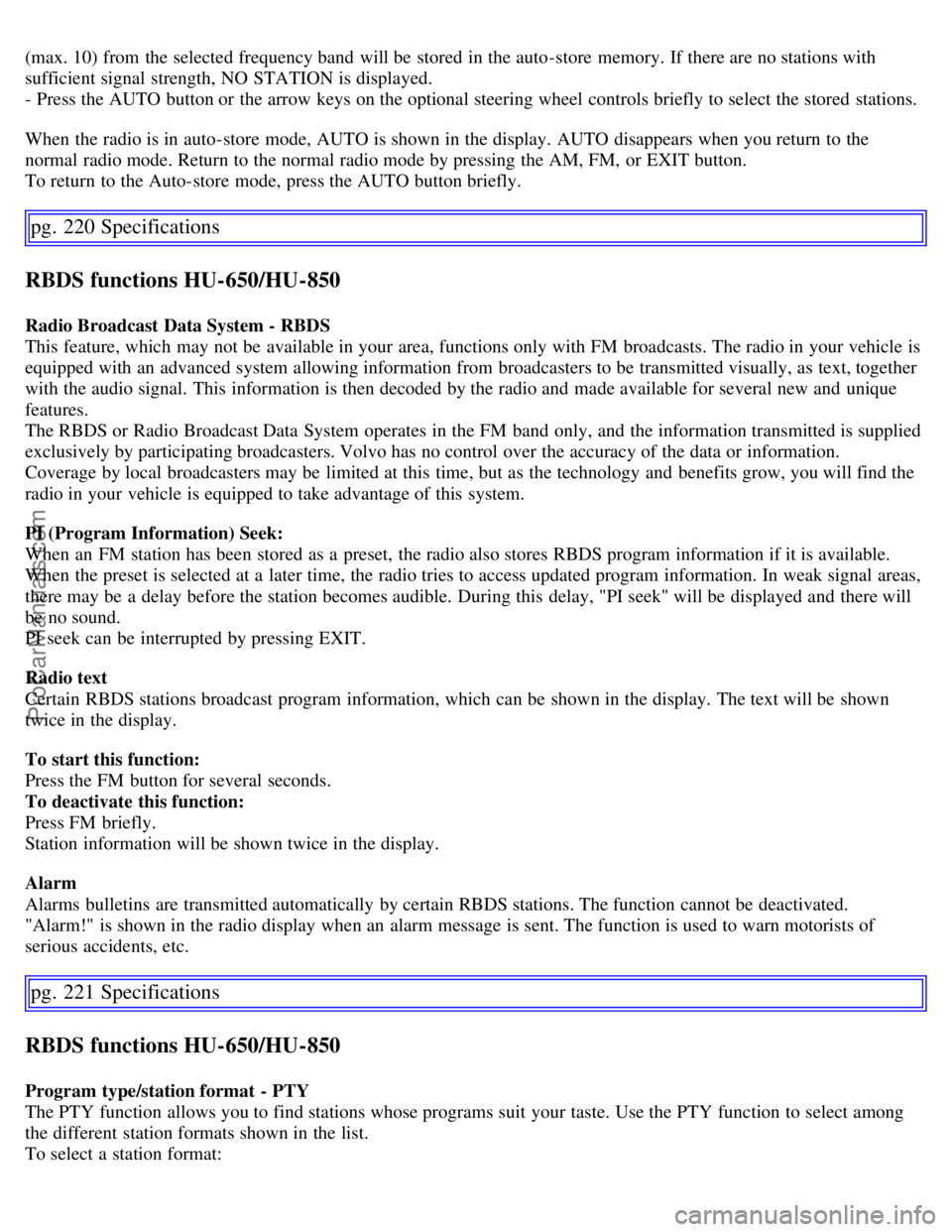
(max. 10) from the selected frequency band will be stored in the auto-store memory. If there are no stations with
sufficient signal strength, NO STATION is displayed.
- Press the AUTO button or the arrow keys on the optional steering wheel controls briefly to select the stored stations.
When the radio is in auto-store mode, AUTO is shown in the display. AUTO disappears when you return to the
normal radio mode. Return to the normal radio mode by pressing the AM, FM, or EXIT button.
To return to the Auto-store mode, press the AUTO button briefly.
pg. 220 Specifications
RBDS functions HU-650/HU-850
Radio Broadcast Data System - RBDS
This feature, which may not be available in your area, functions only with FM broadcasts. The radio in your vehicle is
equipped with an advanced system allowing information from broadcasters to be transmitted visually, as text, together
with the audio signal. This information is then decoded by the radio and made available for several new and unique
features.
The RBDS or Radio Broadcast Data System operates in the FM band only, and the information transmitted is supplied
exclusively by participating broadcasters. Volvo has no control over the accuracy of the data or information.
Coverage by local broadcasters may be limited at this time, but as the technology and benefits grow, you will find the
radio in your vehicle is equipped to take advantage of this system.
PI (Program Information) Seek:
When an FM station has been stored as a preset, the radio also stores RBDS program information if it is available.
When the preset is selected at a later time, the radio tries to access updated program information. In weak signal areas,
there may be a delay before the station becomes audible. During this delay, "PI seek" will be displayed and there will
be no sound.
PI seek can be interrupted by pressing EXIT.
Radio text
Certain RBDS stations broadcast program information, which can be shown in the display. The text will be shown
twice in the display.
To start this function:
Press the FM button for several seconds.
To deactivate this function:
Press FM briefly.
Station information will be shown twice in the display.
Alarm
Alarms bulletins are transmitted automatically by certain RBDS stations. The function cannot be deactivated.
"Alarm!" is shown in the radio display when an alarm message is sent. The function is used to warn motorists of
serious accidents, etc.
pg. 221 Specifications
RBDS functions HU-650/HU-850
Program type/station format - PTY
The PTY function allows you to find stations whose programs suit your taste. Use the PTY function to select among
the different station formats shown in the list.
To select a station format:
ProCarManuals.com