ESP VOLVO S60 2008 Owners Manual
[x] Cancel search | Manufacturer: VOLVO, Model Year: 2008, Model line: S60, Model: VOLVO S60 2008Pages: 230, PDF Size: 5.33 MB
Page 7 of 230
no responsibility for death, injury, or expenses that may result from the installation of non-genuine accessories.
Driver distraction
Driver distraction results from driver activities that are not directly related to controlling the vehicle in the driving
environment. Your new Volvo is, or can be, equipped with many feature-rich entertainment and communication
systems. These include hands-free cellular telephones, navigation systems, and multipurpose audio systems. You may
also own other portable electronic devices for your own convenience. When used properly and safely, they enrich the
driving experience. Improperly used, any of these could cause a distraction.
For all of these systems, we want to provide the following warning that reflects the strong Volvo concern for your
safety:
Never use these devices or any feature of your vehicle in a way that distracts you from the task of driving safely.
Distraction can lead to a serious accident.In addition to this general warning, we offer the following guidance
regarding specific newer features that may be found in your vehicle:
Never use a hand -held cellular telephone while driving. Some jurisdictions prohibit cellular telephone use by a
driver while the vehicle is moving.
If your vehicle is equipped with a navigation system, set and make changes to your travel itinerary only with the
vehicle parked.
Never program your audio system while the vehicle is moving. Program radio presets with the vehicle parked, and
use your programmed presets to make radio use quicker and simpler.
Never use portable computers or personal digital assistants while the vehicle is moving.
A driver has a responsibility to do everything possible to ensure his or her own safety and the safety of passengers in
the vehicle and others sharing the roadway. Avoiding distractions is part of that responsibility.
Contents | Top of Page
ProCarManuals.com
Page 14 of 230
no responsibility for death, injury, or expenses that may result from the installation of non-genuine accessories.
Driver distraction
Driver distraction results from driver activities that are not directly related to controlling the vehicle in the driving
environment. Your new Volvo is, or can be, equipped with many feature-rich entertainment and communication
systems. These include hands-free cellular telephones, navigation systems, and multipurpose audio systems. You may
also own other portable electronic devices for your own convenience. When used properly and safely, they enrich the
driving experience. Improperly used, any of these could cause a distraction.
For all of these systems, we want to provide the following warning that reflects the strong Volvo concern for your
safety:
Never use these devices or any feature of your vehicle in a way that distracts you from the task of driving safely.
Distraction can lead to a serious accident.In addition to this general warning, we offer the following guidance
regarding specific newer features that may be found in your vehicle:
Never use a hand -held cellular telephone while driving. Some jurisdictions prohibit cellular telephone use by a
driver while the vehicle is moving.
If your vehicle is equipped with a navigation system, set and make changes to your travel itinerary only with the
vehicle parked.
Never program your audio system while the vehicle is moving. Program radio presets with the vehicle parked, and
use your programmed presets to make radio use quicker and simpler.
Never use portable computers or personal digital assistants while the vehicle is moving.
A driver has a responsibility to do everything possible to ensure his or her own safety and the safety of passengers in
the vehicle and others sharing the roadway. Avoiding distractions is part of that responsibility.
Contents | Top of Page
ProCarManuals.com
Page 26 of 230
23 01 Safety
Occupant Weight Sensor (OWS)
Have the person sit upright in the seat, centered on the seat cushion, with the person's legs comfortably extended.
Restart the vehicle and have the person remain in this position for about two minutes. This will allow the system to
detect that person and enable the passenger's frontal airbag.
If the PASSENGER AIRBAG OFF indicator lamp remains on even after this, the person should be advised to ride in
the rear seat.
This condition reflects limitations of the OWS classification capability. It does not indicate OWS malfunction.
Modifications
If you are considering modifying your vehicle in any way to accommodate a disability, for example by altering or
adapting the driver's or front passenger's seat(s) and/or airbag systems, please contact Volvo at:
In the USA
Volvo Cars of North America, LLC
Customer Care Center
P.O. Box 914 Rockleigh, New Jersey 07647-0914
1-800-458-1552
In Canada
Volvo Cars of Canada Corp.
National Customer Service
175 Gordon Baker Road
North York, Ontario M2H 2N7
1-800-663-8255
WARNING
No objects that add to the total weight on the seat should be placed on the front passenger's seat. If a child is seated
in the front passenger's seat with any additional weight, this extra weight could cause the OWS system to enable the
airbag, which might cause it to deploy in the event of a collision, thereby injuring the child.
The seat belt should never be wrapped around an object on the front passenger's seat. This could interfere with the
OWS system's function.
The front passenger's seat belt should never be used in a way that exerts more pressure on the passenger than
normal. This could increase the pressure exerted on the weight sensor by a child, and could result in the airbag being
enabled, which might cause it to deploy in the event of a collision, thereby injuring the child.
24 01 Safety
Occupant Weight Sensor (OWS)
WARNING
Keep the following points in mind with respect to the OWS system. Failure to follow these instructions could
adversely affect the system's function and result in serious injury to the occupant of the front passenger's seat:
The full weight of the front seat passenger should always be on the seat cushion. The passenger should never lift
him/herself off the seat cushion using the armrest in the door or the center console, by pressing the feet on the floor,
by sitting on the edge of the seat cushion, or by pressing against the backrest in a way that reduces pressure on the
ProCarManuals.com
Page 60 of 230
will light up.
A timer automatically switches off the heating after approximately 12 minutes. The LED will go out correspondingly.
If the vehicle's speed is increased by using the accelerator pedal for more than 1 minute.
64 02 Instruments and controls
Trip computer
The trip computer stores information gathered from several systems in your vehicle and has four menus that can be
displayed in the text window.
Driving distance on current fuel reserve
Average fuel consumption
Current fuel consumption
Average speed
Current speed in mph (Canadian models only)
DSTC (see page 139 for detailed information)
NOTE
Warning messages from the vehicle's monitoring systems will override the trip computer function. If a warning
message is displayed in the text window while you are using the trip computer, you must acknowledge the message by
pressing button A. Press button A again to return to the trip computer function.
Trip computer controls and functions
The trip computer functions can be accessed by twisting INFO (B) one step at a time in either direction. Twisting a final
time returns you to the original function.
The trip computer can be reset (current data will be erased from system memory) by pressing RESET (button C).
1. Driving distance on current fuel reserve
This function shows the approximate distance that can be driven on the fuel remaining in the tank. This calculation is
based on average fuel consumption during the last 20 miles (30 km) of driving and the amount of fuel remaining in the
tank when the reading was taken.
When the driving distance on current fuel reserve is less than 12 miles (20 km), "----" will be displayed in the text
window.
2. Average fuel consumption
This value indicates fuel consumption since the last time the trip computer was reset (by pressing RESET, button C).
When the engine is switched off, information on fuel consumption is stored and remains in system memory until the
RESET (button C) is pressed again.
3. Current fuel consumption
This value indicates the current fuel consumption, based on readings taken once per second. When the vehicle is not
moving, "----" will be displayed.
4. Average speed
This value indicates average speed since the last time the trip computer was reset (by pressing RESET, button C). When
the engine is switched off, information on average speed is stored and remains in system memory until the RESET
(button C) is pressed again.
ProCarManuals.com
Page 68 of 230
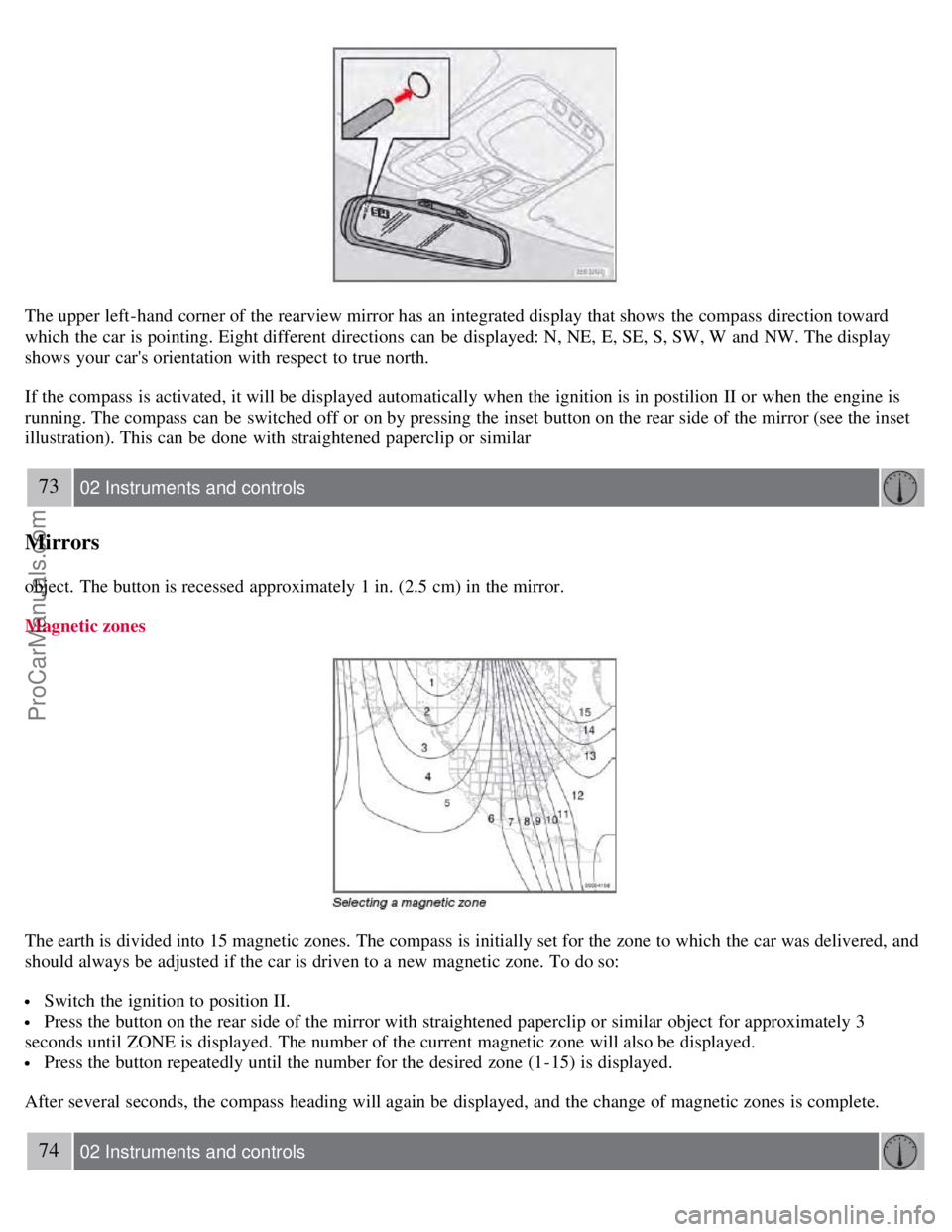
The upper left-hand corner of the rearview mirror has an integrated display that shows the compass direction toward
which the car is pointing. Eight different directions can be displayed: N, NE, E, SE, S, SW, W and NW. The display
shows your car's orientation with respect to true north.
If the compass is activated, it will be displayed automatically when the ignition is in postilion II or when the engine is
running. The compass can be switched off or on by pressing the inset button on the rear side of the mirror (see the inset
illustration). This can be done with straightened paperclip or similar
73 02 Instruments and controls
Mirrors
object. The button is recessed approximately 1 in. (2.5 cm) in the mirror.
Magnetic zones
The earth is divided into 15 magnetic zones. The compass is initially set for the zone to which the car was delivered, and
should always be adjusted if the car is driven to a new magnetic zone. To do so:
Switch the ignition to position II.
Press the button on the rear side of the mirror with straightened paperclip or similar object for approximately 3
seconds until ZONE is displayed. The number of the current magnetic zone will also be displayed.
Press the button repeatedly until the number for the desired zone (1-15) is displayed.
After several seconds, the compass heading will again be displayed, and the change of magnetic zones is complete.
74 02 Instruments and controls
ProCarManuals.com
Page 90 of 230
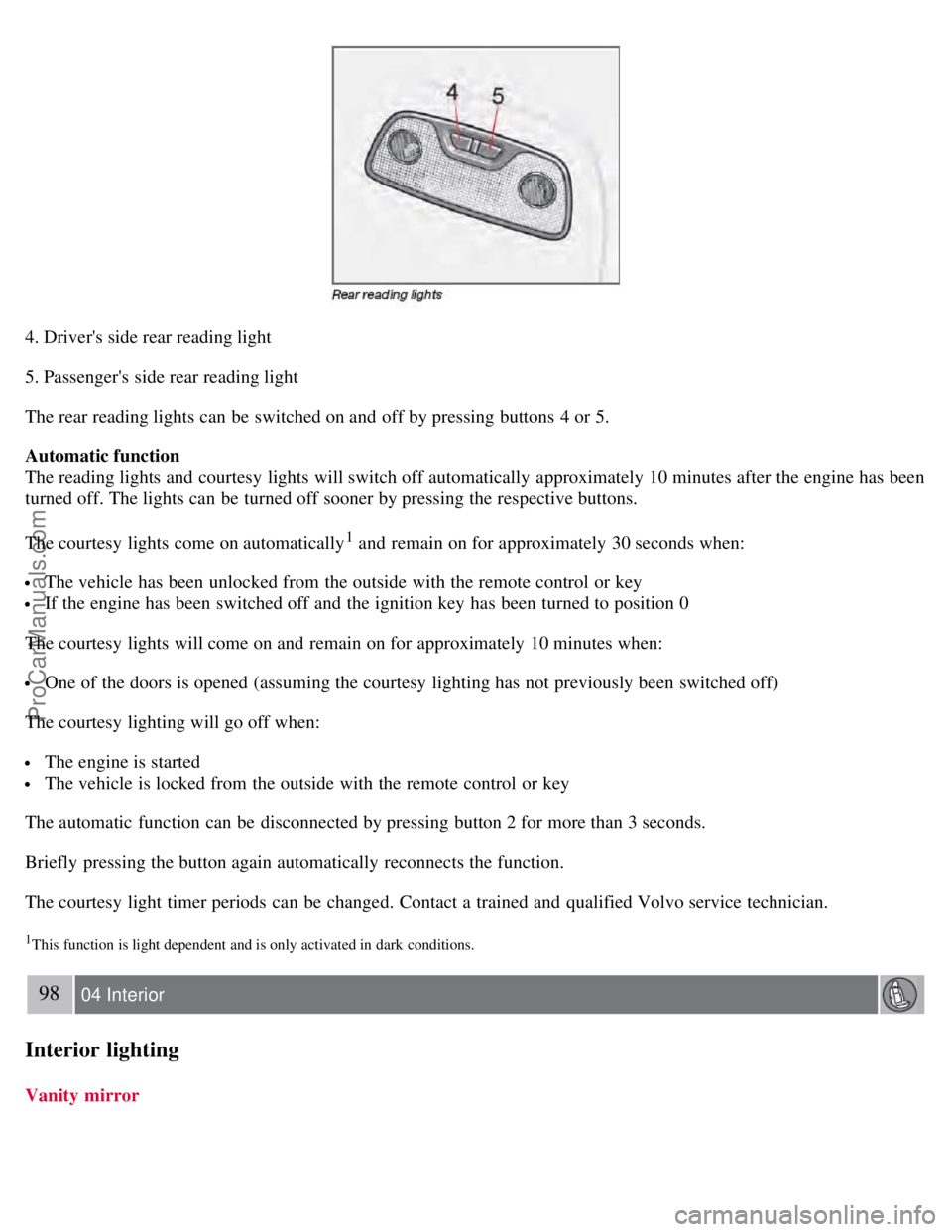
4. Driver's side rear reading light
5. Passenger's side rear reading light
The rear reading lights can be switched on and off by pressing buttons 4 or 5.
Automatic function
The reading lights and courtesy lights will switch off automatically approximately 10 minutes after the engine has been
turned off. The lights can be turned off sooner by pressing the respective buttons.
The courtesy lights come on automatically
1 and remain on for approximately 30 seconds when:
The vehicle has been unlocked from the outside with the remote control or key
If the engine has been switched off and the ignition key has been turned to position 0
The courtesy lights will come on and remain on for approximately 10 minutes when:
One of the doors is opened (assuming the courtesy lighting has not previously been switched off)
The courtesy lighting will go off when:
The engine is started
The vehicle is locked from the outside with the remote control or key
The automatic function can be disconnected by pressing button 2 for more than 3 seconds.
Briefly pressing the button again automatically reconnects the function.
The courtesy light timer periods can be changed. Contact a trained and qualified Volvo service technician.
1This function is light dependent and is only activated in dark conditions.
98 04 Interior
Interior lighting
Vanity mirror
ProCarManuals.com
Page 104 of 230
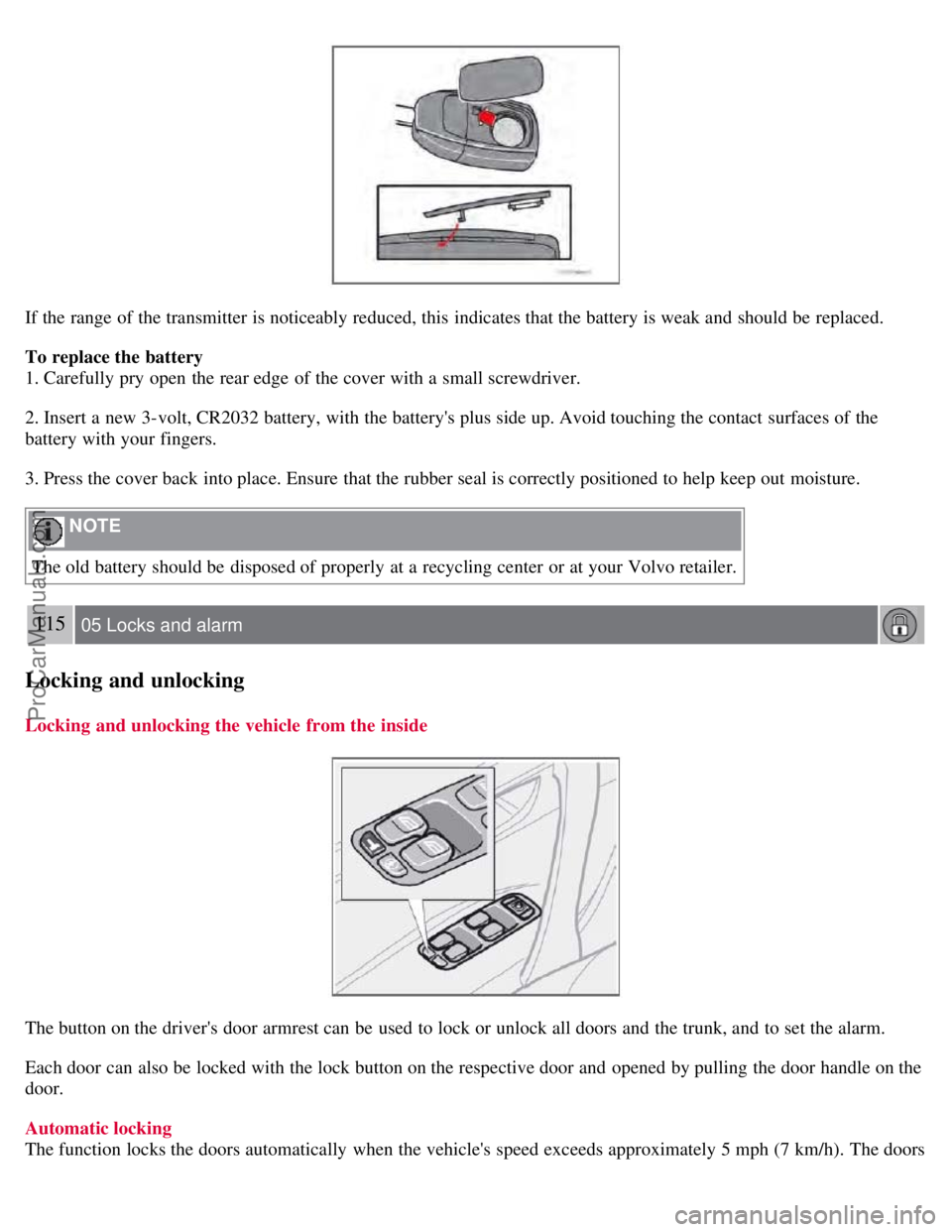
If the range of the transmitter is noticeably reduced, this indicates that the battery is weak and should be replaced.
To replace the battery
1. Carefully pry open the rear edge of the cover with a small screwdriver.
2. Insert a new 3-volt, CR2032 battery, with the battery's plus side up. Avoid touching the contact surfaces of the
battery with your fingers.
3. Press the cover back into place. Ensure that the rubber seal is correctly positioned to help keep out moisture.
NOTE
The old battery should be disposed of properly at a recycling center or at your Volvo retailer.
115 05 Locks and alarm
Locking and unlocking
Locking and unlocking the vehicle from the inside
The button on the driver's door armrest can be used to lock or unlock all doors and the trunk, and to set the alarm.
Each door can also be locked with the lock button on the respective door and opened by pulling the door handle on the
door.
Automatic locking
The function locks the doors automatically when the vehicle's speed exceeds approximately 5 mph (7 km/h). The doors
ProCarManuals.com
Page 112 of 230
Although some oil consumption occurs during normal engine operation, more oil is consumed when the engine is new
as the internal parts generate higher friction while wearing-in to each other. From the time the engine is new until the
first service is performed, the oil consumption could be higher than normal. For this reason, it is especially important
to check the oil every time you refuel your vehicle during this period. See page 193
.
Fuel requirements
Deposit control gasoline (detergent additives)
Volvo recommends the use of detergent gasoline to control engine deposits. Detergent gasoline is effective in keeping
injectors and intake valves clean. Consistent use of deposit control gasolines will help ensure good drivability and fuel
economy. If you are not sure whether the gasoline contains deposit control additives, check with the service station
operator.
NOTE
Volvo does not recommend the use of external fuel injector cleaning systems.
Unleaded fuel
Each Volvo has a three-way catalytic converter and must use only unleaded gasoline. U.S. and Canadian regulations
require that pumps delivering unleaded gasoline be labelled "UNLEADED". Only these pumps have nozzles which fit
your vehicle's filler inlet. It is unlawful to dispense leaded fuel into a vehicle labelled "unleaded gasoline only".
Leaded gasoline damages the three-way catalytic converter and the heated oxygen sensor system. Repeated use of
leaded gasoline will lessen the effectiveness of the emission control system and could result in loss of emission
warranty coverage. State and local vehicle inspection programs will make detection of misfueling easier, possibly
resulting in emission test failure for misfueled vehicles.
NOTE
Some U.S. and Canadian gasolines contain an octane enhancing additive called methyl-cyclopentadienyl manganese
tricarbonyl (MMT). If such fuels are used, your Emission Control System performance may be affected, and the
Check Engine Light (malfunction indicator lamp) located on your instrument panel may light. If this occurs, please
return your vehicle to a trained and qualified Volvo service technician for service.
Gasoline containing alcohol and ethers "Oxygenated fuels"
Some fuel suppliers sell gasoline containing "oxygenates" which are usually alcohols or ethers. In some areas, state or
local laws require that the service pump be marked indicating use of alcohols or ethers. However, there are areas in
which the pumps are unmarked. If you are not sure whether there is alcohol or ethers in the gasoline you buy, check
with the service station operator. To meet seasonal air quality standards, some areas require the use of "oxygenated"
fuel.
Volvo allows the use of the following "oxygenated" fuels; however, the octane ratings listed on this page must still be
met.
123 06 Starting and driving
General information
Alcohol - Ethanol: Fuels containing up to 10% ethanol by volume may be used. Ethanol may also be referred to as
Ethyl alcohol, or "Gasohol".
Ethers - MTBE: Fuels containing up to 15% MTBE may be used.
ProCarManuals.com
Page 116 of 230
Before starting, check that the seat, steering wheel and mirrors are adjusted properly. Make sure the brake pedal can
be depressed completely. Adjust the seat if necessary. See pages 92 and 94
.
2. Apply the parking brake (hand brake) if not already set. The gear selector (automatic transmission) is locked in the
( P )ark position ( SHIFTLOCK ). Manual transmission: the clutch must be fully depressed.
3. Without touching the accelerator pedal, turn the ignition key
1 to the starting position. Allow the starter to operate for
up to 10 seconds. Release the key as soon as the engine starts. If the engine fails to start, repeat this step.
1If two of the keys to your vehicle are close together, e.g. on the same key ring, when you try to start the vehicle, this could cause interference in
the immobilizer system and result in the vehicle not starting. If this should occur, remove one of the keys from the key ring before trying to start
the vehicle again.
NOTE
If the key blade section of the remote is not fully folded out when starting the vehicle, the immobilizer function
may make it impossible to start the engine.
After a cold start, idle speed may be noticeably higher than normal for a short period. This is done to help bring
components in the emission control system to their normal operating temperature as quickly as possible, which
enables them to control emissions and help reduce the vehicle's impact on the environment.
To release the gear selector from the P position, the engine must be running (or the ignition key must be in
position II) and the brake pedal must be depressed.
Select the desired gear. The gear engages after a very slight delay which is especially noticeable when selecting R.
NOTE
Your vehicle is equipped with a KEYLOCK system (automatic transmission). When the engine is switched off, the
gear selector must be in the P position before the key can be removed from the ignition switch.
When starting in cold weather, the transmission may shift up at slightly higher engine speeds than normal until the
automatic transmission fluid reaches normal operating temperature.
WARNING
An extra mat on the driver's floor can cause the accelerator pedal to catch. Check that the movement of the
accelerator pedal is not impeded. No more than one protective floor covering may be used at one time.
WARNING
Always place the gear selector in Park or in reverse on models with a manual transmission, and apply the parking
brake before leaving the vehicle. Never leave the vehicle unattended with the engine running.
Always open garage doors fully before starting the engine inside a garage to ensure adequate ventilation. The exhaust
gases contain carbon monoxide, which is invisible and odorless but very poisonous
128 06 Starting and driving
Starting the vehicle
CAUTION
ProCarManuals.com
Page 119 of 230
Weight distribution affects handling
At the specified curb weight your vehicle has a tendency to understeer, which means that the steering wheel has to be
turned more than might seem appropriate for the curvature of a bend.
This ensures good stability and reduces the risk of rear wheel skid. Remember that these properties can alter with the
vehicle load.
The heavier the load in the trunk (max. 220 lbs, 100 kg), the less the tendency to understeer.
Handling, roadholding
Vehicle load, tire design and inflation pressure all affect vehicle handling. Therefore, check that the tires are inflated to
the recommended pressure according to the vehicle load. See "Tire pressure" section.
Loads should be distributed so that capacity weight or maximum permissible axle loads are not exceeded.
Speed-sensitive power steering (Option on certain models)
With this feature, the steering is most responsive at lower speeds to make parking, driving in city traffic, etc., easier.
The effect of the power steering diminishes as you accelerate for greater stability at highway speeds.
Driving through water
The vehicle can be driven through water up to a depth of approximately 9 in. (25 cm), at a maximum speed of 6 mph
(10 km/h).
Take particular care when driving through flowing water.
Clean the electrical connections for trailer wiring after driving in mud or water.
When driving through water, maintain low speed and do not stop in the water.
WARNING
After driving through water, press lightly on the brake pedal to ensure that the brakes are functioning normally.
Water or mud can make the brake linings slippery, resulting in delayed braking effect.
CAUTION
Engine damage will occur if water is drawn into the air cleaner.
If the vehicle is driven through water deeper than 9 in (25 cm), water may enter the differential and the
transmission. This reduces the oil's lubricating capacity and may shorten the service life of these components.
Do not allow the vehicle to stand in water up to the door sills longer than absolutely necessary. This could result
in electrical malfunctions.
If the engine has been stopped while the car is in water, do not attempt to restart the engine. Have the car towed
out of the water.
131 06 Starting and driving
Manual transmission
ProCarManuals.com