steering wheel VOLVO S60 2013 Owner´s Manual
[x] Cancel search | Manufacturer: VOLVO, Model Year: 2013, Model line: S60, Model: VOLVO S60 2013Pages: 366, PDF Size: 6.85 MB
Page 97 of 366
03 Your driving environment
Lighting
03
* Option/accessory, for more information, see Introduction.95
Active high beams – AHB*AHB is a feature that uses a camera at the
upper edge of the windshield to detect the
headlights of oncoming vehicles or the tail-
lights of a vehicle directly ahead. When this
happens, the headlights will automatically
switch from high beams to low beams. When
the camera no longer detects the headlights/
taillights of other vehicles, your headlights will
switch back to high beams after several sec-
onds.
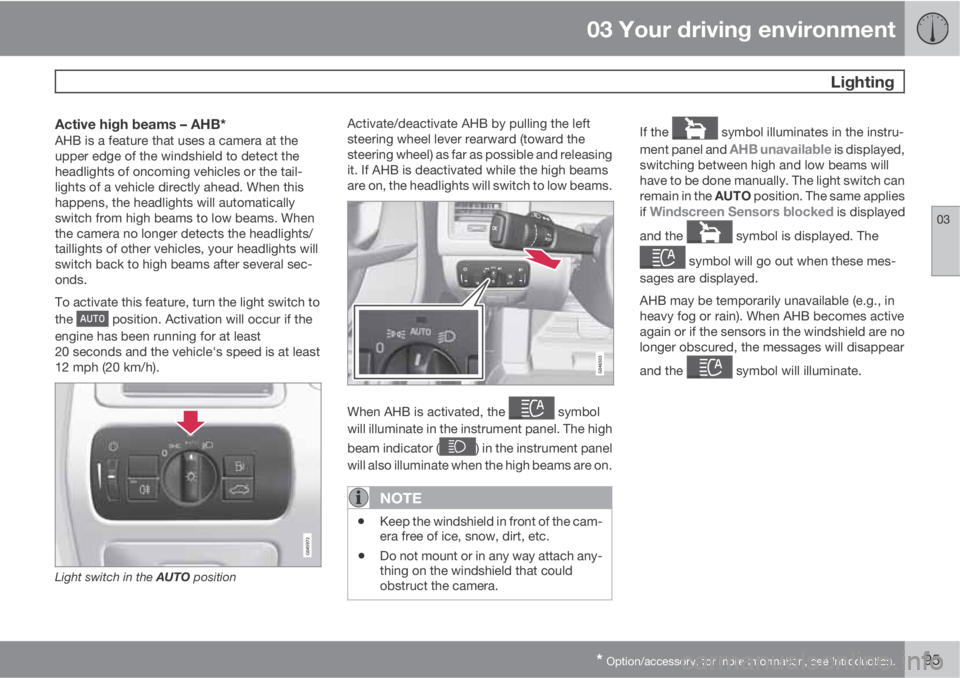
To activate this feature, turn the light switch to
the
position. Activation will occur if the
engine has been running for at least
20 seconds and the vehicle's speed is at least
12 mph (20 km/h).
Light switch in the AUTO position
Activate/deactivate AHB by pulling the left
steering wheel lever rearward (toward the
steering wheel) as far as possible and releasing
it. If AHB is deactivated while the high beams
are on, the headlights will switch to low beams.
When AHB is activated, the symbol
will illuminate in the instrument panel. The high
beam indicator (
) in the instrument panel
will also illuminate when the high beams are on.
NOTE
•Keep the windshield in front of the cam-
era free of ice, snow, dirt, etc.
•Do not mount or in any way attach any-
thing on the windshield that could
obstruct the camera.
If the symbol illuminates in the instru-
ment panel and
AHB unavailable is displayed,
switching between high and low beams will
have to be done manually. The light switch can
remain in the AUTO position. The same applies
if
Windscreen Sensors blocked is displayed
and the
symbol is displayed. The
symbol will go out when these mes-
sages are displayed.
AHB may be temporarily unavailable (e.g., in
heavy fog or rain). When AHB becomes active
again or if the sensors in the windshield are no
longer obscured, the messages will disappear
and the
symbol will illuminate.
Page 98 of 366
03 Your driving environment
Lighting
03
96* Option/accessory, for more information, see Introduction.
CAUTION
In the following situations, it may be neces-
sary to switch between high and low beams
manually:
•In heavy fog or rain
•In blowing snow or slush
•In bright moonlight
•In freezing rain
•In areas with dim street lighting
•When oncoming vehicles have dim front
lighting
•If there are pedestrians on or near the
road
•If there are reflective objects, such as
signs, near the road
•When oncoming vehicles' lights are
obscured by e.g., fences, bushes, etc.
•When there are vehicles on connecting
roads
•At the top of hills or in dips in the road
•In sharp curves
See page161 for more information about the
camera's limitations.
Tunnel detection (standard on models
with a rain sensor)
The optional rain sensor reacts to the change
in lighting conditions when, for example, the
vehicle is driven into a tunnel. If the daytime
running lights have been deactivated, tunnel
detection will activate the low beam headlights
while the vehicle is in the tunnel. The low
beams will be switched off approx.
20 seconds after the vehicle leaves the tunnel.
The rain sensor does not have to be activated
for tunnel detection to function.
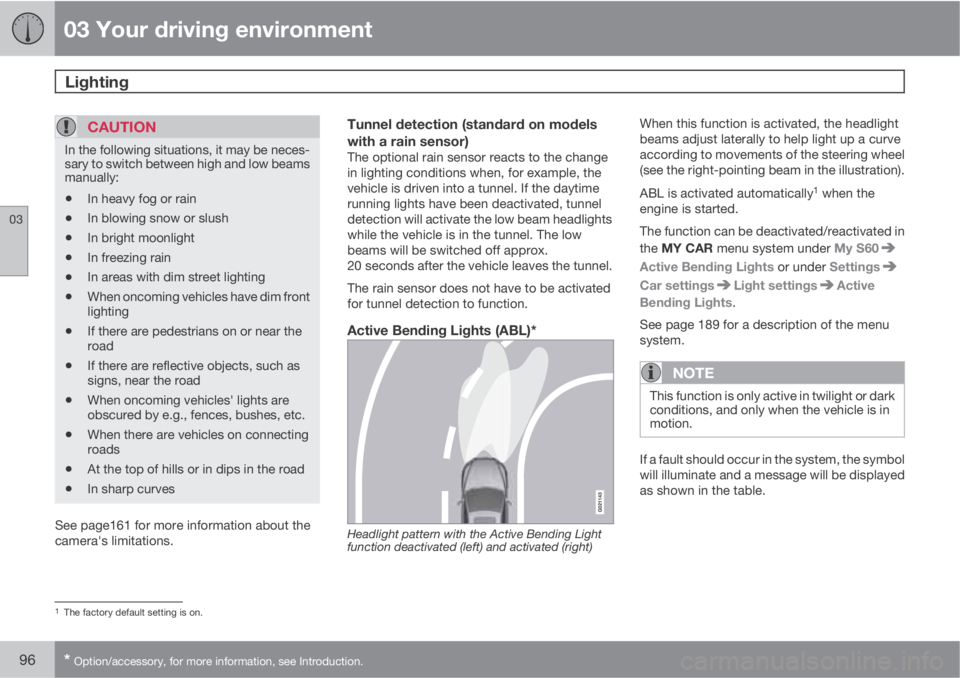
Active Bending Lights (ABL)*
Headlight pattern with the Active Bending Light
function deactivated (left) and activated (right)
When this function is activated, the headlight
beams adjust laterally to help light up a curve
according to movements of the steering wheel
(see the right-pointing beam in the illustration).
ABL is activated automatically
1 when the
engine is started.
The function can be deactivated/reactivated in
the MY CAR menu system under My S60
Active Bending Lights or under Settings
Car settingsLight settingsActive
Bending Lights.
See page 189 for a description of the menu
system.
NOTE
This function is only active in twilight or dark
conditions, and only when the vehicle is in
motion.
If a fault should occur in the system, the symbol
will illuminate and a message will be displayed
as shown in the table.
1The factory default setting is on.
Page 100 of 366
03 Your driving environment
Lighting
03
98
NOTE
The rear fog light is considerably brighter
than the normal taillights and should be
used only when conditions such as fog, rain,
snow, smoke or dust reduce visibility for
other vehicles to less than 500 ft.
(150 meters).
Hazard warning flashers
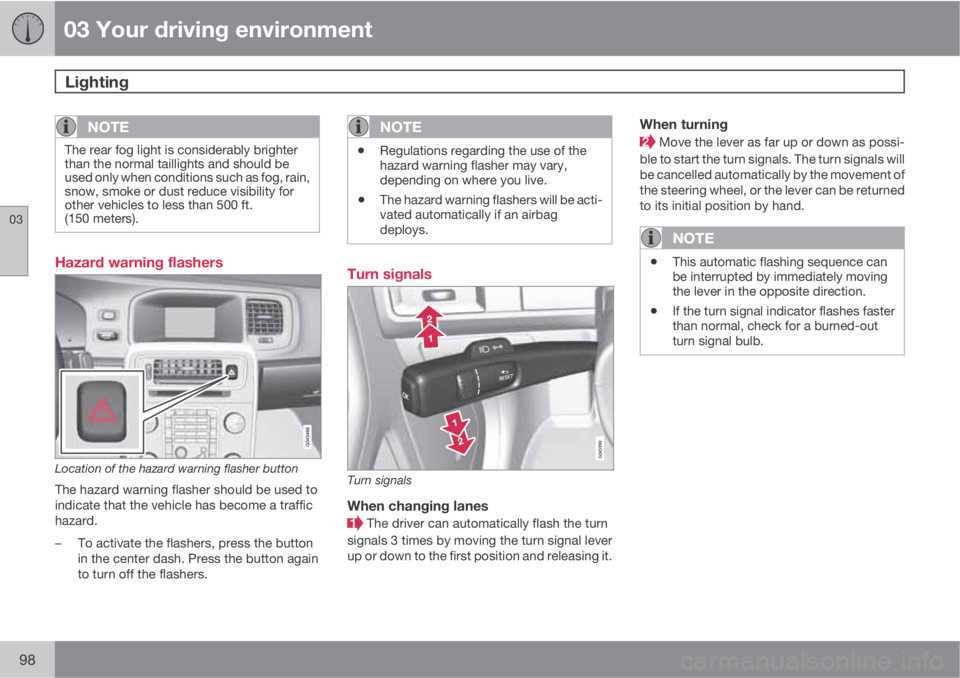
Location of the hazard warning flasher button
The hazard warning flasher should be used to
indicate that the vehicle has become a traffic
hazard.
–To activate the flashers, press the button
in the center dash. Press the button again
to turn off the flashers.
NOTE
•Regulations regarding the use of the
hazard warning flasher may vary,
depending on where you live.
•The hazard warning flashers will be acti-
vated automatically if an airbag
deploys.
Turn signals
Turn signals
When changing lanes
The driver can automatically flash the turn
signals 3 times by moving the turn signal lever
up or down to the first position and releasing it.
When turning
Move the lever as far up or down as possi-
ble to start the turn signals. The turn signals will
be cancelled automatically by the movement of
the steering wheel, or the lever can be returned
to its initial position by hand.
NOTE
•This automatic flashing sequence can
be interrupted by immediately moving
the lever in the opposite direction.
•If the turn signal indicator flashes faster
than normal, check for a burned-out
turn signal bulb.
Page 102 of 366
03 Your driving environment
Lighting
03
100
Trunk lightingThe trunk lighting comes on automatically
when the trunk lid is opened.
Home safe lighting
When you leave your vehicle at night, you can
make use of the home safe lighting function to
illuminate the area in front of the vehicle.
1. Remove the key from the ignition slot to put
the ignition in mode 0 (see page 85 for
information about the ignition modes).
2. Pull the turn signal lever as far as possible
towards the steering wheel and release it.
3. Exit the vehicle and lock the doors.
The headlights, parking lights, turn signals,
lights in the door mirrors, license plate lights,
and footwell lighting will illuminate and remain
on for 30
3, 60 or 90 seconds. The time interval
can be set in MY CAR under Settings
Car
settings
Light settingsHome safe light
duration. See page 189 for a description of
the menu system.
Approach lighting
Approach lighting is activated by pressing the
approach light button on the remote key (see
the illustration on page 55).
When the function has been activated, the
parking lights, indicator lights, door mirror
lights, license plate lighting, dome lighting and
door step lighting come on.
The time interval for this lighting can be set by
pressing MY CAR and going to Car settings
Light settingsApproach light
duration. See page 189 for a description of
the menu system.
3Factory setting
Page 104 of 366
03 Your driving environment
Wipers and washers
03
102* Option/accessory, for more information, see Introduction.
The rain sensor is automatically deactivated
when the key is removed from the ignition slot
or five minutes after the ignition has been
switched off.
CAUTION
The rain sensor should be deactivated when
washing the car in an automatic car wash,
etc. If the rain sensor function is left on, the
wipers will start inadvertently in the car
wash and could be damaged.
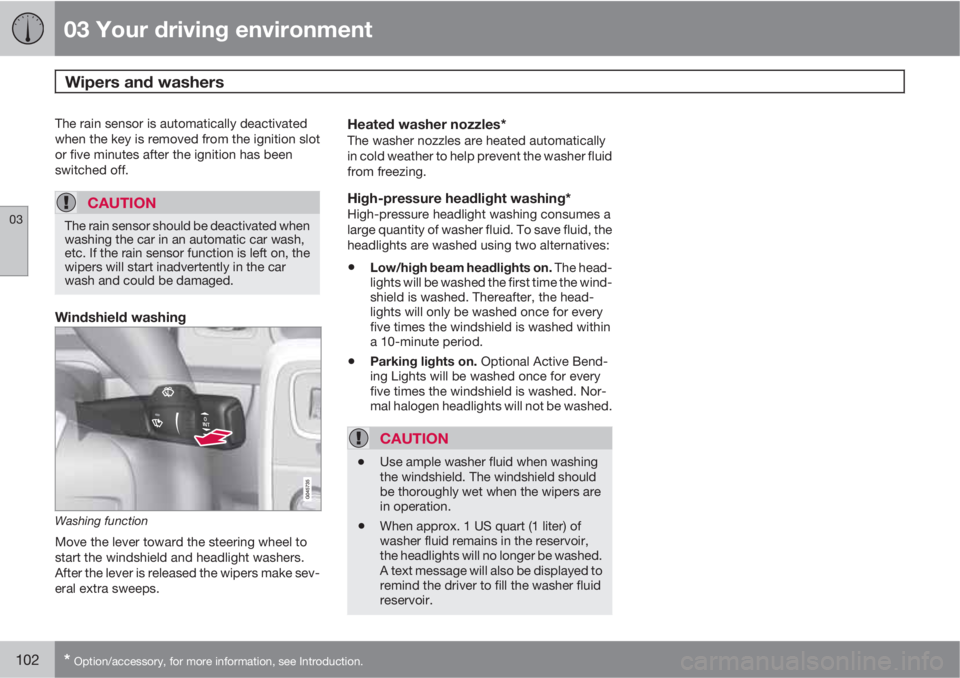
Windshield washing
Washing function
Move the lever toward the steering wheel to
start the windshield and headlight washers.
After the lever is released the wipers make sev-
eral extra sweeps.
Heated washer nozzles*The washer nozzles are heated automatically
in cold weather to help prevent the washer fluid
from freezing.
High-pressure headlight washing*High-pressure headlight washing consumes a
large quantity of washer fluid. To save fluid, the
headlights are washed using two alternatives:
•Low/high beam headlights on. The head-
lights will be washed the first time the wind-
shield is washed. Thereafter, the head-
lights will only be washed once for every
five times the windshield is washed within
a 10-minute period.
•Parking lights on. Optional Active Bend-
ing Lights will be washed once for every
five times the windshield is washed. Nor-
mal halogen headlights will not be washed.
CAUTION
•Use ample washer fluid when washing
the windshield. The windshield should
be thoroughly wet when the wipers are
in operation.
•When approx. 1 US quart (1 liter) of
washer fluid remains in the reservoir,
the headlights will no longer be washed.
A text message will also be displayed to
remind the driver to fill the washer fluid
reservoir.
Page 115 of 366
03 Your driving environment
Starting the engine
03
* Option/accessory, for more information, see Introduction.113 Start
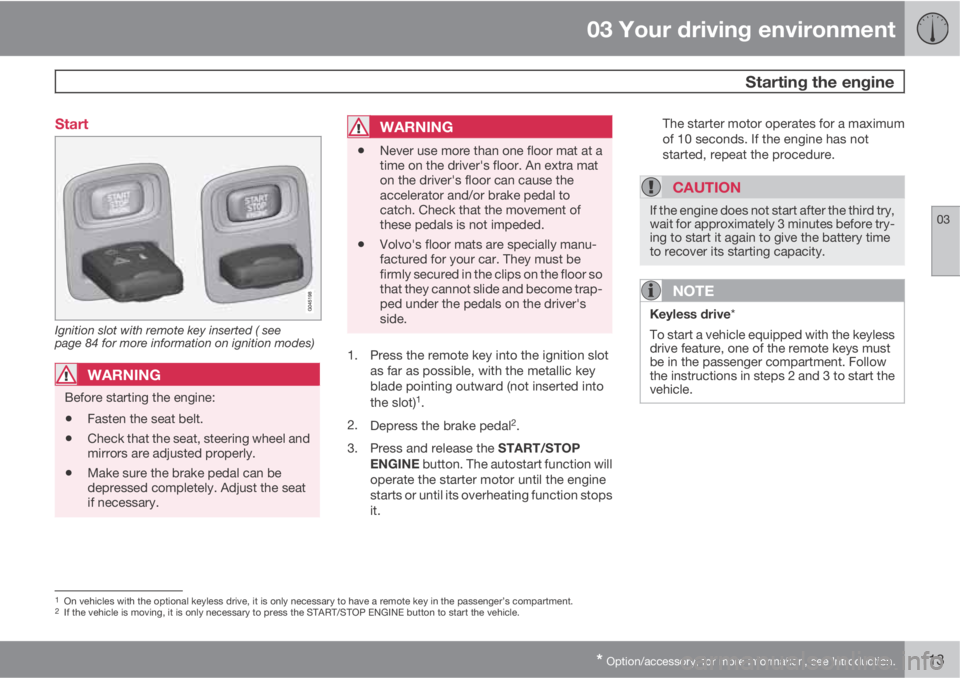
Ignition slot with remote key inserted ( see
page 84 for more information on ignition modes)
WARNING
Before starting the engine:
•Fasten the seat belt.
•Check that the seat, steering wheel and
mirrors are adjusted properly.
•Make sure the brake pedal can be
depressed completely. Adjust the seat
if necessary.
WARNING
•Never use more than one floor mat at a
time on the driver's floor. An extra mat
on the driver's floor can cause the
accelerator and/or brake pedal to
catch. Check that the movement of
these pedals is not impeded.
•Volvo's floor mats are specially manu-
factured for your car. They must be
firmly secured in the clips on the floor so
that they cannot slide and become trap-
ped under the pedals on the driver's
side.
1. Press the remote key into the ignition slot
as far as possible, with the metallic key
blade pointing outward (not inserted into
the slot)
1.
2.
Depress the brake pedal
2.
3.
Press and release the START/STOP
ENGINE button. The autostart function will
operate the starter motor until the engine
starts or until its overheating function stops
it.The starter motor operates for a maximum
of 10 seconds. If the engine has not
started, repeat the procedure.
CAUTION
If the engine does not start after the third try,
wait for approximately 3 minutes before try-
ing to start it again to give the battery time
to recover its starting capacity.
NOTE
Keyless drive*
To start a vehicle equipped with the keyless
drive feature, one of the remote keys must
be in the passenger compartment. Follow
the instructions in steps 2 and 3 to start the
vehicle.
1On vehicles with the optional keyless drive, it is only necessary to have a remote key in the passenger’s compartment.2If the vehicle is moving, it is only necessary to press the START/STOP ENGINE button to start the vehicle.
Page 132 of 366
04 Driver support
Stability system
04
130* Option/accessory, for more information, see Introduction.
Introduction
The Dynamic Stability and Traction Control
system (DSTC) consists of a number of func-
tions designed to help reduce wheel spin,
counteract skidding, and to generally help
improve directional stability.
CAUTION
A pulsating sound will be audible when the
system is actively operating and is normal.
Traction control (TC)This function is designed to help reduce wheel
spin by transferring power from a drive wheel
that begins to lose traction to the wheel on the
opposite side of the vehicle (on the same axle).
TC is most active at low speeds.
This is one of DSTC's permanent functions and
cannot be switched off.
Active Yaw Control (AYC)This function helps maintain directional stabil-
ity, for example when cornering, by braking
one or more of the wheels if the vehicle shows
a tendency to skid or slide laterally.
This is one of DSTC's permanent functions and
cannot be switched off.
Spin control (SC)The spin control function is designed to help
prevent the drive wheels from spinning while
the vehicle is accelerating.
Corner Traction Control – CTCCTC compensates for understeering and helps
provide additional stability when accelerating
through a curve by preventing the inside wheel
from spinning. This is particularly useful when
accelerating on a curving highway on-ramp.
CTC is most effective if the stability system's
Sport mode is selected. See the section about
Sport mode.
Engine Drag Control (EDC)EDC helps keep the engine running if the
wheels show a tendency to lock, e.g., when
shifting down in the Geartronic manual shifting
mode or while using the engine's braking func-
tion on a slippery surface. If the engine were to
stop, power steering would not function, mak-
ing the vehicle more difficult to steer.
Trailer Stability Assist – TSA*Trailer Stability Assist helps stabilize a vehicle
that is towing a trailer when the vehicle and
trailer have begun to sway. See page 266 for
more information.
This system is automatically deactivated if the
driver selects Sport mode.
Operation
Sport modeThe stability system is always activated and
cannot be switched off.
However, the driver can select Sport mode,
which offers more active driving characteris-
tics. In this mode, the engine management sys-
tem monitors movement of the accelerator
pedal and steering wheel for sportier driving by
allowing more lateral movement of the rear
wheels before DSTC is activated.
Under certain circumstances, such as when
driving with snow chains, or driving in deep
snow or loose sand, it may be advisable to
temporarily use Sport mode for maximum
tractive force.
If the driver releases pressure on the acceler-
ator pedal, DSTC will also activate to help sta-
bilize the vehicle.
To switch to Sport mode:
1.
Press the My Car button in the center con-
sole control panel and select My S60
DSTC in the menu.
2. Unselect the symbol and leave the menu
by pressing EXIT.
>
This puts DSTC in Sport mode.
Sport mode remains active until the driver
switches it off in the menu or until the engine is
Page 137 of 366
04 Driver support
Cruise control
04
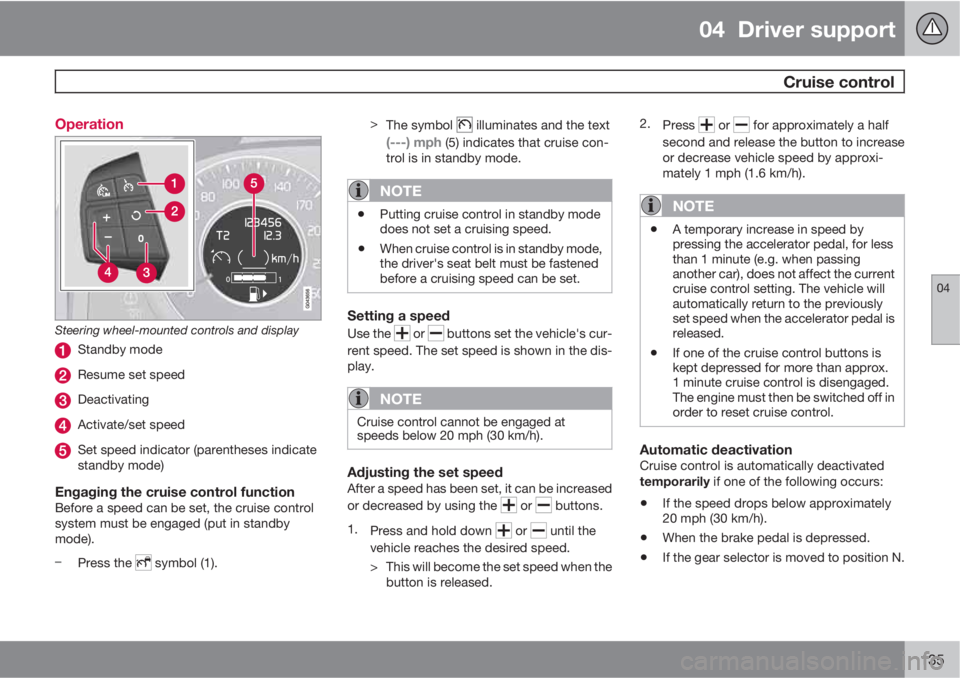
135 Operation
Steering wheel-mounted controls and display
Standby mode
Resume set speed
Deactivating
Activate/set speed
Set speed indicator (parentheses indicate
standby mode)
Engaging the cruise control functionBefore a speed can be set, the cruise control
system must be engaged (put in standby
mode).
–
Press the
symbol (1).>
The symbol
illuminates and the text
(---) mph (5) indicates that cruise con-
trol is in standby mode.
NOTE
•Putting cruise control in standby mode
does not set a cruising speed.
•When cruise control is in standby mode,
the driver's seat belt must be fastened
before a cruising speed can be set.
Setting a speed
Use the or buttons set the vehicle's cur-
rent speed. The set speed is shown in the dis-
play.
NOTE
Cruise control cannot be engaged at
speeds below 20 mph (30 km/h).
Adjusting the set speedAfter a speed has been set, it can be increased
or decreased by using the
or buttons.
1.
Press and hold down
or until the
vehicle reaches the desired speed.
> This will become the set speed when the
button is released.2.
Press
or for approximately a half
second and release the button to increase
or decrease vehicle speed by approxi-
mately 1 mph (1.6 km/h).
NOTE
•A temporary increase in speed by
pressing the accelerator pedal, for less
than 1 minute (e.g. when passing
another car), does not affect the current
cruise control setting. The vehicle will
automatically return to the previously
set speed when the accelerator pedal is
released.
•If one of the cruise control buttons is
kept depressed for more than approx.
1 minute cruise control is disengaged.
The engine must then be switched off in
order to reset cruise control.
Automatic deactivationCruise control is automatically deactivated
temporarily if one of the following occurs:
•If the speed drops below approximately
20 mph (30 km/h).
•When the brake pedal is depressed.
•If the gear selector is moved to position N.
Page 139 of 366
04 Driver support
Adaptive Cruise Control (ACC)*
04
* Option/accessory, for more information, see Introduction.137 Introduction
Adaptive Cruise Control (ACC) is an optional
system designed to assist the driver by main-
taining a set speed or a set time interval to the
vehicle ahead. It is primarily intended for use
on long straight roads in steady traffic, such as
on highways and other main roads.
When the driver has set the desired speed and
the time interval to the vehicle ahead, ACC
functions as follows:
•If there are no other vehicles in the lane
ahead of you, your vehicle will travel at the
set speed.
•If ACC's radar sensor detects a slower
moving vehicle in the lane ahead, the sys-
tem will adapt your vehicle's speed to help
maintain the set time interval to the vehicle
ahead. When there are no longer slower
moving vehicles ahead, your vehicle will
accelerate to resume the set speed.
If ACC is switched off completely or in standby
mode and your vehicle comes too close to
another vehicle ahead, the driver will be
warned by the Distance Alert system (see
page 148).
WARNING
•Adaptive Cruise Control cannot cover
all driving situations and traffic, weather
and road conditions. The "Function"
section provides information about lim-
itations that the driver must be aware of
before using this feature.
•This system is designed to be a supple-
mentary driving aid. It is not, however,
intended to replace the driver's atten-
tion and judgement. The driver is
responsible for maintaining a safe dis-
tance and speed and must intervene if
Adaptive Cruise Control does not main-
tain a suitable speed or suitable dis-
tance to the vehicle ahead.
•Maintenance of ACC components may
only be performed by a trained and
qualified Volvo technician.
Function
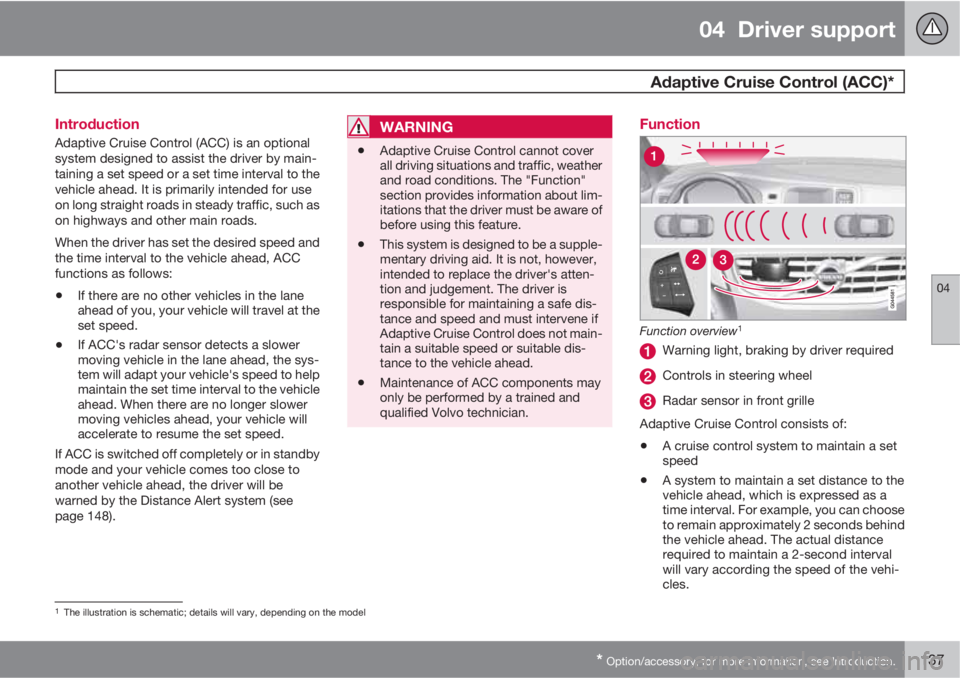
Function overview1
Warning light, braking by driver required
Controls in steering wheel
Radar sensor in front grille
Adaptive Cruise Control consists of:
•A cruise control system to maintain a set
speed
•A system to maintain a set distance to the
vehicle ahead, which is expressed as a
time interval. For example, you can choose
to remain approximately 2 seconds behind
the vehicle ahead. The actual distance
required to maintain a 2-second interval
will vary according the speed of the vehi-
cles.
1The illustration is schematic; details will vary, depending on the model
Page 143 of 366
04 Driver support
Adaptive Cruise Control (ACC)*
04
* Option/accessory, for more information, see Introduction.141
Standby mode due to action by the driverACC is temporarily deactivated and put in
standby mode:
•if the brakes are applied
•if the gear selector is moved to N
•if the driver drives at a speed higher than
the set speed for more than 1 minute.
In this happens, the driver will have to regulate
the vehicle's speed.
NOTE
If the accelerator pedal is only depressed for
a short time, such as when passing another
vehicle, ACC is deactivated temporarily and
is reactivated when the pedal is released.
Automatic standby modeAdaptive cruise control is linked to other sys-
tems such as the stability and traction control
system (DSTC). If this system is not functioning
properly, adaptive cruise control is automati-
cally deactivated and will go into standby
mode.
In the event of automatic deactivation, an audi-
ble signal will sound and the message
Cruise
control Cancelled is shown in the display.
The driver must then intervene and adapt thevehicle's speed to the surrounding traffic and
regulate the distance to the vehicle ahead.
An automatic switch to standby mode may be
caused if:
•engine speed (rpm) is too high/low
•the vehicle's speed goes below 18 mph
(30 km/h)3
•the wheels lose traction
•brake temperature is high
•the radar sensor is obstructed by, for
example, wet snow or rain.
Resuming the set speedIf ACC is in standby mode, it can be reactivated
by pressing the
button on the steering
wheel keypad. The vehicle will return to the
most recently set speed.
WARNING
The vehicle may accelerate quickly after has been pressed if its current speed is
considerably lower than the set speed.
Passing another vehicleIf your vehicle’s speed is being regulated by
ACC and the driver indicates that he/she would
like to pass the vehicle ahead by using theleft turn signal, ACC can assist by accelerating
briefly.
This function is active at speeds above approx-
imately 45 mph (70 km/h).
WARNING
Please be aware that this function will also
cause the vehicle to accelerate briefly in
certain situations other than passing
another vehicle, for example using the left
turn signal to indicate a lane change or a
turn toward a highway exit at speeds above
approximately 45 mph (70 km/h).
Queue AssistQueue Assist is an added ACC feature that is
linked to your vehicle's automatic transmis-
sion.
Queue Assist consists of the following func-
tions:
•Enhanced speed interval (including when
the vehicle is at a complete stop or is mov-
ing at speed below 18 mph (30 km/h))
•Automatic standby mode when ACC
changes target vehicles
•No automatic braking when at a standstill
•The parking brake is applied automatically
3Does not apply to vehicles equipped with the optional Queue Assist