turn signal VOLVO S60 2013 Owner´s Manual
[x] Cancel search | Manufacturer: VOLVO, Model Year: 2013, Model line: S60, Model: VOLVO S60 2013Pages: 366, PDF Size: 6.85 MB
Page 83 of 366
03 Your driving environment
Instruments and controls
03
81
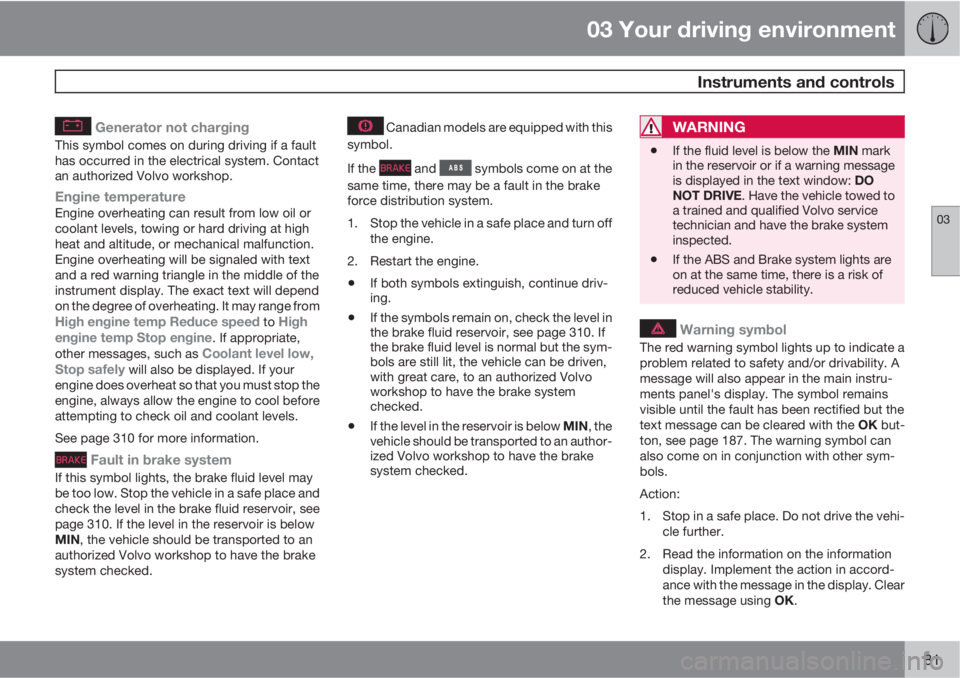
Generator not charging
This symbol comes on during driving if a fault
has occurred in the electrical system. Contact
an authorized Volvo workshop.
Engine temperatureEngine overheating can result from low oil or
coolant levels, towing or hard driving at high
heat and altitude, or mechanical malfunction.
Engine overheating will be signaled with text
and a red warning triangle in the middle of the
instrument display. The exact text will depend
on the degree of overheating. It may range from
High engine temp Reduce speed to High
engine temp Stop engine. If appropriate,
other messages, such as Coolant level low,
Stop safely will also be displayed. If your
engine does overheat so that you must stop the
engine, always allow the engine to cool before
attempting to check oil and coolant levels.
See page 310 for more information.
Fault in brake system
If this symbol lights, the brake fluid level may
be too low. Stop the vehicle in a safe place and
check the level in the brake fluid reservoir, see
page 310. If the level in the reservoir is below
MIN, the vehicle should be transported to an
authorized Volvo workshop to have the brake
system checked.
Canadian models are equipped with this
symbol.
If the
and symbols come on at the
same time, there may be a fault in the brake
force distribution system.
1. Stop the vehicle in a safe place and turn off
the engine.
2. Restart the engine.
•If both symbols extinguish, continue driv-
ing.
•If the symbols remain on, check the level in
the brake fluid reservoir, see page 310. If
the brake fluid level is normal but the sym-
bols are still lit, the vehicle can be driven,
with great care, to an authorized Volvo
workshop to have the brake system
checked.
•If the level in the reservoir is below MIN, the
vehicle should be transported to an author-
ized Volvo workshop to have the brake
system checked.
WARNING
•If the fluid level is below the MIN mark
in the reservoir or if a warning message
is displayed in the text window: DO
NOT DRIVE. Have the vehicle towed to
a trained and qualified Volvo service
technician and have the brake system
inspected.
•If the ABS and Brake system lights are
on at the same time, there is a risk of
reduced vehicle stability.
Warning symbol
The red warning symbol lights up to indicate a
problem related to safety and/or drivability. A
message will also appear in the main instru-
ments panel's display. The symbol remains
visible until the fault has been rectified but the
text message can be cleared with the OK but-
ton, see page 187. The warning symbol can
also come on in conjunction with other sym-
bols.
Action:
1. Stop in a safe place. Do not drive the vehi-
cle further.
2. Read the information on the information
display. Implement the action in accord-
ance with the message in the display. Clear
the message using OK.
Page 96 of 366
03 Your driving environment
Lighting
03
94* Option/accessory, for more information, see Introduction.
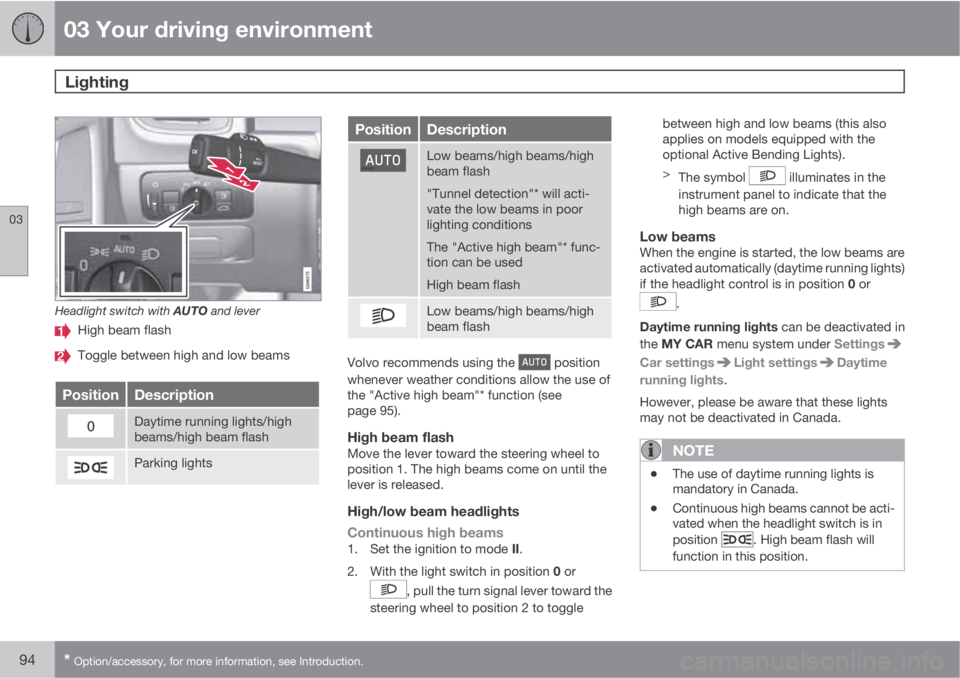
Headlight switch with AUTO and lever
High beam flash
Toggle between high and low beams
PositionDescription
Daytime running lights/high
beams/high beam flash
Parking lights
PositionDescription
Low beams/high beams/high
beam flash
"Tunnel detection"* will acti-
vate the low beams in poor
lighting conditions
The "Active high beam"* func-
tion can be used
High beam flash
Low beams/high beams/high
beam flash
Volvo recommends using the position
whenever weather conditions allow the use of
the "Active high beam"* function (see
page 95).
High beam flashMove the lever toward the steering wheel to
position 1. The high beams come on until the
lever is released.
High/low beam headlights
Continuous high beams
1.
Set the ignition to mode II.
2.
With the light switch in position 0 or
, pull the turn signal lever toward the
steering wheel to position 2 to togglebetween high and low beams (this also
applies on models equipped with the
optional Active Bending Lights).
>
The symbol
illuminates in the
instrument panel to indicate that the
high beams are on.
Low beamsWhen the engine is started, the low beams are
activated automatically (daytime running lights)
if the headlight control is in position 0 or
.
Daytime running lights can be deactivated in
the MY CAR menu system under Settings
Car settingsLight settingsDaytime
running lights.
However, please be aware that these lights
may not be deactivated in Canada.
NOTE
•The use of daytime running lights is
mandatory in Canada.
•Continuous high beams cannot be acti-
vated when the headlight switch is in
position
. High beam flash will
function in this position.
Page 100 of 366
03 Your driving environment
Lighting
03
98
NOTE
The rear fog light is considerably brighter
than the normal taillights and should be
used only when conditions such as fog, rain,
snow, smoke or dust reduce visibility for
other vehicles to less than 500 ft.
(150 meters).
Hazard warning flashers
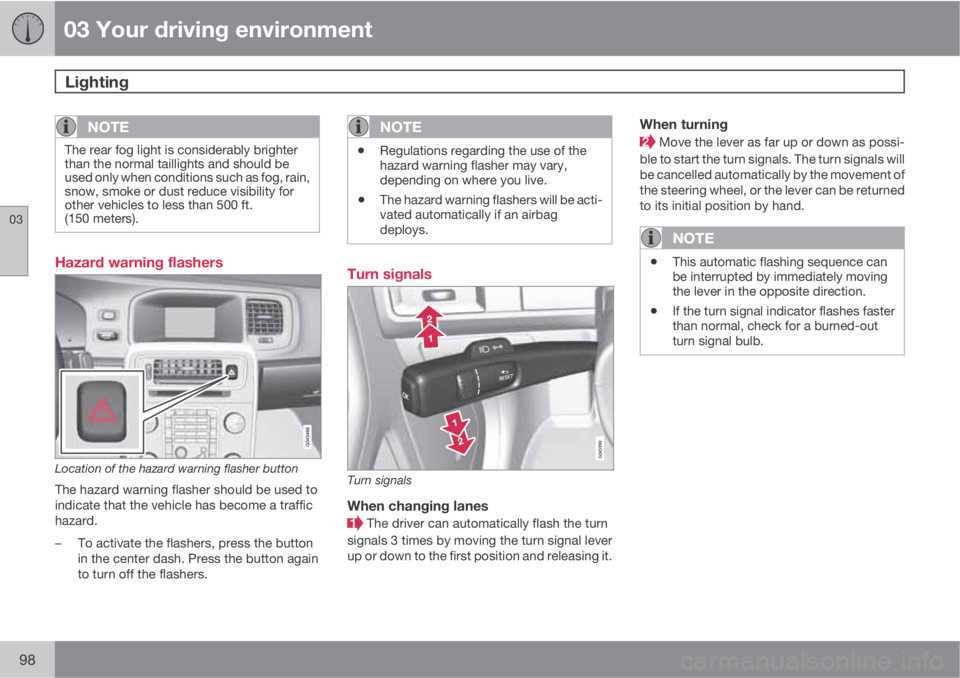
Location of the hazard warning flasher button
The hazard warning flasher should be used to
indicate that the vehicle has become a traffic
hazard.
–To activate the flashers, press the button
in the center dash. Press the button again
to turn off the flashers.
NOTE
•Regulations regarding the use of the
hazard warning flasher may vary,
depending on where you live.
•The hazard warning flashers will be acti-
vated automatically if an airbag
deploys.
Turn signals
Turn signals
When changing lanes
The driver can automatically flash the turn
signals 3 times by moving the turn signal lever
up or down to the first position and releasing it.
When turning
Move the lever as far up or down as possi-
ble to start the turn signals. The turn signals will
be cancelled automatically by the movement of
the steering wheel, or the lever can be returned
to its initial position by hand.
NOTE
•This automatic flashing sequence can
be interrupted by immediately moving
the lever in the opposite direction.
•If the turn signal indicator flashes faster
than normal, check for a burned-out
turn signal bulb.
Page 102 of 366
03 Your driving environment
Lighting
03
100
Trunk lightingThe trunk lighting comes on automatically
when the trunk lid is opened.
Home safe lighting
When you leave your vehicle at night, you can
make use of the home safe lighting function to
illuminate the area in front of the vehicle.
1. Remove the key from the ignition slot to put
the ignition in mode 0 (see page 85 for
information about the ignition modes).
2. Pull the turn signal lever as far as possible
towards the steering wheel and release it.
3. Exit the vehicle and lock the doors.
The headlights, parking lights, turn signals,
lights in the door mirrors, license plate lights,
and footwell lighting will illuminate and remain
on for 30
3, 60 or 90 seconds. The time interval
can be set in MY CAR under Settings
Car
settings
Light settingsHome safe light
duration. See page 189 for a description of
the menu system.
Approach lighting
Approach lighting is activated by pressing the
approach light button on the remote key (see
the illustration on page 55).
When the function has been activated, the
parking lights, indicator lights, door mirror
lights, license plate lighting, dome lighting and
door step lighting come on.
The time interval for this lighting can be set by
pressing MY CAR and going to Car settings
Light settingsApproach light
duration. See page 189 for a description of
the menu system.
3Factory setting
Page 113 of 366
03 Your driving environment
HomeLink® Wireless Control System*
03
* Option/accessory, for more information, see Introduction.111
NOTE
Some devices may require you to replace
this Programming Step 2 with procedures
noted in the “Gate Operator / Canadian Pro-
gramming” section. If the HomeLink indica-
tor light does not change to a rapidly blink-
ing light after performing these steps, con-
tact HomeLink at www.homelink.com or by
phoning the hotline at 1–800–355–3515.
3.
Firmly press, hold for five seconds and
release the programmed HomeLink but-
ton up to two separate times to activate the
door. If the door does not activate, press
and hold the just-trained HomeLink button
and observe the indicator light.
•If the indicator light stays on con-
stantly, programming is complete
and your device should activate when
the HomeLink button is pressed and
released.
•If the indicator light blinks rapidly for
two seconds and then turns to a con-
stant light continue with “Program-
ming” steps 4-6 to complete the pro-
gramming of a rolling code equipped
device (most commonly a garage door
opener).
4. At the garage door opener receiver (motor-
head unit) in the garage, locate the “learn”or “smart” button. This can usually be
found where the hanging antenna wire is
attached to the motor-head unit.
5. Firmly press and release the “learn” or
“smart” button. (The name and color of the
button may vary by manufacturer.) There
are 30 seconds to initiate step 6.
6. Return to the vehicle and firmly press, hold
for two seconds and release the pro-
grammed HomeLink button. Repeat the
“press/hold/release” sequence a second
time, and, depending on the brand of the
garage door opener (or other rolling code
equipped device), repeat this sequence a
third time to complete the programming
process.
HomeLink should now activate your rolling
code equipped device.
Gate Operator/Canadian ProgrammingCanadian radio-frequency laws require trans-
mitter signals to “time-out” (or quit) after sev-
eral seconds of transmission – which may not
be long enough for HomeLink to pick up the
signal during programming. Similar to this
Canadian law, some U.S. gate operators are
designed to “time-out” in the same manner.
If you live in Canada or you are having difficul-
ties programming a gate operator or garage
door opener by using the “Programming” pro-cedures, replace “Programming HomeLink”
step 2 with the following:
•Continue to press and hold the HomeLink
button while you press and release -
every two seconds (“cycle”) your hand-
held transmitter until the HomeLink indica-
tor light changes from a slow to a rapidly
blinking light. Now you may release both
the HomeLink and hand-held transmitter
buttons.
Proceed with “Programming” step 3 to com-
plete.
Using HomeLink
To operate, simply press and hold the pro-
grammed HomeLink button until the trained
device begins to operate (this may take several
seconds). Activation will now occur for the
trained device (i.e., garage door opener, gate
operator, security system, entry door lock,
home/office lighting, etc.). For convenience,
the hand-held transmitter of the device may
also be used at any time. In the event that there
are still programming difficulties or questions,
contact HomeLink at: www.homelink.com or
by phoning the hotline at 1–800–355–3515.
Page 117 of 366
03 Your driving environment
Starting the engine
03
* Option/accessory, for more information, see Introduction.115 Engine Remote Start (ERS)*
IntroductionERS is a feature that makes it possible to
remotely start the engine to cool or heat the
passenger compartment before driving.
The climate control system will start using the
same settings as when the engine was
switched off.
When the engine is started using ERS, it will run
for a maximum of 15 minutes before automat-
ically switching off again. After 2 ERS starts,
the engine must be started in the normal way
before ERS can be used again.
NOTE
Always adhere to applicable State, Province
and or Local laws regarding engine idling
when using ERS.
WARNING
Keep the following in mind before using ERS
•The vehicle should be in view.
•The vehicle should be unoccupied.
•The vehicle must not be parked indoors
or in an enclosed area. Exhaust fumes
are harmful to the health.
Using ERS
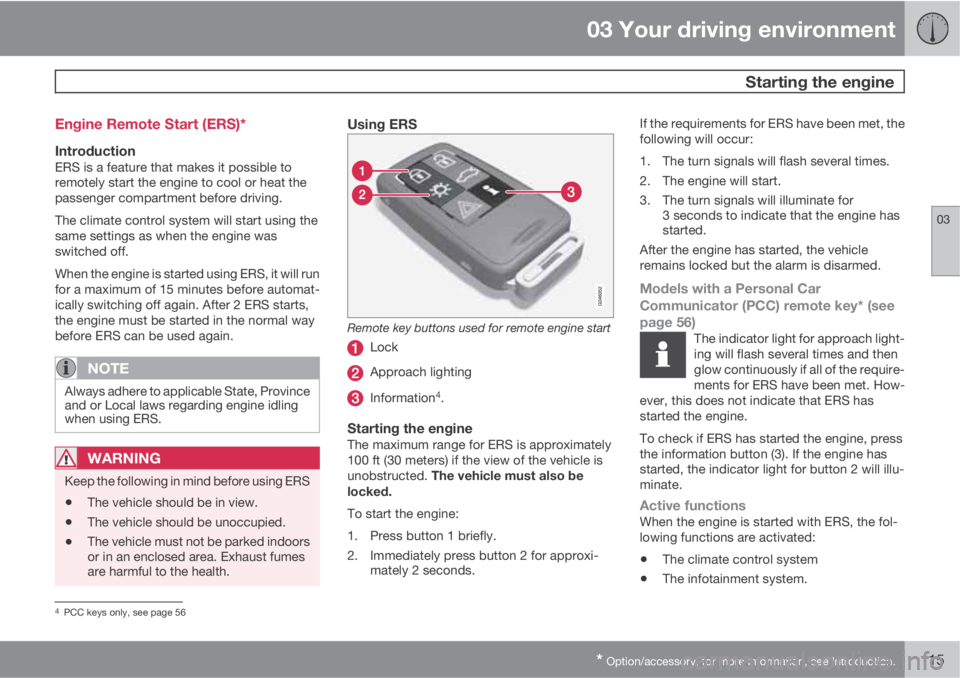
Remote key buttons used for remote engine start
Lock
Approach lighting
Information4.
Starting the engineThe maximum range for ERS is approximately
100 ft (30 meters) if the view of the vehicle is
unobstructed. The vehicle must also be
locked.
To start the engine:
1. Press button 1 briefly.
2. Immediately press button 2 for approxi-
mately 2 seconds.If the requirements for ERS have been met, the
following will occur:
1. The turn signals will flash several times.
2. The engine will start.
3. The turn signals will illuminate for
3 seconds to indicate that the engine has
started.
After the engine has started, the vehicle
remains locked but the alarm is disarmed.
Models with a Personal Car
Communicator (PCC) remote key* (see
page 56)
The indicator light for approach light-
ing will flash several times and then
glow continuously if all of the require-
ments for ERS have been met. How-
ever, this does not indicate that ERS has
started the engine.
To check if ERS has started the engine, press
the information button (3). If the engine has
started, the indicator light for button 2 will illu-
minate.
Active functionsWhen the engine is started with ERS, the fol-
lowing functions are activated:
•The climate control system
•The infotainment system.
4PCC keys only, see page 56
Page 118 of 366
03 Your driving environment
Starting the engine
03
116
Deactivated functionsWhen the engine is started with ERS, the fol-
lowing functions are deactivated:
•Headlights
•Parking lights
•License plate lights
•Windshield wipers
Switching off an engine started with ERSAny of the following will switch off the engine if
it has been started with ERS:
•Pressing the lock button (1) on the remote
key
•Unlocking the vehicle
•Opening a door
•Depressing the throttle or brake pedal
•Moving the gear selector from the P posi-
tion
•If there are less than approx. 2.5 gallons
(10 liters) of fuel in the tank
•More than 15 minutes have elapsed.
If the engine has been started with ERS and
switches off, the turn signals will illuminate for
3 seconds.
Message in the instrument panel displayIf ERS is interrupted, a text message will be
displayed in the instrument panel.
Switching off the engine
With the engine running, press the START/
STOP ENGINE button.
If the gear selector is not in the P position or if
the vehicle is moving, press the START/STOP
ENGINE button twice or press and hold it in
until the engine switches off.
Jump starting
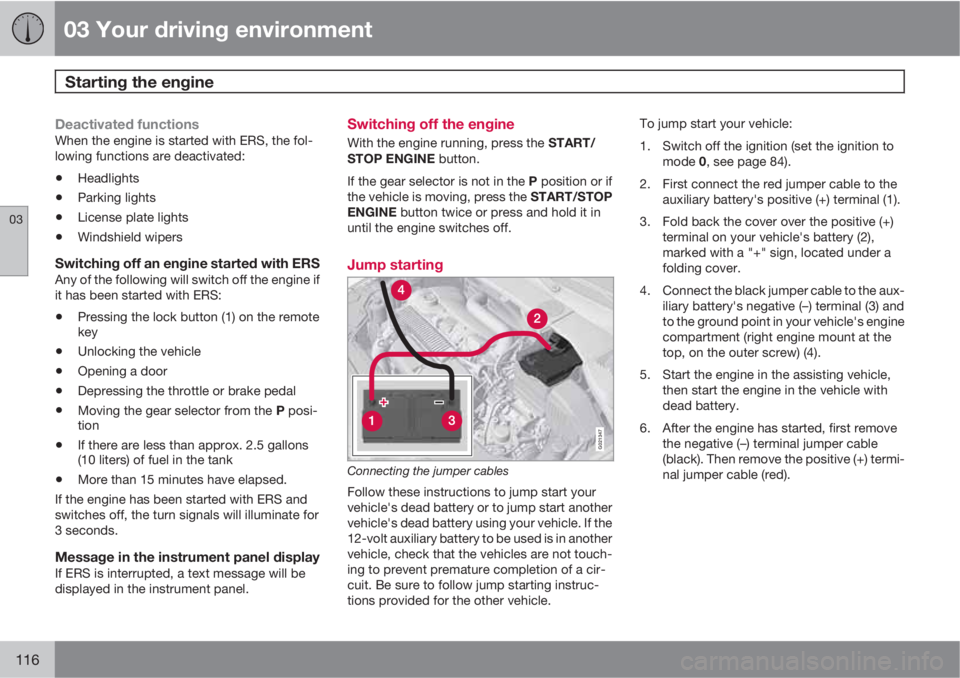
G021347
Connecting the jumper cables
Follow these instructions to jump start your
vehicle's dead battery or to jump start another
vehicle's dead battery using your vehicle. If the
12-volt auxiliary battery to be used is in another
vehicle, check that the vehicles are not touch-
ing to prevent premature completion of a cir-
cuit. Be sure to follow jump starting instruc-
tions provided for the other vehicle.To jump start your vehicle:
1. Switch off the ignition (set the ignition to
mode 0, see page 84).
2. First connect the red jumper cable to the
auxiliary battery's positive (+) terminal (1).
3. Fold back the cover over the positive (+)
terminal on your vehicle's battery (2),
marked with a "+" sign, located under a
folding cover.
4. Connect the black jumper cable to the aux-
iliary battery's negative (–) terminal (3) and
to the ground point in your vehicle's engine
compartment (right engine mount at the
top, on the outer screw) (4).
5. Start the engine in the assisting vehicle,
then start the engine in the vehicle with
dead battery.
6. After the engine has started, first remove
the negative (–) terminal jumper cable
(black). Then remove the positive (+) termi-
nal jumper cable (red).
Page 126 of 366
03 Your driving environment
Parking brake
03
124
Electric parking brake
An electric parking brake has the same func-
tion as a manual parking brake.
NOTE
•A faint sound from the parking brake's
electric motor can be heard when the
parking brake is being applied. This
sound can also be heard during the
automatic function check of the parking
brake.
•The brake pedal will move slightly when
the electric parking brake is applied or
released.
Low battery voltageIf the battery voltage is too low, the parking
brake cannot be applied or released. Connect
an auxiliary battery if the battery voltage is too
low, see page 116.
Applying the electric parking brake
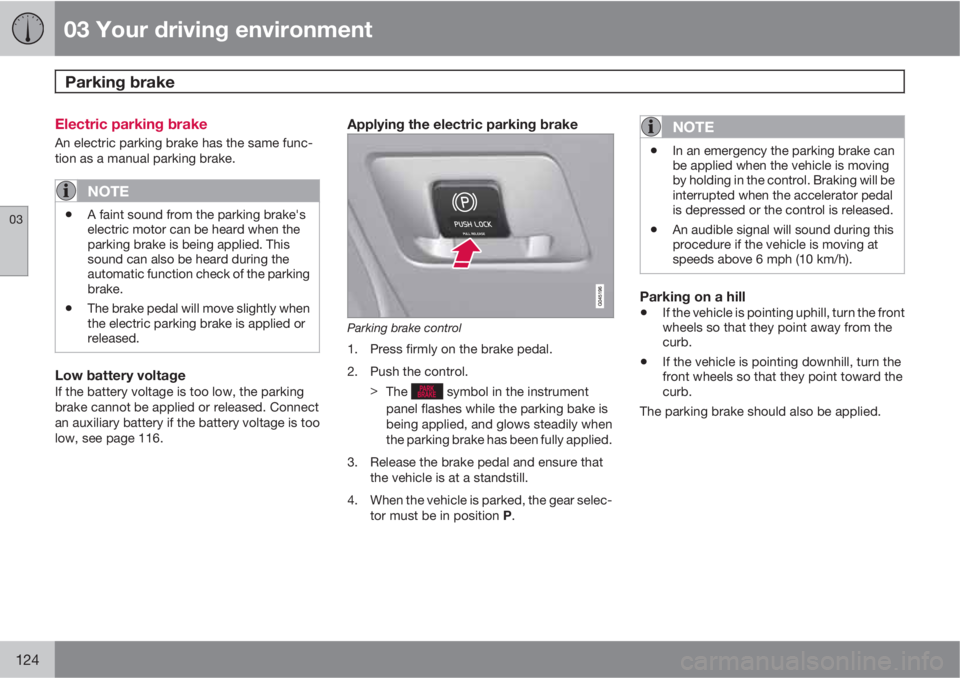
Parking brake control
1. Press firmly on the brake pedal.
2. Push the control.
>
The
symbol in the instrument
panel flashes while the parking bake is
being applied, and glows steadily when
the parking brake has been fully applied.
3. Release the brake pedal and ensure that
the vehicle is at a standstill.
4. When the vehicle is parked, the gear selec-
tor must be in position P.
NOTE
•In an emergency the parking brake can
be applied when the vehicle is moving
by holding in the control. Braking will be
interrupted when the accelerator pedal
is depressed or the control is released.
•An audible signal will sound during this
procedure if the vehicle is moving at
speeds above 6 mph (10 km/h).
Parking on a hill
•If the vehicle is pointing uphill, turn the front
wheels so that they point away from the
curb.
•If the vehicle is pointing downhill, turn the
front wheels so that they point toward the
curb.
The parking brake should also be applied.
Page 128 of 366
03 Your driving environment
Parking brake
03
126
an authorized Volvo workshop. If you drive off
with this error message showing, a warning
signal sounds.
Parking brake not applied – A fault is pre-
venting the parking brake from being applied.
Try to apply the parking brake and release it
several times. If the problem persists, contact
an authorized Volvo workshop. If you drive off
with this error message showing, a warning
signal sounds.
Parking brake Service required – A fault has
occurred. Try to apply and release. Contact a
Volvo workshop if the fault remains.
WARNING
If the vehicle must be parked before the fault
has been corrected, always put the gear
selector in P and turn the wheels so that
they point away from the curb if the vehicle
is pointing uphill or toward the curb if it is
pointing downhill.
Page 143 of 366
04 Driver support
Adaptive Cruise Control (ACC)*
04
* Option/accessory, for more information, see Introduction.141
Standby mode due to action by the driverACC is temporarily deactivated and put in
standby mode:
•if the brakes are applied
•if the gear selector is moved to N
•if the driver drives at a speed higher than
the set speed for more than 1 minute.
In this happens, the driver will have to regulate
the vehicle's speed.
NOTE
If the accelerator pedal is only depressed for
a short time, such as when passing another
vehicle, ACC is deactivated temporarily and
is reactivated when the pedal is released.
Automatic standby modeAdaptive cruise control is linked to other sys-
tems such as the stability and traction control
system (DSTC). If this system is not functioning
properly, adaptive cruise control is automati-
cally deactivated and will go into standby
mode.
In the event of automatic deactivation, an audi-
ble signal will sound and the message
Cruise
control Cancelled is shown in the display.
The driver must then intervene and adapt thevehicle's speed to the surrounding traffic and
regulate the distance to the vehicle ahead.
An automatic switch to standby mode may be
caused if:
•engine speed (rpm) is too high/low
•the vehicle's speed goes below 18 mph
(30 km/h)3
•the wheels lose traction
•brake temperature is high
•the radar sensor is obstructed by, for
example, wet snow or rain.
Resuming the set speedIf ACC is in standby mode, it can be reactivated
by pressing the
button on the steering
wheel keypad. The vehicle will return to the
most recently set speed.
WARNING
The vehicle may accelerate quickly after has been pressed if its current speed is
considerably lower than the set speed.
Passing another vehicleIf your vehicle’s speed is being regulated by
ACC and the driver indicates that he/she would
like to pass the vehicle ahead by using theleft turn signal, ACC can assist by accelerating
briefly.
This function is active at speeds above approx-
imately 45 mph (70 km/h).
WARNING
Please be aware that this function will also
cause the vehicle to accelerate briefly in
certain situations other than passing
another vehicle, for example using the left
turn signal to indicate a lane change or a
turn toward a highway exit at speeds above
approximately 45 mph (70 km/h).
Queue AssistQueue Assist is an added ACC feature that is
linked to your vehicle's automatic transmis-
sion.
Queue Assist consists of the following func-
tions:
•Enhanced speed interval (including when
the vehicle is at a complete stop or is mov-
ing at speed below 18 mph (30 km/h))
•Automatic standby mode when ACC
changes target vehicles
•No automatic braking when at a standstill
•The parking brake is applied automatically
3Does not apply to vehicles equipped with the optional Queue Assist