turn signal VOLVO S60 2013 Owner´s Manual
[x] Cancel search | Manufacturer: VOLVO, Model Year: 2013, Model line: S60, Model: VOLVO S60 2013Pages: 366, PDF Size: 6.85 MB
Page 230 of 366
06 Infotainment
Radio
06
228
page 223 for detailed information on storing
channels.
•A long press on one of the number keys
stores the currently tuned channel on that
key.
•A short press on a number key while the
radio is in SAT1 or SAT2 mode will tune to
the preset satellite channel stored on that
button, regardless of the currently selected
channel category.
Searching for and storing songs
The Song Seek function provides notification
when SiriusXM
E is broadcasting the songs
selected in song memory.
Song memory ena-
bles you to store the name of the song for
future advance notification when that song is
being played.
Song seekWhen a satellite radio channel plays one of the
songs stored in the song memory while the
Song seek feature is activated, the listener will
be alerted by a text message and an audible
signal.
Press OK/MENU to listen to the song or EXIT
to cancel.
To activate/deactivate the song seek function:
1.
Press OK/MENU.2.
Turn TUNE to scroll to
Song memory and
press OK/MENU.
3.
Turn TUNE to scroll to
Song Seek and
press OK/MENU to activate or deactivate
the function.
NOTE
When the song has ended, the radio will
remain tuned to the channel on which the
song was played.
Song memoryUp to ten songs can be saved in the system's
memory.
To add the currently playing song to the list:
1.
Press OK/MENU.
2.
Scroll to
Song memory and press OK/
MENU.
3.
Scroll to
Add current song to song
memory and press OK/MENU.
If a new song is selected when the memory is
full, you will be prompted to delete a song from
the list. To do so:
1.
Press OK/MENU.
2.
Turn TUNE to scroll through the list of
songs. Select a song and press OK/
MENU to delete it from the list.
Radio textThis text provides information about the song
that is currently playing. To turn this feature on
or off, press OK/MENU and scroll to
Show
radio text and press OK/MENU to toggle
between on or off.
Advanced SiriusXM
E settings
This menu function enables you to make set-
tings on certain SiriusXM
E satellite radio func-
tions. To access this menu:
1.
Press OK/MENU.
2.
Scroll to the
Advanced settings menu
and press OK/MENU.
WARNING
Settings should be made when the vehicle
is at a standstill.
The following settings can be made in the sat-
ellite menus:
•Channel skip settings can be made
•Channel lock settings can be made
•The channel access code can be displayed
or changed (see also "Locking a channel"
on page 229)
•Your SiriusXM
E ID can be displayed
•Reset SiriusXM
E settings
Page 246 of 366
06 Infotainment
Bluetooth® hands-free connection
06
244
If no number has been stored, this menu can
be accessed by pressing and holding 1.
Voice mailIn normal view, a speed dial number for voice
mail can be programmed and accessed by
pressing and holding 1.
The number for voice mail can be changed in
phone mode in Phone menu
Call options
Voicemail numberChange number.
Sound settings
Call volumeCall volume can be only be adjusted during a
call. Use the buttons in the steering wheel key-
pad or the infotainment system’s VOL control.
Infotainment system volumeIf no phone call is in progress, volume for the
infotainment system can be adjusted in the
normal way with the infotainment system's
VOL control or from the steering wheel keypad.
Infotainment system sound can be automati-
cally muted when a phone call is received in
Phone menu
Phone settingsSounds
and volume
Mute radio/media.
Ringing volume
In phone mode, go to Phone menuPhone
settings
Sounds and volumeRing
volume and adjust the volume by turning
VOL. Save the setting by pressing EXIT.
Ringing tonesThe hands-free system’s integrated ringing
tones can be selected in Phone menu
Phone settingsSounds and volume
Ring signalsRing signal 1, etc.
NOTE
The connected cell phone’s ring tone may
not be switched off when one of the hands-
free system's ringing tones is used.
If you prefer to use the connected cell phone’s
ring tone2, go to Phone menuPhone
settings
Sounds and volumeRing
signals
Mobile phone ring signal.
Phone book
The hands-free system uses two phone books
(one with the cell phone's list of contacts and
one with contacts saved directly in the info-
tainment system), which are combined to form
one phone book.
•The infotainment system downloads the
phone book from a connected cell phone.
This phone book will only be displayed
when this cell phone is connected to the
hands-free system.
•The infotainment system also has an inte-
grated phone book made up of contacts
that have been saved in the system,
regardless of which cell phone is currently
connected when the contact is saved.
These contacts will be displayed regard-
less of the cell phone that is connected. If
a contact has been saved in the infotain-
ment system, the
symbol will be dis-
played next to it.
2Not supported by all cell phones.
Page 314 of 366
09 Maintenance and specifications
Replacing bulbs 09
312* Option/accessory, for more information, see Introduction.
Introduction
All bulb specifications are listed on page 317.
The following bulbs should only be replaced by
a trained and qualified Volvo service techni-
cian:
•Dome lighting
•Reading lights
•Glove compartment lighting
•Footwell lighting
•Turn signals in the door mirrors
•Approach lighting in the door mirrors
•Active Bending Lights and LED bulbs
NOTE
For information regarding any other bulbs
not mentioned in this section, please con-
tact your Volvo retailer or a trained and
authorized Volvo service technician.
WARNING
•The engine should not be running when
changing bulbs.
•If the engine has been running just prior
to replacing bulbs in the headlight hous-
ing, please keep in mind that compo-
nents in the engine compartment will be
hot.
WARNING
•Active Bending Lights* – due to the high
voltage used by these headlights, these
bulbs should only be replaced by a
trained and qualified Volvo service tech-
nician.
•Turn off the lights and remove the
remote key from the ignition before
changing any bulbs.
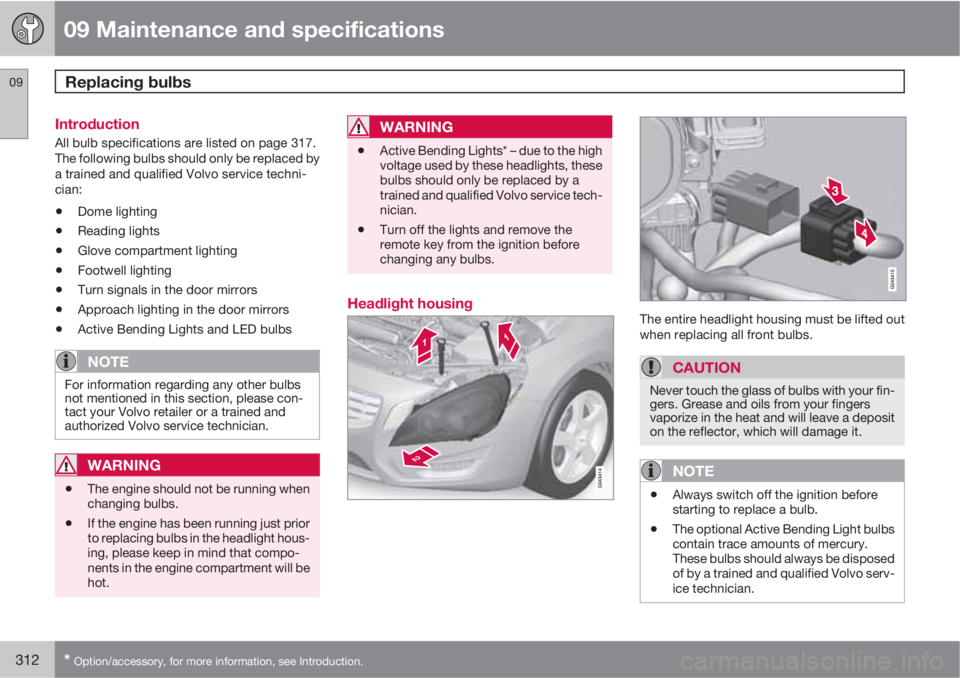
Headlight housingThe entire headlight housing must be lifted out
when replacing all front bulbs.
CAUTION
Never touch the glass of bulbs with your fin-
gers. Grease and oils from your fingers
vaporize in the heat and will leave a deposit
on the reflector, which will damage it.
NOTE
•Always switch off the ignition before
starting to replace a bulb.
•The optional Active Bending Light bulbs
contain trace amounts of mercury.
These bulbs should always be disposed
of by a trained and qualified Volvo serv-
ice technician.
Page 317 of 366
09 Maintenance and specifications
Replacing bulbs09
315
3. Remove the bulb by turning it counter-
clockwise and pulling it straight out.
4. Remove the connector from the bulb.
5. Press the new bulb into the socket and turn
it clockwise to put it in place. It can only be
secured in one position.
6. Put the cover back into position and rein-
stall the headlight housing.
Turn signals
1. Remove the headlight housing from the
vehicle (see page 312).
2. Remove the cover by pulling it straight out.
3. Pull the holder to access the bulb.
4. Press in the bulb and turn it to remove it
from the holder.5. Press and turn the new bulb into place.
6. Reinsert the bulb holder into the headlight
housing.
7. Put the cover back into position and rein-
stall the headlight housing.
Taillight housing
The bulbs in the taillight cluster are replaced
from inside the trunk (not the LED functions).
NOTE
Before starting to replace a bulb, see
page 312.
1. Remove the covers in the left/right panel to
access the bulb holder.2. Press the catches together and pull out the
bulb holder.
3. Remove the defective bulb by pressing it in
slightly and it turning counterclockwise
before pulling it out.
4. Insert a new bulb, press it in slightly and
turn it clockwise.
5. Press the bulb holder until it clicks into
place and reinstall the cover.
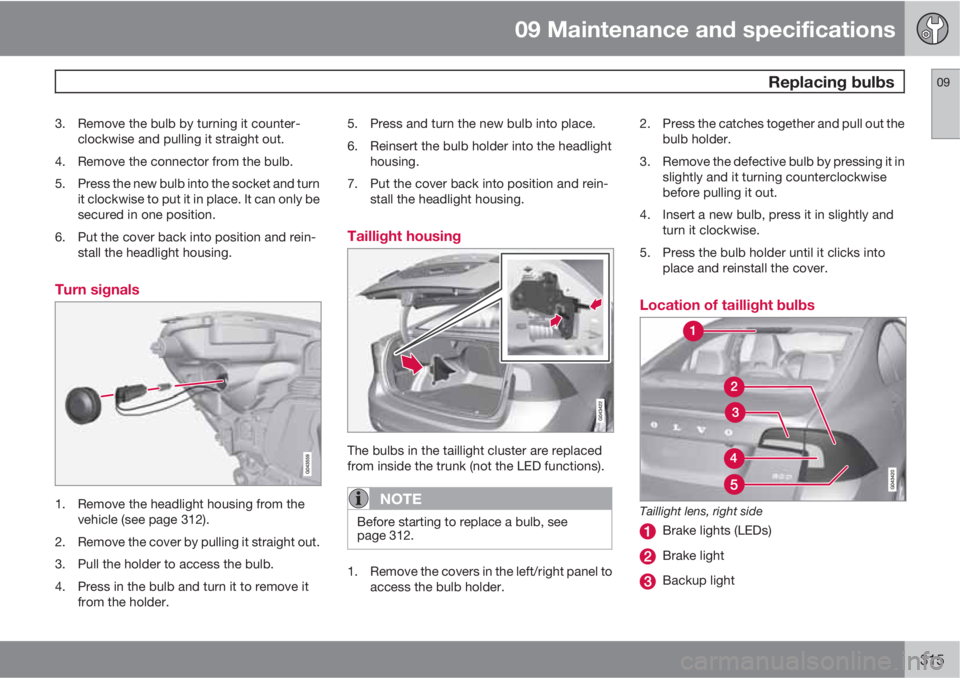
Location of taillight bulbs
Taillight lens, right side
Brake lights (LEDs)
Brake light
Backup light
Page 318 of 366
09 Maintenance and specifications
Replacing bulbs 09
316
Turn signals
Rear fog light (driver’s side only)
NOTE
If an error message remains in the display
after a faulty bulb has been replaced, con-
tact an authorized Volvo workshop.
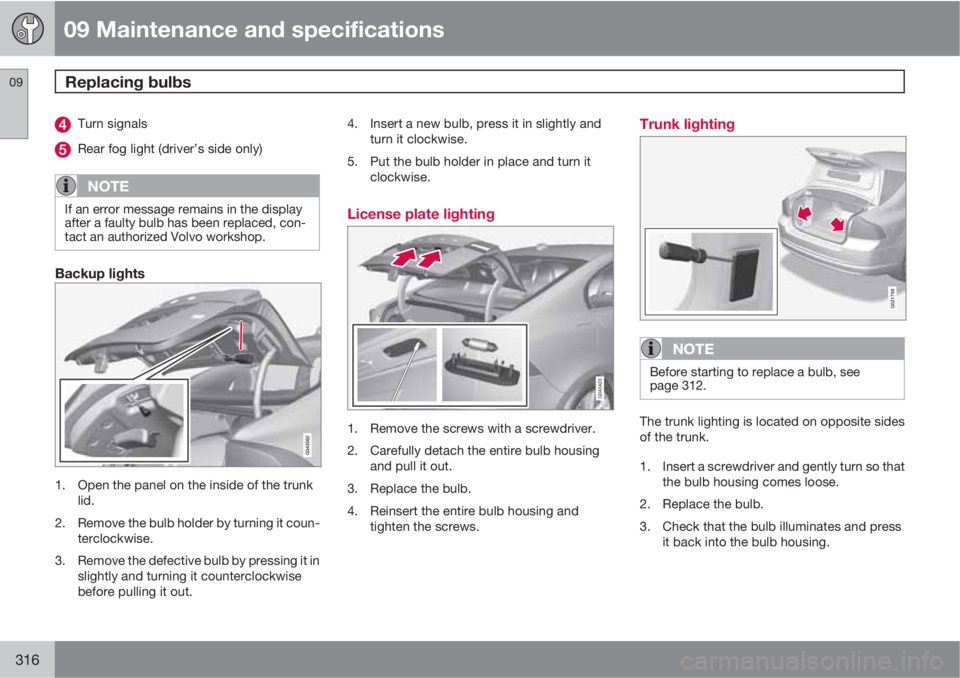
Backup lights
1. Open the panel on the inside of the trunk
lid.
2. Remove the bulb holder by turning it coun-
terclockwise.
3. Remove the defective bulb by pressing it in
slightly and turning it counterclockwise
before pulling it out.4. Insert a new bulb, press it in slightly and
turn it clockwise.
5. Put the bulb holder in place and turn it
clockwise.
License plate lighting
1. Remove the screws with a screwdriver.
2. Carefully detach the entire bulb housing
and pull it out.
3. Replace the bulb.
4. Reinsert the entire bulb housing and
tighten the screws.
Trunk lighting
G021758
NOTE
Before starting to replace a bulb, see
page 312.
The trunk lighting is located on opposite sides
of the trunk.
1. Insert a screwdriver and gently turn so that
the bulb housing comes loose.
2. Replace the bulb.
3. Check that the bulb illuminates and press
it back into the bulb housing.
Page 319 of 366
09 Maintenance and specifications
Replacing bulbs09
* Option/accessory, for more information, see Introduction.317 Vanity mirror lighting
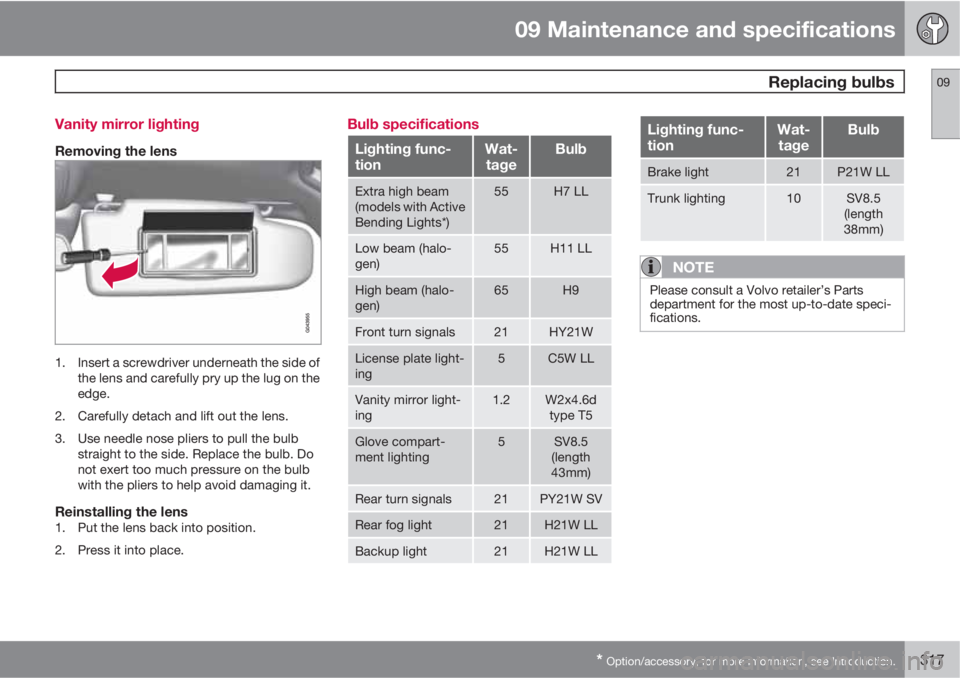
Removing the lens
1. Insert a screwdriver underneath the side of
the lens and carefully pry up the lug on the
edge.
2. Carefully detach and lift out the lens.
3. Use needle nose pliers to pull the bulb
straight to the side. Replace the bulb. Do
not exert too much pressure on the bulb
with the pliers to help avoid damaging it.
Reinstalling the lens1. Put the lens back into position.
2. Press it into place.
Bulb specifications
Lighting func-
tionWat-
tageBulb
Extra high beam
(models with Active
Bending Lights*)55H7 LL
Low beam (halo-
gen)55H11 LL
High beam (halo-
gen)65H9
Front turn signals21HY21W
License plate light-
ing5C5W LL
Vanity mirror light-
ing1.2W2x4.6d
type T5
Glove compart-
ment lighting5SV8.5
(length
43mm)
Rear turn signals21PY21W SV
Rear fog light21H21W LL
Backup light21H21W LL
Lighting func-
tionWat-
tageBulb
Brake light21P21W LL
Trunk lighting10SV8.5
(length
38mm)
NOTE
Please consult a Volvo retailer’s Parts
department for the most up-to-date speci-
fications.
Page 352 of 366
10 Specifications
Overview of information and warning symbols
10
350* Option/accessory, for more information, see Introduction.
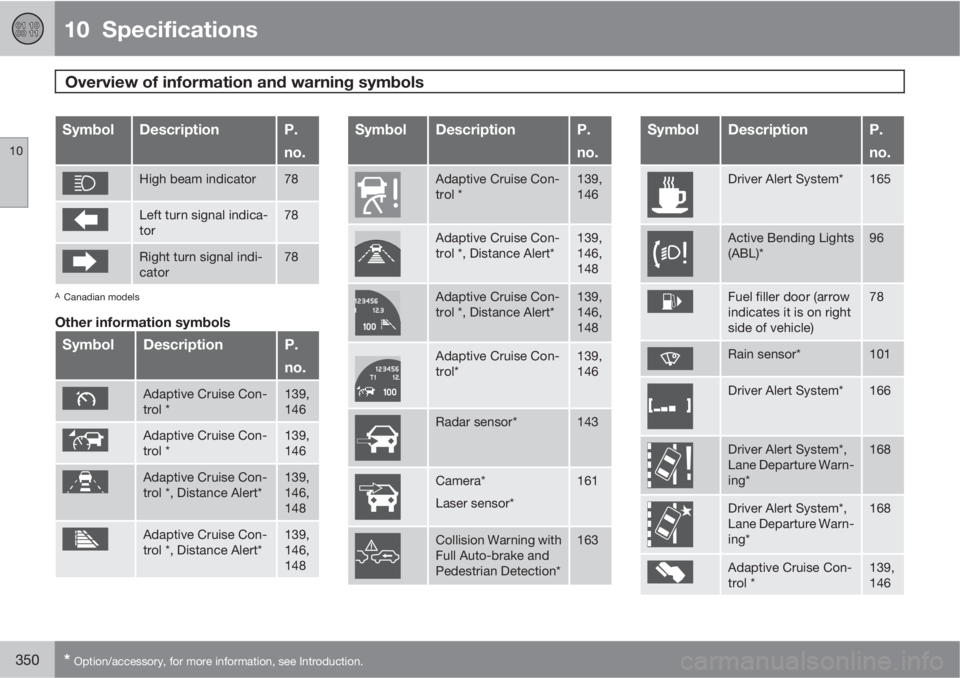
SymbolDescriptionP.
no.
High beam indicator78
Left turn signal indica-
tor78
Right turn signal indi-
cator78
ACanadian models
Other information symbols
SymbolDescriptionP.
no.
Adaptive Cruise Con-
trol *139,
146
Adaptive Cruise Con-
trol *139,
146
Adaptive Cruise Con-
trol *, Distance Alert*139,
146,
148
Adaptive Cruise Con-
trol *, Distance Alert*139,
146,
148
SymbolDescriptionP.
no.
Adaptive Cruise Con-
trol *139,
146
Adaptive Cruise Con-
trol *, Distance Alert*139,
146,
148
Adaptive Cruise Con-
trol *, Distance Alert*139,
146,
148
Adaptive Cruise Con-
trol*139,
146
Radar sensor*143
Camera*
Laser sensor*161
Collision Warning with
Full Auto-brake and
Pedestrian Detection*163
SymbolDescriptionP.
no.
Driver Alert System*165
Active Bending Lights
(ABL)*96
Fuel filler door (arrow
indicates it is on right
side of vehicle)78
Rain sensor*101
Driver Alert System*166
Driver Alert System*,
Lane Departure Warn-
ing*168
Driver Alert System*,
Lane Departure Warn-
ing*168
Adaptive Cruise Con-
trol *139,
146
Page 363 of 366
11 Index
11
361
Trailer towing...................................265, 266
trailer hitch.......................................... 266
Transmission
general description.....................118, 119
oil........................................................ 347
shiftlock override................................ 120
Tread wear indicator................................ 275
Trip computer.......................................... 203
Trip odometers.......................................... 82
Trips, long distance................................. 255
Trunk
changing bulbs................................... 316
driving with it open.............................254
opening manually................................. 67
Tunnel detection........................................ 96
Turn signals............................................... 98
indicator lights...................................... 79
U
Uniform Tire Quality Grading...................285
Unlocking the vehicle..........................55, 65
Upholstery care....................................... 333
V
Valet locking.............................................. 60
Vanity mirror............................................ 208
changing bulbs................................... 317
Vehicle Event Data....................................... 9
Vehicle loading................................262, 283
roof loads............................................ 264
Vehicle maintenance................................ 304
performed by the owner.....................305
Vehicle weights........................................ 344
Voice control
cell phones......................................... 248
Volvo and the environment........................ 12
Volvo maintenance.................................. 304
Volvo On Call Roadside Assistance........ 352
Volvo programs.......................................352
Volvo Sensus........................................... 186
W
Warning flashers, hazard........................... 98
Warning lights.......................... 77, 78, 79, 80
Warning symbol......................................... 81Warning system, collision................157, 158
Warranties................................................ 304
Washer fluid..................................... 319, 347
Washers
headlight............................................. 102
windshield........................................... 101
Water, driving through............................. 255
Waxing..................................................... 333
Weights.................................................... 344
Wheels.....................................................274
changing..................................... 294, 295
storing................................................. 276
Whiplash Protection System..................... 34
Windows
power.................................................. 103
Windshield
rain sensor.......................................... 101
washers.............................................. 102
wipers/washers................................... 101
Windshield washer fluid................... 319, 347
Windshield wipers.................................... 318
service position................................... 318
Wiper blades
replacing............................................. 318