warning VOLVO S60 2014 Owner´s Manual
[x] Cancel search | Manufacturer: VOLVO, Model Year: 2014, Model line: S60, Model: VOLVO S60 2014Pages: 386, PDF Size: 11.24 MB
Page 128 of 386
03 Your driving environment
Transmission
03
126
Shiftlock override
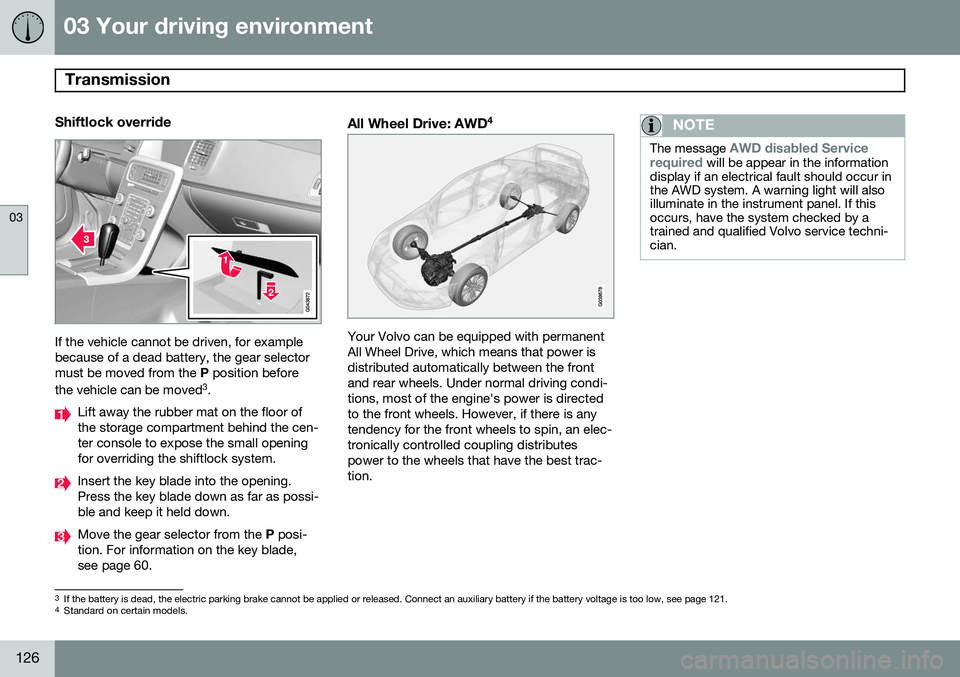
If the vehicle cannot be driven, for example because of a dead battery, the gear selectormust be moved from the P position before
the vehicle can be moved 3
.
Lift away the rubber mat on the floor of the storage compartment behind the cen-ter console to expose the small openingfor overriding the shiftlock system.
Insert the key blade into the opening. Press the key blade down as far as possi-ble and keep it held down.
Move the gear selector from the P posi-
tion. For information on the key blade, see page 60.
All Wheel Drive: AWD 4
Your Volvo can be equipped with permanent All Wheel Drive, which means that power isdistributed automatically between the frontand rear wheels. Under normal driving condi-tions, most of the engine's power is directedto the front wheels. However, if there is anytendency for the front wheels to spin, an elec-tronically controlled coupling distributespower to the wheels that have the best trac-tion.
NOTE
The message AWD disabled Service
required will be appear in the information
display if an electrical fault should occur in the AWD system. A warning light will alsoilluminate in the instrument panel. If thisoccurs, have the system checked by atrained and qualified Volvo service techni-cian.
3 If the battery is dead, the electric parking brake cannot be applied or released. Connect an auxiliary battery if the battery voltage is too low, see page 121.4
Standard on certain models.
Page 131 of 386
03 Your driving environment
Brakes
03
* Option/accessory, for more information, see Introduction.129
Brake system
The brake system is a hydraulic system con- sisting of two separate brake circuits. If aproblem should occur in one of these circuits,it is still possible to stop the vehicle with theother brake circuit. If the brake pedal must be depressed farther than normal and requires greater foot pres-sure, the stopping distance will be longer. A warning light in the instrument panel will light up to warn the driver that a fault hasoccurred. If this light comes on while driving or braking, stop immediately and check the brake fluidlevel in the reservoir.
NOTE
Press the brake pedal hard and maintain pressure on the pedal – do not pump thebrakes.
WARNING
If the fluid level is below the MIN mark in
the reservoir or if a brake system message is shown in the information display: DO
NOT DRIVE . Have the vehicle towed to a
trained and qualified Volvo service techni-cian and have the brake system inspected.
Brake pad inspectionOn vehicles equipped with a jack*, the condi- tion of the brake pads can be checked byraising the vehicle (see page 312 for informa-tion about using the jack and removing awheel) and performing a visual inspection ofthe brake pads.
WARNING
• If the vehicle has been driven immedi- ately prior to a brake pad inspection,the wheel hub, brake components,etc., will be very hot. Allow time forthese components to cool before car-rying out the inspection.
• Apply the parking brake and put thegear selector in the Park (
P) position.
• Block the wheels standing on theground, use rigid wooden blocks orlarge stones.
WARNING
•Use the jack intended for the vehicle when changing a tire. For any otherjob, use stands to support the vehicle.
• The jack should be kept well-greasedand clean, and should not be dam-aged.
• Be sure the jack is on a firm, level,non-slippery surface.
• No objects should be placed betweenthe base of jack and the ground, orbetween the jack and the attachmentbar on the vehicle.
• The jack must correctly engage thejack attachment.
• Never allow any part of your body tobe extended under a vehicle suppor-ted by a jack.
Brake lightsThe brake lights come on automatically when the brakes are applied.
Adaptive brake lightsThe adaptive brake lights activate in the event of sudden braking or if the ABS system isactivated. This function causes an additionaltaillight on each side of the vehicle to illumi-nate to help alert vehicles traveling behind.
Page 133 of 386
03 Your driving environment
Brakes
03
131
NOTE
•When the EBA system is activated, the brake pedal will go down and pressurein the brake system immediatelyincreases to the maximum level. Youmust maintain full pressure on thebrake pedal in order to utilize the sys-tem completely. There will be no brak-ing effect if the pedal is released. EBAis automatically deactivated when thebrake pedal is released.
• When the vehicle has been parked forsome time, the brake pedal may sinkmore than usual when the engine isstarted. This is normal and the pedalwill return to its usual position when itis released.
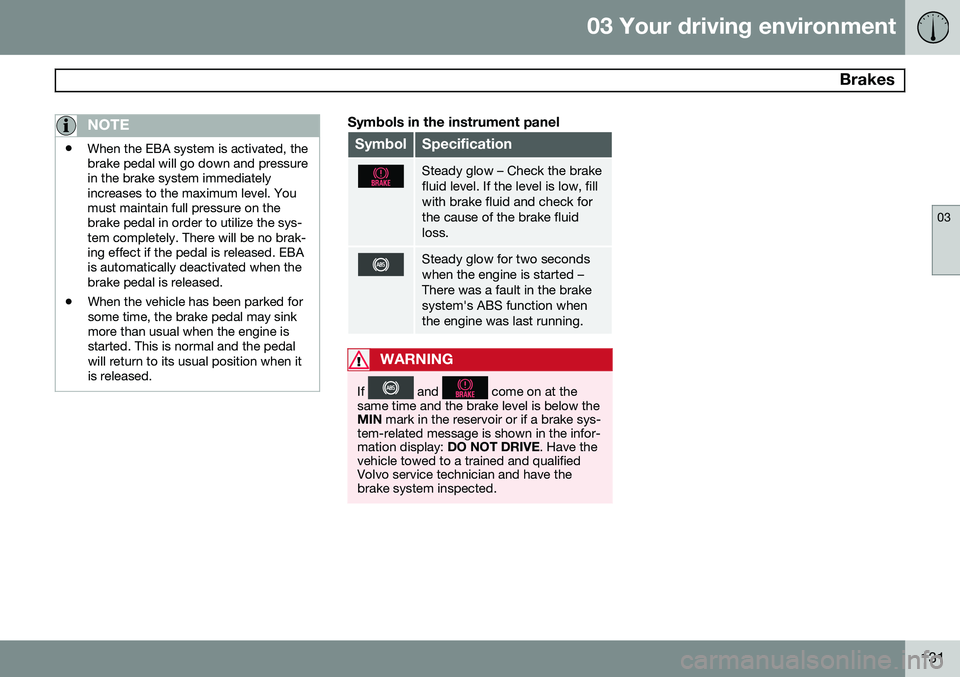
Symbols in the instrument panel
SymbolSpecification
Steady glow – Check the brake fluid level. If the level is low, fillwith brake fluid and check forthe cause of the brake fluidloss.
Steady glow for two seconds when the engine is started –There was a fault in the brakesystem's ABS function whenthe engine was last running.
WARNING
If and come on at the
same time and the brake level is below the MIN mark in the reservoir or if a brake sys-
tem-related message is shown in the infor-mation display: DO NOT DRIVE . Have the
vehicle towed to a trained and qualifiedVolvo service technician and have thebrake system inspected.
Page 136 of 386
03 Your driving environment
Parking brake
03
134
SymbolMessageDescription/action
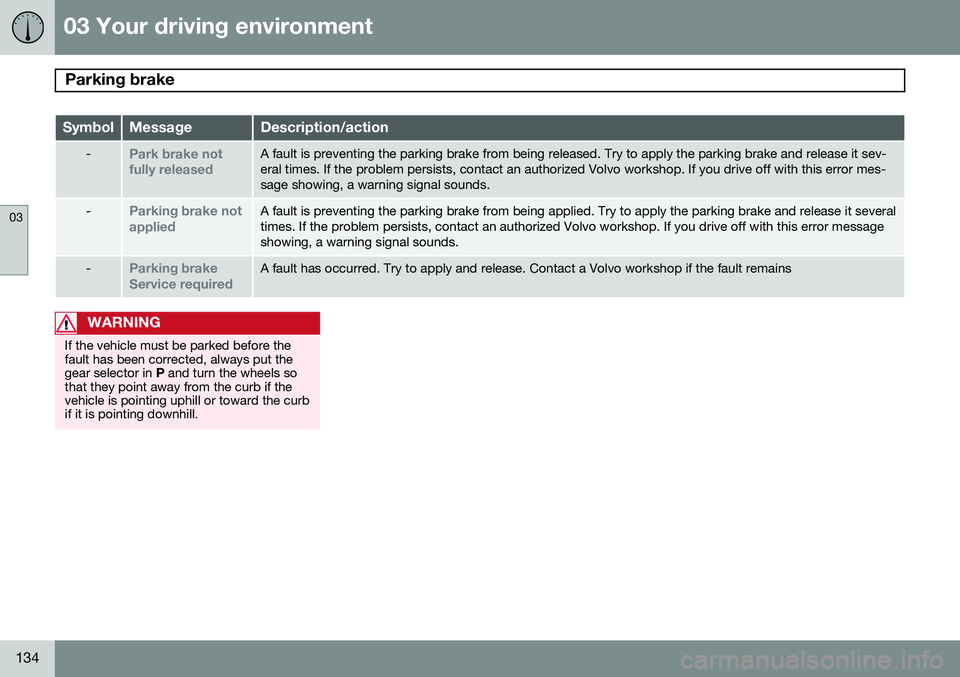
-Park brake not fully releasedA fault is preventing the parking brake from being released. Try to apply the parking brake and release it sev- eral times. If the problem persists, contact an authorized Volvo workshop. If you drive off with this error mes-sage showing, a warning signal sounds.
-Parking brake not appliedA fault is preventing the parking brake from being applied. Try to apply the parking brake and release it several times. If the problem persists, contact an authorized Volvo workshop. If you drive off with this error messageshowing, a warning signal sounds.
-Parking brake Service requiredA fault has occurred. Try to apply and release. Contact a Volvo workshop if the fault remains
WARNING
If the vehicle must be parked before the fault has been corrected, always put thegear selector in P and turn the wheels so
that they point away from the curb if thevehicle is pointing uphill or toward the curbif it is pointing downhill.
Page 138 of 386
G000000
136* Option/accessory, for more information, see Introduction. Stability system..................................................................................... 138
Road sign information (RSI)* ................................................................ 140Cruise control........................................................................................ 142
Adaptive Cruise Control (ACC)*............................................................ 144Distance Alert* ..................................................................................... 155City Safety™ ........................................................................................ 158
Collision warning with Full Auto-brake and Pedestrian Detection*...... 164
Driver Alert System* ............................................................................. 172Park assist*........................................................................................... 178
Rear Park Assist Camera (PAC)* .......................................................... 182
Blind Spot Information System (BLIS)* ................................................ 186
Page 141 of 386
04 Driver support
Stability system
04
139
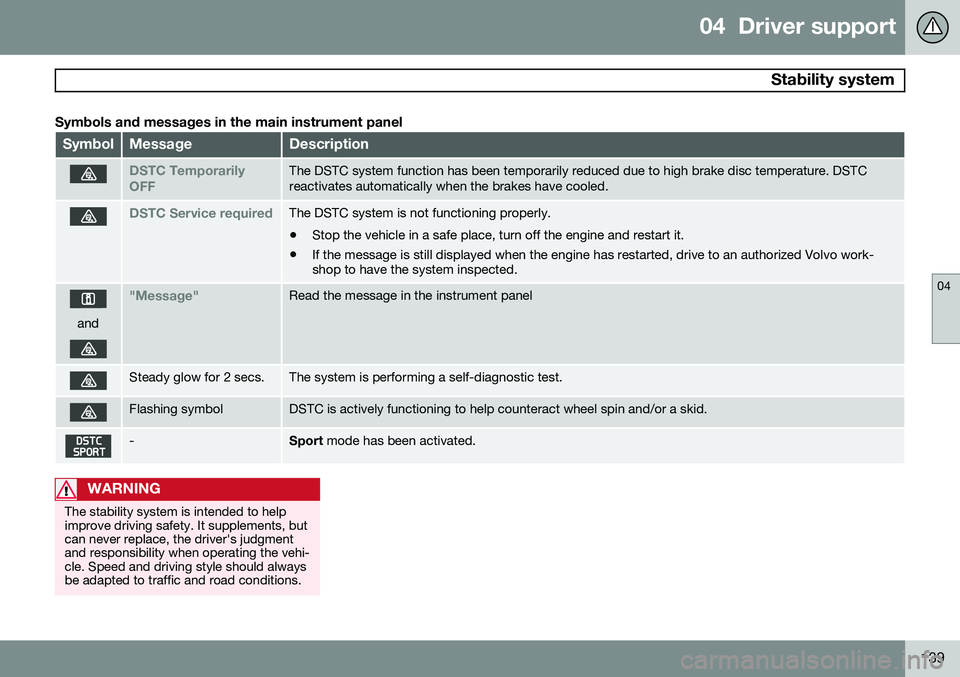
Symbols and messages in the main instrument panel
SymbolMessageDescription
DSTC Temporarily OFFThe DSTC system function has been temporarily reduced due to high brake disc temperature. DSTC reactivates automatically when the brakes have cooled.
DSTC Service requiredThe DSTC system is not functioning properly.
• Stop the vehicle in a safe place, turn off the engine and restart it.
• If the message is still displayed when the engine has restarted, drive to an authorized Volvo work- shop to have the system inspected.
and
"Message"Read the message in the instrument panel
Steady glow for 2 secs.The system is performing a self-diagnostic test.
Flashing symbolDSTC is actively functioning to help counteract wheel spin and/or a skid.
-Sport
mode has been activated.
WARNING
The stability system is intended to help improve driving safety. It supplements, butcan never replace, the driver's judgmentand responsibility when operating the vehi-cle. Speed and driving style should alwaysbe adapted to traffic and road conditions.
Page 142 of 386
04 Driver support
Road sign information (RSI)*
04
140* Option/accessory, for more information, see Introduction.
Introduction
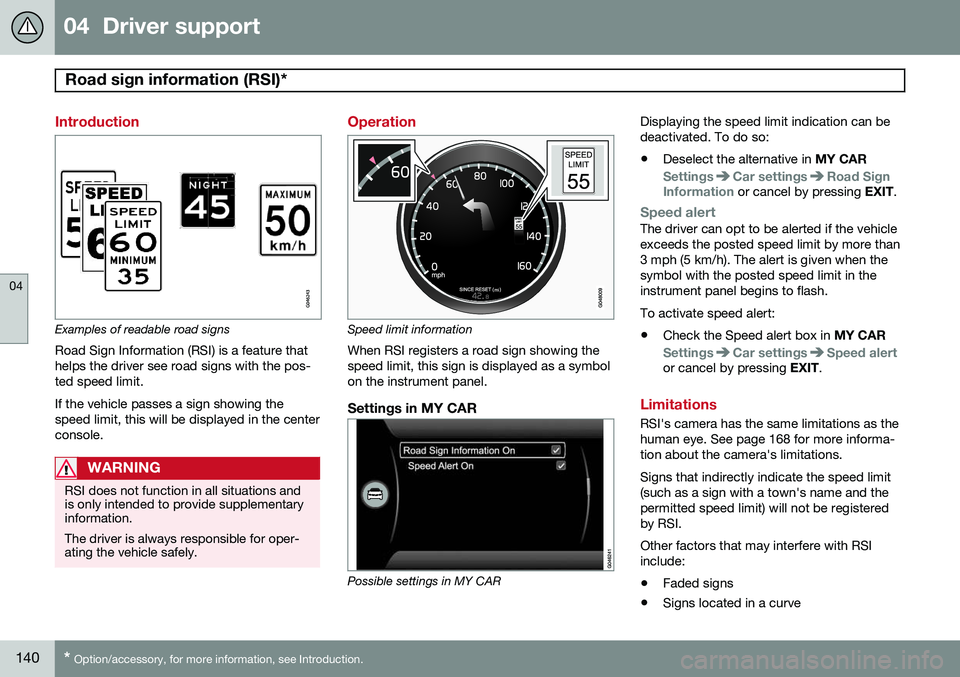
Examples of readable road signs Road Sign Information (RSI) is a feature that helps the driver see road signs with the pos-ted speed limit. If the vehicle passes a sign showing the speed limit, this will be displayed in the centerconsole.
WARNING
RSI does not function in all situations and is only intended to provide supplementaryinformation. The driver is always responsible for oper- ating the vehicle safely.
Operation
Speed limit information
When RSI registers a road sign showing the speed limit, this sign is displayed as a symbolon the instrument panel.
Settings in MY CAR
Possible settings in MY CAR Displaying the speed limit indication can be deactivated. To do so:
• Deselect the alternative in
MY CAR
SettingsCar settingsRoad Sign
Information or cancel by pressing EXIT.
Speed alertThe driver can opt to be alerted if the vehicle exceeds the posted speed limit by more than3 mph (5 km/h). The alert is given when thesymbol with the posted speed limit in theinstrument panel begins to flash. To activate speed alert:
• Check the Speed alert box in
MY CAR
SettingsCar settingsSpeed alertor cancel by pressing EXIT.
Limitations
RSI's camera has the same limitations as the human eye. See page 168 for more informa-tion about the camera's limitations. Signs that indirectly indicate the speed limit (such as a sign with a town's name and thepermitted speed limit) will not be registeredby RSI. Other factors that may interfere with RSI include:
• Faded signs
• Signs located in a curve
Page 145 of 386
04 Driver support
Cruise control
04
143
Automatic deactivationCruise control is automatically deactivated temporarily if one of the following occurs:
• If the speed drops below approximately 20 mph (30 km/h).
• When the brake pedal is depressed.
• If the gear selector is moved to positionN.
• During wheel spin or wheel lock-up.
• If the vehicle's speed is increased byusing the accelerator pedal for more than1 minute.
The currently set speed will be saved in the system's memory.
Temporary deactivationThe driver can temporarily deactivate cruisecontrol by pressing 0. The saved speed is
shown in brackets in the information display.
Resume set speedIf cruise control has been deactivated tempo- rarily, it can be reactivated by pressing
.
The vehicle's speed returns to the most recently set speed.
WARNING
There may be a significant increase in speed after the
button has been
pressed.
Deactivation
Cruise control is disengaged by pressing or by switching off the engine. The set speed is cleared.
WARNING
Cruise control should not be used in heavy traffic or when driving on wet or slipperyroads. Cruise control may not maintain setspeed on steep downgrades.
Page 146 of 386

04 Driver support
Adaptive Cruise Control (ACC)*
04
144* Option/accessory, for more information, see Introduction.
Introduction
Adaptive Cruise Control (ACC) is an optional system designed to assist the driver by main-taining a set speed or a set time interval tothe vehicle ahead. It is primarily intended foruse on long straight roads in steady traffic,such as on highways and other main roads. When the driver has set the desired speed and the time interval to the vehicle ahead,ACC functions as follows:
• If there are no other vehicles in the lane ahead of you, your vehicle will travel atthe set speed.
• If ACC's radar sensor detects a slowermoving vehicle in the lane ahead, the sys-tem will adapt your vehicle's speed tohelp maintain the set time interval to thevehicle ahead. When there are no longerslower moving vehicles ahead, your vehi-cle will accelerate to resume the setspeed.
If ACC is switched off completely or in standby mode and your vehicle comes tooclose to another vehicle ahead, the driver willbe warned by the Distance Alert system (seepage 155).WARNING
• Adaptive Cruise Control cannot cover all driving situations and traffic,weather and road conditions. The"Function" section provides informa-tion about limitations that the drivermust be aware of before using thisfeature.
• This system is designed to be a sup-plementary driving aid. It is not, how-ever, intended to replace the driver'sattention and judgement. The driver isresponsible for maintaining a safe dis-tance and speed and must intervene ifAdaptive Cruise Control does notmaintain a suitable speed or suitabledistance to the vehicle ahead.
• Maintenance of ACC components mayonly be performed by a trained andqualified Volvo technician.
Function
Function overview 1
Warning light, braking by driver required
Controls in steering wheel
Radar sensor in front grille
Adaptive Cruise Control consists of: • A cruise control system to maintain a set speed
• A system to maintain a set distance to thevehicle ahead, which is expressed as atime interval. For example, you canchoose to remain approximately 2 sec-onds behind the vehicle ahead. Theactual distance required to maintain a
1
The illustration is generic; details will vary, depending on the model
Page 147 of 386

04 Driver support
Adaptive Cruise Control (ACC)*
04
* Option/accessory, for more information, see Introduction.145
2-second interval will vary according the speed of the vehicles.
WARNING
•
Adaptive Cruise Control is not a colli- sion avoidance system. The driver isalways responsible for applying thebrakes if the system does not detectanother vehicle.
• Adaptive Cruise Control does not reactto people or animals, or small vehiclessuch as bicycles and motorcycles. Italso does not react to slow moving,parked or approaching vehicles, orstationary objects.
• Do not use Adaptive Cruise Control indemanding driving conditions such ascity driving or other heavy traffic situa-tions, in slippery conditions, whenthere is a great deal of water or slushon the road, during heavy rain orsnow, in poor visibility, on windingroads or on highway on- or off-ramps.
The distance to the vehicle ahead (in the same lane) is monitored by a radar sensor.Your vehicle's speed is regulated by acceler-ating and braking. The brakes may emit asound when they are being modulated by the adaptive cruise control system. This is nor-mal.
WARNING
The brake pedal moves when the adaptive cruise control system modulates thebrakes. Do not rest your foot under thebrake pedal.
The ACC system is designed to smoothly regulate speed. However, the driver mustapply the brakes in situations that requireimmediate braking. This applies when thereare great differences in speed between vehi-cles, or if the vehicle ahead brakes suddenly.
WARNING
Due to limitations in the radar sensor, braking may occur unexpectedly or not atall, see page 151.
Adaptive Cruise Control can be put in active mode at any permitted speed. However, if thevehicle's speed falls below 18 mph (30 km/h)or if engine speed (rpm) becomes too low,ACC disengages (goes into standby mode) and will no longer modulate the brakes
2
. The driver will then have to maintain a safe dis- tance to the vehicle ahead.
WARNING
When Adaptive Cruise Control is in standby mode or is switched off com-pletely, the brakes will not be modulatedautomatically. The driver must assume fullcontrol over the vehicle.
Warning light—driver braking requiredAdaptive Cruise Control can exert brake force that is equivalent to approximately 40% ofthe vehicle's total braking capacity. In situa-tions requiring more brake force than ACCcan provide and if the driver does not applythe brakes, an audible signal from the Colli-sion Warning system will sound and warninglight will illuminate (see page 165) in thewindshield to alert the driver to react.
NOTE
Strong sunlight, reflections, extreme light contrasts, the use of sunglasses, or if thedriver is not looking straight ahead maymake the visual warning signal in the wind-shield difficult to see.
2
Does not apply to vehicles with the optional Queue Assist.