keyless VOLVO S60 2014 Owner´s Manual
[x] Cancel search | Manufacturer: VOLVO, Model Year: 2014, Model line: S60, Model: VOLVO S60 2014Pages: 386, PDF Size: 11.24 MB
Page 4 of 386
Contents
2
00
00 Introduction
Important information................................. 6
Environment.............................................. 12
Important warnings................................... 13
01
01 Safety
Occupant safety........................................ 16
Reporting safety defects........................... 17
Seat belts ................................................. 18
Supplemental Restraint System (SRS) .... 22
Occupant Weight Sensor ......................... 27
Side impact protection (SIPS) airbags ..... 31
Inflatable Curtain (IC) ............................... 33
Whiplash Protection System – WHIPS..... 34
Crash mode.............................................. 36
Child safety............................................... 38
Child restraint systems............................. 41
Infant seats............................................... 43
Convertible seats...................................... 45
Booster cushions...................................... 47
ISOFIX/LATCH lower anchors.................. 48
Top tether anchors.................................... 50
Child safety locks...................................... 51
02
02 Locks and alarm
Remote key and key blade....................... 54
Valet locking ............................................. 63
Keyless drive............................................. 64
Locks........................................................ 67
Alarm......................................................... 72
Page 54 of 386
52
Remote key and key blade..................................................................... 54 Valet locking ........................................................................................... 63Keyless drive........................................................................................... 64Locks....................................................................................................... 67Alarm....................................................................................................... 72
Page 57 of 386
02 Locks and alarm
Remote key and key blade
02
* Option/accessory, for more information, see Introduction.55
FCC ID:KR55WK49266 + Siemens VDO 5WK49233 FCC ID:KR55WK49233This device complies with part 15 of the FCC rules and RSS-210. Operation is subject tothe following conditions: (1) This device maynot cause harmful interference, and (2) thisdevice must accept any interferencereceived, including interference that maycause undesired operation. Canada-5WK49264IC:267T-5WK49264 + Siemens VDO 5WK49236 IC:267T-5WK49236, 5WK49266IC:267T-5WK49266 + Siemens VDO 5WK49233 IC:267T-5WK49233Operation is subject to the following condi- tions: (1) this device may not cause interfer-ence, and (2) this device must accept anyinterference, including interference that maycause undesired operation of the device.
Key memory: door mirrors and driver's seat
The position of the side door mirrors, power driver's seat* and the selected instrument panel theme
1
are stored in the remote keys
when the vehicle is locked. The next time the
driver's door is unlocked with the same
remote key and the door is opened within 2 minutes , the power driver's seat and side
door mirrors will automatically move to theposition that they were in when the doorswere most recently locked with the sameremote key. If the seat/mirrors have not beenreadjusted since the vehicle was locked, theywill already be in the position stored in thatparticular remote key and will not move. Seepage 89 for more information. See alsopage 90 for more information on this fea-ture. This feature can be activated or deactivated in the vehicle's menu by pressing MY CAR
and going into
SettingsCar settingsCar key memory. See page 197 for a
description of the menu system. See also page 64 for information regarding vehicles with the optional keyless drive.
Confirmation when locking/unlocking the vehicle
Settings can be made in the menu system for audible and visual confirmation when thevehicle has been locked or unlocked. Withthese functions activated, the following willoccur when the vehicle is locked/unlocked:
Locking confirmation
• The turn signals flash once, an audible signal sounds and the door mirrors willfold* in.
Confirmation will only be given when all doors and the trunk are properly closed and locked.
NOTE
If you do not receive confirmation when locking the vehicle, check whether a dooror the trunk is ajar, or if this feature hasbeen turned off in the menu.
Unlocking confirmation
• The turn signals will flash twice and the door mirrors will fold* out.
Making a settingDifferent alternatives for locking/unlocking confirmation can be selected in the menus bypressing
MY CAR on the center console con-
trol panel.
1 Optional digital instrument panel only
Page 58 of 386
02 Locks and alarm
Remote key and key blade
02
56
•To activate visual confirmation: go to
SettingsCar settingsLight
settings and select Door lock
confirmation light and/or Unlock
confirmation light by pressing OK/
MENU .
• To activate audible confirmation: go to
SettingsCar settingsLock
settings and select Audible
confirmation by pressing OK/MENU.
See page 197 for a description of the menu system.
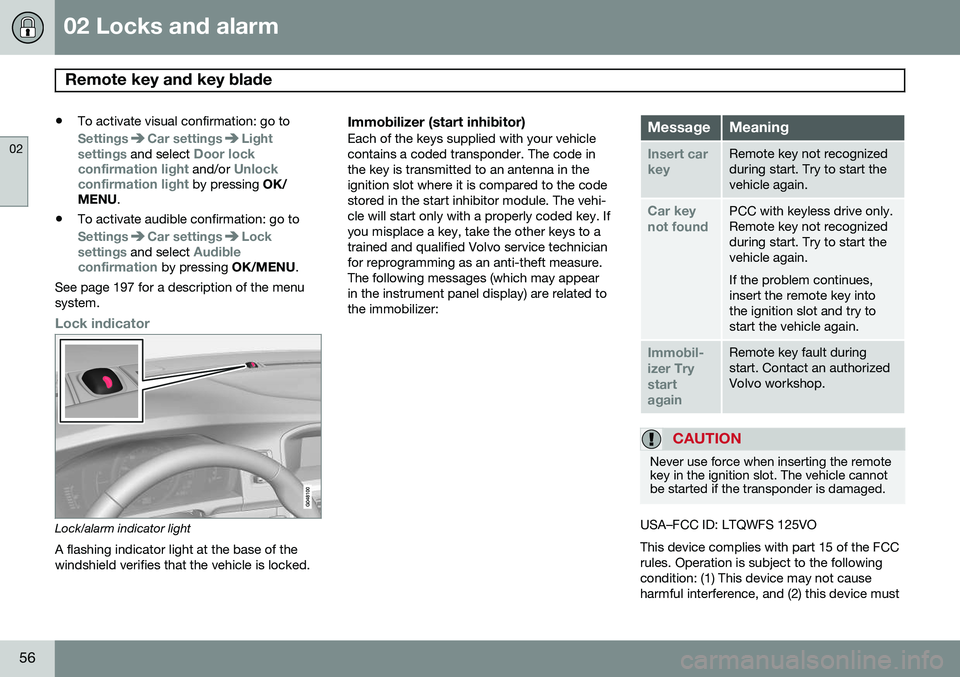
Lock indicator
Lock/alarm indicator light
A flashing indicator light at the base of the windshield verifies that the vehicle is locked.
Immobilizer (start inhibitor)Each of the keys supplied with your vehiclecontains a coded transponder. The code inthe key is transmitted to an antenna in theignition slot where it is compared to the codestored in the start inhibitor module. The vehi-cle will start only with a properly coded key. Ifyou misplace a key, take the other keys to atrained and qualified Volvo service technicianfor reprogramming as an anti-theft measure.The following messages (which may appearin the instrument panel display) are related tothe immobilizer:MessageMeaning
Insert car keyRemote key not recognized during start. Try to start thevehicle again.
Car key not foundPCC with keyless drive only. Remote key not recognizedduring start. Try to start thevehicle again. If the problem continues, insert the remote key intothe ignition slot and try tostart the vehicle again.
Immobil- izer TrystartagainRemote key fault during start. Contact an authorizedVolvo workshop.
CAUTION
Never use force when inserting the remote key in the ignition slot. The vehicle cannotbe started if the transponder is damaged.
USA–FCC ID: LTQWFS 125VO This device complies with part 15 of the FCC rules. Operation is subject to the followingcondition: (1) This device may not causeharmful interference, and (2) this device must
Page 62 of 386
02 Locks and alarm
Remote key and key blade
02
60* Option/accessory, for more information, see Introduction.
or unlock the vehicle will show the vehicle's most recently received status. The indicatorlights will not flash when the information but-ton is pressed while the PCC is out of range. If more than one PCC is used to lock/unlock the vehicle, only the one used most recentlywill show the correct locking status.
NOTE
If none of the indicator lights illuminate when the information button is pressed,this may be because the most recenttransmission between the vehicle and thePCC was interrupted or impeded by build-ings or other objects.
Keyless driveVehicles equipped with the optional Personal Car Communicator have the keyless drivefunction, see page 64 for detailed informa-tion.
Detachable key blade
The key blade can be removed from the remote key. When removed, the key bladecan be used to:
• Lock/unlock the driver's door if the remote key is not functioning properly
• Lock/unlock the glove compartment (seepage 69)
• Override the transmission's shiftlock sys-tem (see page 126)
• Enable/disable the valet locking function(see page 63)
• The front passenger's door and the rearside doors can be locked manually if nec-essary (see page 67)
• The trunk can be opened manually if nec-essary (see page 70)
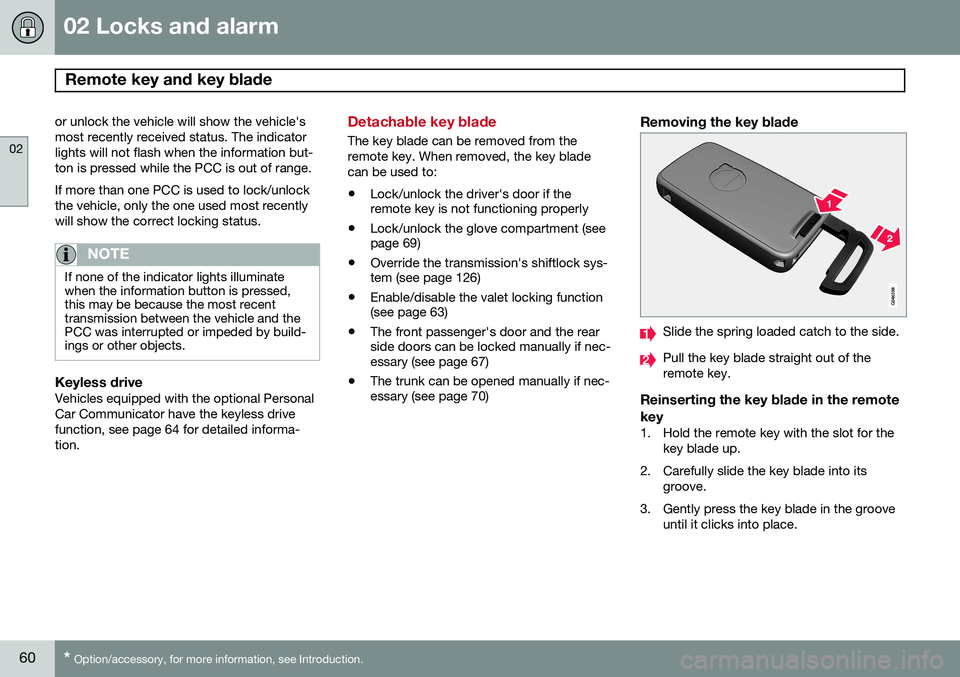
Removing the key blade
Slide the spring loaded catch to the side.
Pull the key blade straight out of the remote key.
Reinserting the key blade in the remote key
1. Hold the remote key with the slot for the
key blade up.
2. Carefully slide the key blade into its groove.
3. Gently press the key blade in the groove until it clicks into place.
Page 63 of 386
02 Locks and alarm
Remote key and key blade
02
}}
* Option/accessory, for more information, see Introduction.61
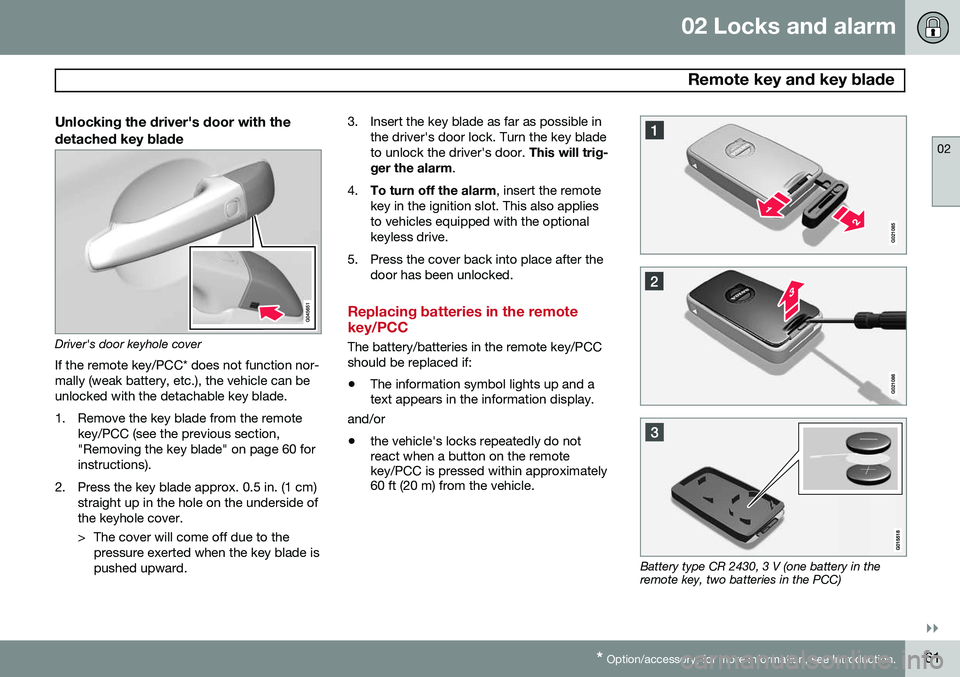
Unlocking the driver's door with the detached key blade
Driver's door keyhole cover
If the remote key/PCC* does not function nor- mally (weak battery, etc.), the vehicle can beunlocked with the detachable key blade.
1. Remove the key blade from the remote key/PCC (see the previous section, "Removing the key blade" on page 60 forinstructions).
2. Press the key blade approx. 0.5 in. (1 cm) straight up in the hole on the underside ofthe keyhole cover.
> The cover will come off due to thepressure exerted when the key blade is pushed upward. 3. Insert the key blade as far as possible in
the driver's door lock. Turn the key bladeto unlock the driver's door. This will trig-
ger the alarm .
4. To turn off the alarm , insert the remote
key in the ignition slot. This also appliesto vehicles equipped with the optionalkeyless drive.
5. Press the cover back into place after the door has been unlocked.
Replacing batteries in the remote key/PCC
The battery/batteries in the remote key/PCC should be replaced if: •The information symbol lights up and a text appears in the information display.
and/or
• the vehicle's locks repeatedly do notreact when a button on the remotekey/PCC is pressed within approximately60 ft (20 m) from the vehicle.
Battery type CR 2430, 3 V (one battery in the remote key, two batteries in the PCC)
Page 66 of 386
02 Locks and alarm
Keyless drive
02
64* Option/accessory, for more information, see Introduction.
Keyless drive* (models with Personal Car Communicator only)
Keyless locking and unlocking
G020577
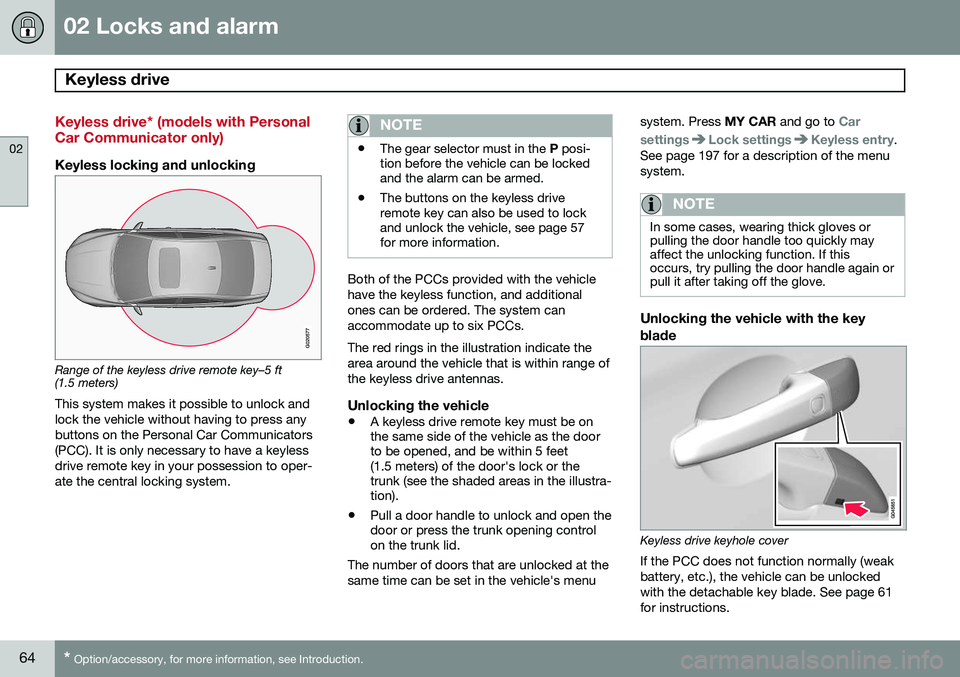
Range of the keyless drive remote key–5 ft (1.5 meters)
This system makes it possible to unlock and lock the vehicle without having to press anybuttons on the Personal Car Communicators(PCC). It is only necessary to have a keylessdrive remote key in your possession to oper-ate the central locking system.
NOTE
• The gear selector must in the
P posi-
tion before the vehicle can be locked and the alarm can be armed.
• The buttons on the keyless driveremote key can also be used to lockand unlock the vehicle, see page 57for more information.
Both of the PCCs provided with the vehicle have the keyless function, and additionalones can be ordered. The system canaccommodate up to six PCCs. The red rings in the illustration indicate the area around the vehicle that is within range ofthe keyless drive antennas.
Unlocking the vehicle
•
A keyless drive remote key must be on the same side of the vehicle as the doorto be opened, and be within 5 feet(1.5 meters) of the door's lock or thetrunk (see the shaded areas in the illustra-tion).
• Pull a door handle to unlock and open thedoor or press the trunk opening controlon the trunk lid.
The number of doors that are unlocked at the same time can be set in the vehicle's menu system. Press
MY CAR and go to
Car
settings
Lock settingsKeyless entry.
See page 197 for a description of the menu system.
NOTE
In some cases, wearing thick gloves or pulling the door handle too quickly mayaffect the unlocking function. If thisoccurs, try pulling the door handle again orpull it after taking off the glove.
Unlocking the vehicle with the key blade
Keyless drive keyhole cover If the PCC does not function normally (weak battery, etc.), the vehicle can be unlockedwith the detachable key blade. See page 61for instructions.
Page 67 of 386

02 Locks and alarm
Keyless drive
02
65
Locking the vehicle
Models with keyless drive have a pressure-sensi- tive area on the outside door handles and a rub-ber-covered button next to the trunk openingcontrol
The doors and the trunk can be locked by pressing the pressure-sensitive area on eachof the outside door handles or the rubber-covered button next to the trunk openingcontrol. The lock indicator on the dash willbegin to flash.
NOTE
On keyless drive vehicles, the gear selec- tor must be in the Park ( P) position, all
doors and the trunk must be closed andthe ignition must be switched off beforethe vehicle can be locked.
Keyless drive remote key and driver's seat/door mirror memory
• When you leave the vehicle with a PCC in your possession and lock any door, theposition of the driver's seat and door mir-rors will be stored in the seat's memory.
• The next time a door is opened by a per-son with the
same PCC in his/her pos-
session, the driver's seat and door mir-rors will automatically move to the posi-tion that they were in when the door wasmost recently locked.
NOTE
If several people carrying PCCs approach the vehicle at the same time, the driver'sseat and door mirrors will assume thepositions they were in for the person whoopens the driver's door.
See also page 89 for information on adjust- ing and storing the seat's position in the seatmemory.
Keyless drive information messagesIf all of the PCCs are removed from the vehi-cle while the engine is running or if the igni-tion is in mode II (see page 86) and all of
the doors are closed, a message will appearin the instrument panel display and an audiblesignal will sound. When at least one PCC has been returned tothe car, the message will be erased in the dis-play and the audible signal will stop when:
• A door has been opened and closed
• The PCC has been inserted in the ignition slot
• The
OK button (see page 195 for the
location of this button) has been pressed.
CAUTION
• Keyless drive remote keys should never be left in the vehicle. In the eventof a break-in, a remote found in thevehicle could make it possible to startthe engine.
• Electromagnetic fields or metalobstructions can interfere with thekeyless drive system. The remote keyshould never be placed closer thanapproximately 4-6 in. (10-15 cm) tocell phones, metallic objects or e.g.,stored in a metal briefcase.
USA – FCC ID:KR55WK48952, KR55WK48964 NOTEThis device complies with part 15 of the FCC Rules. Operation is subject to the followingtwo conditions: (1) This device may not cause
Page 68 of 386
02 Locks and alarm
Keyless drive
02
66
harmful interference, and (2) this device must accept interference received, including inter-ference that may cause undesired operation. CAUTIONChanges or modifications not expressly approved by the manufacturer could void theuser's authority to operate the equipment. Siemens VDO5WK48891Tested To Comply With FCC StandardsFor Automobile UseCanada – IC:267T-5WK48952, 267T-5WK48964, 267T-5WK48891 NOTEThis device complies with RSS -210 of Indus- try Canada. Operation is subject to the fol-lowing two conditions: (1) This device maynot cause harmful interference, and (2) thisdevice must accept interference received,including interference that may cause unde-sired operation. CAUTIONChanges or modifications not expressly approved by the manufacturer could void theuser's authority to operate the equipment.Location of the keyless drive antennas
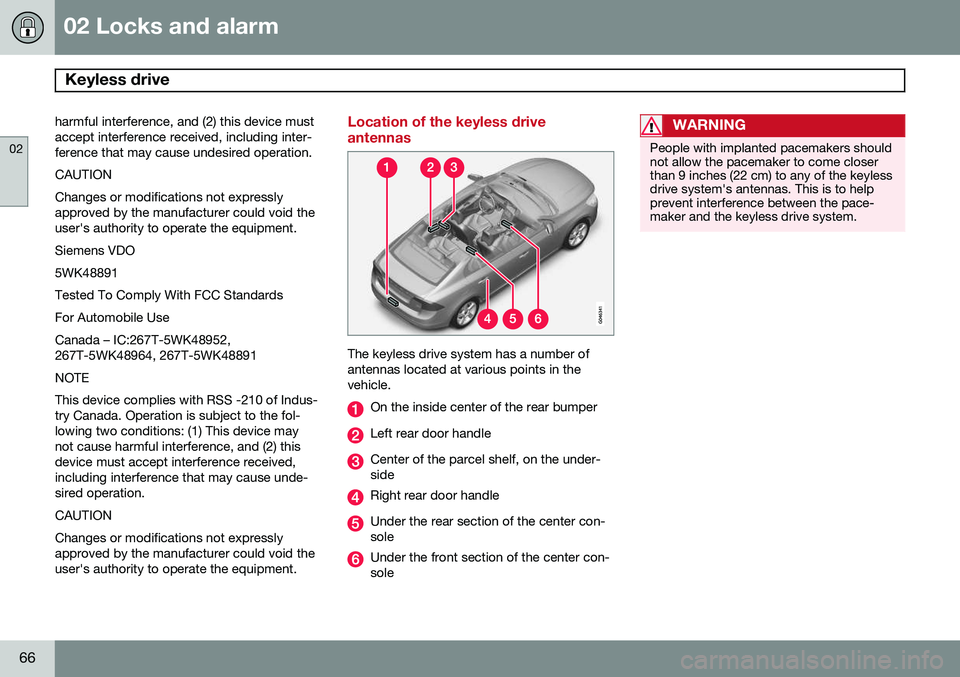
The keyless drive system has a number of antennas located at various points in thevehicle.
On the inside center of the rear bumper
Left rear door handle
Center of the parcel shelf, on the under- side
Right rear door handle
Under the rear section of the center con- sole
Under the front section of the center con- sole
WARNING
People with implanted pacemakers should not allow the pacemaker to come closerthan 9 inches (22 cm) to any of the keylessdrive system's antennas. This is to helpprevent interference between the pace-maker and the keyless drive system.
Page 69 of 386
02 Locks and alarm
Locks
02
67
Locking and unlocking the vehicle
From outside the vehicleThe remote key locks and unlocks all of the doors and the trunk. Before the vehicle can be locked from the outside with the remote key, the driver's doormust be closed. Any other door/trunk that isopen will be locked and the alarm will bearmed.
NOTE
Be sure the remote key is outside of the vehicle before the other doors/trunk areclosed to help avoid locking the remoteinside the vehicle.
If the vehicle is equipped with the optional keyless drive system, all doors/trunk must beclosed before the vehicle can be locked. The first press on the unlock button unlocks the driver's door and a second press unlocksthe other doors and the trunk (see also page57). This setting can be changed in the menusystem. See page 197 for a description. If the locks repeatedly do not react when the unlock button is pressed, it may be necessaryto replace the batteries in the remote, seepage 57. In this case the vehicle can beunlocked with the detachable key blade. Seepage 61.
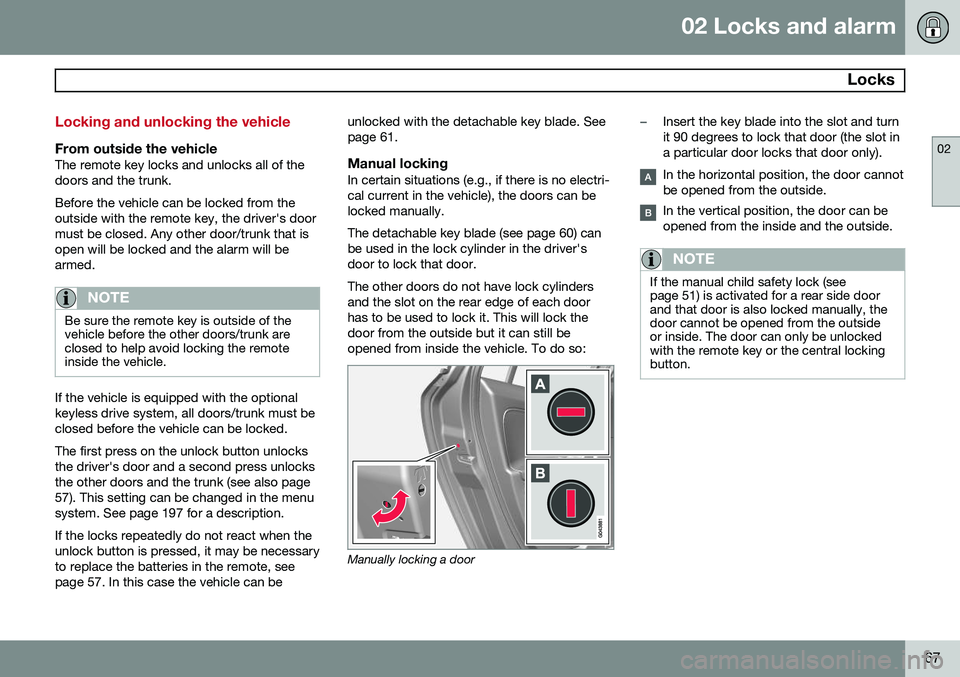
Manual lockingIn certain situations (e.g., if there is no electri-cal current in the vehicle), the doors can belocked manually. The detachable key blade (see page 60) can be used in the lock cylinder in the driver'sdoor to lock that door. The other doors do not have lock cylinders and the slot on the rear edge of each doorhas to be used to lock it. This will lock thedoor from the outside but it can still beopened from inside the vehicle. To do so:
Manually locking a door
–Insert the key blade into the slot and turn it 90 degrees to lock that door (the slot ina particular door locks that door only).
In the horizontal position, the door cannot be opened from the outside.
In the vertical position, the door can be opened from the inside and the outside.
NOTE
If the manual child safety lock (see page 51) is activated for a rear side doorand that door is also locked manually, thedoor cannot be opened from the outsideor inside. The door can only be unlockedwith the remote key or the central lockingbutton.