lights VOLVO S60 2014 Owner´s Manual
[x] Cancel search | Manufacturer: VOLVO, Model Year: 2014, Model line: S60, Model: VOLVO S60 2014Pages: 386, PDF Size: 11.24 MB
Page 18 of 386
01 Safety
Occupant safety 01
16
Volvo's concern for safety
Safety is Volvo's cornerstone. Our concern dates back to 1927 when the first Volvo rolledoff the production line. Three-point seat belts(a Volvo invention), safety cages, and energy-absorbing impact zones were designed intoVolvo vehicles long before it was fashionableor required by government regulation. We will not compromise our commitment to safety. We continue to seek out new safetyfeatures and to refine those already in ourvehicles. You can help. We would appreciatehearing your suggestions about improvingautomobile safety. We also want to know ifyou ever have a safety concern with yourvehicle. Call us in the U.S. at:1-800-458-1552 or in Canada at:1-800-663-8255.
Occupant safety remindersHow safely you drive doesn't depend on howold you are but rather on:• How well you see.
• Your ability to concentrate.
• How quickly you make decisions under stress to avoid an accident.
The following suggestions are intended to help you cope with the ever changing trafficenvironment. •
Never drink and drive.
• If you are taking any medication, consult your physician about its potential effectson your driving abilities.
• Take a driver-retraining course.
• Have your eyes checked regularly.
• Keep your windshield and headlightsclean.
• Replace wiper blades when they start toleave streaks.
• Take into account the traffic, road, andweather conditions, particularly withregard to stopping distance.
• Never send text messages while driving.
• Refrain from using or minimize the use ofa cell phone while driving.
Recall information
Information regarding recalls or other service campaigns is available on our website atwww.volvocars.com/us/. Select the tabYOUR VOLVO and the heading RECALLINFORMATION will be displayed at the lowerleft side of the screen. Enter your VehicleIdentification Number for your vehicle (foundat the base of the windshield). If your vehiclehas any open Recalls, they will be displayedon this page.
Volvo customers in CanadaFor any questions regarding open recalls foryour vehicle, please contact your authorizedVolvo retailer. If your retailer is unable toanswer your questions, please contact VolvoCustomer Relations at 905 695-9626, Mon-day through Friday, 8:30 A.M. to 5:00 P.M.EST or by e-mail at [email protected] may also write us at: Volvo Cars of CanadaNational Customer Service9130 Leslie Street, Suite 101Richmond Hill, Ontario L4B 0B9
Page 24 of 386

01 Safety
Supplemental Restraint System (SRS) 01
22* Option/accessory, for more information, see Introduction.
General information
Models with an analog instrument panel
Models with an digital instrument panel*
As an enhancement to the three-point seat belts, your Volvo is equipped with a Supple-mental Restraint System (SRS). Volvo's SRS consists of seat belt pretensioners, front air-bags, side impact airbags, a front passengeroccupant weight sensor, and inflatable cur-tains. All of these systems are monitored bythe SRS control module. An SRS warninglight in the instrument panel (see the illustra-tion) illuminates when the ignition is in modes I
or II, and will normally go out after approxi-
mately 6 seconds if no faults are detected in the system. Where applicable, a text message will also be displayed when the SRS warning light illumi-nates. If this warning symbol is not function-ing properly, the general warning symbol illu-minates and a text message will be displayed.See also page 79 for more informationabout indicator and warning lights.
WARNING
• If the SRS warning light stays on after the engine has started or if it illumi-nates while you are driving, have thevehicle inspected by a trained andqualified Volvo service technician assoon as possible.
• Never try to repair any component orpart of the SRS yourself. Any interfer-ence in the system could cause mal-function and serious injury. All work onthese systems should be performed bya trained and qualified Volvo servicetechnician.
Page 30 of 386

01 Safety
Occupant Weight Sensor 01
28
WARNING
•Never try to open, remove, or repair any components in the OWS system.This could result in system malfunc-tion. Maintenance or repairs shouldonly be carried out by an a trained andqualified Volvo service technician.
• The front passenger's seat should notbe modified in any way. This couldreduce pressure on the seat cushion,which might interfere with the OWSsystem's function.
Passeng- er's seatoccu-pancy sta-tusOWS indicatorlight sta-tusPasseng- er's sidefront air-bag status
Seat unoc- cupiedOWS indi- cator lightlights up.Passenger's side front air-bag disabled
Seat occu- pied by lowweightoccupant/ object AOWS indi- cator lightlights upPassenger's side front air-bag disabled
Seat occu- pied byheavy occu-pant/objectOWS indi- cator lightis
not litPassenger's side front air-bag enabled
A
Volvo recommends that children always be properly restrained in appropriate child restraints in the rear seats.Do not assume that the passenger's side front airbag isdisabled unless the PASSENGER AIRBAG OFF indicatorlamp is lit. Make sure the child restraint is properly instal-led. If there is any doubt as to the status of the passeng-er's side front airbag, move the child restraint to the rearseat.
The OWS is designed to enable (may inflate) the passenger's side front airbag in the eventof a collision anytime the system senses thata person of adult size is sitting properly in thefront passenger's seat. The PASSENGER AIRBAG OFF indicator lamp will be off andremain off. If a person of adult size is sitting in the front passenger's seat, but the PASSENGER AIR-BAG OFF indicator lamp is on, it is possiblethat the person isn't sitting properly in theseat. If this happens:
• Turn the vehicle off and ask the person to place the seatback in an upright position.
• Have the person sit upright in the seat,centered on the seat cushion, with theperson's legs comfortably extended.
• Restart the vehicle and have the personremain in this position for about twominutes. This will allow the system todetect that person and enable the pas-senger's frontal airbag.
• If the PASSENGER AIRBAG OFF indica-tor lamp remains on even after this, theperson should be advised to ride in therear seat.
This condition reflects limitations of the OWS classification capability. It does not indicateOWS malfunction.
ModificationsIf you are considering modifying your vehiclein any way to accommodate a disability, forexample by altering or adapting the driver's
Page 60 of 386
02 Locks and alarm
Remote key and key blade
02
58* Option/accessory, for more information, see Introduction.
After a short pause, press the Unlock button a second time within 10 seconds to unlockthe other doors and the trunk. This function can be changed so that all doors unlock at the same time by pressing My Car and going to
SettingsCar
settings
Lock settingsChange doors
unlock setting. See page 197 for a descrip-
tion of the menu system.
Approach lighting – As you approach
the vehicle, press the button on the remote key to light the interior lighting, parking lights,license plate lighting and the lights in the doormirrors*. These lights will switch off automatically after 30, 60 or 90 seconds. See page 197 for adescription of the menu system.
Unlock/open trunk
Press once: This unlocks the trunk (but does
not open it) and disarms the alarm (the alarm indicator light on the dashboard will go out). Ifthe trunk is not opened within two minutes itwill automatically relock and the alarm will berearmed. Press twice: This both unlocks the trunk and
pops it open slightly.
NOTE
Any excess weight (snow, etc.) on the trunk lid may prevent it from opening.
See also page 70 for information on open- ing the trunk from the passenger compart-ment. After closing, the trunk will not automatically relock. Press Lock to relock it and rearm thealarm.
Panic alarm – This button can be used
to attract attention during emergency situa- tions. To activate the panic alarm, press and hold this button for at least 3 seconds or press ittwice within 3 seconds. The turn signals andhorn will be activated. The panic alarm willstop automatically after 2 minutes and45 seconds. To deactivate, wait approximately 5 seconds and press the button again. The Panic alarm button will not unlock the vehicle.
RangeThe remote key has a range of approximately60 ft. (20 m) from the vehicle.
NOTE
Buildings or other obstacles may interfere with the function of the remote key. Thevehicle can also be locked or unlockedwith the key blade, see page 60.
If the remote key is removed from the vehicle while the engine is running or if the ignition isin mode I or II and all of the doors are closed,
a message will appear in the instrument paneldisplay and there will be an audible signal. When the remote key is returned to the vehi- cle, the message will be erased and the audi-ble signal will stop after one of the followinghas been done: • The remote key is inserted in the ignition slot
• The vehicle's speed exceeds 20 mph(30 km/h)
• The
OK button on the left steering wheel
lever is pressed
Page 61 of 386
02 Locks and alarm
Remote key and key blade
02
* Option/accessory, for more information, see Introduction.59
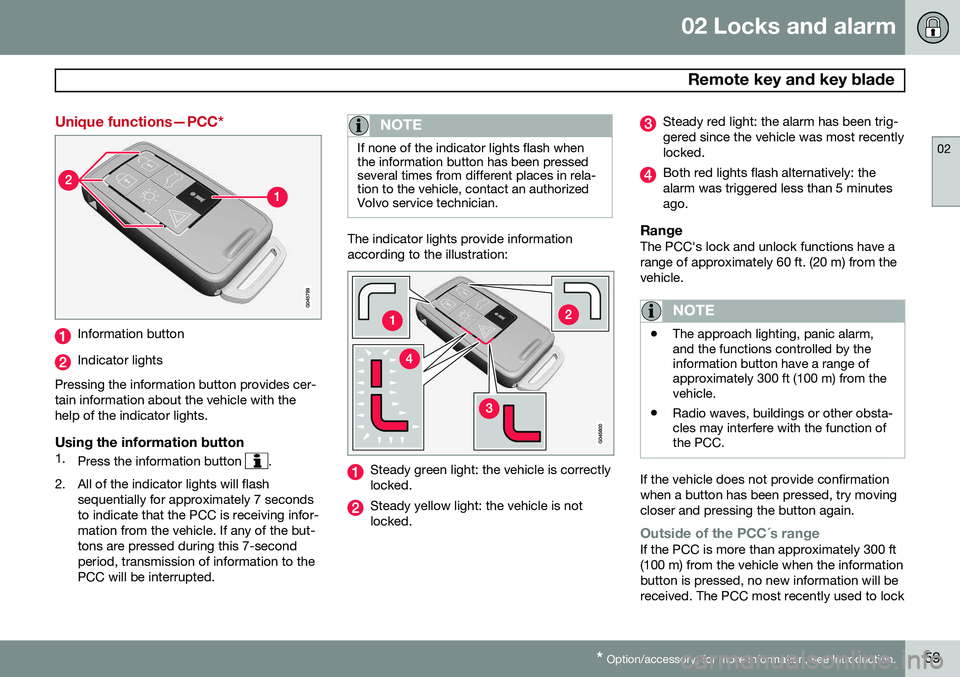
Unique functions—PCC*
Information button
Indicator lights
Pressing the information button provides cer- tain information about the vehicle with thehelp of the indicator lights.
Using the information button1. Press the information button .
2. All of the indicator lights will flash sequentially for approximately 7 seconds to indicate that the PCC is receiving infor-mation from the vehicle. If any of the but-tons are pressed during this 7-secondperiod, transmission of information to thePCC will be interrupted.
NOTE
If none of the indicator lights flash when the information button has been pressedseveral times from different places in rela-tion to the vehicle, contact an authorizedVolvo service technician.
The indicator lights provide information according to the illustration:
Steady green light: the vehicle is correctly locked.
Steady yellow light: the vehicle is not locked.
Steady red light: the alarm has been trig- gered since the vehicle was most recentlylocked.
Both red lights flash alternatively: the alarm was triggered less than 5 minutesago.
RangeThe PCC's lock and unlock functions have arange of approximately 60 ft. (20 m) from thevehicle.
NOTE
•The approach lighting, panic alarm, and the functions controlled by theinformation button have a range ofapproximately 300 ft (100 m) from thevehicle.
• Radio waves, buildings or other obsta-cles may interfere with the function ofthe PCC.
If the vehicle does not provide confirmation when a button has been pressed, try movingcloser and pressing the button again.
Outside of the PCC´s rangeIf the PCC is more than approximately 300 ft (100 m) from the vehicle when the informationbutton is pressed, no new information will bereceived. The PCC most recently used to lock
Page 62 of 386
02 Locks and alarm
Remote key and key blade
02
60* Option/accessory, for more information, see Introduction.
or unlock the vehicle will show the vehicle's most recently received status. The indicatorlights will not flash when the information but-ton is pressed while the PCC is out of range. If more than one PCC is used to lock/unlock the vehicle, only the one used most recentlywill show the correct locking status.
NOTE
If none of the indicator lights illuminate when the information button is pressed,this may be because the most recenttransmission between the vehicle and thePCC was interrupted or impeded by build-ings or other objects.
Keyless driveVehicles equipped with the optional Personal Car Communicator have the keyless drivefunction, see page 64 for detailed informa-tion.
Detachable key blade
The key blade can be removed from the remote key. When removed, the key bladecan be used to:
• Lock/unlock the driver's door if the remote key is not functioning properly
• Lock/unlock the glove compartment (seepage 69)
• Override the transmission's shiftlock sys-tem (see page 126)
• Enable/disable the valet locking function(see page 63)
• The front passenger's door and the rearside doors can be locked manually if nec-essary (see page 67)
• The trunk can be opened manually if nec-essary (see page 70)
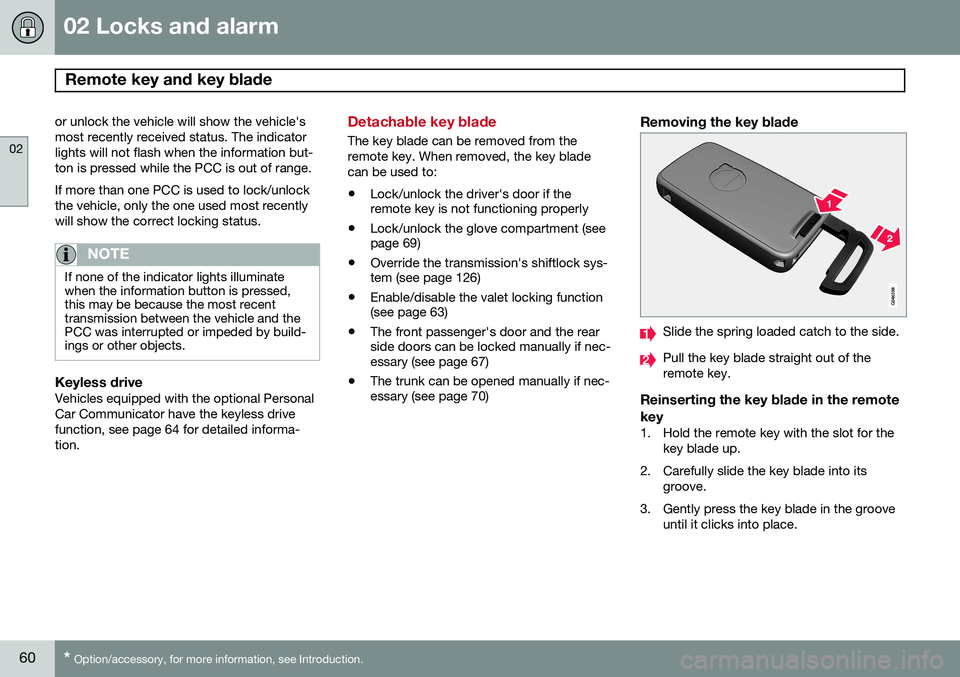
Removing the key blade
Slide the spring loaded catch to the side.
Pull the key blade straight out of the remote key.
Reinserting the key blade in the remote key
1. Hold the remote key with the slot for the
key blade up.
2. Carefully slide the key blade into its groove.
3. Gently press the key blade in the groove until it clicks into place.
Page 63 of 386
02 Locks and alarm
Remote key and key blade
02
}}
* Option/accessory, for more information, see Introduction.61
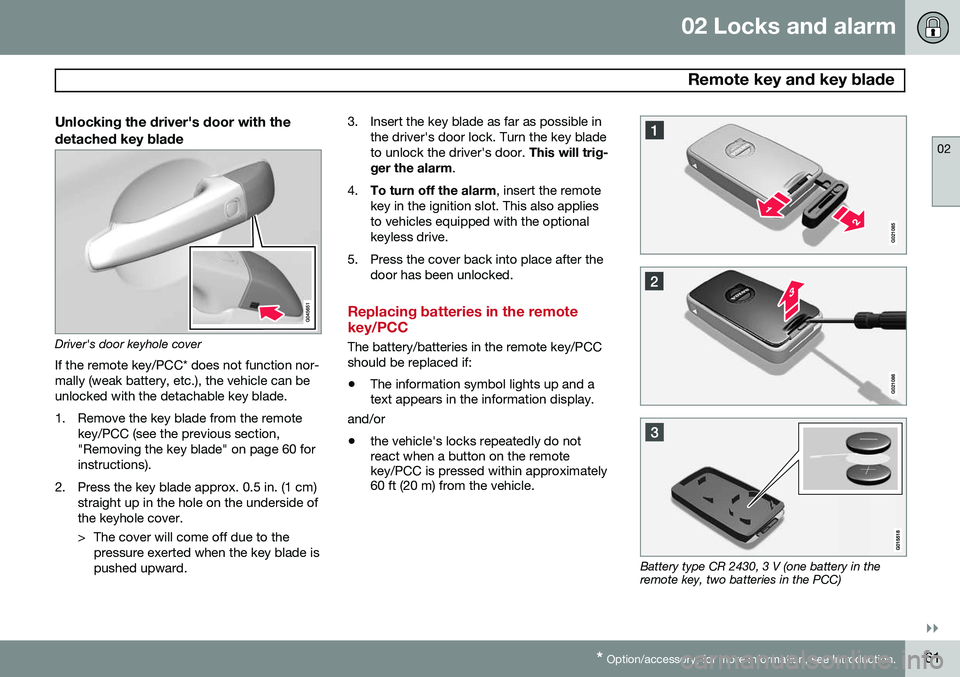
Unlocking the driver's door with the detached key blade
Driver's door keyhole cover
If the remote key/PCC* does not function nor- mally (weak battery, etc.), the vehicle can beunlocked with the detachable key blade.
1. Remove the key blade from the remote key/PCC (see the previous section, "Removing the key blade" on page 60 forinstructions).
2. Press the key blade approx. 0.5 in. (1 cm) straight up in the hole on the underside ofthe keyhole cover.
> The cover will come off due to thepressure exerted when the key blade is pushed upward. 3. Insert the key blade as far as possible in
the driver's door lock. Turn the key bladeto unlock the driver's door. This will trig-
ger the alarm .
4. To turn off the alarm , insert the remote
key in the ignition slot. This also appliesto vehicles equipped with the optionalkeyless drive.
5. Press the cover back into place after the door has been unlocked.
Replacing batteries in the remote key/PCC
The battery/batteries in the remote key/PCC should be replaced if: •The information symbol lights up and a text appears in the information display.
and/or
• the vehicle's locks repeatedly do notreact when a button on the remotekey/PCC is pressed within approximately60 ft (20 m) from the vehicle.
Battery type CR 2430, 3 V (one battery in the remote key, two batteries in the PCC)
Page 70 of 386
02 Locks and alarm
Locks
02
68
From inside the vehicle (central lockingbutton)
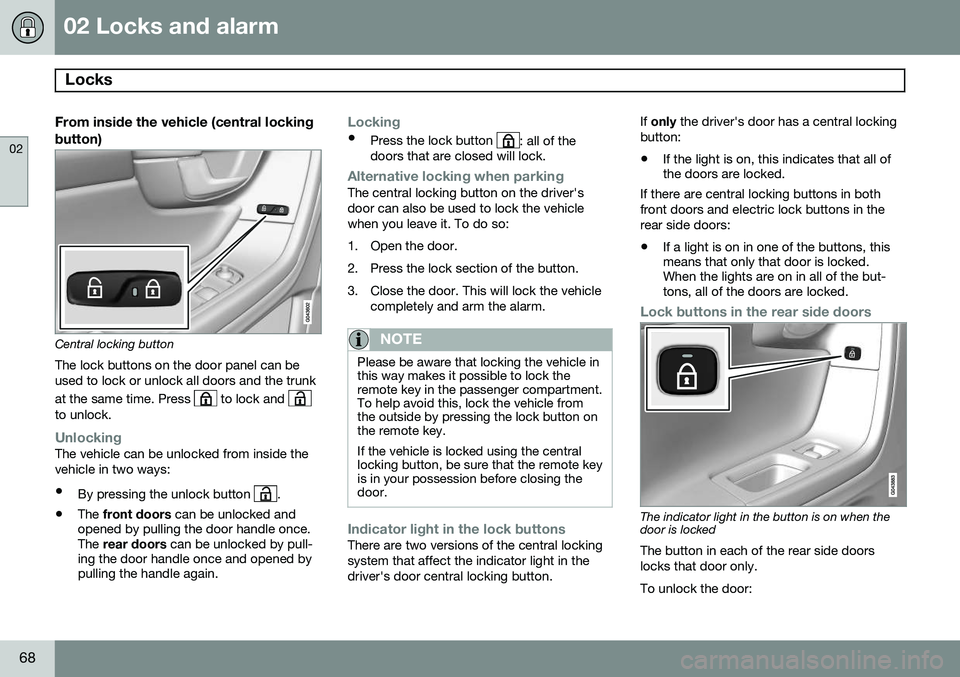
Central locking button
The lock buttons on the door panel can be used to lock or unlock all doors and the trunk at the same time. Press
to lock and to unlock.
UnlockingThe vehicle can be unlocked from inside the vehicle in two ways:
• By pressing the unlock button
.
• The
front doors can be unlocked and
opened by pulling the door handle once. The rear doors can be unlocked by pull-
ing the door handle once and opened bypulling the handle again.
Locking
• Press the lock button : all of the
doors that are closed will lock.
Alternative locking when parkingThe central locking button on the driver's door can also be used to lock the vehiclewhen you leave it. To do so:
1. Open the door.
2. Press the lock section of the button.
3. Close the door. This will lock the vehicle
completely and arm the alarm.
NOTE
Please be aware that locking the vehicle in this way makes it possible to lock theremote key in the passenger compartment.To help avoid this, lock the vehicle fromthe outside by pressing the lock button onthe remote key. If the vehicle is locked using the central locking button, be sure that the remote keyis in your possession before closing thedoor.
Indicator light in the lock buttonsThere are two versions of the central locking system that affect the indicator light in thedriver's door central locking button. If
only the driver's door has a central locking
button:
• If the light is on, this indicates that all of the doors are locked.
If there are central locking buttons in both
front doors and electric lock buttons in the rear side doors: • If a light is on in one of the buttons, this means that only that door is locked.When the lights are on in all of the but-tons, all of the doors are locked.
Lock buttons in the rear side doors
The indicator light in the button is on when the door is locked
The button in each of the rear side doors locks that door only. To unlock the door:
Page 72 of 386
02 Locks and alarm
Locks
02
70
Locking/unlocking the trunk
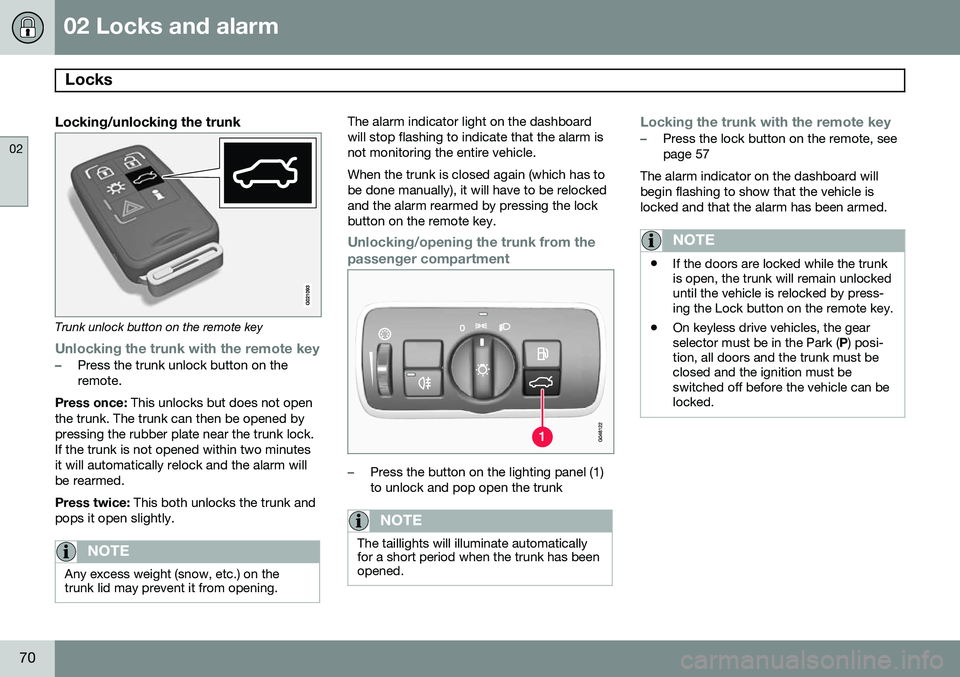
Trunk unlock button on the remote key
Unlocking the trunk with the remote key–Press the trunk unlock button on the remote.
Press once: This unlocks but does not open
the trunk. The trunk can then be opened bypressing the rubber plate near the trunk lock.If the trunk is not opened within two minutesit will automatically relock and the alarm willbe rearmed. Press twice: This both unlocks the trunk and
pops it open slightly.
NOTE
Any excess weight (snow, etc.) on the trunk lid may prevent it from opening.
The alarm indicator light on the dashboard will stop flashing to indicate that the alarm isnot monitoring the entire vehicle. When the trunk is closed again (which has to be done manually), it will have to be relockedand the alarm rearmed by pressing the lockbutton on the remote key.
Unlocking/opening the trunk from the passenger compartment
–Press the button on the lighting panel (1) to unlock and pop open the trunk
NOTE
The taillights will illuminate automatically for a short period when the trunk has beenopened.
Locking the trunk with the remote key–Press the lock button on the remote, see page 57
The alarm indicator on the dashboard willbegin flashing to show that the vehicle islocked and that the alarm has been armed.
NOTE
• If the doors are locked while the trunk is open, the trunk will remain unlockeduntil the vehicle is relocked by press-ing the Lock button on the remote key.
• On keyless drive vehicles, the gearselector must be in the Park (
P) posi-
tion, all doors and the trunk must beclosed and the ignition must beswitched off before the vehicle can belocked.
Page 82 of 386
03 Your driving environment
Instruments and controls
03
80* Option/accessory, for more information, see Introduction.
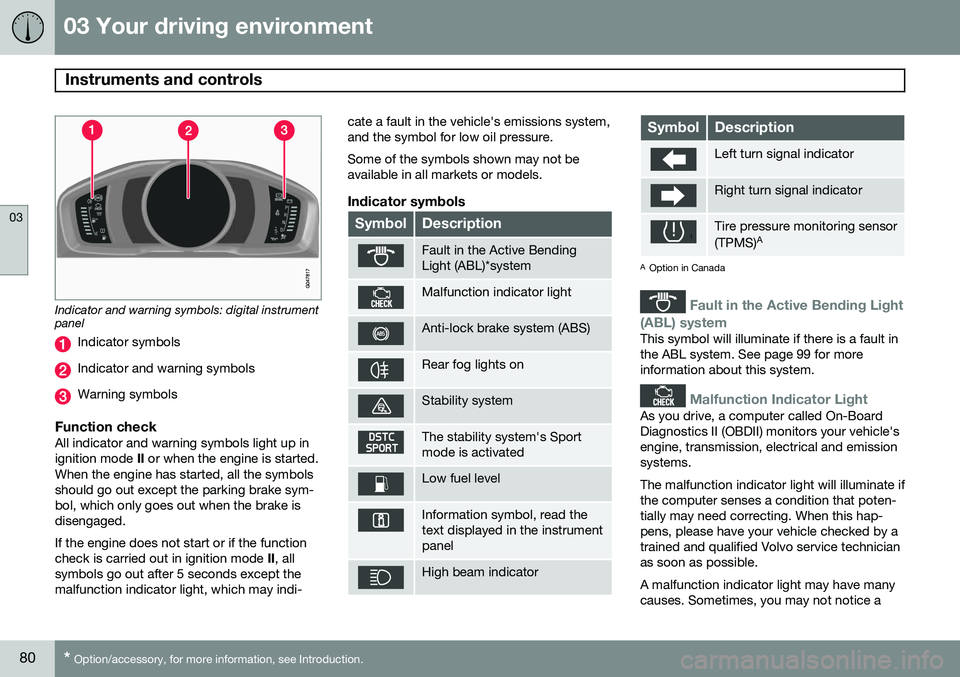
Indicator and warning symbols: digital instrument panel
Indicator symbols
Indicator and warning symbols
Warning symbols
Function checkAll indicator and warning symbols light up in ignition mode II or when the engine is started.
When the engine has started, all the symbolsshould go out except the parking brake sym-bol, which only goes out when the brake isdisengaged. If the engine does not start or if the function check is carried out in ignition mode II, all
symbols go out after 5 seconds except themalfunction indicator light, which may indi- cate a fault in the vehicle's emissions system,and the symbol for low oil pressure. Some of the symbols shown may not be available in all markets or models.
Indicator symbols
SymbolDescription
Fault in the Active Bending Light (ABL)*system
Malfunction indicator light
Anti-lock brake system (ABS)
Rear fog lights on
Stability system
The stability system's Sport mode is activated
Low fuel level
Information symbol, read the text displayed in the instrumentpanel
High beam indicator
SymbolDescription
Left turn signal indicator
Right turn signal indicator
Tire pressure monitoring sensor (TPMS)
A
A
Option in Canada
Fault in the Active Bending Light
(ABL) system
This symbol will illuminate if there is a fault in the ABL system. See page 99 for moreinformation about this system.
Malfunction Indicator Light
As you drive, a computer called On-Board Diagnostics II (OBDII) monitors your vehicle'sengine, transmission, electrical and emissionsystems. The malfunction indicator light will illuminate if the computer senses a condition that poten-tially may need correcting. When this hap-pens, please have your vehicle checked by atrained and qualified Volvo service technicianas soon as possible. A malfunction indicator light may have many causes. Sometimes, you may not notice a