ignition VOLVO S60 2015 Owner´s Manual
[x] Cancel search | Manufacturer: VOLVO, Model Year: 2015, Model line: S60, Model: VOLVO S60 2015Pages: 406, PDF Size: 11.26 MB
Page 93 of 406
03 Your driving environment
Seats
03
}}
91
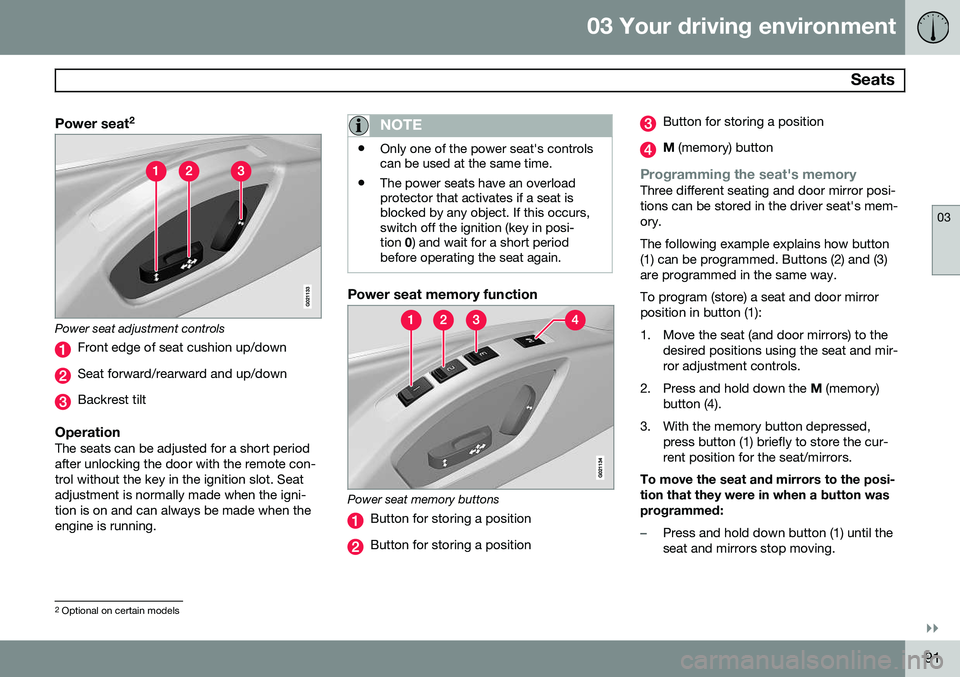
Power seat2
Power seat adjustment controls
Front edge of seat cushion up/down
Seat forward/rearward and up/down
Backrest tilt
OperationThe seats can be adjusted for a short period after unlocking the door with the remote con-trol without the key in the ignition slot. Seatadjustment is normally made when the igni-tion is on and can always be made when theengine is running.
NOTE
•
Only one of the power seat's controls can be used at the same time.
• The power seats have an overloadprotector that activates if a seat isblocked by any object. If this occurs,switch off the ignition (key in posi-tion
0) and wait for a short period
before operating the seat again.
Power seat memory function
Power seat memory buttons
Button for storing a position
Button for storing a position
Button for storing a position
M (memory) button
Programming the seat's memoryThree different seating and door mirror posi- tions can be stored in the driver seat's mem-ory. The following example explains how button (1) can be programmed. Buttons (2) and (3)are programmed in the same way. To program (store) a seat and door mirror position in button (1):
1. Move the seat (and door mirrors) to the
desired positions using the seat and mir- ror adjustment controls.
2. Press and hold down the M (memory)
button (4).
3. With the memory button depressed, press button (1) briefly to store the cur-rent position for the seat/mirrors.
To move the seat and mirrors to the posi-tion that they were in when a button wasprogrammed:
–Press and hold down button (1) until the seat and mirrors stop moving.
2 Optional on certain models
Page 94 of 406
03 Your driving environment
Seats
03
92* Option/accessory, for more information, see Introduction.
NOTE
As a safety precaution, the seat will stop automatically if the button is releasedbefore the seat has reached the presetposition.
Remote key memory and the power
driver's seat* and door mirrors 3
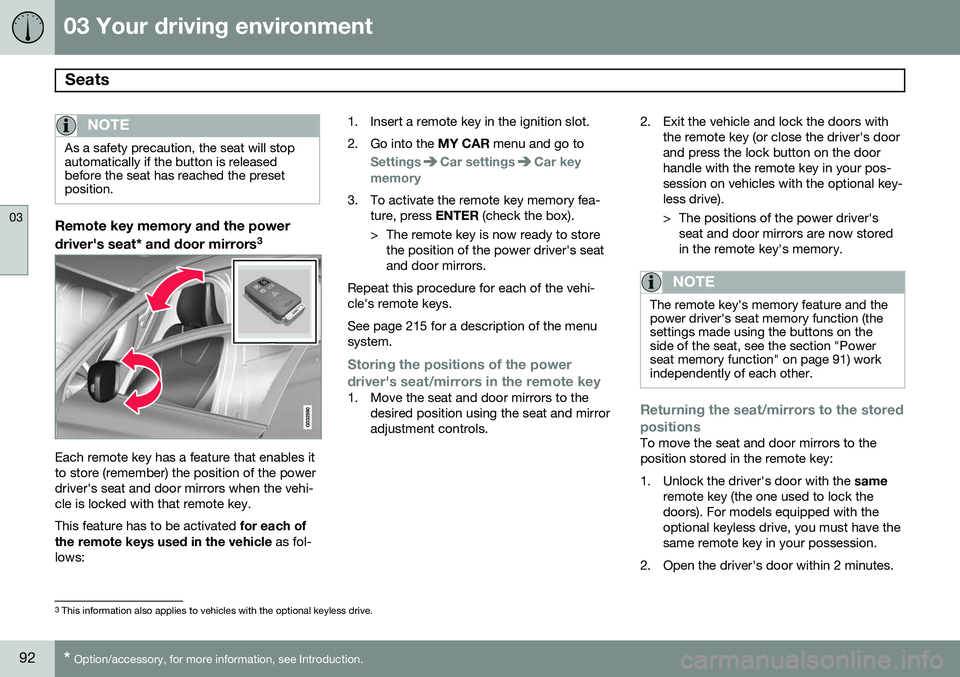
Each remote key has a feature that enables it to store (remember) the position of the powerdriver's seat and door mirrors when the vehi-cle is locked with that remote key. This feature has to be activated
for each of
the remote keys used in the vehicle as fol-
lows: 1. Insert a remote key in the ignition slot.
2. Go into the
MY CAR menu and go to
SettingsCar settingsCar key
memory
3. To activate the remote key memory fea- ture, press ENTER (check the box).
> The remote key is now ready to store the position of the power driver's seat and door mirrors.
Repeat this procedure for each of the vehi-cle's remote keys. See page 215 for a description of the menu system.
Storing the positions of the power
driver's seat/mirrors in the remote key
1. Move the seat and door mirrors to the desired position using the seat and mirror adjustment controls. 2. Exit the vehicle and lock the doors with
the remote key (or close the driver's doorand press the lock button on the doorhandle with the remote key in your pos-session on vehicles with the optional key-less drive).
> The positions of the power driver'sseat and door mirrors are now stored in the remote key's memory.
NOTE
The remote key's memory feature and the power driver's seat memory function (thesettings made using the buttons on theside of the seat, see the section "Powerseat memory function" on page 91) workindependently of each other.
Returning the seat/mirrors to the stored positions
To move the seat and door mirrors to the position stored in the remote key:
1. Unlock the driver's door with the same
remote key (the one used to lock the doors). For models equipped with theoptional keyless drive, you must have thesame remote key in your possession.
2. Open the driver's door within 2 minutes.
3 This information also applies to vehicles with the optional keyless drive.
Page 95 of 406
03 Your driving environment
Seats
03
}}
* Option/accessory, for more information, see Introduction.93
The driver's seat and door mirrors will auto- matically move to the position in which youleft them (if the vehicle has been unlockedwith one of the other keys and new seat/mirror adjustments have been made).
NOTE
•
The seat will move to this position even if someone else has moved it to adifferent position and locked the vehi-cle with a
different remote key.
• This feature will work in the same waywith all of the remote keys that youuse with your vehicle.
Emergency stop
WARNING
•Because the driver's seat can be adjusted with the ignition off, childrenshould never be left unattended in thevehicle.
• Movement of the seat can be STOP-PED at any time by pressing any but-ton on the power seat control panel.
• Do not adjust the seat while driving.The seat should be adjusted so thatthe brake pedal can be depressedfully. In addition, position the seat asfar rearward as comfort and controlallow.
• The seat rails on the floor must not beobstructed in any way when the seat isin motion.
Heated seats*See page 225.
Rear seats
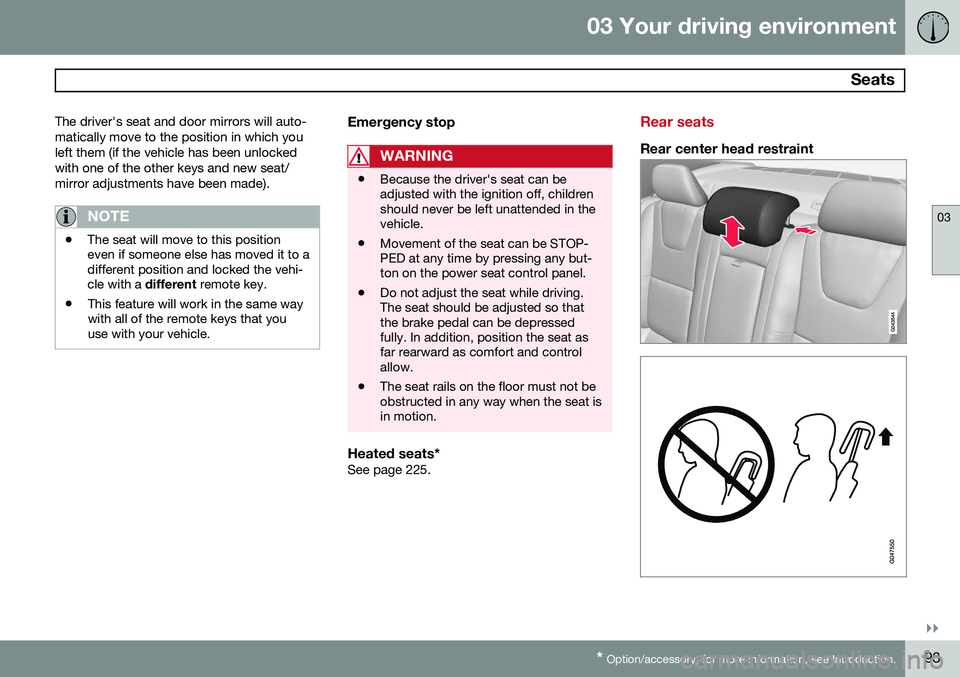
Rear center head restraint
Page 96 of 406
03 Your driving environment
Seats
03
94
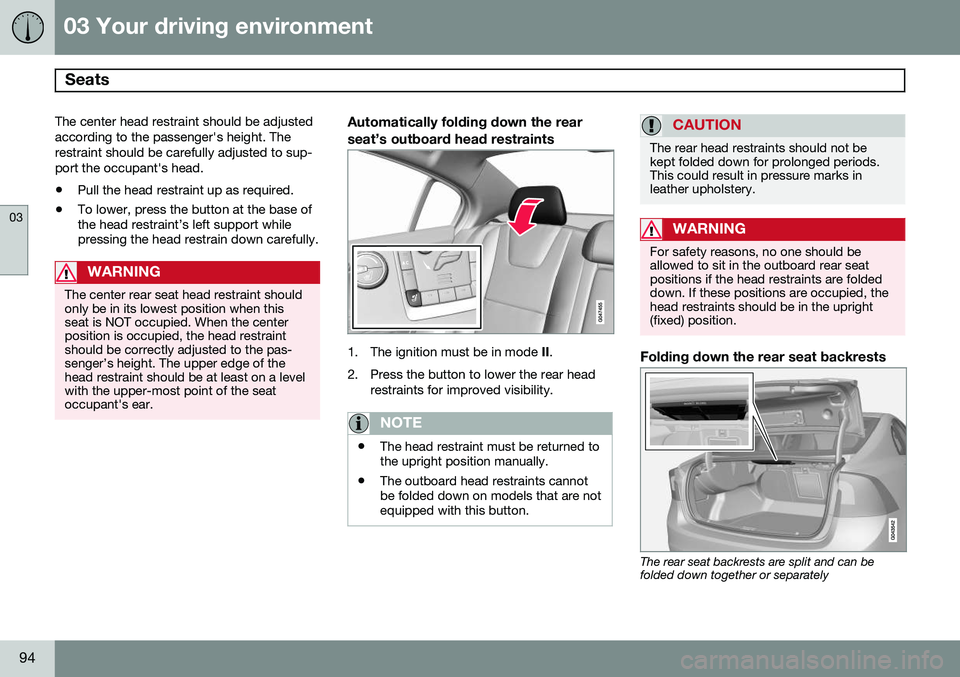
The center head restraint should be adjusted according to the passenger's height. Therestraint should be carefully adjusted to sup-port the occupant's head.
• Pull the head restraint up as required.
• To lower, press the button at the base of the head restraint’s left support whilepressing the head restrain down carefully.
WARNING
The center rear seat head restraint should only be in its lowest position when thisseat is NOT occupied. When the centerposition is occupied, the head restraintshould be correctly adjusted to the pas-senger’s height. The upper edge of thehead restraint should be at least on a levelwith the upper-most point of the seatoccupant's ear.
Automatically folding down the rear seat’s outboard head restraints
1. The ignition must be in mode
II.
2. Press the button to lower the rear head restraints for improved visibility.
NOTE
•The head restraint must be returned to the upright position manually.
• The outboard head restraints cannotbe folded down on models that are notequipped with this button.
CAUTION
The rear head restraints should not be kept folded down for prolonged periods.This could result in pressure marks inleather upholstery.
WARNING
For safety reasons, no one should be allowed to sit in the outboard rear seatpositions if the head restraints are foldeddown. If these positions are occupied, thehead restraints should be in the upright(fixed) position.
Folding down the rear seat backrests
The rear seat backrests are split and can be folded down together or separately
Page 100 of 406
03 Your driving environment
Lighting
03
98
Lighting panel
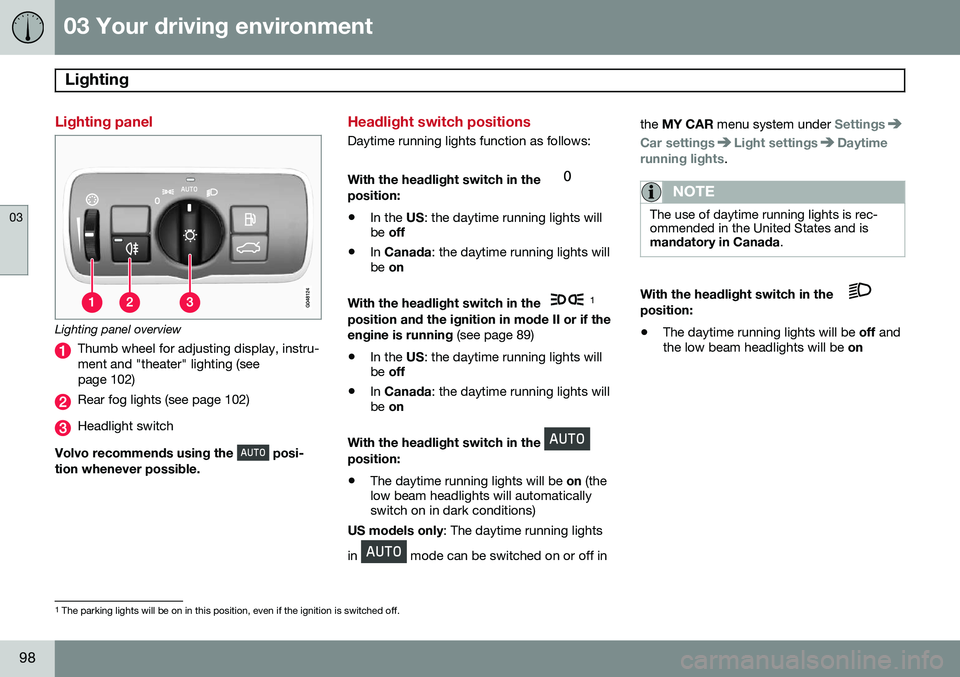
Lighting panel overview
Thumb wheel for adjusting display, instru- ment and "theater" lighting (seepage 102)
Rear fog lights (see page 102)
Headlight switch
Volvo recommends using the
posi-
tion whenever possible.
Headlight switch positions
Daytime running lights function as follows: With the headlight switch in the
position:
• In the
US: the daytime running lights will
be off
• In
Canada : the daytime running lights will
be on
With the headlight switch in the
1
position and the ignition in mode II or if the engine is running (see page 89)
• In the
US: the daytime running lights will
be off
• In
Canada : the daytime running lights will
be on
With the headlight switch in the
position: • The daytime running lights will be
on (the
low beam headlights will automatically switch on in dark conditions)
US models only : The daytime running lights
in
mode can be switched on or off in the
MY CAR menu system under
Settings
Car settingsLight settingsDaytime
running lights.
NOTE
The use of daytime running lights is rec- ommended in the United States and ismandatory in Canada .
With the headlight switch in the position:
• The daytime running lights will be
off and
the low beam headlights will be on
1
The parking lights will be on in this position, even if the ignition is switched off.
Page 104 of 406
03 Your driving environment
Lighting
03
102* Option/accessory, for more information, see Introduction.
The cornering lights are deactivated when the vehicle's speed exceeds approx. 25 mph(40 km/h).
Auxiliary lights*If the vehicle is fitted with auxiliary lights, thedriver can use the MY CAR menu system to
choose to deactivate and turn these lights on and off along with the high beam headlights 3
.
Instrument and "theater" lighting
Instrument lightingIllumination of the display and instrument lights will vary, depending on ignition mode(see page 88). The display lighting is automatically subdued in darkness and the sensitivity is set with thethumb wheel. The intensity of the instrument lighting is adjusted with the thumb wheel.
"Theater" lightingWhen the overhead courtesy lighting hasgone out and the engine is running, severalLEDs located near the roof console illuminateto provide faint lighting for the occupants ofthe front seats. This lighting goes out just after the overhead courtesy lighting when thevehicle is locked.
Parking lights
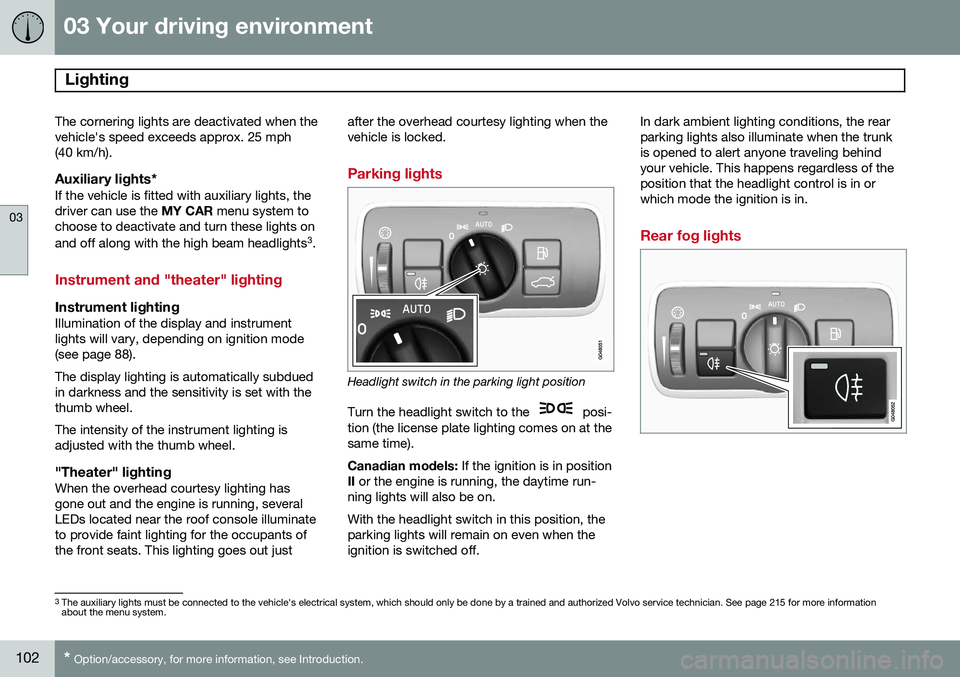
Headlight switch in the parking light position
Turn the headlight switch to the
posi-
tion (the license plate lighting comes on at the same time). Canadian models: If the ignition is in position
II or the engine is running, the daytime run-
ning lights will also be on.With the headlight switch in this position, the parking lights will remain on even when theignition is switched off. In dark ambient lighting conditions, the rearparking lights also illuminate when the trunkis opened to alert anyone traveling behindyour vehicle. This happens regardless of theposition that the headlight control is in orwhich mode the ignition is in.
Rear fog lights
3
The auxiliary lights must be connected to the vehicle's electrical system, which should only be done by a trained and authorized Volvo service technician. See page 215 for more information about the menu system.
Page 106 of 406
03 Your driving environment
Lighting
03
104* Option/accessory, for more information, see Introduction.
NOTE
• This automatic flashing sequence can be interrupted by immediately movingthe lever in the opposite direction.
• If the turn signal indicator flashesfaster than normal, check for aburned-out turn signal bulb.
Interior lighting, front
G021149
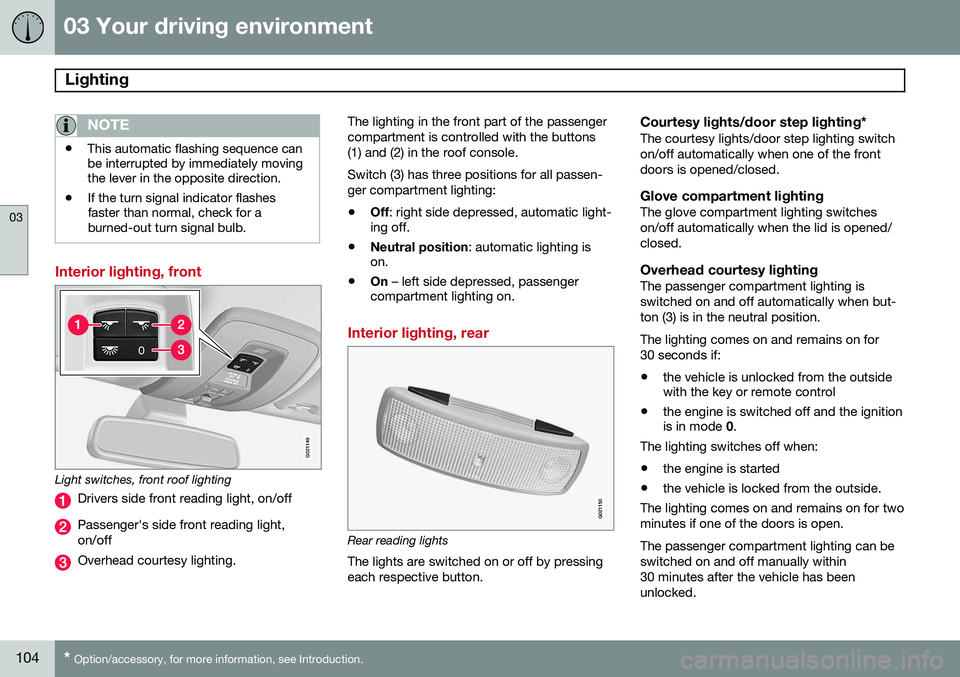
Light switches, front roof lighting
Drivers side front reading light, on/off
Passenger's side front reading light, on/off
Overhead courtesy lighting. The lighting in the front part of the passenger compartment is controlled with the buttons(1) and (2) in the roof console. Switch (3) has three positions for all passen- ger compartment lighting:
• Off
: right side depressed, automatic light-
ing off.
• Neutral position
: automatic lighting is
on.
• On
– left side depressed, passenger
compartment lighting on.
Interior lighting, rear
G021150
Rear reading lights
The lights are switched on or off by pressing each respective button.
Courtesy lights/door step lighting*The courtesy lights/door step lighting switchon/off automatically when one of the frontdoors is opened/closed.
Glove compartment lightingThe glove compartment lighting switcheson/off automatically when the lid is opened/closed.
Overhead courtesy lightingThe passenger compartment lighting isswitched on and off automatically when but-ton (3) is in the neutral position. The lighting comes on and remains on for 30 seconds if:
• the vehicle is unlocked from the outside with the key or remote control
• the engine is switched off and the ignitionis in mode
0.
The lighting switches off when:
• the engine is started
• the vehicle is locked from the outside.
The lighting comes on and remains on for two minutes if one of the doors is open. The passenger compartment lighting can be switched on and off manually within30 minutes after the vehicle has beenunlocked.
Page 107 of 406
03 Your driving environment
Lighting
03
105
If the lighting is switched on manually and the vehicle is locked, the courtesy lighting willswitch off automatically after one minute.
Trunk lightingThe trunk lighting comes on automaticallywhen the trunk lid is opened.
Home safe lighting
When you leave your vehicle at night, you can make use of the home safe lighting functionto illuminate the area in front of the vehicle.
1. Remove the key from the ignition slot to
put the ignition in mode 0 (see page 89
for information about the ignition modes).
2. Pull the turn signal lever as far as possible towards the steering wheel and release it.
3. Exit the vehicle and lock the doors.The headlights, parking lights, turn signals, lights in the door mirrors, license plate lights,and footwell lighting will illuminate and remain on for 30 4
, 60 or 90 seconds. The time inter-
val can be set in MY CAR under
Settings
Car settingsLight settingsHome safe
light duration. See page 215 for a descrip-
tion of the menu system.
Approach lighting
Approach lighting is activated by pressing the approach light button on the remote key (seethe illustration on page 59). When the function has been activated, the parking lights, indicator lights, door mirrorlights, license plate lighting, dome lightingand door step lighting come on. The time interval for this lighting can be set by pressing MY CAR and going to
Car
settings
Light settingsApproach light
duration. See page 215 for a description of
the menu system.
4 Factory setting
Page 108 of 406
03 Your driving environment
Wipers and washers
03
106* Option/accessory, for more information, see Introduction.
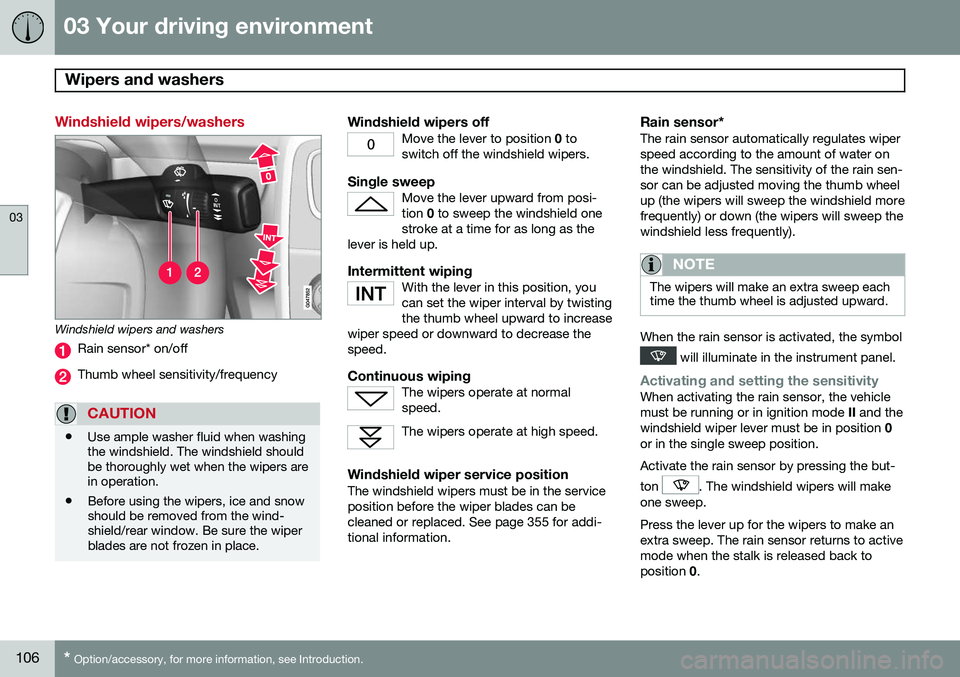
Windshield wipers/washers
Windshield wipers and washers
Rain sensor* on/off
Thumb wheel sensitivity/frequency
CAUTION
• Use ample washer fluid when washing the windshield. The windshield shouldbe thoroughly wet when the wipers arein operation.
• Before using the wipers, ice and snowshould be removed from the wind-shield/rear window. Be sure the wiperblades are not frozen in place.
Windshield wipers offMove the lever to position
0 to
switch off the windshield wipers.
Single sweepMove the lever upward from posi- tion 0 to sweep the windshield one
stroke at a time for as long as the
lever is held up.
Intermittent wipingWith the lever in this position, you can set the wiper interval by twistingthe thumb wheel upward to increase
wiper speed or downward to decrease thespeed.
Continuous wipingThe wipers operate at normal speed.
The wipers operate at high speed.
Windshield wiper service positionThe windshield wipers must be in the service position before the wiper blades can becleaned or replaced. See page 355 for addi-tional information.
Rain sensor*The rain sensor automatically regulates wiperspeed according to the amount of water onthe windshield. The sensitivity of the rain sen-sor can be adjusted moving the thumb wheelup (the wipers will sweep the windshield morefrequently) or down (the wipers will sweep thewindshield less frequently).
NOTE
The wipers will make an extra sweep each time the thumb wheel is adjusted upward.
When the rain sensor is activated, the symbol
will illuminate in the instrument panel.
Activating and setting the sensitivityWhen activating the rain sensor, the vehicle must be running or in ignition mode II and the
windshield wiper lever must be in position 0
or in the single sweep position. Activate the rain sensor by pressing the but- ton
. The windshield wipers will make
one sweep. Press the lever up for the wipers to make an extra sweep. The rain sensor returns to activemode when the stalk is released back toposition 0.
Page 109 of 406
03 Your driving environment
Wipers and washers
03
* Option/accessory, for more information, see Introduction.107
DeactivatingDeactivate the rain sensor by pressing the button
or press the lever down to
another wiper position. The rain sensor is automatically deactivated when the key is removed from the ignitionslot or five minutes after the ignition has beenswitched off.
CAUTION
The rain sensor should be deactivated when washing the car in an automatic carwash, etc. If the rain sensor function is lefton, the wipers will start inadvertently in thecar wash and could be damaged.
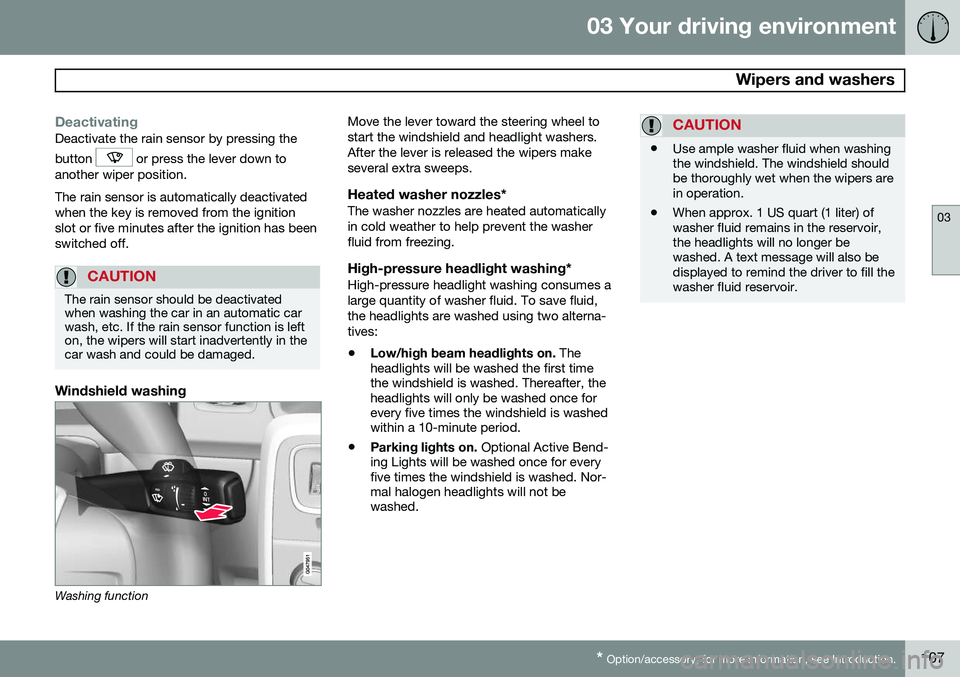
Windshield washing
Washing function Move the lever toward the steering wheel to start the windshield and headlight washers.After the lever is released the wipers makeseveral extra sweeps.
Heated washer nozzles*The washer nozzles are heated automaticallyin cold weather to help prevent the washerfluid from freezing.
High-pressure headlight washing*High-pressure headlight washing consumes alarge quantity of washer fluid. To save fluid,the headlights are washed using two alterna-tives:
• Low/high beam headlights on.
The
headlights will be washed the first time the windshield is washed. Thereafter, theheadlights will only be washed once forevery five times the windshield is washedwithin a 10-minute period.
• Parking lights on.
Optional Active Bend-
ing Lights will be washed once for everyfive times the windshield is washed. Nor-mal halogen headlights will not bewashed.
CAUTION
• Use ample washer fluid when washing the windshield. The windshield shouldbe thoroughly wet when the wipers arein operation.
• When approx. 1 US quart (1 liter) ofwasher fluid remains in the reservoir,the headlights will no longer bewashed. A text message will also bedisplayed to remind the driver to fill thewasher fluid reservoir.