Messages VOLVO S60 2016 Owner´s Manual
[x] Cancel search | Manufacturer: VOLVO, Model Year: 2016, Model line: S60, Model: VOLVO S60 2016Pages: 392, PDF Size: 10.04 MB
Page 166 of 392
||
07 Driver support
07
164
Related information
•Stability system – introduction (p. 162)
• Stability system – symbols and messages (p. 165)
Page 167 of 392
07 Driver support
07
}}
165
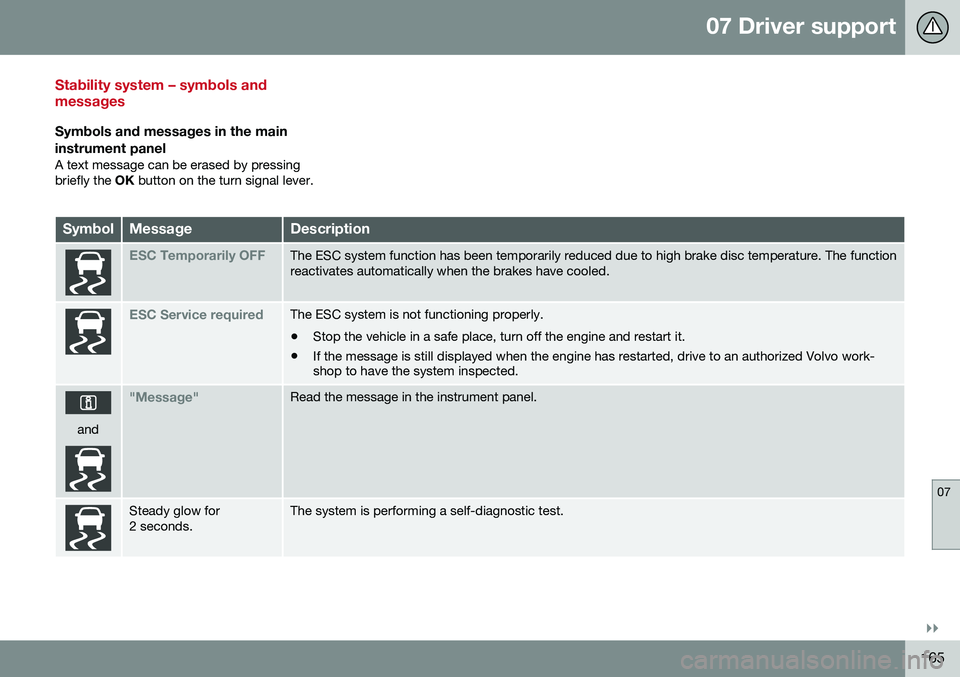
Stability system – symbols and messages
Symbols and messages in the main
instrument panel
A text message can be erased by pressing briefly the OK button on the turn signal lever.
SymbolMessageDescription
ESC Temporarily OFFThe ESC system function has been temporarily reduced due to high brake disc temperature. The function reactivates automatically when the brakes have cooled.
ESC Service requiredThe ESC system is not functioning properly. • Stop the vehicle in a safe place, turn off the engine and restart it.
• If the message is still displayed when the engine has restarted, drive to an authorized Volvo work- shop to have the system inspected.
and
"Message"Read the message in the instrument panel.
Steady glow for 2 seconds.The system is performing a self-diagnostic test.
Page 175 of 392
07 Driver support
07
}}
173
Operation
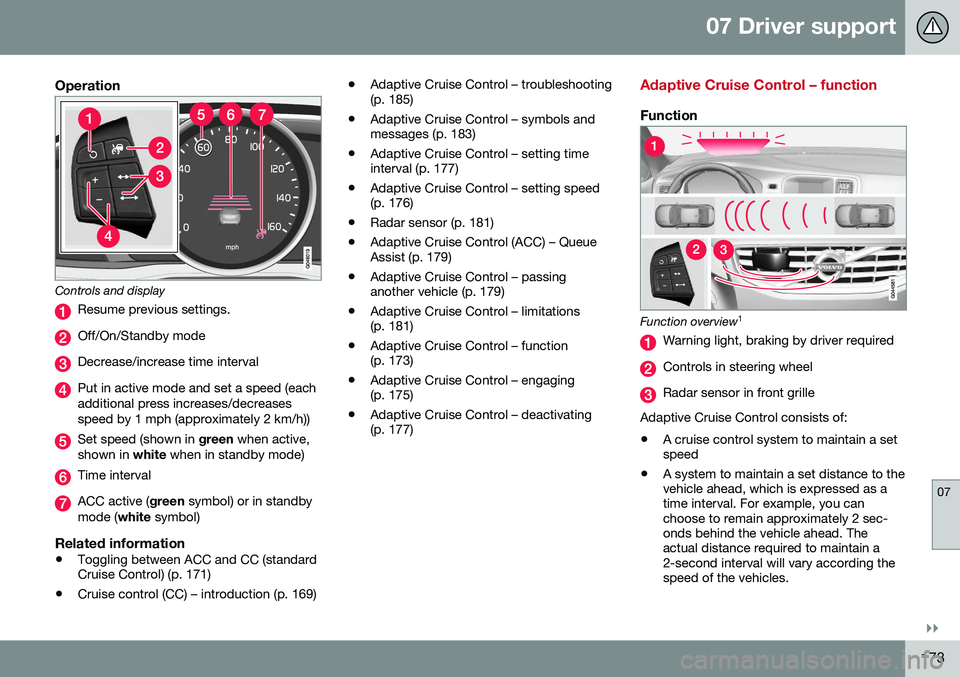
Controls and display
Resume previous settings.
Off/On/Standby mode
Decrease/increase time interval
Put in active mode and set a speed (each additional press increases/decreasesspeed by 1 mph (approximately 2 km/h))
Set speed (shown in green when active,
shown in white when in standby mode)
Time interval
ACC active ( green symbol) or in standby
mode ( white symbol)
Related information
•Toggling between ACC and CC (standard Cruise Control) (p. 171)
• Cruise control (CC) – introduction (p. 169) •
Adaptive Cruise Control – troubleshooting(p. 185)
• Adaptive Cruise Control – symbols andmessages (p. 183)
• Adaptive Cruise Control – setting timeinterval (p. 177)
• Adaptive Cruise Control – setting speed(p. 176)
• Radar sensor (p. 181)
• Adaptive Cruise Control (ACC) – QueueAssist (p. 179)
• Adaptive Cruise Control – passinganother vehicle (p. 179)
• Adaptive Cruise Control – limitations(p. 181)
• Adaptive Cruise Control – function(p. 173)
• Adaptive Cruise Control – engaging(p. 175)
• Adaptive Cruise Control – deactivating(p. 177)
Adaptive Cruise Control – function
Function
Function overview 1
Warning light, braking by driver required
Controls in steering wheel
Radar sensor in front grille
Adaptive Cruise Control consists of: • A cruise control system to maintain a set speed
• A system to maintain a set distance to thevehicle ahead, which is expressed as atime interval. For example, you canchoose to remain approximately 2 sec-onds behind the vehicle ahead. Theactual distance required to maintain a2-second interval will vary according thespeed of the vehicles.
Page 178 of 392
07 Driver support
07
176
Adaptive Cruise Control – setting speed
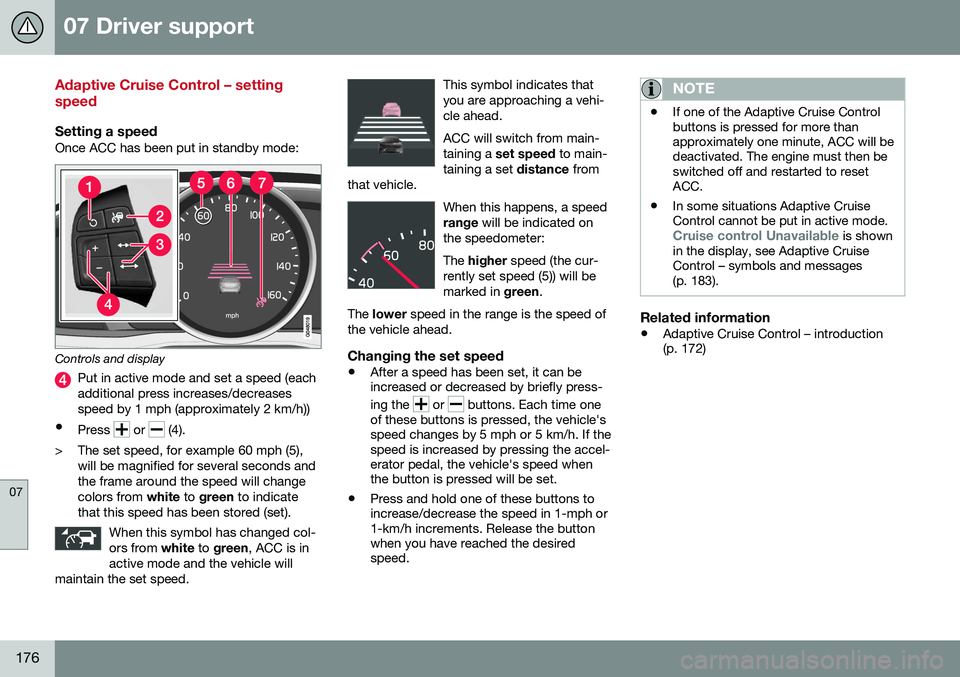
Setting a speedOnce ACC has been put in standby mode:
Controls and display
Put in active mode and set a speed (each additional press increases/decreasesspeed by 1 mph (approximately 2 km/h))
• Press
or (4).
> The set speed, for example 60 mph (5), will be magnified for several seconds and the frame around the speed will changecolors from white to green to indicate
that this speed has been stored (set).
When this symbol has changed col-ors from white to green , ACC is in
active mode and the vehicle will
maintain the set speed.
This symbol indicates that you are approaching a vehi-cle ahead. ACC will switch from main- taining a set speed to main-
taining a set distance from
that vehicle.
When this happens, a speed range will be indicated on
the speedometer: The higher speed (the cur-
rently set speed (5)) will be marked in green.
The lower speed in the range is the speed of
the vehicle ahead.
Changing the set speed
• After a speed has been set, it can be increased or decreased by briefly press- ing the
or buttons. Each time one
of these buttons is pressed, the vehicle's speed changes by 5 mph or 5 km/h. If thespeed is increased by pressing the accel-erator pedal, the vehicle's speed whenthe button is pressed will be set.
• Press and hold one of these buttons toincrease/decrease the speed in 1-mph or1-km/h increments. Release the buttonwhen you have reached the desiredspeed.
NOTE
•If one of the Adaptive Cruise Control buttons is pressed for more thanapproximately one minute, ACC will bedeactivated. The engine must then beswitched off and restarted to resetACC.
• In some situations Adaptive CruiseControl cannot be put in active mode.
Cruise control Unavailable is shown
in the display, see Adaptive Cruise Control – symbols and messages(p. 183).
Related information
• Adaptive Cruise Control – introduction (p. 172)
Page 185 of 392
07 Driver support
07
}}
183
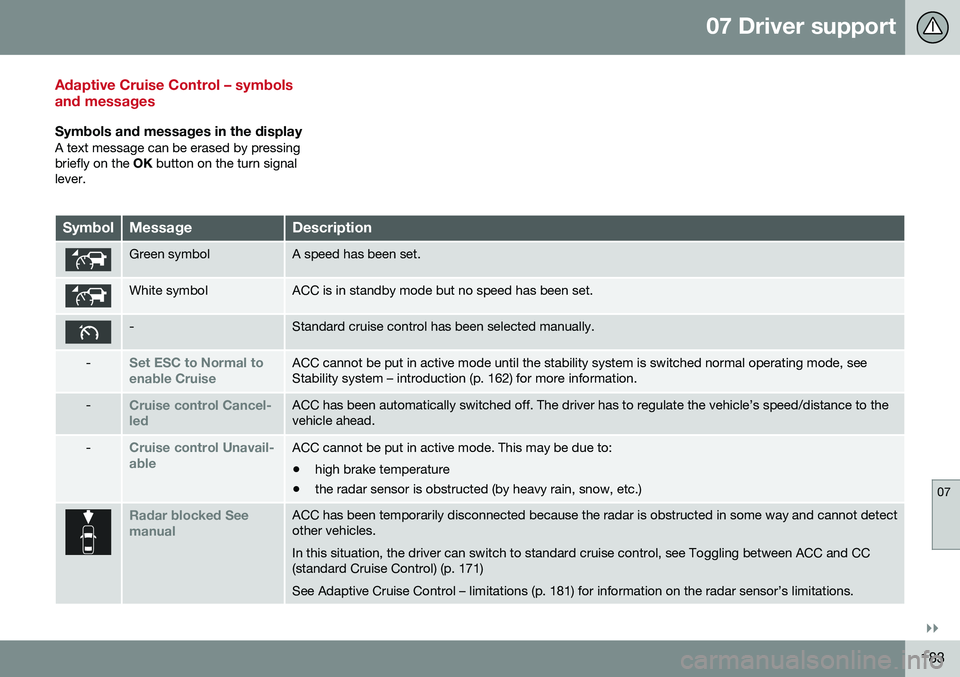
Adaptive Cruise Control – symbols and messages
Symbols and messages in the displayA text message can be erased by pressing briefly on the OK button on the turn signal
lever.
SymbolMessageDescription
Green symbolA speed has been set.
White symbolACC is in standby mode but no speed has been set.
-Standard cruise control has been selected manually.
-Set ESC to Normal to enable CruiseACC cannot be put in active mode until the stability system is switched normal operating mode, see Stability system – introduction (p. 162) for more information.
-Cruise control Cancel- ledACC has been automatically switched off. The driver has to regulate the vehicle’s speed/distance to the vehicle ahead.
-Cruise control Unavail- ableACC cannot be put in active mode. This may be due to: • high brake temperature
• the radar sensor is obstructed (by heavy rain, snow, etc.)
Radar blocked See manualACC has been temporarily disconnected because the radar is obstructed in some way and cannot detect other vehicles. In this situation, the driver can switch to standard cruise control, see Toggling between ACC and CC (standard Cruise Control) (p. 171) See Adaptive Cruise Control – limitations (p. 181) for information on the radar sensor’s limitations.
Page 188 of 392
07 Driver support
07
186
Distance Alert – introduction
Distance Alert is part of Adaptive Cruise Con- trol and is a function that provides informationabout the time interval to the vehicle ahead.
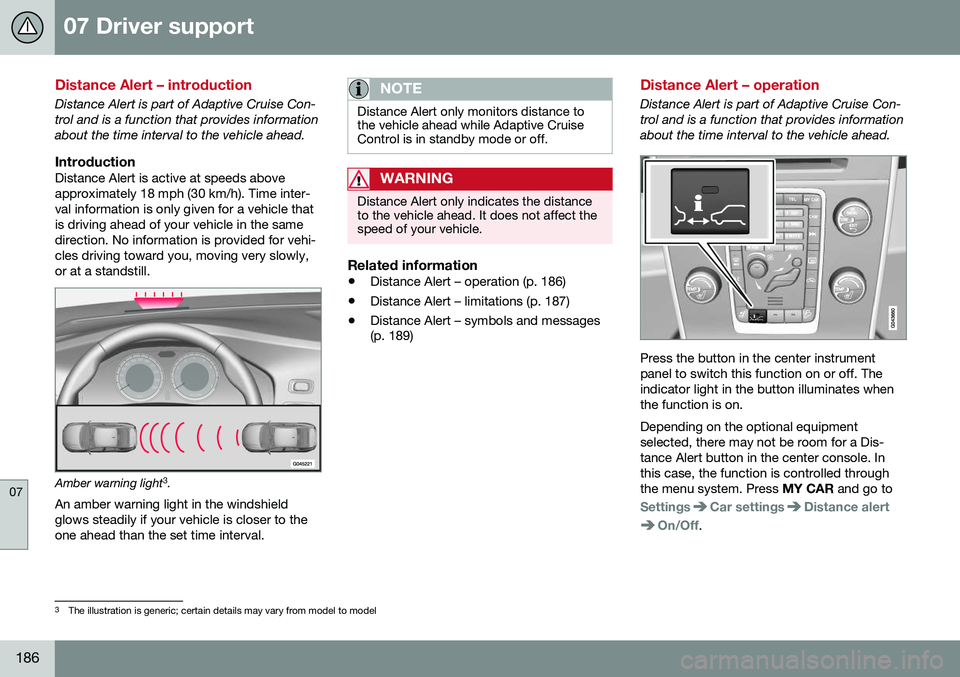
IntroductionDistance Alert is active at speeds aboveapproximately 18 mph (30 km/h). Time inter-val information is only given for a vehicle thatis driving ahead of your vehicle in the samedirection. No information is provided for vehi-cles driving toward you, moving very slowly,or at a standstill.
Amber warning light3
.
An amber warning light in the windshield glows steadily if your vehicle is closer to theone ahead than the set time interval.
NOTE
Distance Alert only monitors distance to the vehicle ahead while Adaptive CruiseControl is in standby mode or off.
WARNING
Distance Alert only indicates the distance to the vehicle ahead. It does not affect thespeed of your vehicle.
Related information
• Distance Alert – operation (p. 186)
• Distance Alert – limitations (p. 187)
• Distance Alert – symbols and messages (p. 189)
Distance Alert – operation
Distance Alert is part of Adaptive Cruise Con- trol and is a function that provides informationabout the time interval to the vehicle ahead.
Press the button in the center instrument panel to switch this function on or off. Theindicator light in the button illuminates whenthe function is on. Depending on the optional equipment selected, there may not be room for a Dis-tance Alert button in the center console. Inthis case, the function is controlled throughthe menu system. Press
MY CAR and go to
SettingsCar settingsDistance alert
On/Off.
3
The illustration is generic; certain details may vary from model to model
Page 189 of 392
07 Driver support
07
}}
187
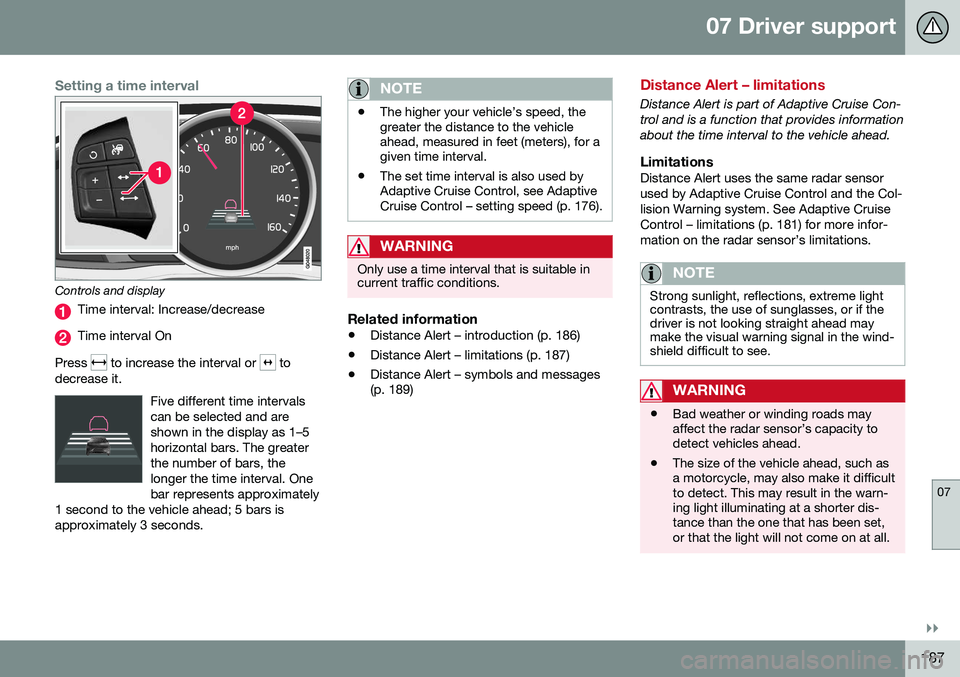
Setting a time interval
Controls and display
Time interval: Increase/decrease
Time interval On
Press
to increase the interval or to
decrease it.
Five different time intervals can be selected and areshown in the display as 1–5horizontal bars. The greaterthe number of bars, thelonger the time interval. Onebar represents approximately
1 second to the vehicle ahead; 5 bars isapproximately 3 seconds.
NOTE
• The higher your vehicle’s speed, the greater the distance to the vehicleahead, measured in feet (meters), for agiven time interval.
• The set time interval is also used byAdaptive Cruise Control, see AdaptiveCruise Control – setting speed (p. 176).
WARNING
Only use a time interval that is suitable in current traffic conditions.
Related information
•
Distance Alert – introduction (p. 186)
• Distance Alert – limitations (p. 187)
• Distance Alert – symbols and messages (p. 189)
Distance Alert – limitations
Distance Alert is part of Adaptive Cruise Con- trol and is a function that provides informationabout the time interval to the vehicle ahead.
LimitationsDistance Alert uses the same radar sensorused by Adaptive Cruise Control and the Col-lision Warning system. See Adaptive CruiseControl – limitations (p. 181) for more infor-mation on the radar sensor’s limitations.
NOTE
Strong sunlight, reflections, extreme light contrasts, the use of sunglasses, or if thedriver is not looking straight ahead maymake the visual warning signal in the wind-shield difficult to see.
WARNING
•Bad weather or winding roads may affect the radar sensor’s capacity todetect vehicles ahead.
• The size of the vehicle ahead, such asa motorcycle, may also make it difficultto detect. This may result in the warn-ing light illuminating at a shorter dis-tance than the one that has been set,or that the light will not come on at all.
Page 190 of 392
||
07 Driver support
07
188
Related information
•Distance Alert – introduction (p. 186)
• Distance Alert – operation (p. 186)
• Distance Alert – symbols and messages (p. 189)
Page 191 of 392
07 Driver support
07
189
Distance Alert – symbols and messages
Distance Alert is part of Adaptive Cruise Con- trol and is a function that provides informationabout the time interval to the vehicle ahead.
Symbols and text messagesA text message can be erased by pressingbriefly on the OK button on the turn signal
lever.
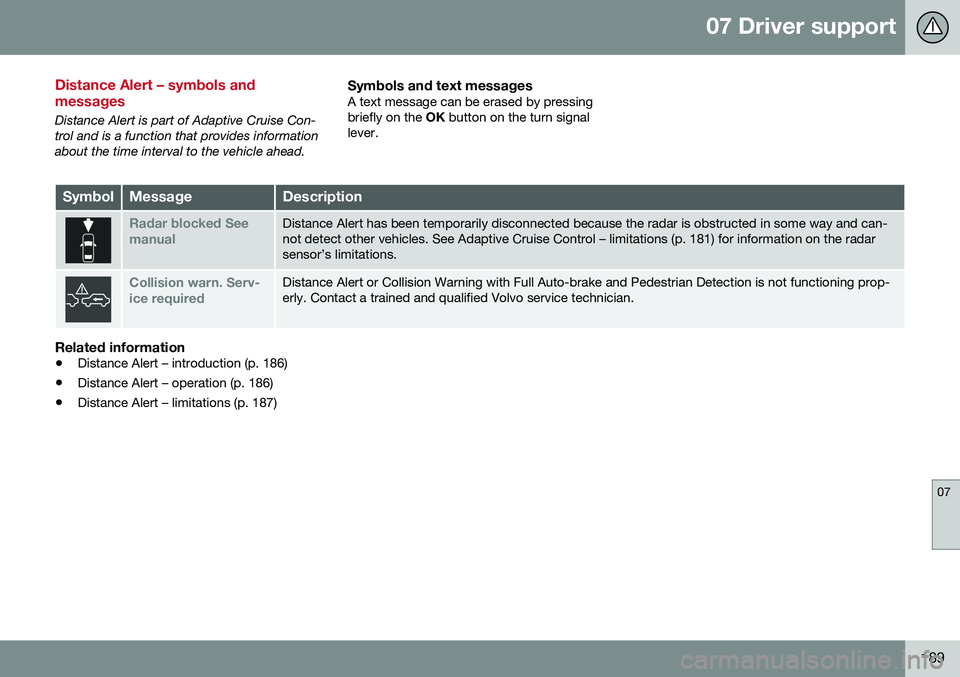
SymbolMessageDescription
Radar blocked See manualDistance Alert has been temporarily disconnected because the radar is obstructed in some way and can- not detect other vehicles. See Adaptive Cruise Control – limitations (p. 181) for information on the radarsensor’s limitations.
Collision warn. Serv- ice requiredDistance Alert or Collision Warning with Full Auto-brake and Pedestrian Detection is not functioning prop- erly. Contact a trained and qualified Volvo service technician.
Related information
• Distance Alert – introduction (p. 186)
• Distance Alert – operation (p. 186)
• Distance Alert – limitations (p. 187)
Page 193 of 392
07 Driver support
07
191
•
City Safety – troubleshooting (p. 193)
• City Safety – symbols and messages (p. 195)
• City Safety – Laser sensor (p. 196)
City Safety – function
Function
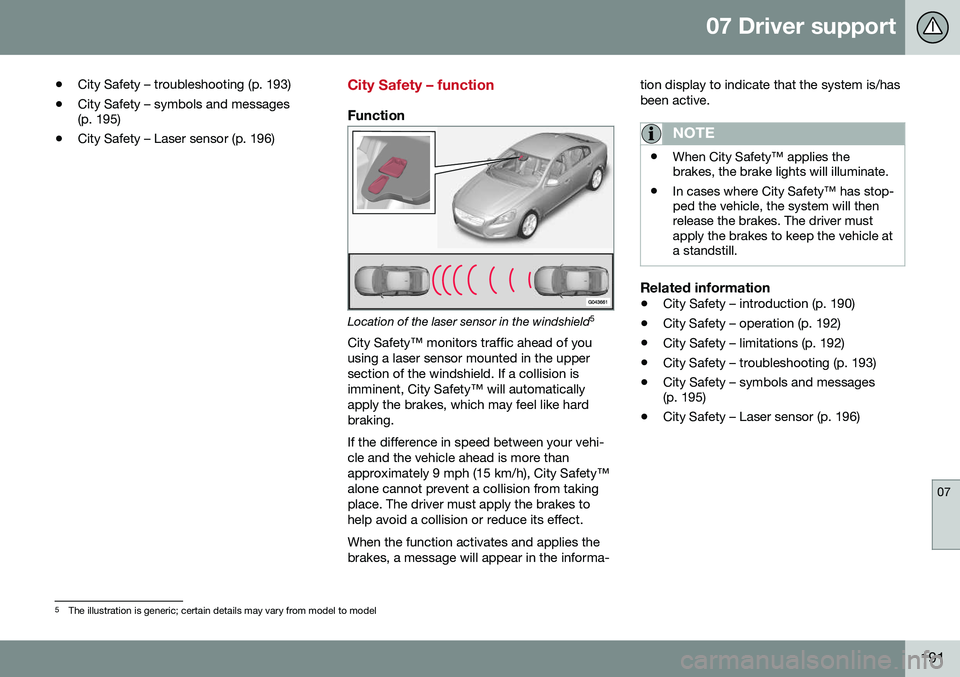
Location of the laser sensor in the windshield 5
City Safety™ monitors traffic ahead of you using a laser sensor mounted in the uppersection of the windshield. If a collision isimminent, City Safety™ will automaticallyapply the brakes, which may feel like hardbraking. If the difference in speed between your vehi- cle and the vehicle ahead is more thanapproximately 9 mph (15 km/h), City Safety™alone cannot prevent a collision from takingplace. The driver must apply the brakes tohelp avoid a collision or reduce its effect. When the function activates and applies the brakes, a message will appear in the informa- tion display to indicate that the system is/hasbeen active.
NOTE
•
When City Safety™ applies the brakes, the brake lights will illuminate.
• In cases where City Safety™ has stop-ped the vehicle, the system will thenrelease the brakes. The driver mustapply the brakes to keep the vehicle ata standstill.
Related information
•
City Safety – introduction (p. 190)
• City Safety – operation (p. 192)
• City Safety – limitations (p. 192)
• City Safety – troubleshooting (p. 193)
• City Safety – symbols and messages (p. 195)
• City Safety – Laser sensor (p. 196)
5
The illustration is generic; certain details may vary from model to model