Messages VOLVO S60 2016 Owner´s Manual
[x] Cancel search | Manufacturer: VOLVO, Model Year: 2016, Model line: S60, Model: VOLVO S60 2016Pages: 392, PDF Size: 10.04 MB
Page 312 of 392
||
09 Wheels and tires
09
310* Option/accessory, for more information, see Introduction.
Related information
• Tire Monitor – messages (p. 309)
• Tire inflation – checking pressure (p. 294)
• Tire inflation – pressure table (p. 297)
Tire sealing system* – general information
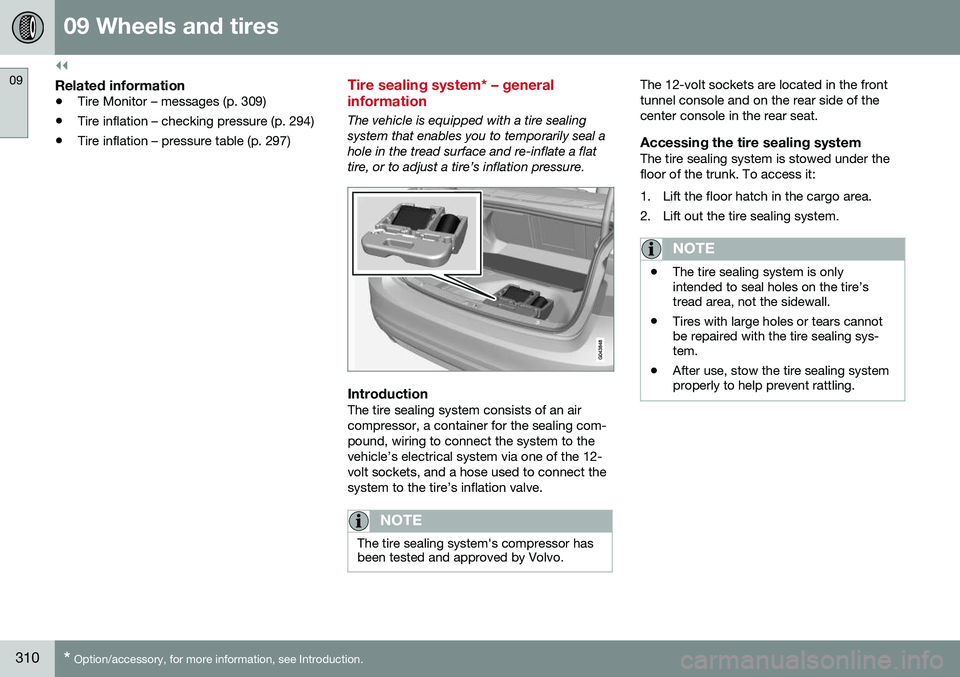
The vehicle is equipped with a tire sealing system that enables you to temporarily seal ahole in the tread surface and re-inflate a flattire, or to adjust a tire’s inflation pressure.
IntroductionThe tire sealing system consists of an air compressor, a container for the sealing com-pound, wiring to connect the system to thevehicle’s electrical system via one of the 12-volt sockets, and a hose used to connect thesystem to the tire’s inflation valve.
NOTE
The tire sealing system's compressor has been tested and approved by Volvo.
The 12-volt sockets are located in the front tunnel console and on the rear side of thecenter console in the rear seat.
Accessing the tire sealing systemThe tire sealing system is stowed under thefloor of the trunk. To access it:
1. Lift the floor hatch in the cargo area.
2. Lift out the tire sealing system.
NOTE
•The tire sealing system is only intended to seal holes on the tire’stread area, not the sidewall.
• Tires with large holes or tears cannotbe repaired with the tire sealing sys-tem.
• After use, stow the tire sealing systemproperly to help prevent rattling.
Page 324 of 392
||
10 Maintenance and servicing
10
322
accessed in MY CAR by pressing OK/MENU
and then selecting Maintenance & repair.
Booking information and data from the vehicle
If you request an appointment from your vehi- cle, with your consent, booking information and data about your vehicle 1
will be transmit-
ted to your preferred retailer.
Using the serviceOnce the prerequisites have been estab- lished, all CSB-related menus can beaccessed in MY CAR by pressing OK/MENU
and then selecting
Maintenance & repair.
If the time for the next regularly scheduled service is approaching, if the vehicle requirescertain types of repairs or if a system needsto be checked, a message will be displayed.You will then by guided through the stepsrequired to book service or repairs.
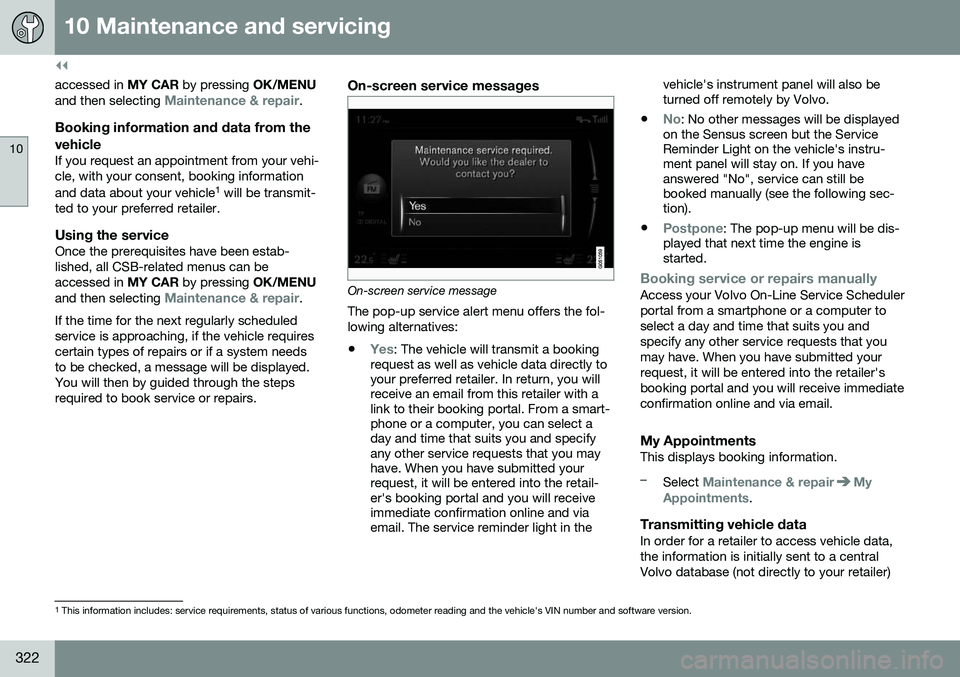
On-screen service messages
On-screen service message The pop-up service alert menu offers the fol- lowing alternatives:
•
Yes: The vehicle will transmit a booking
request as well as vehicle data directly to your preferred retailer. In return, you willreceive an email from this retailer with alink to their booking portal. From a smart-phone or a computer, you can select aday and time that suits you and specifyany other service requests that you mayhave. When you have submitted yourrequest, it will be entered into the retail-er's booking portal and you will receiveimmediate confirmation online and viaemail. The service reminder light in the vehicle's instrument panel will also beturned off remotely by Volvo.
•
No: No other messages will be displayed
on the Sensus screen but the Service Reminder Light on the vehicle's instru-ment panel will stay on. If you haveanswered "No", service can still bebooked manually (see the following sec-tion).
•
Postpone: The pop-up menu will be dis-
played that next time the engine is started.
Booking service or repairs manuallyAccess your Volvo On-Line Service Scheduler portal from a smartphone or a computer toselect a day and time that suits you andspecify any other service requests that youmay have. When you have submitted yourrequest, it will be entered into the retailer'sbooking portal and you will receive immediateconfirmation online and via email.
My AppointmentsThis displays booking information.
–Select Maintenance & repairMy
Appointments.
Transmitting vehicle dataIn order for a retailer to access vehicle data, the information is initially sent to a centralVolvo database (not directly to your retailer)
1 This information includes: service requirements, status of various functions, odometer reading and the vehicle's VIN number and software version.
Page 378 of 392
11 Specifications
11
376
Symbols – general information
The following tables list the most common warning and indicator lights and symbols anda reference to where more detailed informa-tion can be found.
IntroductionThe symbols in the vehicle's various displaysare divided into three main categories:• Warning symbols
• Indicator symbols
• Information symbols
The following tables list the most commonsymbols, their meaning and the pages in thismanual that provide more detailed informa-tion.
NOTE
Not all of the symbols shown in the related articles are available in all models or on allmarkets. Local variations may occur.
Warning symbol
: The red warning symbol illuminates to
indicate a problem related to safety and/or drivability. A message will also appear in themain instruments panel's display.
Information symbol
: The information symbol illuminates and
a text message is displayed to provide the driver with necessary information about one of the vehicle's systems.
Related information
•
Information displays – indicator symbols (p. 66)
• Information displays – warning symbols(p. 68)
• Information display – messages (p. 108)
Warning symbols
The following tables list the most common warning and indicator lights and symbols anda reference to where more detailed informa-tion can be found.
: The red warning symbol illuminates to
indicate a problem related to safety and/or drivability. A message will also appear in themain instruments panel's display.
: The information symbol illuminates and
a text message is displayed to provide the driver with necessary information about oneof the vehicle's systems.
Page 379 of 392
11 Specifications
11
* Option/accessory, for more information, see Introduction.377
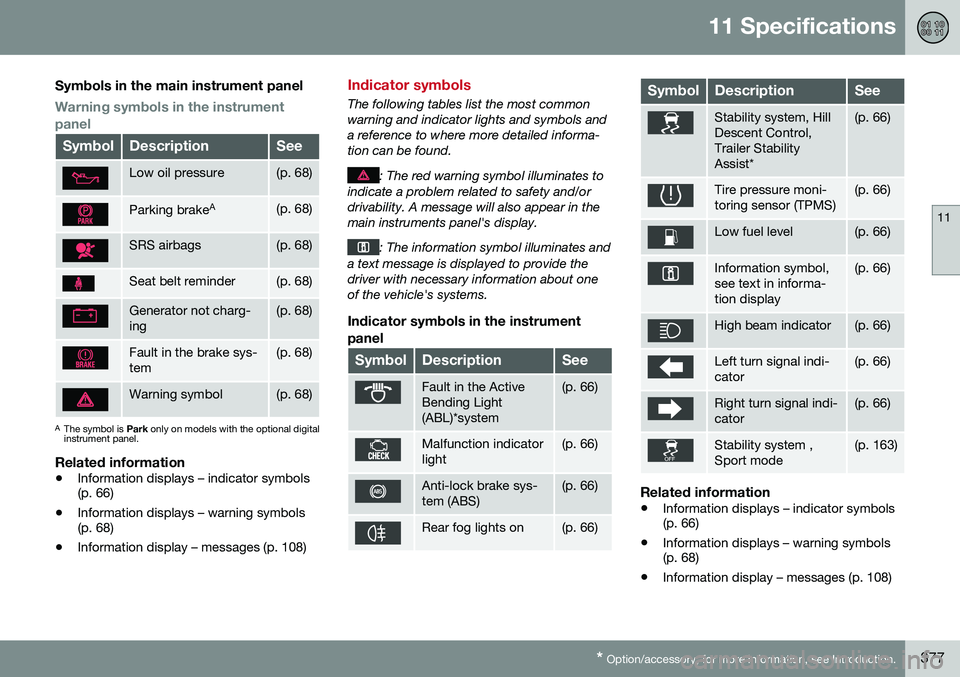
Symbols in the main instrument panel
Warning symbols in the instrument panel
SymbolDescriptionSee
Low oil pressure(p. 68)
Parking brake A(p. 68)
SRS airbags(p. 68)
Seat belt reminder(p. 68)
Generator not charg- ing(p. 68)
Fault in the brake sys- tem(p. 68)
Warning symbol(p. 68)
A
The symbol is Park only on models with the optional digital
instrument panel.
Related information
• Information displays – indicator symbols (p. 66)
• Information displays – warning symbols(p. 68)
• Information display – messages (p. 108)
Indicator symbols
The following tables list the most common warning and indicator lights and symbols anda reference to where more detailed informa-tion can be found.
: The red warning symbol illuminates to
indicate a problem related to safety and/or drivability. A message will also appear in themain instruments panel's display.
: The information symbol illuminates and
a text message is displayed to provide the driver with necessary information about oneof the vehicle's systems.
Indicator symbols in the instrument
panel
SymbolDescriptionSee
Fault in the Active Bending Light(ABL)*system(p. 66)
Malfunction indicator light(p. 66)
Anti-lock brake sys- tem (ABS)(p. 66)
Rear fog lights on(p. 66)
SymbolDescriptionSee
Stability system, Hill Descent Control,Trailer StabilityAssist*(p. 66)
Tire pressure moni- toring sensor (TPMS)(p. 66)
Low fuel level(p. 66)
Information symbol, see text in informa-tion display(p. 66)
High beam indicator(p. 66)
Left turn signal indi- cator(p. 66)
Right turn signal indi- cator(p. 66)
Stability system , Sport mode(p. 163)
Related information
• Information displays – indicator symbols (p. 66)
• Information displays – warning symbols(p. 68)
• Information display – messages (p. 108)
Page 380 of 392
11 Specifications
11
378* Option/accessory, for more information, see Introduction.
Information symbols
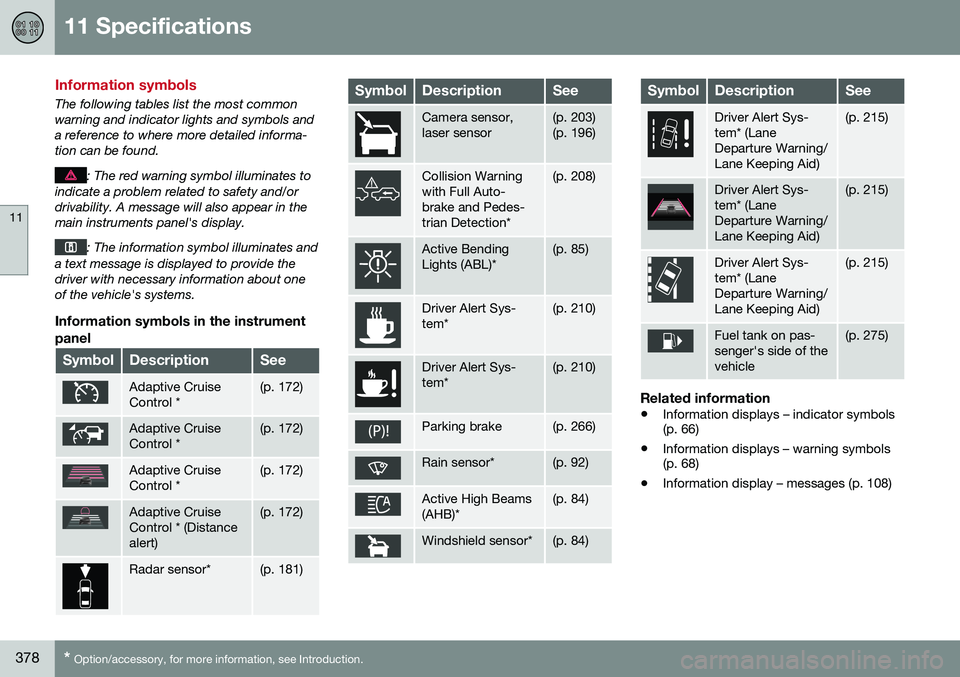
The following tables list the most common warning and indicator lights and symbols anda reference to where more detailed informa-tion can be found.
: The red warning symbol illuminates to
indicate a problem related to safety and/or drivability. A message will also appear in themain instruments panel's display.
: The information symbol illuminates and
a text message is displayed to provide the driver with necessary information about oneof the vehicle's systems.
Information symbols in the instrument
panel
SymbolDescriptionSee
Adaptive Cruise Control *(p. 172)
Adaptive Cruise Control *(p. 172)
Adaptive Cruise Control *(p. 172)
Adaptive Cruise Control * (Distancealert)(p. 172)
Radar sensor*(p. 181)
SymbolDescriptionSee
Camera sensor, laser sensor(p. 203) (p. 196)
Collision Warning with Full Auto-brake and Pedes-trian Detection*(p. 208)
Active Bending Lights (ABL)*(p. 85)
Driver Alert Sys- tem*(p. 210)
Driver Alert Sys- tem*(p. 210)
Parking brake(p. 266)
Rain sensor*(p. 92)
Active High Beams (AHB)*(p. 84)
Windshield sensor*(p. 84)
SymbolDescriptionSee
Driver Alert Sys- tem* (LaneDeparture Warning/Lane Keeping Aid)(p. 215)
Driver Alert Sys- tem* (LaneDeparture Warning/Lane Keeping Aid)(p. 215)
Driver Alert Sys- tem* (LaneDeparture Warning/Lane Keeping Aid)(p. 215)
Fuel tank on pas- senger's side of thevehicle(p. 275)
Related information
• Information displays – indicator symbols (p. 66)
• Information displays – warning symbols(p. 68)
• Information display – messages (p. 108)
Page 381 of 392
11 Specifications
11
* Option/accessory, for more information, see Introduction.379
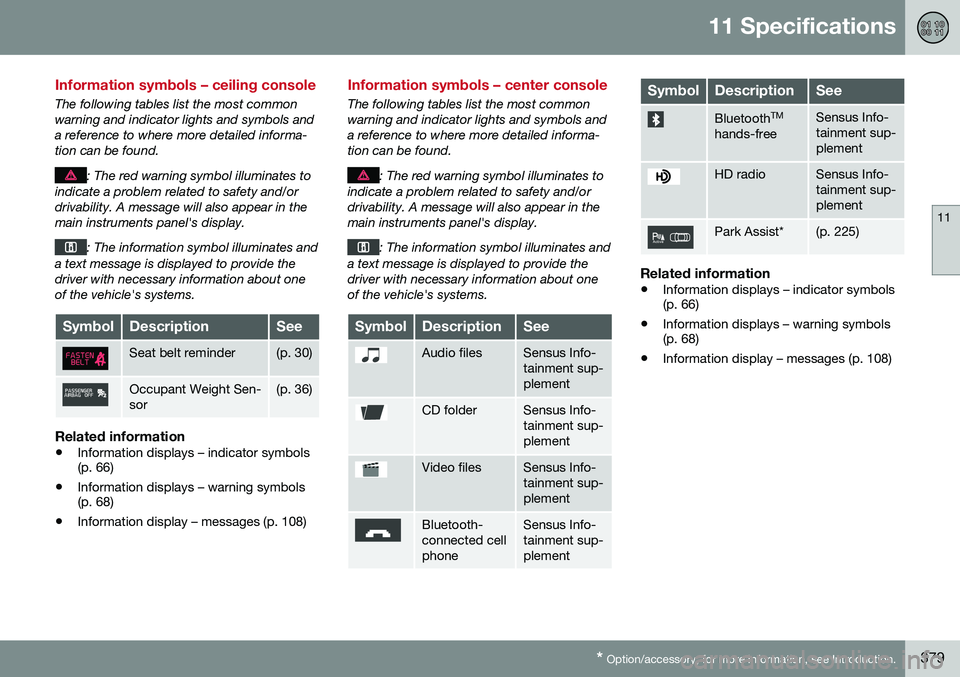
Information symbols – ceiling console
The following tables list the most common warning and indicator lights and symbols anda reference to where more detailed informa-tion can be found.
: The red warning symbol illuminates to
indicate a problem related to safety and/or drivability. A message will also appear in themain instruments panel's display.
: The information symbol illuminates and
a text message is displayed to provide the driver with necessary information about oneof the vehicle's systems.
SymbolDescriptionSee
Seat belt reminder(p. 30)
Occupant Weight Sen- sor(p. 36)
Related information
• Information displays – indicator symbols (p. 66)
• Information displays – warning symbols(p. 68)
• Information display – messages (p. 108)
Information symbols – center console
The following tables list the most common warning and indicator lights and symbols anda reference to where more detailed informa-tion can be found.
: The red warning symbol illuminates to
indicate a problem related to safety and/or drivability. A message will also appear in themain instruments panel's display.
: The information symbol illuminates and
a text message is displayed to provide the driver with necessary information about oneof the vehicle's systems.
SymbolDescriptionSee
Audio filesSensus Info- tainment sup-plement
CD folderSensus Info- tainment sup-plement
Video filesSensus Info- tainment sup-plement
Bluetooth- connected cellphoneSensus Info- tainment sup-plement
SymbolDescriptionSee
Bluetooth TM
hands-freeSensus Info- tainment sup-plement
HD radioSensus Info- tainment sup-plement
Park Assist*(p. 225)
Related information
• Information displays – indicator symbols (p. 66)
• Information displays – warning symbols(p. 68)
• Information display – messages (p. 108)
Page 385 of 392
12 Index
12
383
Horn........................................................... 81
I
ID, Volvo.................................................... 21
Ignition modes..................................... 72, 73
Immobilizer.............................................. 141
Important information.......................... 13, 14
Indicator lights............................... 62, 64, 68
Infant seats................................................ 49
Inflatable Curtain........................................ 41
Inflation pressure............................. 293, 294
Inflation pressure table............................ 297Information and warning symbols, table
of.............................................................. 376
Information lights........................... 62, 64, 68
Inspection readiness................................ 321
Instrument lighting..................................... 87
"theater" lighting................................... 87
Instrument overview............................ 59, 62
Instrument panel........................ 62, 107, 108
Interior Air Quality System....................... 119
Interior lighting........................................... 89Internet connection booking service.................................. 321 ISOFIX/LATCH anchors............................. 55
J
Jack
attaching............................................. 288
location of........................................... 288
Jump starting........................................... 249
K
Key blade. 139, 140, 143, 144, 145, 146, 149 private locking.................................... 145
valet locking........................................ 145
Keyless drive............................................ 148 general description............. 149, 150, 151
starting the vehicle............................. 245
Keyless locking/unlocking....................... 148
L
Labels list of................................................... 365
location of........................................... 364
Lane Departure Warning (LDW) 215, 216, 217, 218Lane Keeping Aid............ 220, 221, 223, 224
LATCH anchors......................................... 55
Leather care............................................. 358
Lighting panel............................................ 82
Loading the vehicle.................. 135, 137, 298
roof loads............................................ 136
Locking.................................... 152, 153, 155
Locking the vehicle.................................. 142
Locks, child safety..................................... 57
Low beams................................................ 83
Low oil pressure warning light................... 68
M
Main instrument panel..................... 107, 108
Maintenance............................................ 318 hoisting the vehicle............................. 320
performed by the owner..................... 319
Malfunction indicator light......................... 67
Messages in the instrument panel... 107, 108Mirrors defroster............................................... 98
power door..................................... 96, 97
rearview, auto-dim function.................. 98
retractable....................................... 96, 97
vanity.................................................. 134