ignition VOLVO S60 2016 Owner´s Manual
[x] Cancel search | Manufacturer: VOLVO, Model Year: 2016, Model line: S60, Model: VOLVO S60 2016Pages: 392, PDF Size: 10.04 MB
Page 93 of 392
03 Instruments and controls
03
}}
* Option/accessory, for more information, see Introduction.91
Home safe lighting
When you leave your vehicle at night, you can make use of the home safe lighting functionto illuminate the area in front of the vehicle. This function illuminates the headlights, park- ing lights, lights in the door mirrors, licenseplate lights, front ceiling lighting and footwell lighting. These lights will remain on for 30 19
,
60 or 90 seconds. The time interval can be set in MY CAR under
SettingsCar
settings
Light settingsHome safe
light duration. See My Car – introduction
(p. 70) for a description of the menu system.
1. Remove the key from the ignition slot to put the ignition in mode 0 (see Ignition
modes (p. 73) for information about the ignition modes).
2. Pull the turn signal lever as far as possible towards the steering wheel and release it.
3. Exit the vehicle and lock the doors.
Related information
• Approach lighting (p. 91)
Approach lighting
Approach lighting activates the parking lights, door mirror lights, license plate lighting, domelighting and door step lighting when youapproach the vehicle. This function is activated by pressing the approach light button on the remote key (see
the illustration in Remote key – functions(p. 142)). The time interval for this lighting can be set by pressing
MY CAR and going to
Car
settings
Light settingsApproach light
duration. See My Car – introduction (p. 70)
for a description of the menu system.
Related information
• Home safe lighting (p. 91)
Windshield wipers
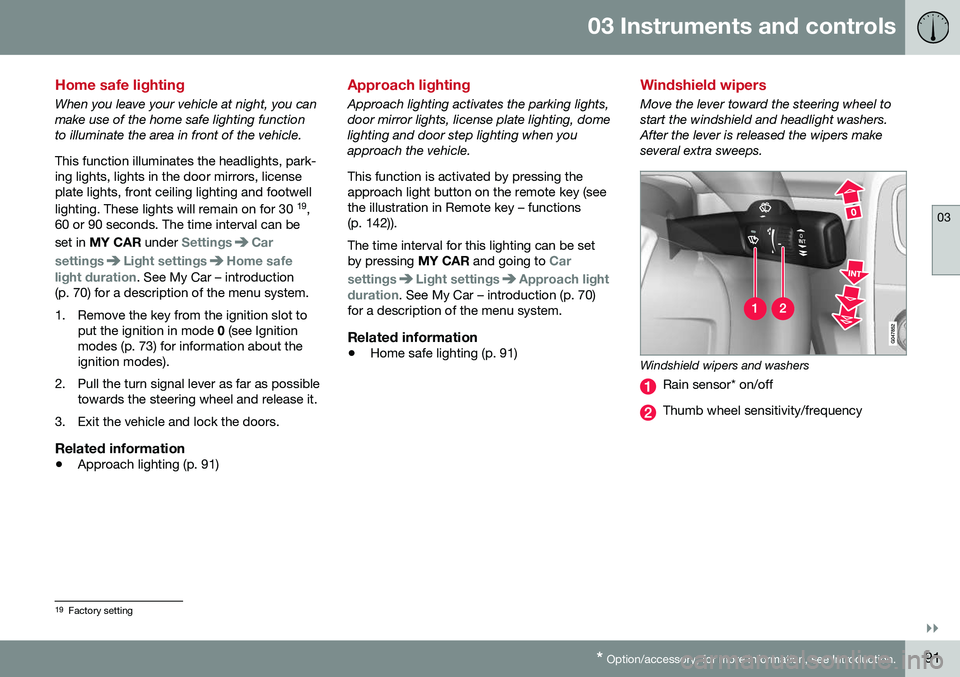
Move the lever toward the steering wheel to start the windshield and headlight washers.After the lever is released the wipers makeseveral extra sweeps.
Windshield wipers and washers
Rain sensor* on/off
Thumb wheel sensitivity/frequency
19
Factory setting
Page 94 of 392
||
03 Instruments and controls
03
92* Option/accessory, for more information, see Introduction.
CAUTION
• Use ample washer fluid when washing the windshield. The windshield shouldbe thoroughly wet when the wipers arein operation.
• Before using the wipers, ice and snowshould be removed from the wind-shield/rear window. Be sure the wiperblades are not frozen in place.
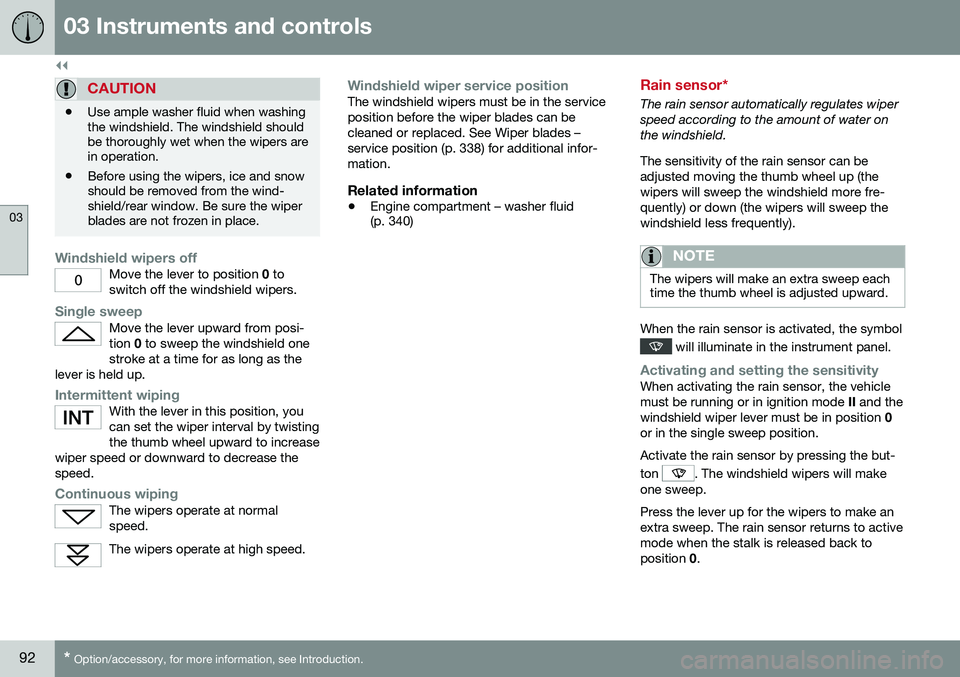
Windshield wipers offMove the lever to position
0 to
switch off the windshield wipers.
Single sweepMove the lever upward from posi- tion 0 to sweep the windshield one
stroke at a time for as long as the
lever is held up.
Intermittent wipingWith the lever in this position, you can set the wiper interval by twistingthe thumb wheel upward to increase
wiper speed or downward to decrease thespeed.
Continuous wipingThe wipers operate at normal speed.
The wipers operate at high speed.
Windshield wiper service positionThe windshield wipers must be in the service position before the wiper blades can becleaned or replaced. See Wiper blades –service position (p. 338) for additional infor-mation.
Related information
• Engine compartment – washer fluid (p. 340)
Rain sensor*
The rain sensor automatically regulates wiper speed according to the amount of water onthe windshield. The sensitivity of the rain sensor can be adjusted moving the thumb wheel up (thewipers will sweep the windshield more fre-quently) or down (the wipers will sweep thewindshield less frequently).
NOTE
The wipers will make an extra sweep each time the thumb wheel is adjusted upward.
When the rain sensor is activated, the symbol
will illuminate in the instrument panel.
Activating and setting the sensitivityWhen activating the rain sensor, the vehicle must be running or in ignition mode
II and the
windshield wiper lever must be in position 0
or in the single sweep position. Activate the rain sensor by pressing the but- ton
. The windshield wipers will make
one sweep. Press the lever up for the wipers to make an extra sweep. The rain sensor returns to activemode when the stalk is released back toposition 0.
Page 95 of 392
03 Instruments and controls
03
* Option/accessory, for more information, see Introduction.93
DeactivatingDeactivate the rain sensor by pressing the button
or press the lever down to
another wiper position. The rain sensor is automatically deactivated when the key is removed from the ignitionslot or five minutes after the ignition has beenswitched off.
CAUTION
The rain sensor should be deactivated when washing the car in an automatic carwash, etc. If the rain sensor function is lefton, the wipers will start inadvertently in thecar wash and could be damaged.
Windshield washer
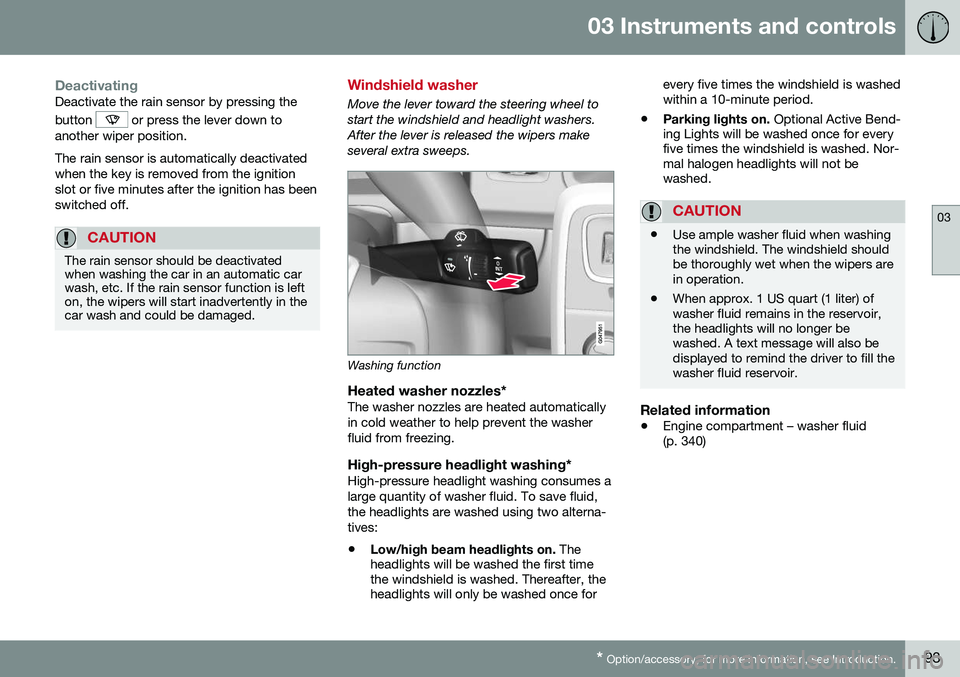
Move the lever toward the steering wheel to start the windshield and headlight washers.After the lever is released the wipers makeseveral extra sweeps.
Washing function
Heated washer nozzles*The washer nozzles are heated automatically in cold weather to help prevent the washerfluid from freezing.
High-pressure headlight washing*High-pressure headlight washing consumes alarge quantity of washer fluid. To save fluid,the headlights are washed using two alterna-tives:
• Low/high beam headlights on.
The
headlights will be washed the first time the windshield is washed. Thereafter, theheadlights will only be washed once for every five times the windshield is washedwithin a 10-minute period.
• Parking lights on.
Optional Active Bend-
ing Lights will be washed once for everyfive times the windshield is washed. Nor-mal halogen headlights will not bewashed.
CAUTION
• Use ample washer fluid when washing the windshield. The windshield shouldbe thoroughly wet when the wipers arein operation.
• When approx. 1 US quart (1 liter) ofwasher fluid remains in the reservoir,the headlights will no longer bewashed. A text message will also bedisplayed to remind the driver to fill thewasher fluid reservoir.
Related information
•
Engine compartment – washer fluid (p. 340)
Page 97 of 392
03 Instruments and controls
03
95
WARNING
•Always remove the ignition key when the vehicle is unattended to put theignition in mode
0 (see Ignition modes
(p. 73) for information about the igni-tion modes).
• Never leave children unattended in thevehicle.
• Make sure that the windows are com-pletely unobstructed before they areoperated.
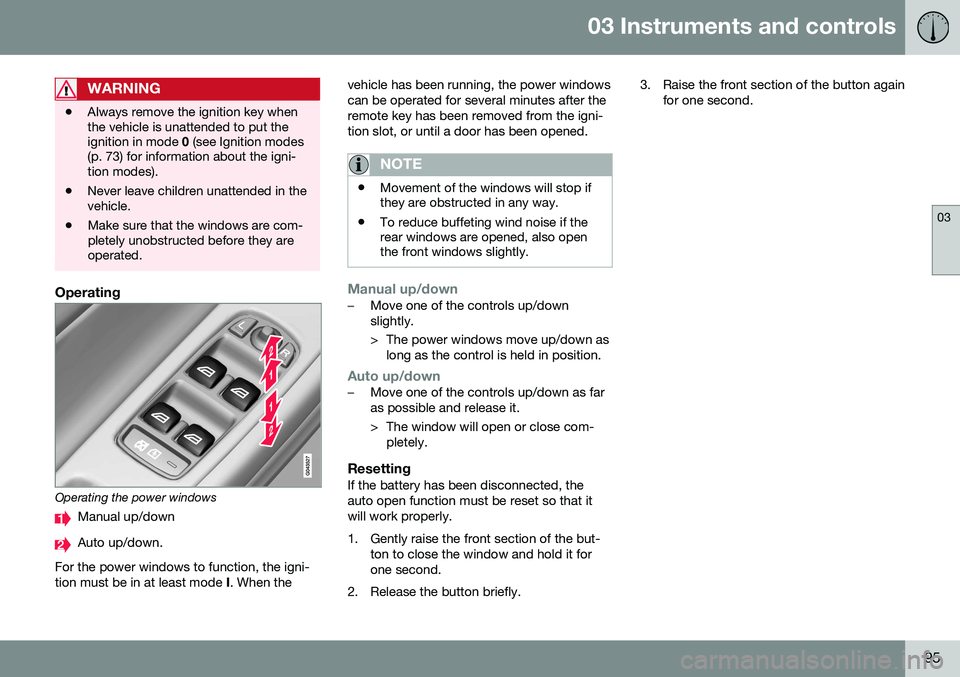
Operating
Operating the power windows
Manual up/down
Auto up/down.
For the power windows to function, the igni- tion must be in at least mode I. When the vehicle has been running, the power windowscan be operated for several minutes after theremote key has been removed from the igni-tion slot, or until a door has been opened.
NOTE
•
Movement of the windows will stop if they are obstructed in any way.
• To reduce buffeting wind noise if therear windows are opened, also openthe front windows slightly.
Manual up/down–Move one of the controls up/down slightly.
> The power windows move up/down as
long as the control is held in position.
Auto up/down–Move one of the controls up/down as far as possible and release it.
> The window will open or close com-pletely.
ResettingIf the battery has been disconnected, the auto open function must be reset so that itwill work properly.
1. Gently raise the front section of the but- ton to close the window and hold it for one second.
2. Release the button briefly. 3. Raise the front section of the button again
for one second.
Page 100 of 392
||
03 Instruments and controls
03
98* Option/accessory, for more information, see Introduction.
Resetting to neutralMirrors that have been moved out of position by an external force must be electrically resetto the neutral position for electric retracting/extending to work. • Retract the mirrors with the
L and R but-
tons.
• Fold them out again with the
L and R but-
tons.
The mirrors are now reset in neutral position.
Related information
• Interior rearview mirror (p. 99)
• Heated windshield*, rear window and door mirror defrosters (p. 98)
Heated windshield*, rear window and door mirror defrosters
The heating function is used to defrost/de-ice the windshield and/or the rear window anddoor mirrors.
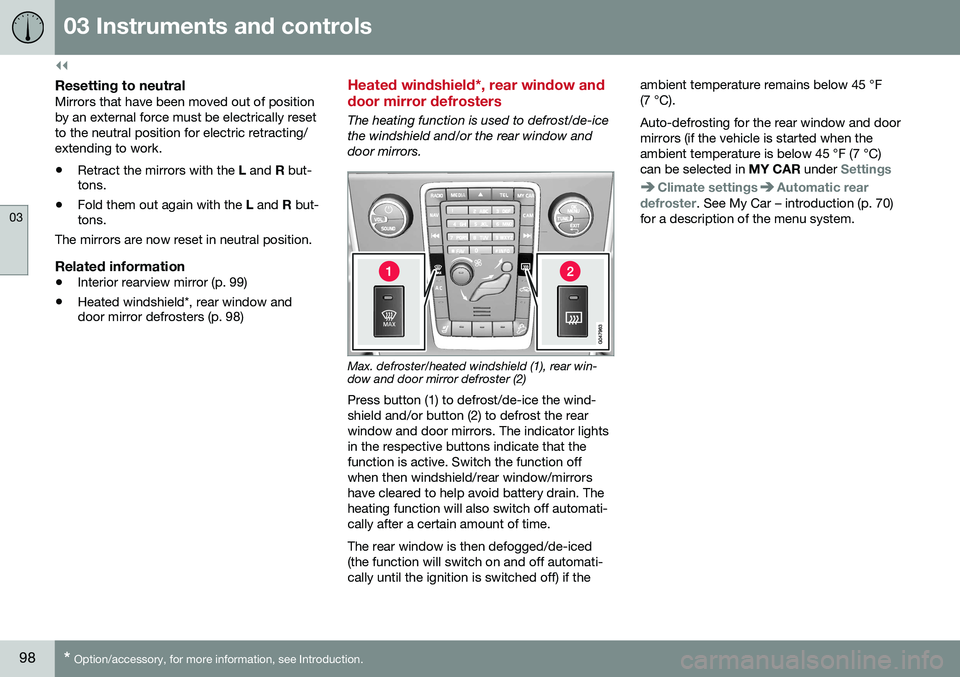
Max. defroster/heated windshield (1), rear win- dow and door mirror defroster (2)
Press button (1) to defrost/de-ice the wind- shield and/or button (2) to defrost the rearwindow and door mirrors. The indicator lightsin the respective buttons indicate that thefunction is active. Switch the function offwhen then windshield/rear window/mirrorshave cleared to help avoid battery drain. Theheating function will also switch off automati-cally after a certain amount of time. The rear window is then defogged/de-iced (the function will switch on and off automati-cally until the ignition is switched off) if the ambient temperature remains below 45 °F(7 °C). Auto-defrosting for the rear window and door mirrors (if the vehicle is started when theambient temperature is below 45 °F (7 °C)can be selected in
MY CAR under
Settings
Climate settingsAutomatic rear
defroster. See My Car – introduction (p. 70)
for a description of the menu system.
Page 101 of 392
03 Instruments and controls
03
}}
* Option/accessory, for more information, see Introduction.99
Interior rearview mirror
The interior rearview mirror has an auto-dim function that helps reduce glare from follow-ing vehicle's headlights.
Auto-dim functionThe interior rearview mirror’s auto-dim func-tion is controlled by two sensors: one point-ing forward (located on the forward-facingside of the mirror, which monitors the amountof ambient light) and one pointing rearward(located on the side of the mirror facing thedriver at the upper edge, which senses thestrength of following vehicles' headlights), and work together to help eliminate glare. 21
NOTE
Obstructing the forward sensor with e.g., parking stickers, transponders, etc., or therear sensor by placing objects on the par-cel shelf or the rear seat in such a way thatlight is prevented from reaching the sensorwill reduce the auto-dim function in theinterior rearview mirror and optional auto-dim function in the door mirrors.
Related information
•
Power door mirrors (p. 96)
Digital compass*
The rear-view mirror has an integrated display that shows the compass direction in whichthe vehicle is traveling.
Operation
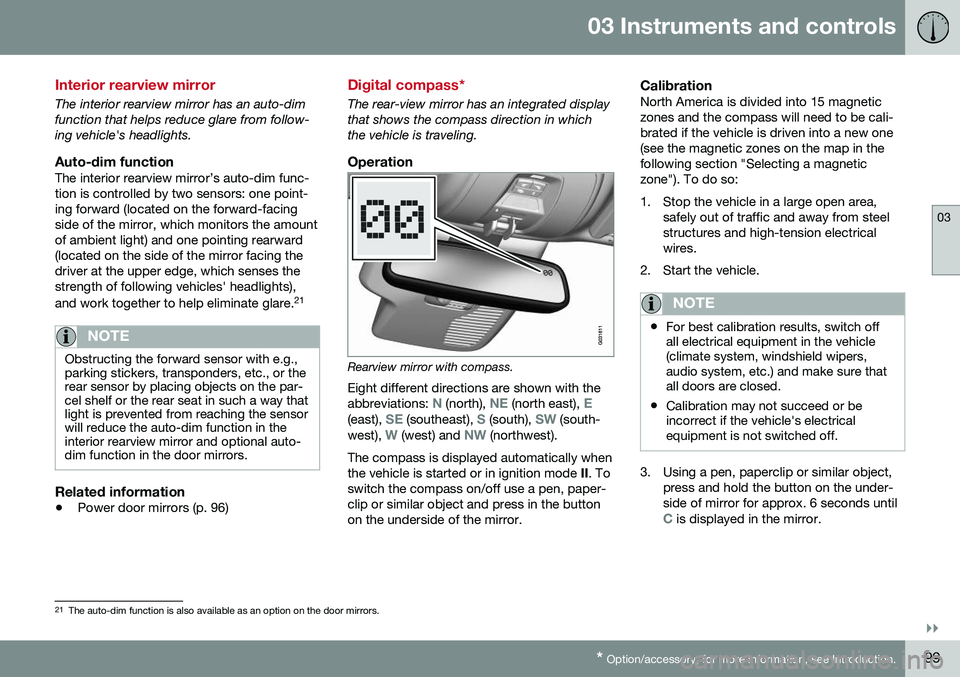
Rearview mirror with compass.
Eight different directions are shown with the abbreviations:
N (north), NE (north east), E(east), SE (southeast), S (south), SW (south-
west), W (west) and NW (northwest).
The compass is displayed automatically when the vehicle is started or in ignition mode II. To
switch the compass on/off use a pen, paper-clip or similar object and press in the buttonon the underside of the mirror.
CalibrationNorth America is divided into 15 magneticzones and the compass will need to be cali-brated if the vehicle is driven into a new one(see the magnetic zones on the map in thefollowing section "Selecting a magneticzone"). To do so:
1. Stop the vehicle in a large open area, safely out of traffic and away from steel structures and high-tension electricalwires.
2. Start the vehicle.
NOTE
• For best calibration results, switch off all electrical equipment in the vehicle(climate system, windshield wipers,audio system, etc.) and make sure thatall doors are closed.
• Calibration may not succeed or beincorrect if the vehicle's electricalequipment is not switched off.
3. Using a pen, paperclip or similar object,
press and hold the button on the under- side of mirror for approx. 6 seconds until
C is displayed in the mirror.
21The auto-dim function is also available as an option on the door mirrors.
Page 102 of 392
||
03 Instruments and controls
03
100* Option/accessory, for more information, see Introduction.
4. Press and hold the button for 3 seconds
until the number of the current magnetic zone is displayed.
5. Press the button repeatedly until the number of the desired magnetic zone (
1-15) is displayed. See the magnetic
zones on the map in the following section "Selecting a magnetic zone").
6. Wait until
C is again displayed in the mir-
ror.
7. Drive slowly in a circle at a speed of no more than 6 mph (10 km/h) until a direc- tion is displayed. This indicates that cali-bration is complete.
8. Drive around in a circle an additional two times to fine-tune the calibration.
9. Vehicles with an electrically heated windshield:
* if
C is displayed when the
heating function is activated, perform step 7 with the heating function on. Seealso Max. defroster and electricallyheated windshield* (p. 125) for additionalinformation about the heated windshield.
Repeat the calibration procedure if neces-sary.
Selecting a magnetic zone
15 14
13
12
11
9
8
7
6
5
4
3
2
1
10
G018632
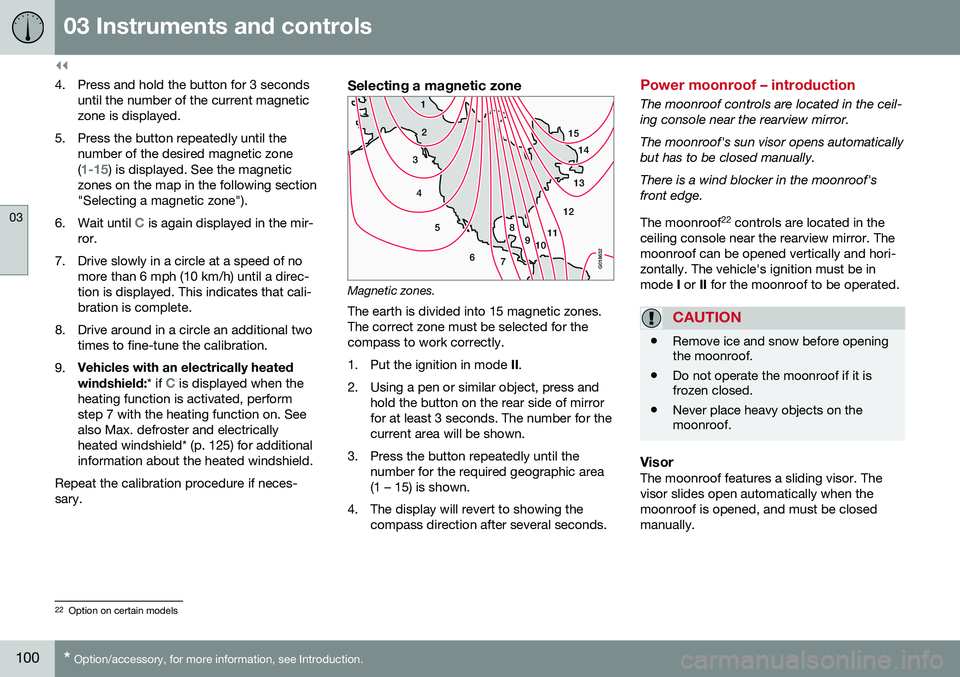
Magnetic zones.The earth is divided into 15 magnetic zones. The correct zone must be selected for thecompass to work correctly.
1. Put the ignition in mode II.
2. Using a pen or similar object, press and hold the button on the rear side of mirror for at least 3 seconds. The number for thecurrent area will be shown.
3. Press the button repeatedly until the number for the required geographic area(1 – 15) is shown.
4. The display will revert to showing the compass direction after several seconds.
Power moonroof – introduction
The moonroof controls are located in the ceil- ing console near the rearview mirror. The moonroof's sun visor opens automatically but has to be closed manually. There is a wind blocker in the moonroof's front edge. The moonroof 22
controls are located in the
ceiling console near the rearview mirror. The moonroof can be opened vertically and hori-zontally. The vehicle's ignition must be inmode I or II for the moonroof to be operated.
CAUTION
• Remove ice and snow before opening the moonroof.
• Do not operate the moonroof if it isfrozen closed.
• Never place heavy objects on themoonroof.
VisorThe moonroof features a sliding visor. The visor slides open automatically when themoonroof is opened, and must be closedmanually.
22
Option on certain models
Page 104 of 392
||
03 Instruments and controls
03
102* Option/accessory, for more information, see Introduction.
Automatic closing–Push the switch as far forward as possi- ble (the position for automatic closing)and release it to automatically close themoonroof.
WARNING
• During manual closing, if the moonroof is obstructed, immediately open itagain.
• Never open or close the moonroof if itis obstructed in any way.
• Never allow a child to operate themoonroof.
• Never leave a child alone in a vehicle.
• When leaving the vehicle, ensure thatthe ignition is in mode
0 (see Ignition
modes (p. 73) for information about thevarious ignition modes) to disable themoonroof. Never leave the remote keyin the vehicle.
• Never extend any object or body partthough the open moonroof, even if thevehicle's ignition is completelyswitched off.
Tilt position
G028899
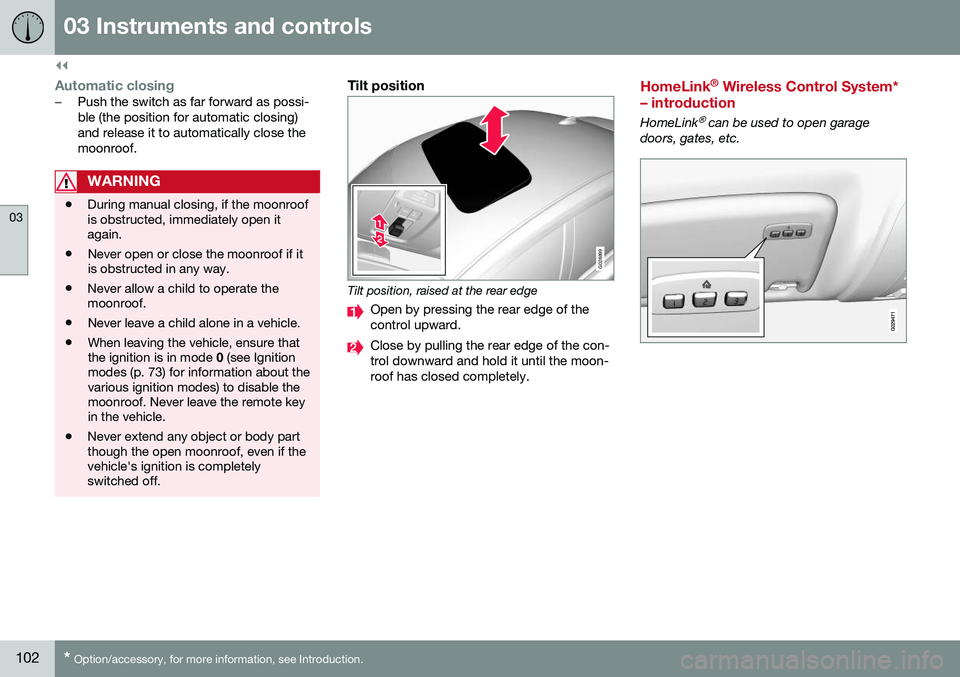
Tilt position, raised at the rear edge
Open by pressing the rear edge of the control upward.
Close by pulling the rear edge of the con- trol downward and hold it until the moon-roof has closed completely.
HomeLink ®
Wireless Control System*
– introduction
HomeLink® can be used to open garage
doors, gates, etc.
Page 105 of 392
03 Instruments and controls
03
}}
* Option/accessory, for more information, see Introduction.103
WARNING
•
If you use HomeLink ®
to open a
garage door or gate, be sure no one is near the gate or door while it is inmotion.
• When programming a garage dooropener, it is advised to park outside ofthe garage.
• Do not use HomeLink ®
with any
garage door opener that lacks safetystop and reverse features as requiredby U.S. federal safety standards (thisincludes any garage door openermodel manufactured before April 1,1982). A garage door that cannotdetect an object - signaling the door tostop and reverse - does not meet cur-rent U.S. federal safety standards. Formore information, contact HomeLinkat: www.homelink.com.
The HomeLink ®
23
Wireless Control System
provides a convenient way to replace up to three hand-held radio-frequency (RF) trans-mitters used to activate devices such as gateoperators, garage door openers, entry doorlocks, security systems, even home lighting.Additional information can be found on theInternet at, www.homelink.com/www.youtube.com/HomeLinkGentex or byphoning the hotline at 1–800–355–3515. Retain the original transmitter of the RFdevice you are programming for use in othervehicles as well as for future HomeLink pro-gramming. It is also suggested that upon thesale of the vehicle, the programmed Home-Link buttons be erased for security purposes.Refer to “Resetting HomeLink Buttons” in HomeLink
®
Wireless Control System* – pro-
gramming (p. 103).
Using HomeLinkTo operate, simply press and hold the pro- grammed HomeLink button until the traineddevice begins to operate (this may take sev-eral seconds). Activation will now occur forthe trained device (i.e., garage door opener,gate operator, security system, entry doorlock, home/office lighting, etc.). For conven-ience, the hand-held transmitter of the devicemay also be used at any time. In the eventthat there are still programming difficulties orquestions, contact HomeLink at:www.homelink.com/www.youtube.com/HomeLinkGentex or by phoning the hotline at1–800–355–3515.
NOTE
If the ignition is switched off, HomeLink will function for 30 minutes after the driv-er's door has been opened.
HomeLink ®
Wireless Control System*
– programming
The HomeLink Wireless Control System pro- vides a convenient way to replace up to threehand-held radio-frequency (RF) transmittersused to activate devices such as gate opera-tors, garage door openers, entry door locks,security systems, even home lighting. Addi-tional information can be found on the Inter-net atwww.homelink.com/www.youtube.com/HomeLinkGentex or by phoning the hotline at1–800–355–3515.
NOTE
Some vehicles may require the ignition to be switched on or be in the “accessories”position for programming and/or operationof HomeLink. It is also recommended thata new battery be placed in the hand-heldtransmitter of the device being pro-grammed to HomeLink for quicker trainingand accurate transmission of the radio-fre-quency signal. The HomeLink buttonsmust be reset first. When this has beencompleted, Homelink is in learning modeso that you can perform programming.
1. Position the end of your hand-held trans- mitter 1–3 inches (5–14 cm) away from the HomeLink button you wish to pro-gram while keeping the indicator light inview.
23HomeLink and the HomeLink house are registered trademarks of Gentex Corporation.
Page 109 of 392
03 Instruments and controls
03
* Option/accessory, for more information, see Introduction.107
Information display – menu controls
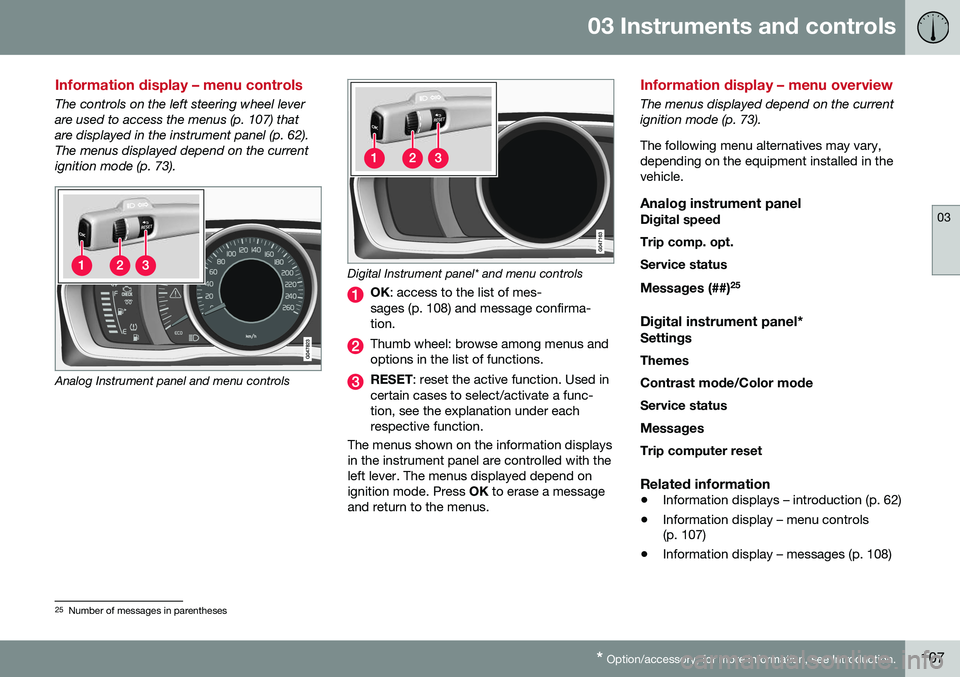
The controls on the left steering wheel lever are used to access the menus (p. 107) thatare displayed in the instrument panel (p. 62).The menus displayed depend on the currentignition mode (p. 73).
Analog Instrument panel and menu controls
Digital Instrument panel* and menu controls
OK : access to the list of mes-
sages (p. 108) and message confirma- tion.
Thumb wheel: browse among menus and options in the list of functions.
RESET : reset the active function. Used in
certain cases to select/activate a func- tion, see the explanation under eachrespective function.
The menus shown on the information displaysin the instrument panel are controlled with theleft lever. The menus displayed depend onignition mode. Press OK to erase a message
and return to the menus.
Information display – menu overview
The menus displayed depend on the current ignition mode (p. 73). The following menu alternatives may vary, depending on the equipment installed in thevehicle.
Analog instrument panelDigital speed Trip comp. opt.Service status
Messages (##) 25
Digital instrument panel*
Settings
Themes
Contrast mode /Color mode
Service status
Messages Trip computer reset
Related information
• Information displays – introduction (p. 62)
• Information display – menu controls (p. 107)
• Information display – messages (p. 108)
25
Number of messages in parentheses