battery VOLVO S60 2017 Owner´s Manual
[x] Cancel search | Manufacturer: VOLVO, Model Year: 2017, Model line: S60, Model: VOLVO S60 2017Pages: 398, PDF Size: 9.46 MB
Page 257 of 398
STARTING AND DRIVING
}}
* Option/accessory, for more information, see Introduction.255
1. The turn signals will flash several times.
2. The engine will start.
3. The turn signals will illuminate for 3 seconds
to indicate that the engine has started.
After the engine has started, the vehicle remains locked but the alarm is disarmed.
Active functions
When the engine is started with ERS, the follow- ing functions are activated: • The climate control system
• The infotainment system.
• Approach lighting
Deactivated functions
When the engine is started with ERS, the follow- ing functions are deactivated: •
Headlights
• Parking lights
• License plate lights
• Windshield wipers
Related information
•
Engine Remote Start (ERS)
* – switching off
the engine (p. 255)
• Engine Remote Start (ERS)
* – introduction
(p. 254)
Engine Remote Start (ERS) * –
switching off the engine
Any of the following will switch off the engine if it has been started with ERS: • Pressing the lock button (1) or the unlock button (2) on the remote key
• Unlocking the vehicle
• Opening a door
• Depressing the accelerator or brake pedal
• Moving the gear selector from the
P position
• If there are less than approx. 2.5 gallons(10 liters) of fuel in the tank
• More than 15 minutes have elapsed.
If the engine has been started with ERS andswitches off, the turn signals will illuminate for3 seconds.
Message in the instrument panel display
If ERS is interrupted, a text message will be dis- played in the instrument panel.
Related information
• Engine Remote Start (ERS)
* – introduction
(p. 254)
• Engine Remote Start (ERS)
* – starting the
engine (p. 254)
Jump starting
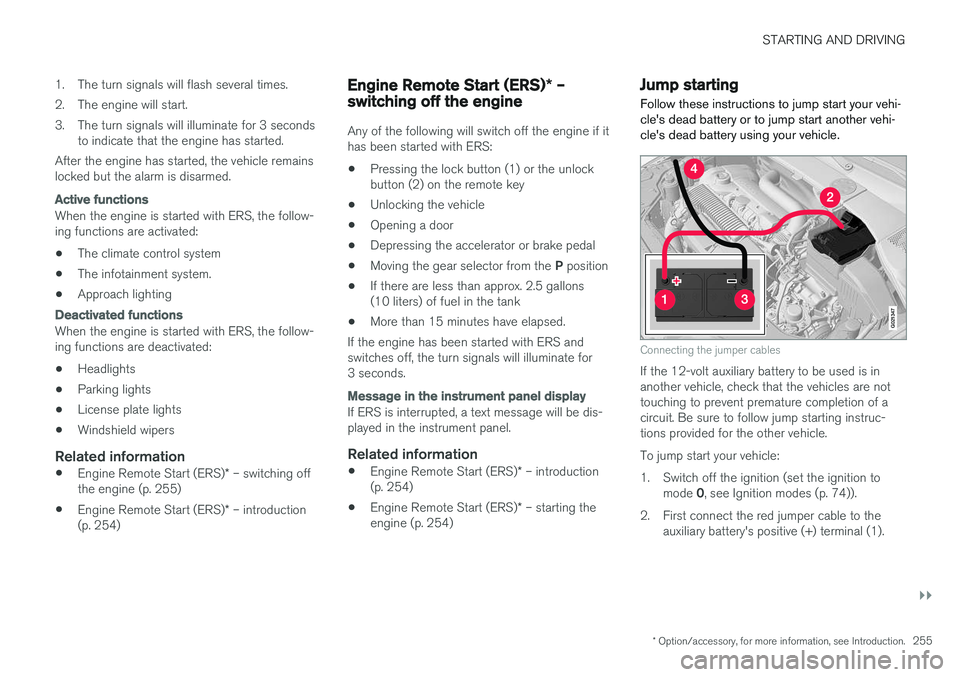
Follow these instructions to jump start your vehi- cle's dead battery or to jump start another vehi-cle's dead battery using your vehicle.
G021347
Connecting the jumper cables
If the 12-volt auxiliary battery to be used is in another vehicle, check that the vehicles are nottouching to prevent premature completion of acircuit. Be sure to follow jump starting instruc-tions provided for the other vehicle. To jump start your vehicle:
1. Switch off the ignition (set the ignition to mode 0, see Ignition modes (p. 74)).
2. First connect the red jumper cable to the auxiliary battery's positive (+) terminal (1).
Page 258 of 398
||
STARTING AND DRIVING
2563. Fold back the cover over the positive (+) ter-
minal on your vehicle's battery (2), marked with a "+" sign, located under a folding cover.
4. Connect the black jumper cable to the auxili- ary battery's negative (–) terminal (3) and tothe ground point in your vehicle's enginecompartment (right engine mount at the top,on the outer screw) (4).
5. Start the engine in the assisting vehicle, then start the engine in the vehicle with dead bat-tery.
6. After the engine has started, first remove the negative (–) terminal jumper cable (black).Then remove the positive (+) terminal jumpercable (red).
WARNING
PROPOSITION 65 WARNING! Battery posts, terminals, and related accesso- ries contain lead and lead compounds, chemi-cals known to the state of California to causecancer and reproductive harm. Wash handsafter handling.
CAUTION
Connect the jumper cables carefully to avoid short circuits with other components in theengine compartment.
WARNING
• Do not connect the jumper cable to any part of the fuel system or to any movingparts. Avoid touching hot manifolds.
• Batteries generate hydrogen gas, whichis flammable and explosive.
• Battery fluid contains sulfuric acid. Do notallow battery fluid to contact eyes, skin,fabrics or painted surfaces. If contactoccurs, flush the affected area immedi-ately with water. Obtain medical helpimmediately if eyes are affected.
• Never expose the battery to open flameor electric spark.
• Do not smoke near the battery.
• Failure to follow the instructions for jumpstarting can lead to injury.
Related information
• Starting the engine (p. 252)
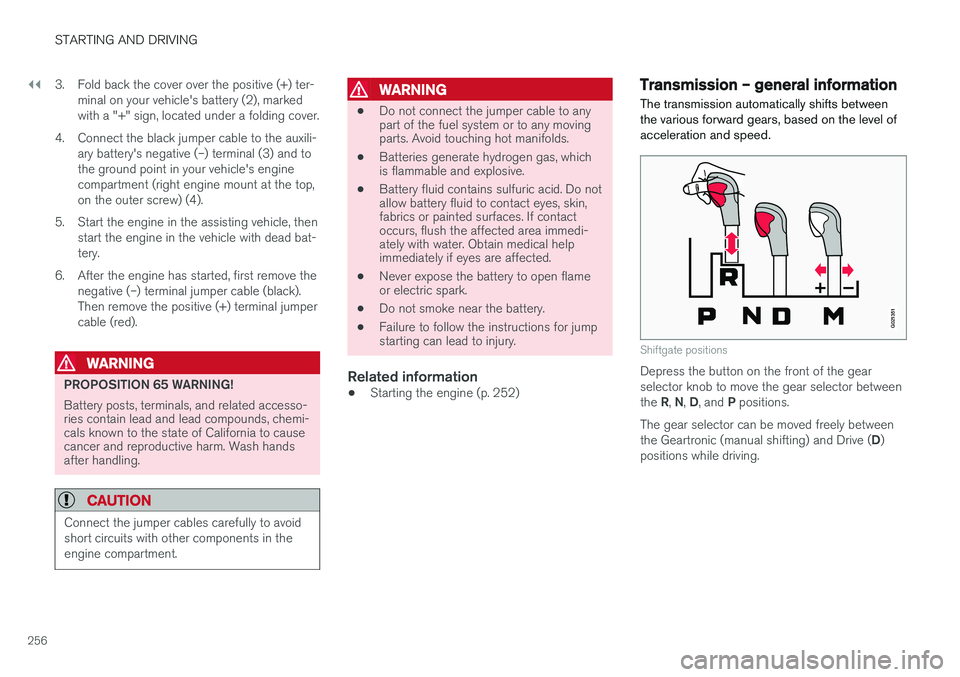
Transmission – general information The transmission automatically shifts between the various forward gears, based on the level ofacceleration and speed.
G021351
Shiftgate positions
Depress the button on the front of the gear selector knob to move the gear selector between the
R, N , D , and P positions.
The gear selector can be moved freely betweenthe Geartronic (manual shifting) and Drive ( D)
positions while driving.
Page 263 of 398
STARTING AND DRIVING
261
Transmission – shiftlock override
If the vehicle cannot be driven, for example because of a dead battery, the gear selectormust be moved from the P position before the
vehicle can be moved 8
.
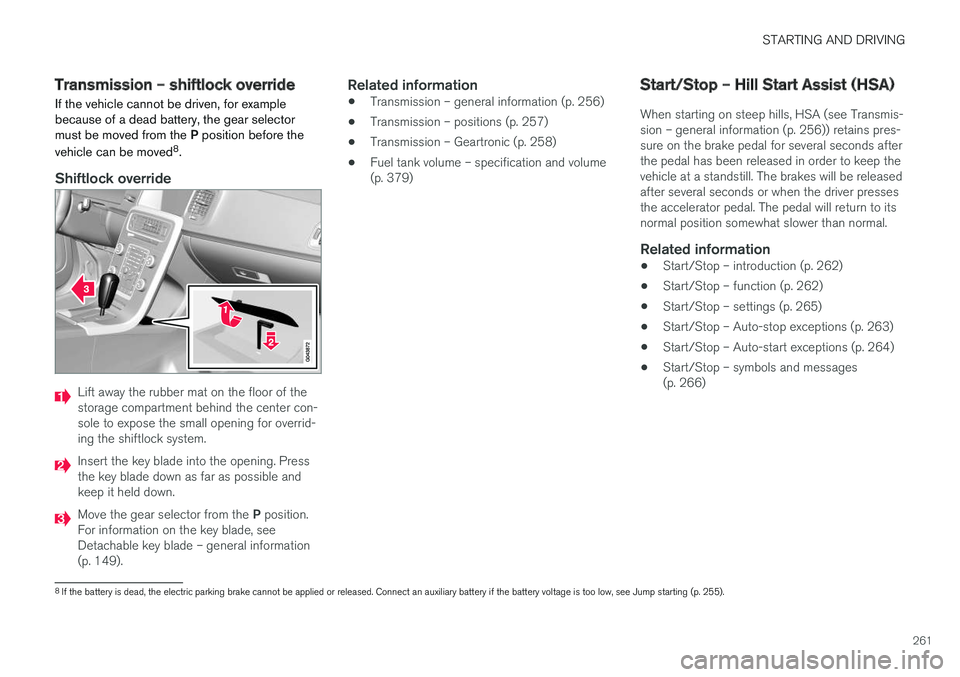
Shiftlock override
Lift away the rubber mat on the floor of the storage compartment behind the center con-sole to expose the small opening for overrid-ing the shiftlock system.
Insert the key blade into the opening. Press the key blade down as far as possible andkeep it held down.
Move the gear selector from the P position.
For information on the key blade, see Detachable key blade – general information(p. 149).
Related information
• Transmission – general information (p. 256)
• Transmission – positions (p. 257)
• Transmission – Geartronic (p. 258)
• Fuel tank volume – specification and volume(p. 379)
Start/Stop – Hill Start Assist (HSA)
When starting on steep hills, HSA (see Transmis- sion – general information (p. 256)) retains pres-sure on the brake pedal for several seconds afterthe pedal has been released in order to keep thevehicle at a standstill. The brakes will be releasedafter several seconds or when the driver pressesthe accelerator pedal. The pedal will return to itsnormal position somewhat slower than normal.
Related information
• Start/Stop – introduction (p. 262)
• Start/Stop – function (p. 262)
• Start/Stop – settings (p. 265)
• Start/Stop – Auto-stop exceptions (p. 263)
• Start/Stop – Auto-start exceptions (p. 264)
• Start/Stop – symbols and messages(p. 266)
8
If the battery is dead, the electric parking brake cannot be applied or released. Connect an auxiliary battery if the battery voltage is too low, see Jump starting (p. 255).
Page 264 of 398
STARTING AND DRIVING
* Option/accessory, for more information, see Introduction.
262
Start/Stop – introduction
Start/Stop is a function that temporarily switches off the engine when the vehicle is not moving,for instance in heavy traffic or at a traffic light tohelp reduce fuel consumption.
Start/Stop is available with certain engines/ transmissions.
Related information
• Start/Stop – function (p. 262)
• Start/Stop – settings (p. 265)
• Start/Stop – Auto-stop exceptions (p. 263)
• Start/Stop – Auto-start exceptions (p. 264)
• Start/Stop – Hill Start Assist (HSA) (p. 261)
• Start/Stop – symbols and messages(p. 266)
Start/Stop – function
Function and use
Start/Stop symbol in the instrument panel
Start/Stop button on the center console
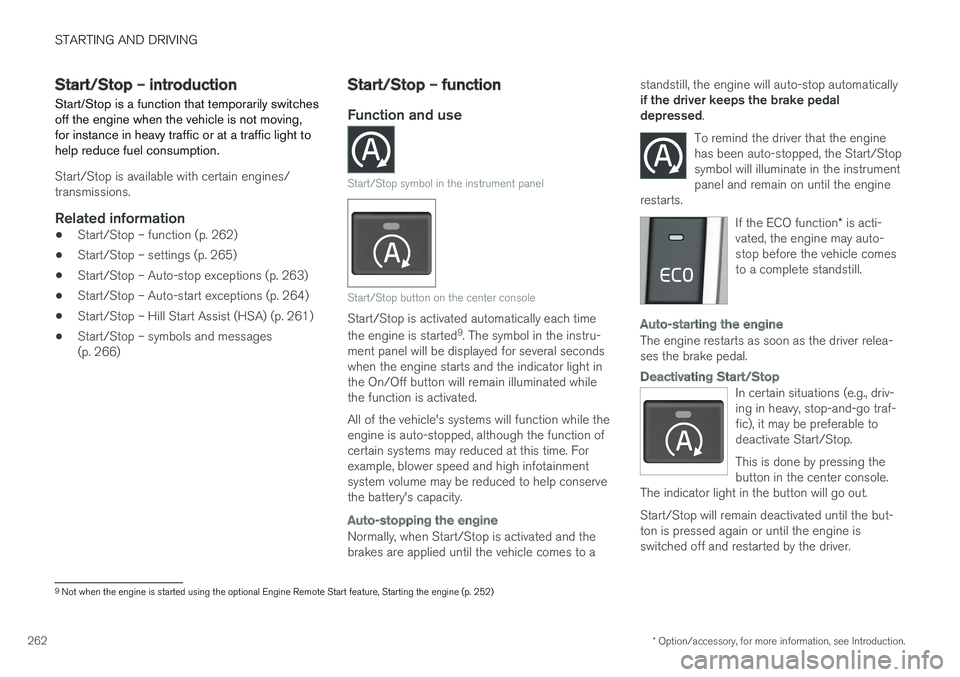
Start/Stop is activated automatically each time the engine is started 9
. The symbol in the instru-
ment panel will be displayed for several seconds when the engine starts and the indicator light inthe On/Off button will remain illuminated whilethe function is activated. All of the vehicle's systems will function while the engine is auto-stopped, although the function ofcertain systems may reduced at this time. Forexample, blower speed and high infotainmentsystem volume may be reduced to help conservethe battery's capacity.
Auto-stopping the engine
Normally, when Start/Stop is activated and the brakes are applied until the vehicle comes to a standstill, the engine will auto-stop automatically if the driver keeps the brake pedal depressed
.
To remind the driver that the enginehas been auto-stopped, the Start/Stopsymbol will illuminate in the instrumentpanel and remain on until the engine
restarts.
If the ECO function * is acti-
vated, the engine may auto- stop before the vehicle comesto a complete standstill.
Auto-starting the engine
The engine restarts as soon as the driver relea- ses the brake pedal.
Deactivating Start/Stop
In certain situations (e.g., driv- ing in heavy, stop-and-go traf-fic), it may be preferable todeactivate Start/Stop. This is done by pressing the button in the center console.
The indicator light in the button will go out. Start/Stop will remain deactivated until the but- ton is pressed again or until the engine isswitched off and restarted by the driver.
9 Not when the engine is started using the optional Engine Remote Start feature, Starting the engine (p. 252)
Page 265 of 398
STARTING AND DRIVING
* Option/accessory, for more information, see Introduction.263
Related information
•Start/Stop – introduction (p. 262)
• Start/Stop – settings (p. 265)
• Start/Stop – Auto-stop exceptions (p. 263)
• Start/Stop – Auto-start exceptions (p. 264)
• Start/Stop – Hill Start Assist (HSA) (p. 261)
• Start/Stop – symbols and messages (p. 266)
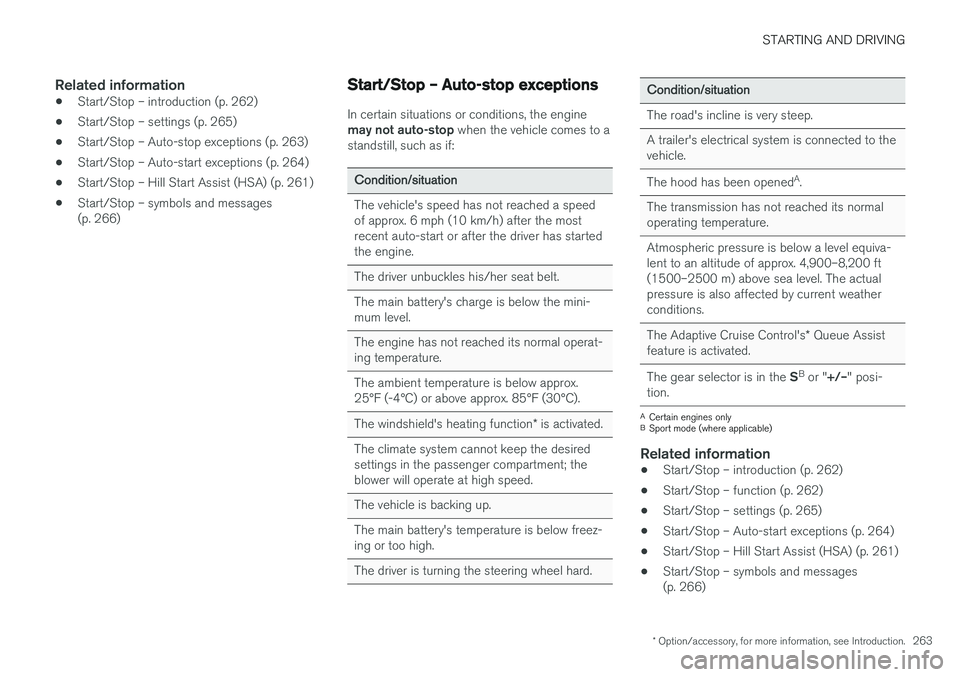
Start/Stop – Auto-stop exceptions
In certain situations or conditions, the engine may not auto-stop
when the vehicle comes to a
standstill, such as if:
Condition/situation
The vehicle's speed has not reached a speed of approx. 6 mph (10 km/h) after the mostrecent auto-start or after the driver has startedthe engine.
The driver unbuckles his/her seat belt.
The main battery's charge is below the mini- mum level.
The engine has not reached its normal operat- ing temperature.
The ambient temperature is below approx. 25°F (-4°C) or above approx. 85°F (30°C).
The windshield's heating function * is activated.
The climate system cannot keep the desired settings in the passenger compartment; theblower will operate at high speed.
The vehicle is backing up.
The main battery's temperature is below freez- ing or too high.
The driver is turning the steering wheel hard.
Condition/situation
The road's incline is very steep.
A trailer's electrical system is connected to the vehicle.
The hood has been opened A
.
The transmission has not reached its normal operating temperature.
Atmospheric pressure is below a level equiva- lent to an altitude of approx. 4,900–8,200 ft(1500–2500 m) above sea level. The actualpressure is also affected by current weatherconditions.
The Adaptive Cruise Control's * Queue Assist
feature is activated.
The gear selector is in the SB
or " +/–" posi-
tion.
A Certain engines only
B Sport mode (where applicable)
Related information
• Start/Stop – introduction (p. 262)
• Start/Stop – function (p. 262)
• Start/Stop – settings (p. 265)
• Start/Stop – Auto-start exceptions (p. 264)
• Start/Stop – Hill Start Assist (HSA) (p. 261)
• Start/Stop – symbols and messages (p. 266)
Page 266 of 398
STARTING AND DRIVING
* Option/accessory, for more information, see Introduction.
264
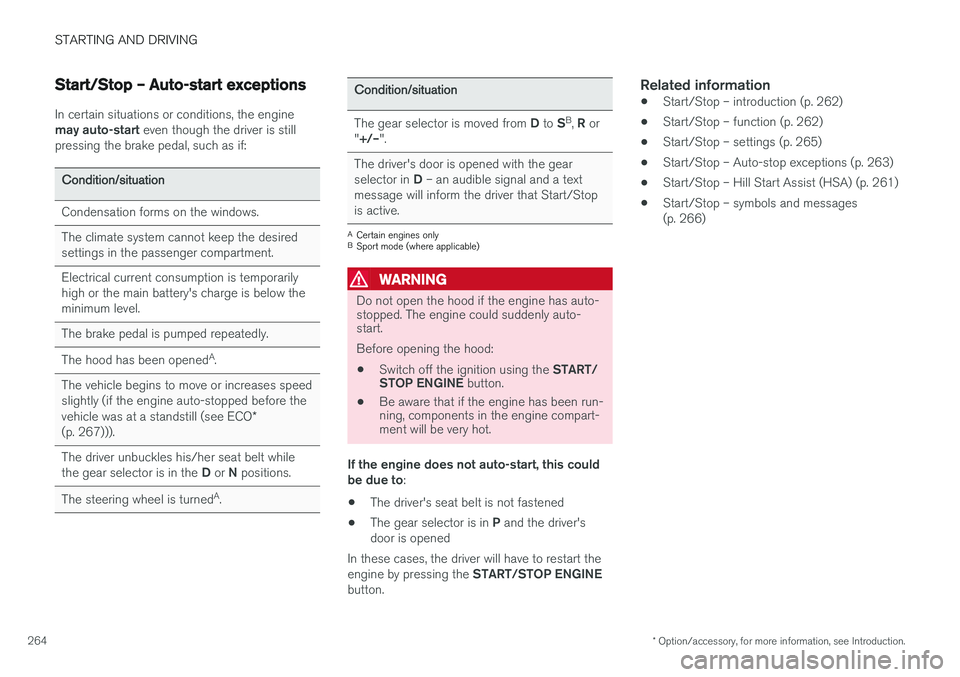
Start/Stop – Auto-start exceptions
In certain situations or conditions, the engine may auto-start even though the driver is still
pressing the brake pedal, such as if:
Condition/situation
Condensation forms on the windows.
The climate system cannot keep the desired settings in the passenger compartment.
Electrical current consumption is temporarily high or the main battery's charge is below theminimum level.
The brake pedal is pumped repeatedly.
The hood has been opened A
.
The vehicle begins to move or increases speed slightly (if the engine auto-stopped before the vehicle was at a standstill (see ECO *
(p. 267))).
The driver unbuckles his/her seat belt while the gear selector is in the D or N positions.
The steering wheel is turned A
.
Condition/situation
The gear selector is moved from D to SB
, R or
" +/– ".
The driver's door is opened with the gear selector in D – an audible signal and a text
message will inform the driver that Start/Stop is active.
A Certain engines only
B Sport mode (where applicable)
WARNING
Do not open the hood if the engine has auto- stopped. The engine could suddenly auto-start. Before opening the hood:
• Switch off the ignition using the
START/
STOP ENGINE button.
• Be aware that if the engine has been run- ning, components in the engine compart-ment will be very hot.
If the engine does not auto-start, this could be due to :
• The driver's seat belt is not fastened
• The gear selector is in
P and the driver's
door is opened
In these cases, the driver will have to restart the engine by pressing the START/STOP ENGINE
button.
Related information
• Start/Stop – introduction (p. 262)
• Start/Stop – function (p. 262)
• Start/Stop – settings (p. 265)
• Start/Stop – Auto-stop exceptions (p. 263)
• Start/Stop – Hill Start Assist (HSA) (p. 261)
• Start/Stop – symbols and messages (p. 266)
Page 275 of 398
STARTING AND DRIVING
}}
273
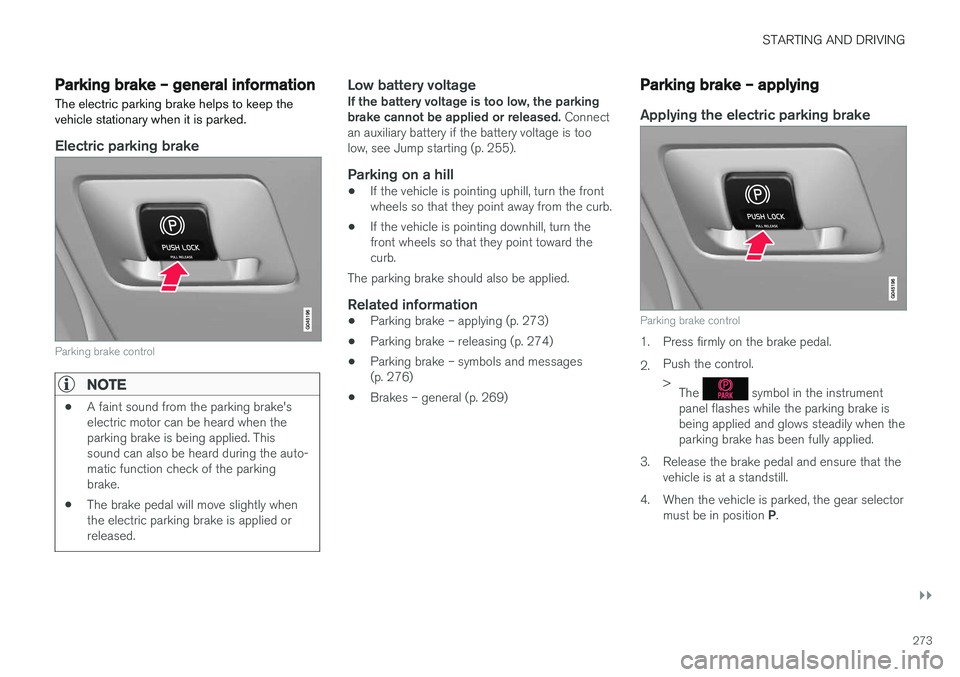
Parking brake – general information The electric parking brake helps to keep the vehicle stationary when it is parked.
Electric parking brake
Parking brake control
NOTE
•A faint sound from the parking brake's electric motor can be heard when theparking brake is being applied. Thissound can also be heard during the auto-matic function check of the parkingbrake.
• The brake pedal will move slightly whenthe electric parking brake is applied orreleased.
Low battery voltageIf the battery voltage is too low, the parking brake cannot be applied or released.
Connect
an auxiliary battery if the battery voltage is toolow, see Jump starting (p. 255).
Parking on a hill
• If the vehicle is pointing uphill, turn the frontwheels so that they point away from the curb.
• If the vehicle is pointing downhill, turn thefront wheels so that they point toward thecurb.
The parking brake should also be applied.
Related information
• Parking brake – applying (p. 273)
• Parking brake – releasing (p. 274)
• Parking brake – symbols and messages(p. 276)
• Brakes – general (p. 269)
Parking brake – applying
Applying the electric parking brake
Parking brake control
1. Press firmly on the brake pedal. 2.Push the control. >
The
symbol in the instrument
panel flashes while the parking brake is being applied and glows steadily when theparking brake has been fully applied.
3. Release the brake pedal and ensure that the vehicle is at a standstill.
4. When the vehicle is parked, the gear selector must be in position P.
Page 280 of 398
STARTING AND DRIVING
278
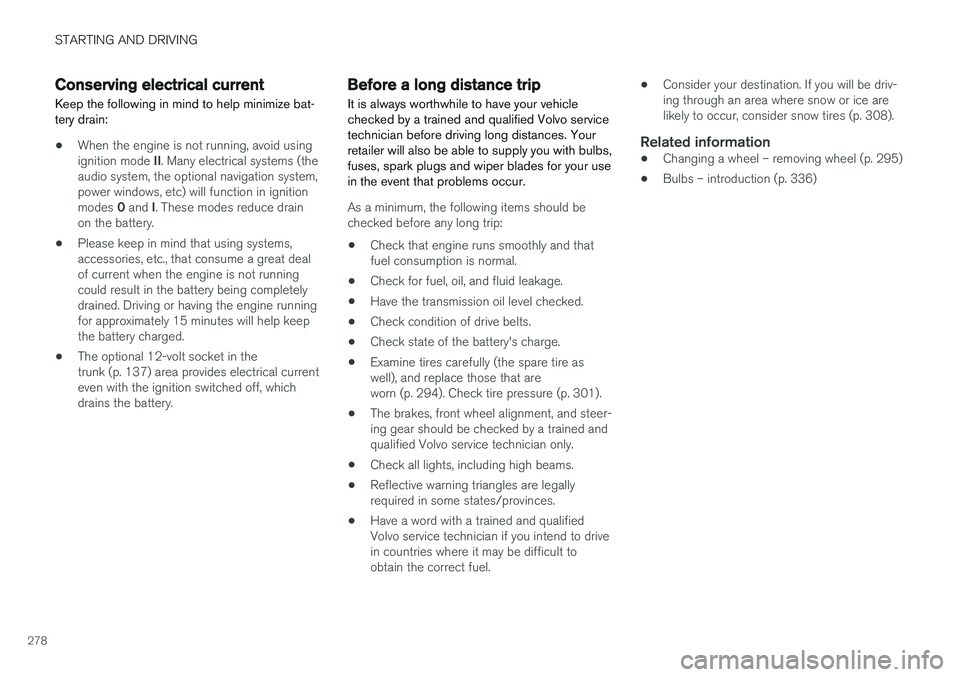
Conserving electrical current
Keep the following in mind to help minimize bat- tery drain:
• When the engine is not running, avoid using ignition mode
II. Many electrical systems (the
audio system, the optional navigation system, power windows, etc) will function in ignition modes 0 and I. These modes reduce drain
on the battery.
• Please keep in mind that using systems, accessories, etc., that consume a great dealof current when the engine is not runningcould result in the battery being completelydrained. Driving or having the engine runningfor approximately 15 minutes will help keepthe battery charged.
• The optional 12-volt socket in thetrunk (p. 137) area provides electrical currenteven with the ignition switched off, whichdrains the battery.
Before a long distance trip
It is always worthwhile to have your vehicle checked by a trained and qualified Volvo servicetechnician before driving long distances. Yourretailer will also be able to supply you with bulbs,fuses, spark plugs and wiper blades for your usein the event that problems occur.
As a minimum, the following items should be checked before any long trip:
• Check that engine runs smoothly and thatfuel consumption is normal.
• Check for fuel, oil, and fluid leakage.
• Have the transmission oil level checked.
• Check condition of drive belts.
• Check state of the battery's charge.
• Examine tires carefully (the spare tire aswell), and replace those that areworn (p. 294). Check tire pressure (p. 301).
• The brakes, front wheel alignment, and steer-ing gear should be checked by a trained andqualified Volvo service technician only.
• Check all lights, including high beams.
• Reflective warning triangles are legallyrequired in some states/provinces.
• Have a word with a trained and qualifiedVolvo service technician if you intend to drivein countries where it may be difficult toobtain the correct fuel. •
Consider your destination. If you will be driv-ing through an area where snow or ice arelikely to occur, consider snow tires (p. 308).
Related information
•
Changing a wheel – removing wheel (p. 295)
• Bulbs – introduction (p. 336)
Page 281 of 398
STARTING AND DRIVING
}}
279
Driving in cold weather
Check your vehicle before the approach of cold weather.
The following advice is worth noting:
• Make sure that the engine coolant (p. 333) contains 50 percent antifreeze. Any othermixture will reduce freeze protection. Thisgives protection against freezing down to–31 °F (–35 °C). The use of "recycled" anti-freeze is not approved by Volvo. Differenttypes of antifreeze must not be mixed.
• Volvo recommends using only genuine Volvoantifreeze in your vehicle's radiator.
• Try to keep the fuel tank well filled – thishelps prevent the formation of condensationin the tank. In addition, in extremely coldweather conditions it is worthwhile to addfuel line de-icer before refueling.
• The viscosity of the engine oil is important.Oil with low viscosity (thinner oil) improvescold-weather starting as well as decreasingfuel consumption while the engine is warm-ing up. Full synthetic 0W-30 oil is recom-mended for driving in areas with sustainedlow temperatures.
• The load placed on the battery is greater dur-ing the winter since the windshield wipers,lighting, etc., are used more often. Moreover,the capacity of the battery decreases as thetemperature drops. In very cold weather, apoorly charged battery can freeze and be damaged. It is therefore advisable to checkthe state of charge more frequently andspray an anti-rust oil on the battery posts.
• Volvo recommends the use of snow tires onall four wheels for winter driving, see Snowtires/studded tires (p. 308).
• To prevent the washer fluid (p. 346)reservoirfrom freezing, add washer solvents contain-ing antifreeze. This is important since dirt isoften splashed on the windshield during win-ter driving, requiring the frequent use of thewashers and wipers. Volvo Washer Solventshould be diluted as follows: Down to 14 °F(–10 °C): 1 part washer solvent and 4 partswater Down to 5 °F (–15 °C): 1 part washersolvent and 3 parts water Down to 0 °F(–18 °C): 1 part washer solvent and 2 partswater Down to –18 °F (–28 °C): 1 partwasher solvent and 1 part water.
• Use Volvo Teflon Lock Spray in the locks.
• Avoid using de-icing sprays as they cancause damage to the locks.
Refueling – fuel requirements
Volvo recommends the use of detergent gaso- line to control engine deposits.
Deposit control gasoline (detergent
additives)
Detergent gasoline is effective in keeping injec- tors and intake valves clean. Consistent use ofdeposit control gasolines will help ensure gooddrivability and fuel economy. If you are not surewhether the gasoline contains deposit controladditives, check with the service station operator.
NOTE
Volvo does not recommend the use of exter- nal fuel injector cleaning systems.
Unleaded fuelEach Volvo has a three-way catalytic converter and must use only unleaded gasoline. U.S. andCanadian regulations require that pumps deliver-ing unleaded gasoline be labeled "UNLEADED".Only these pumps have nozzles which fit yourvehicle's filler inlet. It is unlawful to dispense lea-ded fuel into a vehicle labeled "unleaded gaso-line only". Leaded gasoline damages the three-way catalytic converter and the heated oxygensensor system. Repeated use of leaded gasolinewill lessen the effectiveness of the emission con-trol system (p. 283) and could result in loss ofemission warranty coverage. State and local vehi-
Page 290 of 398
STARTING AND DRIVING
288
Towing the vehicle Always check with state and local authorities before attempting to tow another vehiclebecause this type of towing is subject to regula-tions regarding maximum towing speed, lengthand type of towing device, lighting, etc.
1. With the remote key fully pressed into theignition slot 14
, press START/STOP ENGINE
for approximately 2 seconds to activate igni- tion mode II.
2. The remote key must remain in the ignition slot15
for the entire time that the vehicle is
being towed.
3. Keep the tow rope taut when the towing vehicle slows down by applying light pressure on the brake pedal. This will help prevent jar-ring movements of the vehicle being towed.
4. Be prepared to apply the brakes to stop the vehicle being towed.
CAUTION
General towing precautions:
• Please check with state and local author- ities before attempting this type of tow-ing, as vehicles being towed are subjectto regulations regarding maximum towingspeed, length and type of towing device,lighting, etc.
• If the vehicle's battery is dead, see Jumpstarting (p. 255) to provide current forreleasing the electric parking brake and to move the gear selector from the
P
position to N. If this is not possible, see
Transmission – shiftlock override (p. 261) for information about manually overridingthe shiftlock system to move the gear selector from P to N.
• Maximum speed: 50 mph (80 km/h). Do not exceed the maximum allowable tow-ing speed.
• Maximum distance with front wheels onground: 50 miles (80 km).
• The vehicle should only be towed in theforward direction.
Related information
• Towing eyelet (p. 288)
• Remote key – functions (p. 147)
Towing eyelet
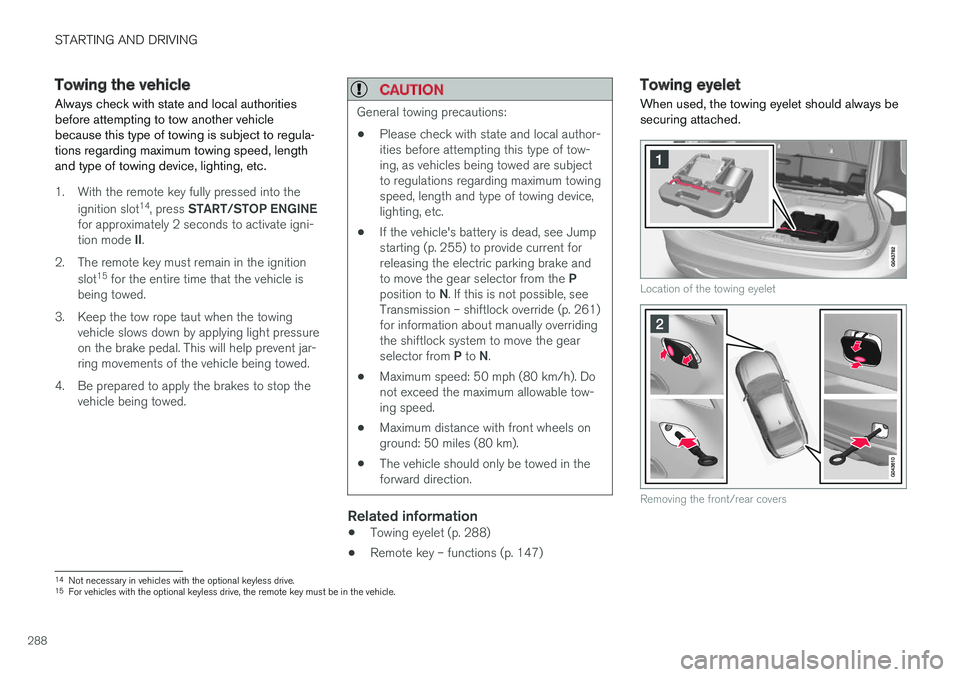
When used, the towing eyelet should always be securing attached.
Location of the towing eyelet
Removing the front/rear covers
14 Not necessary in vehicles with the optional keyless drive.
15 For vehicles with the optional keyless drive, the remote key must be in the vehicle.