instrument panel VOLVO S60 2018 Owner´s Manual
[x] Cancel search | Manufacturer: VOLVO, Model Year: 2018, Model line: S60, Model: VOLVO S60 2018Pages: 396, PDF Size: 9.4 MB
Page 315 of 396
WHEELS AND TIRES
313
Tire Pressure Monitoring System (TPMS) – messages
Erasing warning messagesWhen a low tire pressure warning message has been displayed and the tire pressure warning light in the instrument panell (
) has come
on:
1. Use a tire pressure gauge to check the infla- tion pressure of all four tires.
2. Re-inflate the tire(s) to the correct pressure (consult the tire pressure decal on the driv- er's door opening).
3. In certain cases, it may be necessary to drive the vehicle for several minutes at a speed of20 mph (30 km/h) or faster. This will erasethe warning text and the telltale will go out.
NOTE
• The tire monitoring systems use a tem- perature compensated pressure value.This pressure value is dependent on tiretemperature and ambient temperature,which can differ from the recommendedcold tire pressure in the tire inflation tableand on the tire pressure placard locatedon the driver's side B-pillar (the structuralmember at the side of the vehicle, at therear of the driver's door opening). Thismeans that it may sometimes be neces-sary to inflate them slightly above therecommended cold pressure value(approx. 3-4 psi or 0.2-0.3 bar) in orderto reset a low tire pressure warning.
• To help avoid incorrect tire inflation pres-sure, if possible only inflate the tireswhen they are cold. The tires are consid-ered to be cold when they have the sametemperature as the surrounding (ambi-ent) air. This temperature is normallyreached after the vehicle has beenparked for at least 3 hours. After driving adistance of approximately 1 mile (1.6 km),the tires are considered to be hot.
CAUTION
•
After inflating the tires, always reinstall the valve cap to help avoid damage to thevalve from dirt, gravel, etc.
• Use plastic valve caps only. Metal capscould corrode and become difficult toremove.
WARNING
•Incorrect inflation pressure could lead to tire failure, resulting in a loss of control ofthe vehicle.
• Tire monitoring systems cannot indicatesudden tire damage caused by externalfactors (e.g., a blowout) in advance.
Related information
•Tire Pressure Monitoring System (TPMS) –general information (p. 310)
• Tire Pressure Monitoring System (TPMS) –recalibrating (p. 312)
• Tire Pressure Monitoring System (TPMS) –activating/deactivating (p. 312)
• Tire Pressure Monitoring System (TPMS) –changing wheels (p. 311)
• Tire pressure monitoring - overview (p. 306)
Page 328 of 396
||
MAINTENANCE AND SERVICING
326
CSB menu accessOnce the prerequisites have been established, all CSB-related menus can be accessed in MY CAR
by pressing OK/MENU and then selecting
Scheduled maintenance & repair.
Booking information and data from the
vehicle
If you request an appointment from your vehicle, with your consent, booking information and data about your vehicle 1
will be transmitted to your
preferred retailer.
Using the serviceOnce the prerequisites have been established, all CSB-related menus can be accessed in MY CAR
by pressing OK/MENU and then selecting
Maintenance & repair.
If the time for the next regularly scheduled serv- ice is approaching, if the vehicle requires certaintypes of repairs or if a system needs to bechecked, a message will be displayed. You willthen by guided through the steps required tobook service or repairs.
On-screen service messages
On-screen service message
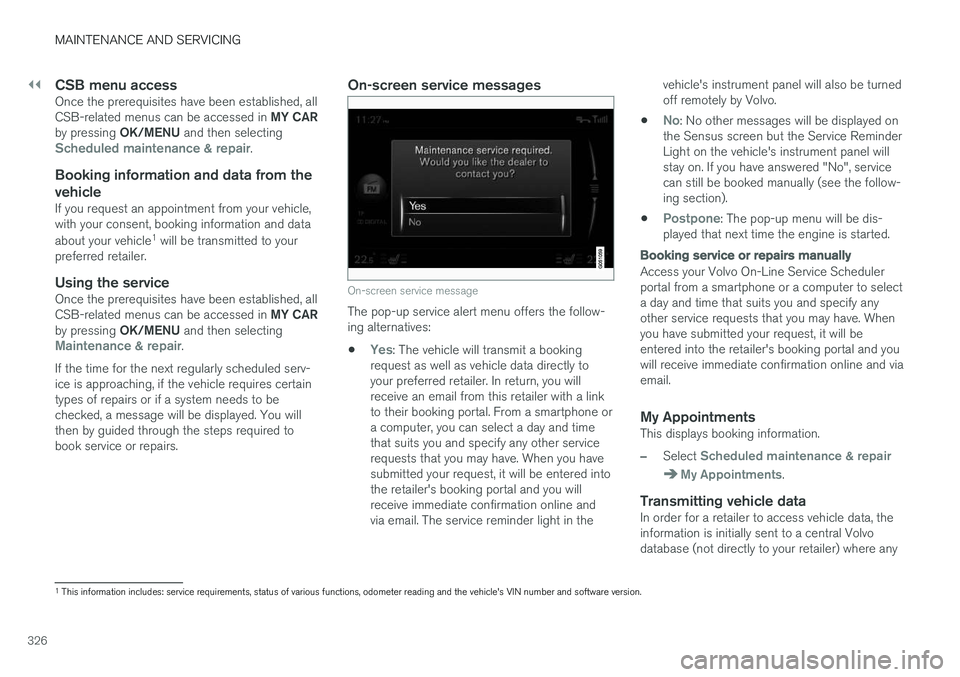
The pop-up service alert menu offers the follow- ing alternatives:
•
Yes: The vehicle will transmit a booking
request as well as vehicle data directly to your preferred retailer. In return, you willreceive an email from this retailer with a linkto their booking portal. From a smartphone ora computer, you can select a day and timethat suits you and specify any other servicerequests that you may have. When you havesubmitted your request, it will be entered intothe retailer's booking portal and you willreceive immediate confirmation online andvia email. The service reminder light in the vehicle's instrument panel will also be turnedoff remotely by Volvo.
•
No: No other messages will be displayed on
the Sensus screen but the Service Reminder Light on the vehicle's instrument panel willstay on. If you have answered "No", servicecan still be booked manually (see the follow-ing section).
•
Postpone: The pop-up menu will be dis-
played that next time the engine is started.
Booking service or repairs manually
Access your Volvo On-Line Service Scheduler portal from a smartphone or a computer to selecta day and time that suits you and specify anyother service requests that you may have. Whenyou have submitted your request, it will beentered into the retailer's booking portal and youwill receive immediate confirmation online and viaemail.
My AppointmentsThis displays booking information.
–Select Scheduled maintenance & repair
My Appointments.
Transmitting vehicle dataIn order for a retailer to access vehicle data, the information is initially sent to a central Volvodatabase (not directly to your retailer) where any
1 This information includes: service requirements, status of various functions, odometer reading and the vehicle's VIN number and software version.
Page 333 of 396
MAINTENANCE AND SERVICING
* Option/accessory.331
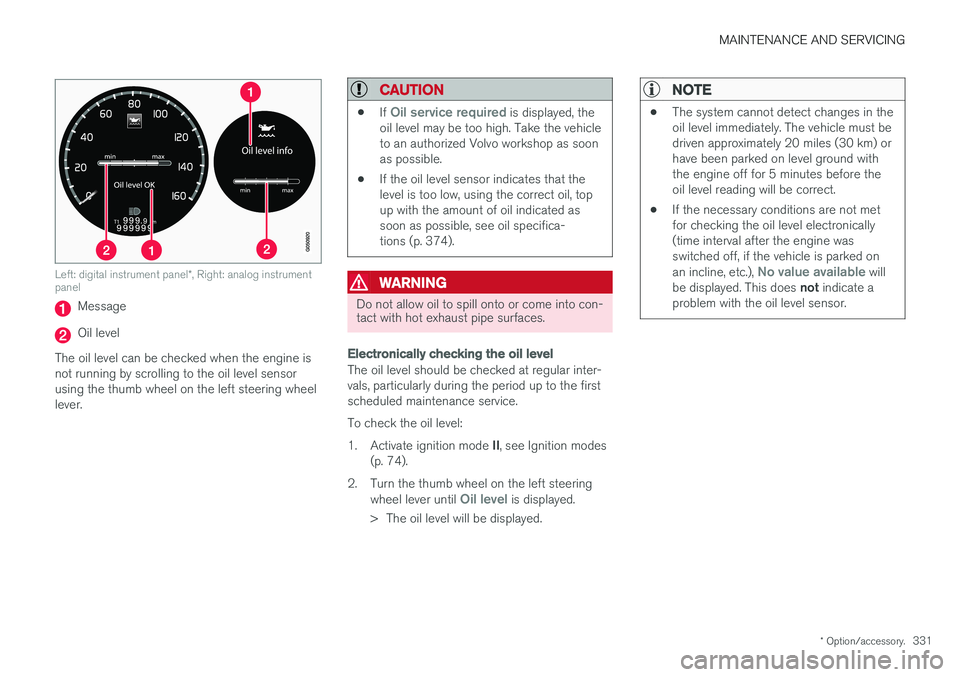
Left: digital instrument panel *, Right: analog instrument
panel
Message
Oil level
The oil level can be checked when the engine is not running by scrolling to the oil level sensorusing the thumb wheel on the left steering wheellever.
CAUTION
• If Oil service required is displayed, the
oil level may be too high. Take the vehicle to an authorized Volvo workshop as soonas possible.
• If the oil level sensor indicates that thelevel is too low, using the correct oil, topup with the amount of oil indicated assoon as possible, see oil specifica-tions (p. 374).
WARNING
Do not allow oil to spill onto or come into con- tact with hot exhaust pipe surfaces.
Electronically checking the oil level
The oil level should be checked at regular inter- vals, particularly during the period up to the firstscheduled maintenance service. To check the oil level:1.
Activate ignition mode II, see Ignition modes
(p. 74).
2. Turn the thumb wheel on the left steering wheel lever until
Oil level is displayed.
> The oil level will be displayed.
NOTE
• The system cannot detect changes in the oil level immediately. The vehicle must bedriven approximately 20 miles (30 km) orhave been parked on level ground withthe engine off for 5 minutes before theoil level reading will be correct.
• If the necessary conditions are not metfor checking the oil level electronically(time interval after the engine wasswitched off, if the vehicle is parked on an incline, etc.),
No value available will
be displayed. This does not indicate a
problem with the oil level sensor.
Page 356 of 396
||
MAINTENANCE AND SERVICING
* Option/accessory.
354
Pos Function A
Controls in left rear passenger's door20
Keyless drive
* 7.5
Power driver's seat
*20
Power front passenger's seat
*20
-
Infotainment system display 5
Infotainment system: amplifier, Sir- iusXM
™ satellite radio * 10
Sensus control module 15
Bluetooth hands-free system 5
-
Power moonroof
*
Courtesy lighting, climate system sensor 5
12-volt sockets in tunnel console 15
Heated rear seat
* (passenger's
side) 15
Heated rear seat
* (driver's side) 15
Pos
Function A
-
Heated front passenger's seat*15
Heated driver's seat
*15
Park assist
*
Blind Spot Information System (BLIS) *, park assist camera *5
All Wheel Drive
* control module 15
Active chassis system
*10
Positions: fusebox B
Pos
Function A
-
-
Front courtesy lighting, driver's door power window controls, power seat(s)*, 7.5
Instrument panel 5
Adaptive cruise control/collision warning
* 10
Pos
Function A
Courtesy lighting, rain sensor*,
HomeLInk ®
Wireless Control Sys-
tem * 7.5
Steering wheel module 7.5
Cental locking: fuel filler door 10
Electrically heated steering wheel
*15
Electrically heated windshield
*15
Trunk open 10
Electrical folding rear seat out- board head restraints
*10
Fuel pump 20
Climate system control panel 5
-
Alarm, On-board diagnostic sys- tem
5
Satellite radio
*, audio system
amplifier 10
Airbag system, occupant weight sensor
10
Collision warning system
*5
Page 365 of 396
MAINTENANCE AND SERVICING
}}
363
Cleaning the seat beltsClean only with lukewarm water and a mild soap solution.
Cleaning floor matsThe floor mats should be vacuumed or brushedclean regularly, especially during winter whenthey should be taken out for drying. Spots on tex-tile mats can be removed with a mild detergent.For best protection in winter, Volvo recommendsthe use of Volvo rubber floor mats. Consult yourVolvo retailer.
Spots on interior plastic, metal, or wood
surfaces
Cleaning interior plastic components should bedone with a cleaning agent specially designed forthis purpose. Consult your Volvo retailer.
CAUTION
• Do not use cleaning agents with high alcohol content such as washer fluid toclean instrument panel glass.
• Never spray cleaning agents or waterdirectly onto components with electricalbuttons or controls. Clean components ofthis type by applying the cleaning agent/water sparingly to a cloth and wiping thecomponents so that no liquid penetratesinto these components.
Related information
•Washing the vehicle (p. 359)
Touching up paintwork
Paint damage requires immediate attention to avoid rusting. Make it a habit to check the finishregularly, for instance washing the vehicle.Touch-up if necessary.
Paint repairs require special equipment and skill. Contact your Volvo retailer for any extensive dam-age. Minor scratches can be repaired by using Volvo touch-up paint.
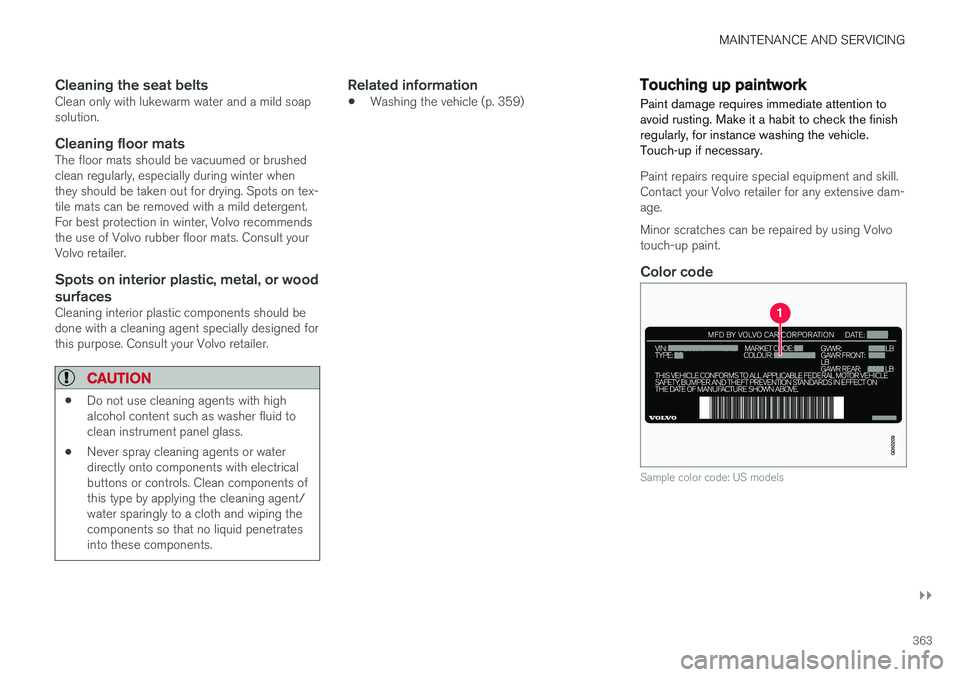
Color code
Sample color code: US models
Page 381 of 396
SPECIFICATIONS
}}
379
Air conditioning – specification and volume
The air conditioning system in your vehicle con- tains the following:
Refrigerant : R134a (HFC134a)
Volume: 1.7 lbs (770 g)
Compressor oil : PAG
Battery specifications If the battery is replaced, replace it with a battery of the same cold start capacity as the original(see the decal on the battery).
General information
WARNING
PROPOSITION 65 WARNING! Battery posts, terminals, and related accesso- ries contain lead and lead compounds, chemi-cals known to the state of California to causecancer and reproductive harm. Wash handsafter handling.
12 volt system with a voltage-regulated alterna- tor. Single pole system in which the chassis andengine block are used as conductors. The nega-tive terminal is connected to the chassis.
Voltage (V) 12 Cold start capacity (Cold CrankingAmperes - CCA) (A) 760
Dimensions, L×W×H in.(mm) 10.9×6.9×7.5
(278×175×190)
Capacity (Ah) 70
Symbols – general information The following tables list the most common warn- ing and indicator lights and symbols and a refer-ence to where more detailed information can befound.
IntroductionThe symbols in the vehicle's various displays are divided into three main categories: • Warning symbols
• Indicator symbols
• Information symbols
The following tables list the most common sym- bols, their meaning and the pages in this manualthat provide more detailed information.
NOTE
Not all of the symbols shown in the related articles are available in all models or on allmarkets. Local variations may occur.
Warning symbol
: The red warning symbol illuminates to
indicate a problem related to safety and/or driva- bility. A message will also appear in the maininstruments panel's display.
Information symbol
: The information symbol illuminates and a
text message is displayed to provide the driver
Page 382 of 396
||
SPECIFICATIONS
380with necessary information about one of the vehi- cle's systems.
Related information
•
Information displays – indicator symbols(p. 67)
• Information displays – warning symbols(p. 69)
• Information display – messages (p. 109)
Warning symbols
The following tables list the most common warn- ing and indicator lights and symbols and a refer-ence to where more detailed information can befound.
: The red warning symbol illuminates to
indicate a problem related to safety and/or driva- bility. A message will also appear in the maininstruments panel's display.
: The information symbol illuminates and a
text message is displayed to provide the driver with necessary information about one of thevehicle's systems.
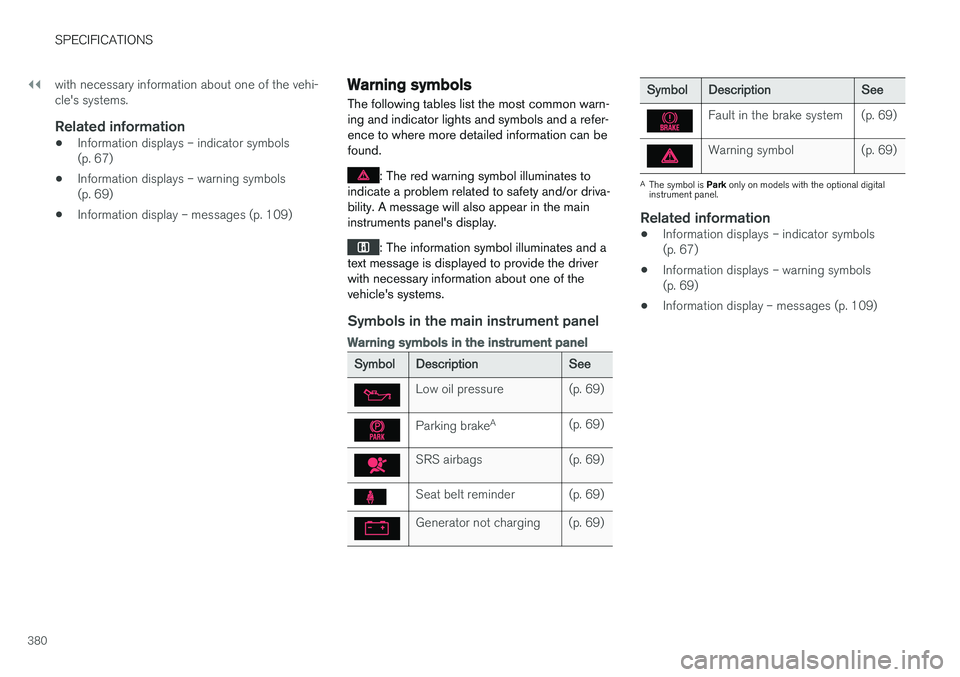
Symbols in the main instrument panel
Warning symbols in the instrument panel
Symbol Description See
Low oil pressure (p. 69)
Parking brakeA
(p. 69)
SRS airbags (p. 69)
Seat belt reminder (p. 69)
Generator not charging (p. 69)
SymbolDescription See
Fault in the brake system (p. 69)
Warning symbol (p. 69)
A
The symbol is Park only on models with the optional digital
instrument panel.
Related information
• Information displays – indicator symbols (p. 67)
• Information displays – warning symbols(p. 69)
• Information display – messages (p. 109)
Page 383 of 396
SPECIFICATIONS
}}
* Option/accessory.381
Indicator symbols
The following tables list the most common warn- ing and indicator lights and symbols and a refer-ence to where more detailed information can befound.
: The red warning symbol illuminates to
indicate a problem related to safety and/or driva- bility. A message will also appear in the maininstruments panel's display.
: The information symbol illuminates and a
text message is displayed to provide the driver with necessary information about one of thevehicle's systems.
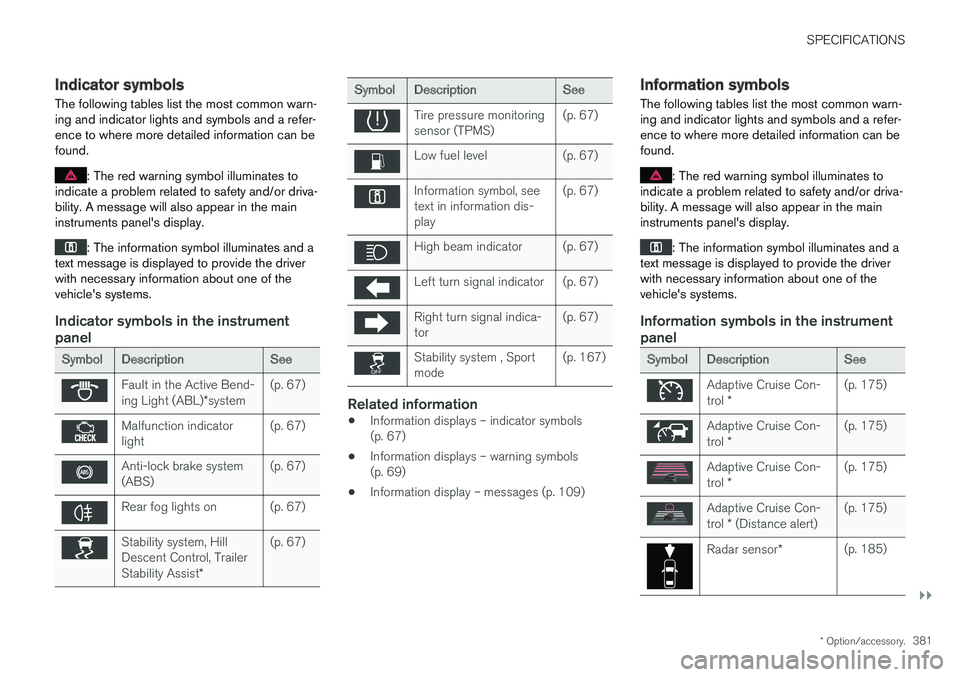
Indicator symbols in the instrument panel
Symbol Description See
Fault in the Active Bend- ing Light (ABL)*system (p. 67)
Malfunction indicator light
(p. 67)
Anti-lock brake system (ABS)(p. 67)
Rear fog lights on (p. 67)
Stability system, Hill Descent Control, Trailer Stability Assist
*(p. 67)
Symbol
Description See
Tire pressure monitoring sensor (TPMS)(p. 67)
Low fuel level (p. 67)
Information symbol, see text in information dis-play(p. 67)
High beam indicator (p. 67)
Left turn signal indicator (p. 67)
Right turn signal indica- tor
(p. 67)
Stability system , Sport mode(p. 167)
Related information
•
Information displays – indicator symbols (p. 67)
• Information displays – warning symbols(p. 69)
• Information display – messages (p. 109)
Information symbols
The following tables list the most common warn- ing and indicator lights and symbols and a refer-ence to where more detailed information can befound.
: The red warning symbol illuminates to
indicate a problem related to safety and/or driva- bility. A message will also appear in the maininstruments panel's display.
: The information symbol illuminates and a
text message is displayed to provide the driver with necessary information about one of thevehicle's systems.
Information symbols in the instrument panel
Symbol Description See
Adaptive Cruise Con- trol * (p. 175)
Adaptive Cruise Con- trol
* (p. 175)
Adaptive Cruise Con- trol
* (p. 175)
Adaptive Cruise Con- trol
* (Distance alert) (p. 175)
Radar sensor
*(p. 185)
Page 384 of 396
||
SPECIFICATIONS
* Option/accessory.
382
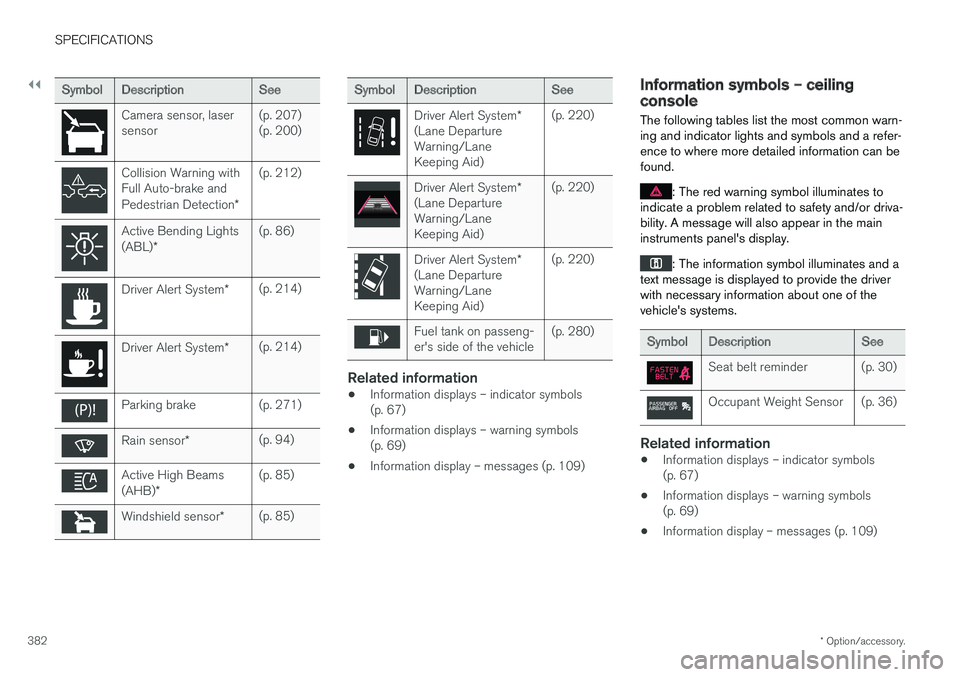
Symbol Description See
Camera sensor, laser sensor(p. 207)(p. 200)
Collision Warning with Full Auto-brake and Pedestrian Detection
*(p. 212)
Active Bending Lights (ABL)
* (p. 86)
Driver Alert System
*(p. 214)
Driver Alert System
*(p. 214)
Parking brake (p. 271)
Rain sensor
* (p. 94)
Active High Beams (AHB)
* (p. 85)
Windshield sensor
*(p. 85)
Symbol
Description See
Driver Alert System*
(Lane Departure Warning/LaneKeeping Aid) (p. 220)
Driver Alert System
*
(Lane Departure Warning/LaneKeeping Aid) (p. 220)
Driver Alert System
*
(Lane Departure Warning/LaneKeeping Aid) (p. 220)
Fuel tank on passeng- er's side of the vehicle
(p. 280)
Related information
•
Information displays – indicator symbols (p. 67)
• Information displays – warning symbols(p. 69)
• Information display – messages (p. 109)
Information symbols – ceiling console
The following tables list the most common warn- ing and indicator lights and symbols and a refer-ence to where more detailed information can befound.
: The red warning symbol illuminates to
indicate a problem related to safety and/or driva- bility. A message will also appear in the maininstruments panel's display.
: The information symbol illuminates and a
text message is displayed to provide the driver with necessary information about one of thevehicle's systems.
Symbol Description See
Seat belt reminder (p. 30)
Occupant Weight Sensor (p. 36)
Related information
•Information displays – indicator symbols (p. 67)
• Information displays – warning symbols(p. 69)
• Information display – messages (p. 109)
Page 385 of 396
SPECIFICATIONS
* Option/accessory.383
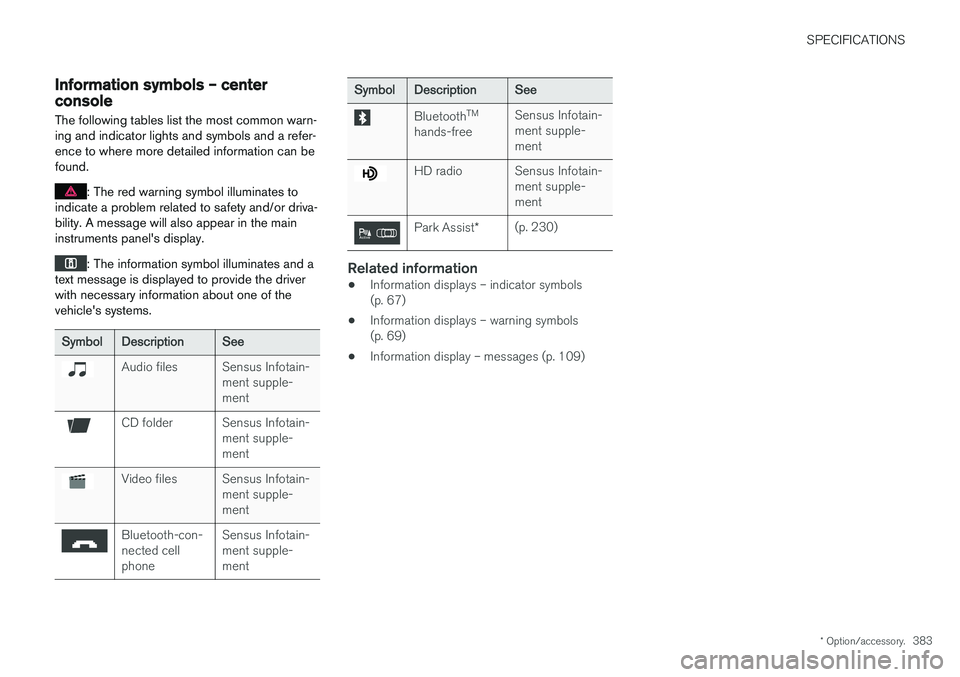
Information symbols – center console
The following tables list the most common warn- ing and indicator lights and symbols and a refer-ence to where more detailed information can befound.
: The red warning symbol illuminates to
indicate a problem related to safety and/or driva- bility. A message will also appear in the maininstruments panel's display.
: The information symbol illuminates and a
text message is displayed to provide the driver with necessary information about one of thevehicle's systems.
Symbol Description See
Audio files Sensus Infotain-
ment supple- ment
CD folder Sensus Infotain-ment supple- ment
Video files Sensus Infotain-ment supple- ment
Bluetooth-con- nected cellphoneSensus Infotain-ment supple-ment
Symbol
Description See
BluetoothTM
hands-free Sensus Infotain- ment supple-ment
HD radio Sensus Infotain-
ment supple- ment
Park Assist*(p. 230)
Related information
•Information displays – indicator symbols (p. 67)
• Information displays – warning symbols(p. 69)
• Information display – messages (p. 109)