headlights VOLVO S60 INSCRIPTION 2016 Owner´s Manual
[x] Cancel search | Manufacturer: VOLVO, Model Year: 2016, Model line: S60 INSCRIPTION, Model: VOLVO S60 INSCRIPTION 2016Pages: 344, PDF Size: 7.24 MB
Page 85 of 344
03 Instruments and controls
03
83
Rear interior lighting
The lights are switched on or off by pressing each respective button.
Related information
•Front interior lighting (p. 82)
Home safe lighting
When you leave your vehicle at night, you can make use of the home safe lighting functionto illuminate the area in front of the vehicle. This function illuminates the headlights, park- ing lights, lights in the door mirrors, licenseplate lights, front ceiling lighting and footwell lighting. These lights will remain on for 30 17
,
60 or 90 seconds. The time interval can be set in MY CAR under
SettingsCar
settings
Light settingsHome safe
light duration. See My Car – introduction
(p. 66) for a description of the menu system.
1. Remove the key from the ignition slot to put the ignition in mode 0 (see Ignition
modes (p. 69) for information about the ignition modes).
2. Pull the turn signal lever as far as possible towards the steering wheel and release it.
3. Exit the vehicle and lock the doors.
Related information
• Approach lighting (p. 83)
Approach lighting
Approach lighting activates the parking lights, door mirror lights, license plate lighting, domelighting and door step lighting when youapproach the vehicle. This function is activated by pressing the approach light button on the remote key (see
the illustration in Remote key – functions(p. 127)). The time interval for this lighting can be set by pressing
MY CAR and going to
Car
settings
Light settingsApproach light
duration. See My Car – introduction (p. 66)
for a description of the menu system.
Related information
• Home safe lighting (p. 83)
17
Factory setting
Page 87 of 344
03 Instruments and controls
03
* Option/accessory, for more information, see Introduction.85
DeactivatingDeactivate the rain sensor by pressing the button
or press the lever down to
another wiper position. The rain sensor is automatically deactivated when the key is removed from the ignitionslot or five minutes after the ignition has beenswitched off.
CAUTION
The rain sensor should be deactivated when washing the car in an automatic carwash, etc. If the rain sensor function is lefton, the wipers will start inadvertently in thecar wash and could be damaged.
Windshield washer
Move the lever toward the steering wheel to start the windshield and headlight washers.After the lever is released the wipers makeseveral extra sweeps.
Heated washer nozzles*The washer nozzles are heated automaticallyin cold weather to help prevent the washerfluid from freezing.
High-pressure headlight washing*High-pressure headlight washing consumes alarge quantity of washer fluid. To save fluid,the headlights are washed using two alterna-tives:
• Low/high beam headlights on.
The
headlights will be washed the first time the windshield is washed. Thereafter, theheadlights will only be washed once forevery five times the windshield is washedwithin a 10-minute period.
• Parking lights on.
Optional Active Bend-
ing Lights will be washed once for everyfive times the windshield is washed. Nor-mal halogen headlights will not bewashed.
CAUTION
• Use ample washer fluid when washing the windshield. The windshield shouldbe thoroughly wet when the wipers arein operation.
• When approx. 1 US quart (1 liter) ofwasher fluid remains in the reservoir,the headlights will no longer bewashed. A text message will also bedisplayed to remind the driver to fill thewasher fluid reservoir.
Related information
•
Engine compartment – washer fluid (p. 295)
Page 92 of 344
03 Instruments and controls
03
90* Option/accessory, for more information, see Introduction.
Interior rearview mirror
The interior rearview mirror has an auto-dim function that helps reduce glare from follow-ing vehicle's headlights.
Auto-dim functionThe interior rearview mirror’s auto-dim func-tion is controlled by two sensors: one point-ing forward (located on the forward-facingside of the mirror, which monitors the amountof ambient light) and one pointing rearward(located on the side of the mirror facing thedriver at the upper edge, which senses thestrength of following vehicles' headlights),and work together to help eliminate glare.
NOTE
Related information
• Power door mirrors (p. 87)
Digital compass*
The rear-view mirror has an integrated display that shows the compass direction in whichthe vehicle is traveling.
OperationEight different directions are shown with the abbreviations: N (north), NE (north east), E(east), SE (southeast), S (south), SW (south-
west), W (west) and NW (northwest).
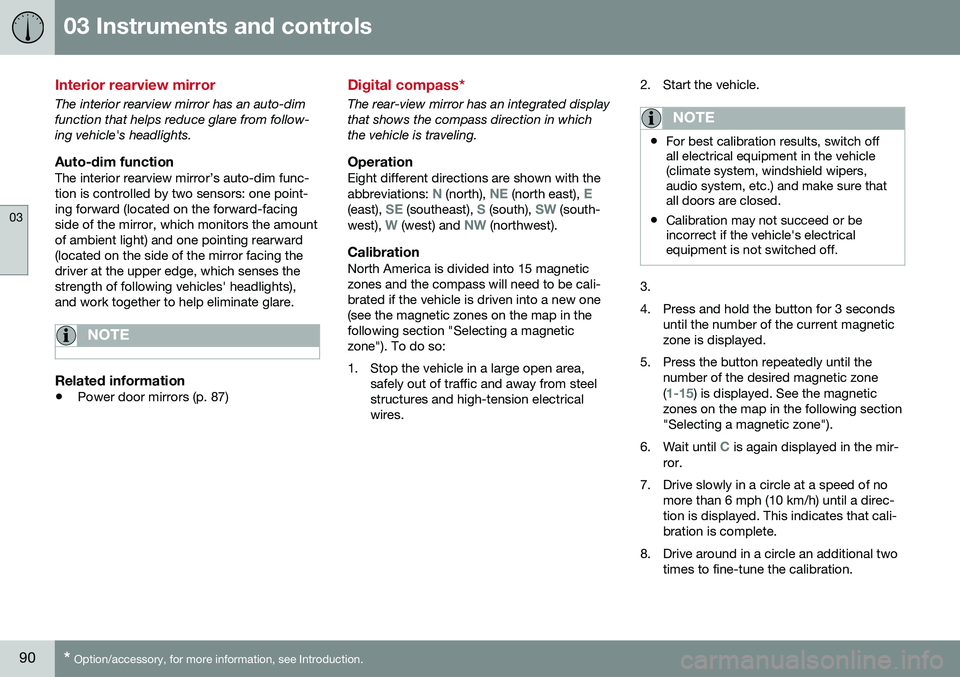
CalibrationNorth America is divided into 15 magnetic zones and the compass will need to be cali-brated if the vehicle is driven into a new one(see the magnetic zones on the map in thefollowing section "Selecting a magneticzone"). To do so:
1. Stop the vehicle in a large open area, safely out of traffic and away from steel structures and high-tension electricalwires. 2. Start the vehicle.
NOTE
•
For best calibration results, switch off all electrical equipment in the vehicle(climate system, windshield wipers,audio system, etc.) and make sure thatall doors are closed.
• Calibration may not succeed or beincorrect if the vehicle's electricalequipment is not switched off.
3.
4. Press and hold the button for 3 seconds
until the number of the current magnetic zone is displayed.
5. Press the button repeatedly until the number of the desired magnetic zone (
1-15) is displayed. See the magnetic
zones on the map in the following section "Selecting a magnetic zone").
6. Wait until
C is again displayed in the mir-
ror.
7. Drive slowly in a circle at a speed of no more than 6 mph (10 km/h) until a direc- tion is displayed. This indicates that cali-bration is complete.
8. Drive around in a circle an additional two times to fine-tune the calibration.
Page 161 of 344
07 Driver support
07
}}
159
Radar sensor
The radar sensor is designed to help detect cars or larger vehicles driving in the samedirection as your vehicle, in the same lane.
The radar sensor and its limitationsIn addition to being used by the AdaptiveCruise Control (ACC), the radar sensor is alsoused by Distance Alert (see Distance Alert –introduction (p. 164)) and Collision Warningwith Full Auto-brake and Pedestrian Detec-tion (see Collision warning – introduction(p. 175)).
WARNING
•If there is visible damage to the front grille or you suspect that the radarsensor may be damaged in any way,contact a trained and qualified Volvoservice technician as soon as possible.The radar sensor may only functionpartially (or not at all) if it is damagedor is not securely fastened in place.
• Accessories or other objects, such asextra headlights, must not be installedin front of the grille.
• Modification of the radar sensor couldmake its use illegal.
The radar sensor's capacity to detect vehi- cles ahead is impeded:
• if the radar sensor is obstructed and can- not detect other vehicles, for example in heavy rain, or if snow or other objects areobscuring the radar sensor.
NOTE
Keep the area in front of the radar sensor clean.
•
if the speed of vehicles ahead is signifi- cantly different from your own speed.
Related information
•Adaptive Cruise Control – introduction(p. 150)
• Collision warning – introduction (p. 175)
• Distance Alert – introduction (p. 164)
Adaptive Cruise Control – limitations
The ACC cannot cover all driving situations and traffic, weather and road conditions.
Situations where ACC may not function optimally
WARNING
• The radar sensor has a limited field of vision. In some situations it may detecta vehicle later than expected or notdetect other vehicles at all.
• If ACC is not functioning properly,cruise control will also be disabled.
Page 201 of 344
07 Driver support
07
199
Audible signalThe Park Assist system uses an intermittent tone that pulses faster as you come close toan object, and becomes constant when youare within approximately 1 ft (30 cm) of anobject in front of or behind the vehicle. Ifthere are objects within this distance bothbehind and in front of the vehicle, the tonealternates between front and rear speakers.
NOTE
The level of the audible signal can be low- ered/raised with the infotainment volumecontrol. The level can also be set in the MYCAR menu system. See My Car – introduc-tion (p. 66) for a description of the menusystem.
If the volume of another source from the audio system is high, this will be automati-cally lowered.
Rear park assistThe distance monitored behind the vehicle is approximately 5 ft (1.5 m). The audible signalcomes from the rear speakers. The system must be deactivated when towing a trailer, carrying bicycles in a rear-mountedcarrier, etc, which could trigger the rear parkassist system's sensors.
NOTE
•Rear park assist is deactivated auto- matically when towing a trailer if Volvogenuine trailer wiring is used. If a non-Volvo trailer hitch is being used, it maybe necessary to switch off the systemmanually, see Park assist – operation(p. 200).
• The system will not detect highobjects, such as a loading dock, etc.
• Objects such as chains, thin shinypoles or low objects may temporarilynot be detected by the system. Thismay result in the pulsing tone unex-pectedly stopping instead of changingto a constant tone as the vehicleapproaches the object. In such cases,use caution when backing up or stopthe vehicle to help avoid damage.
Front park assistThe distance monitored in front of the vehicle is approximately 2.5 ft (0.8 m). The audiblesignal comes from the audio system's frontspeakers. It may not be possible to combine auxiliary headlights and front park assist since theselights could trigger the system's sensors.
NOTE
Front park assist is deactivated when the parking brake is applied and or when thegear selector is in the
P position.
Related information
• Park assist – introduction (p. 198)
• Park assist – limitations (p. 200)
• Park assist – operation (p. 200)
• Park assist – troubleshooting (p. 201)
• Rear Park Assist Camera (PAC) – function (p. 202)
Page 216 of 344
08 Starting and driving
08
214* Option/accessory, for more information, see Introduction.
Engine Remote Start (ERS)* – starting the engine
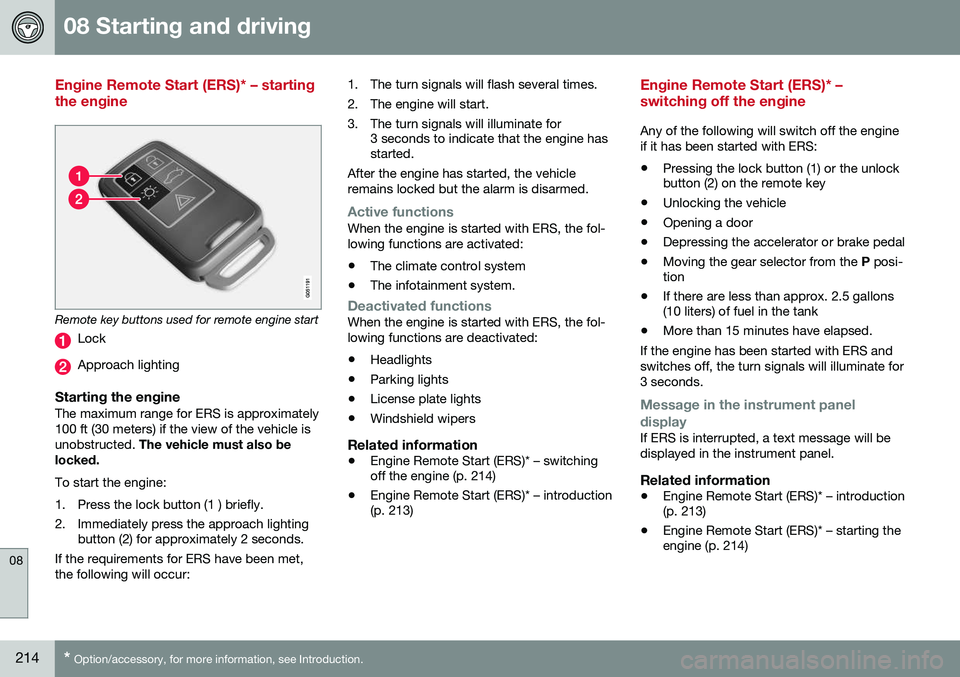
Remote key buttons used for remote engine start
Lock
Approach lighting
Starting the engineThe maximum range for ERS is approximately 100 ft (30 meters) if the view of the vehicle isunobstructed. The vehicle must also be
locked. To start the engine:
1. Press the lock button (1 ) briefly.
2. Immediately press the approach lighting button (2) for approximately 2 seconds.
If the requirements for ERS have been met, the following will occur: 1. The turn signals will flash several times.
2. The engine will start.
3. The turn signals will illuminate for
3 seconds to indicate that the engine has started.
After the engine has started, the vehicle remains locked but the alarm is disarmed.
Active functionsWhen the engine is started with ERS, the fol- lowing functions are activated: • The climate control system
• The infotainment system.
Deactivated functionsWhen the engine is started with ERS, the fol- lowing functions are deactivated: •Headlights
• Parking lights
• License plate lights
• Windshield wipers
Related information
•
Engine Remote Start (ERS)* – switching off the engine (p. 214)
• Engine Remote Start (ERS)* – introduction(p. 213)
Engine Remote Start (ERS)* – switching off the engine
Any of the following will switch off the engine if it has been started with ERS:
• Pressing the lock button (1) or the unlock button (2) on the remote key
• Unlocking the vehicle
• Opening a door
• Depressing the accelerator or brake pedal
• Moving the gear selector from the
P posi-
tion
• If there are less than approx. 2.5 gallons(10 liters) of fuel in the tank
• More than 15 minutes have elapsed.
If the engine has been started with ERS and switches off, the turn signals will illuminate for3 seconds.
Message in the instrument panel
display
If ERS is interrupted, a text message will be displayed in the instrument panel.
Related information
• Engine Remote Start (ERS)* – introduction (p. 213)
• Engine Remote Start (ERS)* – starting theengine (p. 214)
Page 284 of 344
10 Maintenance and servicing
10
282
Maintenance – owner maintenance
Periodic maintenance requirements and inter- vals are described in your vehicle's Warrantyand Service Records Information booklet. The following points can be carried out between the normally scheduled maintenanceservices.
Owner maintenance
Each time the car is refueled:
•Check the engine oil level.
• Clean the windshield, windshield wipers, headlights, and taillights.
Monthly:
• Check cold tire pressure in all tires. Inspect the tires for wear.
• Check that engine coolant and other fluidlevels are between the indicated "min"and "max" markings.
• Clean interior glass surfaces with a glasscleaner and soft paper towels.
• Wipe driver information displays with asoft cloth.
• Visually inspect battery terminals for cor-rosion. Corrosion may indicate a looseterminal connector, or a battery near theend of its useful service life. Consult yourVolvo retailer for additional information.
As needed:Wash the car, including the undercarriage, to reduce wear that can be caused by a buildup of dirt, and corrosion that can be caused bysalt residues. Clean leaves and twigs from air intake vents at the base of the windshield, and from otherplaces where they may collect.
NOTE
Complete service information for qualified technicians is available online for purchaseor subscription at www.volvotechinfo.com.
Related information
•
Maintenance – opening/closing hood (p. 285)
• Engine compartment – overview (p. 285)
• Engine compartment – coolant (p. 288)
• Engine compartment – engine oil (p. 286)
• Engine compartment – power steeringfluid (p. 289)
• Engine compartment – washer fluid(p. 295)
• Cleaning the interior (p. 310)
• Washing the car (p. 308)
• Tire inflation – checking pressure (p. 256)
• Tires – tread wear indicator (p. 251)
Maintenance – hoisting
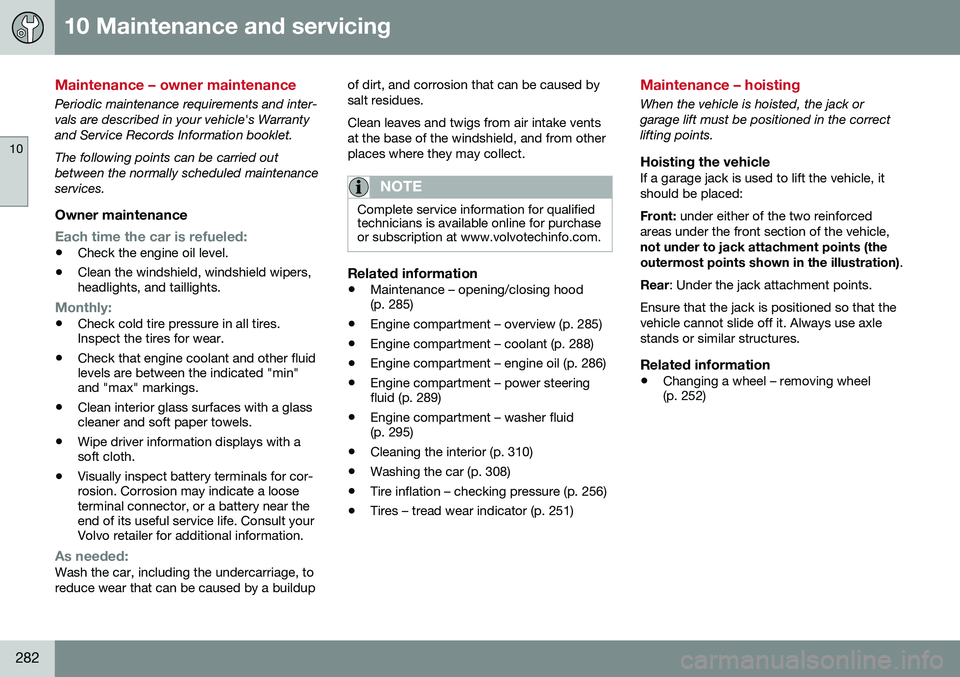
When the vehicle is hoisted, the jack or garage lift must be positioned in the correctlifting points.
Hoisting the vehicleIf a garage jack is used to lift the vehicle, itshould be placed: Front:
under either of the two reinforced
areas under the front section of the vehicle, not under to jack attachment points (the outermost points shown in the illustration) .
Rear : Under the jack attachment points.
Ensure that the jack is positioned so that the vehicle cannot slide off it. Always use axlestands or similar structures.
Related information
• Changing a wheel – removing wheel (p. 252)
Page 292 of 344
10 Maintenance and servicing
10
290* Option/accessory, for more information, see Introduction.
Bulbs – introduction
Certain bulbs can be replaced by the vehicle's owner. However, the bulbs on the followinglist should only be replaced by a trained andqualified Volvo service technician.
NOTE
• For information regarding any bulbs not mentioned in this section, pleasecontact your Volvo retailer or a trainedand authorized Volvo service techni-cian.
• Always switch off the ignition beforestarting to replace a bulb.
• If an error message remains in the dis-play after a faulty bulb has beenreplaced, contact an authorized Volvoworkshop.
• Condensation may form temporarily onthe inside of the lenses of exteriorlights such as headlights, fog lights, ortaillights. This is normal and the lightsare designed to withstand moisture.Normally, condensation will dissipateafter the lights have been on for ashort time.
• The optional Active Bending Lightbulbs contain trace amounts of mer-cury. These bulbs should always bedisposed of by a trained and qualifiedVolvo service technician.
CAUTION
Never touch the glass of bulbs with your fingers. Grease and oils from your fingersvaporize in the heat and will leave adeposit on the reflector, which will damageit.
WARNING
•
The engine should not be running when changing bulbs.
• If the engine has been running justprior to replacing bulbs in the head-light housing, please keep in mind thatcomponents in the engine compart-ment will be hot.
WARNING
•
Active Bending Lights* – due to the high voltage used by these headlights,these bulbs should only be replacedby a trained and qualified Volvo serv-ice technician.
• Turn off the lights and remove theremote key from the ignition beforechanging any bulbs.
Related information
•
Bulbs – headlight housing (p. 290)
• Bulbs – vanity mirror lighting (p. 293)
• Bulbs – license plate lighting (p. 292)
Bulbs – headlight housing
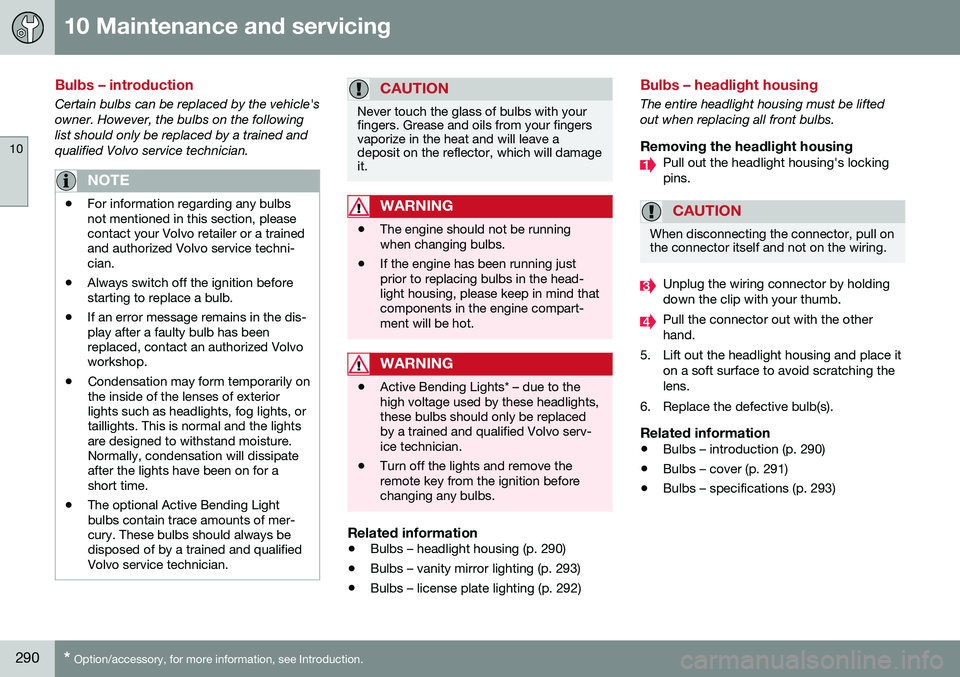
The entire headlight housing must be lifted out when replacing all front bulbs.
Removing the headlight housingPull out the headlight housing's locking pins.
CAUTION
When disconnecting the connector, pull on the connector itself and not on the wiring.
Unplug the wiring connector by holding down the clip with your thumb.
Pull the connector out with the other hand.
5. Lift out the headlight housing and place it on a soft surface to avoid scratching thelens.
6. Replace the defective bulb(s).
Related information
• Bulbs – introduction (p. 290)
• Bulbs – cover (p. 291)
• Bulbs – specifications (p. 293)
Page 297 of 344
10 Maintenance and servicing
10
}}
295
against the windshield and press the
START/
STOP ENGINE button briefly to put the igni-
tion in mode I (or start the engine).
CleaningKeeping the windshield and wiper blades clean helps improve visibility and prolongsthe service life of the wiper blades. Clean thewiper blades with a stiff-bristle brush andlukewarm soap solution or car washing deter-gent.
Related information
• Engine compartment – washer fluid (p. 295)
• Wiper blades – service position (p. 293)
Engine compartment – washer fluid
Washer fluid helps keep the windshield and headlights clean. During cold weather, thereservoir should be filled with windshieldwasher solvent containing antifreeze. UseVolvo Original Washer Fluid or the equivalentwith a recommended pH value between 6 and8. The windshield and headlight washers share a common reservoir. The washer fluid reservoir is located on the driver's side of the engine compartment. Forcapacities, see the printed Owner's Manual. Specification:
Use a washer antifreeze rec-
ommended by Volvo, mixed with water. Volume: • 6.8 US qts (6.5 liters)
• 4.7 US qts (4.5 liters 4
)
Related information
• Wiper blades – service position (p. 293)
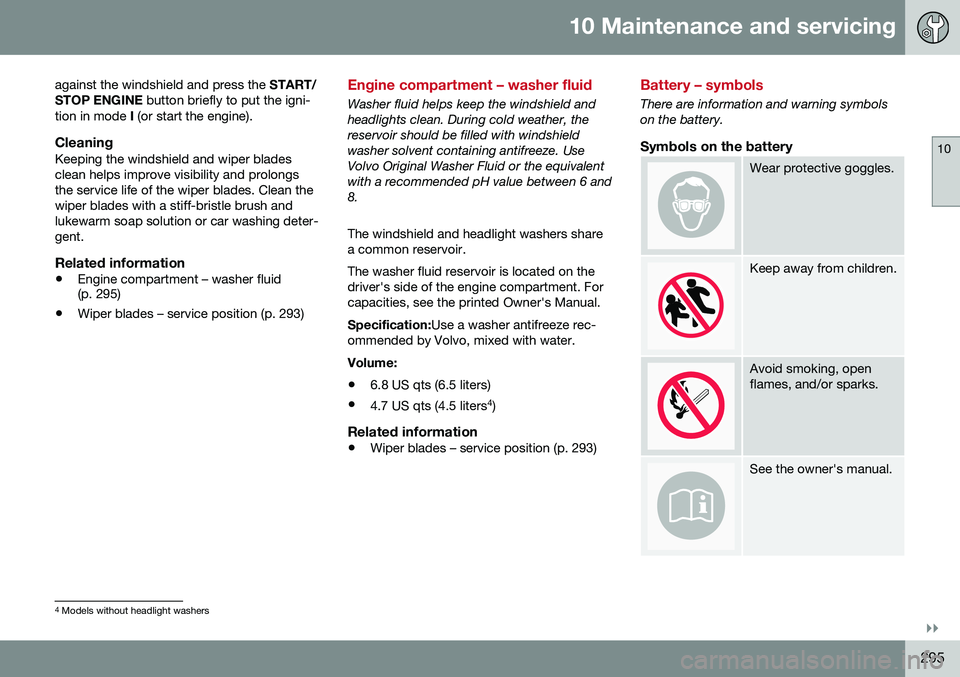
Battery – symbols
There are information and warning symbols on the battery.
Symbols on the battery
Wear protective goggles.
Keep away from children.
Avoid smoking, open flames, and/or sparks.
See the owner's manual.
4
Models without headlight washers
Page 310 of 344
10 Maintenance and servicing
10
308
Washing the car
The vehicle should be washed at regular inter- vals since dirt, dust, insects and tar spotsadhere to the paint and may cause damage.To help prevent corrosion, it is particularlyimportant to wash the car frequently in thewintertime. The following points should be kept in mind when washing and cleaning the car: •Avoid washing your car in direct sunlight. Doing so may cause detergents and waxto dry out and become abrasive. To avoidscratching, use lukewarm water to softenthe dirt before you wash with a softsponge, and plenty of sudsy water.
• Bird droppings
: Remove from paintwork
as soon as possible. Otherwise the finishmay be permanently damaged.
• A detergent can be used to facilitate thesoftening of dirt and oil.
• Dry the car with a clean chamois andremember to clean the drain holes in thedoors and rocker panels.
• Tar spots can be removed with tarremover after the car has been washed.
• A stiff-bristle brush and lukewarm soapywater can be used to clean the wiperblades. Frequent cleaning of the wind-shield and wiper blades improves visibilityconsiderably and also helps prolong theservice life of the wiper blades. •
Wash off the dirt from the underside(wheel housings, fenders, etc).
• In areas of high industrial fallout, morefrequent washing is recommended.
NOTE
When washing the car, remember to remove dirt from the drain holes in thedoors and sills.
CAUTION
• During high pressure washing, the spray mouthpiece must never becloser to the vehicle than 13" (30 cm).Do not spray into the locks.
• Dirt, snow, etc., on the headlights canreduce lighting capacity considerably.Clean the headlights regularly, forexample when refueling.
Exterior componentsVolvo recommends the use of special clean- ing products, available at your Volvo retailer,for cleaning colored plastic, rubber, or orna-mental components such as chromed stripson the exterior of your vehicle. The instruc-tions for using these products should be fol-lowed carefully. Solvents or stain removersshould not be used.
CAUTION
• Avoid waxing or polishing plastic or rubber components
• Polishing chromed strips can wearaway or damage the surface
• Polishes containing abrasive sub-stances should not be used
Related information
•
Polishing and waxing (p. 309)
• Cleaning the interior (p. 310)