instrument panel VOLVO S60 INSCRIPTION 2016 Owner´s Manual
[x] Cancel search | Manufacturer: VOLVO, Model Year: 2016, Model line: S60 INSCRIPTION, Model: VOLVO S60 INSCRIPTION 2016Pages: 344, PDF Size: 7.24 MB
Page 5 of 344
Contents
* Option/accessory, for more information, see Introduction.3
03
03 Instruments and controls
Instrument overview ................................. 58
Information displays – introduction........... 58
Eco Guide* and Power Meter*.................. 61
Information displays – indicator symbols. 62
Information displays – warning symbols... 64
My Car – introduction............................... 66Information displays – ambient tempera-
ture sensor................................................ 67 Information displays – trip odometer and
clock......................................................... 67
Inserting/removing remote key................. 68
Ignition modes.......................................... 69
Front seats................................................ 70
Front seats – folding backrest*................. 70
Front seats – power seat.......................... 71Key memory – power driver's seat* and
door mirrors.............................................. 72
Rear seats – head restraints..................... 74
Rear seats – folding backrest................... 74
Steering wheel.......................................... 75
Electrically heated* steering wheel........... 75
Lighting panel........................................... 76
High/low beam headlights........................ 77
Active high beams (AHB)*......................... 77
03
Tunnel detection (models with the rain
sensor* only)............................................. 78
Active Bending Lights (ABL)*.................... 79
Auxiliary lights*.......................................... 79
Instrument and "theater" lighting.............. 80
Parking lights............................................ 80
Rear fog lights........................................... 80
Hazard warning flashers........................... 81
Turn signals............................................... 81
Front interior lighting................................. 82
Rear interior lighting.................................. 83
Home safe lighting.................................... 83
Approach lighting...................................... 83
Windshield wipers..................................... 84
Rain sensor*.............................................. 84
Windshield washer.................................... 85
Tailgate wiper/washer............................... 86
Power windows......................................... 86
Power door mirrors................................... 87Power door mirrors – automatic tilting/
retraction................................................... 88 Heated windshield*, rear window and
door mirror defrosters............................... 89
Interior rearview mirror.............................. 90
03
Digital compass*....................................... 90 HomeLink ®
Wireless Control System* –
introduction............................................... 91HomeLink ®
Wireless Control System* –
programming............................................. 92
Volvo Sensus............................................ 95
Information display – menu controls......... 96
Information display – menu overview....... 96
Information display – messages............... 97
Trip computer – introduction ................... 98Trip computer – functions, analog instru-
ment panel................................................ 99 Trip computer – functions, digital instru-
ment panel.............................................. 102 Trip computer – Supplementary informa-
tion.......................................................... 104
Trip computer – Trip statistics................ 105
Page 16 of 344
01 Introduction
01
14
About this manual
Reading your owner's manual is a good way to familiarize yourself with the features andsystems in your vehicle.• Before you operate your vehicle for the first time, we recommend that you lookthrough the information found in thechapters "Your Driving Environment" and"During Your Trip."
• Information contained in the balance ofthe manual is extremely useful and shouldbe read after operating the vehicle for thefirst time.
• The manual is structured so that it can beused for reference. For this reason, itshould be kept in the vehicle for readyaccess.
On-board owner's manualWhen the printed manual refers to the on- board owner's manual, this pertains to theinformation displayed on the center consolescreen. The language used on the center console screen and instrument panel can be changed in the
MY CAR system settings menu.
There are four ways of finding information articles in the on-board owner's manual:
•
Searching: search for an article.
•
Categories: All of the articles are sorted
by category. •
Favorites: Quick access to frequently
read articles.
•
Quick Guide: A selection of articles cov-
ering commonly used functions.
Select the symbol in the lower right-hand cor- ner for additional information about the on-board owner's manual.
NOTE
• The on-board owner's manual cannot be accessed while the vehicle is mov-ing.
• Specifications regarding your vehicleare not found in the on-board informa-tion. This information is listed in theprinted owner's manual.
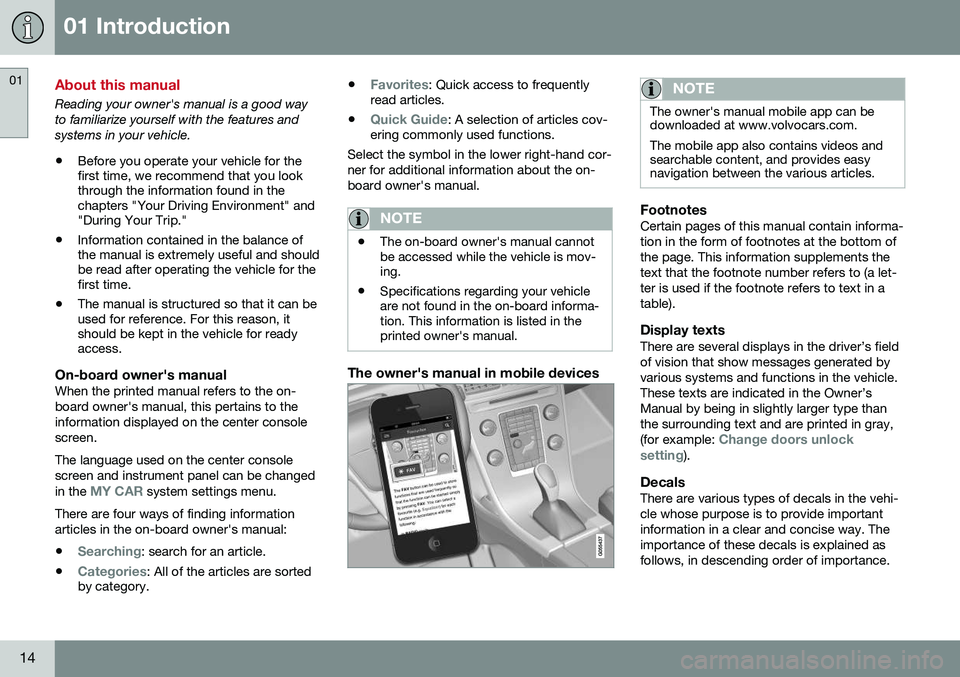
The owner's manual in mobile devices
NOTE
The owner's manual mobile app can be downloaded at www.volvocars.com. The mobile app also contains videos and searchable content, and provides easynavigation between the various articles.
FootnotesCertain pages of this manual contain informa- tion in the form of footnotes at the bottom ofthe page. This information supplements thetext that the footnote number refers to (a let-ter is used if the footnote refers to text in atable).
Display textsThere are several displays in the driver’s fieldof vision that show messages generated byvarious systems and functions in the vehicle.These texts are indicated in the Owner’sManual by being in slightly larger type thanthe surrounding text and are printed in gray, (for example:
Change doors unlock
setting).
DecalsThere are various types of decals in the vehi- cle whose purpose is to provide importantinformation in a clear and concise way. Theimportance of these decals is explained asfollows, in descending order of importance.
Page 33 of 344
02 Safety
02
}}
* Option/accessory, for more information, see Introduction.31
a distance as possible between their belly and the steering wheel.
Related information
•
Seat belts – buckling/unbuckling (p. 29)
• Seat belt reminder (p. 30)
• Child restraints (p. 47)
Supplemental Restraint System (SRS)
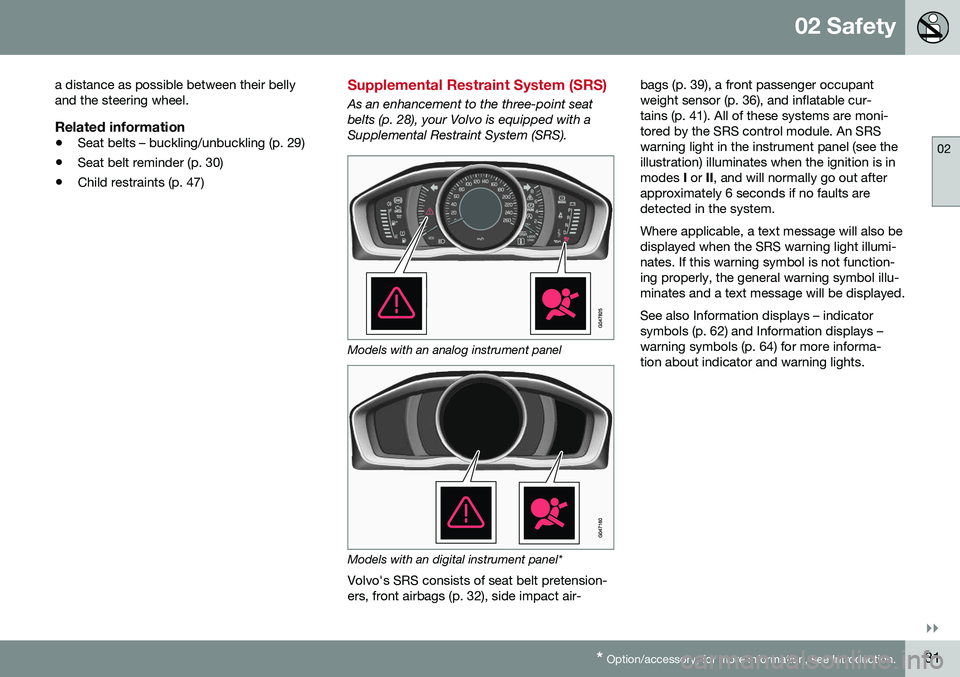
As an enhancement to the three-point seat belts (p. 28), your Volvo is equipped with aSupplemental Restraint System (SRS).
Models with an analog instrument panel
Models with an digital instrument panel*
Volvo's SRS consists of seat belt pretension- ers, front airbags (p. 32), side impact air- bags (p. 39), a front passenger occupantweight sensor (p. 36), and inflatable cur-tains (p. 41). All of these systems are moni-tored by the SRS control module. An SRSwarning light in the instrument panel (see theillustration) illuminates when the ignition is inmodes
I or II, and will normally go out after
approximately 6 seconds if no faults aredetected in the system. Where applicable, a text message will also be displayed when the SRS warning light illumi-nates. If this warning symbol is not function-ing properly, the general warning symbol illu-minates and a text message will be displayed. See also Information displays – indicator symbols (p. 62) and Information displays –warning symbols (p. 64) for more informa-tion about indicator and warning lights.
Page 37 of 344
02 Safety
02
35
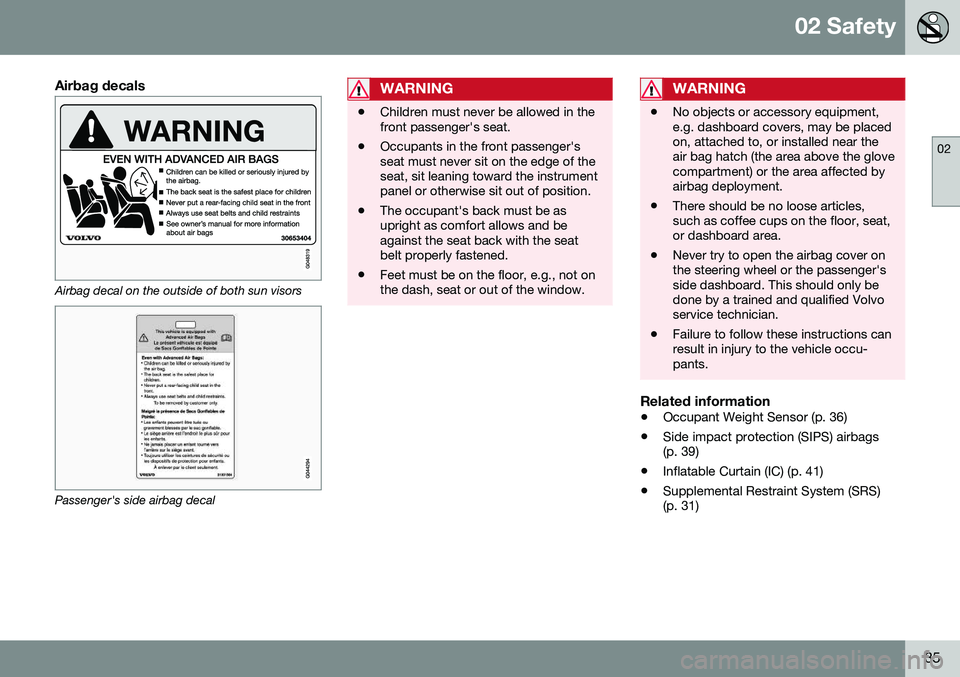
Airbag decals
Airbag decal on the outside of both sun visors
Passenger's side airbag decal
WARNING
•Children must never be allowed in the front passenger's seat.
• Occupants in the front passenger'sseat must never sit on the edge of theseat, sit leaning toward the instrumentpanel or otherwise sit out of position.
• The occupant's back must be asupright as comfort allows and beagainst the seat back with the seatbelt properly fastened.
• Feet must be on the floor, e.g., not onthe dash, seat or out of the window.
WARNING
•
No objects or accessory equipment, e.g. dashboard covers, may be placedon, attached to, or installed near theair bag hatch (the area above the glovecompartment) or the area affected byairbag deployment.
• There should be no loose articles,such as coffee cups on the floor, seat,or dashboard area.
• Never try to open the airbag cover onthe steering wheel or the passenger'sside dashboard. This should only bedone by a trained and qualified Volvoservice technician.
• Failure to follow these instructions canresult in injury to the vehicle occu-pants.
Related information
•
Occupant Weight Sensor (p. 36)
• Side impact protection (SIPS) airbags (p. 39)
• Inflatable Curtain (IC) (p. 41)
• Supplemental Restraint System (SRS)(p. 31)
Page 45 of 344
02 Safety
02
}}
* Option/accessory, for more information, see Introduction.43
WARNING
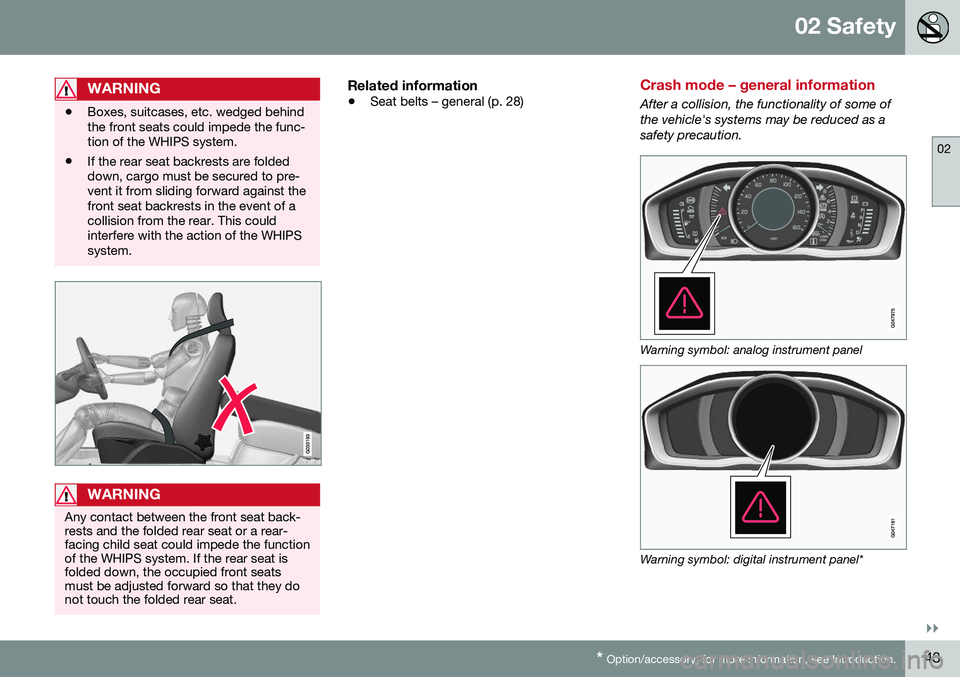
• Boxes, suitcases, etc. wedged behind the front seats could impede the func-tion of the WHIPS system.
• If the rear seat backrests are foldeddown, cargo must be secured to pre-vent it from sliding forward against thefront seat backrests in the event of acollision from the rear. This couldinterfere with the action of the WHIPSsystem.
WARNING
Any contact between the front seat back- rests and the folded rear seat or a rear-facing child seat could impede the functionof the WHIPS system. If the rear seat isfolded down, the occupied front seatsmust be adjusted forward so that they donot touch the folded rear seat.
Related information
•
Seat belts – general (p. 28)
Crash mode – general information
After a collision, the functionality of some of the vehicle's systems may be reduced as asafety precaution.
Warning symbol: analog instrument panel
Warning symbol: digital instrument panel*
Page 60 of 344
03 Instruments and controls
03
58* Option/accessory, for more information, see Introduction.
Instrument overview
This overview shows the location of the instrument panel and center console displays,and controls/buttons/switches.
Related information
• Information displays – ambient tempera- ture sensor (p. 67)
• Information displays – trip odometer andclock (p. 67)
Information displays – introduction
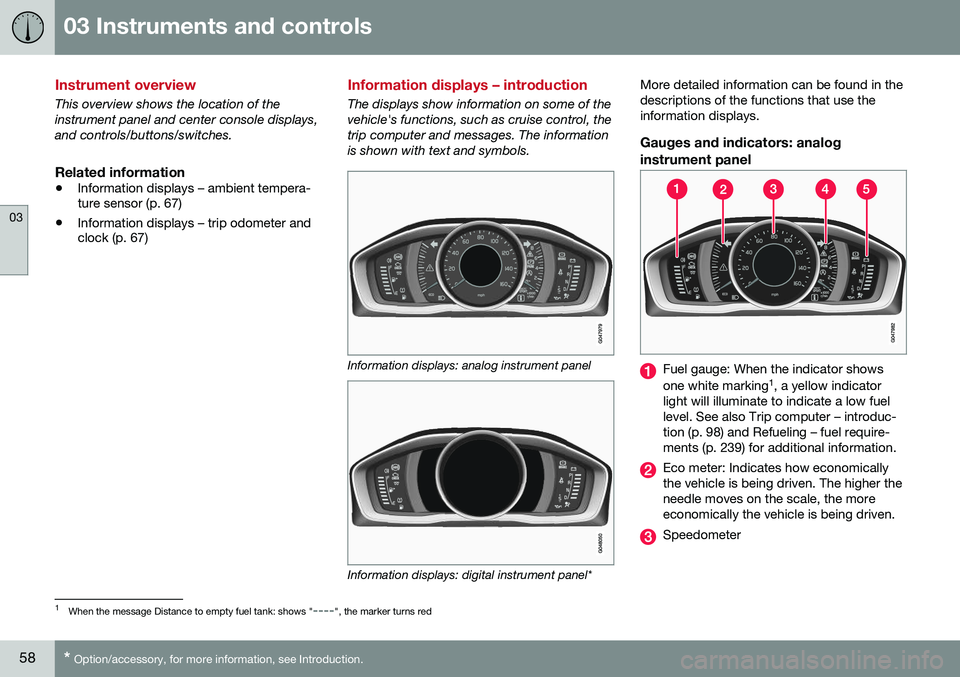
The displays show information on some of the vehicle's functions, such as cruise control, thetrip computer and messages. The informationis shown with text and symbols.
Information displays: analog instrument panel
Information displays: digital instrument panel* More detailed information can be found in the descriptions of the functions that use theinformation displays.
Gauges and indicators: analog
instrument panel
Fuel gauge: When the indicator shows one white marking 1
, a yellow indicator
light will illuminate to indicate a low fuel level. See also Trip computer – introduc-tion (p. 98) and Refueling – fuel require-ments (p. 239) for additional information.
Eco meter: Indicates how economically the vehicle is being driven. The higher theneedle moves on the scale, the moreeconomically the vehicle is being driven.
Speedometer
1 When the message Distance to empty fuel tank: shows "----", the marker turns red
Page 61 of 344
03 Instruments and controls
03
}}
* Option/accessory, for more information, see Introduction.59
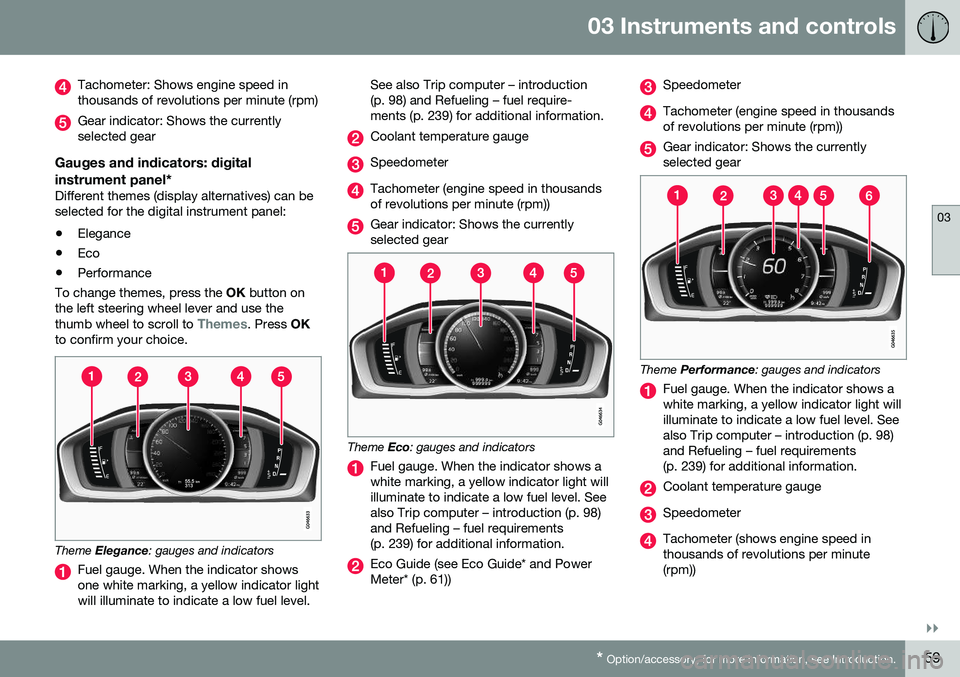
Tachometer: Shows engine speed in thousands of revolutions per minute (rpm)
Gear indicator: Shows the currently selected gear
Gauges and indicators: digital instrument panel*
Different themes (display alternatives) can be selected for the digital instrument panel: • Elegance
• Eco
• Performance
To change themes, press the OK button on
the left steering wheel lever and use the thumb wheel to scroll to
Themes. Press OK
to confirm your choice.
Theme Elegance : gauges and indicators
Fuel gauge. When the indicator shows one white marking, a yellow indicator lightwill illuminate to indicate a low fuel level. See also Trip computer – introduction(p. 98) and Refueling – fuel require-ments (p. 239) for additional information.
Coolant temperature gauge
Speedometer
Tachometer (engine speed in thousands of revolutions per minute (rpm))
Gear indicator: Shows the currently selected gear
Theme
Eco: gauges and indicators
Fuel gauge. When the indicator shows a white marking, a yellow indicator light willilluminate to indicate a low fuel level. Seealso Trip computer – introduction (p. 98)and Refueling – fuel requirements(p. 239) for additional information.
Eco Guide (see Eco Guide* and Power Meter* (p. 61))
Speedometer
Tachometer (engine speed in thousands of revolutions per minute (rpm))
Gear indicator: Shows the currently selected gear
Theme Performance : gauges and indicators
Fuel gauge. When the indicator shows a white marking, a yellow indicator light willilluminate to indicate a low fuel level. Seealso Trip computer – introduction (p. 98)and Refueling – fuel requirements(p. 239) for additional information.
Coolant temperature gauge
Speedometer
Tachometer (shows engine speed in thousands of revolutions per minute(rpm))
Page 62 of 344
||
03 Instruments and controls
03
60* Option/accessory, for more information, see Introduction.
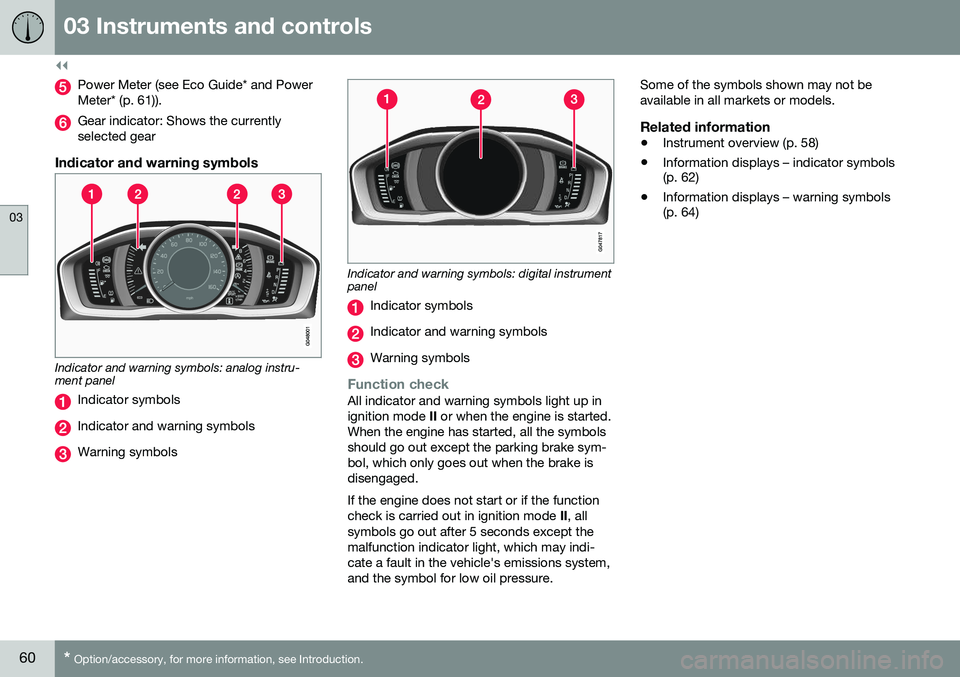
Power Meter (see Eco Guide* and Power Meter* (p. 61)).
Gear indicator: Shows the currently selected gear
Indicator and warning symbols
Indicator and warning symbols: analog instru- ment panel
Indicator symbols
Indicator and warning symbols
Warning symbols
Indicator and warning symbols: digital instrument panel
Indicator symbols
Indicator and warning symbols
Warning symbols
Function checkAll indicator and warning symbols light up in ignition mode II or when the engine is started.
When the engine has started, all the symbolsshould go out except the parking brake sym-bol, which only goes out when the brake isdisengaged. If the engine does not start or if the function check is carried out in ignition mode II, all
symbols go out after 5 seconds except themalfunction indicator light, which may indi-cate a fault in the vehicle's emissions system,and the symbol for low oil pressure. Some of the symbols shown may not beavailable in all markets or models.
Related information
•
Instrument overview (p. 58)
• Information displays – indicator symbols (p. 62)
• Information displays – warning symbols(p. 64)
Page 63 of 344
03 Instruments and controls
03
}}
* Option/accessory, for more information, see Introduction.61
Eco Guide* and Power Meter*
Eco guide and Power guide are two gauges in the instrument panel that help improve drivingeconomy. The vehicle also stores driving-related statis- tics in the form of a bar graph, see Trip com-puter – Trip statistics (p. 105).
Introduction
To display or remove these functions from theinstrument panel, select the "Eco" theme (seeInformation displays – introduction (p. 58)). Driving statistics are also stored and can be displayed in the form of a bar chart (see Tripcomputer – Trip statistics (p. 105)).
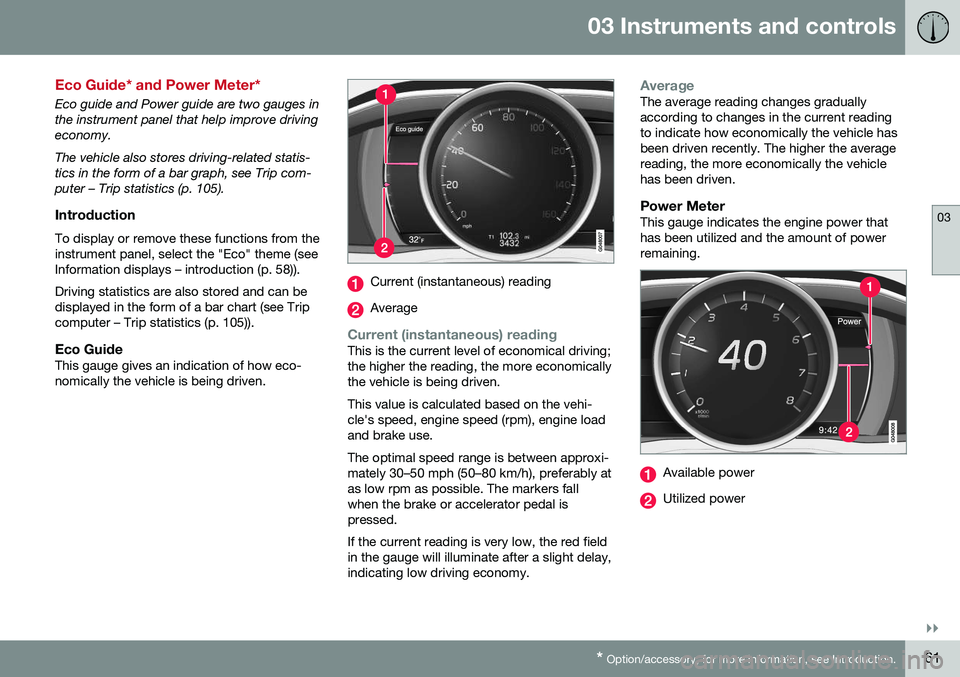
Eco GuideThis gauge gives an indication of how eco-nomically the vehicle is being driven.
Current (instantaneous) reading
Average
Current (instantaneous) readingThis is the current level of economical driving; the higher the reading, the more economicallythe vehicle is being driven. This value is calculated based on the vehi- cle's speed, engine speed (rpm), engine loadand brake use. The optimal speed range is between approxi- mately 30–50 mph (50–80 km/h), preferably atas low rpm as possible. The markers fallwhen the brake or accelerator pedal ispressed. If the current reading is very low, the red field in the gauge will illuminate after a slight delay,indicating low driving economy.
AverageThe average reading changes gradually according to changes in the current readingto indicate how economically the vehicle hasbeen driven recently. The higher the averagereading, the more economically the vehiclehas been driven.
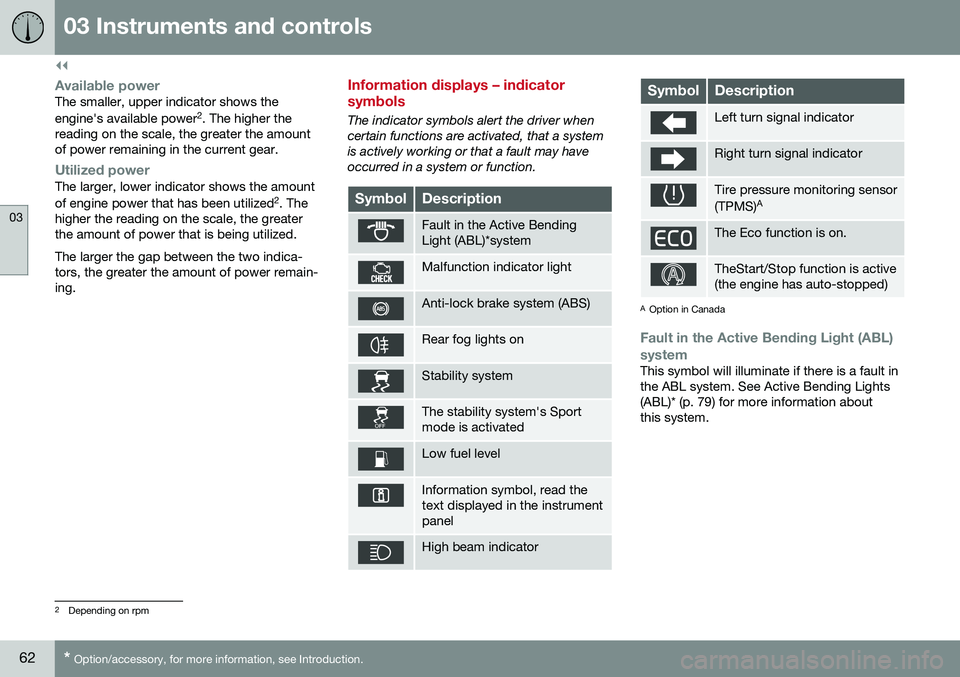
Power MeterThis gauge indicates the engine power thathas been utilized and the amount of powerremaining.
Available power
Utilized power
Page 64 of 344
||
03 Instruments and controls
03
62* Option/accessory, for more information, see Introduction.
Available powerThe smaller, upper indicator shows the engine's available power 2
. The higher the
reading on the scale, the greater the amount of power remaining in the current gear.
Utilized powerThe larger, lower indicator shows the amount of engine power that has been utilized 2
. The
higher the reading on the scale, the greater the amount of power that is being utilized. The larger the gap between the two indica- tors, the greater the amount of power remain-ing.
Information displays – indicator symbols
The indicator symbols alert the driver when certain functions are activated, that a systemis actively working or that a fault may haveoccurred in a system or function.
SymbolDescription
Fault in the Active Bending Light (ABL)*system
Malfunction indicator light
Anti-lock brake system (ABS)
Rear fog lights on
Stability system
The stability system's Sport mode is activated
Low fuel level
Information symbol, read the text displayed in the instrumentpanel
High beam indicator
SymbolDescription
Left turn signal indicator
Right turn signal indicator
Tire pressure monitoring sensor (TPMS) A
The Eco function is on.
TheStart/Stop function is active (the engine has auto-stopped)
A
Option in Canada
Fault in the Active Bending Light (ABL)
system
This symbol will illuminate if there is a fault in the ABL system. See Active Bending Lights(ABL)* (p. 79) for more information aboutthis system.
2 Depending on rpm