mirror VOLVO S60 INSCRIPTION 2016 Owner´s Manual
[x] Cancel search | Manufacturer: VOLVO, Model Year: 2016, Model line: S60 INSCRIPTION, Model: VOLVO S60 INSCRIPTION 2016Pages: 344, PDF Size: 7.24 MB
Page 129 of 344
06 Locks and alarm
06
* Option/accessory, for more information, see Introduction.127
interference that may cause undesired opera- tion. Canada–IC: 3659A-WFS125VOOperation is subject to the following condi- tions: (1) this device may not cause interfer-ence, and (2) this device must accept anyinterference, including interference that maycause undesired operation of the device. For information on starting the vehicle, see Starting the engine (p. 211).
Remote key – functions
The remote key is used e.g., to unlock the doors and start the engine.
Buttons on the remote
Unlock – Press the Unlock button on the
remote once to unlock the driver's door. This function can be changed so that all doors unlock at the same time by pressing My Car and going to
SettingsCar
settings
Lock settingsChange doors
unlock setting. For a description of the menu
system, see My Car – introduction (p. 66).
Approach lighting – As you approach
the vehicle, press the button on the remote key to light the interior lighting, parking lights,license plate lighting and the lights in the doormirrors*. These lights will switch off automatically after 30, 60 or 90 seconds. For a description of themenu system, see My Car – introduction(p. 66).
Panic alarm – This button can be used
to attract attention during emergency situa- tions. To activate the panic alarm, press and hold this button for at least 3 seconds or press ittwice within 3 seconds. The turn signals andhorn will be activated. The panic alarm will stop automatically after 2 minutes and45 seconds. To deactivate, wait approximately 5 seconds and press the button again. The Panic alarm button will not unlock the vehicle.
Related information
•
Locking/unlocking – from inside (p. 135)
• Locking/unlocking – from the outside (p. 134)
• Locking/unlocking confirmation (p. 125)
Page 134 of 344

||
06 Locks and alarm
06
132* Option/accessory, for more information, see Introduction.
4. To turn off the alarm , insert the remote
key in the ignition slot. This also applies to vehicles equipped with the optionalkeyless drive.
5. Press the cover back into place after the door has been unlocked.
Related information
• Keyless drive*– locking/unlocking (p. 131)
• Alarm – general information (p. 136)
Keyless drive* – key memory
When you leave the vehicle with a remote key in your possession and lock any door, the position of the driver's seat 2
and door mirrors
will be stored in the remote key's memory. The next time a door is opened by a person with the same remote key in his/her posses-
sion, the driver's seat and door mirrors willautomatically move to the position that theywere in when the door was most recentlylocked.
NOTE
If several people carrying remote keys approach the vehicle at the same time, thedriver's seat and door mirrors will assumethe positions they were in for the personwho opens the driver's door.
See also power seats (p. 71) for information on adjusting and storing the seat's position inthe seat memory.
NOTE
If the vehicle is locked by pressing the but- ton on one of the door handles or bypressing the lock button on the remotekey, or if it is left unlocked for more than30 minutes, the key memory function willbe deactivated. To reactivate the key's memory: • Unlock the vehicle by pulling a door handle with the remote key in yourpossession or by pressing the unlockbutton on the remote key.
Related information
•
Keyless drive*– locking/unlocking (p. 131)
• Remote key – functions (p. 127)
2
Power seats only
Page 206 of 344
07 Driver support
07
204* Option/accessory, for more information, see Introduction.
Rear Park Assist Camera (PAC) – limitations
LimitationsEven if a fairly small section of the screen image appears to be obstructed, this maymean that a relatively large area behind thevehicle is hidden and objects there may notbe detected until they are very near the vehi-cle.
NOTE
Keep in mind
• Keep the camera's lens free of dirt, ice and snow. Remove ice and snow care-fully to avoid scratching the lens.
• Clean the lens regularly with warm waterand a suitable car washing detergent.
Related information
•Rear Park Assist Camera (PAC) – intro-duction (p. 201)
• Rear Park Assist Camera (PAC) – opera-tion (p. 202)
• Park assist – introduction (p. 198)
BLIS* – introduction
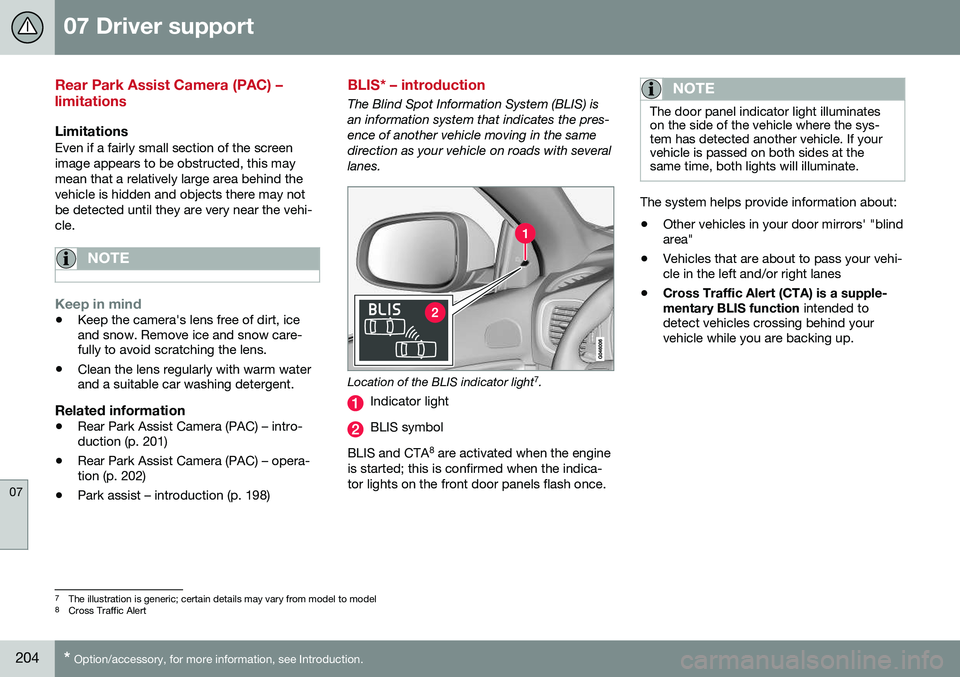
The Blind Spot Information System (BLIS) is an information system that indicates the pres-ence of another vehicle moving in the samedirection as your vehicle on roads with severallanes.
Location of the BLIS indicator light 7
.
Indicator light
BLIS symbol
BLIS and CTA 8
are activated when the engine
is started; this is confirmed when the indica- tor lights on the front door panels flash once.
NOTE
The door panel indicator light illuminates on the side of the vehicle where the sys-tem has detected another vehicle. If yourvehicle is passed on both sides at thesame time, both lights will illuminate.
The system helps provide information about:
• Other vehicles in your door mirrors' "blind area"
• Vehicles that are about to pass your vehi-cle in the left and/or right lanes
• Cross Traffic Alert (CTA) is a supple- mentary BLIS function
intended to
detect vehicles crossing behind your vehicle while you are backing up.
7 The illustration is generic; certain details may vary from model to model
8 Cross Traffic Alert
Page 207 of 344
07 Driver support
07
* Option/accessory, for more information, see Introduction.205
WARNING
• BLIS and CTA are information sys- tems, NOT warning or safety systemsand do not function in all situations.
• BLIS and CTA do not eliminate theneed for you to visually confirm theconditions around you, and the needfor you to turn your head and should-ers to make sure that you can safelychange lanes or back up.
• As the driver, you have full responsibil-ity for changing lanes/backing up in asafe manner.
Related information
•
BLIS* – function (p. 205)
• BLIS* – operation (p. 206)
• BLIS* – Cross Traffic Alert (CTA) (p. 206)
• BLIS* – limitations (p. 208)
• BLIS* – messages (p. 209)
BLIS* – function
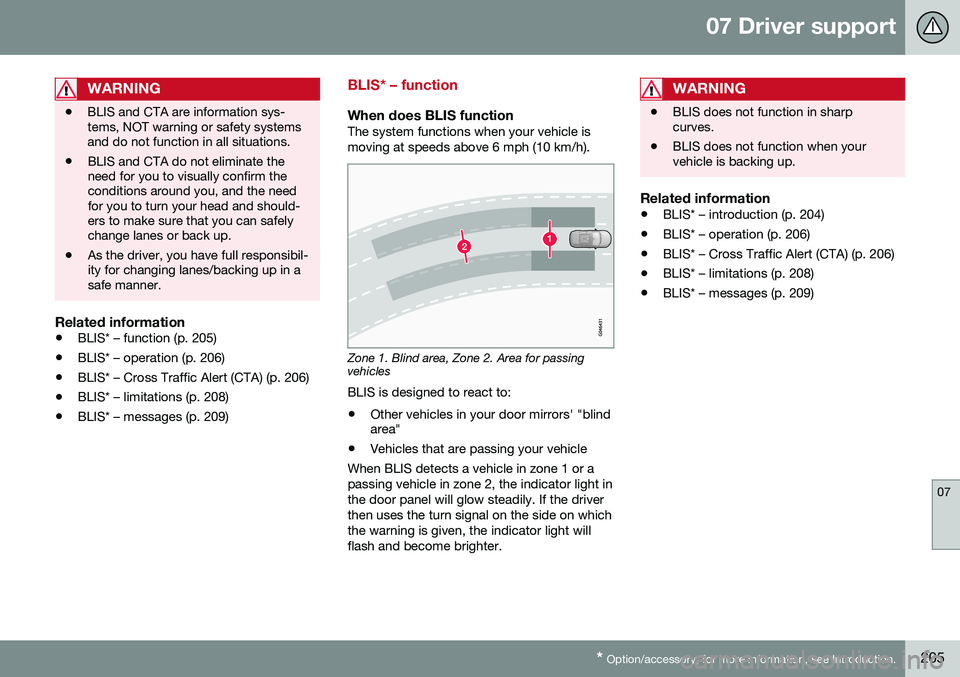
When does BLIS functionThe system functions when your vehicle is moving at speeds above 6 mph (10 km/h).
Zone 1. Blind area, Zone 2. Area for passing vehicles
BLIS is designed to react to:
• Other vehicles in your door mirrors' "blind area"
• Vehicles that are passing your vehicle
When BLIS detects a vehicle in zone 1 or a passing vehicle in zone 2, the indicator light inthe door panel will glow steadily. If the driverthen uses the turn signal on the side on whichthe warning is given, the indicator light willflash and become brighter.
WARNING
• BLIS does not function in sharp curves.
• BLIS does not function when yourvehicle is backing up.
Related information
•
BLIS* – introduction (p. 204)
• BLIS* – operation (p. 206)
• BLIS* – Cross Traffic Alert (CTA) (p. 206)
• BLIS* – limitations (p. 208)
• BLIS* – messages (p. 209)
Page 213 of 344
08 Starting and driving
08
}}
* Option/accessory, for more information, see Introduction.211
Starting the engine
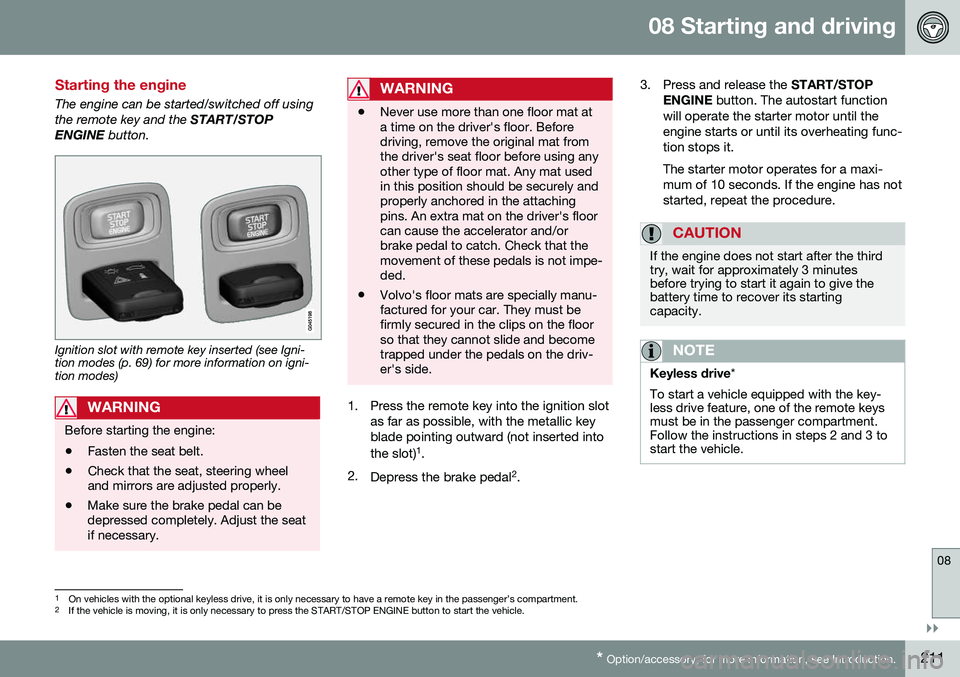
The engine can be started/switched off using the remote key and the START/STOP
ENGINE button.
Ignition slot with remote key inserted (see Igni- tion modes (p. 69) for more information on igni-tion modes)
WARNING
Before starting the engine:
• Fasten the seat belt.
• Check that the seat, steering wheel and mirrors are adjusted properly.
• Make sure the brake pedal can bedepressed completely. Adjust the seatif necessary.
WARNING
•Never use more than one floor mat at a time on the driver's floor. Beforedriving, remove the original mat fromthe driver's seat floor before using anyother type of floor mat. Any mat usedin this position should be securely andproperly anchored in the attachingpins. An extra mat on the driver's floorcan cause the accelerator and/orbrake pedal to catch. Check that themovement of these pedals is not impe-ded.
• Volvo's floor mats are specially manu-factured for your car. They must befirmly secured in the clips on the floorso that they cannot slide and becometrapped under the pedals on the driv-er's side.
1. Press the remote key into the ignition slot
as far as possible, with the metallic key blade pointing outward (not inserted into the slot) 1
.
2. Depress the brake pedal 2
. 3. Press and release the
START/STOP
ENGINE button. The autostart function
will operate the starter motor until the engine starts or until its overheating func-tion stops it. The starter motor operates for a maxi- mum of 10 seconds. If the engine has notstarted, repeat the procedure.
CAUTION
If the engine does not start after the third try, wait for approximately 3 minutesbefore trying to start it again to give thebattery time to recover its startingcapacity.
NOTE
Keyless drive *
To start a vehicle equipped with the key- less drive feature, one of the remote keysmust be in the passenger compartment.Follow the instructions in steps 2 and 3 tostart the vehicle.
1 On vehicles with the optional keyless drive, it is only necessary to have a remote key in the passenger’s compartment.
2 If the vehicle is moving, it is only necessary to press the START/STOP ENGINE button to start the vehicle.
Page 292 of 344
10 Maintenance and servicing
10
290* Option/accessory, for more information, see Introduction.
Bulbs – introduction
Certain bulbs can be replaced by the vehicle's owner. However, the bulbs on the followinglist should only be replaced by a trained andqualified Volvo service technician.
NOTE
• For information regarding any bulbs not mentioned in this section, pleasecontact your Volvo retailer or a trainedand authorized Volvo service techni-cian.
• Always switch off the ignition beforestarting to replace a bulb.
• If an error message remains in the dis-play after a faulty bulb has beenreplaced, contact an authorized Volvoworkshop.
• Condensation may form temporarily onthe inside of the lenses of exteriorlights such as headlights, fog lights, ortaillights. This is normal and the lightsare designed to withstand moisture.Normally, condensation will dissipateafter the lights have been on for ashort time.
• The optional Active Bending Lightbulbs contain trace amounts of mer-cury. These bulbs should always bedisposed of by a trained and qualifiedVolvo service technician.
CAUTION
Never touch the glass of bulbs with your fingers. Grease and oils from your fingersvaporize in the heat and will leave adeposit on the reflector, which will damageit.
WARNING
•
The engine should not be running when changing bulbs.
• If the engine has been running justprior to replacing bulbs in the head-light housing, please keep in mind thatcomponents in the engine compart-ment will be hot.
WARNING
•
Active Bending Lights* – due to the high voltage used by these headlights,these bulbs should only be replacedby a trained and qualified Volvo serv-ice technician.
• Turn off the lights and remove theremote key from the ignition beforechanging any bulbs.
Related information
•
Bulbs – headlight housing (p. 290)
• Bulbs – vanity mirror lighting (p. 293)
• Bulbs – license plate lighting (p. 292)
Bulbs – headlight housing
The entire headlight housing must be lifted out when replacing all front bulbs.
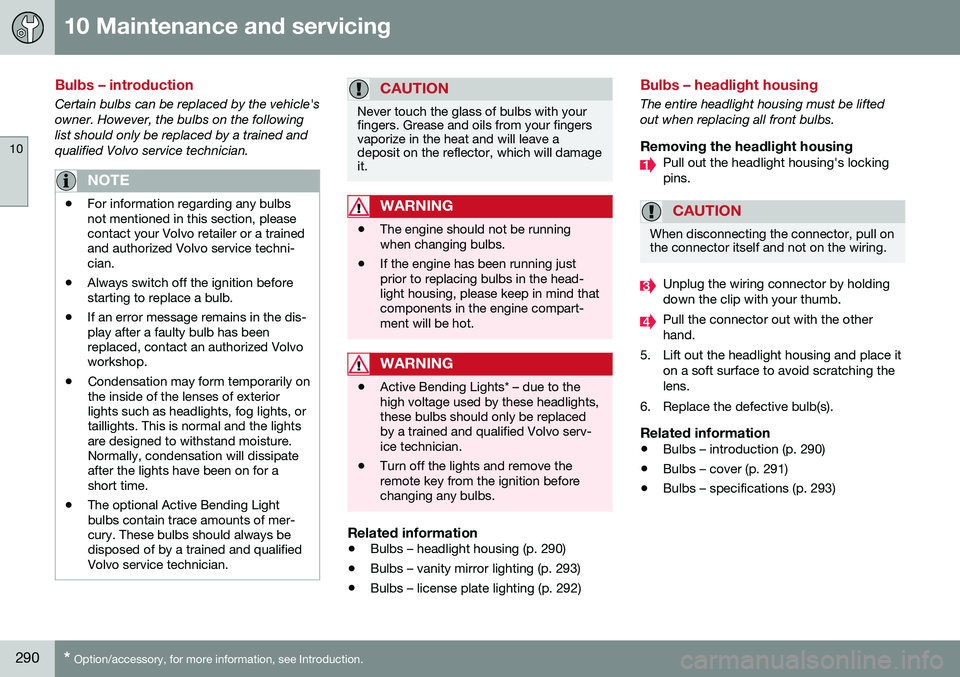
Removing the headlight housingPull out the headlight housing's locking pins.
CAUTION
When disconnecting the connector, pull on the connector itself and not on the wiring.
Unplug the wiring connector by holding down the clip with your thumb.
Pull the connector out with the other hand.
5. Lift out the headlight housing and place it on a soft surface to avoid scratching thelens.
6. Replace the defective bulb(s).
Related information
• Bulbs – introduction (p. 290)
• Bulbs – cover (p. 291)
• Bulbs – specifications (p. 293)
Page 295 of 344
10 Maintenance and servicing
10
}}
293
Bulbs – vanity mirror lighting
The vanity mirror bulbs are located behind the lens.
Related information
•Bulbs – specifications (p. 293)
Bulbs – specifications
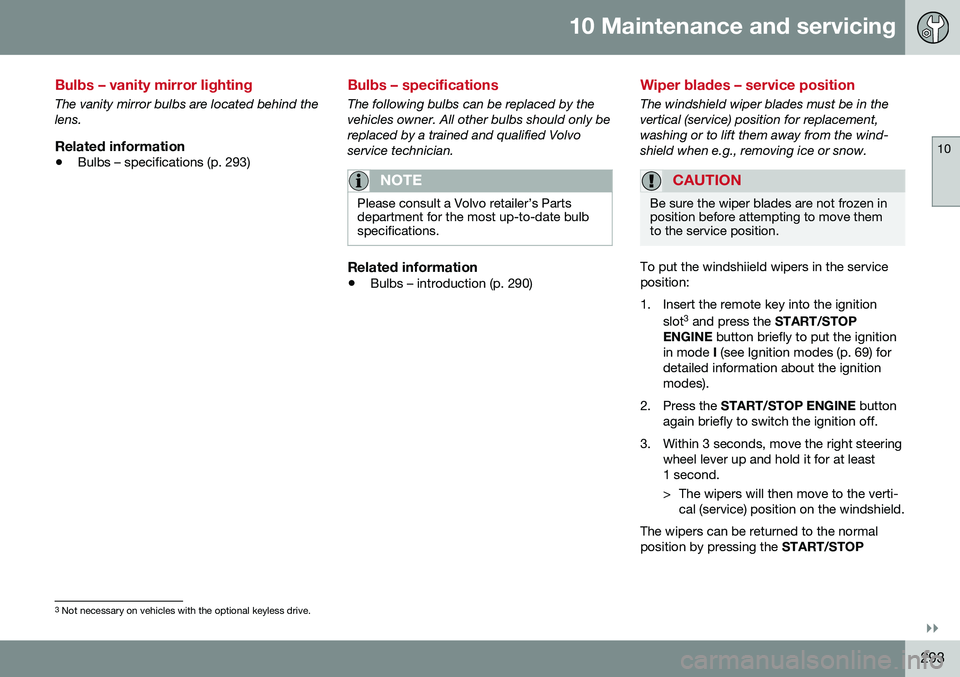
The following bulbs can be replaced by the vehicles owner. All other bulbs should only bereplaced by a trained and qualified Volvoservice technician.
NOTE
Please consult a Volvo retailer’s Parts department for the most up-to-date bulbspecifications.
Related information
•Bulbs – introduction (p. 290)
Wiper blades – service position
The windshield wiper blades must be in the vertical (service) position for replacement,washing or to lift them away from the wind-shield when e.g., removing ice or snow.
CAUTION
Be sure the wiper blades are not frozen in position before attempting to move themto the service position.
To put the windshiield wipers in the service position:
1. Insert the remote key into the ignition
slot3
and press the START/STOP
ENGINE button briefly to put the ignition
in mode I (see Ignition modes (p. 69) for
detailed information about the ignition modes).
2. Press the START/STOP ENGINE button
again briefly to switch the ignition off.
3. Within 3 seconds, move the right steering wheel lever up and hold it for at least1 second.
> The wipers will then move to the verti-cal (service) position on the windshield.
The wipers can be returned to the normal position by pressing the START/STOP
3
Not necessary on vehicles with the optional keyless drive.
Page 305 of 344
10 Maintenance and servicing
10
}}
* Option/accessory, for more information, see Introduction.303
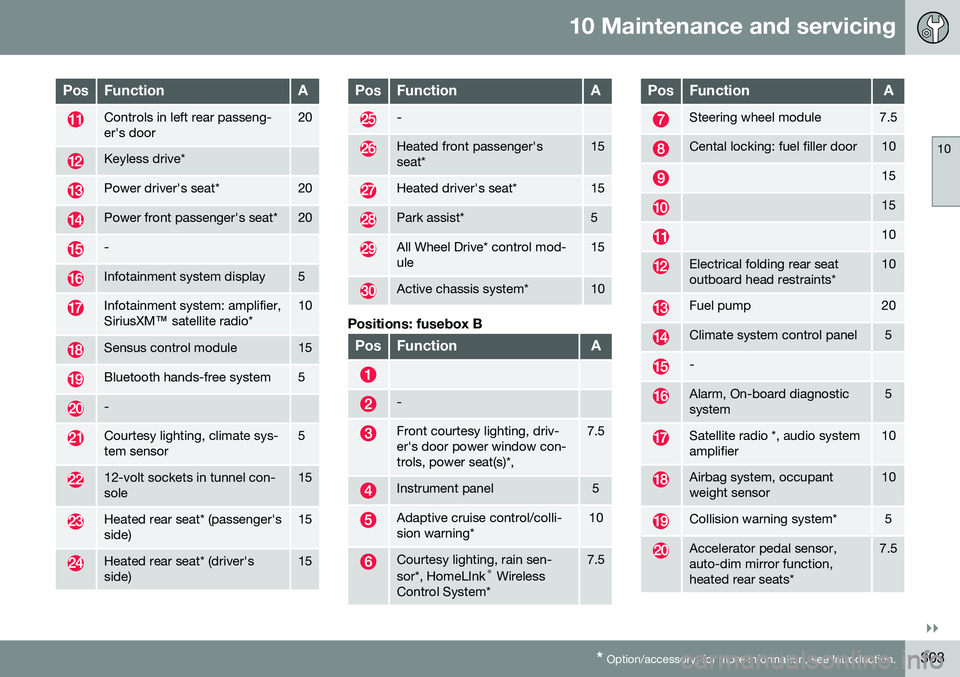
PosFunctionA
Controls in left rear passeng- er's door20
Keyless drive*
Power driver's seat*20
Power front passenger's seat*20
-
Infotainment system display5
Infotainment system: amplifier, SiriusXM ™ satellite radio*10
Sensus control module15
Bluetooth hands-free system5
-
Courtesy lighting, climate sys- tem sensor5
12-volt sockets in tunnel con- sole15
Heated rear seat* (passenger's side)15
Heated rear seat* (driver's side)15
PosFunctionA
-
Heated front passenger's seat*15
Heated driver's seat*15
Park assist*5
All Wheel Drive* control mod- ule15
Active chassis system*10
Positions: fusebox B
PosFunctionA
-
Front courtesy lighting, driv- er's door power window con-trols, power seat(s)*,7.5
Instrument panel5
Adaptive cruise control/colli- sion warning*10
Courtesy lighting, rain sen- sor*, HomeLInk ®
Wireless
Control System*7.5
PosFunctionA
Steering wheel module7.5
Cental locking: fuel filler door10
15
15
10
Electrical folding rear seat outboard head restraints*10
Fuel pump20
Climate system control panel5
-
Alarm, On-board diagnostic system5
Satellite radio *, audio system amplifier10
Airbag system, occupant weight sensor10
Collision warning system*5
Accelerator pedal sensor, auto-dim mirror function,heated rear seats*7.5
Page 311 of 344
10 Maintenance and servicing
10
}}
309
Automatic car wash
The vehicle should be washed at regular inter- vals since dirt, dust, insects and tar spotsadhere to the paint and may cause damage.To help prevent corrosion, it is particularlyimportant to wash the car frequently in thewintertime.• We do NOT recommend washing your car in an automatic wash during the firstfew months (because the paint will nothave hardened sufficiently).
• An automatic wash is a simple and quickway to clean your car, but it is worthremembering that it may not be as thor-ough as when you yourself go over thecar with sponge and water. Keeping theunderbody clean is most important, espe-cially in the winter. Some automaticwashers do not have facilities for washingthe underbody.
NOTE
Condensation may form temporarily on the inside of the lenses of exterior lights suchas headlights, fog lights, or taillights. Thisis normal and the lights are designed towithstand moisture. Normally, condensa-tion will dissipate after the lights have beenon for a short time.
CAUTION
• Before driving into an automatic car wash, turn off the optional rain sensorto avoid damaging the windshield wip-ers.
• Make sure that side view mirrors, aux-iliary lamps, etc, are secure, and thatany antenna(s) are retracted orremoved. Otherwise there is risk of themachine dislodging them.
• Chromed wheels:
Clean chrome-
plated wheels using the same deter-gents used for the body of the vehicle.Aggressive wheel-cleaning agents canpermanently stain chrome-platedwheels.
WARNING
• When the vehicle is driven immediately after being washed, apply the brakes,including the parking brake, severaltimes in order to remove any moisturefrom the brake linings.
• Engine cleaning agents should not beused when the engine is warm. Thisconstitutes a fire risk.
Related information
•
Polishing and waxing (p. 309)
• Cleaning the interior (p. 310)
• Washing the car (p. 308)
Polishing and waxing
Normally, polishing is not required during the first year after delivery, however, waxing maybe beneficial.
• Before applying polish or wax the vehicle must be washed and dried. Tar spots canbe removed with kerosene or tar remover.Difficult spots may require a fine rubbingcompound.
• After polishing use liquid or paste wax.
• Several commercially available productscontain both polish and wax.
• Waxing alone does not substitute for pol-ishing a dull surface.
• A wide range of polymer-based waxescan be purchased today. These waxesare easy to use and produce a long-last-ing, high-gloss finish that protects thebodywork against oxidation, road dirt andfading.
• Do not polish or wax your vehicle in directsunlight (the surface of the vehicle shouldnot be warmer than 113 °F (45 °C).
Page 321 of 344
11 Specifications
11
319
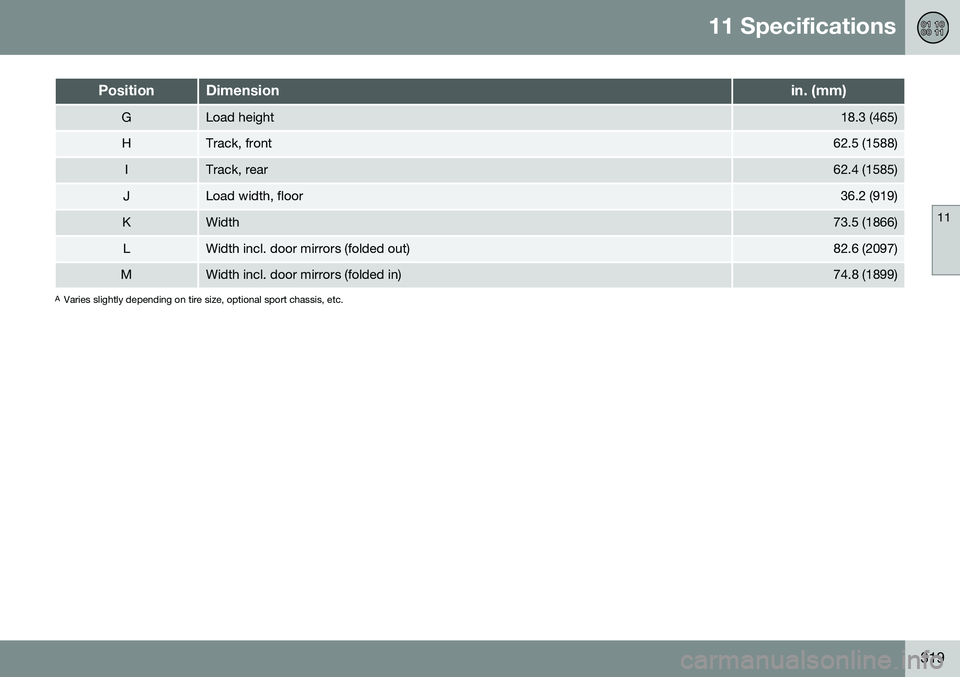
PositionDimensionin. (mm)
GLoad height18.3 (465)
HTrack, front62.5 (1588)
ITrack, rear62.4 (1585)
JLoad width, floor36.2 (919)
KWidth73.5 (1866)
LWidth incl. door mirrors (folded out)82.6 (2097)
MWidth incl. door mirrors (folded in)74.8 (1899)
AVaries slightly depending on tire size, optional sport chassis, etc.