service VOLVO S60 INSCRIPTION 2016 Owner´s Manual
[x] Cancel search | Manufacturer: VOLVO, Model Year: 2016, Model line: S60 INSCRIPTION, Model: VOLVO S60 INSCRIPTION 2016Pages: 344, PDF Size: 7.24 MB
Page 43 of 344
02 Safety
02
}}
41
Inflatable Curtain (IC)
The inflatable curtain is designed to help pro- tect the heads of the occupants of the frontseats and the occupant of the outboard rearseating positions in certain side impact colli-sions. This system consists of inflatable curtains located along the sides of the roof liners,stretching from the center of both front sidewindows to the rear edge of the rear sidedoor windows. In certain side impacts, both the Inflatable
Curtain (IC) and the Side Impact Airbag Sys- tem (p. 39) (SIPS airbag) will deploy. The ICand the SIPS airbag deploy simultaneously.
NOTE
WARNING
• Never try to open or repair any compo- nents of the IC system. This should bedone only by a trained and qualifiedVolvo service technician.
• Never hang heavy items from the ceil-ing handles. This could impededeployment of the Inflatable Curtain.
WARNING
In order for the IC to provide its best pro- tection, both front seat occupants andboth outboard rear seat occupants shouldsit in an upright position with the seat beltproperly fastened; adults using the seatbelt and children using the proper childrestraint system. Only adults should sit inthe front seats. Children must never beallowed in the front passenger seat, Childsafety (p. 45) for guidelines. Failure tofollow these instructions can result in injuryto the vehicle occupants in an accident.
Related information
•
Supplemental Restraint System (SRS) (p. 31)
• Front airbags (p. 32)
• Child safety (p. 45)
Whiplash Protection System (WHIPS)
The WHIPS system consists of specially designed hinges and brackets on the frontseat backrests designed to help absorb someof the energy generated in a collision from therear (when the vehicle is rear-ended).
Page 44 of 344
||
02 Safety
02
42
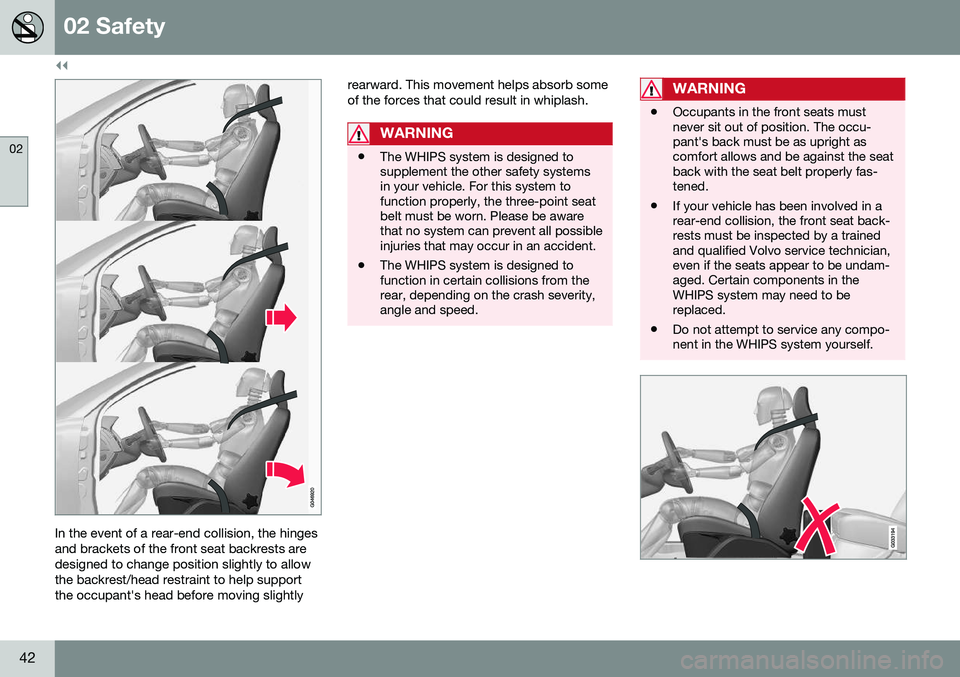
In the event of a rear-end collision, the hinges and brackets of the front seat backrests aredesigned to change position slightly to allowthe backrest/head restraint to help supportthe occupant's head before moving slightlyrearward. This movement helps absorb someof the forces that could result in whiplash.
WARNING
•
The WHIPS system is designed to supplement the other safety systemsin your vehicle. For this system tofunction properly, the three-point seatbelt must be worn. Please be awarethat no system can prevent all possibleinjuries that may occur in an accident.
• The WHIPS system is designed tofunction in certain collisions from therear, depending on the crash severity,angle and speed.
WARNING
•
Occupants in the front seats must never sit out of position. The occu-pant's back must be as upright ascomfort allows and be against the seatback with the seat belt properly fas-tened.
• If your vehicle has been involved in arear-end collision, the front seat back-rests must be inspected by a trainedand qualified Volvo service technician,even if the seats appear to be undam-aged. Certain components in theWHIPS system may need to bereplaced.
• Do not attempt to service any compo-nent in the WHIPS system yourself.
Page 46 of 344
||
02 Safety
02
44
If the vehicle has been involved in a collision, the text Safety mode See manual may
appear in the information display.
NOTE
This text can only be shown if the display is undamaged and the vehicle's electricalsystem is intact.
Crash mode is a feature that is triggered if one or more of the safety systems (e.g.front (p. 32) or side airbags (p. 39), an inflat-able curtain (p. 41), or one or more of the seatbelt pretensioners) has deployed. The colli-sion may have damaged an important func-tion in the vehicle, such as the fuel lines, sen-sors for one of the safety systems, the brakesystem, etc.
WARNING
• Never attempt to repair the vehicle yourself or to reset the electrical sys-tem after the vehicle has displayed
Safety mode See manual. This could
result in injury or improper system function.
• Restoring the vehicle to normal operat-ing status should only be done by atrained and qualified Volvo servicetechnician.
• After
Safety mode See manual has
been displayed, if you detect the odor of fuel vapor, or see any signs of fuelleakage, do not attempt to start thevehicle. Leave the vehicle immediately.
Related information
• Crash mode – starting the vehicle (p. 44)
• Crash mode – moving the vehicle(p. 45)
Crash mode – starting the vehicle
If Crash mode has been set Crash mode (p. 43)) and damage to the vehicle isminor and there is no fuel leakage, you mayattempt to start the engine. To do so:
1. Remove the remote key from the ignition
slot and open the driver's door. If a mes- sage is displayed that the ignition is on,press the start button.
2. Close the driver's door and reinsert the remote key in the ignition slot.
3. Try to start the vehicle.
WARNING
If the message Safety mode See manualis still displayed, the vehicle should not be driven and must be towed. Concealedfaults may make the vehicle difficult tocontrol.
Related information
• Crash mode – general information (p. 43)
• Crash mode – moving the vehicle (p. 45)
Page 47 of 344
02 Safety
02
}}
45
Crash mode – moving the vehicle
If the message Normal mode appears after
an attempt has been made to start the engine, Starting the vehicle after a crash (p. 44), thevehicle may be moved carefully from its pres-ent position, if for example, it is blocking traf-fic. It should, however, not be moved fartherthan is absolutely necessary.
WARNING
Even if the vehicle appears to be drivable after Crash mode has been set, it shouldnot be driven or towed (pulled by anothervehicle). There may be concealed damagethat could make it difficult or impossible tocontrol. The vehicle should be transportedon a flatbed tow truck to a trained andqualified Volvo service technician forinspection/repairs.
Related information
• Crash mode – general information (p. 43)
Child safety
Children should always be seated safely when traveling in the vehicle.
General informationVolvo recommends the proper use of restraintsystems (p. 47) for all occupants includingchildren. Remember that, regardless of ageand size, a child should always be properlyrestrained in a vehicle. Your vehicle is also equipped with ISOFIX/ LATCH attachments (p. 54), which make itmore convenient to install child seats. Some restraint systems for children are designed to be secured in the vehicle by lapbelts or the lap portion of a lap-shoulder belt.Such child restraint systems can help protectchildren in vehicles in the event of an acci-dent only if they are used properly. However,children could be endangered in a crash if thechild restraints are not properly secured in thevehicle. Failure to follow the installationinstructions for your child restraint can resultin your child striking the vehicle's interior in asudden stop. Holding a child in your arms is NOT a suitable substitute for a child restraint system. In anaccident, a child held in a person's arms canbe crushed between the vehicle's interior andan unrestrained person. The child could alsobe injured by striking the interior, or by beingejected from the vehicle during a suddenmaneuver or impact. The same can also hap- pen if the infant or child rides unrestrained onthe seat. Other occupants should also beproperly restrained to help reduce the chanceof injuring or increasing the injury of a child. All states and provinces have legislation gov- erning how and where children should be car-ried in a vehicle. Find out the regulationsexisting in your state or province. Recentaccident statistics have shown that childrenare safer in rear seating positions than frontseating positions when properly restrained. Achild restraint system can help protect a childin a vehicle. Here's what to look for whenselecting a child restraint system: It should have a label certifying that it meets applicable Federal Motor Vehicle SafetyStandards (FMVSS 213) – or in Canada,CMVSS 213. Make sure the child restraint system is approved for the child's height, weight anddevelopment – the label required by thestandard or regulation, or instructions forinfant restraints, typically provide this infor-mation. In using any child restraint system, we urge you to carefully look over the instructions thatare provided with the restraint. Be sure youunderstand them and can use the deviceproperly and safely in this vehicle. A misusedchild restraint system can result in increasedinjuries for both the infant or child and otheroccupants in the vehicle.
Page 65 of 344
03 Instruments and controls
03
}}
* Option/accessory, for more information, see Introduction.63
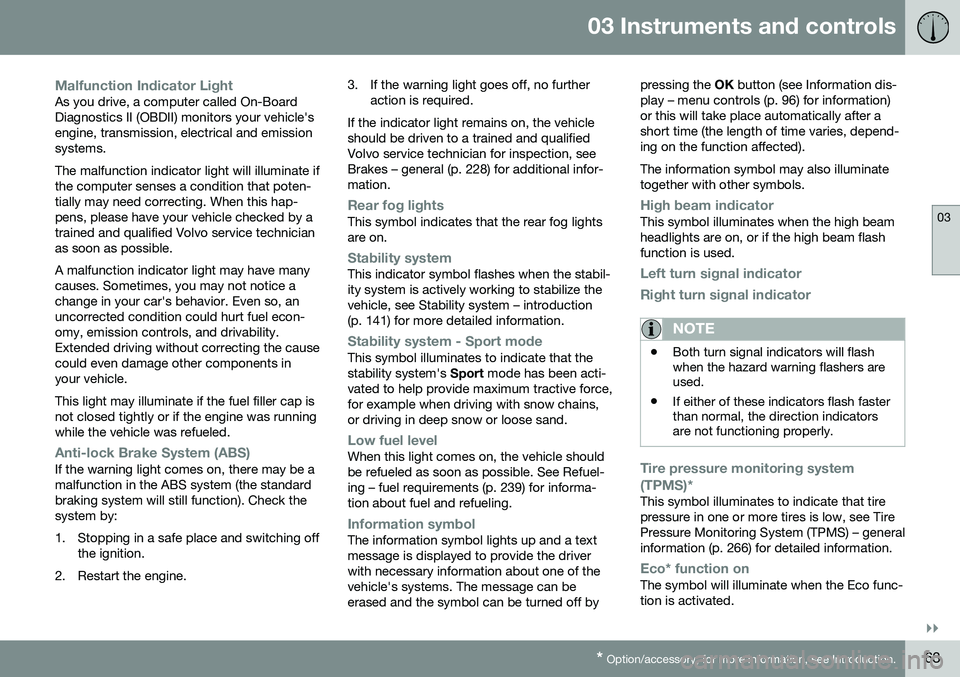
Malfunction Indicator LightAs you drive, a computer called On-Board Diagnostics II (OBDII) monitors your vehicle'sengine, transmission, electrical and emissionsystems. The malfunction indicator light will illuminate if the computer senses a condition that poten-tially may need correcting. When this hap-pens, please have your vehicle checked by atrained and qualified Volvo service technicianas soon as possible. A malfunction indicator light may have many causes. Sometimes, you may not notice achange in your car's behavior. Even so, anuncorrected condition could hurt fuel econ-omy, emission controls, and drivability.Extended driving without correcting the causecould even damage other components inyour vehicle. This light may illuminate if the fuel filler cap is not closed tightly or if the engine was runningwhile the vehicle was refueled.
Anti-lock Brake System (ABS)If the warning light comes on, there may be a malfunction in the ABS system (the standardbraking system will still function). Check thesystem by:
1. Stopping in a safe place and switching off
the ignition.
2. Restart the engine. 3. If the warning light goes off, no further
action is required.
If the indicator light remains on, the vehicle should be driven to a trained and qualifiedVolvo service technician for inspection, seeBrakes – general (p. 228) for additional infor-mation.
Rear fog lightsThis symbol indicates that the rear fog lights are on.
Stability systemThis indicator symbol flashes when the stabil- ity system is actively working to stabilize thevehicle, see Stability system – introduction(p. 141) for more detailed information.
Stability system - Sport modeThis symbol illuminates to indicate that the stability system's Sport mode has been acti-
vated to help provide maximum tractive force,for example when driving with snow chains,or driving in deep snow or loose sand.
Low fuel levelWhen this light comes on, the vehicle should be refueled as soon as possible. See Refuel-ing – fuel requirements (p. 239) for informa-tion about fuel and refueling.
Information symbolThe information symbol lights up and a text message is displayed to provide the driverwith necessary information about one of thevehicle's systems. The message can beerased and the symbol can be turned off by pressing the
OK button (see Information dis-
play – menu controls (p. 96) for information)or this will take place automatically after ashort time (the length of time varies, depend-ing on the function affected). The information symbol may also illuminate together with other symbols.
High beam indicatorThis symbol illuminates when the high beam headlights are on, or if the high beam flashfunction is used.
Left turn signal indicator
Right turn signal indicator
NOTE
• Both turn signal indicators will flash when the hazard warning flashers areused.
• If either of these indicators flash fasterthan normal, the direction indicatorsare not functioning properly.
Tire pressure monitoring system (TPMS)*
This symbol illuminates to indicate that tire pressure in one or more tires is low, see TirePressure Monitoring System (TPMS) – generalinformation (p. 266) for detailed information.
Eco* function onThe symbol will illuminate when the Eco func- tion is activated.
Page 66 of 344
||
03 Instruments and controls
03
64* Option/accessory, for more information, see Introduction.
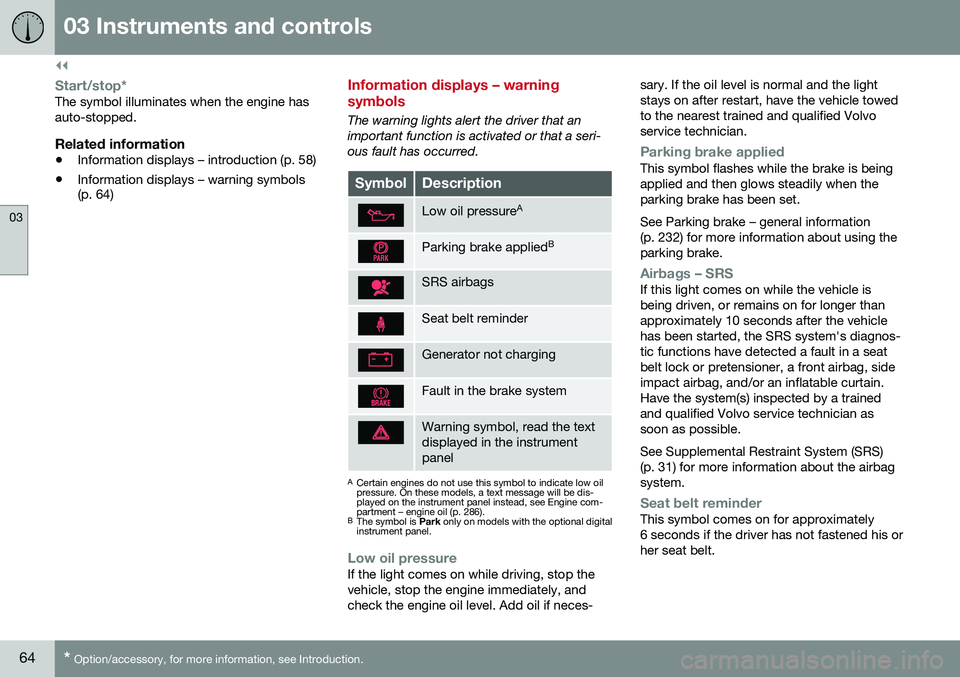
Start/stop*The symbol illuminates when the engine has auto-stopped.
Related information
• Information displays – introduction (p. 58)
• Information displays – warning symbols (p. 64)
Information displays – warning symbols
The warning lights alert the driver that an important function is activated or that a seri-ous fault has occurred.
SymbolDescription
Low oil pressure A
Parking brake applied B
SRS airbags
Seat belt reminder
Generator not charging
Fault in the brake system
Warning symbol, read the text displayed in the instrumentpanel
A
Certain engines do not use this symbol to indicate low oil pressure. On these models, a text message will be dis-played on the instrument panel instead, see Engine com-partment – engine oil (p. 286).
B The symbol is Park only on models with the optional digital
instrument panel.
Low oil pressureIf the light comes on while driving, stop the vehicle, stop the engine immediately, andcheck the engine oil level. Add oil if neces- sary. If the oil level is normal and the lightstays on after restart, have the vehicle towedto the nearest trained and qualified Volvoservice technician.
Parking brake appliedThis symbol flashes while the brake is being applied and then glows steadily when theparking brake has been set. See Parking brake – general information (p. 232) for more information about using theparking brake.
Airbags – SRSIf this light comes on while the vehicle is being driven, or remains on for longer thanapproximately 10 seconds after the vehiclehas been started, the SRS system's diagnos-tic functions have detected a fault in a seatbelt lock or pretensioner, a front airbag, sideimpact airbag, and/or an inflatable curtain.Have the system(s) inspected by a trainedand qualified Volvo service technician assoon as possible. See Supplemental Restraint System (SRS) (p. 31) for more information about the airbagsystem.
Seat belt reminderThis symbol comes on for approximately 6 seconds if the driver has not fastened his orher seat belt.
Page 67 of 344
03 Instruments and controls
03
}}
65
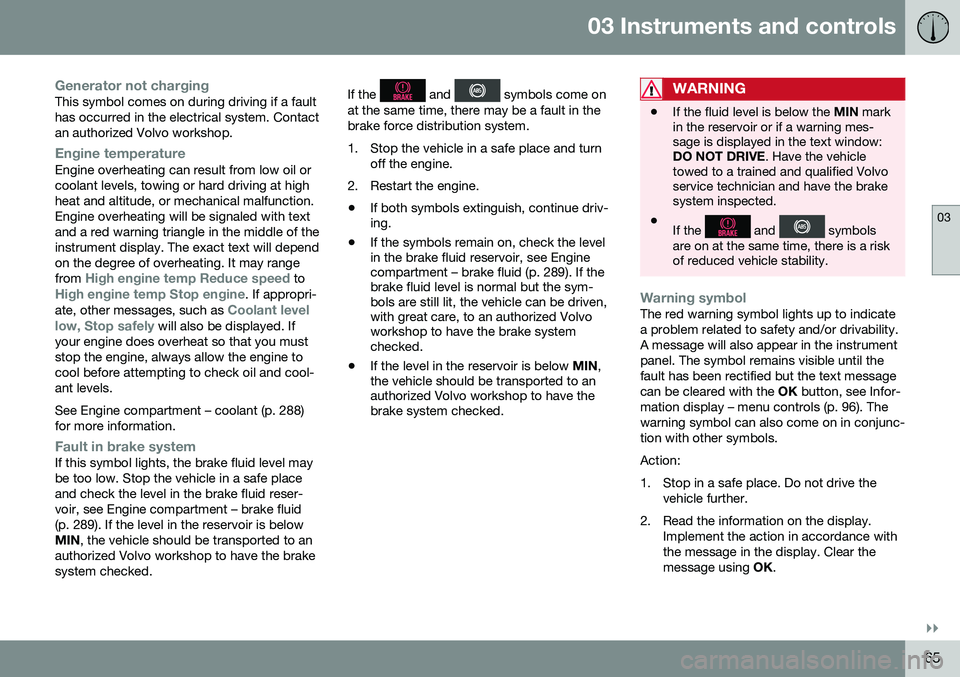
Generator not chargingThis symbol comes on during driving if a fault has occurred in the electrical system. Contactan authorized Volvo workshop.
Engine temperatureEngine overheating can result from low oil or coolant levels, towing or hard driving at highheat and altitude, or mechanical malfunction.Engine overheating will be signaled with textand a red warning triangle in the middle of theinstrument display. The exact text will dependon the degree of overheating. It may range from
High engine temp Reduce speed toHigh engine temp Stop engine. If appropri-
ate, other messages, such as Coolant level
low, Stop safely will also be displayed. If
your engine does overheat so that you must stop the engine, always allow the engine tocool before attempting to check oil and cool-ant levels. See Engine compartment – coolant (p. 288) for more information.
Fault in brake systemIf this symbol lights, the brake fluid level may be too low. Stop the vehicle in a safe placeand check the level in the brake fluid reser-voir, see Engine compartment – brake fluid(p. 289). If the level in the reservoir is belowMIN , the vehicle should be transported to an
authorized Volvo workshop to have the brakesystem checked. If the
and symbols come on
at the same time, there may be a fault in the brake force distribution system.
1. Stop the vehicle in a safe place and turn off the engine.
2. Restart the engine.
• If both symbols extinguish, continue driv- ing.
• If the symbols remain on, check the levelin the brake fluid reservoir, see Enginecompartment – brake fluid (p. 289). If thebrake fluid level is normal but the sym-bols are still lit, the vehicle can be driven,with great care, to an authorized Volvoworkshop to have the brake systemchecked.
• If the level in the reservoir is below
MIN,
the vehicle should be transported to anauthorized Volvo workshop to have thebrake system checked.WARNING
• If the fluid level is below the
MIN mark
in the reservoir or if a warning mes- sage is displayed in the text window:DO NOT DRIVE . Have the vehicle
towed to a trained and qualified Volvoservice technician and have the brakesystem inspected.
• If the
and symbols
are on at the same time, there is a risk of reduced vehicle stability.
Warning symbolThe red warning symbol lights up to indicate a problem related to safety and/or drivability.A message will also appear in the instrumentpanel. The symbol remains visible until thefault has been rectified but the text messagecan be cleared with the OK button, see Infor-
mation display – menu controls (p. 96). Thewarning symbol can also come on in conjunc-tion with other symbols. Action:
1. Stop in a safe place. Do not drive the vehicle further.
2. Read the information on the display. Implement the action in accordance with the message in the display. Clear themessage using OK.
Page 81 of 344
03 Instruments and controls
03
* Option/accessory, for more information, see Introduction.79
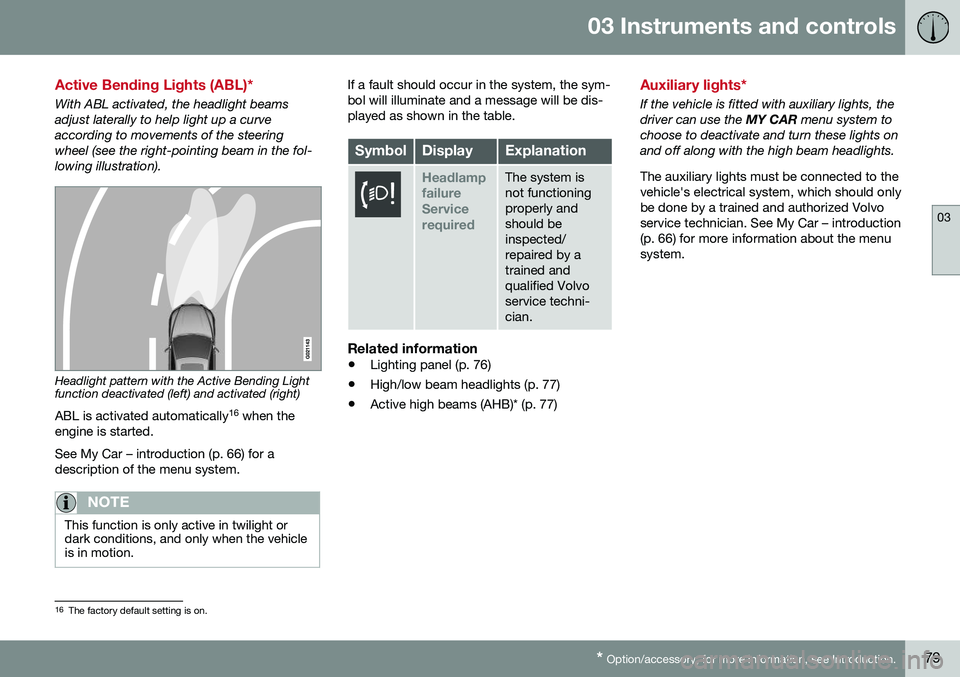
Active Bending Lights (ABL)*
With ABL activated, the headlight beams adjust laterally to help light up a curveaccording to movements of the steeringwheel (see the right-pointing beam in the fol-lowing illustration).
Headlight pattern with the Active Bending Light function deactivated (left) and activated (right)
ABL is activated automatically 16
when the
engine is started. See My Car – introduction (p. 66) for a description of the menu system.
NOTE
This function is only active in twilight or dark conditions, and only when the vehicleis in motion.
If a fault should occur in the system, the sym- bol will illuminate and a message will be dis-played as shown in the table.
SymbolDisplayExplanation
Headlamp failureServicerequiredThe system is not functioningproperly andshould beinspected/repaired by atrained andqualified Volvoservice techni-cian.
Related information
• Lighting panel (p. 76)
• High/low beam headlights (p. 77)
• Active high beams (AHB)* (p. 77)
Auxiliary lights*
If the vehicle is fitted with auxiliary lights, the driver can use the
MY CAR menu system to
choose to deactivate and turn these lights onand off along with the high beam headlights. The auxiliary lights must be connected to the vehicle's electrical system, which should onlybe done by a trained and authorized Volvoservice technician. See My Car – introduction(p. 66) for more information about the menusystem.
16 The factory default setting is on.
Page 86 of 344
03 Instruments and controls
03
84* Option/accessory, for more information, see Introduction.
Windshield wipers
Move the lever toward the steering wheel to start the windshield and headlight washers.After the lever is released the wipers makeseveral extra sweeps.
CAUTION
• Use ample washer fluid when washing the windshield. The windshield shouldbe thoroughly wet when the wipers arein operation.
• Before using the wipers, ice and snowshould be removed from the wind-shield/rear window. Be sure the wiperblades are not frozen in place.
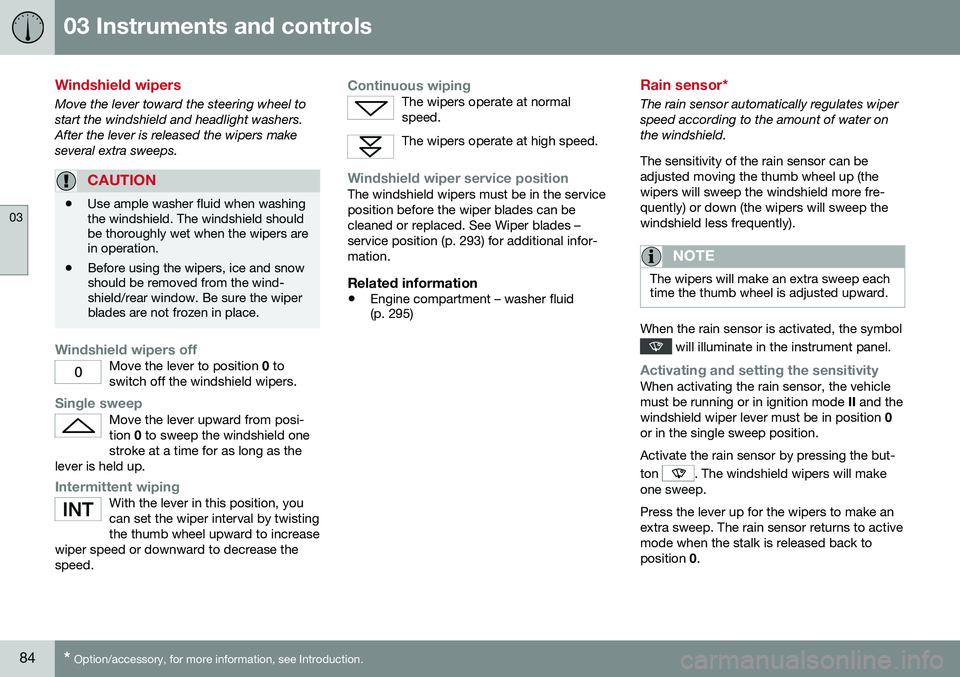
Windshield wipers offMove the lever to position
0 to
switch off the windshield wipers.
Single sweepMove the lever upward from posi- tion 0 to sweep the windshield one
stroke at a time for as long as the
lever is held up.
Intermittent wipingWith the lever in this position, you can set the wiper interval by twistingthe thumb wheel upward to increase
wiper speed or downward to decrease thespeed.
Continuous wipingThe wipers operate at normal speed.
The wipers operate at high speed.
Windshield wiper service positionThe windshield wipers must be in the service position before the wiper blades can becleaned or replaced. See Wiper blades –service position (p. 293) for additional infor-mation.
Related information
• Engine compartment – washer fluid (p. 295)
Rain sensor*
The rain sensor automatically regulates wiper speed according to the amount of water onthe windshield. The sensitivity of the rain sensor can be adjusted moving the thumb wheel up (thewipers will sweep the windshield more fre-quently) or down (the wipers will sweep thewindshield less frequently).
NOTE
The wipers will make an extra sweep each time the thumb wheel is adjusted upward.
When the rain sensor is activated, the symbol
will illuminate in the instrument panel.
Activating and setting the sensitivityWhen activating the rain sensor, the vehicle must be running or in ignition mode
II and the
windshield wiper lever must be in position 0
or in the single sweep position. Activate the rain sensor by pressing the but- ton
. The windshield wipers will make
one sweep. Press the lever up for the wipers to make an extra sweep. The rain sensor returns to activemode when the stalk is released back toposition 0.
Page 98 of 344
03 Instruments and controls
03
96* Option/accessory, for more information, see Introduction.
Information display – menu controls
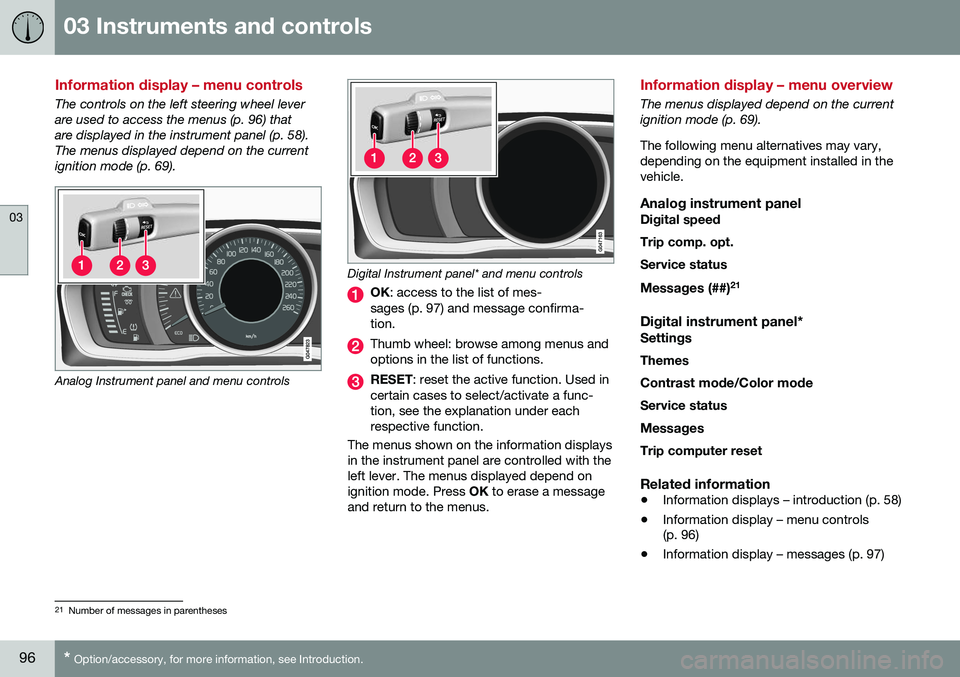
The controls on the left steering wheel lever are used to access the menus (p. 96) thatare displayed in the instrument panel (p. 58).The menus displayed depend on the currentignition mode (p. 69).
Analog Instrument panel and menu controls
Digital Instrument panel* and menu controls
OK : access to the list of mes-
sages (p. 97) and message confirma- tion.
Thumb wheel: browse among menus and options in the list of functions.
RESET : reset the active function. Used in
certain cases to select/activate a func- tion, see the explanation under eachrespective function.
The menus shown on the information displaysin the instrument panel are controlled with theleft lever. The menus displayed depend onignition mode. Press OK to erase a message
and return to the menus.
Information display – menu overview
The menus displayed depend on the current ignition mode (p. 69). The following menu alternatives may vary, depending on the equipment installed in thevehicle.
Analog instrument panelDigital speed Trip comp. opt.Service status
Messages (##) 21
Digital instrument panel*
Settings
Themes
Contrast mode /Color mode
Service status
Messages Trip computer reset
Related information
• Information displays – introduction (p. 58)
• Information display – menu controls (p. 96)
• Information display – messages (p. 97)
21
Number of messages in parentheses