service VOLVO S60 INSCRIPTION 2016 Owner´s Manual
[x] Cancel search | Manufacturer: VOLVO, Model Year: 2016, Model line: S60 INSCRIPTION, Model: VOLVO S60 INSCRIPTION 2016Pages: 344, PDF Size: 7.24 MB
Page 169 of 344
07 Driver support
07
167
Distance Alert – symbols and messages
Distance Alert is part of Adaptive Cruise Con- trol and is a function that provides informationabout the time interval to the vehicle ahead.
Symbols and text messagesA text message can be erased by pressingbriefly on the OK button on the turn signal
lever.
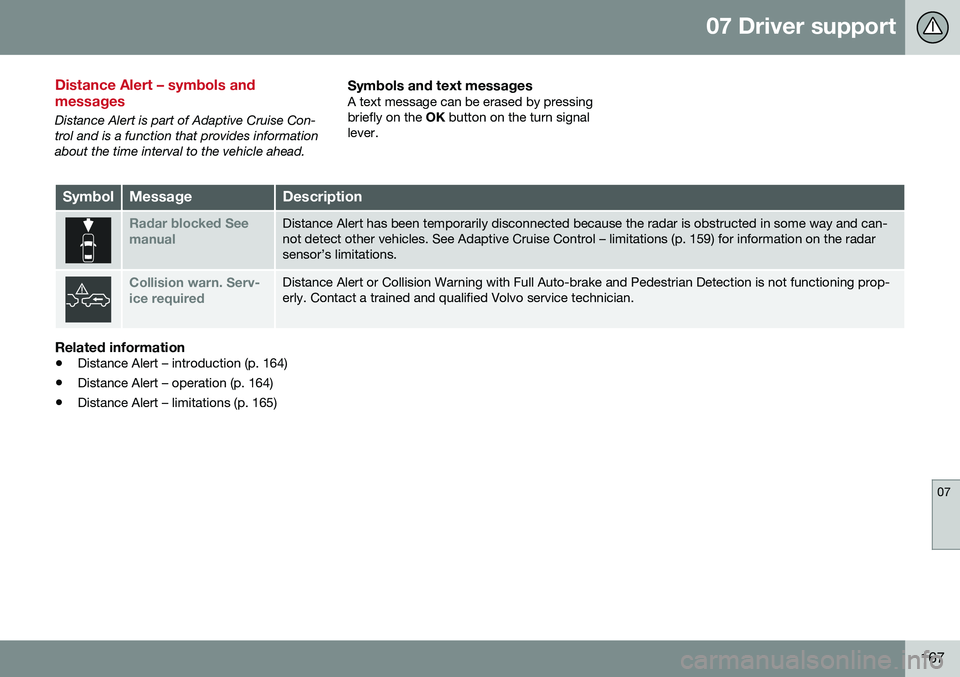
SymbolMessageDescription
Radar blocked See manualDistance Alert has been temporarily disconnected because the radar is obstructed in some way and can- not detect other vehicles. See Adaptive Cruise Control – limitations (p. 159) for information on the radarsensor’s limitations.
Collision warn. Serv- ice requiredDistance Alert or Collision Warning with Full Auto-brake and Pedestrian Detection is not functioning prop- erly. Contact a trained and qualified Volvo service technician.
Related information
• Distance Alert – introduction (p. 164)
• Distance Alert – operation (p. 164)
• Distance Alert – limitations (p. 165)
Page 173 of 344
07 Driver support
07
}}
171
Therefore, vehicles or objects with low-reflec- tive surfaces may not be detected. Normally,the license plate and taillight reflectors givethe rear section of a vehicle ahead sufficientreflective surfaces to be detected.
NOTE
•
Keep the windshield in front of the laser sensor free of ice, snow, dirt,etc., see City Safety – function(p. 169).
• Snow or ice on the hood deeper than2 inches (5 cm) may obstruct the sen-sor. Keep the hood free of ice andsnow.
• Do not mount or in any way attachanything on the windshield that couldobstruct the laser sensor.
Related information
•
City Safety – introduction (p. 168)
• City Safety – function (p. 169)
• City Safety – operation (p. 170)
• City Safety – troubleshooting (p. 171)
• City Safety – symbols and messages (p. 173)
• City Safety – Laser sensor (p. 174)
City Safety – troubleshooting
Troubleshooting
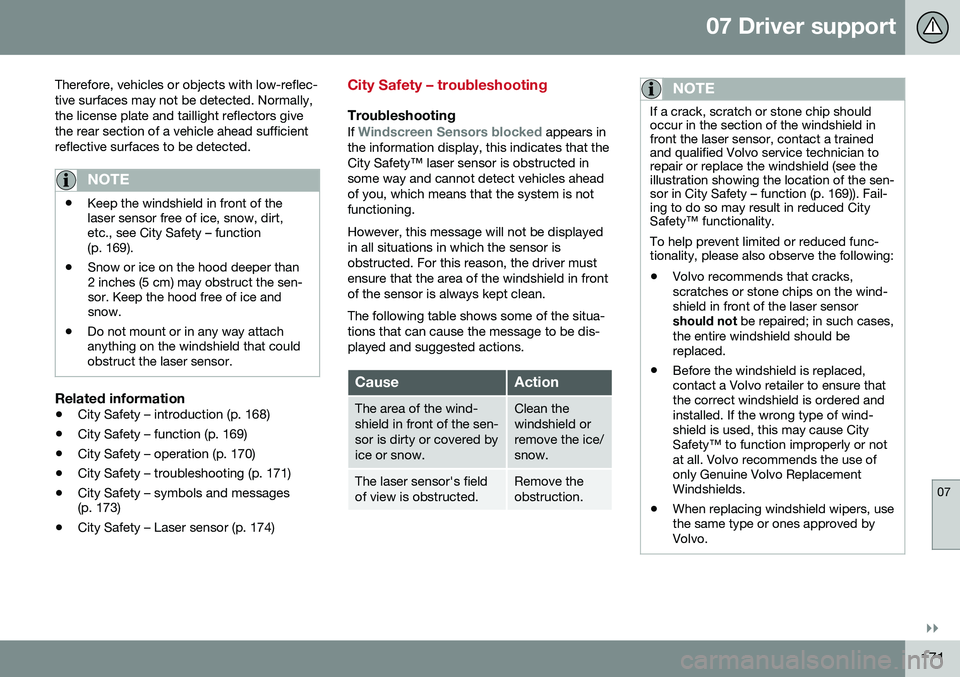
If Windscreen Sensors blocked appears in
the information display, this indicates that the City Safety™ laser sensor is obstructed insome way and cannot detect vehicles aheadof you, which means that the system is notfunctioning. However, this message will not be displayed in all situations in which the sensor isobstructed. For this reason, the driver mustensure that the area of the windshield in frontof the sensor is always kept clean. The following table shows some of the situa- tions that can cause the message to be dis-played and suggested actions.
CauseAction
The area of the wind- shield in front of the sen-sor is dirty or covered byice or snow.Clean the windshield orremove the ice/snow.
The laser sensor's field of view is obstructed.Remove the obstruction.
NOTE
If a crack, scratch or stone chip should occur in the section of the windshield infront the laser sensor, contact a trainedand qualified Volvo service technician torepair or replace the windshield (see theillustration showing the location of the sen-sor in City Safety – function (p. 169)). Fail-ing to do so may result in reduced CitySafety™ functionality. To help prevent limited or reduced func- tionality, please also observe the following:
• Volvo recommends that cracks, scratches or stone chips on the wind-shield in front of the laser sensorshould not
be repaired; in such cases,
the entire windshield should bereplaced.
• Before the windshield is replaced,contact a Volvo retailer to ensure thatthe correct windshield is ordered andinstalled. If the wrong type of wind-shield is used, this may cause CitySafety™ to function improperly or notat all. Volvo recommends the use ofonly Genuine Volvo ReplacementWindshields.
• When replacing windshield wipers, usethe same type or ones approved byVolvo.
Page 175 of 344
07 Driver support
07
173
City Safety – symbols and messages
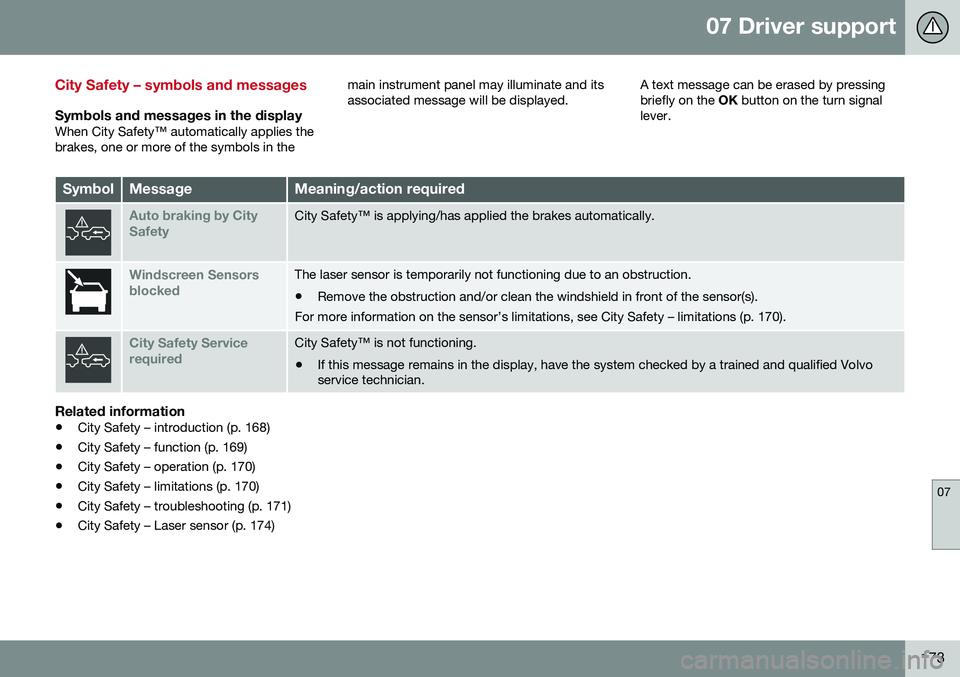
Symbols and messages in the displayWhen City Safety™ automatically applies the brakes, one or more of the symbols in themain instrument panel may illuminate and itsassociated message will be displayed.
A text message can be erased by pressingbriefly on the
OK button on the turn signal
lever.
SymbolMessageMeaning/action required
Auto braking by City SafetyCity Safety™ is applying/has applied the brakes automatically.
Windscreen Sensors blockedThe laser sensor is temporarily not functioning due to an obstruction.
• Remove the obstruction and/or clean the windshield in front of the sensor(s).
For more information on the sensor’s limitations, see City Safety – limitations (p. 170).
City Safety Service requiredCity Safety™ is not functioning.
• If this message remains in the display, have the system checked by a trained and qualified Volvo service technician.
Related information
• City Safety – introduction (p. 168)
• City Safety – function (p. 169)
• City Safety – operation (p. 170)
• City Safety – limitations (p. 170)
• City Safety – troubleshooting (p. 171)
• City Safety – Laser sensor (p. 174)
Page 176 of 344
07 Driver support
07
174
City Safety – Laser sensor
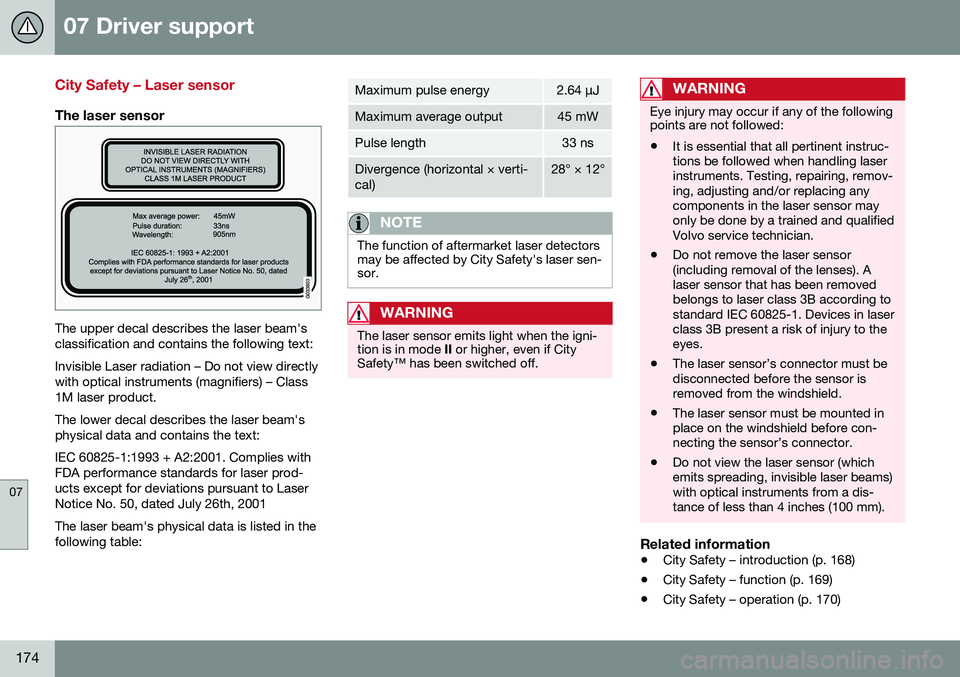
The laser sensor
The upper decal describes the laser beam's classification and contains the following text: Invisible Laser radiation – Do not view directly with optical instruments (magnifiers) – Class1M laser product. The lower decal describes the laser beam's physical data and contains the text: IEC 60825-1:1993 + A2:2001. Complies with FDA performance standards for laser prod-ucts except for deviations pursuant to LaserNotice No. 50, dated July 26th, 2001 The laser beam's physical data is listed in the following table:
Maximum pulse energy2.64 μJ
Maximum average output45 mW
Pulse length33 ns
Divergence (horizontal × verti- cal)28° × 12°
NOTE
The function of aftermarket laser detectors may be affected by City Safety's laser sen-sor.
WARNING
The laser sensor emits light when the igni- tion is in mode II or higher, even if City
Safety™ has been switched off.
WARNING
Eye injury may occur if any of the following points are not followed: • It is essential that all pertinent instruc- tions be followed when handling laserinstruments. Testing, repairing, remov-ing, adjusting and/or replacing anycomponents in the laser sensor mayonly be done by a trained and qualifiedVolvo service technician.
• Do not remove the laser sensor(including removal of the lenses). Alaser sensor that has been removedbelongs to laser class 3B according tostandard IEC 60825-1. Devices in laserclass 3B present a risk of injury to theeyes.
• The laser sensor’s connector must bedisconnected before the sensor isremoved from the windshield.
• The laser sensor must be mounted inplace on the windshield before con-necting the sensor’s connector.
• Do not view the laser sensor (whichemits spreading, invisible laser beams)with optical instruments from a dis-tance of less than 4 inches (100 mm).
Related information
•
City Safety – introduction (p. 168)
• City Safety – function (p. 169)
• City Safety – operation (p. 170)
Page 186 of 344

07 Driver support
07
184
Collision warning – troubleshooting
Fault tracing and actions
If the message Windscreen Sensors
blocked is displayed, this means that the
camera is obscured and cannot detect pedestrians, cyclists, vehicles or road marker lines in front of the vehicle. This, in turn, means that Pedestrian and Cyclist Detection with Full Auto Brake, DriverAlert Control, Lane Departure Warning or
Lane Keeping Aid will not have full functional-ity. The table lists possible causes for this mes- sage being displayed, and suitable actions.
CauseAction
The surface of the windshield in front of the camera is dirty or covered with ice or snow.Clean or clear the section of the windshield in front of the camera.
Fog, heavy rain or snow is interfering with the function of the camera.No action possible. Heavy precipitation may affect the function of the camera.
The surface of the windshield is clean but the message remains in the display.Wait a short time. It may take several minutes for the camera to regis- ter visibility.
The surface between the inside of the windshield and the camera is dirty.Contact an authorized Volvo retailer or service technician to have this surface cleaned.
Page 188 of 344
07 Driver support
07
186
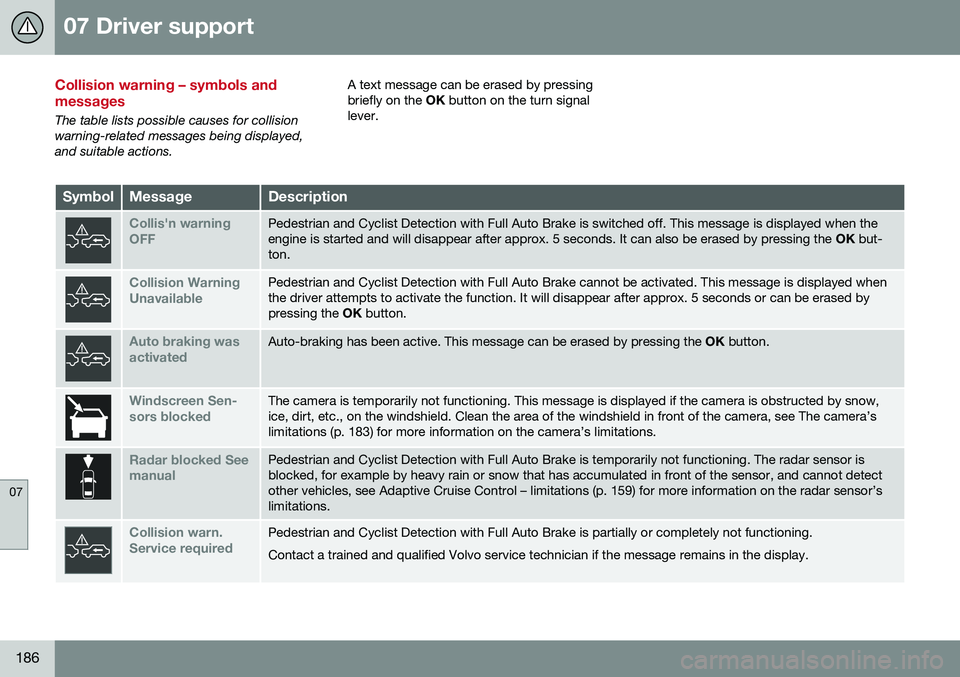
Collision warning – symbols and messages
The table lists possible causes for collision warning-related messages being displayed,and suitable actions.A text message can be erased by pressingbriefly on the
OK button on the turn signal
lever.
SymbolMessageDescription
Collis'n warning OFFPedestrian and Cyclist Detection with Full Auto Brake is switched off. This message is displayed when the engine is started and will disappear after approx. 5 seconds. It can also be erased by pressing the OK but-
ton.
Collision Warning UnavailablePedestrian and Cyclist Detection with Full Auto Brake cannot be activated. This message is displayed when the driver attempts to activate the function. It will disappear after approx. 5 seconds or can be erased bypressing the OK button.
Auto braking was activatedAuto-braking has been active. This message can be erased by pressing the OK button.
Windscreen Sen- sors blockedThe camera is temporarily not functioning. This message is displayed if the camera is obstructed by snow, ice, dirt, etc., on the windshield. Clean the area of the windshield in front of the camera, see The camera’slimitations (p. 183) for more information on the camera’s limitations.
Radar blocked See manualPedestrian and Cyclist Detection with Full Auto Brake is temporarily not functioning. The radar sensor is blocked, for example by heavy rain or snow that has accumulated in front of the sensor, and cannot detectother vehicles, see Adaptive Cruise Control – limitations (p. 159) for more information on the radar sensor’slimitations.
Collision warn. Service requiredPedestrian and Cyclist Detection with Full Auto Brake is partially or completely not functioning. Contact a trained and qualified Volvo service technician if the message remains in the display.
Page 193 of 344
07 Driver support
07
}}
191
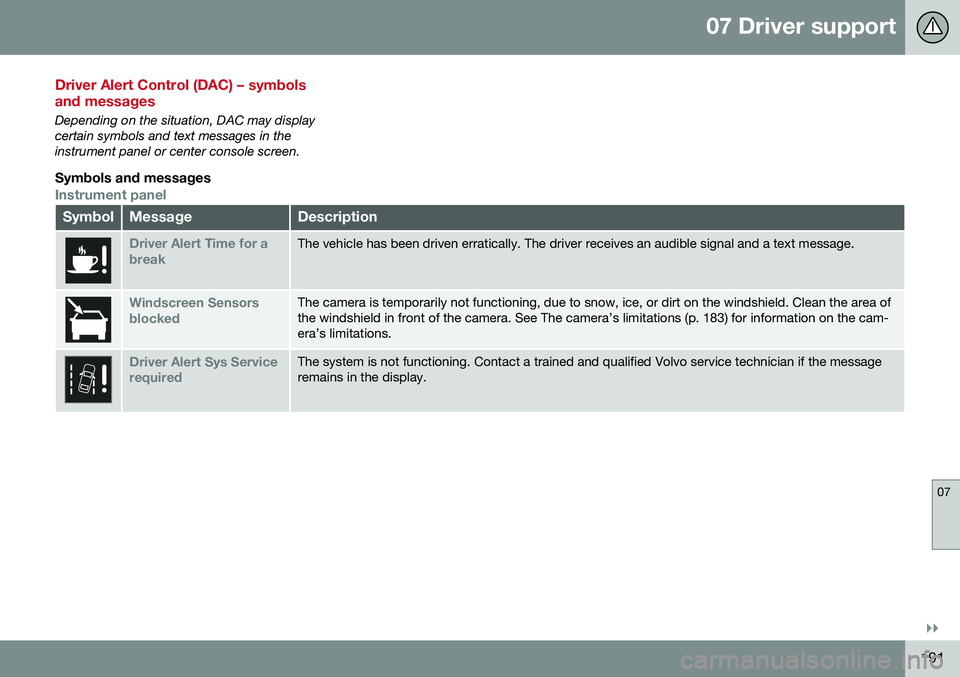
Driver Alert Control (DAC) – symbols and messages
Depending on the situation, DAC may display certain symbols and text messages in theinstrument panel or center console screen.
Symbols and messages
Instrument panel
SymbolMessageDescription
Driver Alert Time for a breakThe vehicle has been driven erratically. The driver receives an audible signal and a text message.
Windscreen Sensors blockedThe camera is temporarily not functioning, due to snow, ice, or dirt on the windshield. Clean the area of the windshield in front of the camera. See The camera’s limitations (p. 183) for information on the cam-era’s limitations.
Driver Alert Sys Service requiredThe system is not functioning. Contact a trained and qualified Volvo service technician if the message remains in the display.
Page 198 of 344
07 Driver support
07
196
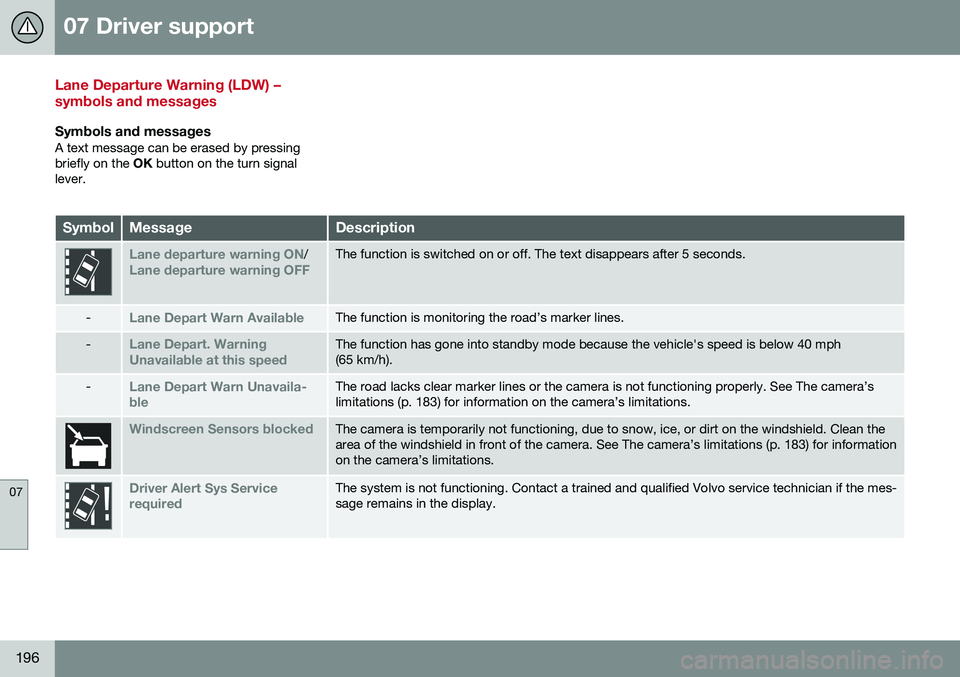
Lane Departure Warning (LDW) – symbols and messages
Symbols and messagesA text message can be erased by pressing briefly on the OK button on the turn signal
lever.
SymbolMessageDescription
Lane departure warning ON/Lane departure warning OFFThe function is switched on or off. The text disappears after 5 seconds.
-Lane Depart Warn AvailableThe function is monitoring the road’s marker lines.
-Lane Depart. Warning Unavailable at this speedThe function has gone into standby mode because the vehicle's speed is below 40 mph (65 km/h).
-Lane Depart Warn Unavaila- bleThe road lacks clear marker lines or the camera is not functioning properly. See The camera’s limitations (p. 183) for information on the camera’s limitations.
Windscreen Sensors blockedThe camera is temporarily not functioning, due to snow, ice, or dirt on the windshield. Clean the area of the windshield in front of the camera. See The camera’s limitations (p. 183) for informationon the camera’s limitations.
Driver Alert Sys Service requiredThe system is not functioning. Contact a trained and qualified Volvo service technician if the mes- sage remains in the display.
Page 203 of 344
07 Driver support
07
201
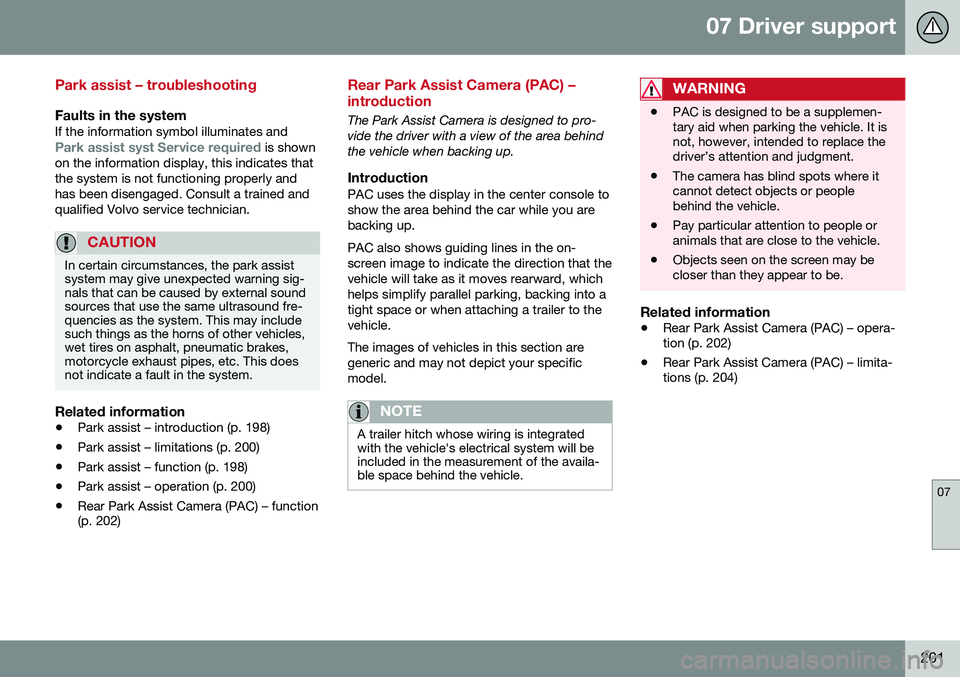
Park assist – troubleshooting
Faults in the systemIf the information symbol illuminates andPark assist syst Service required is shown
on the information display, this indicates that the system is not functioning properly andhas been disengaged. Consult a trained andqualified Volvo service technician.
CAUTION
In certain circumstances, the park assist system may give unexpected warning sig-nals that can be caused by external soundsources that use the same ultrasound fre-quencies as the system. This may includesuch things as the horns of other vehicles,wet tires on asphalt, pneumatic brakes,motorcycle exhaust pipes, etc. This doesnot indicate a fault in the system.
Related information
• Park assist – introduction (p. 198)
• Park assist – limitations (p. 200)
• Park assist – function (p. 198)
• Park assist – operation (p. 200)
• Rear Park Assist Camera (PAC) – function (p. 202)
Rear Park Assist Camera (PAC) – introduction
The Park Assist Camera is designed to pro- vide the driver with a view of the area behindthe vehicle when backing up.
IntroductionPAC uses the display in the center console toshow the area behind the car while you arebacking up. PAC also shows guiding lines in the on- screen image to indicate the direction that thevehicle will take as it moves rearward, whichhelps simplify parallel parking, backing into atight space or when attaching a trailer to thevehicle. The images of vehicles in this section are generic and may not depict your specificmodel.
NOTE
A trailer hitch whose wiring is integrated with the vehicle's electrical system will beincluded in the measurement of the availa-ble space behind the vehicle.
WARNING
• PAC is designed to be a supplemen- tary aid when parking the vehicle. It isnot, however, intended to replace thedriver’s attention and judgment.
• The camera has blind spots where itcannot detect objects or peoplebehind the vehicle.
• Pay particular attention to people oranimals that are close to the vehicle.
• Objects seen on the screen may becloser than they appear to be.
Related information
•
Rear Park Assist Camera (PAC) – opera- tion (p. 202)
• Rear Park Assist Camera (PAC) – limita-tions (p. 204)
Page 211 of 344
07 Driver support
07
* Option/accessory, for more information, see Introduction.209
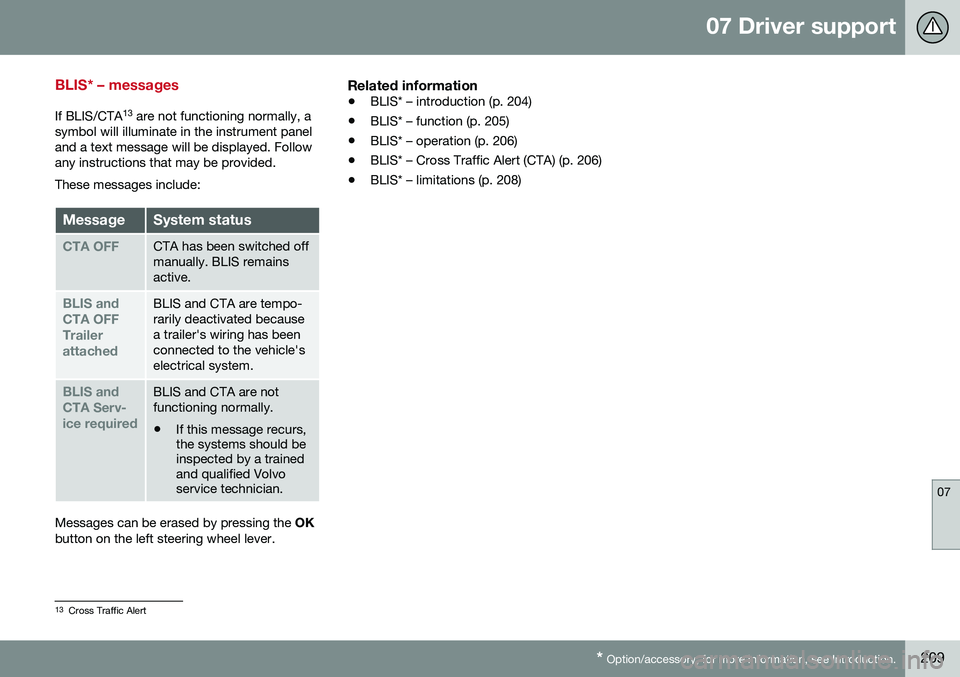
BLIS* – messages
If BLIS/CTA 13
are not functioning normally, a
symbol will illuminate in the instrument panel and a text message will be displayed. Followany instructions that may be provided. These messages include:
MessageSystem status
CTA OFFCTA has been switched off manually. BLIS remainsactive.
BLIS and CTA OFFTrailerattachedBLIS and CTA are tempo- rarily deactivated becausea trailer's wiring has beenconnected to the vehicle'selectrical system.
BLIS and CTA Serv-ice requiredBLIS and CTA are not functioning normally.
• If this message recurs, the systems should beinspected by a trainedand qualified Volvoservice technician.
Messages can be erased by pressing the
OK
button on the left steering wheel lever.
Related information
• BLIS* – introduction (p. 204)
• BLIS* – function (p. 205)
• BLIS* – operation (p. 206)
• BLIS* – Cross Traffic Alert (CTA) (p. 206)
• BLIS* – limitations (p. 208)
13
Cross Traffic Alert