lock VOLVO S60 INSCRIPTION 2017 Owner´s Manual
[x] Cancel search | Manufacturer: VOLVO, Model Year: 2017, Model line: S60 INSCRIPTION, Model: VOLVO S60 INSCRIPTION 2017Pages: 398, PDF Size: 9.45 MB
Page 51 of 398
SAFETY
}}
49
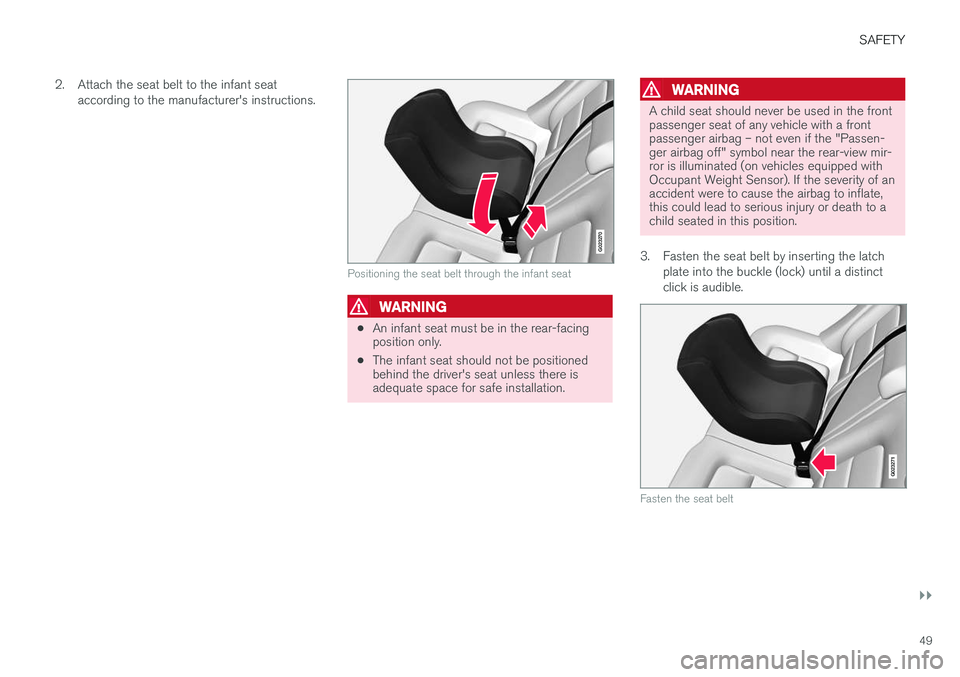
2. Attach the seat belt to the infant seat
according to the manufacturer's instructions.
G023270
Positioning the seat belt through the infant seat
WARNING
•An infant seat must be in the rear-facing position only.
• The infant seat should not be positionedbehind the driver's seat unless there isadequate space for safe installation.
WARNING
A child seat should never be used in the front passenger seat of any vehicle with a frontpassenger airbag – not even if the "Passen-ger airbag off" symbol near the rear-view mir-ror is illuminated (on vehicles equipped withOccupant Weight Sensor). If the severity of anaccident were to cause the airbag to inflate,this could lead to serious injury or death to achild seated in this position.
3. Fasten the seat belt by inserting the latch plate into the buckle (lock) until a distinct click is audible.
G023271
Fasten the seat belt
Page 52 of 398
||
SAFETY
50
G022846
Pull out the shoulder section of the seat belt
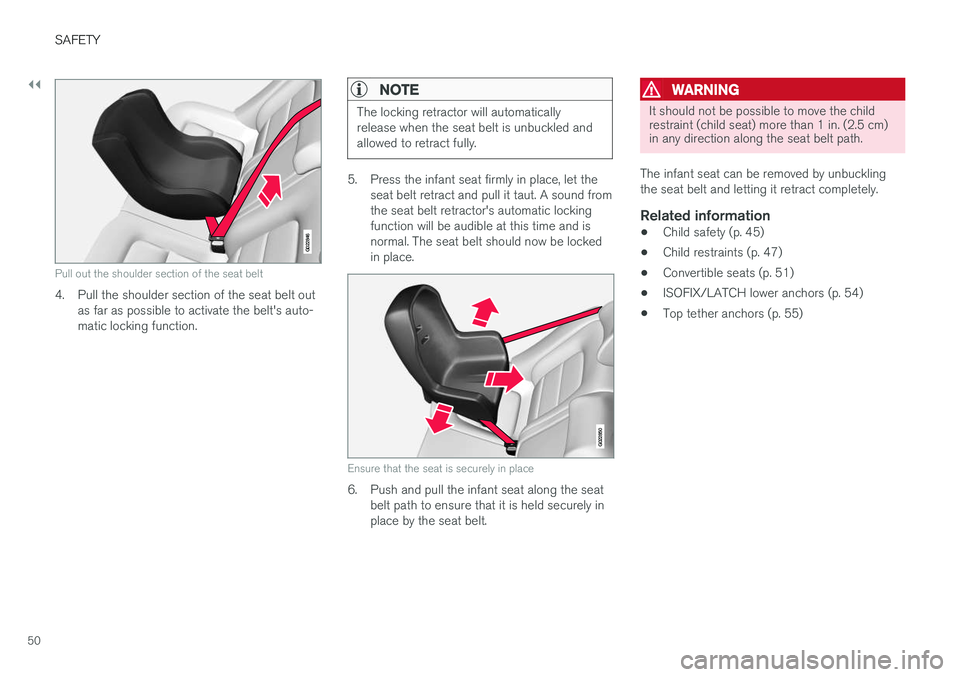
4. Pull the shoulder section of the seat belt outas far as possible to activate the belt's auto- matic locking function.
NOTE
The locking retractor will automatically release when the seat belt is unbuckled andallowed to retract fully.
5. Press the infant seat firmly in place, let theseat belt retract and pull it taut. A sound from the seat belt retractor's automatic lockingfunction will be audible at this time and isnormal. The seat belt should now be lockedin place.
G022850
Ensure that the seat is securely in place
6. Push and pull the infant seat along the seatbelt path to ensure that it is held securely in place by the seat belt.
WARNING
It should not be possible to move the child restraint (child seat) more than 1 in. (2.5 cm)in any direction along the seat belt path.
The infant seat can be removed by unbuckling the seat belt and letting it retract completely.
Related information
• Child safety (p. 45)
• Child restraints (p. 47)
• Convertible seats (p. 51)
• ISOFIX/LATCH lower anchors (p. 54)
• Top tether anchors (p. 55)
Page 54 of 398
||
SAFETY
523. Fasten the seat belt by inserting the latch
plate into the buckle (lock) until a distinct click is audible.
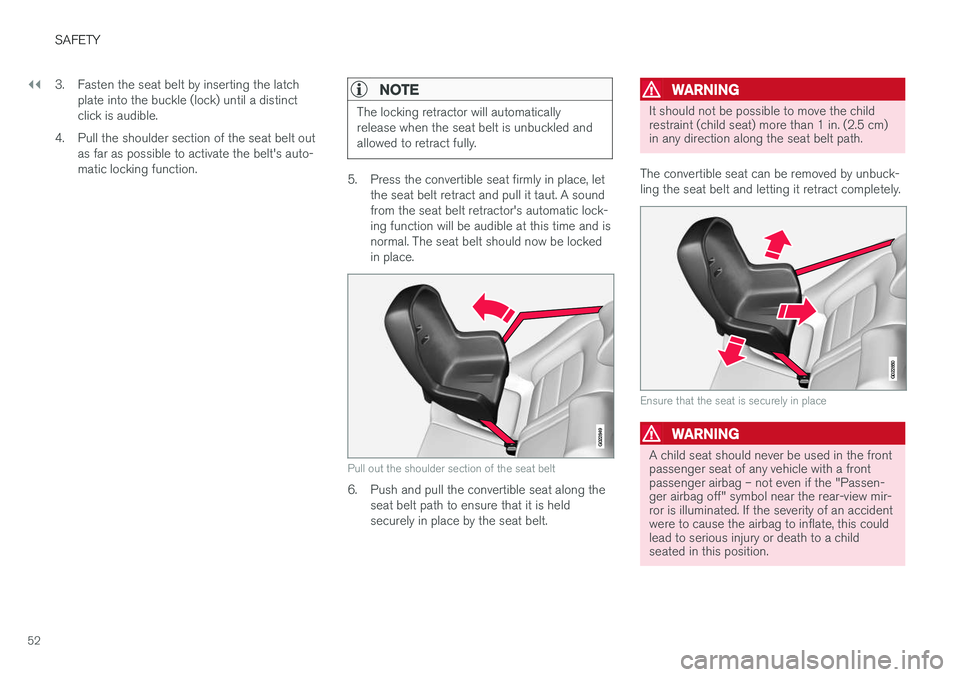
4. Pull the shoulder section of the seat belt out as far as possible to activate the belt's auto-matic locking function.
NOTE
The locking retractor will automatically release when the seat belt is unbuckled andallowed to retract fully.
5. Press the convertible seat firmly in place, letthe seat belt retract and pull it taut. A sound from the seat belt retractor's automatic lock-ing function will be audible at this time and isnormal. The seat belt should now be lockedin place.
G022849
Pull out the shoulder section of the seat belt
6. Push and pull the convertible seat along theseat belt path to ensure that it is held securely in place by the seat belt.
WARNING
It should not be possible to move the child restraint (child seat) more than 1 in. (2.5 cm)in any direction along the seat belt path.
The convertible seat can be removed by unbuck- ling the seat belt and letting it retract completely.
G022850
Ensure that the seat is securely in place
WARNING
A child seat should never be used in the front passenger seat of any vehicle with a frontpassenger airbag – not even if the "Passen-ger airbag off" symbol near the rear-view mir-ror is illuminated. If the severity of an accidentwere to cause the airbag to inflate, this couldlead to serious injury or death to a childseated in this position.
Page 55 of 398
SAFETY
}}
53
Related information
•Child safety (p. 45)
• Child restraints (p. 47)
• Infant seats (p. 48)
• ISOFIX/LATCH lower anchors (p. 54)
• Top tether anchors (p. 55)
Booster cushions
Booster cushions should be properly positioned in the vehicle.
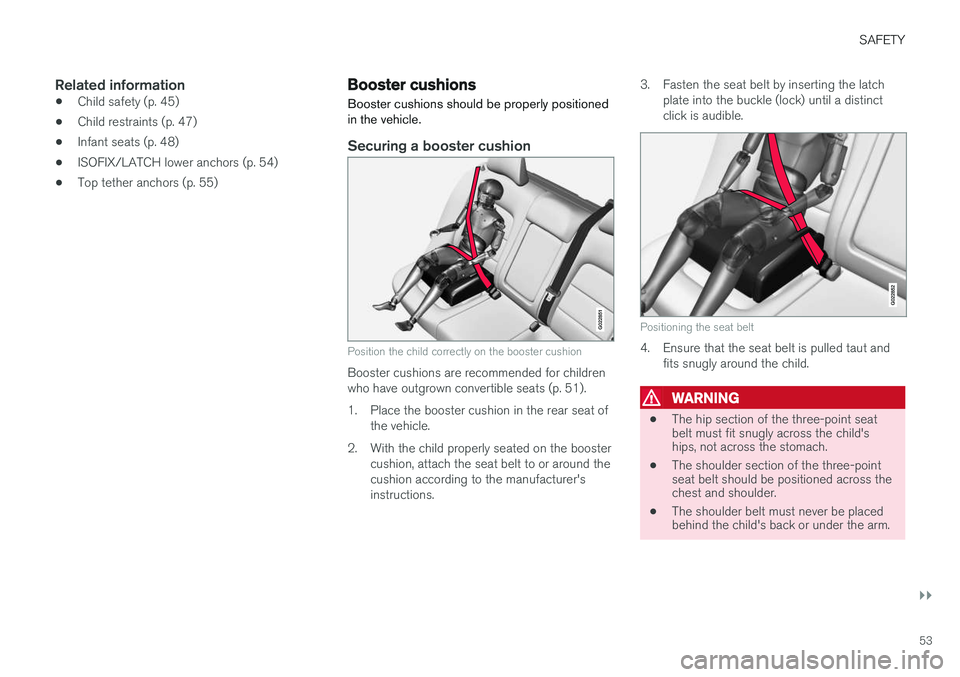
Securing a booster cushion
G022851
Position the child correctly on the booster cushion
Booster cushions are recommended for children who have outgrown convertible seats (p. 51).
1. Place the booster cushion in the rear seat of the vehicle.
2. With the child properly seated on the booster cushion, attach the seat belt to or around the cushion according to the manufacturer'sinstructions. 3. Fasten the seat belt by inserting the latch
plate into the buckle (lock) until a distinctclick is audible.
G022852
Positioning the seat belt
4. Ensure that the seat belt is pulled taut and fits snugly around the child.
WARNING
• The hip section of the three-point seat belt must fit snugly across the child'ships, not across the stomach.
• The shoulder section of the three-pointseat belt should be positioned across thechest and shoulder.
• The shoulder belt must never be placedbehind the child's back or under the arm.
Page 58 of 398
||
SAFETY
56
Securing a child seat
1. Place the child restraint on the rear seat.
2. Fold up the plastic cover over the anchorageto be used.
3. Route the top tether strap under the head restraint and attach it to the anchor.
4. Fold down the outboard head restraints or lower the center head restraint for easier access to the ISOFIX/LATCH anchor.
5. Attach lower tether straps to the lower ISO- FIX/LATCH anchors. If the child restraint isnot equipped with lower tether straps, or therestraint is used in the center seating posi-tion, follow instructions for securing a childrestraint using the Automatic LockingRetractor seat belt (see Child restraints(p. 47)).
6. Firmly tension all straps. Refer also to the child seat manufacturer's instructions for information on securing the childseat.
WARNING
• Always refer to the recommendations made by the child restraint manufacturer.
• Volvo recommends that the top tetheranchors be used when installing a for-ward-facing child restraint.
• Never route a top tether strap over thetop of the head restraint. The strapshould be routed beneath the headrestraint.
• Child restraint anchorages are designedto withstand only those loads imposed bycorrectly fitted child restraints. Under nocircumstances are they to be used foradult seat belts or harnesses. The ancho-rages are not able to withstand excessiveforces on them in the event of collision iffull harness seat belts or adult seat beltsare installed to them. An adult who uses abelt anchored in a child restraint anchor-age runs a great risk of suffering severeinjuries should a collision occur.
• Do not install rear speakers that requirethe removal of the top tether anchors orinterfere with the proper use of the toptether strap.
Related information
•Child safety (p. 45)
• Infant seats (p. 48)
• Convertible seats (p. 51)
• ISOFIX/LATCH lower anchors (p. 54)
Child safety locks
Child safety locks help prevent children from inadvertently opening one of the rear doors frominside the vehicle.
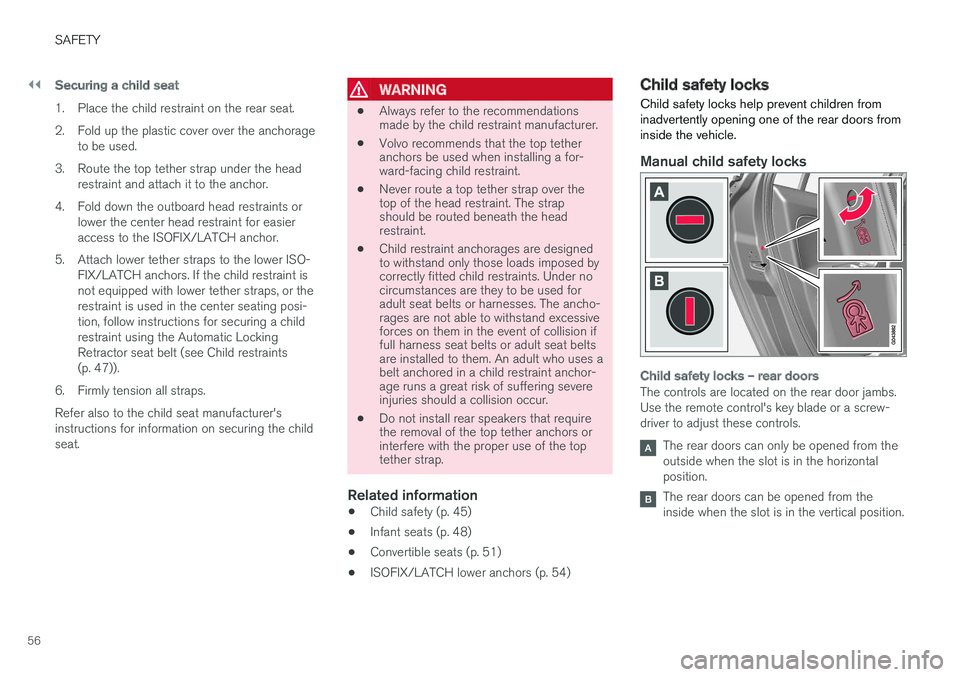
Manual child safety locks
Child safety locks – rear doors
The controls are located on the rear door jambs. Use the remote control's key blade or a screw-driver to adjust these controls.
The rear doors can only be opened from the outside when the slot is in the horizontalposition.
The rear doors can be opened from the inside when the slot is in the vertical position.
Page 59 of 398
SAFETY
57
Related information
•Detachable key blade – general information (p. 149)
• Locking/unlocking – from inside (p. 158)
Page 64 of 398
||
INSTRUMENTS AND CONTROLS
* Option/accessory, for more information, see Introduction.
62
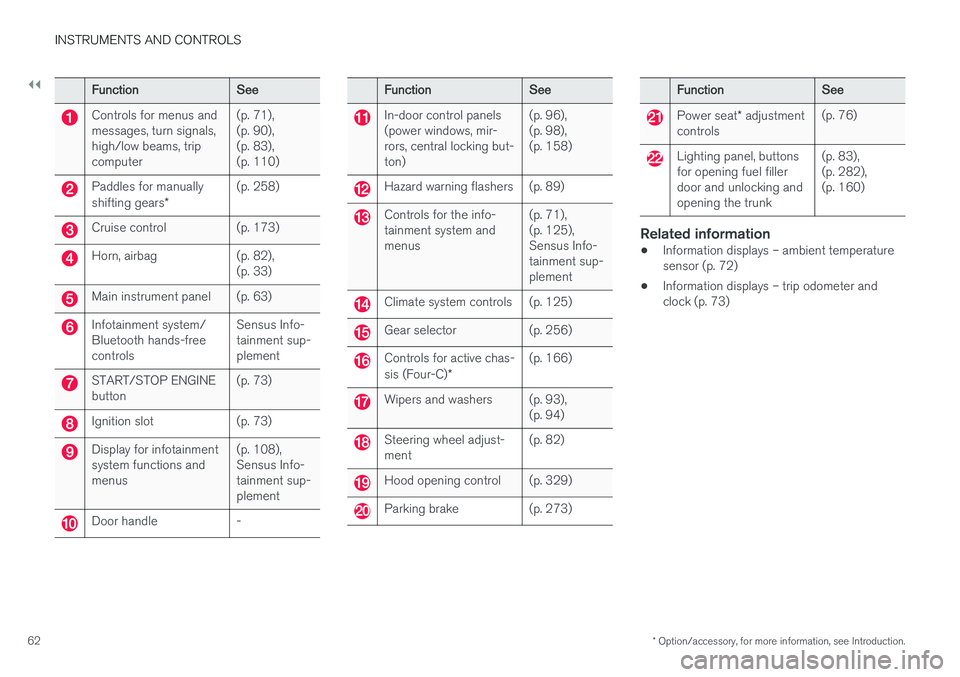
FunctionSee
Controls for menus and messages, turn signals,high/low beams, tripcomputer(p. 71), (p. 90),(p. 83),(p. 110)
Paddles for manually shifting gears *(p. 258)
Cruise control(p. 173)
Horn, airbag(p. 82), (p. 33)
Main instrument panel(p. 63)
Infotainment system/ Bluetooth hands-freecontrolsSensus Info- tainment sup-plement
START/STOP ENGINE button(p. 73)
Ignition slot(p. 73)
Display for infotainment system functions andmenus(p. 108), Sensus Info-tainment sup-plement
Door handle-
FunctionSee
In-door control panels (power windows, mir-rors, central locking but-ton)(p. 96), (p. 98),(p. 158)
Hazard warning flashers(p. 89)
Controls for the info- tainment system andmenus(p. 71), (p. 125),Sensus Info-tainment sup-plement
Climate system controls(p. 125)
Gear selector(p. 256)
Controls for active chas- sis (Four-C)*(p. 166)
Wipers and washers(p. 93), (p. 94)
Steering wheel adjust- ment(p. 82)
Hood opening control(p. 329)
Parking brake(p. 273)
FunctionSee
Power seat* adjustment
controls(p. 76)
Lighting panel, buttons for opening fuel fillerdoor and unlocking andopening the trunk(p. 83), (p. 282),(p. 160)
Related information
• Information displays – ambient temperature sensor (p. 72)
• Information displays – trip odometer andclock (p. 73)
Page 69 of 398
INSTRUMENTS AND CONTROLS
}}
* Option/accessory, for more information, see Introduction.67
Utilized power
The larger, lower indicator shows the amount of engine power that has been utilized2
. The higher
the reading on the scale, the greater the amount of power that is being utilized. The larger the gap between the two indicators, the greater the amount of power remaining.Information displays – indicator symbols
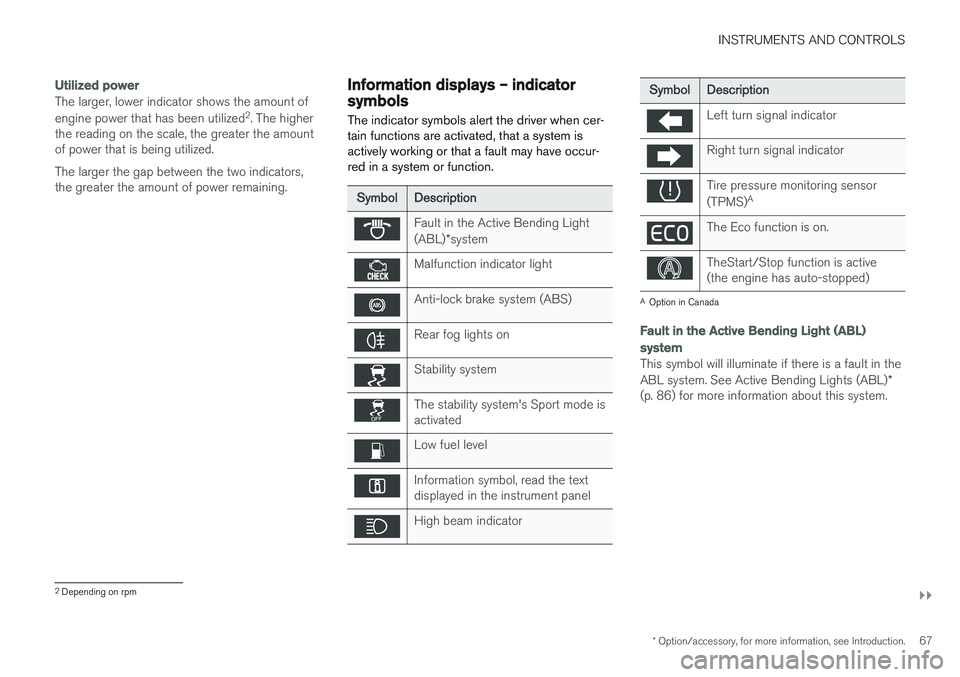
The indicator symbols alert the driver when cer- tain functions are activated, that a system isactively working or that a fault may have occur-red in a system or function.
SymbolDescription
Fault in the Active Bending Light (ABL) *system
Malfunction indicator light
Anti-lock brake system (ABS)
Rear fog lights on
Stability system
The stability system's Sport mode is activated
Low fuel level
Information symbol, read the text displayed in the instrument panel
High beam indicator
SymbolDescription
Left turn signal indicator
Right turn signal indicator
Tire pressure monitoring sensor (TPMS) A
The Eco function is on.
TheStart/Stop function is active (the engine has auto-stopped)
A
Option in Canada
Fault in the Active Bending Light (ABL)
system
This symbol will illuminate if there is a fault in the ABL system. See Active Bending Lights (ABL) *
(p. 86) for more information about this system.
2 Depending on rpm
Page 70 of 398
||
INSTRUMENTS AND CONTROLS
* Option/accessory, for more information, see Introduction.
68
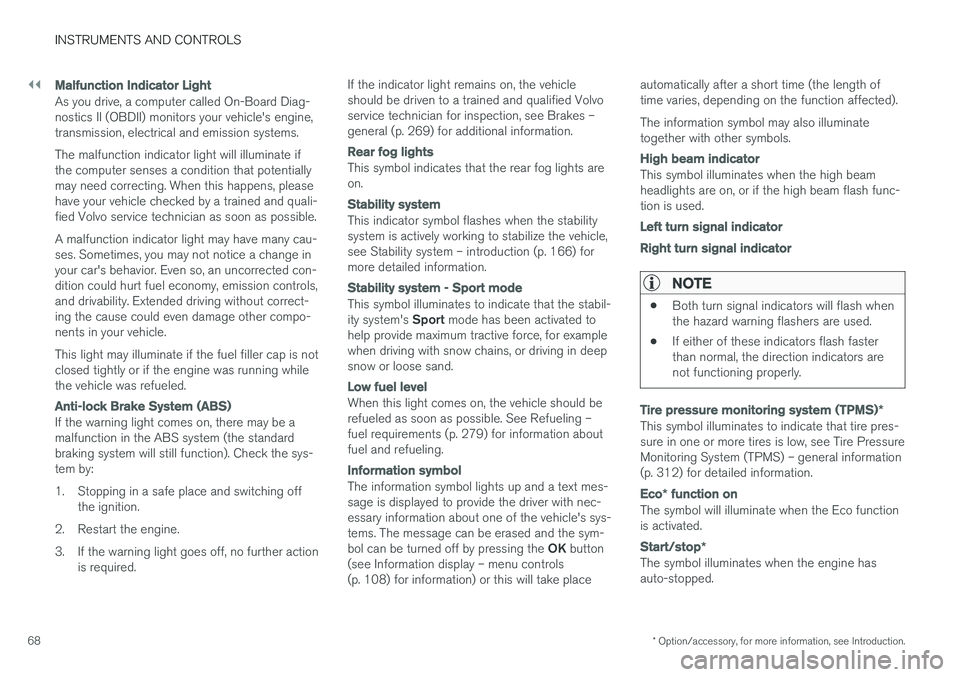
Malfunction Indicator Light
As you drive, a computer called On-Board Diag- nostics II (OBDII) monitors your vehicle's engine,transmission, electrical and emission systems. The malfunction indicator light will illuminate if the computer senses a condition that potentiallymay need correcting. When this happens, pleasehave your vehicle checked by a trained and quali-fied Volvo service technician as soon as possible. A malfunction indicator light may have many cau- ses. Sometimes, you may not notice a change inyour car's behavior. Even so, an uncorrected con-dition could hurt fuel economy, emission controls,and drivability. Extended driving without correct-ing the cause could even damage other compo-nents in your vehicle. This light may illuminate if the fuel filler cap is not closed tightly or if the engine was running whilethe vehicle was refueled.
Anti-lock Brake System (ABS)
If the warning light comes on, there may be a malfunction in the ABS system (the standardbraking system will still function). Check the sys-tem by:
1. Stopping in a safe place and switching off
the ignition.
2. Restart the engine.
3. If the warning light goes off, no further action is required. If the indicator light remains on, the vehicle should be driven to a trained and qualified Volvoservice technician for inspection, see Brakes –general (p. 269) for additional information.
Rear fog lights
This symbol indicates that the rear fog lights are on.
Stability system
This indicator symbol flashes when the stability system is actively working to stabilize the vehicle,see Stability system – introduction (p. 166) formore detailed information.
Stability system - Sport mode
This symbol illuminates to indicate that the stabil- ity system's
Sport mode has been activated to
help provide maximum tractive force, for example when driving with snow chains, or driving in deepsnow or loose sand.
Low fuel level
When this light comes on, the vehicle should be refueled as soon as possible. See Refueling –fuel requirements (p. 279) for information aboutfuel and refueling.
Information symbol
The information symbol lights up and a text mes- sage is displayed to provide the driver with nec-essary information about one of the vehicle's sys-tems. The message can be erased and the sym- bol can be turned off by pressing the OK button
(see Information display – menu controls (p. 108) for information) or this will take place automatically after a short time (the length oftime varies, depending on the function affected). The information symbol may also illuminate together with other symbols.
High beam indicator
This symbol illuminates when the high beam headlights are on, or if the high beam flash func-tion is used.
Left turn signal indicator Right turn signal indicator
NOTE
•
Both turn signal indicators will flash when the hazard warning flashers are used.
• If either of these indicators flash fasterthan normal, the direction indicators arenot functioning properly.
Tire pressure monitoring system (TPMS)
*
This symbol illuminates to indicate that tire pres- sure in one or more tires is low, see Tire PressureMonitoring System (TPMS) – general information(p. 312) for detailed information.
Eco* function on
The symbol will illuminate when the Eco function is activated.
Start/stop *
The symbol illuminates when the engine has auto-stopped.
Page 71 of 398
INSTRUMENTS AND CONTROLS
}}
69
Related information
•Information displays – introduction (p. 63)
• Information displays – warning symbols (p. 69)
Information displays – warning symbols
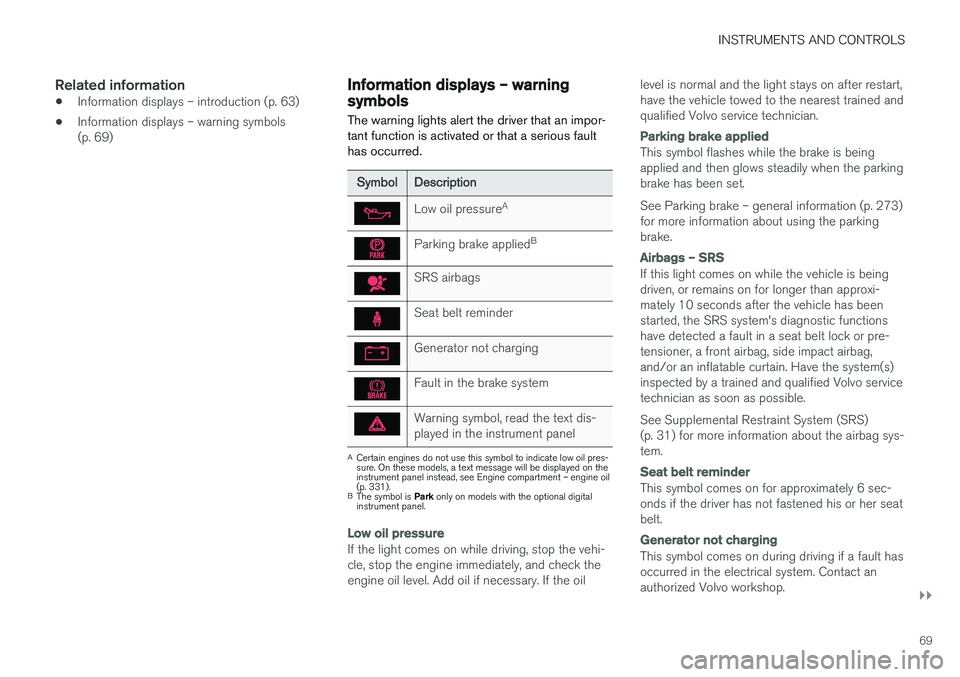
The warning lights alert the driver that an impor- tant function is activated or that a serious faulthas occurred.
SymbolDescription
Low oil pressure A
Parking brake applied B
SRS airbags
Seat belt reminder
Generator not charging
Fault in the brake system
Warning symbol, read the text dis- played in the instrument panel
A
Certain engines do not use this symbol to indicate low oil pres- sure. On these models, a text message will be displayed on theinstrument panel instead, see Engine compartment – engine oil(p. 331).
B The symbol is Park only on models with the optional digital
instrument panel.
Low oil pressure
If the light comes on while driving, stop the vehi- cle, stop the engine immediately, and check theengine oil level. Add oil if necessary. If the oil level is normal and the light stays on after restart,have the vehicle towed to the nearest trained andqualified Volvo service technician.
Parking brake applied
This symbol flashes while the brake is being applied and then glows steadily when the parkingbrake has been set. See Parking brake – general information (p. 273) for more information about using the parkingbrake.
Airbags – SRS
If this light comes on while the vehicle is being driven, or remains on for longer than approxi-mately 10 seconds after the vehicle has beenstarted, the SRS system's diagnostic functionshave detected a fault in a seat belt lock or pre-tensioner, a front airbag, side impact airbag,and/or an inflatable curtain. Have the system(s)inspected by a trained and qualified Volvo servicetechnician as soon as possible. See Supplemental Restraint System (SRS) (p. 31) for more information about the airbag sys-tem.
Seat belt reminder
This symbol comes on for approximately 6 sec- onds if the driver has not fastened his or her seatbelt.
Generator not charging
This symbol comes on during driving if a fault has occurred in the electrical system. Contact anauthorized Volvo workshop.