lock VOLVO S60 INSCRIPTION 2017 Owner´s Manual
[x] Cancel search | Manufacturer: VOLVO, Model Year: 2017, Model line: S60 INSCRIPTION, Model: VOLVO S60 INSCRIPTION 2017Pages: 398, PDF Size: 9.45 MB
Page 87 of 398
INSTRUMENTS AND CONTROLS
}}}}
* Option/accessory, for more information, see Introduction.85
Active high beams (AHB)*
AHB uses a camera at the upper edge of the windshield to detect the headlights of oncomingvehicles or the taillights of a vehicle directlyahead. When this happens, the headlights willautomatically switch from high beams to lowbeams. When the camera no longer detects theheadlights/taillights of other vehicles, your head-lights will switch back to high beams after sev-eral seconds.
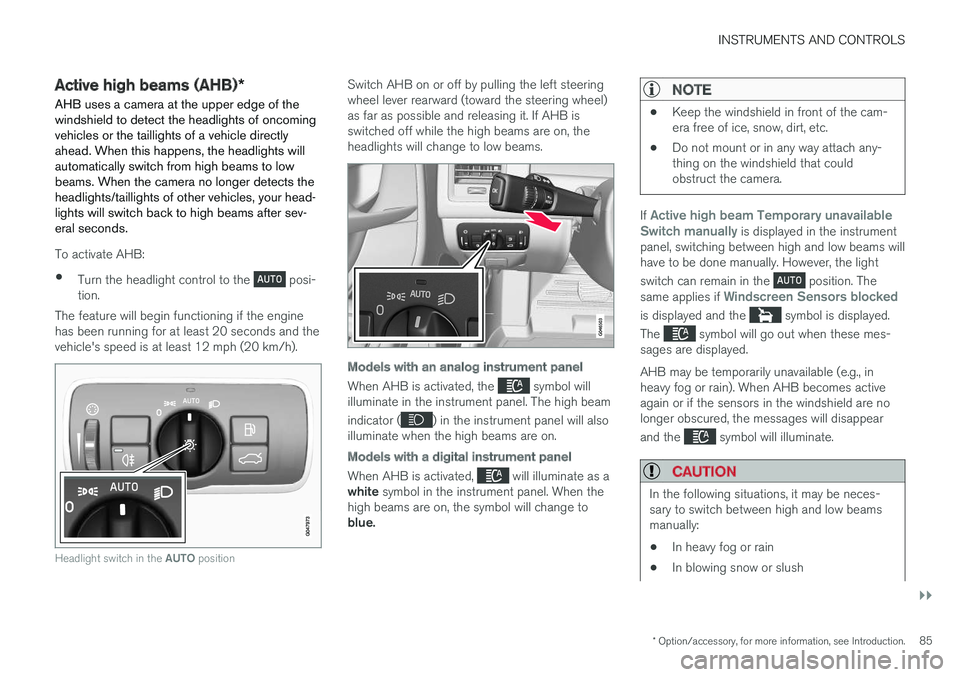
To activate AHB:
• Turn the headlight control to the
posi-
tion.
The feature will begin functioning if the engine has been running for at least 20 seconds and thevehicle's speed is at least 12 mph (20 km/h).
Headlight switch in the AUTO position
Switch AHB on or off by pulling the left steering wheel lever rearward (toward the steering wheel)as far as possible and releasing it. If AHB isswitched off while the high beams are on, theheadlights will change to low beams.
Models with an analog instrument panel
When AHB is activated, the symbol will
illuminate in the instrument panel. The high beam indicator (
) in the instrument panel will also
illuminate when the high beams are on.
Models with a digital instrument panel
When AHB is activated, will illuminate as a
white symbol in the instrument panel. When the
high beams are on, the symbol will change to blue.
NOTE
• Keep the windshield in front of the cam- era free of ice, snow, dirt, etc.
• Do not mount or in any way attach any-thing on the windshield that couldobstruct the camera.
If Active high beam Temporary unavailable
Switch manually is displayed in the instrument
panel, switching between high and low beams will have to be done manually. However, the light switch can remain in the
position. The
same applies if Windscreen Sensors blocked
is displayed and the symbol is displayed.
The
symbol will go out when these mes-
sages are displayed. AHB may be temporarily unavailable (e.g., in heavy fog or rain). When AHB becomes activeagain or if the sensors in the windshield are nolonger obscured, the messages will disappear and the
symbol will illuminate.
CAUTION
In the following situations, it may be neces- sary to switch between high and low beamsmanually:
• In heavy fog or rain
• In blowing snow or slush
Page 90 of 398
INSTRUMENTS AND CONTROLS
88
Instrument and "theater" lighting
Instrument lightingIllumination of the display and instrument lights will vary, depending on ignition mode. The display lighting is automatically subdued in darkness and the sensitivity is set with the thumbwheel. The intensity of the instrument lighting is adjusted with the thumb wheel.
"Theater" lightingWhen the overhead courtesy lighting has goneout and the engine is running, several LEDslocated near the roof console illuminate to pro-vide faint lighting for the occupants of the frontseats. This lighting goes out just after the over-head courtesy lighting when the vehicle is locked.
Related information
•Lighting panel (p. 83)
• Front interior lighting (p. 91)
• Rear interior lighting (p. 92)
• Ignition modes (p. 74)
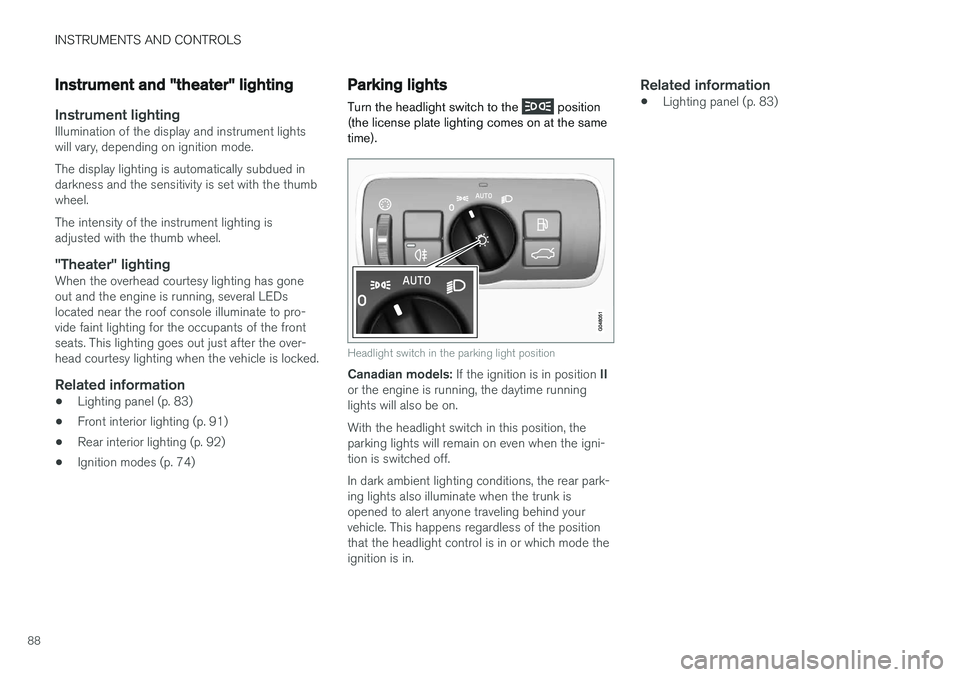
Parking lights Turn the headlight switch to the
position
(the license plate lighting comes on at the same time).
Headlight switch in the parking light position
Canadian models: If the ignition is in position II
or the engine is running, the daytime running lights will also be on. With the headlight switch in this position, the parking lights will remain on even when the igni-tion is switched off. In dark ambient lighting conditions, the rear park- ing lights also illuminate when the trunk isopened to alert anyone traveling behind yourvehicle. This happens regardless of the positionthat the headlight control is in or which mode theignition is in.
Related information
• Lighting panel (p. 83)
Page 93 of 398
INSTRUMENTS AND CONTROLS
* Option/accessory, for more information, see Introduction.91
Front interior lighting
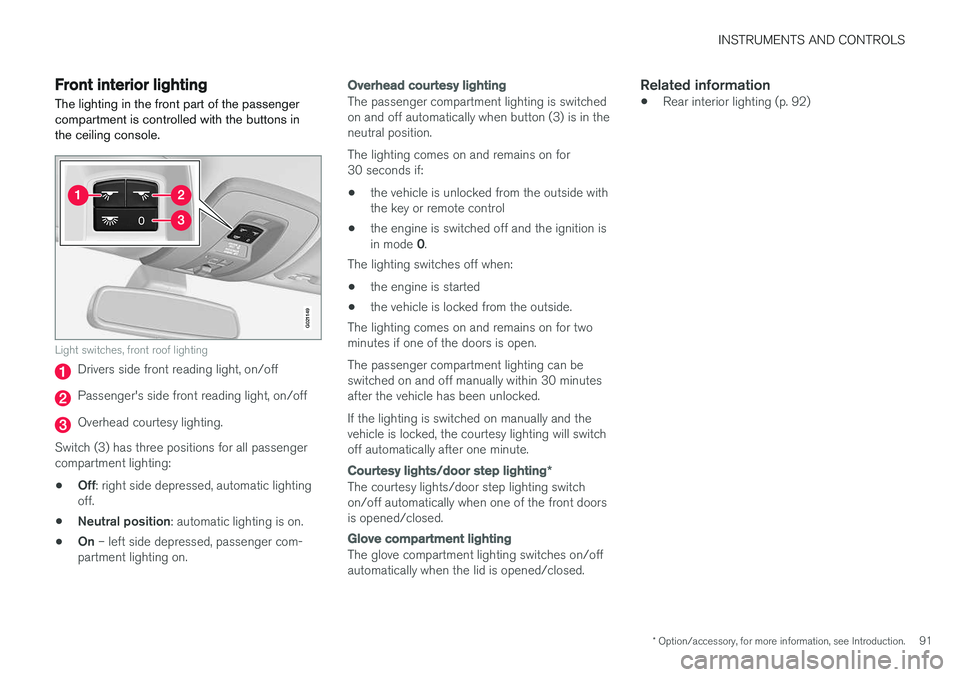
The lighting in the front part of the passenger compartment is controlled with the buttons inthe ceiling console.
G021149
Light switches, front roof lighting
Drivers side front reading light, on/off
Passenger's side front reading light, on/off
Overhead courtesy lighting.
Switch (3) has three positions for all passenger compartment lighting: • Off
: right side depressed, automatic lighting
off.
• Neutral position
: automatic lighting is on.
• On
– left side depressed, passenger com-
partment lighting on.
Overhead courtesy lighting
The passenger compartment lighting is switched on and off automatically when button (3) is in theneutral position. The lighting comes on and remains on for 30 seconds if:
• the vehicle is unlocked from the outside withthe key or remote control
• the engine is switched off and the ignition is in mode
0.
The lighting switches off when:
• the engine is started
• the vehicle is locked from the outside.
The lighting comes on and remains on for two minutes if one of the doors is open. The passenger compartment lighting can be switched on and off manually within 30 minutesafter the vehicle has been unlocked. If the lighting is switched on manually and the vehicle is locked, the courtesy lighting will switchoff automatically after one minute.
Courtesy lights/door step lighting *
The courtesy lights/door step lighting switch on/off automatically when one of the front doorsis opened/closed.
Glove compartment lighting
The glove compartment lighting switches on/off automatically when the lid is opened/closed.
Related information
•Rear interior lighting (p. 92)
Page 94 of 398
INSTRUMENTS AND CONTROLS
92
Rear interior lighting
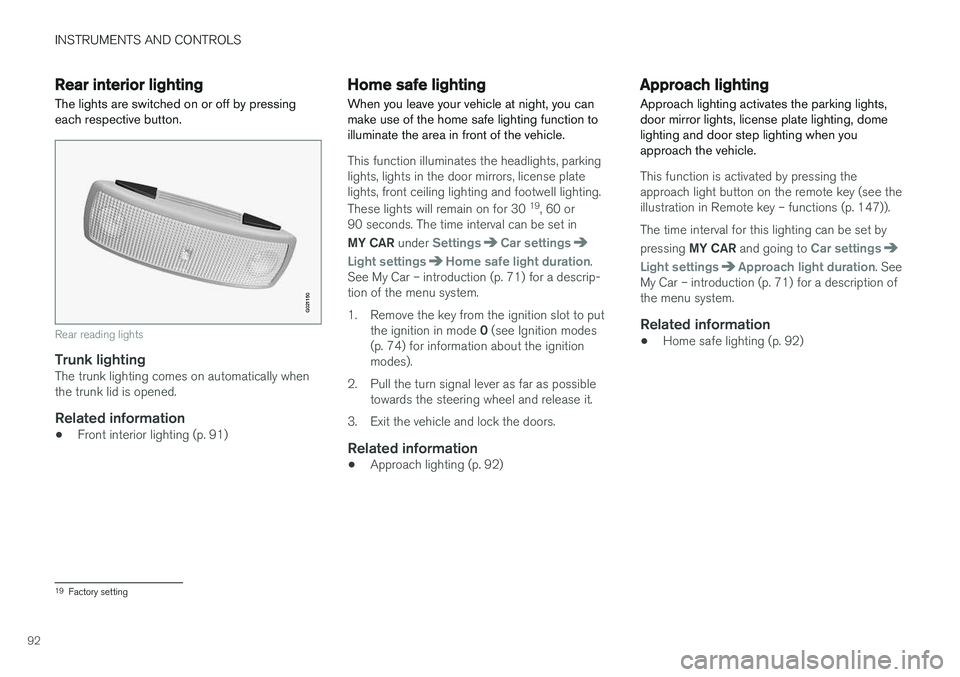
The lights are switched on or off by pressing each respective button.
G021150
Rear reading lights
Trunk lightingThe trunk lighting comes on automatically when the trunk lid is opened.
Related information
• Front interior lighting (p. 91)
Home safe lighting
When you leave your vehicle at night, you can make use of the home safe lighting function toilluminate the area in front of the vehicle.
This function illuminates the headlights, parking lights, lights in the door mirrors, license platelights, front ceiling lighting and footwell lighting. These lights will remain on for 30 19
, 60 or
90 seconds. The time interval can be set in MY CAR under
SettingsCar settings
Light settingsHome safe light duration.
See My Car – introduction (p. 71) for a descrip- tion of the menu system.
1. Remove the key from the ignition slot to put
the ignition in mode 0 (see Ignition modes
(p. 74) for information about the ignition modes).
2. Pull the turn signal lever as far as possible towards the steering wheel and release it.
3. Exit the vehicle and lock the doors.
Related information
• Approach lighting (p. 92)
Approach lighting
Approach lighting activates the parking lights, door mirror lights, license plate lighting, domelighting and door step lighting when youapproach the vehicle.
This function is activated by pressing the approach light button on the remote key (see theillustration in Remote key – functions (p. 147)). The time interval for this lighting can be set by pressing MY CAR and going to
Car settings
Light settingsApproach light duration. See
My Car – introduction (p. 71) for a description of the menu system.
Related information
• Home safe lighting (p. 92)
19
Factory setting
Page 99 of 398
INSTRUMENTS AND CONTROLS
97
Sun shades
Sun shades can be integrated into the panels in the rear doors. A sun shade can be integrated into the rear par- cel shelf.
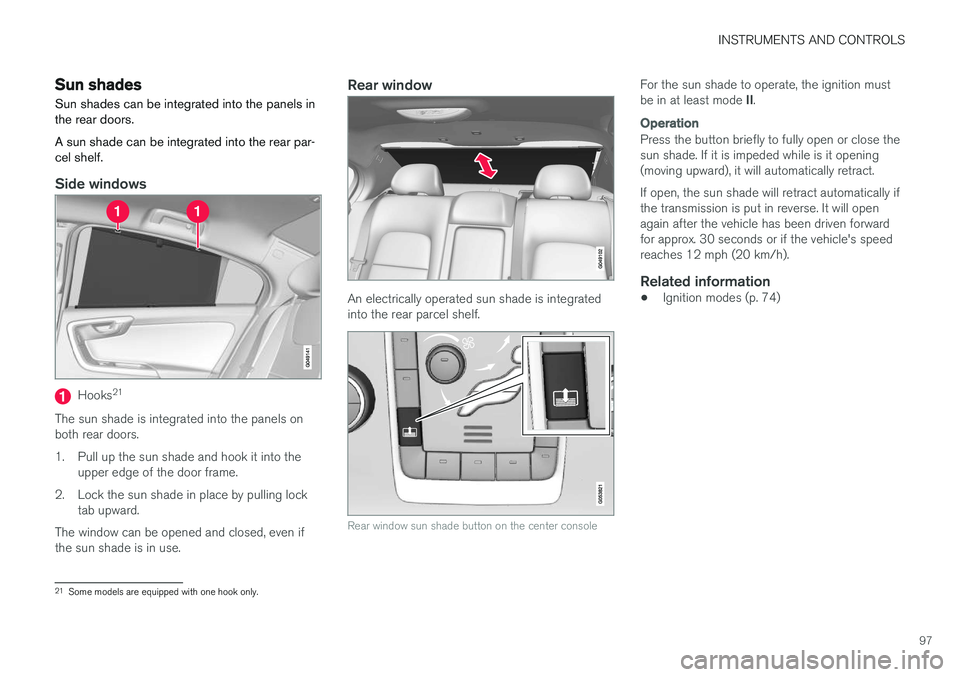
Side windows
Hooks 21
The sun shade is integrated into the panels on both rear doors.
1. Pull up the sun shade and hook it into the upper edge of the door frame.
2. Lock the sun shade in place by pulling lock tab upward.
The window can be opened and closed, even if the sun shade is in use.
Rear window
An electrically operated sun shade is integrated into the rear parcel shelf.
Rear window sun shade button on the center console
For the sun shade to operate, the ignition must be in at least mode II.
Operation
Press the button briefly to fully open or close the sun shade. If it is impeded while is it opening(moving upward), it will automatically retract. If open, the sun shade will retract automatically if the transmission is put in reverse. It will openagain after the vehicle has been driven forwardfor approx. 30 seconds or if the vehicle's speedreaches 12 mph (20 km/h).
Related information
• Ignition modes (p. 74)
21
Some models are equipped with one hook only.
Page 100 of 398
INSTRUMENTS AND CONTROLS
* Option/accessory, for more information, see Introduction.
98
Power door mirrors
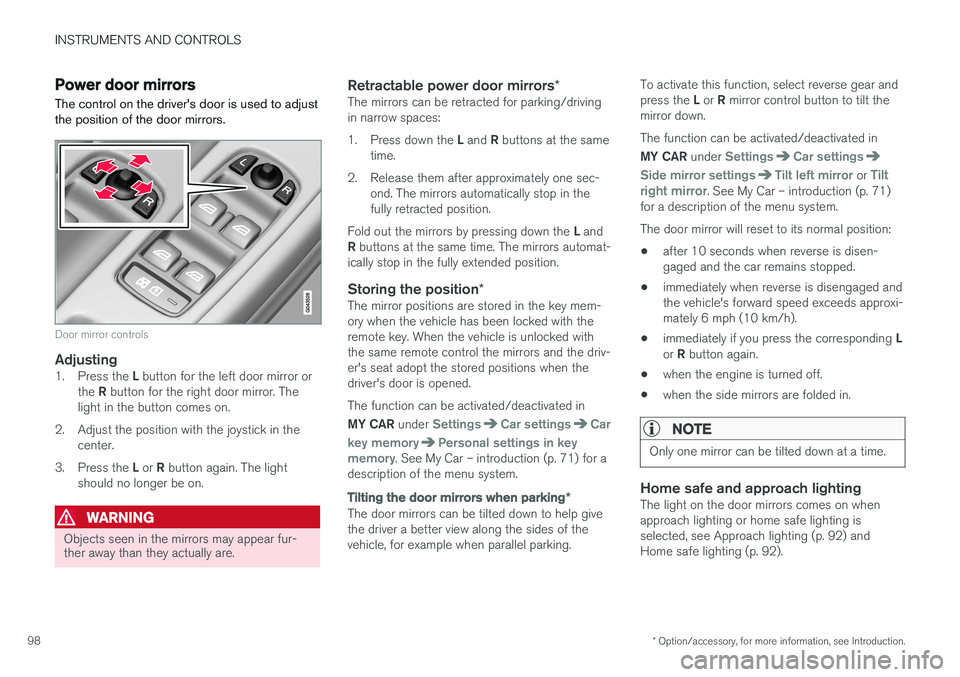
The control on the driver's door is used to adjust the position of the door mirrors.
Door mirror controls
Adjusting1. Press the L button for the left door mirror or
the R button for the right door mirror. The
light in the button comes on.
2. Adjust the position with the joystick in the center.
3. Press the L or R button again. The light
should no longer be on.
WARNING
Objects seen in the mirrors may appear fur- ther away than they actually are.
Retractable power door mirrors *The mirrors can be retracted for parking/driving in narrow spaces: 1.
Press down the L and R buttons at the same
time.
2. Release them after approximately one sec- ond. The mirrors automatically stop in the fully retracted position.
Fold out the mirrors by pressing down the L and
R buttons at the same time. The mirrors automat-
ically stop in the fully extended position.
Storing the position *The mirror positions are stored in the key mem-ory when the vehicle has been locked with theremote key. When the vehicle is unlocked withthe same remote control the mirrors and the driv-er's seat adopt the stored positions when thedriver's door is opened. The function can be activated/deactivated in MY CAR under
SettingsCar settingsCar
key memory
Personal settings in key
memory. See My Car – introduction (p. 71) for a
description of the menu system.
Tilting the door mirrors when parking *
The door mirrors can be tilted down to help give the driver a better view along the sides of thevehicle, for example when parallel parking. To activate this function, select reverse gear and press the
L or R mirror control button to tilt the
mirror down. The function can be activated/deactivated in MY CAR under
SettingsCar settings
Side mirror settingsTilt left mirror or Tilt
right mirror. See My Car – introduction (p. 71)
for a description of the menu system. The door mirror will reset to its normal position:
• after 10 seconds when reverse is disen- gaged and the car remains stopped.
• immediately when reverse is disengaged andthe vehicle's forward speed exceeds approxi-mately 6 mph (10 km/h).
• immediately if you press the corresponding
L
or R button again.
• when the engine is turned off.
• when the side mirrors are folded in.
NOTE
Only one mirror can be tilted down at a time.
Home safe and approach lightingThe light on the door mirrors comes on when approach lighting or home safe lighting isselected, see Approach lighting (p. 92) andHome safe lighting (p. 92).
Page 101 of 398
INSTRUMENTS AND CONTROLS
* Option/accessory, for more information, see Introduction.99
Related information
•Interior rearview mirror (p. 100)
• Heated windshield
*, rear window and door
mirror defrosters (p. 100)
• Power door mirrors – automatic tilting/ retraction (p. 99)
Power door mirrors – automatic tilting/retraction
The control on the driver's door is used to adjust the position of the door mirrors.
Automatically tilting the door mirrors
when parking
The door mirrors can tilt down automatically to help give the driver a better view along the sidesof the vehicle, for example when parallel parking.When the transmission is no longer in reverse,the mirrors will automatically return to their origi-nal position. This function can be activated/deactivated in MY
CAR under
SettingsCar settingsSide
mirror settings
In reverse gear tilt left
mirror or In reverse gear tilt right mirror. See
My Car – introduction (p. 71) for information about the MY CAR menu system.
Automatic retraction when lockingWhen the vehicle is locked/unlocked with the remote key the door mirrors are automaticallyretracted/extended. The function can be activated/deactivated in MY CAR under
SettingsCar settings
Side mirror settingsRetract side mirrors
when locking. See My Car – introduction (p. 71)
for a description of the menu system.
Resetting to neutralMirrors that have been moved out of position by an external force must be electrically reset to theneutral position for electric retracting/extendingto work. • Retract the mirrors with the
L and R buttons.
• Fold them out again with the
L and R but-
tons.
The mirrors are now reset in neutral position.
Related information
• Interior rearview mirror (p. 100)
• Heated windshield
*, rear window and door
mirror defrosters (p. 100)
Page 104 of 398
||
INSTRUMENTS AND CONTROLS
102
Selecting a magnetic zone
1514
13
12
11
9
8
7
6
5
4
3
2
1
10
G018632
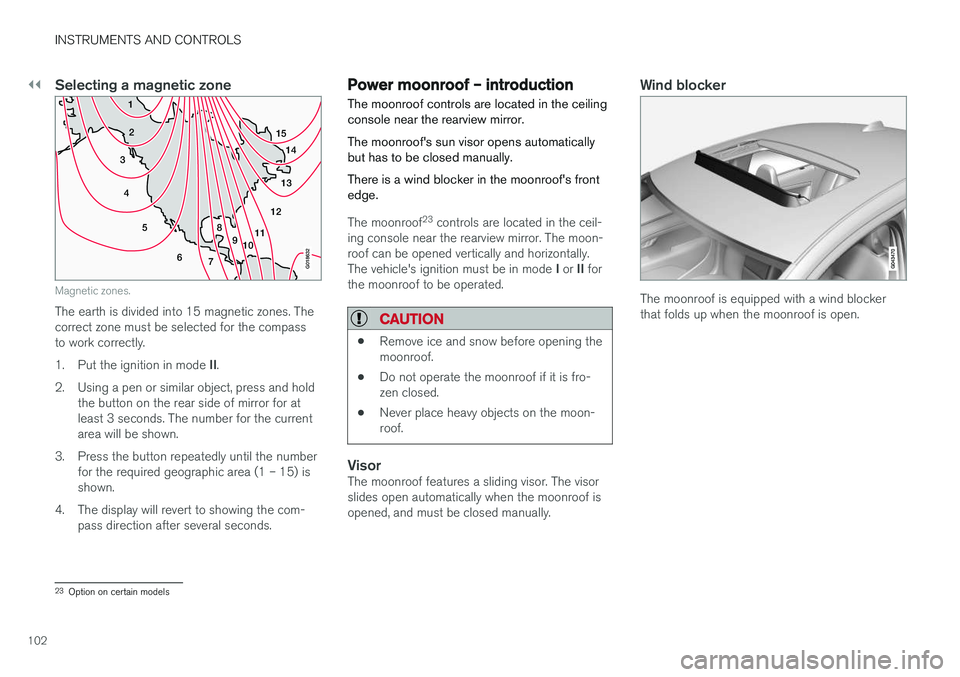
Magnetic zones.
The earth is divided into 15 magnetic zones. The correct zone must be selected for the compassto work correctly. 1.Put the ignition in mode II.
2. Using a pen or similar object, press and hold the button on the rear side of mirror for at least 3 seconds. The number for the currentarea will be shown.
3. Press the button repeatedly until the number for the required geographic area (1 – 15) isshown.
4. The display will revert to showing the com- pass direction after several seconds.
Power moonroof – introduction The moonroof controls are located in the ceiling console near the rearview mirror. The moonroof's sun visor opens automatically but has to be closed manually. There is a wind blocker in the moonroof's front edge.
The moonroof 23
controls are located in the ceil-
ing console near the rearview mirror. The moon- roof can be opened vertically and horizontally. The vehicle's ignition must be in mode I or II for
the moonroof to be operated.
CAUTION
• Remove ice and snow before opening the moonroof.
• Do not operate the moonroof if it is fro-zen closed.
• Never place heavy objects on the moon-roof.
VisorThe moonroof features a sliding visor. The visor slides open automatically when the moonroof isopened, and must be closed manually.
Wind blocker
The moonroof is equipped with a wind blocker that folds up when the moonroof is open.
23
Option on certain models
Page 105 of 398
INSTRUMENTS AND CONTROLS
}}
103
Power moonroof – operationThe moonroof controls are located in the ceiling console near the rearview mirror. The moonroof's sun visor opens automatically but has to be closed manually. There is a wind blocker in the moonroof's front edge.
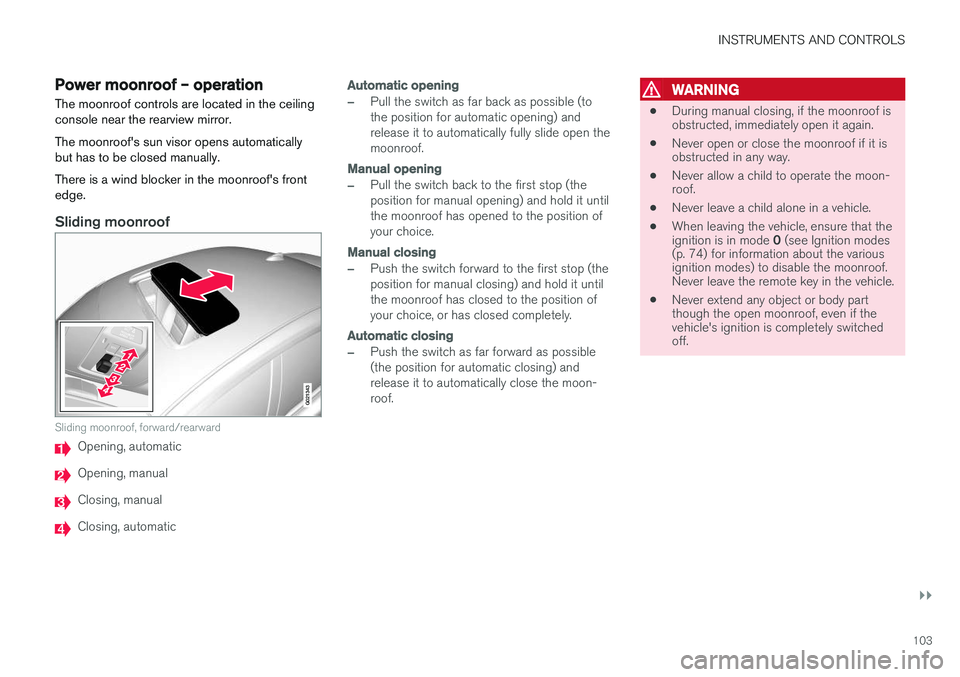
Sliding moonroof
G021343
Sliding moonroof, forward/rearward
Opening, automatic
Opening, manual
Closing, manual
Closing, automatic
Automatic opening
–Pull the switch as far back as possible (to the position for automatic opening) andrelease it to automatically fully slide open themoonroof.
Manual opening
–Pull the switch back to the first stop (the position for manual opening) and hold it untilthe moonroof has opened to the position ofyour choice.
Manual closing
–Push the switch forward to the first stop (the position for manual closing) and hold it untilthe moonroof has closed to the position ofyour choice, or has closed completely.
Automatic closing
–Push the switch as far forward as possible (the position for automatic closing) andrelease it to automatically close the moon-roof.
WARNING
• During manual closing, if the moonroof is obstructed, immediately open it again.
• Never open or close the moonroof if it isobstructed in any way.
• Never allow a child to operate the moon-roof.
• Never leave a child alone in a vehicle.
• When leaving the vehicle, ensure that the ignition is in mode
0 (see Ignition modes
(p. 74) for information about the various ignition modes) to disable the moonroof.Never leave the remote key in the vehicle.
• Never extend any object or body partthough the open moonroof, even if thevehicle's ignition is completely switchedoff.
Page 106 of 398
||
INSTRUMENTS AND CONTROLS
* Option/accessory, for more information, see Introduction.
104
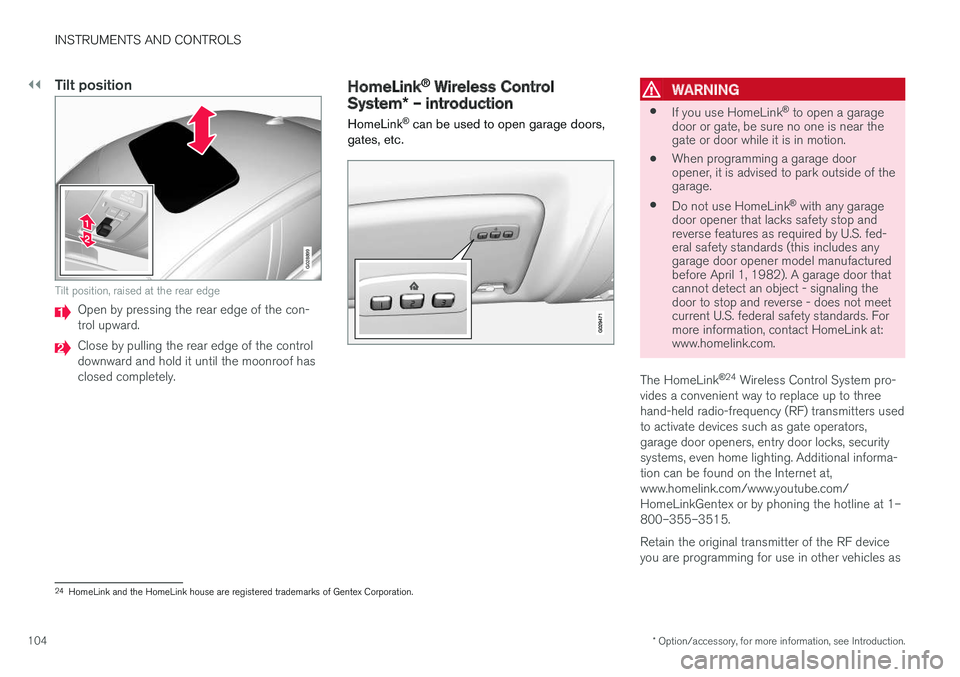
Tilt position
G028899
Tilt position, raised at the rear edge
Open by pressing the rear edge of the con- trol upward.
Close by pulling the rear edge of the control downward and hold it until the moonroof hasclosed completely.
HomeLink ®
Wireless Control
System * – introduction
HomeLink ®
can be used to open garage doors,
gates, etc.WARNING
• If you use HomeLink ®
to open a garage
door or gate, be sure no one is near the gate or door while it is in motion.
• When programming a garage dooropener, it is advised to park outside of thegarage.
• Do not use HomeLink ®
with any garage
door opener that lacks safety stop andreverse features as required by U.S. fed-eral safety standards (this includes anygarage door opener model manufacturedbefore April 1, 1982). A garage door thatcannot detect an object - signaling thedoor to stop and reverse - does not meetcurrent U.S. federal safety standards. Formore information, contact HomeLink at:www.homelink.com.
The HomeLink ®
24
Wireless Control System pro-
vides a convenient way to replace up to three hand-held radio-frequency (RF) transmitters usedto activate devices such as gate operators,garage door openers, entry door locks, securitysystems, even home lighting. Additional informa-tion can be found on the Internet at,www.homelink.com/www.youtube.com/HomeLinkGentex or by phoning the hotline at 1–800–355–3515. Retain the original transmitter of the RF device you are programming for use in other vehicles as
24 HomeLink and the HomeLink house are registered trademarks of Gentex Corporation.