lock VOLVO S60 TWIN ENGINE 2019 Owners Manual
[x] Cancel search | Manufacturer: VOLVO, Model Year: 2019, Model line: S60 TWIN ENGINE, Model: VOLVO S60 TWIN ENGINE 2019Pages: 645, PDF Size: 13.96 MB
Page 319 of 645

DRIVER SUPPORT
}}}}
317
Camera and radar sensor's field of vision
The camera's field of vision is limited and in cer-tain situations, it may be unable to detect pedes-trians, large animals, cyclists or vehicles, or it maydetect them later than expected.
Vehicles that are dirty may be detected later thanclean vehicles, and in dark conditions, motorcy-cles may be detected late or not at all.
If a text message displayed in the instrumentpanel indicates that the camera/radar sensor isobstructed, it may be difficult for City Safety todetect pedestrians, large animals, cyclists, vehi-cles or lane markings in front of the vehicle. CitySafety functionality may therefore be reduced.
Text messages may not be displayed for all situa-tions in which the windshield sensors areblocked. The driver must therefore always keepthe windshield in front of the camera/radar sen-sor clean.
CAUTION
Maintenance of driver support components
may only performed by a workshop50.
Driver intervention
Backing up
City Safety is temporarily deactivated when thevehicle is backing up.
Low speed
City Safety is not activated at very low speedsunder 4 km/h (3 mph). The system will thereforenot intervene in situations in which your vehicle isapproaching another vehicle very slowly, such aswhen parking.
Active driver
Action by the driver always has priority. CitySafety will therefore not react or will react at alater stage with a warning or intervention in situa-tions in which the driver is clearly steering andoperating the accelerator pedal, even if a collisionis unavoidable.
An active and aware driving style may thereforedelay collision warnings and intervention in orderto minimize unnecessary warnings.
Other limitations
WARNING
Warnings and brake interventions can betriggered late or not at all if the traffic sit-uation or external influences prevent thecamera and radar unit from properlydetecting pedestrians, cyclists, large ani-mals or vehicles ahead of the vehicle.
To be able to detect vehicles at night, itsfront and rear lights must work and illumi-nate clearly.
The camera and radar unit have a limitedrange for pedestrians and cyclists – thesystem can provide effective warningsand brake interventions if the relativespeed is lower than 50 km/h (30 mph).For stationary or slow-moving vehicles,warnings and brake interventions areeffective at vehicle speeds of up to70 km/h (43 mph). Speed reduction forlarge animals is less than 15 km/h(9 mph) and can be achieved at vehiclespeeds over 70 km/h (43 mph). At lowerspeeds, the warning and brake interven-tion for large animals is less effective.
Warnings for stationary or slow-movingvehicles and large animals can be disen-gaged due to darkness or poor visibility.
50An authorized Volvo workshop is recommended.
Page 328 of 645

||
DRIVER SUPPORT
* Option/accessory.326
WARNING
The function is supplementary driver sup-port intended to facilitate driving and helpmake it safer – it cannot handle all situa-tions in all traffic, weather and road condi-tions.
The driver is advised to read all sectionsin the Owner's Manual about this functionto learn of its limitations, which the drivermust be aware of before using the func-tion.
Driver support functions are not a substi-tute for the driver's attention and judg-ment. The driver is always responsible forensuring the vehicle is driven in a safemanner, at the appropriate speed, with anappropriate distance to other vehicles,and in accordance with current trafficrules and regulations.
Related information
Driver support systems (p. 260)
Activating/deactivating Cross Traffic Alert(p. 326)
Cross Traffic Alert limitations (p. 326)
Cross Traffic Alert messages (p. 328)
BLIS* (p. 321)
Park Assist* (p. 350)
Activating/deactivating Cross Traffic
Alert62
The driver can select to switch off the warning
in the function CTA63 – the sub-function autobrake cannot be switched off and continues tobe active.
Activate or deactivate the func-tion using this button in thecenter display's Function view.
GREEN button indicator light – the functionis activated.
GRAY button indication – warning signal andindication on display for the function is deac-tivated.
The function is automatically activated each timethe engine is started.
Related information
Cross Traffic Alert* (p. 325)
Cross Traffic Alert64 limitations
The CTA65 function with auto brake may havelimited functionality in certain situations. Auto-brake is active at speeds under 15 km/h (9.3mph).
CTA does not function optimally in all situationsand has certain limitations. The CTA sensors, forexample, cannot "see" through other parkedvehicles or objects blocking the vehicle.
Below are a few examples of situations in whichCTA's field of vision may be initially limited andapproaching vehicles may therefore not bedetected until they are very close to your vehicle:
The vehicle is parked very far into a parking space.
62Warning for crossing traffic when the vehicle is backing up.
Page 343 of 645

DRIVER SUPPORT
}}
341
Lane Keeping Aid symbols andmessages
A number of symbols and messages related to
Lane Keeping Aid (LKA85) may be displayed inthe instrument panel.Some examples of symbols and messages are shown in the table below.
SymbolMessageMeaning
Driver support system
Reduced functionality Service required
The system is not functioning as intended. Contact a workshop ‒ an authorized Volvo work-shop is recommended.
Windscreen sensor
Sensor blocked, see Owner's manual
The camera's ability to detect the lane in front of the vehicle is reduced.
Lane Keeping Aid
Apply steering
LKA's steering assistance is disabled when the driver's hands are not on the wheel. Followthe instructions and steer the vehicle.
Lane Keeping Aid
Standby until steering applied
LKA will go into standby mode until the driver begins steering the vehicle again.
85Lane Keeping Aid
Page 351 of 645

DRIVER SUPPORT
349
Symbols and messages for steeringassistance during collision risks
A number of symbols and messages related tothe function may be displayed in the instrumentpanel.Some examples of symbols and messages are shown in the table below.
SymbolMessageMeaning
Collision avoidance assistance
Automatic intervention
When the function is activated, a message will appear to alert the driver.
Windscreen sensor
Sensor blocked, see Owner's manual
The camera's ability to detect the lane in front of the vehicle is reduced.
A text message can be erased by briefly pressing
the button in the center of the right-sidesteering wheel keypad.
If the message persists: Contact a workshop ‒ anauthorized Volvo workshop is recommended.
Related information
Steering assistance at risk of collision(p. 344)
Page 356 of 645
DRIVER SUPPORT
* Option/accessory.354
Park Assist symbols and messages
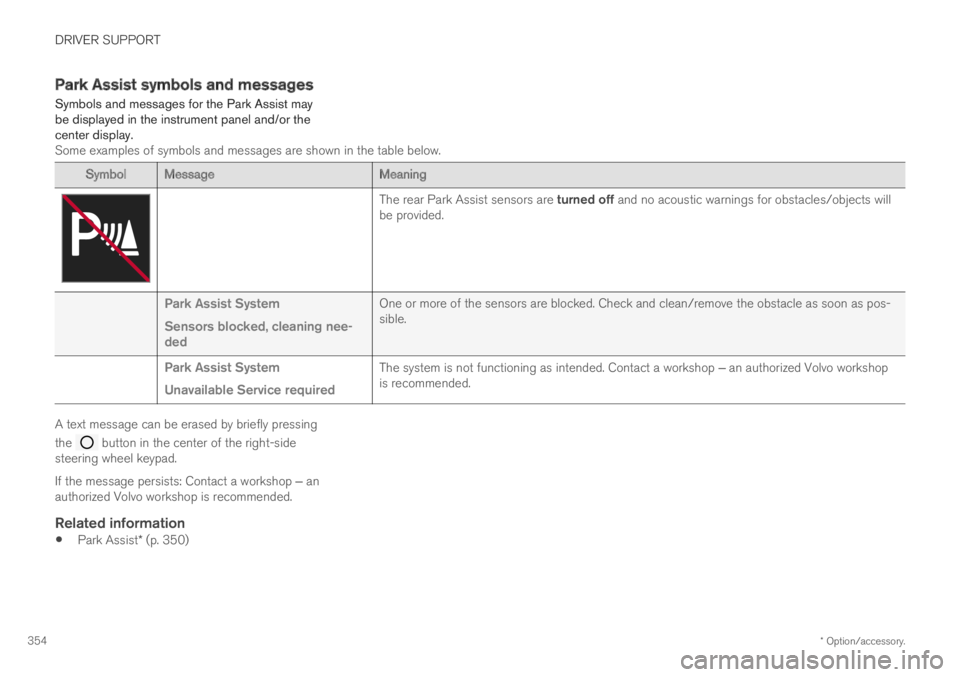
Symbols and messages for the Park Assist maybe displayed in the instrument panel and/or thecenter display.Some examples of symbols and messages are shown in the table below.
SymbolMessageMeaning
The rear Park Assist sensors are turned off and no acoustic warnings for obstacles/objects willbe provided.
Park Assist System
Sensors blocked, cleaning nee-ded
One or more of the sensors are blocked. Check and clean/remove the obstacle as soon as pos-sible.
Park Assist System
Unavailable Service required
The system is not functioning as intended. Contact a workshop ‒ an authorized Volvo workshopis recommended.
A text message can be erased by briefly pressing
the button in the center of the right-sidesteering wheel keypad.
If the message persists: Contact a workshop ‒ anauthorized Volvo workshop is recommended.
Related information
Park Assist* (p. 350)
Page 365 of 645

DRIVER SUPPORT
* Option/accessory.363
Park Assist Camera symbols andmessages
Symbols and messages for the Park AssistCamera may be displayed in the instrumentpanel and/or the center display.Some examples of symbols and messages are shown in the table below.
SymbolMessageMeaning
The rear Park Assist sensors are turned off and no acoustic warnings or field markings for obsta-cles/objects will be provided.
The camera is not functioning properly.
Park Assist System
Sensors blocked, cleaningneeded
One or more of the sensors are blocked. Check and clean/remove the obstacle as soon as possible.
Park Assist System
Unavailable Service required
The system is not functioning as intended. Contact a workshop ‒ an authorized Volvo workshop isrecommended.
A text message can be erased by briefly pressing
the button in the center of the right-sidesteering wheel keypad.
If the message persists: Contact a workshop ‒ anauthorized Volvo workshop is recommended.
Related information
Park Assist Camera* (p. 355)
Page 372 of 645

||
DRIVER SUPPORT
370
The driver should be aware of the following limi-tations for Park Assist Pilot:
The parking sequence is cancelled
A parking sequence will be cancelled if:
The driver moves the steering wheel
The vehicle's speed exceeds 7 km/h(4 mph)
The driver taps Cancel in the center display
When the anti-lock brakes or the Electronicstability control are engaged - e.g. when awheel loses grip on a slippery road
When speed-dependent power steeringwheel resistance is working at reducedpower – e.g. during cooling due to overheat-ing.
A message in the center display will explain whythe parking sequence was cancelled.
CAUTION
Under certain circumstances, the functionmay not be able to find parking spaces – onereason may be that the sensors are disruptedby external sound sources that emit the sameultrasonic frequencies that the system workswith.
Examples of such sources include horns, wettires on asphalt, pneumatic brakes, exhaustnoise from motorcycles, etc.
NOTE
Dirt, ice and snow covering the sensorsreduce their function and can make measure-ment impossible.
Driver responsibility
The driver should keep in mind that the functionis a parking aid ‒ not an infallible fully automaticsystem. The driver must always be prepared totake control and cancel a parking sequence ifnecessary.
There are a number of things to keep in mindwhen parking, including:
The driver is always responsible for determin-ing if the space suggested by the function issuitable for parking.
Do not use the function when using snowchains or a temporary spare tire.
Do not use the function if there are anyobjects protruding from the vehicle.
Heavy rain or snowfall may inhibit PAP's abil-ity to accurately measure a parking space.
While searching and measuring the parkingspace, the function may be unable to detectobjects located far into the space.
PAP may not suggest parking spaces onnarrow streets if it does not detect sufficientspace for maneuvering the vehicle.
Use approved tires96 inflated to the correcttire pressure because this affects the func-tion's ability to provide parking assistance.
The function is based on the way the vehi-cles are parked behind and in front of yourparking space. If they are, for example,parked too close to the curb, there is a riskthat your vehicle's tires or wheel rims couldbe damaged by the curb during the parkingprocedure.
96"Approved tires" refers to tires of the same type and make as the vehicle's original, factory-installed tires.
Page 374 of 645
DRIVER SUPPORT
* Option/accessory.372
Park Assist Pilot* messages
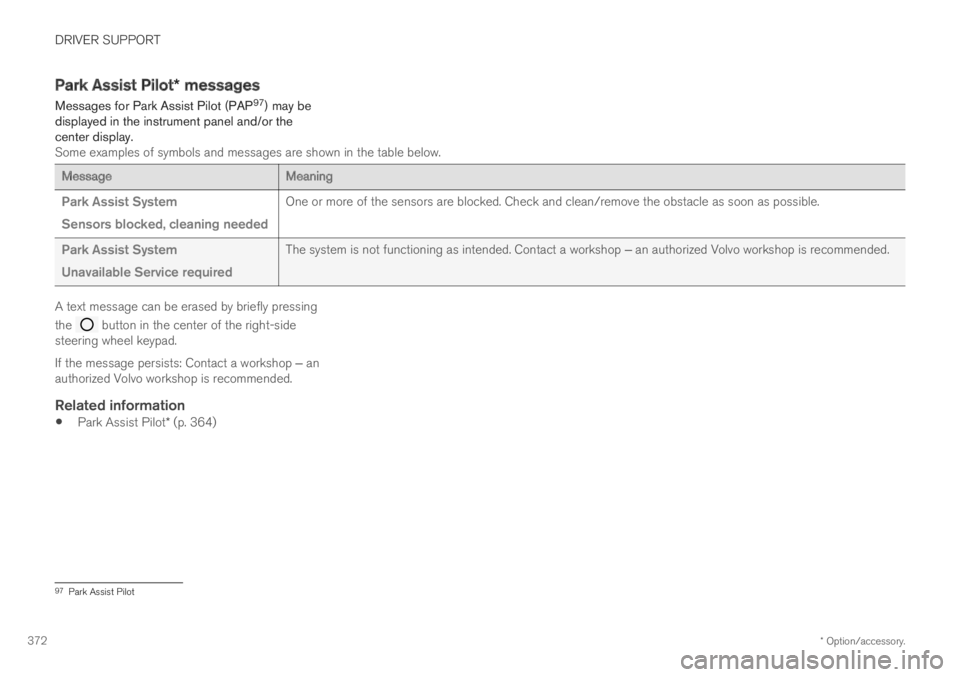
Messages for Park Assist Pilot (PAP97) may bedisplayed in the instrument panel and/or thecenter display.Some examples of symbols and messages are shown in the table below.
MessageMeaning
Park Assist System
Sensors blocked, cleaning needed
One or more of the sensors are blocked. Check and clean/remove the obstacle as soon as possible.
Park Assist System
Unavailable Service required
The system is not functioning as intended. Contact a workshop ‒ an authorized Volvo workshop is recommended.
A text message can be erased by briefly pressing
the button in the center of the right-sidesteering wheel keypad.
If the message persists: Contact a workshop ‒ anauthorized Volvo workshop is recommended.
Related information
Park Assist Pilot* (p. 364)
97Park Assist Pilot
Page 384 of 645

||
HYBRID INFORMATION
382
2. The charging cable handle will lock intoplace and charging will begin within5 seconds. When charging starts, the greenLED light in the charging socket will begin toflash. The approximate remaining chargingtime or the charging status will be displayedin the instrument panel.
Charging may be temporarily interrupted ifthe vehicle is unlocked:
and a door is open ‒ charging will restartwithin a few minutes.
if no door is opened ‒ the vehicle willautomatically relock. Charging will resumeafter 1 minute.
CAUTION
Never detach the charging cable from the120/240 V outlet (AC, alternating current)while charging is in progress – the120/240 V outlet could be damaged in suchcircumstances. Always interrupt charging firstand then disconnect the charging cable – firstfrom the vehicle's charging socket and thenfrom the 120/240 V outlet.
During charging, condensation from the air con-ditioning may form under the vehicle. This is nor-mal and is caused by the hybrid battery cooling.
Related information
Charging the hybrid battery (p. 375)
Opening and closing the charging socketcover (p. 380)
Charging status in the vehicle's chargingsocket (p. 382)
Charging status in the instrument panel(p. 384)
Charging status in the charging cable'scharging module (p. 383)
Stopping hybrid battery charging (p. 386)
Charging status in the vehicle'scharging socket
The charging status is indicated by an LED lightin the charging socket.
Location of the LED indicator light in the vehicle'scharging socket.
The LED indicator light shows the current chargestatus during charging. If the LED indicator lightis not illuminated, check to make sure the cableis securely connected in the wall outlet and in theoutlet in the vehicle. A white, red or yellow lightilluminates when the passenger compartmentlighting is activated and will remain illuminated fora short time after the passenger compartmentlighting has gone out.
Page 385 of 645

HYBRID INFORMATION
383
LED indicatorlight's colorMeaning
WhiteCourtesy light.
YellowWait modeA – waiting forcharging to start.
Flashing greenCharging is in progressB.
GreenCharging completedC.
RedMalfunction.
AE.g. after a door has been opened or if the charging cable han-dle is not locked in place.BThe more slowly the light flashes, the closer the battery is tobeing fully charged.CThe light will go out after a short time.
Related information
Charging the hybrid battery (p. 375)
Charging status in the instrument panel(p. 384)
Charging status in the charging cable'scharging module (p. 383)
Stopping hybrid battery charging (p. 386)
Charging status in the chargingcable's charging module
The red and blue lights in the charging moduleindicate the status of ongoing and completedcharging.
Charge module: 1. Red warning light, 2. Blue status indi-cator
When the charge module is initially plugged intoa wall outlet, the red warning light will flash onceto indicate that a startup safety check has beenperformed. When the safety check has beencompleted, the blue status indicator will glowsteadily and the red warning light will be off. Thecharger is now ready to be used. If the red warn-ing light continues to flash or glows steadily, afault has been detected and the charger will notdeliver power to the vehicle. Contact a Volvoretailer or a certified Volvo service technician.
When the charging cable is connected to thevehicle's charging socket, the blue light will flashonce.
Charging cable connected to the vehicle's charg-ing socket:
Indicatorlight's colorMeaning
FlashingblueCharging is in progress. Thelight flashes about once everyother second
Solid blueCharging completed. This willalso be indicated in the instru-ment panel
Related information
Charging the hybrid battery (p. 375)
Charging status in the vehicle's chargingsocket (p. 382)
Charging status in the instrument panel(p. 384)
Stopping hybrid battery charging (p. 386)