maintenance VOLVO S60 TWIN ENGINE 2019 User Guide
[x] Cancel search | Manufacturer: VOLVO, Model Year: 2019, Model line: S60 TWIN ENGINE, Model: VOLVO S60 TWIN ENGINE 2019Pages: 645, PDF Size: 13.96 MB
Page 59 of 645

SAFETY
}}
57
seated occupant and determine if the passeng-er's side front airbag should be enabled (mayinflate) or disabled (will not inflate).
The OWS will disable (will not inflate) the pas-senger's side front airbag when:
the front passenger's seat is unoccupied, orhas small/medium objects in the front seat,
the system determines that an infant is pres-ent in a rear-facing infant seat that is instal-led according to the manufacturer's instruc-tions,
the system determines that a small child ispresent in a forward-facing child restraintthat is installed according to the manufactur-er's instructions,
the system determines that a small child ispresent in a booster seat,
a front passenger takes his/her weight off ofthe seat for a period of time,
a child or a small person occupies the frontpassenger's seat.
The OWS uses a PASSENGER AIRBAG OFFindicator lamp which will illuminate and stay on toremind you that the passenger's side front airbagis disabled. The PASSENGER AIRBAG OFF indi-cator lamp is located in the overhead console,near the base of the rearview mirror.
NOTE
When the ignition is switched on, the OWSindicator light will illuminate for several sec-onds while the system performs a self-diag-nostic test.
However, if a fault is detected in the system:
The OWS indicator light will stay on.
The SRS warning light will come on and stayon and a text message will be displayed.
WARNING
If a fault in the system is detected and indi-cated as described, be aware that the pas-senger's side front airbag will not deploy inthe event of a collision. In this case, the SRSsystem and Occupant Weight Sensor shouldbe inspected by a trained and qualified Volvoservice technician as soon as possible.
WARNING
Never try to open, remove or repair anycomponents in the OWS system. Thiscould cause the system to malfunction.Maintenance or repairs should only becarried out by an a trained and qualifiedVolvo service technician.
The front passenger's seat should not bemodified in any way. This could reducepressure on the seat cushion, whichmight interfere with the OWS system'sfunction.
Page 105 of 645
DISPLAYS AND VOICE CONTROL
}}
103
Related information
App menu in instrument panel (p. 101)
Messages in the instrument panel (p. 103)
Messages in the instrument panel
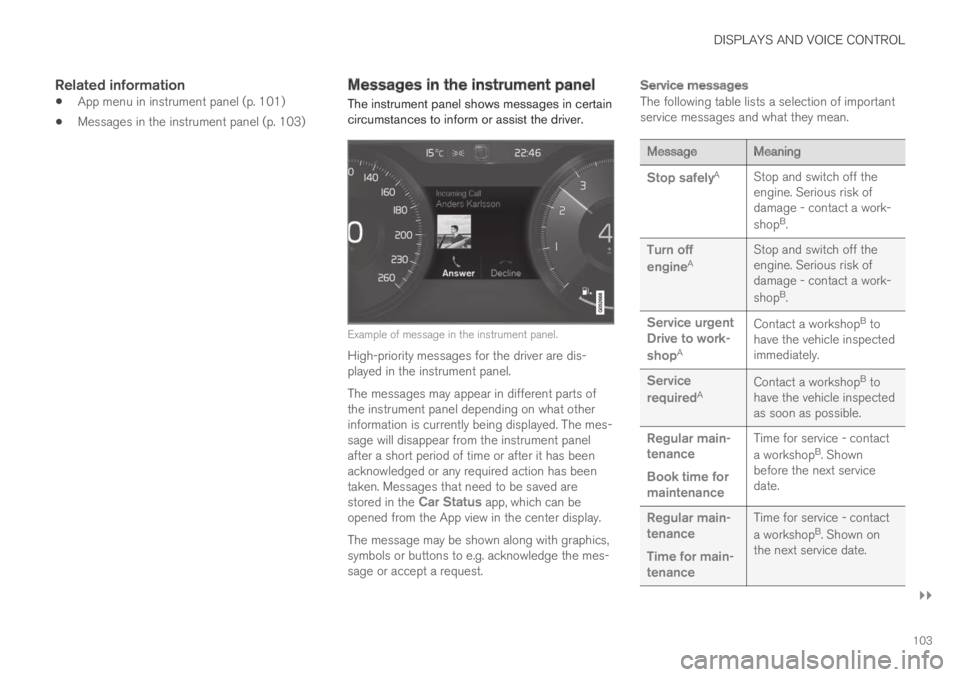
The instrument panel shows messages in certaincircumstances to inform or assist the driver.
Example of message in the instrument panel.
High-priority messages for the driver are dis-played in the instrument panel.
The messages may appear in different parts ofthe instrument panel depending on what otherinformation is currently being displayed. The mes-sage will disappear from the instrument panelafter a short period of time or after it has beenacknowledged or any required action has beentaken. Messages that need to be saved arestored in the Car Status app, which can beopened from the App view in the center display.
The message may be shown along with graphics,symbols or buttons to e.g. acknowledge the mes-sage or accept a request.
Service messages
The following table lists a selection of importantservice messages and what they mean.
MessageMeaning
Stop safelyAStop and switch off theengine. Serious risk ofdamage - contact a work-
shopB.
Turn off
engineAStop and switch off theengine. Serious risk ofdamage - contact a work-
shopB.
Service urgentDrive to work-
shopA
Contact a workshopB tohave the vehicle inspectedimmediately.
Service
requiredAContact a workshopB tohave the vehicle inspectedas soon as possible.
Regular main-tenance
Book time formaintenance
Time for service - contact
a workshopB. Shownbefore the next servicedate.
Regular main-tenance
Time for main-tenance
Time for service - contact
a workshopB. Shown onthe next service date.
Page 106 of 645
||
DISPLAYS AND VOICE CONTROL
104
MessageMeaning
Regular main-tenance
Maintenanceoverdue
Time for service - contact
a workshopB. Shown whenthe date for service haspassed.
Temporarily
offAA function has been tem-porarily deactivated andwill be reactivated auto-matically while driving orafter the engine is restar-ted.
APart of message, shown along with information on the locationof the problem.BAn authorized Volvo workshop is recommended.
Related information
Handling messages in the instrument panel(p. 104)
Handling messages saved from the instru-ment panel (p. 105)
Messages in the center display (p. 138)
Handling messages in theinstrument panel
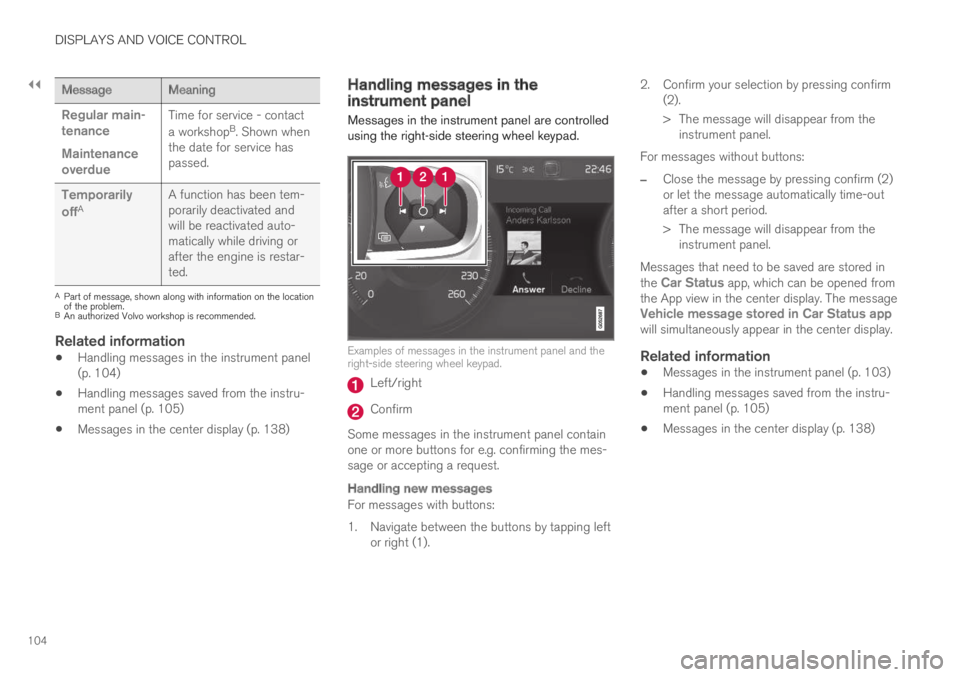
Messages in the instrument panel are controlledusing the right-side steering wheel keypad.
Examples of messages in the instrument panel and theright-side steering wheel keypad.
Left/right
Confirm
Some messages in the instrument panel containone or more buttons for e.g. confirming the mes-sage or accepting a request.
Handling new messages
For messages with buttons:
1. Navigate between the buttons by tapping leftor right (1).
2. Confirm your selection by pressing confirm(2).
> The message will disappear from theinstrument panel.
For messages without buttons:
–Close the message by pressing confirm (2)or let the message automatically time-outafter a short period.
>The message will disappear from theinstrument panel.
Messages that need to be saved are stored inthe Car Status app, which can be opened fromthe App view in the center display. The messageVehicle message stored in Car Status appwill simultaneously appear in the center display.
Related information
Messages in the instrument panel (p. 103)
Handling messages saved from the instru-ment panel (p. 105)
Messages in the center display (p. 138)
Page 224 of 645

CLIMATE CONTROL
222
Climate comfort retaining function
The climate in the passenger compartment canbe maintained when the vehicle is parked, e.g. ifthe engine is turned off but the driver or passen-gers remain in the vehicle.
This function can only be direct-started.
The function utilizes several of the vehicle's sys-tems:
Residual heat from the engine is used tohelp heat the passenger compartment to acomfortable temperature.
In warm weather, the ventilation system coolsthe passenger compartment by blowing air infrom outside.
NOTE
Climate comfort maintenance will be deacti-vated if the vehicle is locked from the outsidein order to avoid using residual engine heatunnecessarily. This function is intended to beused to maintain climate comfort when thedriver or a passenger remains in the vehicleafter the engine is turned off.
Related information
Parking climate (p. 217)
Starting and switching off the climate retain-ing function when parking (p. 222)
Starting and switching off theclimate retaining function whenparking
The climate retaining function maintains the cli-mate settings in the vehicle after the engine hasbeen switched off. The function can be activatedin the center display.
1. Tap the symbol in the center of the climatebar to open Climate view in the center dis-play.
2.Select the Parking climate tab.
3.Tap Keep climate comfort.
>The climate comfort retaining function willbe activated/deactivated and the buttonlight will go on/off.
NOTE
Maintained climate comfort is not possiblewhen there is not sufficient residual engineheat to maintain the climate settings in thepassenger compartment, or if the outsidetemperature is above approximately 20 °C(68 °F).
NOTE
Climate comfort maintenance will be deacti-vated if the vehicle is locked from the outsidein order to avoid using residual engine heatunnecessarily. This function is intended to beused to maintain climate comfort when thedriver or a passenger remains in the vehicleafter the engine is turned off.
Related information
Climate comfort retaining function (p. 222)
Page 275 of 645

DRIVER SUPPORT
}}
* Option/accessory.273
sensor, braking may occur unexpectedly or not atall.
Adaptive Cruise Control is designed to follow avehicle ahead in the same lane and maintain atime interval to that vehicle set by the driver. If theradar sensor does not detect a vehicle ahead, itwill instead maintain the speed set by the driver.This will also happen if the speed of the vehicleahead exceeds the set speed for your vehicle.
WARNING
This is not a collision avoidance system.The driver is always responsible and mustintervene if the system fails to detect avehicle ahead.
The function does not brake for people oranimals and does not brake for smallvehicles, such as bikes and motorcycles.Similarly, it does not brake for low trailers,oncoming, slow-moving or stationary vehi-cles and objects.
Do not use the function in demanding sit-uations, such as in city traffic, at intersec-tions, on slippery surfaces, with a lot ofwater or slush on the road, in heavy rain/snow, in poor visibility, on winding roads,or on on/off ramps.
CAUTION
Maintenance of driver support components
may only performed by a workshop22.
Related information
Driver support systems (p. 260)
Adaptive Cruise Control* controls and dis-plays (p. 273)
Activating and starting Adaptive Cruise Con-trol* (p. 274)
Adaptive Cruise Control* limitations (p. 277)
Symbols and messages for Adaptive CruiseControl* (p. 279)
Collision risk warning from driver support(p. 290)
Set time interval for driver support (p. 292)
Adjusting set speed for driver support(p. 293)
Auto-hold braking with driver support(p. 294)
Switching target vehicles with driver support(p. 291)
Passing assistance (p. 295)
Adaptive Cruise Control* controlsand displays
A summary of how Adaptive Cruise Control iscontrolled using the right-side steering wheelkeypad and how the function is shown in the dis-play.
: From standby mode - activates andsets the current speed
: From active mode - deactivates/putsin standby mode
: Activates the function from standbymode and resumes the set speed
: Increases the set speed
20Depending on market, this function can be either standard or optional.21Adaptive Cruise Control22An authorized Volvo workshop is recommended.
Page 284 of 645

||
DRIVER SUPPORT
282
WARNING
The function is supplementary driver sup-port intended to facilitate driving and helpmake it safer – it cannot handle all situa-tions in all traffic, weather and road condi-tions.
The driver is advised to read all sectionsin the Owner's Manual about this functionto learn of its limitations, which the drivermust be aware of before using the func-tion.
Driver support functions are not a substi-tute for the driver's attention and judg-ment. The driver is always responsible forensuring the vehicle is driven in a safemanner, at the appropriate speed, with anappropriate distance to other vehicles,and in accordance with current trafficrules and regulations.
Pilot Assist regulates speed by accelerating andbraking. It is normal for the brakes to emit a slightsound when they are being used to adjust speed.
Pilot Assist attempts to smoothly regulate speed.The driver must apply the brakes in situationsrequiring immediate braking. For example, whenthere are great differences in speed betweenvehicles or if the vehicle ahead brakes suddenly.
Due to limitations in the camera and radar sen-sor, braking may occur unexpectedly or not at all.
Pilot Assist is designed to follow a vehicle aheadin the same lane and maintain a time interval tothat vehicle set by the driver. If the radar sensordoes not detect a vehicle ahead, it will insteadmaintain the speed set by the driver. This will alsohappen if the speed of the vehicle aheadexceeds the set speed for your vehicle.
WARNING
This is not a collision avoidance system.The driver is always responsible and mustintervene if the system fails to detect avehicle ahead.
The function does not brake for people oranimals and does not brake for smallvehicles, such as bikes and motorcycles.Similarly, it does not brake for low trailers,oncoming, slow-moving or stationary vehi-cles and objects.
Do not use the function in demanding sit-uations, such as in city traffic, at intersec-tions, on slippery surfaces, with a lot ofwater or slush on the road, in heavy rain/snow, in poor visibility, on winding roads,or on on/off ramps.
CAUTION
Maintenance of driver support components
may only performed by a workshop31.
In curves and forks in the road
Pilot Assist is designed to interact with the driver.The driver should never wait for steering assis-tance from Pilot Assist, but instead should alwaysbe ready to increase his or her own steeringefforts, particularly in curves.
When the vehicle is approaching an off-rampor a fork in the road, the driver should steertoward the desired lane to indicate to PilotAssist the desired direction of travel.
Pilot Assist strives to keep the vehicle
in the center of the lane
When Pilot Assist provides steering assistance, itstrives to position the vehicle in the center of thelane between the lane markings. For the smooth-est driving experience possible, the driver shouldpermit the vehicle to find the optimal positioning.The driver should check that the vehicle is posi-tioned safely in the lane and can always adjustthe vehicle's position by applying more force tothe steering wheel.
If Pilot Assist does not position the vehicleappropriately in the lane, the driver should
31An authorized Volvo workshop is recommended.
Page 299 of 645

DRIVER SUPPORT
}}
* Option/accessory.297
Radar sensor
The radar sensor is used by several driver sup-port systems to detect other vehicles.
Location of radar sensor.
The radar sensor is used by the following func-tions:
Distance Alert*
Adaptive Cruise Control*
Lane Keeping Aid
Pilot Assist*
City Safety
Any modifications to the radar sensor may makeits use illegal.
Related information
Driver support systems (p. 260)
Camera/radar sensor limitations (p. 300)
Recommended camera and radar sensormaintenance (p. 304)
Radar sensor type approval (p. 297)
Radar sensor type approval
The type approval for the vehicle radar sensor in
the ACC42, PA43 and BLIS44 functions can beread here.
Page 301 of 645

DRIVER SUPPORT
* Option/accessory.299
Camera
The camera is used by several driver supportsystems to e.g. detect lane marker lines or roadsigns.
Location of the camera.
The camera is used by the following functions:
Adaptive Cruise Control*
Pilot Assist*
Lane Keeping Aid*
Steering assistance at risk of collision
City Safety
Driver Alert Control*
Road Sign Information*
Active high beams*
Related information
Driver support systems (p. 260)
Camera/radar sensor limitations (p. 300)
Recommended camera and radar sensormaintenance (p. 304)
Page 305 of 645

DRIVER SUPPORT
* Option/accessory.303
Park Assist Camera *
Blind sectors
There are "blind" sectors between the cameras' fields ofvision.
With Park Assist Camera's 360° view* selected,objects/obstacles may not be detected if theyare located in the "joints" where the edges of theindividual camera views meet.
WARNING
Even if it seems as though only a fairly smallsection of the screen image is obstructed, thismay mean that a relatively large sector is hid-den and obstacles there may not be detecteduntil they are very near the vehicle.
Defective camera
If a camera sector is dark andcontains this symbol, this indi-cates that the camera is notfunctioning properly.
See the following illustration foran example.
The vehicle's left-side camera is malfunctioning.
A dark camera sector may also be displayed inthe following situations, but without the defectivecamera symbol:
a door is open
the trunk lid is open
a rearview mirror is folded in
Lighting conditions
The camera image is automatically adjustedaccording to the current lighting conditions. Thismeans that the brightness and quality of the
image may vary slightly. Poor lighting conditionsmay result in reduced image quality.
Rear Park Assist Camera
WARNING
Be extra cautious whenreversing if this symbol isshown when a trailer, bikecarrier or similar is attachedand electrically connectedto the vehicle.
The symbol indicates thatthe rear parking assist sensors are deacti-vated and will not warn of any obstacles.
NOTE
A bike carrier and other accessories mountedon the rear of the vehicle can obscure thecamera's view.
Related information
Camera (p. 299)
Radar sensor (p. 297)
Recommended camera and radar sensormaintenance (p. 304)
Park Assist Camera* (p. 355)
Page 306 of 645

DRIVER SUPPORT
* Option/accessory.304
Recommended camera and radarsensor maintenance
In order for the camera and radar sensor to func-tion properly, they must be kept free of dirt, ice,snow, etc. and should be washed regularly withwater and car washing detergent.
NOTE
Dirt, ice and snow covering the sensors couldcause false warnings, reduced function, or nofunction.
Location of the Park Assist sensors.
Location of rear radar sensors. Keep the marked areaclean (on both the left and right sides of the vehicle).
For optimal performance, it is important tokeep the areas in front of the sensors clean.
Do not attach any objects, tape or decals tothe surface of the sensors.
Clean the camera lenses regularly usinglukewarm water and car washing detergent.Wash gently to avoid scratching the lens.
CAUTION
Maintenance of driver support components
may only performed by a workshop46.
Related information
Camera (p. 299)
Radar sensor (p. 297)
Camera/radar sensor limitations (p. 300)
Park Assist Camera* (p. 355)
46An authorized Volvo workshop is recommended.