trailer VOLVO S60 TWIN ENGINE 2019 User Guide
[x] Cancel search | Manufacturer: VOLVO, Model Year: 2019, Model line: S60 TWIN ENGINE, Model: VOLVO S60 TWIN ENGINE 2019Pages: 645, PDF Size: 13.96 MB
Page 322 of 645

DRIVER SUPPORT
320
Rear Collision Warning51
The Rear Collision Warning52 (RCW) functioncan help the driver avoid rear-end collisions fromvehicles approaching from behind.
The function is automatically activated each timethe engine is started.
The function can alert drivers of following vehi-cles of the risk of a collision by rapidly flashingthe turn signals.
If, at a speed below 30 km/h (20 mph), the func-tion detects that the vehicle is in danger of beinghit from behind, the seatbelt tensioners may ten-sion the front seat belts and activate theWhiplash Protection System safety system.
Immediately before a collision from behind, thefunction may also activate the brakes in order toreduce the forward acceleration of the vehicleduring the collision. However, the brakes will onlybe applied if your vehicle is stationary. The brakeswill be immediately released if the acceleratorpedal is depressed.
Related information
Driver support systems (p. 260)
Rear Collision Warning limitations (p. 320)
Whiplash Protection System (p. 46)
Rear Collision Warning53 limitations
In some situations, it may be difficult for RearCollision Warning (RCW) to warn the driver of acollision risk.
This may be the case if:
the vehicle approaching from the rear isdetected at a late stage
the vehicle approaching from the rearchanges lanes at a late stage
a trailer, bicycle holder or similar is con-nected to the vehicle's electrical system - thefunction will then be automatically deacti-vated.
NOTE
In certain markets RCW does not warn withthe direction indicators due to local trafficregulations – in such cases, that part of thefunction is deactivated.
NOTE
The warning with direction indicators for RearCollision Warning is deactivated if the colli-sion warning distance in the City Safety func-tion is set to the lowest level "Late".
The seat belt tensioning and braking func-tions remain active.
Related information
Rear Collision Warning (p. 320)
51RCW: Warning of collision from the rear.52This function is not available on all markets.53RCW: Warning of collision from the rear.
Page 325 of 645

DRIVER SUPPORT
* Option/accessory.323
If BLIS is deactivated when the engine is turnedoff, it will remain off the next time the engine isstarted and the indicator lights will not illuminate.
Related information
BLIS* (p. 321)
BLIS limitations
BLIS57 functionality may be reduced in certainsituations.
Keep the marked area clean (on both the left and rightsides of the vehicle)58.
Examples of limitations:
Dirt, ice and snow covering the sensors mayreduce functionality and prevent the systemfrom providing warnings.
The BLIS function is automatically deacti-vated if a trailer, bicycle holder or similar isconnected to the vehicle's electrical system.
For BLIS to function optimally, bicycle hold-ers, luggage racks or similar should not bemounted on the vehicle's towbar.
WARNING
BLIS does not work in sharp curves.
BLIS does not work when the vehicle isbeing reversed.
NOTE
The function uses the vehicle's camera andradar sensor, which has certain general limita-tions.
Related information
BLIS* (p. 321)
Camera/radar sensor limitations (p. 300)
57Blind Spot Information Systems58Note: This illustration is general and details may vary depending on model.
Page 326 of 645

DRIVER SUPPORT
* Option/accessory.324
BLIS messages
A number of messages related to BLIS59 maybe displayed in the instrument panel.Some examples of symbols and messages are shown in the table below.
MessageMeaning
Blind spot sensor
Service required
The system is not functioning as intended. Contact a workshop ‒ an authorized Volvo workshop is recommended.
Blind spot system off
Trailer attached
BLIS and CTA A have been deactivated because a trailer has been connected to the vehicle's electrical system.
ACross Trafic Alert*
A text message can be erased by briefly pressing
the button in the center of the right-sidesteering wheel keypad.
If the message persists: Contact a workshop ‒ anauthorized Volvo workshop is recommended.
Related information
BLIS* (p. 321)
Cross Traffic Alert* (p. 325)
59Blind Spot Information System
Page 329 of 645

DRIVER SUPPORT
* Option/accessory.327
In a diagonal parking space, CTA may be completely"blind" on one side of your vehicle.
CTA's blind zone.
CTA's field of vision.
However, as you back your vehicle slowly out of aparking space, CTA's field of vision changes inrelation to the obstructing vehicle/object and itsblind zone is reduced.
Examples of further limitations
The auto brake sub-function only detectsvehicles in motion and may therefore not
"see" and brake for e.g. stationary obstacles,a cyclists or a pedestrian.
Dirt, ice and snow covering the sensors mayreduce functionality and prevent the systemfrom providing warnings.
CTA is automatically deactivated if a trailer,bicycle holder or similar is connected to thevehicle's electrical system.
For CTA to function optimally, bicycle hold-ers, luggage racks or similar should not bemounted on the vehicle's towbar.
NOTE
The function uses the vehicle's camera andradar sensor, which has certain general limita-tions.
Related information
Cross Traffic Alert* (p. 325)
Camera/radar sensor limitations (p. 300)
63Cross Traffic Alert64Warning for crossing traffic when the vehicle is backing up.65Cross Traffic Alert
Page 330 of 645

DRIVER SUPPORT
* Option/accessory.328
Cross Traffic Alert66 messages
A number of messages related to CTA67 withauto brake can be shown in the instrumentpanel.Some examples of symbols and messages are shown in the table below.
MessageMeaning
Blind spot sensor
Service required
The system is not functioning as intended. Contact a workshop ‒ an authorized Volvo workshop is recommended.
Blind spot system off
Trailer attached
BLISA and CTA have been deactivated because a trailer has been connected to the vehicle's electrical system.
ABlind Spot Information System
A text message can be erased by briefly pressing
the button in the center of the right-sidesteering wheel keypad.
If the message persists: Contact a workshop ‒ anauthorized Volvo workshop is recommended.
Related information
Cross Traffic Alert* (p. 325)
BLIS* (p. 321)
66Warning for crossing traffic when the vehicle is backing up.67Cross Traffic Alert
Page 336 of 645

DRIVER SUPPORT
* Option/accessory.334
Road Sign Information* limitations
Road Sign Information (RSI77) functionality maybe reduced in certain situations.
The function could have reduced functionalitydue to e.g.:
faded road signs
signs located in a curve in the road
twisted or damaged signs
signs positioned high above the road
fully/partially obstructed or poorly positionedsigns
signs partially or fully covered by frost, snowand/or dirt
digital road maps78 that are outdated, incor-
rect or do not contain speed information79.
NOTE
Certain types of bike carriers that are con-nected to the trailer socket may be interpre-ted as a connected trailer by the RSI function.In such cases, the instrument panel may indi-cate incorrect speed information.
NOTE
The function uses the vehicle's camera andradar sensor, which has certain general limita-tions.
Related information
Road Sign Information* (p. 329)
Camera/radar sensor limitations (p. 300)
Driver Alert Control
The Driver Alert Control (DAC) function isdesigned to help capture the driver becomeaware of erratic behavior, e.g. if the driver is dis-tracted or showing signs of fatigue.
The objective of DAC is to detect slowly deterio-rating driving behavior and is primarily intended tobe used on major roads. The function is notintended for use in city traffic.
DAC is activated when the vehicle's speedexceeds 65 km/h (40 mph) and remains activeas long as speeds are above 60 km/h (37 mph).
DAC detects the vehicle's position in the traffic lane.
77Road Sign Information78Vehicles equipped with Sensus Navigation*.79Map data and speed information is not available for all areas.
Page 354 of 645

||
DRIVER SUPPORT
* Option/accessory.352
The distance monitored extendsapprox. 1.5 meters (5 ft) behind the vehicle.
The Parking Assist system's rear sensors will beautomatically deactivated if the vehicle is backingup with a trailer connected to the vehicle's elec-trical system.
NOTE
When reversing with e.g. a trailer or bike car-rier on the trailer hitch – without Volvo originaltrailer cables – the Parking Assist system mayhave to be turned off manually to prevent thesensors from reacting to these.
Side sensors
The warning signal will begin pulsating rapidly when theobstacle is less than approx. 25 cm (0.8 ft) from thevehicle.
Park Assist's side sensors are automatically acti-vated when the engine is started. They are activeat speeds below 10 km/h (6 mph).
The distance monitored is approx. 25 cm (0.8 ft)out from the sides.
The detection area of the side sensors increasessignificantly, however, when the steering angle ofthe front wheel increases and depending on theposition of the steering wheel, obstacles up toapprox. 90 cm (3 ft) diagonally behind or in frontof the vehicle can be detected.
Related information
Park Assist* (p. 350)
Sensor field from Park Assist for Park AssistCamera (p. 360)
Activating/deactivating Park Assist*
The Park Assist Pilot function can be activated/deactivated.
Park Assist's front and side sensors are automat-ically activated when the engine is started. Therear sensors are activated if the vehicle is movingbackward or reverse gear is engaged.
Activate or deactivate the func-tion using this button in thecenter display's Function view.
GREEN button indicator light – the functionis activated.
GRAY button indicator light – the function isdeactivated.
In vehicles equipped with Park Assist Camera*,Park Assist can also be activated or deactivatedfrom the relevant camera view.
Related information
Park Assist* (p. 350)
Page 355 of 645

DRIVER SUPPORT
* Option/accessory.353
Park Assist limitations
Park Assist may not be able to detect all condi-tions in all situations and functionality may there-fore be limited in certain cases.
The driver should be aware of the following limi-tations for Park Assist:
WARNING
Be extra cautious whenreversing if this symbol isshown when a trailer, bikecarrier or similar is attachedand electrically connectedto the vehicle.
The symbol indicates thatthe rear parking assist sensors are deacti-vated and will not warn of any obstacles.
CAUTION
Objects such as chains, thin and glossy polesor low obstacles may end up in the "signalshadow" and then go temporarily undetectedby the sensors – the pulsating tone may thenunexpectedly stop instead of becoming aconstant tone as expected.
The sensors cannot detect high objects, suchas protruding ramps.
In such situations, pay extra attention andmaneuver/drive the vehicle very slowly orstop the current parking maneuver –there may be a high risk of damage tothe vehicle or other objects since infor-mation from the sensors is not alwaysreliable in such situations.
CAUTION
In some circumstances, the Park Assist Sys-tem may produce false warnings due to exter-nal sound sources with the same ultrasonicfrequencies as those the system works with.
Examples of such sources are horns, wet tireson asphalt, pneumatic brakes, exhaust noisefrom motorcycles, etc.
NOTE
When a trailer hitch is configured with thevehicle electrical system, the trailer hitch pro-trusion is included when the function meas-ures the distance to objects behind the vehi-cle.
Related information
Park Assist* (p. 350)
Page 360 of 645

||
DRIVER SUPPORT
* Option/accessory.358
Side cameras
The side cameras are located in the rearview mirrors.
The side cameras can show views along eachside of the vehicle.
Related information
Park Assist Camera* (p. 355)
Starting the Park Assist Camera (p. 361)
Park Assist Camera trajectory lines*
The Park Assist Camera uses trajectory linesand fields on the screen to indicate the vehicle'sposition in relation to its immediate surround-ings.
Example of trajectory lines.
The trajectory lines show the anticipated trajec-tory for the vehicle's outermost dimensions basedon the current position of the steering wheel to
help simplify parallel parking, backing into tightspaces or attaching a trailer.
The lines on the screen are projected as if theywere painted lines on the ground behind thevehicle and are directly affected by the way inwhich the steering wheel is turned. This enablesthe driver to see path the vehicle will take, even ifhe/she turns the steering wheel.
These lines also indicate the outermost limits thatany object (towbar, rearview mirrors, corners ofthe body, etc.) extends out from the vehicle.
NOTE
When reversing with a trailer that is notelectrically connected to the vehicle, thescreen guide lines show the path thevehicle will take – not the trailer.
The screen does not show guide lineswhen a trailer is electrically connected tothe vehicle's electrical system.
Guide lines are not shown when zoomingin.
Page 361 of 645
DRIVER SUPPORT
}}
* Option/accessory.359
CAUTION
Bear in mind that when the rearwardcamera view is selected, the screen onlyshows the area behind the vehicle – payattention to the sides and front of thevehicle when steering while reversing.
The same applies to the reverse – payattention to what is happening with therear parts of the vehicle when the frontcamera view is selected.
Note that the guide lines show the short-est path – pay extra attention to ensurethat the vehicle sides do not come incontact with/travel over anything whensteering while driving forward or that thevehicle front moves toward/over anythingwhen steering while reversing.
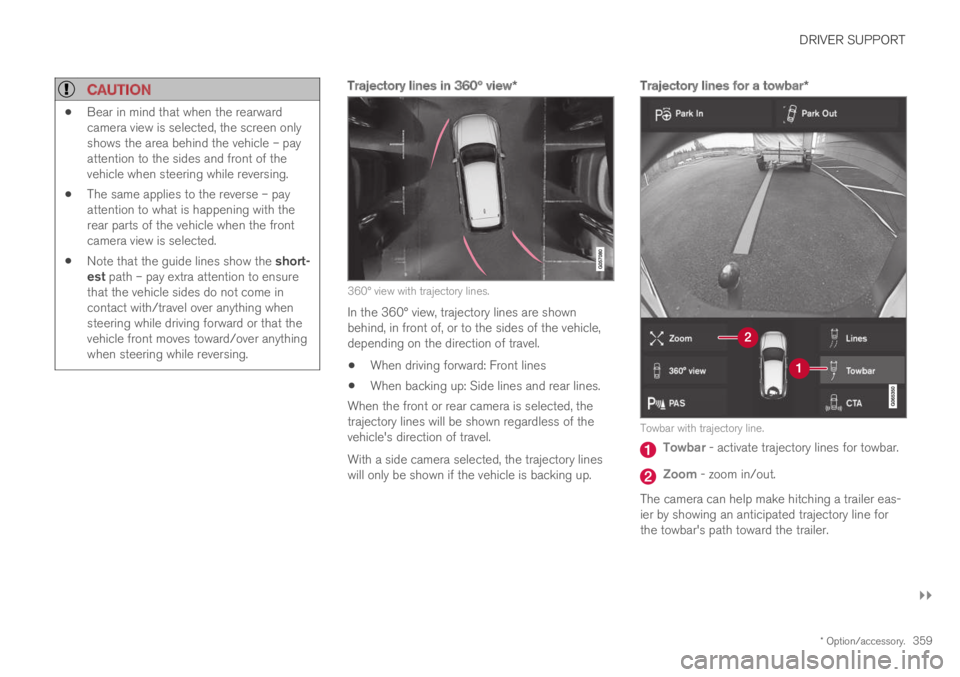
Trajectory lines in 360° view *
360° view with trajectory lines.
In the 360° view, trajectory lines are shownbehind, in front of, or to the sides of the vehicle,depending on the direction of travel.
When driving forward: Front lines
When backing up: Side lines and rear lines.
When the front or rear camera is selected, thetrajectory lines will be shown regardless of thevehicle's direction of travel.
With a side camera selected, the trajectory lineswill only be shown if the vehicle is backing up.
Trajectory lines for a towbar *
Towbar with trajectory line.
Towbar - activate trajectory lines for towbar.
Zoom - zoom in/out.
The camera can help make hitching a trailer eas-ier by showing an anticipated trajectory line forthe towbar's path toward the trailer.