trailer VOLVO S60 TWIN ENGINE 2019 Owner's Guide
[x] Cancel search | Manufacturer: VOLVO, Model Year: 2019, Model line: S60 TWIN ENGINE, Model: VOLVO S60 TWIN ENGINE 2019Pages: 645, PDF Size: 13.96 MB
Page 439 of 645
STARTING AND DRIVING
}}
* Option/accessory.437
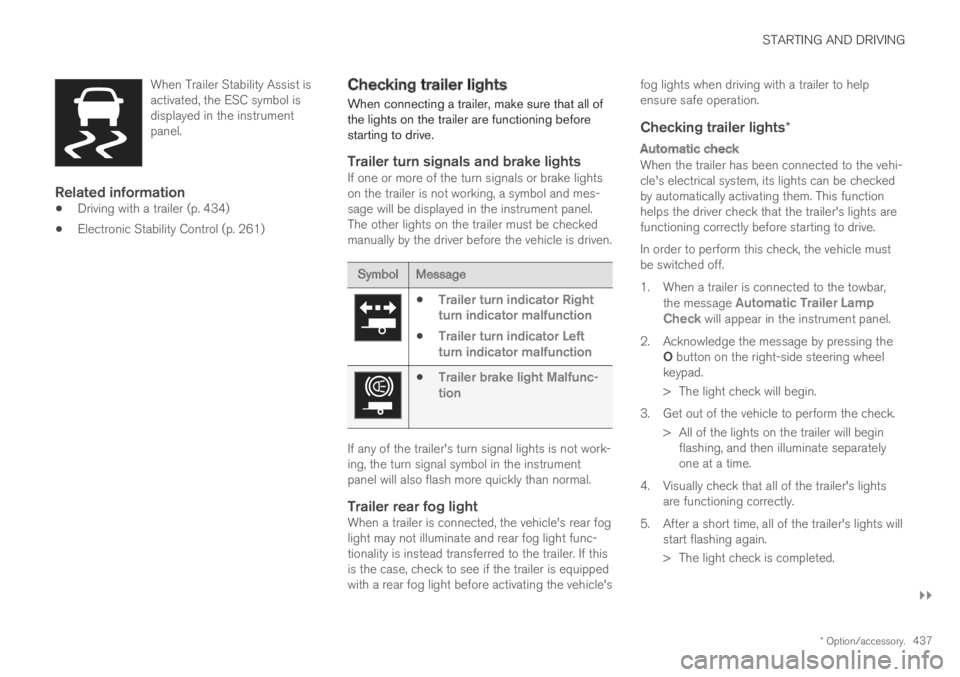
When Trailer Stability Assist isactivated, the ESC symbol isdisplayed in the instrumentpanel.
Related information
Driving with a trailer (p. 434)
Electronic Stability Control (p. 261)
Checking trailer lights
When connecting a trailer, make sure that all ofthe lights on the trailer are functioning beforestarting to drive.
Trailer turn signals and brake lights
If one or more of the turn signals or brake lightson the trailer is not working, a symbol and mes-sage will be displayed in the instrument panel.The other lights on the trailer must be checkedmanually by the driver before the vehicle is driven.
SymbolMessage
Trailer turn indicator Rightturn indicator malfunction
Trailer turn indicator Leftturn indicator malfunction
Trailer brake light Malfunc-tion
If any of the trailer's turn signal lights is not work-ing, the turn signal symbol in the instrumentpanel will also flash more quickly than normal.
Trailer rear fog light
When a trailer is connected, the vehicle's rear foglight may not illuminate and rear fog light func-tionality is instead transferred to the trailer. If thisis the case, check to see if the trailer is equippedwith a rear fog light before activating the vehicle's
fog lights when driving with a trailer to helpensure safe operation.
Checking trailer lights *
Automatic check
When the trailer has been connected to the vehi-cle's electrical system, its lights can be checkedby automatically activating them. This functionhelps the driver check that the trailer's lights arefunctioning correctly before starting to drive.
In order to perform this check, the vehicle mustbe switched off.
1. When a trailer is connected to the towbar,the message Automatic Trailer LampCheck will appear in the instrument panel.
2.Acknowledge the message by pressing theO button on the right-side steering wheelkeypad.
> The light check will begin.
3. Get out of the vehicle to perform the check.
> All of the lights on the trailer will beginflashing, and then illuminate separatelyone at a time.
4. Visually check that all of the trailer's lightsare functioning correctly.
5. After a short time, all of the trailer's lights willstart flashing again.
> The light check is completed.
Page 440 of 645

||
STARTING AND DRIVING
438
Disabling the automatic check
The automatic light check can be disabled in thecenter display.
1.Tap Settings in the Top view.
2.Tap My CarLights and Lighting.
3.Deselect Automatic Trailer Lamp Check.
Manual check
If the automatic check has been disabled, thecheck can be started manually.
1.Tap Settings in the Top view.
2.Tap My CarLights and Lighting.
3.Select Manual Trailer Lamp Check.
>The light check will begin. Get out of thevehicle to perform the check.
Related information
Driving with a trailer (p. 434)
Towing using a towline
This section refers to one vehicle being towedbehind another using a towline.
Never attempt to tow a Twin Engine vehiclebehind another vehicle as this could damage theelectric motor. The vehicle must instead be liftedonto a tow truck and transported with all fourwheels on the bed or lifting platform of the truck(no wheels may touch the road).
Towing another vehicle
Towing another vehicle requires a lot of power -use the Constant AWD drive mode. This helpscharge the hybrid battery and improve the vehi-cle's driving and roadholding characteristics.
Before towing another vehicle, check applicablespeed limit regulations.
Jump starting
Never attempt to tow the vehicle to start theengine, as this could damage the electric motor.Use an auxiliary battery if the start battery'scharge level is so low that the engine cannot bestarted.
CAUTION
Attempts to tow-start the vehicle could causedamage to the electrical drive motor andthree-way catalytic converter.
Related information
Attaching and removing the towing eyelet(p. 439)
Hazard warning flashers (p. 159)
Recovery (p. 440)
Jump starting using another battery (p. 432)
Selecting ignition mode (p. 396)
Page 542 of 645
||
WHEELS AND TIRES
540
Related information
Recommended tire pressure (p. 521)
Using the tire sealing system (p. 535)
Tire sealing system (p. 534)
Determining the vehicle's permittedweight
Properly loading your vehicle will provide maxi-mum return of vehicle design performance.
Weight designations
Before loading your vehicle, familiarize yourselfwith the following terms for determining yourvehicle's weight ratings, with or without a trailer,from the vehicle's Federal/Canadian Motor Vehi-cle Safety Standards (FMVSS/CMVSS) label, andthe vehicle's tire information placard:
Curb weight
The weight of the vehicle including a full tank offuel and all standard equipment. It does notinclude passengers, cargo, or optional equipment.
Capacity weight
All weight added to the curb weight, includingcargo and optional equipment. When towing, tow-bar weight is also part of cargo weight.
Permissible axle weight
The maximum allowable weight that can be car-ried by a single axle (front or rear). These num-bers are shown on the Federal/Canadian MotorVehicle Safety Standards (FMVSS/CMVSS) label.The total load on each axle must never exceed itsmaximum permissible weight.
Gross vehicle weight (GVW)
The vehicle's curb weight + cargo + passengers.
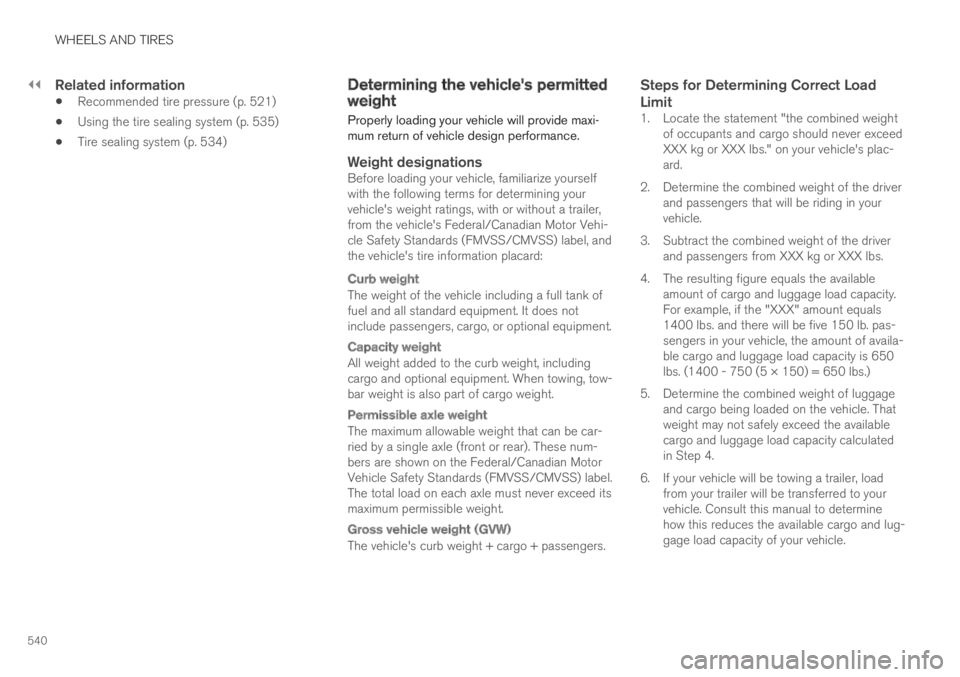
Steps for Determining Correct Load
Limit
1. Locate the statement "the combined weightof occupants and cargo should never exceedXXX kg or XXX lbs." on your vehicle's plac-ard.
2. Determine the combined weight of the driverand passengers that will be riding in yourvehicle.
3. Subtract the combined weight of the driverand passengers from XXX kg or XXX lbs.
4. The resulting figure equals the availableamount of cargo and luggage load capacity.For example, if the "XXX" amount equals1400 lbs. and there will be five 150 lb. pas-sengers in your vehicle, the amount of availa-ble cargo and luggage load capacity is 650lbs. (1400 - 750 (5 × 150) = 650 lbs.)
5. Determine the combined weight of luggageand cargo being loaded on the vehicle. Thatweight may not safely exceed the availablecargo and luggage load capacity calculatedin Step 4.
6. If your vehicle will be towing a trailer, loadfrom your trailer will be transferred to yourvehicle. Consult this manual to determinehow this reduces the available cargo and lug-gage load capacity of your vehicle.
Page 620 of 645
SPECIFICATIONS
* Option/accessory.618
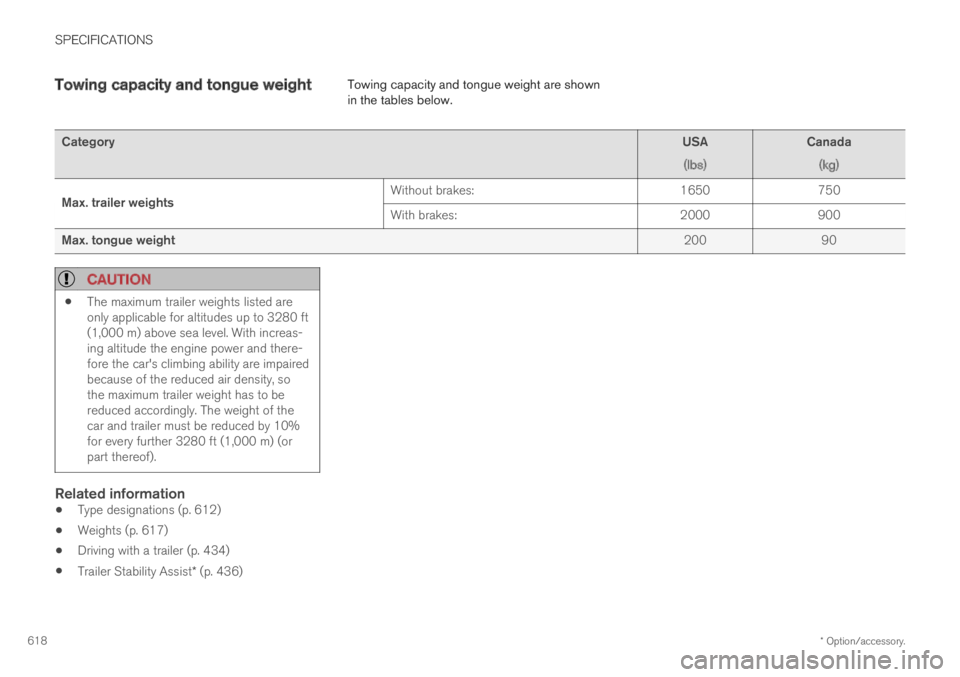
Towing capacity and tongue weightTowing capacity and tongue weight are shownin the tables below.
CategoryUSA
(lbs)
Canada
(kg)
Max. trailer weightsWithout brakes:1650750
With brakes:2000900
Max. tongue weight20090
CAUTION
The maximum trailer weights listed areonly applicable for altitudes up to 3280 ft(1,000 m) above sea level. With increas-ing altitude the engine power and there-fore the car's climbing ability are impairedbecause of the reduced air density, sothe maximum trailer weight has to bereduced accordingly. The weight of thecar and trailer must be reduced by 10%for every further 3280 ft (1,000 m) (orpart thereof).
Related information
Type designations (p. 612)
Weights (p. 617)
Driving with a trailer (p. 434)
Trailer Stability Assist* (p. 436)
Page 628 of 645
INDEX
626
Automatic transmission 406
kickdown 410
oil 621
Trailer 434
Auxiliary heater 224
B
Backrest
front seat, adjusting180, 181, 184,
185, 186, 187
rear seat, folding189
Battery
Hybrid578
jump-start432
Maintenance574
recycling579
start574
symbols on the battery579
BLIS321
activating/deactivating322
limitations323
Symbols and messages324
Blower
adjusting214
air distribution202
air vents202
Bluetooth
connect476
connecting vehicle to Internet 495
phone484
settings493
Book service and repair 561
Booster cushions 71
Brake assist
after collision 405
Brake energy 397, 410
Brake fluid
grade 621
Brake functions 396
Brake position 406
Brakes 397
anti-lock brakes, ABS 397
automatic when stationary 403
Brake Assist System, BAS 398
brake lights 159
brake system 396
emergency brake lights 159
Maintenance 399
on salted roads 399
on wet roads 399
parking brake 400
brake system
fluid 621
C
Camera sensor
see Camera299
Camera unit299
limitations300
maintenance and cleaning304
Capacity weight540, 617
Cargo compartment551
attachment points553
Car wash 598, 599, 601, 602, 603, 604
Catalytic converter430
recovery438
CD player474
Cell phone, see Phone485
Center console545
Center display
change appearance129
cleaning593
climate controls207
Function view120
keyboard124
messages138, 139
operation110, 113, 117, 122
overview107
settings130, 131
switch off and change volume 129
Page 631 of 645

INDEX
629
Drive systems 410
Driving
cooling system 431
with a trailer 434
Driving economy 420
Driving through standing water 425
driving with a trailer
towball load 618
towing capacity 618
E
Economical driving420
Electrical outlet546
use548
Electrical system 574
Electric drive motor
specifications 619
electric motor 410
Range 421
Electric parking brake 400
Electronic immobilizer 243
emergency brake lights 159
Emission inspection readiness 556
Energy distribution
using map data 417
Engine
automatic start and stop of combustion
engine411
overheating431
start392
turn off394
Engine braking 397, 406
Engine compartment
coolant 571
engine oil 569
overview 568
Engine drag control 261
Engine oil 569
filling 570
filter 569
grade and volume 620
Engine shutdown 394
Engine specifications 619
Engine temperature
high 431
Environment 27
Ethanol content
max. 10% by volume 428
Exterior dimensions 615
Extra heater (Auxiliary heater) 224
F
Federal Clean Air Act556
Ferry transport418
Flooded road425
Fluids, volumes609, 622
Fluids and oils621, 622
Fog lights
front157
rear158
Four-C418
Front seat
blower214
climate207
heating208, 209
temperature215
ventilation209
Front seat manual180
Front seats, power181
adjusting passenger seat from driver's
seat188
adjusting seat181
Lumbar support187
massage184, 185
multifunction control 184, 185, 186, 187
Side bolsters186
store position182, 183
FSC, environmental labeling23
Page 633 of 645

INDEX
631
I
IAQS (Interior Air Quality System) 200
IC (Inflatable Curtain)60
ID, Volvo26
Identification number38
Ignition mode395, 396
Immobilizer243
Electronic immobilizer243
Indicator symbols92
Individual drive mode412
Infant seats67
Inflatable curtain60
Inflatable Curtain60
Inflating tires539
Inflation pressure
adjusting520
Checking519
decal with recommended pressure 521
Inflation pressure monitoring521
action525
save new inflation pressure523
Status524
Inflation pressure table623
Information display82, 84
Infotainment (Audio and media)448
Instrument cluster82
settings84
Instrument illumination162
Instrument lighting162
Instrument panel82
App menu101, 102
hybrid-related symbols and messages 387
messages103
settings84
Instruments and controls80
Instruments overview
left-hand drive vehicle80
IntelliSafe
driver support28
Interior Air Quality System200
Intermittent wiping175
Internet, see Internet-connected vehicle 494
Internet-connected vehicle494
book service and repair561
No connection or poor connection 498
send car data562
system updates559
iPod®, connecting476
ISOFIX/LATCH anchors74
J
Jack527
Jump-start432
K
Key230
Keyboard124, 127
change language127
Keyless
locking/unlocking245
settings246
touch-sensitive surfaces244
Key tag230
L
Labels
location612
Laminated glass 164
Lamps
changing 572
Trailer 437
Lane Keeping Aid 337
activating/deactivating 339
Page 639 of 645

INDEX
637
Sun visor 550
mirror lighting 161
Switching target vehicles
with Adaptive Cruise Control 291
with Pilot Assist 291
Symbols
dynamic 82
indicator symbols 92
warning symbols 95
Symbols and messages
center display's status bar 122
hybrid-related 387
parking climate 223
system updates 559
T
Technician certification38
Temperature
adjusting215, 216
perceived197
Temperature monitoring 380
Temporary Spare 531
Temporary tire sealing system 534
execution, checking 535
Inflating tires 539
Terms and conditions
services35
users500
Tire dimensions 516
when changing wheels 526
Tires 512
direction of rotation 514
glossary of terms 515
inflation pressure table 623
mounting 530
pressure 623
removal 528
rotation when changing 512
specifications 516, 623
storage 512
tread wear indicator 515
winter tires 533
Tire sealing system
Inflating tires 539
use 535
Tire tread 515
Tools 526
Top tether anchors (child restraint sys-
tems)72
Top view 130
Total airing function 230
Towing 438
Towing capacity and towball load 618
Towing eyelet439
TPMS - Tire Pressure Monitoring System521
Traction control 261
Traffic information 456
Trailer
driving with a trailer 434
Lamps 437
swaying 436
Trailer Stability Assist 262
trailer 436
Trailer stabilizer 262, 436
Transmission 406
automatic 406
Transmission fluid
grade 621
Travel Link 464
Notifications 467
Sports 469
weather 466
Tread depth 515
winter tires 533
Tread wear indicator 515
Trip computer 87
display in instrument panel 89
Trip odometer 87
Trip odometer resetting 90
Page 640 of 645

INDEX
638
Trip statistics 90
settings 91
Troubleshooting
Adaptive Cruise Control 277
Camera unit 300
City Safety 316
Radar unit 300
Trunk
electrical outlet 546, 548
Lighting 161
Trunk lid
emergency opening 250
locking/unlocking 233, 247
unlocking from inside 250
TSA - Trailer Stability Assist 436
Tunnel detection 154
Turn off engine 394
Turn signals 156
Twin Engine
general 374
Type approval
HomeLink®443
radar system 297
U
Uniform Tire Quality Grading518
Units130
Unlocking
settings 233
with key blade 241
USB
socket for connecting media 477
V
Vehicle care 598, 599, 601, 602, 603, 604
leather upholstery596
Vehicle Event Data33
Vehicle functions
in the center display120
Vehicle key bat. low234
Vehicle modem
connecting vehicle to Internet 496
settings497
Vehicle recovery440
Vehicle status560
inflation pressure524
Vehicle upholstery 593, 595, 596, 597, 598
Vehicle weight617
Ventilation201, 202
Seats209
Video474, 476
settings475
Voice control143
climate197
phone145
radio and media146
settings147
VOL mark512
Volvo ID26
create and register27
W
Warning lights
Adaptive Cruise Control290
airbags SRS95
alternator does not charge95
brake system error95
low oil pressure95
parking brake applied95
Pilot Assist290
seat belt reminder95
stability and traction control system 261