trunk VOLVO S60 TWIN ENGINE 2019 User Guide
[x] Cancel search | Manufacturer: VOLVO, Model Year: 2019, Model line: S60 TWIN ENGINE, Model: VOLVO S60 TWIN ENGINE 2019Pages: 645, PDF Size: 13.96 MB
Page 201 of 645

CLIMATE CONTROL
* Option/accessory.199
Clean Zone*
The Clean Zone function monitors the condi-tions affecting good air quality in the passengercompartment and indicates whether they are ful-filled or not.
The indicator is shown in the center display'sClimate view.
The indicator is shown in the climate barwhen Climate view is not open.
If the conditions are not met, the text CleanZone will be shown in white. When all the condi-tions are met, the text will change to blue.
The following conditions must be met:
All doors and trunk lid are closed.
All side windows and panoramic roof* areclosed.
The Interior Air Quality System* is activated.
The blower is activated.
Air recirculation is deactivated.
NOTE
Clean Zone does not indicate that the airquality is good, but only that the conditions forgood air quality have been met.
Related information
Air quality (p. 198)
Clean Zone Interior Package* (p. 199)
Interior Air Quality System* (p. 200)
Passenger compartment air filter (p. 201)
Clean Zone Interior Package*
Clean Zone Interior Package (CZIP) is a seriesof modifications that filters even more allergy andasthma-inducing substances from the passengercompartment.
CZIP includes the following:
An enhanced function that starts the blowerwhen the vehicle is unlocked using theremote key. The blower will then fill the pas-senger compartment with fresh air. The func-tion starts when required and switches offautomatically after a period of time or whenone of the passenger compartment doors isopened. The amount of time the blower runsgradually decreases due to reduced need upuntil the vehicle is 4 years old.
The fully automatic Interior Air QualitySystem (IAQS).
Related information
Air quality (p. 198)
Clean Zone* (p. 199)
Interior Air Quality System* (p. 200)
Passenger compartment air filter (p. 201)
Page 230 of 645

KEY, LOCKS AND ALARM
* Option/accessory.228
Lock indication
The turn signals will flash when the vehicle islocked or unlocked.
Exterior confirmation
Locking
The turn signals will flash once and the door
mirrors will fold in1 to confirm the vehicle islocked.
Unlocking
The turn signals will flash twice and the door
mirrors will fold out1 to confirm the vehicle isunlocked.
The trunk lid, hood and all doors must be closedfor confirmation to be given. If only the driver's
door is closed when the vehicle is locked2, thevehicle will be locked but the turn signals will onlyflash to indicate locking when all doors and thetrunk and hood have been closed.
Lock and alarm indicators on the
dashboard
The locks and alarm indicator will display the sta-tus of the locking system:
One long flash indicates locking.
When the vehicle is locked, this will be indi-cated by short, pulsating flashes.
Rapid flashing after disabling the alarm indi-cates that the alarm has been triggered.
Lock button indicators
Front door
Lock buttons with indicator lights in front door.
Illuminated indicator lights in both front door lockbuttons indicate that all doors are locked. If anydoor is opened, the lights in both doors will goout.
1Only vehicles with power folding mirrors.2Does not apply to vehicles equipped with keyless locking/unlocking*.
Page 232 of 645

KEY, LOCKS AND ALARM
* Option/accessory.230
Remote key
The remote key is used to lock and unlock doorsand the trunk lid. The remote key must be in thevehicle in order to start the engine.
Remote key3 and button-less key (Key Tag)*.
The remote key is not physically used to start theignition because the vehicle is standard-equippedwith keyless start (Passive Start). The key onlyneeds to be in the front section of the passengercompartment.
For vehicles equipped with keyless locking andunlocking (Passive Entry)*, the engine can bestarted with the key anywhere in the vehicle. Asmaller, lighter and button-less key (Key Tag) isalso provided.
The remote keys can be linked to different driverprofiles to store personal settings in the vehicle.
Remote key buttons
The remote key has four buttons, one on the left sideand three on the right.
Locking - Press once to lock the doors,trunk lid and fuel filler door and arm thealarm.
Press and hold to close all windows.
Unlocking – Press once to unlock thedoors and trunk lid and disarm the alarm.
Press and hold to open all windows at thesame time. This total airing function can beused to e.g. quickly air out the vehicle in hotweather.
Trunk lid - Press to unlock and disarm thetrunk lid only. Pressing and holding will open
the trunk lid mechanically due to the preloa-ded springs.
Panic alarm - Used to attract attention inemergency situations. Press and hold thebutton for at least 3 seconds or press twicewithin 3 seconds to activate the turn signalsand horn. To deactivate, wait at least 5 sec-onds and press the button again. If no actionis taken, the panic alarm will deactivate auto-matically after 3 minutes.
WARNING
If anyone is left in the vehicle, make sure thatpower to the power windows and panoramicroof* is cut off by always taking the remotekey with you when you leave the vehicle.
3The illustration is generic - details may vary according to vehicle model.
Page 234 of 645
KEY, LOCKS AND ALARM
* Option/accessory.232
Locking and unlocking using theremote key
All doors and the trunk lid can be locked andunlocked simultaneously using the buttons onthe remote key.
Locking with remote key
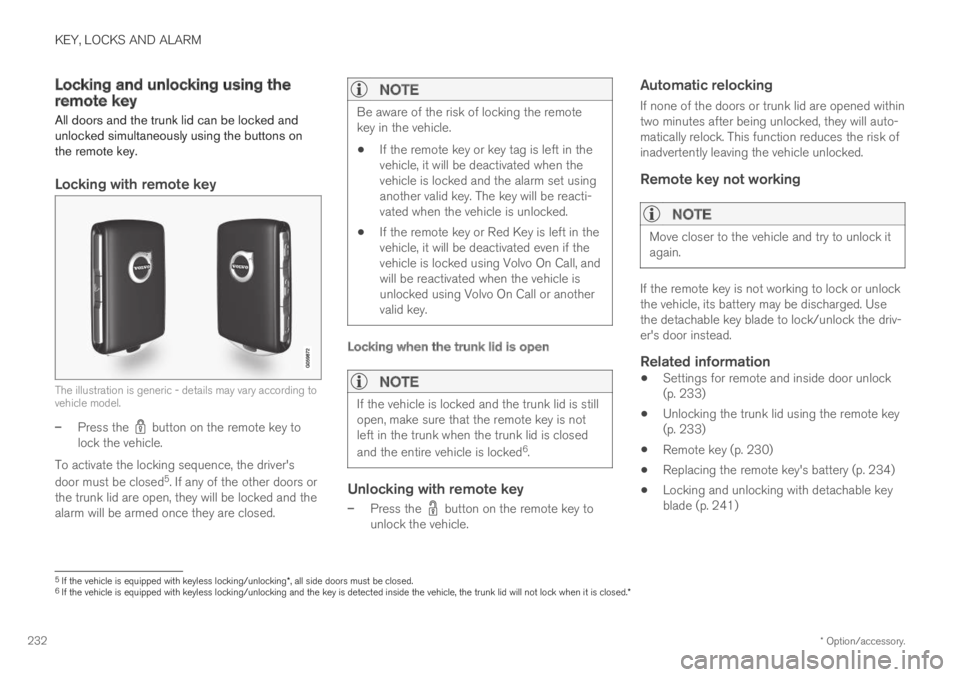
The illustration is generic - details may vary according tovehicle model.
–Press the button on the remote key tolock the vehicle.
To activate the locking sequence, the driver's
door must be closed5. If any of the other doors orthe trunk lid are open, they will be locked and thealarm will be armed once they are closed.
NOTE
Be aware of the risk of locking the remotekey in the vehicle.
If the remote key or key tag is left in thevehicle, it will be deactivated when thevehicle is locked and the alarm set usinganother valid key. The key will be reacti-vated when the vehicle is unlocked.
If the remote key or Red Key is left in thevehicle, it will be deactivated even if thevehicle is locked using Volvo On Call, andwill be reactivated when the vehicle isunlocked using Volvo On Call or anothervalid key.
Locking when the trunk lid is open
NOTE
If the vehicle is locked and the trunk lid is stillopen, make sure that the remote key is notleft in the trunk when the trunk lid is closed
and the entire vehicle is locked6.
Unlocking with remote key
–Press the button on the remote key tounlock the vehicle.
Automatic relocking
If none of the doors or trunk lid are opened withintwo minutes after being unlocked, they will auto-matically relock. This function reduces the risk ofinadvertently leaving the vehicle unlocked.
Remote key not working
NOTE
Move closer to the vehicle and try to unlock itagain.
If the remote key is not working to lock or unlockthe vehicle, its battery may be discharged. Usethe detachable key blade to lock/unlock the driv-er's door instead.
Related information
Settings for remote and inside door unlock(p. 233)
Unlocking the trunk lid using the remote key(p. 233)
Remote key (p. 230)
Replacing the remote key's battery (p. 234)
Locking and unlocking with detachable keyblade (p. 241)
5If the vehicle is equipped with keyless locking/unlocking*, all side doors must be closed.6If the vehicle is equipped with keyless locking/unlocking and the key is detected inside the vehicle, the trunk lid will not lock when it is closed.*
Page 235 of 645
KEY, LOCKS AND ALARM
* Option/accessory.233
Settings for remote and inside doorunlock
Several different sequences are available forremote unlocking.
To change this setting:
1.Tap Settings in the center display's Topview.
2.Tap My CarLockingRemote andInterior Unlock.
3.Select alternative:
All Doors – unlocks all doors at the sametime.
Single Door – unlocks the driver's door.Press the remote key unlock button twiceto unlock all doors.
The settings made here also affect central lock-ing using the inside door handle.
Related information
Locking and unlocking using the remote key(p. 232)
Locking and unlocking from inside the vehi-cle (p. 249)
Unlocking the trunk lid using theremote key
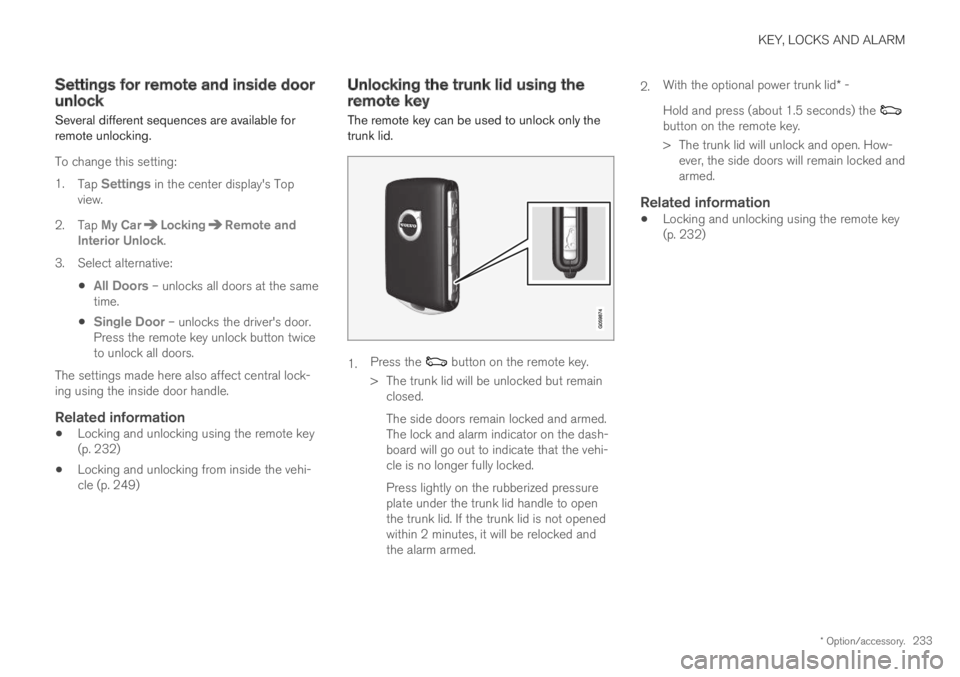
The remote key can be used to unlock only thetrunk lid.
1.Press the button on the remote key.
>The trunk lid will be unlocked but remainclosed.
The side doors remain locked and armed.The lock and alarm indicator on the dash-board will go out to indicate that the vehi-cle is no longer fully locked.
Press lightly on the rubberized pressureplate under the trunk lid handle to openthe trunk lid. If the trunk lid is not openedwithin 2 minutes, it will be relocked andthe alarm armed.
2.With the optional power trunk lid* -
Hold and press (about 1.5 seconds) the button on the remote key.
>The trunk lid will unlock and open. How-ever, the side doors will remain locked andarmed.
Related information
Locking and unlocking using the remote key(p. 232)
Page 236 of 645

KEY, LOCKS AND ALARM
* Option/accessory.234
Remote key range
In order to function correctly, the remote keymust be within a certain distance from the vehi-cle.
Manual use
The remote key's functions for e.g. locking and
unlocking, which are activated by pressing or
, have a range of approx. 20 meters (65 feet)from the vehicle.
If the vehicle's locks do not react, move closerand try again.
Keyless * use
The shaded areas around the vehicle illustrate the rangeof the system's antennas.
For keyless use, a remote key or the Key Tagmust be within the shaded areas shown in theillustration, i.e. a semicircle with a radius of
approx. 1.5 meter (5 feet) along the sides of thevehicle or approx. 1 meter (3 feet) from the trunklid.
NOTE
The functions of the remote control key canbe disrupted by ambient radio waves, build-ings, topographical conditions, etc. The vehi-cle can always be locked/unlocked using thekey blade.
If the remote key is removed from the
vehicle
If the remote key is removed from thevehicle while the engine is running, thewarning message Vehicle key notfound Removed from vehicle will bedisplayed in the instrument panel and an audiblesignal will sound when the last door is closed.
The message will disappear when the key isreturned to the vehicle and the O button on theright-side steering wheel keypad is pressed orwhen the last door is closed again.
Related information
Remote key (p. 230)
Antenna locations for the start and lock sys-tem (p. 248)
Keyless and touch-sensitive surfaces*(p. 244)
Replacing the remote key's battery
The battery in the remote key must be replacedwhen it is discharged.
NOTE
All batteries have a limited service life andmust eventually be replaced (does not applyfor Key Tag). The battery's service life variesdepending on how often the vehicle/key isused.
The remote key battery should be replaced if
the information symbol illuminates and themessage Vehicle key bat. low is displayedin the instrument panel.
the locks do not react after several attemptsto lock or unlock the vehicle using theremote key within approx. 20 meter (65 feet)from the vehicle.
NOTE
Move closer to the vehicle and try to unlock itagain.
Page 247 of 645
KEY, LOCKS AND ALARM
}}
* Option/accessory.245
Pressure-sensitive surfaces
Door handle
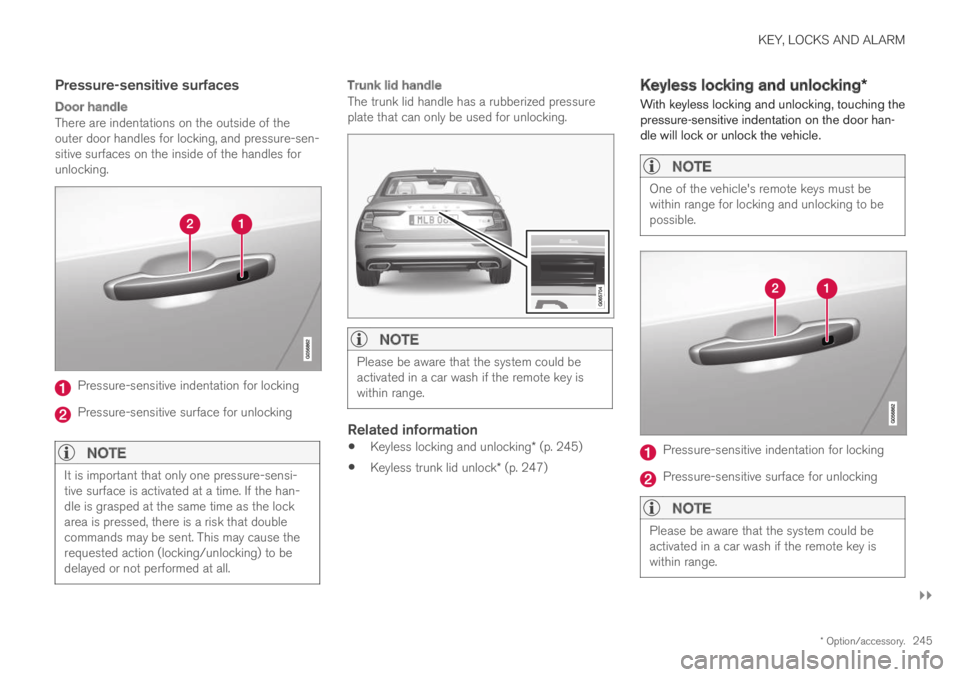
There are indentations on the outside of theouter door handles for locking, and pressure-sen-sitive surfaces on the inside of the handles forunlocking.
Pressure-sensitive indentation for locking
Pressure-sensitive surface for unlocking
NOTE
It is important that only one pressure-sensi-tive surface is activated at a time. If the han-dle is grasped at the same time as the lockarea is pressed, there is a risk that doublecommands may be sent. This may cause therequested action (locking/unlocking) to bedelayed or not performed at all.
Trunk lid handle
The trunk lid handle has a rubberized pressureplate that can only be used for unlocking.
NOTE
Please be aware that the system could beactivated in a car wash if the remote key iswithin range.
Related information
Keyless locking and unlocking* (p. 245)
Keyless trunk lid unlock* (p. 247)
Keyless locking and unlocking*
With keyless locking and unlocking, touching thepressure-sensitive indentation on the door han-dle will lock or unlock the vehicle.
NOTE
One of the vehicle's remote keys must bewithin range for locking and unlocking to bepossible.
Pressure-sensitive indentation for locking
Pressure-sensitive surface for unlocking
NOTE
Please be aware that the system could beactivated in a car wash if the remote key iswithin range.
Page 248 of 645

||
KEY, LOCKS AND ALARM
* Option/accessory.246
Keyless locking
All of the doors have to be closed before thevehicle can be locked. However, the trunk lid canbe open when a door handle is used for locking.
–Touch the marked area on the outside of oneof the door handles after the door is closed.
>The lock indicator light on the dashboardwill flash to confirm that the vehicle islocked.
To close all door windows at the same time -place your finger on the pressure-sensitiveindentation on the outside of the door handle andhold it there until the side windows have closed.
Locking when the trunk lid is open
NOTE
If the vehicle is locked and the trunk lid is stillopen, make sure that the remote key is notleft in the trunk when the trunk lid is closed.
If the key is detected in the vehicle, the trunklid will not lock when it is closed.
Keyless unlocking
–To unlock, grasp a door handle or lightlypress the rubberized button on the undersideof the trunk lid handle.
>The lock indicator light on the dashboardwill stop flashing to confirm that the vehi-cle is unlocked.
The rubberized button on the trunk lid can only be usedfor unlocking.
Automatic relocking
If none of the doors or trunk lid are opened withintwo minutes after being unlocked, they will auto-matically relock. This function reduces the risk ofinadvertently leaving the vehicle unlocked.
Related information
Keyless unlock settings* (p. 246)
Keyless trunk lid unlock* (p. 247)
Keyless and touch-sensitive surfaces*(p. 244)
Keyless unlock settings*
Several different sequences are available forkeyless unlocking.
To change this setting:
1.Tap Settings in the center display's Topview.
2.Tap My CarLockingKeyless Unlock
3. Select alternative:
All Doors – unlocks all doors at the sametime.
Single Door – unlocks the selected door.
Related information
Keyless locking and unlocking* (p. 245)
Keyless and touch-sensitive surfaces*(p. 244)
Page 249 of 645

KEY, LOCKS AND ALARM
}}
* Option/accessory.247
Keyless trunk lid unlock*
With keyless locking/unlocking, touching thepressure-sensitive indentation on the trunk lidhandle will unlock the trunk lid.
NOTE
One of the vehicle's remote keys must bewithin range behind the vehicle for unlockingto be possible.
The trunk lid is held closed by an electronic lock-ing mechanism.
To open:
1.Lightly press the rubberized pressure plateon the underside of the trunk lid handle.
> The lock will disengage.
2. Lift the outer handle to open the trunk lid.
CAUTION
Only light pressure on the rubberized pres-sure plate is necessary to release thetrunk lid's locking mechanism.
Use the handle to lift the trunk lid and donot apply force to the rubberized pressureplate. Too much force can damage thepressure plate's electrical connections.
Hands-free opening of the trunk lid is also possi-ble using a foot movement under the rearbumper.
Kicking motion within the sensor's activation area.
–Make one slow forward kicking motion withyour foot under the left section of the rearbumper. Take a step back. Do not touch thebumper.
>A brief audible signal will sound whenopening is activated – the trunk lid willopen/close.
If several opening attempts have been madewithout the remote key in range behind the vehi-cle, foot movement operation will not be availablefor a short period of time.
Do not keep your foot under the vehicle in a kick-ing motion. This may prevent activation.
Page 250 of 645

||
KEY, LOCKS AND ALARM
* Option/accessory.248
NOTE
Please note that the system could be inadver-tently activated in a car wash or similar if theremote key is within range.
WARNING
Do not drive with the trunk lid open. Toxicexhaust fumes can be sucked into the vehiclethrough the trunk.
Related information
Keyless and touch-sensitive surfaces*(p. 244)
Remote key range (p. 234)
Antenna locations for the start andlock system
The antennas for the keyless start system andkeyless locking system* are integrated in thevehicle.
Location of the antennas:
Under the cup holder in the front section ofthe tunnel console
In the upper front section of the left-side rear
door10
In the upper front section of the right-side
rear door10
In the trunk10
WARNING
Individuals with an implanted pacemakershould not allow the pacemaker to comecloser than 22 cm (9 in.) to the Keyless sys-tem antennas. The aim of this is to preventdisturbances between the pacemaker and theKeyless system.
Related information
Keyless and touch-sensitive surfaces*(p. 244)
Remote key range (p. 234)
10Only in vehicles equipped with keyless locking and unlocking*.