brake light VOLVO S60 TWIN ENGINE 2019 Owner's Manual
[x] Cancel search | Manufacturer: VOLVO, Model Year: 2019, Model line: S60 TWIN ENGINE, Model: VOLVO S60 TWIN ENGINE 2019Pages: 645, PDF Size: 13.96 MB
Page 311 of 645
DRIVER SUPPORT
}}
309
The Late warning distance setting should there-fore only be used in exceptional cases, such aswhen a more dynamic driving style is preferred.
WARNING
No automatic system can guarantee100% correct function in all situations.You should therefore never test use ofCity Safety in the direction of people, ani-mals or vehicles – this could lead tosevere damage, serious personal injury oreven death.
City Safety warns the driver if there is arisk of collision, but the function cannotreduce the driver's reaction time.
Even if the warning distance has been setto Early, warnings may be perceived aslate in certain situations – e.g. when thereare large speed differences or if the vehi-cle ahead suddenly brakes heavily.
With the warning distance set to Early,warnings come further in advance. Thismay cause the warnings to come morefrequently than with warning distanceNormal, but is recommended since it canmake City Safety more effective.
NOTE
The warning with direction indicators for RearCollision Warning is deactivated if the colli-sion warning distance in the City Safety func-tion is set to the lowest level "Late".
The seat belt tensioning and braking func-tions remain active.
Related information
City Safety™ (p. 305)
Rear Collision Warning (p. 320)
Detecting obstacles with City Safety
City Safety can help the driver detect other vehi-cles, cyclists, large animals and pedestrians.
Vehicles
City Safety can detect most vehicles that are sta-tionary or are moving in the same direction asyour vehicle. In some cases, it can also detectoncoming vehicles and crossing traffic.
For City Safety to be able to detect a vehicle inthe dark, its headlights and taillights must be onand clearly visible.
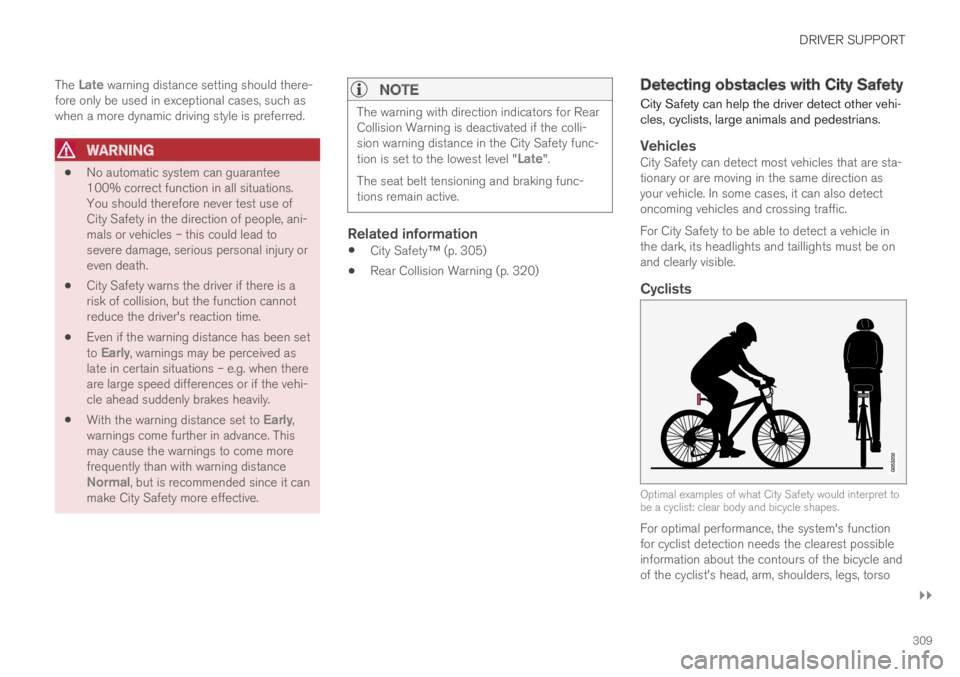
Cyclists
Optimal examples of what City Safety would interpret tobe a cyclist: clear body and bicycle shapes.
For optimal performance, the system's functionfor cyclist detection needs the clearest possibleinformation about the contours of the bicycle andof the cyclist's head, arm, shoulders, legs, torso
Page 312 of 645

||
DRIVER SUPPORT
310
and lower body in combination with normalhuman movements.
If large portions of the cyclist's body or the bicy-cle itself are not visible to the function's camera,it will not be able to detect a cyclist.
The system can only detect adult cyclists ridingon bicycles intended for adults.
WARNING
City Safety is supplementary driver support,but it cannot detect all cyclists in all situationsand, for example, cannot see:
partially obscured cyclists.
cyclists if the background contrast of thecyclist is poor - warning and brake inter-ventions may then be late or not occur atall.
cyclists in clothing that hides their bodycontour.
bikes loaded with large objects.
The driver is always responsible for ensuringthat the vehicle is driven correctly and with asafety distance suitable for the speed.
Pedestrians
Optimal examples of what the system considers to be apedestrian: clear body contours.
For optimal performance, the system's functionfor pedestrian detection needs the clearest pos-sible information about body and bicycle con-tours. This entails being able to detect the con-tours of the pedestrian's head, arm, shoulders,legs, torso and lower body in combination withnormal human movements.
In order to detect a pedestrian, there must be acontrast to the background, which could dependon clothing, weather conditions, etc. If there is lit-tle contrast, the person may be detected late ornot at all, which may result in a delayed reactionfrom the system or no reaction at all.
City Safety can detect pedestrians even in darkconditions if they are illuminated by the vehicle'sheadlights.
WARNING
City Safety is supplementary driver support,but it cannot detect all pedestrians in all sit-uations and, for example, cannot see:
partially obscured pedestrians, people inclothing that hides their body contour orpedestrians shorter than 80 cm (32 in.).
pedestrians if the background contrast ofthe pedestrians is poor - warning andbrake interventions may then be late ornot occur at all.
pedestrians who are carrying largeobjects.
The driver is always responsible for ensuringthat the vehicle is driven correctly and with asafety distance suitable for the speed.
Page 313 of 645

DRIVER SUPPORT
}}
311
Large animals
Optimal examples of what City Safety would interpret asa large animal: stationary or moving slowly and with clearbody contours.
If a large animal appears in front of the vehicle,Large Animal Detection, which is part of CitySafety, can in some cases alert the driver of theanimal and provide braking assistance.
For optimal performance, the system's functionfor detecting large animals (e.g. moose, horses,etc.) needs the clearest possible informationabout body contours. This entails being able todetect the animal straight from the side in combi-nation with normal movements for that animal.
If parts of the animal's body are not visible to thefunction's camera, the system will not be able todetect the animal.
City Safety can detect large animals even in darkconditions if they are illuminated by the vehicle'sheadlights.
WARNING
City Safety is supplementary driver support,but it cannot detect all large animals in all sit-uations and, for example, cannot see:
partially obscured larger animals.
larger animals seen from the front or frombehind.
running or fast moving larger animals.
larger animals if the contrast of the ani-mal's background is poor - warning andbrake interventions may then occur lateor not at all.
smaller animals such as cats and dogs.
The driver is always responsible for ensuringthat the vehicle is driven correctly and with asafety distance suitable for the speed.
Related information
City Safety™ (p. 305)
City Safety limitations (p. 316)
Limitations of City Safety in crossing traffic(p. 312)
City Safety steering assistance limitationsduring evasive maneuvers (p. 314)
City Safety in crossing traffic
City Safety can assist the driver when turning inthe path of an oncoming vehicle in an intersec-tion.
: Sector in which City Safety can detect an oncomingvehicle in crossing traffic.
In order for City Safety to detect an oncomingvehicle in situations where there is a risk of a col-lision, that vehicle must be within the sector inwhich City Safety can analyze the situation.
The following criteria must also be met:
your vehicle's speed must be at least 4 km/h(3 mph)
your vehicle must be making a left turn
the oncoming vehicle's headlights must beon
Page 314 of 645

||
DRIVER SUPPORT
312
WARNING
The driver support system only issues a warn-ing for obstacles detected by its radar sensor– thus, a warning may come after a delay ornot at all.
Never wait for a warning or assistance.Apply the brakes when necessary.
WARNING
The function is supplementary driver sup-port intended to facilitate driving and helpmake it safer – it cannot handle all situa-tions in all traffic, weather and road condi-tions.
The driver is advised to read all sectionsin the Owner's Manual about this functionto learn of its limitations, which the drivermust be aware of before using the func-tion.
Driver support functions are not a substi-tute for the driver's attention and judg-ment. The driver is always responsible forensuring the vehicle is driven in a safemanner, at the appropriate speed, with anappropriate distance to other vehicles,and in accordance with current trafficrules and regulations.
Related information
City Safety™ (p. 305)
Limitations of City Safety in crossing traffic(p. 312)
Limitations of City Safety incrossing traffic
In certain situations, it may be difficult for CitySafety to help the driver avoid a collision withcrossing traffic.
For example:
on slippery roads when Electronic StabilityControl (ESC) is actively operating
if an approaching vehicle is detected at a latestage
if the oncoming vehicle is partially obstructedby another vehicle or object
if the oncoming vehicle's headlights are off
if the oncoming vehicle is moving erraticallyand e.g. suddenly changes lanes at a latestage.
Page 318 of 645

||
DRIVER SUPPORT
316
your lane must have clear side lane markings
your vehicle must be positioned straight inyour lane
the oncoming vehicle must be positionedwithin your vehicle's lane markings
the oncoming vehicle's headlights must beon
the function can only handle “front-to-front”collisions
the function can only detect vehicles withfour wheels.
NOTE
The function uses the vehicle's camera andradar sensor, which has certain general limita-tions.
WARNING
The driver support system only issues a warn-ing for obstacles detected by its radar sensor– thus, a warning may come after a delay ornot at all.
Never wait for a warning or assistance.Apply the brakes when necessary.
WARNING
The function is supplementary driver sup-port intended to facilitate driving and helpmake it safer – it cannot handle all situa-tions in all traffic, weather and road condi-tions.
The driver is advised to read all sectionsin the Owner's Manual about this functionto learn of its limitations, which the drivermust be aware of before using the func-tion.
Driver support functions are not a substi-tute for the driver's attention and judg-ment. The driver is always responsible forensuring the vehicle is driven in a safemanner, at the appropriate speed, with anappropriate distance to other vehicles,and in accordance with current trafficrules and regulations.
Related information
City Safety™ (p. 305)
City Safety limitations (p. 316)
Camera/radar sensor limitations (p. 300)
City Safety limitations
City Safety48 functionality may be reduced incertain situations.
Surroundings
Low objects
Hanging objects, such as flags for overhangingloads or accessories such as auxiliary lights orfront protective grids that extend beyond theheight of the hood, may limit City Safety function-ality.
Slippery road conditions
The extended braking distance on slippery roadsmay reduce City Safety's capacity to help avoid acollision. In these types of situations, the Anti-lock Braking System and Electronic Stability Con-
trol (ESC49) will help provide optimal brakingpower with maintained stability.
Backlighting
The visual warning signal in the windshield maybe difficult to detect in bright sunlight, if there arereflections, or if the driver is wearing sunglassesor not looking straight ahead.
Heat
If the temperature in the passenger compartmentis high due to e.g. bright sunlight, the visual warn-ing signal in the windshield may be temporarilydisabled.
48This function is not available on all markets.49Electronic Stability Control
Page 319 of 645

DRIVER SUPPORT
}}}}
317
Camera and radar sensor's field of vision
The camera's field of vision is limited and in cer-tain situations, it may be unable to detect pedes-trians, large animals, cyclists or vehicles, or it maydetect them later than expected.
Vehicles that are dirty may be detected later thanclean vehicles, and in dark conditions, motorcy-cles may be detected late or not at all.
If a text message displayed in the instrumentpanel indicates that the camera/radar sensor isobstructed, it may be difficult for City Safety todetect pedestrians, large animals, cyclists, vehi-cles or lane markings in front of the vehicle. CitySafety functionality may therefore be reduced.
Text messages may not be displayed for all situa-tions in which the windshield sensors areblocked. The driver must therefore always keepthe windshield in front of the camera/radar sen-sor clean.
CAUTION
Maintenance of driver support components
may only performed by a workshop50.
Driver intervention
Backing up
City Safety is temporarily deactivated when thevehicle is backing up.
Low speed
City Safety is not activated at very low speedsunder 4 km/h (3 mph). The system will thereforenot intervene in situations in which your vehicle isapproaching another vehicle very slowly, such aswhen parking.
Active driver
Action by the driver always has priority. CitySafety will therefore not react or will react at alater stage with a warning or intervention in situa-tions in which the driver is clearly steering andoperating the accelerator pedal, even if a collisionis unavoidable.
An active and aware driving style may thereforedelay collision warnings and intervention in orderto minimize unnecessary warnings.
Other limitations
WARNING
Warnings and brake interventions can betriggered late or not at all if the traffic sit-uation or external influences prevent thecamera and radar unit from properlydetecting pedestrians, cyclists, large ani-mals or vehicles ahead of the vehicle.
To be able to detect vehicles at night, itsfront and rear lights must work and illumi-nate clearly.
The camera and radar unit have a limitedrange for pedestrians and cyclists – thesystem can provide effective warningsand brake interventions if the relativespeed is lower than 50 km/h (30 mph).For stationary or slow-moving vehicles,warnings and brake interventions areeffective at vehicle speeds of up to70 km/h (43 mph). Speed reduction forlarge animals is less than 15 km/h(9 mph) and can be achieved at vehiclespeeds over 70 km/h (43 mph). At lowerspeeds, the warning and brake interven-tion for large animals is less effective.
Warnings for stationary or slow-movingvehicles and large animals can be disen-gaged due to darkness or poor visibility.
50An authorized Volvo workshop is recommended.
Page 328 of 645

||
DRIVER SUPPORT
* Option/accessory.326
WARNING
The function is supplementary driver sup-port intended to facilitate driving and helpmake it safer – it cannot handle all situa-tions in all traffic, weather and road condi-tions.
The driver is advised to read all sectionsin the Owner's Manual about this functionto learn of its limitations, which the drivermust be aware of before using the func-tion.
Driver support functions are not a substi-tute for the driver's attention and judg-ment. The driver is always responsible forensuring the vehicle is driven in a safemanner, at the appropriate speed, with anappropriate distance to other vehicles,and in accordance with current trafficrules and regulations.
Related information
Driver support systems (p. 260)
Activating/deactivating Cross Traffic Alert(p. 326)
Cross Traffic Alert limitations (p. 326)
Cross Traffic Alert messages (p. 328)
BLIS* (p. 321)
Park Assist* (p. 350)
Activating/deactivating Cross Traffic
Alert62
The driver can select to switch off the warning
in the function CTA63 – the sub-function autobrake cannot be switched off and continues tobe active.
Activate or deactivate the func-tion using this button in thecenter display's Function view.
GREEN button indicator light – the functionis activated.
GRAY button indication – warning signal andindication on display for the function is deac-tivated.
The function is automatically activated each timethe engine is started.
Related information
Cross Traffic Alert* (p. 325)
Cross Traffic Alert64 limitations
The CTA65 function with auto brake may havelimited functionality in certain situations. Auto-brake is active at speeds under 15 km/h (9.3mph).
CTA does not function optimally in all situationsand has certain limitations. The CTA sensors, forexample, cannot "see" through other parkedvehicles or objects blocking the vehicle.
Below are a few examples of situations in whichCTA's field of vision may be initially limited andapproaching vehicles may therefore not bedetected until they are very close to your vehicle:
The vehicle is parked very far into a parking space.
62Warning for crossing traffic when the vehicle is backing up.
Page 353 of 645

DRIVER SUPPORT
}}
* Option/accessory.351
Related information
Driver support systems (p. 260)
Park Assist front, rear and sides* (p. 351)
Activating/deactivating Park Assist* (p. 352)
Park Assist symbols and messages (p. 354)
Camera/radar sensor limitations (p. 300)
Park Assist front, rear and sides*
Park Assist behaves differently depending onwhich part of the vehicle is approaching anobstacle.
Front camera
The warning signal has a continuous tone when theobstacle is less than approx. 30 cm (1 ft) from the vehi-cle.
The Parking Assist system's front sensors areautomatically activated when the engine isstarted. They are active at speeds below 10 km/h(6 mph).
The distance monitored extends approx. 80 cm(2.5 ft) in front of the vehicle.
NOTE
The Parking Assist system is deactivatedwhen the parking brake is used or when P isselected on vehicles with automatic transmis-sion.
CAUTION
When installing auxiliary lights: Make surethese do not obscure the sensors – the auxili-ary lights could be perceived as an obstacle.
Back
The warning signal has a continuous tone when theobstacle is less than approx. 30 cm (1 ft) from the vehi-cle.
The rear sensors will be activated if the vehiclebegins rolling backward or if reverse gear isengaged.
Page 376 of 645

HYBRID INFORMATION
374
General information about TwinEngine
Twin Engine vehicles are driven just like anyother vehicle, but certain functions differ from avehicle powered exclusively by gasoline. Theelectric motor powers the vehicle primarily at lowspeeds; the gasoline engine is used at higherspeeds or during more active driving.
The instrument panel displays Twin Engine-spe-cific information - charging information, selecteddrive mode, distance to discharged battery andhybrid battery charge level.
Different drive modes can be selected while driv-ing, e.g. electric power only or, if more power isneeded, a combination of electric and gasolinepower. The vehicle calculates the optimal combi-nation of driveability, driving experience, environ-mental impact and fuel economy for the selecteddrive mode.
In order to function optimally, the hybrid battery(and its electrical drive systems) and the gasolineengine (and its drive systems) must be at thecorrect operating temperature. Battery capacitycan be considerably reduced if the battery is toocold or too hot. Preconditioning prepares thevehicle's drive systems and passenger compart-ment before driving to help reduce both wear andenergy consumption. It also helps increase thehybrid battery's range.
The hybrid battery which powers the electricmotor is recharged using the charging cable. It
can also be recharged during light braking andthrough engine braking in gear position B. Thecombustion engine can also help recharge thehybrid battery.
Important
No electrical current
Keep in mind that if there is no electrical currentto the vehicle, i.e. the ignition is switched off orthe start battery is discharged, certain functionssuch as brakes, power steering, etc. will not work.
WARNING
If the vehicle does not have electrical currentand both the electric motor and the gasolineengine are switched off, the brakes cannot beused to stop the vehicle.
Towing not permitted
Never tow a Twin Engine vehicle behind anothervehicle, as this could damage the electric motor.
Exterior engine noise
WARNING
Please be aware that there is no sound fromthe engine when the vehicle is being poweredby the electric motor and it may be difficult todetect by children, pedestrians, cyclists andanimals. This is especially true at low speeds.
High-voltage electrical current
WARNING
A number of electrical components in TwinEngine Plug-in Hybrid vehicles use high-volt-age current and can be extremely dangerousif handled incorrectly. These components andany orange wiring in the vehicle may only behandled by trained and qualified Volvo servicetechnicians.
Do not touch anything that is not clearly descri-bed in this Owner's Manual.
Related information
Charging the hybrid battery (p. 375)
Hybrid gauge (p. 85)
Drive modes (p. 412)
Starting and stopping preconditioning(p. 218)
Hybrid battery (p. 578)
Factors affecting electric motor range(p. 421)
Page 378 of 645

||
HYBRID INFORMATION
376
Charging cable handle and charging socket.
Charging status is indicated in three ways:
The indicator lights in the charging module(the unit connected to the wall outlet).
Indicator light in the vehicle's chargingsocket.
Images and text in the instrument panel.
The start battery is charged while the hybrid bat-tery is charging and stops charging when thehybrid battery is fully charged.
If the hybrid battery's temperature is below-10 ºC (14 ºF) or above 40 ºC (104 ºF), some ofthe vehicle's functions may be reduced or notavailable at all.
The electric motor cannot be used if the battery'stemperature is too low or too high. If the PUREdrive mode is selected, the gasoline engine willstart.
Charging using the gasoline engine
The vehicle generates electrical current to charge thebattery, e.g. when the driver lightly presses the brakepedal or when engine braking is used on downgrades.
The vehicle can also generate current to thehybrid battery to charge it.
The hybrid battery can also be recharged bylightly depressing the brake pedal, i.e. duringlight braking. This converts the vehicle'skinetic energy to electrical energy, which isused to charge the hybrid battery.
In gear position B, the electric motor brakesthe vehicle when the accelerator pedal isreleased and the hybrid battery is rechargedat the same time.
The combustion engine can also helprecharge the hybrid battery.
Related information
Charge cable (p. 377)
Charging current (p. 377)
Opening and closing the charging socketcover (p. 380)
Initiating hybrid battery charging (p. 380)
Stopping hybrid battery charging (p. 386)
Charging status in the charging cable'scharging module (p. 383)
Charging status in the vehicle's chargingsocket (p. 382)
Charging status in the instrument panel(p. 384)
Twin Engine symbols and messages in theinstrument panel (p. 387)
Gear selector positions for automatic trans-missions (p. 406)
Changing drive mode (p. 416)
Long-term storage of vehicles with hybridbatteries (p. 389)