transmission VOLVO S60 TWIN ENGINE 2019 Owners Manual
[x] Cancel search | Manufacturer: VOLVO, Model Year: 2019, Model line: S60 TWIN ENGINE, Model: VOLVO S60 TWIN ENGINE 2019Pages: 645, PDF Size: 13.96 MB
Page 11 of 645

9
HYBRID INFORMATION
General information about Twin Engine374
Charging the hybrid battery375
Charging current377
Charge cable377
Charging cable residual current device379
Charging cable temperature monitoring380
Opening and closing the chargingsocket cover380
Initiating hybrid battery charging380
Charging status in the vehicle'scharging socket382
Charging status in the chargingcable's charging module383
Charging status in the instrument panel384
Stopping hybrid battery charging386
Twin Engine symbols and messagesin the instrument panel387
Long-term storage of vehicles withhybrid batteries389
STARTING AND DRIVING
Starting the vehicle392
Switching off the vehicle394
Ignition modes395
Selecting ignition mode396
Brake functions396
Brakes397
Brake Assist System398
Braking on wet roads399
Braking on salted roads399
Maintenance of the brake system399
Parking brake400
Activating and deactivating the park-ing brake400
Settings for automatically activatingthe parking brake402
Parking on a hill402
Parking brake malfunction402
Auto-hold brakes403
Activating and deactivating Auto-hold at a standstill404
Hill Start Assist405
Braking assist after a collision405
Transmission406
Gear selector positions for automatictransmissions406
Using the steering wheel paddles* toshift408
Shiftlock409
The kickdown function410
All Wheel Drive (AWD)410
Drive systems410
Starting and stopping the combus-tion engine in Twin Engine vehicles411
Drive modes412
Changing drive mode416
Energy distribution in hybrid modeusing map data*417
Leveling control* and suspension418
Leveling control settings*420
Economical driving420
Factors affecting electric motor range421
Hold and Charge functions423
Preparing for a long trip424
Winter driving424
Driving through standing water425
Opening/closing the fuel filler door425
Refueling426
Fuel428
Octane rating429
Emission controls430
Page 12 of 645

10
Overheating of engine and transmission431
Battery drain432
Jump starting using another battery432
Driving with a trailer434
Trailer Stability Assist*436
Checking trailer lights437
Towing using a towline438
Attaching and removing the towing eyelet439
Recovery440
HomeLink®*440
Programming HomeLink®*441
Using HomeLink®*442
Type approval for HomeLink®*443
Compass*443
Activating and deactivating the compass*444
Calibrating the compass*444
AUDIO, MEDIA AND INTERNET
Audio, media and Internet448
Sound settings448
Sound experience*449
Apps450
Download apps451
Updating apps452
Deleting apps452
Radio453
Starting the radio453
Changing waveband and radio station454
Searching for a radio station455
Storing radio favorites455
Radio settings456
RBDS457
HD Radio™457
Activating and deactivating the HDRadio™458
HD Radio™ sub-channels459
HD Radio™ limitations460
SiriusXM® Satellite radio*460
Using SiriusXM® Satellite radio*461
Settings for SiriusXM® Satellite radio*463
SiriusXM Travel Link®*464
SiriusXM Travel Link®* - Weather466
SiriusXM Travel Link®* - Notifications467
SiriusXM Travel Link®* - Fuel468
SiriusXM Travel Link®* - Sports469
Media player470
Playing media470
Controlling and changing media472
Media searches473
Gracenote®473
CD player*474
Video474
Playing video475
Playing DivX® 475
Video settings475
Streaming media via Bluetooth®476
Connecting a device via Bluetooth®476
Playing media via the USB port476
Connecting a device via the USB port477
Technical specifications for USB devices477
Compatible file formats for media478
Apple® CarPlay®*479
Using Apple® CarPlay®*479
Settings for Apple® CarPlay®*480
Tips for using Apple® CarPlay®*481
Page 15 of 645
13
Fuses in the engine compartment582
Fuses under the glove compartment586
Fuses in the trunk589
Cleaning the interior593
Cleaning the center display593
Cleaning the head-up display*594
Cleaning fabric upholstery and ceil-ing liner595
Cleaning the seat belt595
Cleaning floor mats and inlay mats595
Cleaning leather upholstery596
Cleaning the leather steering wheel597
Cleaning interior plastic, metal andwood surfaces598
Cleaning the exterior598
Polishing and waxing599
Hand washing599
Automatic car washes601
High-pressure washing602
Cleaning the wiper blades602
Cleaning exterior plastic, rubber andtrim components603
Cleaning rims604
Corrosion protection604
Paintwork605
Touching up minor paint damage605
Color codes606
Replacing windshield wiper blades607
Windshield wipers in the service position608
Filling washer fluid609
SPECIFICATIONS
Type designations612
Dimensions615
Weights617
Towing capacity and tongue weight618
Engine specifications619
Engine oil specifications620
Coolant specifications621
Transmission fluid specifications621
Brake fluid specifications621
Fuel tank volume622
Air conditioning specifications622
Approved tire pressure623
Page 83 of 645
DISPLAYS AND VOICE CONTROL
* Option/accessory.81
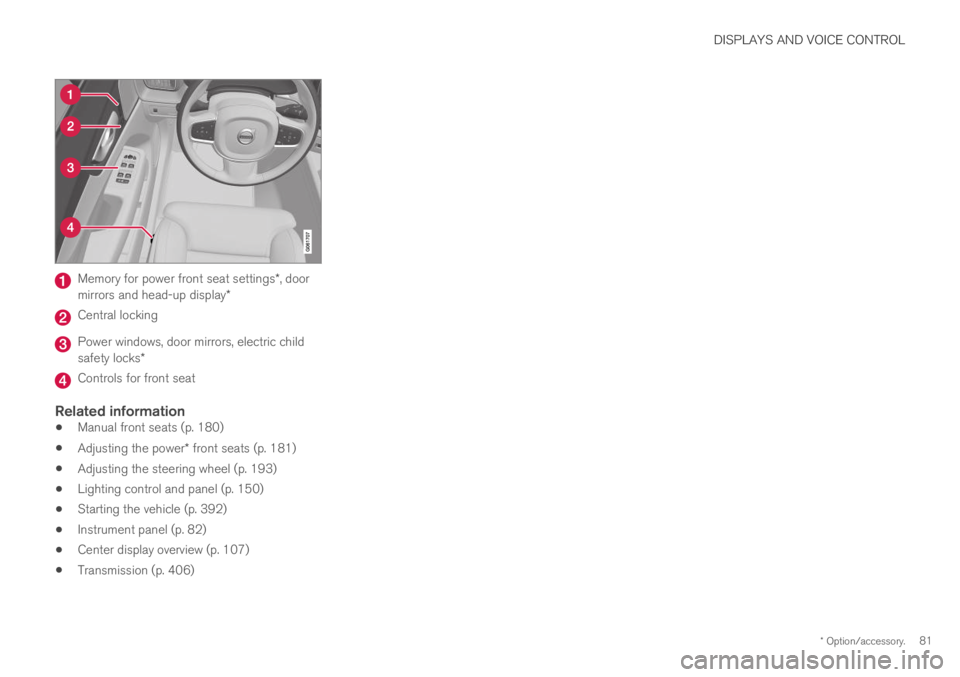
Memory for power front seat settings*, doormirrors and head-up display*
Central locking
Power windows, door mirrors, electric childsafety locks*
Controls for front seat
Related information
Manual front seats (p. 180)
Adjusting the power* front seats (p. 181)
Adjusting the steering wheel (p. 193)
Lighting control and panel (p. 150)
Starting the vehicle (p. 392)
Instrument panel (p. 82)
Center display overview (p. 107)
Transmission (p. 406)
Page 194 of 645
||
SEATS AND STEERING WHEEL
* Option/accessory.192
Related information
Folding down the rear seat backrests*(p. 189)
Steering wheel controls and horn
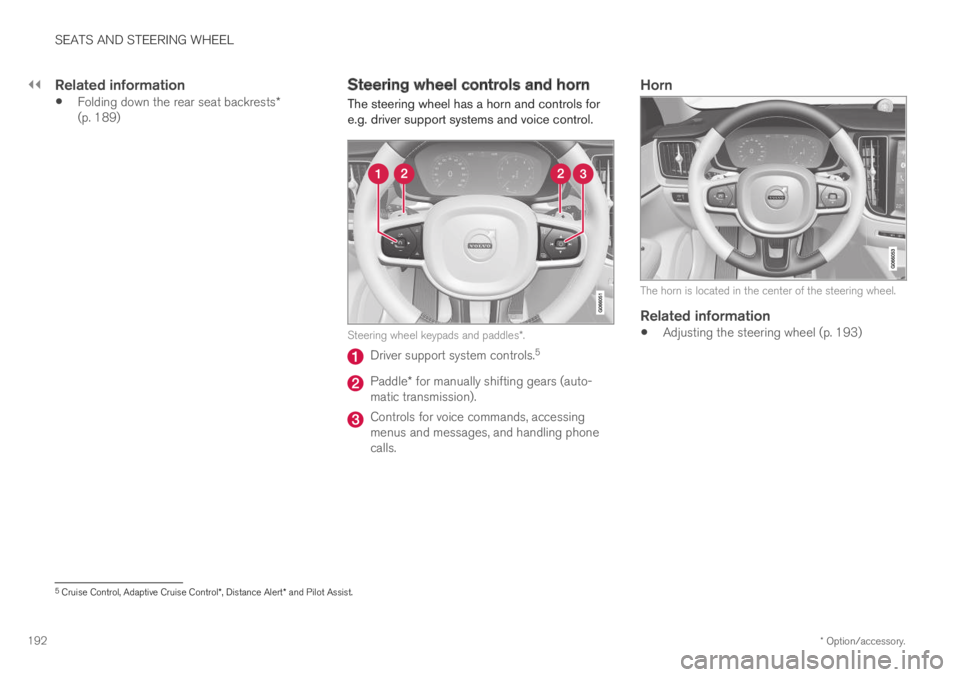
The steering wheel has a horn and controls fore.g. driver support systems and voice control.
Steering wheel keypads and paddles*.
Driver support system controls.5
Paddle* for manually shifting gears (auto-matic transmission).
Controls for voice commands, accessingmenus and messages, and handling phonecalls.
Horn
The horn is located in the center of the steering wheel.
Related information
Adjusting the steering wheel (p. 193)
5Cruise Control, Adaptive Cruise Control*, Distance Alert* and Pilot Assist.
Page 296 of 645

||
DRIVER SUPPORT
* Option/accessory.294
–Change a set speed by pressing the (1)
or (2) buttons briefly or by pressing andholding them:
Brief press: Each press changes thespeed in +/- 5 km/h (+/- 5 mph) incre-ments.
Press and hold: Release the button whenthe set speed indicator (3) has moved tothe desired speed.
NOTE
For vehicles without Adaptive Cruise Control*,speed instead increases by +/- 1km/h(+/- 1 mph) each time the button is pressed.
The most recently set speed will be stored.
If speed is increased by depressing the accelera-
tor pedal while pressing the (1) button onthe steering wheel, the vehicle's speed when thebutton is pressed will be stored as the set speed.
Temporarily increasing speed using the accelera-tor pedal, e.g. when passing another vehicle, willnot affect the setting. The vehicle will return tothe set speed when the accelerator pedal isreleased.
Automatic transmission
The driver support functions can follow anothervehicle at speeds from a standstill up to200 km/h (125 mph).
Pilot Assist can provide steering assistance fromnear-stationary speeds up to 140 km/h(87 mph).
The lowest speed that can be set is 30 km/h(20 mph). When following another vehicle, ACCcan monitor that vehicle's speed and slow yourown vehicle down to a standstill, but it is not pos-sible to set speeds lower than 30 km/h(20 mph).
Related information
Driver support systems (p. 260)
Cruise control (p. 266)
Adaptive Cruise Control* (p. 272)
Pilot Assist (p. 281)
Auto-hold braking with driversupport
Pilot Assist and Adaptive Cruise Control*
(ACC39) have a special brake function in slowtraffic and while stationary.
Braking function in slow traffic and at a
standstill
In slow-moving, stop-and-go traffic or when stop-ped at a traffic light, driving will resume automati-cally if the vehicle is stopped for less thanapprox. 3 seconds. If it takes more than 3 sec-onds for the vehicle ahead to begin moving again,the driver support function will go into standbymode and the auto-hold brake function will acti-vate.
–The function can be reactivated by:
Pressing the button on the steeringwheel keypad.
Pressing the accelerator pedal.
>The function will resume following thevehicle ahead if it begins to move withinapprox. 6 seconds.
Page 396 of 645

||
STARTING AND DRIVING
394
CAUTION
When starting in cold weather, the auto-matic transmission may shift up at slightlyhigher engine speeds than normal untilthe automatic transmission fluid reachesnormal operating temperature.
Do not race a cold engine immediatelyafter starting. This could prevent fluidsfrom properly lubricating vital compo-nents in the engine before it has reachedthe proper operating temperature.
The engine should be idling when thegear selector is moved. Never accelerateuntil the gear is fully engaged. Accelerat-ing rapidly before a gear is properlyengaged could lead to harder wear ofcomponents.
To help prevent the transmission oil fromoverheating, select P or N when idling ata standstill for prolonged periods of time.
Related information
Switching off the vehicle (p. 394)
Ignition modes (p. 395)
Adjusting the steering wheel (p. 193)
Jump starting using another battery (p. 432)
Selecting ignition mode (p. 396)
Switching off the vehicle
The vehicle can be switched off using the startknob in the tunnel console.
Start knob in the tunnel console.
To switch off the vehicle:
–Turn the start knob clockwise and release toswitch off the vehicle. The control will auto-matically return to the original position.
If the vehicle rolls:
–Turn clockwise and hold the knob until thevehicle switches off.
Related information
Starting the vehicle (p. 392)
Ignition modes (p. 395)
Adjusting the steering wheel (p. 193)
Jump starting using another battery (p. 432)
Selecting ignition mode (p. 396)
Page 398 of 645

STARTING AND DRIVING
396
Selecting ignition mode
The vehicle's ignition can be put in variousmodes (levels) to make different functions availa-ble.
Selecting an ignition mode
Start knob in the tunnel console.
Ignition mode 0 – Unlock the vehicle andkeep the remote key in the passenger com-partment.
NOTE
To set level I or II without engine start – donot depress the brake pedal (or clutch pedalfor vehicles with manual transmission) whenselecting this ignition mode.
Ignition mode I – Turn the start knob clock-wise and release it. The control will automati-cally return to the original position.
Ignition mode II – Turn the start knobclockwise and hold it there forapprox. 5 seconds. Release the knob, whichwill automatically return to its original posi-tion.
Back to ignition mode 0 – To return toignition mode 0 from modes I and II, turn thestart knob clockwise and release it. The con-trol will automatically return to the originalposition.
Related information
Starting the vehicle (p. 392)
Switching off the vehicle (p. 394)
Ignition modes (p. 395)
Adjusting the steering wheel (p. 193)
Jump starting using another battery (p. 432)
Brake functions
The vehicle's brakes are used to reduce speedor prevent the vehicle from rolling.
In addition to the wheel brakes and parkingbrakes, the vehicle is also equipped with a num-ber of automatic brake assist functions. Thesesystems help the driver by e.g. keeping the vehi-cle stationary when the brake pedal is notdepressed (e.g. at a traffic light or intersection) orwhen starting up a hill.
Depending on how the vehicle is equipped, thefollowing brake assist functions may be included:
Auto-hold brake function at a standstill (AutoHold)
Hill Start Assist (Hill Start Assist)
Braking assist after a collision
City Safety
Related information
Brakes (p. 397)
Parking brake (p. 400)
Auto-hold brakes (p. 403)
Braking assist after a collision (p. 405)
Hill Start Assist (p. 405)
City Safety™ (p. 305)
Page 404 of 645

STARTING AND DRIVING
402
Settings for automatically activatingthe parking brake
Choose whether the parking brake should beactivated automatically when the vehicle isswitched off.
To change this setting:
1.Tap Settings in the center display's Topview.
2.Tap My CarParking Brake andSuspension and select or deselect theAuto Activate Parking Brake function.
Related information
Activating and deactivating the parking brake(p. 400)
Parking brake (p. 400)
Parking on a hill
Always use the parking brake when parking on ahill.
WARNING
Always apply the parking brake when parkingon an incline. Selecting a gear or putting theautomatic transmission in P may not be suffi-cient to keep the vehicle stationary in all sit-uations.
If the vehicle is pointing uphill:
Turn the front wheels so they are pointingaway from the curb.
If the vehicle is pointing downhill:
Turn the front wheels so they are pointingtoward the curb.
Heavy load uphill
Heavy loads, such as a trailer, could cause thevehicle to roll backward when the parking brakeis released automatically on steep uphill gradi-ents. To help avoid this, pull the control upwardwhile you are driving away. Release the controlwhen the vehicle gains traction.
Related information
Activating and deactivating the parking brake(p. 400)
Parking brake malfunction
If you are unable to deactivate or activate theparking brake after several attempts, contact anauthorized Volvo workshop.
A audible warning signal will sound if the parkingbrake is activated while the vehicle is beingdriven.
If the vehicle must be parked before the problemis rectified, turn the wheels as when parking onan incline and put the gear selector in P.
Low battery charge level
If the battery charge level is too low, it will not bepossible to activate or deactivate the parkingbrake. Connect an auxiliary battery to the vehicleif the battery is discharged.
Replacing brake pads
Due to the design of the electric parking brake,the rear brake pads must be replaced by a work-shop. An authorized Volvo workshop is recom-mended.
Page 408 of 645

STARTING AND DRIVING
* Option/accessory.406
Transmission
The transmission is part of the vehicle's driveline(power transmission) between the engine andthe drive wheels. The function of the transmis-sion is to change gears depending on speedand power needs.
The vehicle has an 8-speed automatic transmis-sion and an electric motor for rear-wheel drive.The number of gears allows the engine's torqueand power band to be effectively utilized. Two ofthe gears are overdrive gears that save fuel whendriving at a constant engine speed. The steeringwheel paddles* can be used to shift up or downmanually. The instrument panel shows the gearcurrently in use.
CAUTION
Check the operating temperature of thetransmission to help avoid damage to any ofthe drive system components. If there is a riskof overheating, a warning symbol will appearin the instrument panel and a text messagewill be displayed. Follow the recommenda-tions given.
Symbols in the instrument panel
If a problem should occur with the transmission, asymbol and a message will appear in the instru-ment panel.
SymbolMeaning
Information and messages relatedto the transmission. Follow the rec-ommendations provided.
Hot or overheated transmission.Follow the recommendations provi-ded.
Reduced performance/Acceler-ation performance reduced
In the event of a temporary fault inthe driveline, the vehicle may gointo a "limp home" mode withreduced power output to help avoiddamage to the driveline.
Related information
Gear selector positions for automatic trans-missions (p. 406)
Gear selector positions forautomatic transmissions
In vehicles with an automatic transmission, thesystem selects the optimal gear for the currentdriving conditions. The transmission also has amanual mode.
The instrument panel shows which gear is cur-rently in use:
P, R, N, D or B.
For manual shifting, the gear indicator in theinstrument panel displays the gear currentlybeing used.
Selecting gears
The gear selector is a shift-by-wire selector,where shifting is done electronically instead ofmechanically. This makes shifting easier and thegear positions more distinct.