transmission VOLVO S60 TWIN ENGINE 2019 Owner's Manual
[x] Cancel search | Manufacturer: VOLVO, Model Year: 2019, Model line: S60 TWIN ENGINE, Model: VOLVO S60 TWIN ENGINE 2019Pages: 645, PDF Size: 13.96 MB
Page 462 of 645
AUDIO, MEDIA AND INTERNET
* Option/accessory.460
HD Radio™ limitations
Limitations
Main channel vs. sub-channels (FM only):The main channel is the only channel thatcan receive in hybrid mode (both digital andanalog). If a frequency has sub-channels,they are broadcast in digital mode only. Themain FM channel will be displayed as, forexample, "WRIF-FM HD1". The sub-FMchannels will be displayed as"WRIF-FMHD2", "WRIF-FM HD3", etc.
Reception coverage area: Due to currentIBOC transmitter power limitations, thereception coverage area in digital mode issomewhat more limited than the station'sanalog coverage area. Be aware that, like allradio transmission technology, terrain, time ofday, vegetation and buildings can have apositive or negative effect on radio reception.
Analog to digital/digital to analog blend-ing: Analog to digital blending will occur asthe signal strength reaches a preset thresh-old in the receiver. This will be noticeable infringe areas (areas with weak reception) andis normal.
NOTE
There may be a noticeable difference insound quality when a change from analogueto digital or digital to analogue occurs, suchas:
Volume increase or decrease
Equalizer settings, i.e., Bass/ Midrange/Treble cut or boost
Time alignment (Digital program materialin extreme cases can be as much as 8seconds behind the analogue). This willnoticeable as a "stuttering" effect.
The above items are dependant on thebroadcaster's equipment settings and donot indicate a fault in the vehicle's radioreceiver or antenna systems.
Related information
HD Radio™ (p. 457)
Activating and deactivating the HD Radio™(p. 458)
HD Radio™ sub-channels (p. 459)
SiriusXM® Satellite radio*
The SiriusXM® Satellite system broadcasts fromof a number of high elevation satellites in geo-synchronous orbit.
Listening to satellite radio
The digital signals from the satellites are line-of-sight, which means that physical obstructionssuch as bridges, tunnels, etc, may temporarilyinterfere with signal reception.
Avoid any obstructions, such as metallic objectstransported on roof racks or in a ski box, or otherantennas that may impede signals from the
SiriusXM® satellites.
Selecting SiriusXM ®
Satellite radio
mode
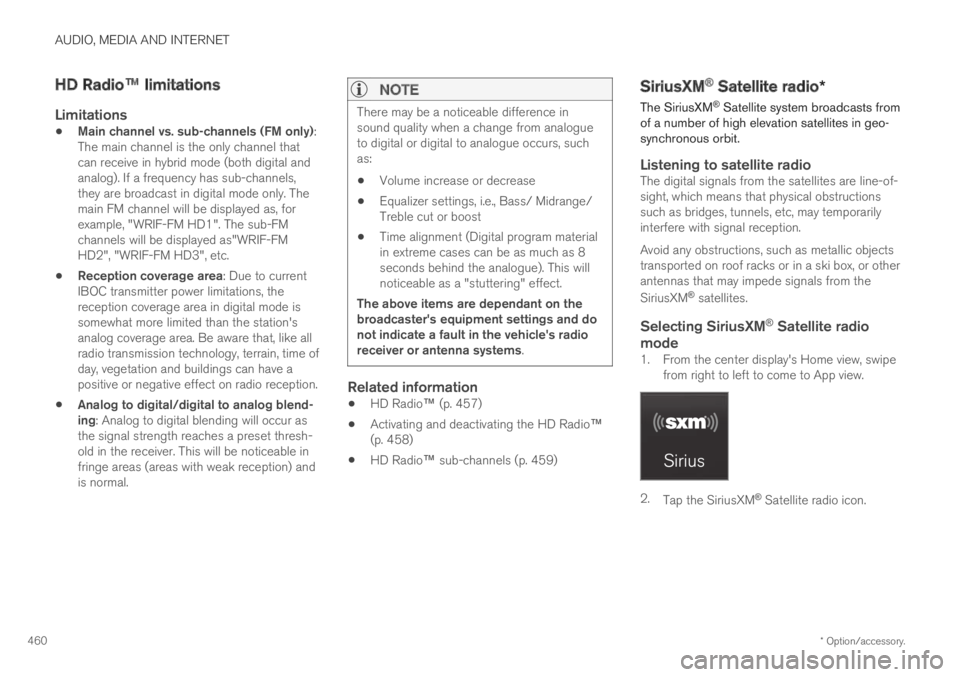
1. From the center display's Home view, swipefrom right to left to come to App view.
2.Tap the SiriusXM® Satellite radio icon.
Page 531 of 645

WHEELS AND TIRES
}}
* Option/accessory.529
1.Turn on the vehicle's hazard warning flashersif a wheel change must be performed in anarea with traffic.
2. Apply the parking brake and put the gearselector in P, or first gear if the vehicle has amanual transmission.
For vehicles with Leveling Control*: If thevehicle is equipped with pneumatic suspen-sion, this must be switched off before thevehicle is lifted with the jack*.
3.Take out the jack*, lug wrench* and tool forremoving the plastic covers, which arestowed in the foam block.
Tool for removing the plastic covers on the wheel bolts.
4. Place chocks in front of and behind thewheels that are still on the ground. For exam-ple, use heavy wooden blocks or largestones.
5.Using the lug wrench, screw the towing eyeinto place as far as possible according to theinstructions.
CAUTION
The towing eyelet must be screwed into thelug wrench* as far as possible.
6. Remove the plastic covers from the wheelbolts using the designated tool.
7.With the vehicle still on the ground, use thelug wrench/towing eye to loosen the wheelbolts ½-1 turn by pressing downward (coun-terclockwise).
8. When hoisting the vehicle, it is important thatthe jack or garage lift arms are positioned onthe designated points under the vehicle. Thetriangle markings on the plastic cover indi-cate where the jack attachment points/liftingpoints are located. There are two jack attach-ment points on each side of the vehicle.There is a groove for the jack at each attach-ment point.
9. Position the jack under the attachment pointbeing used, ensuring that the surface is firm,flat and not slippery.
Page 534 of 645
||
WHEELS AND TIRES
532
WARNING
The vehicle must never be driven withmore than one "Temporary Spare" tiremounted.
Driving with a spare wheel may alter thedriving characteristics of the vehicle.Replace the spare wheel with a normalwheel as soon as possible.
The spare wheel is smaller than the nor-mal wheel, which affects the vehicle'sground clearance. Watch for high curbsand do not wash the vehicle in an auto-matic car wash when a spare wheel ismounted.
Follow the manufacturer's recommendedtire inflation pressure for the spare wheel.
On all-wheel drive vehicles, the drive onthe rear axle can be disconnected.
If the spare wheel is mounted on thefront axle, snow chains must not be used.
The spare wheel must not be repaired.
CAUTION
The vehicle must not be driven with wheels ofdifferent dimensions or with a spare tire otherthan the one that came with the vehicle. Theuse of different size wheels can seriouslydamage your vehicle's transmission.
Related information
When changing wheels (p. 526)
Recommended tire pressure (p. 521)
Handling spare tires
Follow these instructions regarding handling thespare wheel.
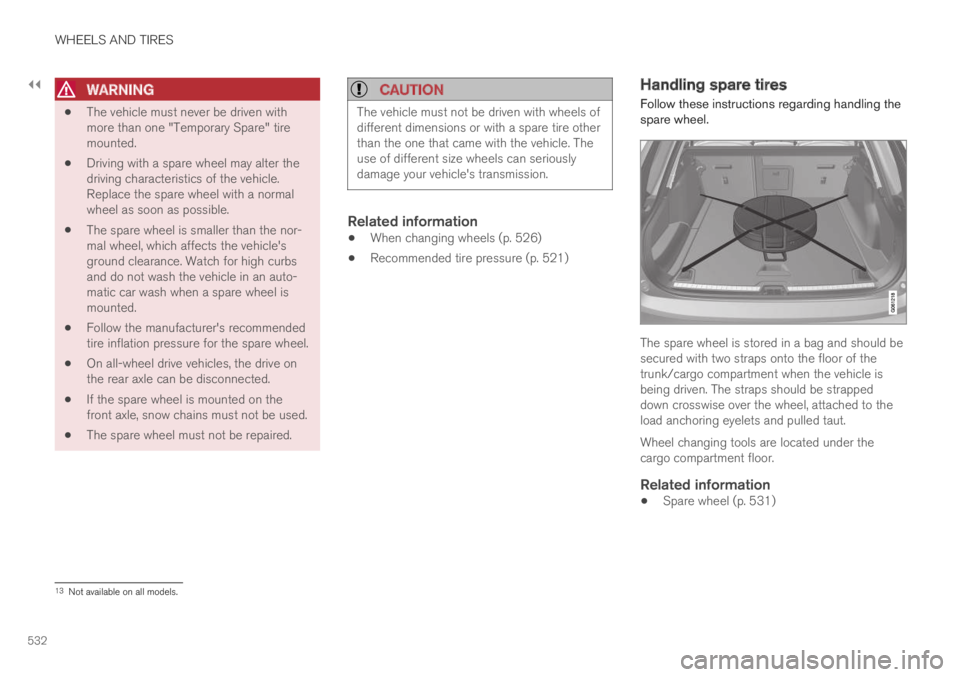
The spare wheel is stored in a bag and should besecured with two straps onto the floor of thetrunk/cargo compartment when the vehicle isbeing driven. The straps should be strappeddown crosswise over the wheel, attached to theload anchoring eyelets and pulled taut.
Wheel changing tools are located under thecargo compartment floor.
Related information
Spare wheel (p. 531)
13Not available on all models.
Page 564 of 645

||
MAINTENANCE AND SERVICE
* Option/accessory.562
7.Tap Send appointment request.
>You will receive an appointment sugges-
tion by email within a couple of days7.
You will also receive the same messagevia email and when you log in towww.volvocars.com.
On some markets, the message in theinstrument panel indicating that the vehi-cle requires service will go out once theappointment request has been sent.
8.Tap Cancel request if you would like tocancel your request.
The appointment request contains informationabout your vehicle that helps the workshop planfor your visit.
The retailer will send you a digital appointmentsuggestion. Information about your retailer is alsoavailable in the vehicle so that you can contactyour workshop at any time.
Accepting an appointment suggestion
When the vehicle has received an appointmentsuggestion, a message will be displayed at thetop of the center display.
1. Tap the message.
2. To accept the suggested appointment, tapAccept. Otherwise, tap Send newproposal or Decline.
For some markets, the system reminds you whenan appointment time is approaching and the navi-
gation system8 can also guide you to the work-shop at the appointed time.
Related information
Vehicle status (p. 560)
Sending vehicle information to the workshop(p. 562)
Navigating in the center display's views(p. 113)
Volvo ID (p. 26)
Internet-connected vehicle* (p. 494)
Sending vehicle information to the
workshop9
Vehicle-related information can be sent at anytime from the vehicle, e.g. if you schedule a visitto a workshop and would like to assist yourworkshop by providing additional basic informa-tion. Sending vehicle information is not the sameas scheduling service.
1.Open the Car Status app from App view inthe center display.
2.Tap Appointments.
3.Tap Send vehicle data.
>A message confirming that vehicle-relatedinformation has been sent will appear atthe top of the center display. You cancancel data transmission by tapping thecheckbox in the activity indicator.
Information is sent via the vehicle's Inter-
net connection10.
7Timespan may vary depending on market.8For vehicles with Sensus Navigation*.9Certain markets only.10There may be a charge for transmitting data over the Internet, depending on your service plan.
Page 585 of 645

MAINTENANCE AND SERVICE
}}
* Option/accessory.583
Fuse pliers are provided on the inside of the fusebox cover to assist in removing and insertingfuses.
There are also spaces for several extra fuses inthe fusebox.
Positions
There is a decal with a diagram of the locationsof the fuses on the inside of the cover.
Fuses 1–13, 18–30, 35–37 and 46–70 are"Micro" fuses.
Fuses 14–17, 31–34, 38–45 and 71–78 are"MCase" fuses and should only be replaced
by a workshop18.
FunctionAmpere
––
––
––
Control module for actuatorfor engaging/changing gears,automatic transmission
5
High-voltage coolant heatercontrol module5
FunctionAmpere
Control module for A/C; heatexchanger cut-off valve; cut-off valve for coolant throughthe climate system
5
Hybrid battery control module;high-voltage converter forcombined high-voltage gener-ator/starter motor with 500V–12 V voltage converter
5
––
Converter for controlling feedto rear axle electric motor10
Hybrid battery control module;high-voltage converter forcombined high-voltage gener-ator/starter motor with 500V–12 V voltage converter
10
Charge module5
Cut-off valve for hybrid batterycoolant; coolant pump 1 forhybrid battery
10
Coolant pump for electric drivesystem10
FunctionAmpere
Hybrid component cooling fan 25
––
––
––
––
––
––
––
––
––
12 V outlet in tunnel console,front15
12 V outlet in tunnel consolebetween second-row seats15
12 V outlet in trunk/cargocompartment*
USB ports for iPad holders
15
––
18An authorized Volvo workshop is recommended.
Page 586 of 645

||
MAINTENANCE AND SERVICE
* Option/accessory.584
FunctionAmpere
––
––
––
––
––
Headlight washers*25
Windshield washer25
––
Horn20
Alarm siren*5
Brake system control module(valves, parking brake)40
Wipers30
––
––
Parking heater*20
Brake system control module(ABS pump)40
FunctionAmpere
––
––
Fed when ignition is on:Engine control module; trans-mission components, electricalpower steering, central electri-cal module
5
Exterior vehicle sound (certainmarkets)5
Right-side headlight7.5
Right-side headlight, some
models with LEDA15
––
––
––
Airbags5
Left-side headlight7.5
Left-side headlight, some
models with LEDA15
Accelerator pedal sensor 5
FunctionAmpere
Transmission control module;gear selector control module15
Engine control module5
––
––
––
––
Engine control module; actua-tor; throttle unit; turbo-chargervalve
20
Solenoids; valve; engine cool-ing system thermostat10
Vacuum regulators; valve 7.5
Spoiler shutter control module;radiator shutter control mod-ule
5
––
Heated oxygen sensor, front;heated oxygen sensor, rear15
Oil pump solenoid; A/C mag-netic coupling; heated oxygensensor (center)
15
Page 587 of 645

MAINTENANCE AND SERVICE
585
FunctionAmpere
––
Engine control module20
Ignition coils; spark plugs 15
––
––
Transmission oil pump controlmodule30
Vacuum pump control module 40
Transmission actuator25
––
––
––
ALED (Light Emitting Diode)
Related information
Fuses and fuseboxes (p. 580)
Replacing fuses (p. 580)
Page 623 of 645

SPECIFICATIONS
621
Coolant specifications
Recommended grade: Volvo-approved pre-mixed coolant. If concentrated coolant is used,mix with 50% water of acceptable quality (i.e.not salt water, etc.). Consult a Volvo retailer ifyou have any questions.
To avoid deterioration of the cooling system,engine trouble, etc., only approved Volvo coolantshould be used.
WARNING
Coolant is hazardous if ingested and couldcause damage to organs (kidneys). The prod-uct contains ethylene glycol, inhibitor, emetic,water, etc.
Related information
Refilling coolant (p. 571)
Transmission fluid specifications
Under normal driving conditions, the transmis-sion fluid will not need to be changed during thetransmission's service life. However, it may needto be changed if the vehicle is driven frequentlyin adverse driving conditions.
Automatic transmission
Prescribed transmission fluid:AW1
Related information
Type designations (p. 612)
Brake fluid specifications
The medium in the hydraulic brake system iscalled brake fluid and is used to transfer brakingforce from e.g. pressure on the brake pedal via amaster brake cylinder to one or more slave cylin-ders, which in turn act on a mechanical brake.
Recommended grade: Volvo Original or similarfluid that meets a combination of Dot 4, 5.1 andISO 4925 class 6.
NOTE
Changing or filling brake fluid should beentrusted to an authorized Volvo workshop.
Related information
Engine compartment overview (p. 568)
Page 628 of 645
INDEX
626
Automatic transmission 406
kickdown 410
oil 621
Trailer 434
Auxiliary heater 224
B
Backrest
front seat, adjusting180, 181, 184,
185, 186, 187
rear seat, folding189
Battery
Hybrid578
jump-start432
Maintenance574
recycling579
start574
symbols on the battery579
BLIS321
activating/deactivating322
limitations323
Symbols and messages324
Blower
adjusting214
air distribution202
air vents202
Bluetooth
connect476
connecting vehicle to Internet 495
phone484
settings493
Book service and repair 561
Booster cushions 71
Brake assist
after collision 405
Brake energy 397, 410
Brake fluid
grade 621
Brake functions 396
Brake position 406
Brakes 397
anti-lock brakes, ABS 397
automatic when stationary 403
Brake Assist System, BAS 398
brake lights 159
brake system 396
emergency brake lights 159
Maintenance 399
on salted roads 399
on wet roads 399
parking brake 400
brake system
fluid 621
C
Camera sensor
see Camera299
Camera unit299
limitations300
maintenance and cleaning304
Capacity weight540, 617
Cargo compartment551
attachment points553
Car wash 598, 599, 601, 602, 603, 604
Catalytic converter430
recovery438
CD player474
Cell phone, see Phone485
Center console545
Center display
change appearance129
cleaning593
climate controls207
Function view120
keyboard124
messages138, 139
operation110, 113, 117, 122
overview107
settings130, 131
switch off and change volume 129
Page 630 of 645
INDEX
628
Connecting vehicle to Internet
No connection or poor connection 498
via a mobile device (WiFi) 495
via cellular phone (Bluetooth) 495
via vehicle's modem 496
Connect phone 485
Contact information 26
Convertible seats 69
coolant 621
filling 571
Cooling system
overheating 431
Cornering illumination 158
Corner Traction Control 261
Corrosion protection 604
Crash, see Collision 42
Crash event data 33
Cross Traffic Alert 325
activating/deactivating 326
limitations 326
messages 328
Cruise control 266
activating 267
manage speed 293
reactivating 269
temporary deactivation 268
turn off 269
Curb weight617
Customer Privacy Policy35
CZIP (Clean Zone Interior Package) 199
D
Data
recording33
transferring between vehicle and work-
shop558
Data sharing500
Daytime running lights153
Decals
location612
Defrosting212
Detecting obstacles
City Safety309
Dimensions615
Dipstick, electronic570
Direction of rotation514
Display
driver information82
Display lighting162
Distance Alert270
activating/deactivating271
limitations271
Set time interval292
DivX®475
Door mirrors168
compass443, 444
dimming168
outer168
power folding169
resetting169
store position182, 183
Download Center559
use559
Driveline
transmission406
Drive mode412
changing416
driver support293
Driver Alert Control334
activating/deactivating336
limitations336
rest stop guidance336
Driver performance90
settings91
Driver profile134
edit135, 136, 137
select135
Driver support system260
Drive mode293