instrument panel VOLVO S60 TWIN ENGINE 2019 Repair Manual
[x] Cancel search | Manufacturer: VOLVO, Model Year: 2019, Model line: S60 TWIN ENGINE, Model: VOLVO S60 TWIN ENGINE 2019Pages: 645, PDF Size: 13.96 MB
Page 280 of 645

||
DRIVER SUPPORT
* Option/accessory.278
2.Tap the Cruise Control button in the centerdisplay's Function view. The button's indica-tor will change from GRAY to GREEN.
>The symbol in the instrument panel will
change from ACC to CC, indicating that Adaptive Cruise Con-trol is off and Cruise Control is in standbymode.
3.Pressing the button on the steeringwheel keypad.
>Cruise Control will start and the vehicle'scurrent speed will be set.
WARNING
Switching from ACC to CC means that thevehicle:
will no longer maintain a preset timeinterval to the vehicle ahead.
will only follow the stored speed and thedriver must therefore apply the brakeswhen necessary.
If CC is active when the engine is turned off, ACCwill be automatically activated the next time theengine is started.
Switching from CC to ACC
To do so:
1.Press the button on the steering wheelkeypad to put Cruise Control in standbymode.
2.Tap the Cruise Control button in Functionview. The button's indicator will change fromGREEN to GRAY.
>The symbols in the instrument panel will
switch from CC to ACCto indicate that Adaptive Cruise Control isin standby mode.
3.Pressing the button on the steeringwheel keypad.
>Adaptive Cruise Control will go into activemode and set the vehicle's current speedand the selected time interval to the vehi-cle ahead.
Related information
Adaptive Cruise Control* (p. 272)
Cruise control (p. 266)
Page 281 of 645

DRIVER SUPPORT
}}
* Option/accessory.279
Symbols and messages for
Adaptive Cruise Control*
A number of symbols and messages relating to
Adaptive Cruise Control (ACC29) may be dis-played in the instrument panel and/or the head-up display*.
In the following illustration, Road Sign Information(RSI*) indicates that the maximum permittedspeed is 130 km/h (80 mph).
The previous illustration shows that AdaptiveCruise Control is set to maintain a speed of110 km/h (68 mph) and that there is no targetvehicle ahead to follow.
The previous illustration shows that AdaptiveCruise Control is set to maintain a speed of110 km/h (68 mph) and is following a targetvehicle ahead, which is traveling at the samespeed.
29Adaptive Cruise Control
Page 286 of 645
||
DRIVER SUPPORT
284
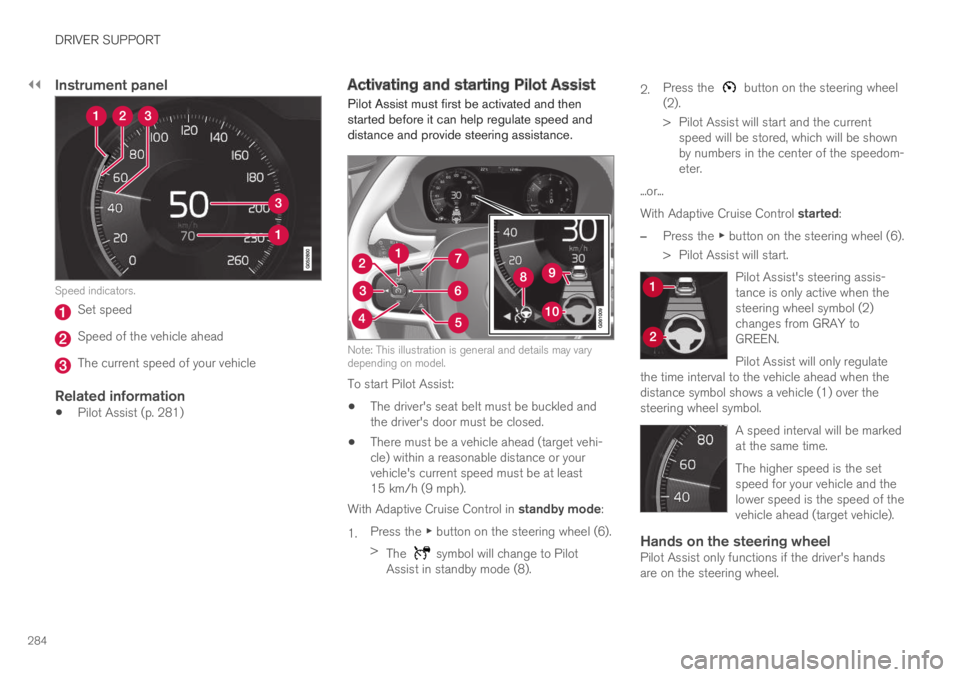
Instrument panel
Speed indicators.
Set speed
Speed of the vehicle ahead
The current speed of your vehicle
Related information
Pilot Assist (p. 281)
Activating and starting Pilot Assist
Pilot Assist must first be activated and thenstarted before it can help regulate speed anddistance and provide steering assistance.
Note: This illustration is general and details may varydepending on model.
To start Pilot Assist:
The driver's seat belt must be buckled andthe driver's door must be closed.
There must be a vehicle ahead (target vehi-cle) within a reasonable distance or yourvehicle's current speed must be at least15 km/h (9 mph).
With Adaptive Cruise Control in standby mode:
1.Press the ▶ button on the steering wheel (6).
>The symbol will change to PilotAssist in standby mode (8).
2.Press the button on the steering wheel(2).
>Pilot Assist will start and the currentspeed will be stored, which will be shownby numbers in the center of the speedom-eter.
...or...
With Adaptive Cruise Control started:
–Press the ▶ button on the steering wheel (6).
>Pilot Assist will start.
Pilot Assist's steering assis-tance is only active when thesteering wheel symbol (2)changes from GRAY toGREEN.
Pilot Assist will only regulatethe time interval to the vehicle ahead when thedistance symbol shows a vehicle (1) over thesteering wheel symbol.
A speed interval will be markedat the same time.
The higher speed is the setspeed for your vehicle and thelower speed is the speed of thevehicle ahead (target vehicle).
Hands on the steering wheel
Pilot Assist only functions if the driver's handsare on the steering wheel.
Page 287 of 645
DRIVER SUPPORT
}}
* Option/accessory.285
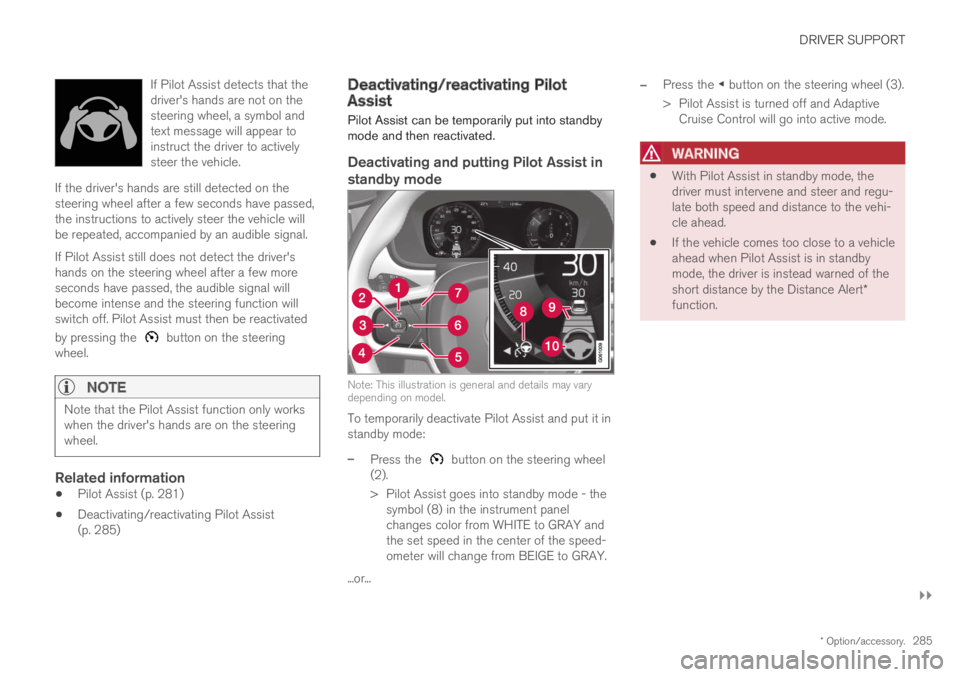
If Pilot Assist detects that thedriver's hands are not on thesteering wheel, a symbol andtext message will appear toinstruct the driver to activelysteer the vehicle.
If the driver's hands are still detected on thesteering wheel after a few seconds have passed,the instructions to actively steer the vehicle willbe repeated, accompanied by an audible signal.
If Pilot Assist still does not detect the driver'shands on the steering wheel after a few moreseconds have passed, the audible signal willbecome intense and the steering function willswitch off. Pilot Assist must then be reactivated
by pressing the button on the steeringwheel.
NOTE
Note that the Pilot Assist function only workswhen the driver's hands are on the steeringwheel.
Related information
Pilot Assist (p. 281)
Deactivating/reactivating Pilot Assist(p. 285)
Deactivating/reactivating PilotAssist
Pilot Assist can be temporarily put into standbymode and then reactivated.
Deactivating and putting Pilot Assist in
standby mode
Note: This illustration is general and details may varydepending on model.
To temporarily deactivate Pilot Assist and put it instandby mode:
–Press the button on the steering wheel(2).
>Pilot Assist goes into standby mode - thesymbol (8) in the instrument panelchanges color from WHITE to GRAY andthe set speed in the center of the speed-ometer will change from BEIGE to GRAY.
...or...
–Press the ◀ button on the steering wheel (3).
>Pilot Assist is turned off and AdaptiveCruise Control will go into active mode.
WARNING
With Pilot Assist in standby mode, thedriver must intervene and steer and regu-late both speed and distance to the vehi-cle ahead.
If the vehicle comes too close to a vehicleahead when Pilot Assist is in standbymode, the driver is instead warned of theshort distance by the Distance Alert*function.
Page 288 of 645

||
DRIVER SUPPORT
286
Standby mode due to action by the driver
Pilot Assist will be temporarily deactivated andput in standby mode if:
the brakes are applied.
the gear selector is moved to N.
a turn signal is used for more than 1 minute.
the vehicle is driven faster than the setspeed for more than 1 minute.
Temporarily increasing speed using the accelera-tor pedal, e.g. when passing another vehicle, willnot affect the setting. The vehicle will return tothe set speed when the accelerator pedal isreleased.
When the turn signals are used, Pilot Assist'ssteering assistance will be temporarily deacti-vated. When the turn signal is switched off, steer-ing assistance will be automatically reactivated ifthe traffic lane's side markings can still bedetected.
Automatic standby mode
Pilot Assist is dependent on other systems, such
as Electronic Stability Control (ESC32). If any ofthese other systems stops working, Pilot Assistwill automatically switch off.
WARNING
With automatic standby mode, the driver iswarned by an acoustic signal and a messageon the instrument panel.
The driver must then regulate vehiclespeed, apply the brakes if necessary, andmaintain a safe distance to other vehicles.
Adaptive Cruise Control may go into standbymode if, e.g.:
the driver opens the door.
the brake temperature is high.
the driver's hands are not on the steeringwheel.
the parking brake is applied.
the engine speed (rpm) is too low/high.
the driver unbuckles the seat belt.
one or more of the wheels lose traction.
the camera/radar sensor is covered by snowor heavy rain (the camera lens/radar wavesare blocked).
your vehicle's speed goes under 5 km/h(3 mph) and Pilot Assist cannot determine ifthe vehicle ahead is stationary or if it isanother object, e.g. a speed bump.
your vehicle's speed goes under 5 km/h(3 mph) and the vehicle ahead turns so thatPilot Assist no longer has a vehicle to follow.
Reactivating Pilot Assist from standby
mode
Note: This illustration is general and details may varydepending on model.
To reactivate Pilot Assist:
–Press the button on the steering wheel(1).
>Speed will be set to the most recentlystored speed.
32Electronic Stability Control
Page 290 of 645

||
DRIVER SUPPORT
* Option/accessory.288
The driver is responsible for ensuring thatthe vehicle maintains a suitable distancefrom such obstacles.
The camera and radar sensors do nothave the capacity to detect all oncomingobjects and obstacles in traffic environ-ments, e.g. potholes, stationary obstaclesor objects that completely or partiallyblock the route.
Pilot Assist does not "see" pedestrians,animals, etc.
The recommended steering input is lim-ited in force, which means that it cannotalways help the driver to steer and keepthe vehicle within the lane.
In vehicles equipped with SensusNavigation*, the function is able to useinformation from map data, which couldcause variations in performance.
Pilot Assist will be switched off if thespeed-dependent power steering wheelresistance is working at reduced power,e.g. during cooling due to overheating.
The driver can always correct or adjust steeringassistance provided by Pilot Assist by turning thesteering wheel to the desired position.
Steep roads and/or heavy loads
Pilot Assist is primarily intended to be driven onflat roads. The function may not be able to main-
tain the correct time interval to the vehicle aheadwhen driving down steep hills. The driver shouldbe extra attentive and prepared to apply thebrakes.
Do not use Pilot Assist if the vehicle is carry-ing a heavy load or towing a trailer.
NOTE
Pilot Assist cannot be activated if a trailer,bike carrier or similar is connected to thevehicle electrical system.
Other limitations
The Off Road drive mode cannot beselected when Pilot Assist is activated.
NOTE
The function uses the vehicle's camera andradar sensor, which has certain general limita-tions.
Related information
Pilot Assist (p. 281)
Camera/radar sensor limitations (p. 300)
Speed-dependent steering wheel resistance(p. 260)
Drive modes (p. 412)
Pilot Assist* symbols and messages
A number of symbols and messages relating toPilot Assist may be displayed in the instrumentpanel and/or the head-up display*.
Page 294 of 645
DRIVER SUPPORT
* Option/accessory.292
Set time interval for driver support
The time interval to the vehicle ahead can be set
for the functions Adaptive Cruise Control*37,Pilot Assist and Distance Alert*.
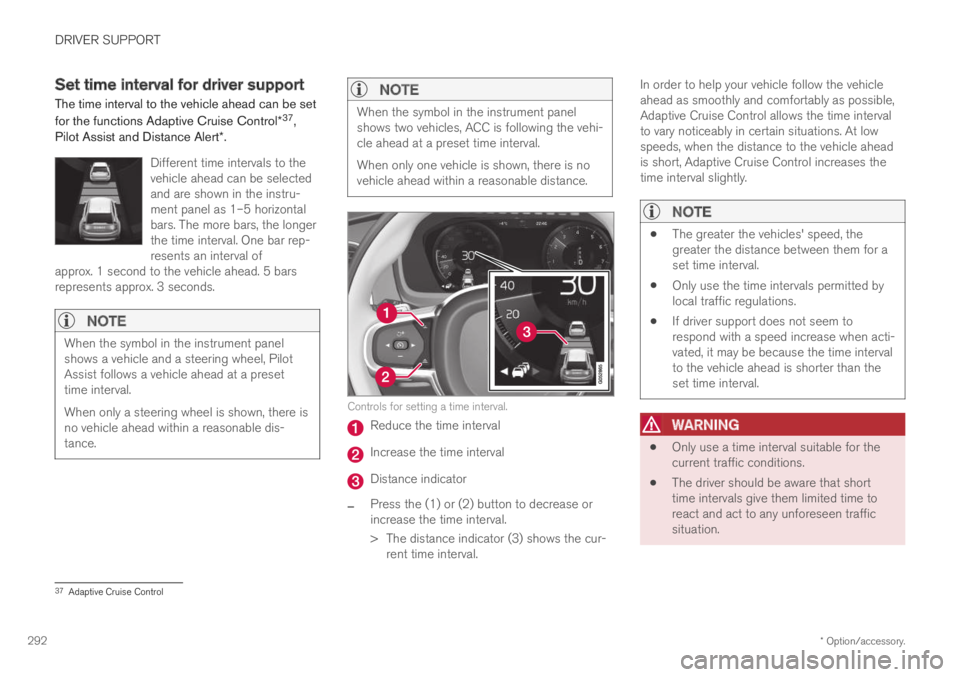
Different time intervals to thevehicle ahead can be selectedand are shown in the instru-ment panel as 1–5 horizontalbars. The more bars, the longerthe time interval. One bar rep-resents an interval ofapprox. 1 second to the vehicle ahead. 5 barsrepresents approx. 3 seconds.
NOTE
When the symbol in the instrument panelshows a vehicle and a steering wheel, PilotAssist follows a vehicle ahead at a presettime interval.
When only a steering wheel is shown, there isno vehicle ahead within a reasonable dis-tance.
NOTE
When the symbol in the instrument panelshows two vehicles, ACC is following the vehi-cle ahead at a preset time interval.
When only one vehicle is shown, there is novehicle ahead within a reasonable distance.
Controls for setting a time interval.
Reduce the time interval
Increase the time interval
Distance indicator
–Press the (1) or (2) button to decrease orincrease the time interval.
>The distance indicator (3) shows the cur-rent time interval.
In order to help your vehicle follow the vehicleahead as smoothly and comfortably as possible,Adaptive Cruise Control allows the time intervalto vary noticeably in certain situations. At lowspeeds, when the distance to the vehicle aheadis short, Adaptive Cruise Control increases thetime interval slightly.
NOTE
The greater the vehicles' speed, thegreater the distance between them for aset time interval.
Only use the time intervals permitted bylocal traffic regulations.
If driver support does not seem torespond with a speed increase when acti-vated, it may be because the time intervalto the vehicle ahead is shorter than theset time interval.
WARNING
Only use a time interval suitable for thecurrent traffic conditions.
The driver should be aware that shorttime intervals give them limited time toreact and act to any unforeseen trafficsituation.
37Adaptive Cruise Control
Page 302 of 645

DRIVER SUPPORT
300
Camera/radar sensor limitations
The camera and radar sensor used by several ofthe driver support functions has certain limita-tions, which also affect the functions using thecamera and radar sensor. The driver should beaware of the following limitations:
Camera and radar
Obstructed camera
The area marked in the illustration must be cleaned reg-ularly and kept free of decals, objects, solar film, etc.
The camera is located on the upper interior sec-tion of the windshield along with the radar sen-sor.
Do not place, affix or mount anything on theinside or outside of the windshield, or in front ofor around the camera and radar sensor – thiscould disrupt camera and radar-based functions.It could cause functions to be reduced, deacti-vated completely or to produce an incorrect func-tion response.
If this symbol and the message“Windscreen sensor Sensorblocked, see Owner's manual” isdisplayed in the instrument panel, itmeans that the camera and radar sensor areunable to detect other vehicles, cyclists, pedes-trians and large animals in front of the vehicleand that the vehicle's camera and radar-basedfunctions may be obstructed, reduced, completelydisabled or providing inaccurate responses.
The following table shows some of the situationsthat can cause the message to be displayed, andsuggested actions:
CauseAction
The area of the windshield in front of the camera/radar sensor isdirty or covered by ice or snow.Clean the windshield in front of the camera/radar sensor and remove dirt, ice andsnow.
Thick fog, heavy rain or snow is blocking the radar signals or thecamera's range of visibility.No action. Heavy precipitation may sometimes prevent the camera/radar sensor fromfunctioning.
Page 310 of 645

||
DRIVER SUPPORT
* Option/accessory.308
3 - Auto-brake
The automatic braking function is activated at thelast moment.
If the driver has not taken evasive action by thisstage and a collision is imminent, the automaticbraking function will be triggered. This occurswhether or not the driver is pressing the brakepedal. Full braking force will be applied to reducethe speed at impact or reduced braking effect willbe applied if this is sufficient to avoid the colli-sion.
The seat belt tensioner may be activated whenthe automatic braking function is triggered.
In certain situations, auto-braking may begin witha limited braking force before applying full brak-ing force.
If City Safety has prevented a collision, the vehi-cle will be kept at a standstill until the drivertakes action. If the vehicle has slowed to avoidcolliding with a slower-moving vehicle ahead, yourspeed will be reduced to that vehicle's speed.
Auto-braking can always be cancelled if thedriver presses hard on the accelerator pedal.
NOTE
When City Safety activates the brakes, thebrake lights come on.
When City Safety applies the brakes, a text mes-sage will appear in the instrument panel to notifythe driver that the function is/was activated.
WARNING
City Safety may not be used to change howthe driver operates the vehicle. The drivermust not only rely on City Safety to brake thevehicle.
Related information
City Safety™ (p. 305)
Head-up display* (p. 140)
Seat belt tensioners (p. 50)
Setting a warning distance for CitySafety
City Safety is always active, but the function'swarning distance can be adjusted.
NOTE
The City Safety function cannot be deacti-vated. It is activated automatically each timethe engine/electric motor is started.
The alert distance determines the sensitivity ofthe system and regulates the distance at whichthe light, sound and brake pulsations will be acti-vated.
To select warning distance:
1.Select SettingsMy CarIntelliSafe inthe center display's Top view.
2.Under City Safety Warning, tap Late,Normal or Early to set the desired warningdistance.
If the driver feels that the Early setting is givingtoo many warnings or finds them irritating, theNormal or Late warning distance settings canbe selected instead.
If the driver feels that the warnings are too fre-quent and distracting, the warning distance canbe reduced. This will reduce the total number ofwarnings, but it will also result in City Safety pro-viding warnings at a later stage.
Page 319 of 645

DRIVER SUPPORT
}}}}
317
Camera and radar sensor's field of vision
The camera's field of vision is limited and in cer-tain situations, it may be unable to detect pedes-trians, large animals, cyclists or vehicles, or it maydetect them later than expected.
Vehicles that are dirty may be detected later thanclean vehicles, and in dark conditions, motorcy-cles may be detected late or not at all.
If a text message displayed in the instrumentpanel indicates that the camera/radar sensor isobstructed, it may be difficult for City Safety todetect pedestrians, large animals, cyclists, vehi-cles or lane markings in front of the vehicle. CitySafety functionality may therefore be reduced.
Text messages may not be displayed for all situa-tions in which the windshield sensors areblocked. The driver must therefore always keepthe windshield in front of the camera/radar sen-sor clean.
CAUTION
Maintenance of driver support components
may only performed by a workshop50.
Driver intervention
Backing up
City Safety is temporarily deactivated when thevehicle is backing up.
Low speed
City Safety is not activated at very low speedsunder 4 km/h (3 mph). The system will thereforenot intervene in situations in which your vehicle isapproaching another vehicle very slowly, such aswhen parking.
Active driver
Action by the driver always has priority. CitySafety will therefore not react or will react at alater stage with a warning or intervention in situa-tions in which the driver is clearly steering andoperating the accelerator pedal, even if a collisionis unavoidable.
An active and aware driving style may thereforedelay collision warnings and intervention in orderto minimize unnecessary warnings.
Other limitations
WARNING
Warnings and brake interventions can betriggered late or not at all if the traffic sit-uation or external influences prevent thecamera and radar unit from properlydetecting pedestrians, cyclists, large ani-mals or vehicles ahead of the vehicle.
To be able to detect vehicles at night, itsfront and rear lights must work and illumi-nate clearly.
The camera and radar unit have a limitedrange for pedestrians and cyclists – thesystem can provide effective warningsand brake interventions if the relativespeed is lower than 50 km/h (30 mph).For stationary or slow-moving vehicles,warnings and brake interventions areeffective at vehicle speeds of up to70 km/h (43 mph). Speed reduction forlarge animals is less than 15 km/h(9 mph) and can be achieved at vehiclespeeds over 70 km/h (43 mph). At lowerspeeds, the warning and brake interven-tion for large animals is less effective.
Warnings for stationary or slow-movingvehicles and large animals can be disen-gaged due to darkness or poor visibility.
50An authorized Volvo workshop is recommended.