instrument panel VOLVO S60 TWIN ENGINE 2019 Manual Online
[x] Cancel search | Manufacturer: VOLVO, Model Year: 2019, Model line: S60 TWIN ENGINE, Model: VOLVO S60 TWIN ENGINE 2019Pages: 645, PDF Size: 13.96 MB
Page 337 of 645

DRIVER SUPPORT
* Option/accessory.335
A camera monitors the traffic lane's marker linesand compares the direction of the road with thedriver's movements of the steering wheel.
The vehicle is moving erratically in the lane.
If driving behavior becomesconsiderably erratic, the driverwill be alerted by this symbol inthe instrument panel, an audi-ble signal and the messageTime for a break.
If the vehicle is equipped with SensusNavigation* and the Rest Stop Guidance func-tion is activated, suggestions will also be providedfor suitable places to take a break.
The warning will be repeated after a short time ifdriving behavior does not improve.
WARNING
Driver Alert Control must not be used toextend a period of driving. The driver shouldplan in breaks at regular intervals and makesure they are well rested.
WARNING
The function is supplementary driver sup-port intended to facilitate driving and helpmake it safer – it cannot handle all situa-tions in all traffic, weather and road condi-tions.
The driver is advised to read all sectionsin the Owner's Manual about this functionto learn of its limitations, which the drivermust be aware of before using the func-tion.
Driver support functions are not a substi-tute for the driver's attention and judg-ment. The driver is always responsible forensuring the vehicle is driven in a safemanner, at the appropriate speed, with anappropriate distance to other vehicles,and in accordance with current trafficrules and regulations.
WARNING
An alarm from Driver Alert Control should betaken very seriously since a sleepy driver isoften not aware of their own condition.
If the alarm sounds or you feel fatigued:
Stop the vehicle safely as soon as possi-ble and rest.
Studies have shown that it is just as danger-ous to drive while tired as it is to drive underthe influence of alcohol or other stimulants.
Related information
Driver support systems (p. 260)
Activating/deactivating Driver Alert Control(p. 336)
Selecting guidance to a rest area if theDriver Alert Control warning has been given(p. 336)
Driver Alert Control limitations (p. 336)
Page 343 of 645

DRIVER SUPPORT
}}
341
Lane Keeping Aid symbols andmessages
A number of symbols and messages related to
Lane Keeping Aid (LKA85) may be displayed inthe instrument panel.Some examples of symbols and messages are shown in the table below.
SymbolMessageMeaning
Driver support system
Reduced functionality Service required
The system is not functioning as intended. Contact a workshop ‒ an authorized Volvo work-shop is recommended.
Windscreen sensor
Sensor blocked, see Owner's manual
The camera's ability to detect the lane in front of the vehicle is reduced.
Lane Keeping Aid
Apply steering
LKA's steering assistance is disabled when the driver's hands are not on the wheel. Followthe instructions and steer the vehicle.
Lane Keeping Aid
Standby until steering applied
LKA will go into standby mode until the driver begins steering the vehicle again.
85Lane Keeping Aid
Page 344 of 645
||
DRIVER SUPPORT
342
A text message can be erased by briefly pressing
the button in the center of the right-sidesteering wheel keypad.
If the message persists: Contact a workshop ‒ anauthorized Volvo workshop is recommended.
Related information
Lane Keeping Aid (p. 337)
Lane Keeping Aid symbols in the instrumentpanel (p. 343)
Page 345 of 645
DRIVER SUPPORT
343
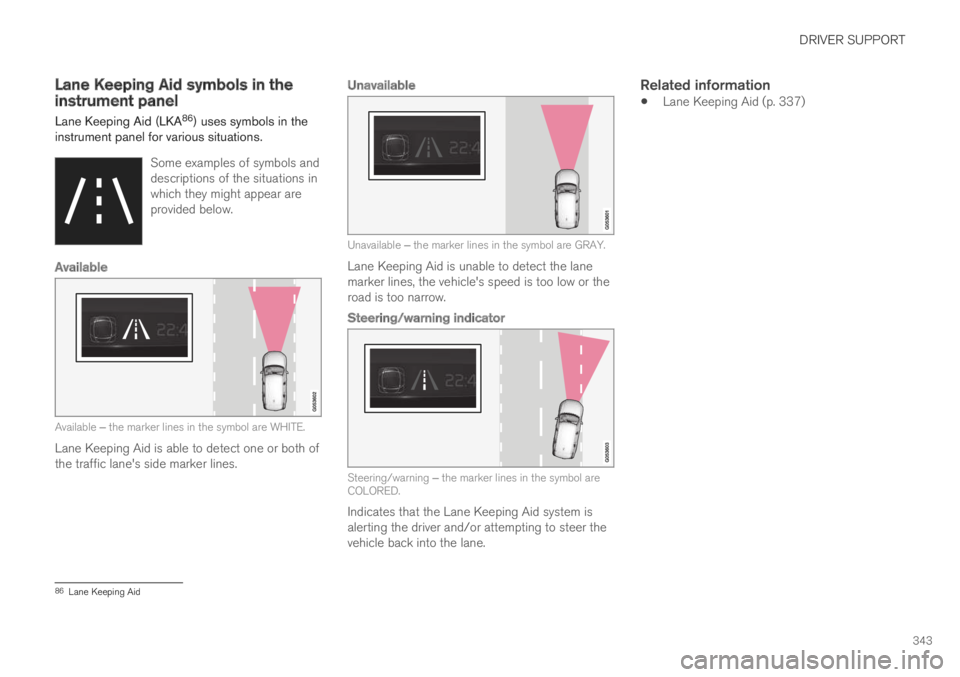
Lane Keeping Aid symbols in theinstrument panel
Lane Keeping Aid (LKA86) uses symbols in theinstrument panel for various situations.
Some examples of symbols anddescriptions of the situations inwhich they might appear areprovided below.
Available
Available ‒ the marker lines in the symbol are WHITE.
Lane Keeping Aid is able to detect one or both ofthe traffic lane's side marker lines.
Unavailable
Unavailable ‒ the marker lines in the symbol are GRAY.
Lane Keeping Aid is unable to detect the lanemarker lines, the vehicle's speed is too low or theroad is too narrow.
Steering/warning indicator
Steering/warning ‒ the marker lines in the symbol areCOLORED.
Indicates that the Lane Keeping Aid system isalerting the driver and/or attempting to steer thevehicle back into the lane.
Related information
Lane Keeping Aid (p. 337)
86Lane Keeping Aid
Page 346 of 645
DRIVER SUPPORT
344
Steering assistance at risk ofcollision
The Collision avoidance assistance functioncan help the driver reduce the risk of the vehicleleaving its lane unintentionally and/or collidingwith another vehicle or obstacle by activelysteering the vehicle back into its lane and/orswerving.
The function consists of these sub-functions:
Run-Off Mitigation with steering assistance
Steering assistance during collision risksfrom oncoming traffic
After the system has automatically intervened,this text message will appear in the instrumentpanel:
Collision avoidance assistance –Automatic intervention
WARNING
The function is supplementary driver sup-port intended to facilitate driving and helpmake it safer – it cannot handle all situa-tions in all traffic, weather and road condi-tions.
The driver is advised to read all sectionsin the Owner's Manual about this functionto learn of its limitations, which the drivermust be aware of before using the func-tion.
Driver support functions are not a substi-tute for the driver's attention and judg-ment. The driver is always responsible forensuring the vehicle is driven in a safemanner, at the appropriate speed, with anappropriate distance to other vehicles,and in accordance with current trafficrules and regulations.
NOTE
It is always the driver who must decide howmuch the vehicle should be in control – thevehicle can never take command.
Related information
Driver support systems (p. 260)
Activating/deactivating steering assistanceduring collision risks (p. 345)
Run-Off Mitigation with steering assistancelevels (p. 345)
Steering assistance during collision risks lim-itations (p. 348)
Symbols and messages for steering assis-tance during collision risks (p. 349)
Page 348 of 645

||
DRIVER SUPPORT
346
Steering assistance with braking
Intervention with steering assistance and braking.
Braking intervention assists in situations wheresteering assistance alone is not sufficient. Brak-ing force is automatically adapted according tothe situation at the moment the vehicle begins torun off the road.
Related information
Steering assistance at risk of collision(p. 344)
Run-Off Mitigation with steeringassistance
Steering assistance has several sub-functions.Run-Off Mitigation with steering assistance canhelp the driver and reduce the risk of the vehicleinadvertently running off the road by activelysteering the vehicle back onto the road.
The function is active at speeds between65-140 km/h (40-87 mph) on roads with clearlyvisible traffic lane markings/lines.
The system uses a camera to monitor the edgesof the road and the painted side marker lines. Ifthe vehicle is about to cross the edge of the road,the function will attempt to steer the vehicle backonto the road. If this is not sufficient to keep thevehicle on the road, the brakes will also beapplied.
However, the function will not provide eithersteering assistance or braking if the turn signal isused. The function will also not be activated if itdetects that the driver is actively operating thevehicle.
After the system has automatically intervened,this text message will appear in the instrumentpanel:
Collision avoidance assistance –Automatic intervention
WARNING
The function is supplementary driver sup-port intended to facilitate driving and helpmake it safer – it cannot handle all situa-tions in all traffic, weather and road condi-tions.
The driver is advised to read all sectionsin the Owner's Manual about this functionto learn of its limitations, which the drivermust be aware of before using the func-tion.
Driver support functions are not a substi-tute for the driver's attention and judg-ment. The driver is always responsible forensuring the vehicle is driven in a safemanner, at the appropriate speed, with anappropriate distance to other vehicles,and in accordance with current trafficrules and regulations.
Related information
Steering assistance at risk of collision(p. 344)
Page 349 of 645

DRIVER SUPPORT
347
Steering assistance during collisionrisks from oncoming traffic
Steering assistance has several sub-functions.Steering assistance during collision risks fromoncoming traffic can help a distracted driverwho has not noticed that the vehicle is veeringout of the lane.
The function provides assistance by swerving your vehi-cle back into your own lane.
Oncoming vehicles
Own vehicle
When steering assistance is activated, collisionwarning for driver support will also be activated.However, the brake pedal pulsations that are partof collision warning will not be activated.
The function is active at speeds between60-140 km/h (37-87 mph) on roads with clearlyvisible traffic lane markings/lines.
If your vehicle is starting to veer from your ownlane and a vehicle is approaching from the oppo-site direction, this function can help the driversteer the vehicle back into its own lane.
However, the function will not provide steeringassistance if the turn signal is used. The functionwill also not be activated if it detects that thedriver is actively operating the vehicle.
After the system has automatically intervened,this text message will appear in the instrumentpanel:
Collision avoidance assistance –Automatic intervention
WARNING
The function is supplementary driver sup-port intended to facilitate driving and helpmake it safer – it cannot handle all situa-tions in all traffic, weather and road condi-tions.
The driver is advised to read all sectionsin the Owner's Manual about this functionto learn of its limitations, which the drivermust be aware of before using the func-tion.
Driver support functions are not a substi-tute for the driver's attention and judg-ment. The driver is always responsible forensuring the vehicle is driven in a safemanner, at the appropriate speed, with anappropriate distance to other vehicles,and in accordance with current trafficrules and regulations.
Related information
Steering assistance at risk of collision(p. 344)
Collision risk warning from driver support(p. 290)
Page 351 of 645

DRIVER SUPPORT
349
Symbols and messages for steeringassistance during collision risks
A number of symbols and messages related tothe function may be displayed in the instrumentpanel.Some examples of symbols and messages are shown in the table below.
SymbolMessageMeaning
Collision avoidance assistance
Automatic intervention
When the function is activated, a message will appear to alert the driver.
Windscreen sensor
Sensor blocked, see Owner's manual
The camera's ability to detect the lane in front of the vehicle is reduced.
A text message can be erased by briefly pressing
the button in the center of the right-sidesteering wheel keypad.
If the message persists: Contact a workshop ‒ anauthorized Volvo workshop is recommended.
Related information
Steering assistance at risk of collision(p. 344)
Page 356 of 645
DRIVER SUPPORT
* Option/accessory.354
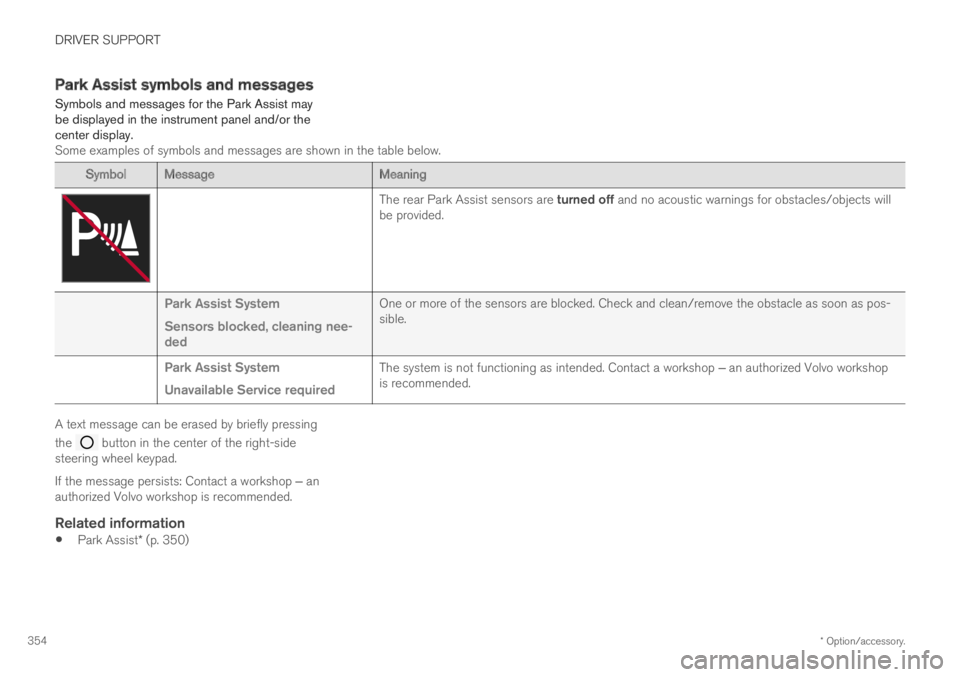
Park Assist symbols and messages
Symbols and messages for the Park Assist maybe displayed in the instrument panel and/or thecenter display.Some examples of symbols and messages are shown in the table below.
SymbolMessageMeaning
The rear Park Assist sensors are turned off and no acoustic warnings for obstacles/objects willbe provided.
Park Assist System
Sensors blocked, cleaning nee-ded
One or more of the sensors are blocked. Check and clean/remove the obstacle as soon as pos-sible.
Park Assist System
Unavailable Service required
The system is not functioning as intended. Contact a workshop ‒ an authorized Volvo workshopis recommended.
A text message can be erased by briefly pressing
the button in the center of the right-sidesteering wheel keypad.
If the message persists: Contact a workshop ‒ anauthorized Volvo workshop is recommended.
Related information
Park Assist* (p. 350)
Page 365 of 645

DRIVER SUPPORT
* Option/accessory.363
Park Assist Camera symbols andmessages
Symbols and messages for the Park AssistCamera may be displayed in the instrumentpanel and/or the center display.Some examples of symbols and messages are shown in the table below.
SymbolMessageMeaning
The rear Park Assist sensors are turned off and no acoustic warnings or field markings for obsta-cles/objects will be provided.
The camera is not functioning properly.
Park Assist System
Sensors blocked, cleaningneeded
One or more of the sensors are blocked. Check and clean/remove the obstacle as soon as possible.
Park Assist System
Unavailable Service required
The system is not functioning as intended. Contact a workshop ‒ an authorized Volvo workshop isrecommended.
A text message can be erased by briefly pressing
the button in the center of the right-sidesteering wheel keypad.
If the message persists: Contact a workshop ‒ anauthorized Volvo workshop is recommended.
Related information
Park Assist Camera* (p. 355)