service VOLVO S60 TWIN ENGINE 2019 Repair Manual
[x] Cancel search | Manufacturer: VOLVO, Model Year: 2019, Model line: S60 TWIN ENGINE, Model: VOLVO S60 TWIN ENGINE 2019Pages: 645, PDF Size: 13.96 MB
Page 430 of 645

STARTING AND DRIVING
428
Fuel
Volvo recommends the use of detergent gaso-line to control engine deposits.
Deposit control gasoline (gasoline with
detergent additives)
Detergent gasoline is effective in keeping injec-tors and intake valves clean. Consistent use ofdeposit control gasolines will help ensure gooddriveability and fuel economy. If you are not surewhether the gasoline contains deposit controladditives, check with the service station operator.
NOTE
Volvo recommends not using external fuelinjector cleaning systems, e.g. do not adddetergent additives to gasoline before or afterrefueling.
Unleaded fuel
All Volvo vehicles have a three-way catalytic con-verter and must only use unleaded gasoline. USand Canadian regulations require that pumpsdelivering unleaded gasoline are labeled"UNLEADED". Only the nozzles of these pumpswill fit in your vehicle's fuel filler inlet. It is unlaw-ful to dispense leaded fuel into a vehicle labeled"unleaded gasoline only". Leaded gasoline dam-ages the three-way catalytic converter and theheated oxygen sensor system. Repeated use ofleaded gasoline will lessen the effectiveness of
the emission control system and could result inloss of emission warranty coverage. State andlocal vehicle inspection programs will makedetection of misfueling easier, possibly resultingin emission test failure for misfueled vehicles.
NOTE
Some U.S. and Canadian gasolines contain anoctane enhancing additive called methyl-cyclopentadienyl manganese tricarbonyl(MMT). If such fuels are used, your EmissionControl System performance may be affected,and the Check Engine Light (malfunctionindicator light) located on your instrumentpanel may light. If this occurs, please returnyour vehicle to a trained and qualified Volvoservice technician for service.
Gasoline containing alcohol and ethers,
"Oxygenated fuels"
Some fuel suppliers sell gasoline containing"oxygenates" which are usually alcohols orethers. In some areas, state or local laws requirethat the service pump be marked indicating useof alcohols or ethers. However, there are areas inwhich the pumps are unmarked. If you are notsure whether there is alcohol or ethers in thegasoline you buy, check with the service stationoperator. To meet seasonal air quality standards,some areas require the use of "oxygenated" fuel.
Volvo permits the use of the following "oxygen-ated" fuels. However, the specified octane ratingsmust still be met.
Alcohol - Ethanol
Fuels containing up to 10% ethanol by volumemay be used. Ethanol may also be referred to asEthyl alcohol, or "Gasohol".
Ethers - MTBE/ETBE: Fuels containing up to22% MTBE/ETBE by volume may be used.
Methanol
Do not use gasolines containing methanol(methyl alcohol, wood alcohol). This practice canresult in vehicle performance deterioration andcan damage critical parts in the fuel system. Suchdamage may not be covered under the NewVehicle Limited Warranty.
Related information
Octane rating (p. 429)
Opening/closing the fuel filler door (p. 425)
Refueling (p. 426)
Emission controls (p. 430)
Page 431 of 645

STARTING AND DRIVING
}}
429
Octane rating
Volvo requires premium fuel (91 octane10 orhigher) for all T5, T6 and T8 engines, and rec-ommends AKI 93 for optimal performance andfuel economy. See decal examples in illustra-tions 1 and 2.
Minimum octane
Decals
Illustration 1: Sample fuel pump octane label10.
Illustration 2: Decal on the inside of the fuel filler flap onvehicles that require premium fuel11.
TOP TIER Detergent Gasoline
Volvo endorses the use of "TOP TIER DetergentGasoline" where available to help maintainengine performance and reliability. TOP TIERDetergent Gasoline meets a new standard jointlyestablished by leading automotive manufacturesto meet the needs of today's advanced engines.Qualifying gasoline retailers (stations) will, inmost cases, identify their gasoline as having metthe "TOP TIER Detergent Gasoline" standards.
NOTE
Information about TOP TIER Detergent Gaso-line is available at www.toptiergas.com.
NOTE
When switching to higher octane fuel orchanging gasoline brands, it may be neces-sary to fill the tank more than once before adifference in engine operation is noticeable.
Fuel Formulations
Do not use gasoline that contains lead or manga-nese as a knock inhibitor, and do not use leadadditives. Besides damaging the exhaust emis-sion control systems on your vehicle, lead hasbeen strongly linked to certain forms of cancer.
Many fuels contain benzene as a solvent.Unburned benzene has been strongly linked tocertain forms of cancer. If you live in an areawhere you must fill your own gas tank, take pre-cautions. These may include:
standing upwind away from the filler nozzlewhile refueling
refueling only at gas stations with vaporrecovery systems that fully seal the mouth ofthe filler neck during refueling
wearing neoprene gloves while handling afuel filler nozzle.
10AKI (Anti Knock Index) is an average value of RON (Research Octane Number) and MON (Motor Octane Number) - (RON)+(MON)/211For supplementary information - see the car's Service and Warranty Booklet.
Page 432 of 645

||
STARTING AND DRIVING
430
Use of Additives
With the exception of gas line antifreeze duringwinter months, do not add solvents, thickeners, orother store-bought additives to your vehicle'sfuel, cooling, or lubricating systems. Overuse maydamage your engine, and some of these additivescontain organically volatile chemicals. Do notneedlessly expose yourself to these chemicals.
WARNING
Never carry a cell phone that is switched onwhile refueling your vehicle. If the phone rings,this may cause a spark that could ignite gaso-line fumes, resulting in fire and injury.
WARNING
Carbon monoxide is a poisonous, colorless,and odorless gas. It is present in all exhaustgases. If you ever smell exhaust fumes insidethe vehicle, make sure the passenger com-partment is ventilated, and immediately returnthe vehicle to a trained and qualified Volvoservice technician for correction.
Demanding driving
In demanding driving conditions, such as whentowing a trailer or driving in hot weather or forprolonged periods at high altitudes, it may be agood idea to switch to a higher-octane fuel
(AKI10 91 or higher) or to switch to another
brand of gasoline in order to fully utilize the vehi-cle's engine capacity and optimize traction.
Related information
Fuel (p. 428)
Emission controls (p. 430)
Emission controls
Three-way catalytic converter
Keep your engine properly tuned. Certainengine malfunctions, particularly involving theelectrical, fuel or distributor ignition systems,may cause unusually high three-way catalyticconverter temperatures. Do not continue tooperate your vehicle if you detect enginemisfire, noticeable loss of power or otherunusual operating conditions, such as engineoverheating or backfiring. A properly tunedengine will help avoid malfunctions thatcould damage the three-way catalytic con-verter.
Do not park your vehicle over combustiblematerials, such as grass or leaves, which cancome into contact with the hot exhaust sys-tem and cause such materials to ignite undercertain wind and weather conditions.
Excessive starter cranking (in excess of oneminute), or an intermittently firing or floodedengine can cause three-way catalytic con-verter or exhaust system overheating.
Remember that tampering or unauthorizedmodifications to the engine, the Engine Con-trol Module, or the vehicle may be illegal andcan cause three-way catalytic converter orexhaust system overheating. This includes:altering fuel injection settings or compo-nents, altering emission system components
10AKI (Anti Knock Index) is an average value of RON (Research Octane Number) and MON (Motor Octane Number) - (RON)+(MON)/2
Page 434 of 645
||
STARTING AND DRIVING
432
Related information
Refilling coolant (p. 571)
Driving with a trailer (p. 434)
Preparing for a long trip (p. 424)
Battery drain
The electrical functions in the vehicle drain thebattery to varying degrees. Avoid using ignitionmode II when the engine is switched off. Useignition mode I instead, as this uses less electri-cal current.
Note that certain accessories may also drainpower from the electrical system. Do not usefunctions that use a lot of electrical current whenthe engine is turned off. Examples of such func-tions are:
blower
headlights
windshield wipers
audio system (especially at high volume).
If the starter battery voltage is low, a message isshown in the driver display. The vehicle's energy-saving function will then turn off or reduce certainfunctions, such as the blower and/or the audiosystem.
–Charge the battery by starting the engineand let it run for at least 15 minutes (drivingcharges the battery faster than letting theengine idle).
Related information
Start battery (p. 574)
Ignition modes (p. 395)
Jump starting using another battery
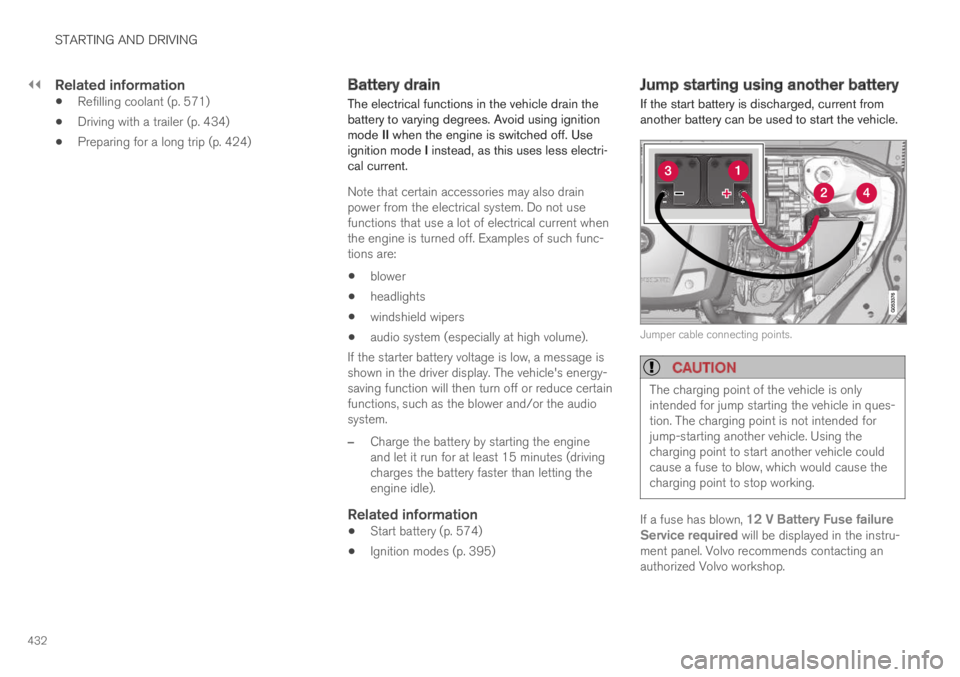
If the start battery is discharged, current fromanother battery can be used to start the vehicle.
Jumper cable connecting points.
CAUTION
The charging point of the vehicle is onlyintended for jump starting the vehicle in ques-tion. The charging point is not intended forjump-starting another vehicle. Using thecharging point to start another vehicle couldcause a fuse to blow, which would cause thecharging point to stop working.
If a fuse has blown, 12 V Battery Fuse failureService required will be displayed in the instru-ment panel. Volvo recommends contacting anauthorized Volvo workshop.
Page 442 of 645

STARTING AND DRIVING
* Option/accessory.440
Recovery
This section refers to transporting the vehiclewith a tow truck or similar vehicle.
Call a professional towing service for assistance.
In certain conditions, the towing eyelet can beused to pull the vehicle onto a flatbed tow truck.
CAUTION
Note that vehicles with Twin Engine mustalways be towed raised with all wheels on thetow truck.
The vehicle's location and ground clearancedetermine if it can be lifted onto a tow truck. Ifthe incline of the tow truck is too steep or if theground clearance under the vehicle is insufficient,attempting to pull it up may result in damage. Inthis case, the vehicle should only be lifted withthe tow truck's lifting equipment.
WARNING
No person or object should be behind the towtruck when the vehicle is lifted onto the bedof the truck.
Related information
Attaching and removing the towing eyelet(p. 439)
HomeLink®*14
HomeLink®15 is a programmable remote control,integrated in the vehicle electrical system, thatcan control up to three different devices (e.g.garage door opener, alarm system, outdoor andindoor lighting) and thereby replace the remotecontrols for these.
General
The illustration is generic – the design may vary.
Button 1
Button 2
Button 3
Indicator light
HomeLink® is delivered integrated in the rearview
mirror. The HomeLink® panel consists of threeprogrammable buttons and an indicator light inthe mirror.
For more information about HomeLink®, pleasevisit: www.HomeLink.com or call1-800-355-3515.
Save the original remote controls for future pro-gramming (e.g. for use in another vehicle). It isalso advisable to delete the button programmingif the vehicle is sold.
Related information
Using HomeLink®* (p. 442)
Programming HomeLink®* (p. 441)
Type approval for HomeLink®* (p. 443)
14Certain markets only.15HomeLink and the HomeLink house symbol are registered trademarks of Gentex Corporation.
Page 452 of 645
||
AUDIO, MEDIA AND INTERNET
* Option/accessory.450
High Performance Pro * (Harman
Kardon)
Seat Optimization - the sound can be opti-mized for Driver, All and Rear.
Surround - surround sound mode with levelsettings.
Tone - setting for e.g. bass, treble, equalizer,etc.
Related information
Sound settings (p. 448)
Navigating in the center display's views(p. 113)
Apps
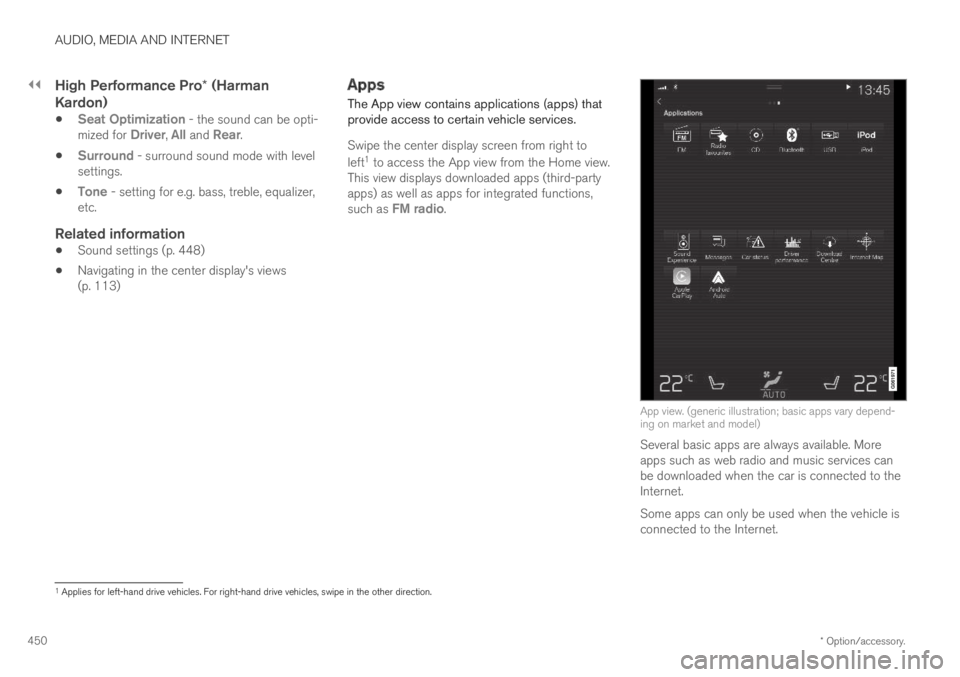
The App view contains applications (apps) thatprovide access to certain vehicle services.
Swipe the center display screen from right to
left1 to access the App view from the Home view.This view displays downloaded apps (third-partyapps) as well as apps for integrated functions,such as FM radio.
App view. (generic illustration; basic apps vary depend-ing on market and model)
Several basic apps are always available. Moreapps such as web radio and music services canbe downloaded when the car is connected to theInternet.
Some apps can only be used when the vehicle isconnected to the Internet.
1Applies for left-hand drive vehicles. For right-hand drive vehicles, swipe in the other direction.
Page 453 of 645
AUDIO, MEDIA AND INTERNET
* Option/accessory.451
Start an app by pressing the app in the centerdisplay's app view.
All apps used should be updated to the latestversion.
Related information
Download apps (p. 451)
Updating apps (p. 452)
Deleting apps (p. 452)
Apple® CarPlay®* (p. 479)
Android Auto* (p. 482)
Internet-connected vehicle* (p. 494)
Hard disk storage space (p. 500)
Terms of use and data sharing (p. 500)
Download apps
New apps can be downloaded when the vehicleis connected to the Internet.
NOTE
Data downloading can affect other servicessuch as transfer data, e.g. web radio. If theaffect on other services is experienced asproblematic, the download can be interrupted.Alternatively, it may be appropriate to switchoff or cancel other services.
NOTE
When downloading using a phone, pay extraattention to the data traffic costs.
1.Open the Download Center app in Appview.
2.Select New apps to open a list of apps thatare available but are not installed in the vehi-cle.
3.Tap on the row for an app in order to expandin the list and get more information about theapp.
4.Select Install to start the download andinstallation of the app.
>The current status of the download andinstallation will be shown.
If a download cannot be started immedi-ately, a message will be displayed. Theapp will remain in the list and it will bepossible to reattempt downloading.
Canceling a download
–Tap Abort to cancel a download in progress.
Note that only a download can be cancelled. Aninstallation cannot be cancelled once it hasbegun.
Related information
Apps (p. 450)
Updating apps (p. 452)
Deleting apps (p. 452)
Internet-connected vehicle* (p. 494)
Handling system updates via Download Cen-ter (p. 559)
Hard disk storage space (p. 500)
Page 454 of 645
AUDIO, MEDIA AND INTERNET
* Option/accessory.452
Updating apps
Apps can be updated when the vehicle is con-nected to the Internet.
NOTE
Data downloading can affect other servicessuch as transfer data, e.g. web radio. If theaffect on other services is experienced asproblematic, the download can be interrupted.Alternatively, it may be appropriate to switchoff or cancel other services.
NOTE
When downloading using a phone, pay extraattention to the data traffic costs.
If an app is being used while an update is in pro-gress, it will be restarted to complete the update.
Update all
1.Open the Download Center app in Appview.
2.Select Install all.
>The update will begin.
Update certain apps
1.Open the Download Center app in Appview.
2.Select Application updates to open a listof all available updates.
3.Find the desired app and select Install.
>The update will begin.
Related information
Apps (p. 450)
Download apps (p. 451)
Deleting apps (p. 452)
Handling system updates via Download Cen-ter (p. 559)
Internet-connected vehicle* (p. 494)
Deleting apps
When the vehicle is connected to the Internet, itis possible to uninstall apps.
If the app is being used, it must be closed beforeit can be uninstalled.
1.Open the Download Center app in Appview.
2.Select Application updates to open a listof all installed apps.
3.Find the desired app and select Uninstall tobegin uninstalling the app.
>When the app has been uninstalled, it willbe removed from the list.
Related information
Apps (p. 450)
Download apps (p. 451)
Updating apps (p. 452)
Handling system updates via Download Cen-ter (p. 559)
Internet-connected vehicle* (p. 494)
Page 458 of 645
AUDIO, MEDIA AND INTERNET
* Option/accessory.456
Voice control for radio and media (p. 146)
Radio settings (p. 456)
App menu in instrument panel (p. 101)
Radio settings
There are a number of different radio functionsthat can be activated and deactivated.
Canceling a traffic message
A current broadcast (e.g. a traffic message) can
be temporarily interrupted by pressing in theright-side steering wheel keypad or tappingCancel in the center display.
Activating and deactivating radio
functions
Pull down Top view and select SettingsMedia and the desired waveband to see availablefunctions.
FM Radio
HD Radio FM: HD Radio™ Technology:makes it possible to achieve a sound qualitycomparable with a CD.
Show Broadcast Information: showsinformation on program content, artists, etc.
Freeze Program Name: select to stop theprogram service name from scrolling continu-ously. Instead it freezes after 20 seconds.
SiriusXM ®
Satellite radio *
Pull down Top view and select Settings
MediaSiriusXM to show a list of availableoptions.
Related information
Radio (p. 453)
Settings for SiriusXM® Satellite radio*(p. 463)
Symbols in the center display status bar(p. 122)
Page 463 of 645
AUDIO, MEDIA AND INTERNET
}}
* Option/accessory.461
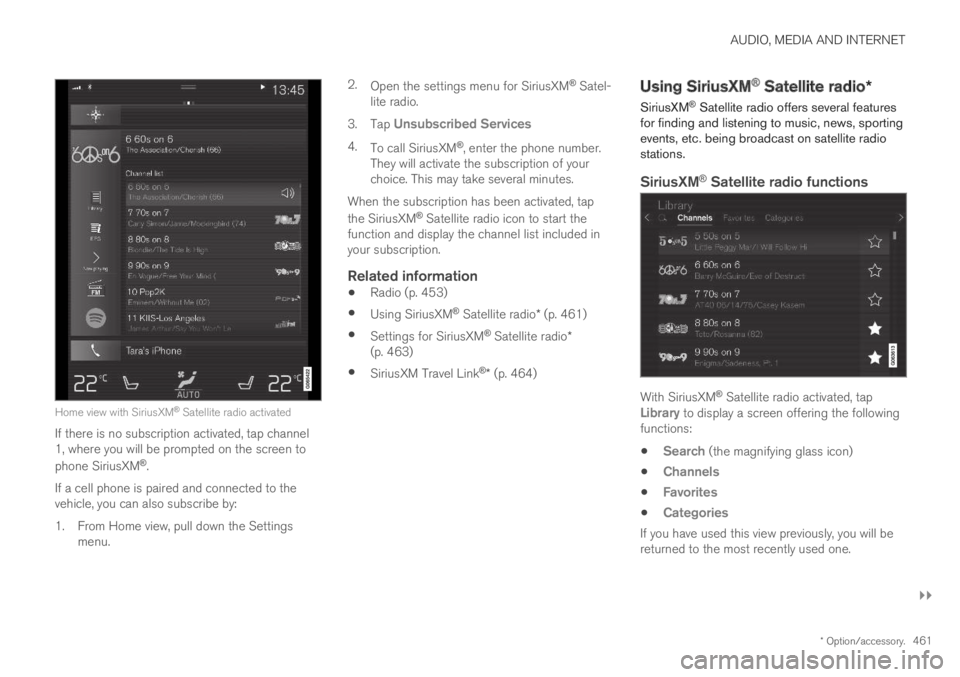
Home view with SiriusXM® Satellite radio activated
If there is no subscription activated, tap channel1, where you will be prompted on the screen to
phone SiriusXM®.
If a cell phone is paired and connected to thevehicle, you can also subscribe by:
1.From Home view, pull down the Settingsmenu.
2.Open the settings menu for SiriusXM® Satel-lite radio.
3.Tap Unsubscribed Services
4.To call SiriusXM®, enter the phone number.They will activate the subscription of yourchoice. This may take several minutes.
When the subscription has been activated, tap
the SiriusXM® Satellite radio icon to start thefunction and display the channel list included inyour subscription.
Related information
Radio (p. 453)
Using SiriusXM® Satellite radio* (p. 461)
Settings for SiriusXM® Satellite radio*(p. 463)
SiriusXM Travel Link®* (p. 464)
Using SiriusXM® Satellite radio*
SiriusXM® Satellite radio offers several featuresfor finding and listening to music, news, sportingevents, etc. being broadcast on satellite radiostations.
SiriusXM ®
Satellite radio functions
With SiriusXM® Satellite radio activated, tapLibrary to display a screen offering the followingfunctions:
Search (the magnifying glass icon)
Channels
Favorites
Categories
If you have used this view previously, you will bereturned to the most recently used one.