change wheel VOLVO S60 TWIN ENGINE 2020 User Guide
[x] Cancel search | Manufacturer: VOLVO, Model Year: 2020, Model line: S60 TWIN ENGINE, Model: VOLVO S60 TWIN ENGINE 2020Pages: 657, PDF Size: 13.6 MB
Page 212 of 657

||
CLIMATE CONTROL
* Option/accessory.
210
Blower control.
AUTO - Automatic climate control.
Parking climate
Parking climate functions can be controlled from the Parking climate tab.
Climate controls on the rear side of
the tunnel console *
If the vehicle is equipped with heated rear seats*, there are physical buttons on the rear
side of the tunnel console to control this func- tion.
Related information
Climate (p. 198)
Activating and deactivating power front seats
* (p. 210)
Activating and deactivating the heatedrear seats
* (p. 211)
Activating and deactivating front seat ven-tilation
* (p. 211)
Activating and deactivating the heatedsteering wheel
* (p. 212)
Activating auto climate control (p. 213)
Activating and deactivating recirculation (p. 213)
Activating and deactivating max defroster(p. 214)
Activating and deactivating the heatedrear window and door mirrors (p. 215)
Setting the blower speed for the frontseats (p. 216)
Synchronize temperature (p. 218)
Activating and deactivating air condition-ing (p. 219)
Activating and deactivating power front seats
*
The seats can be heated for added comfort for the driver and passengers in cold weather.
1. Tap the left- or right-side steering wheel and seat button in the center display's cli- mate bar to open the controls for steeringwheel and seat heating. If the vehicle is not equipped with ventila- ted seats or heated steering wheel (for thedriver's side), the button for seat heating isdirectly accessible in the climate bar.
2. Tap the seat heating button repeatedly to
select one of the four levels: Off, High,Medium or Low.
> The level is changed and the set level is displayed in the button.
Related information
Climate system controls (p. 209)
Activating and deactivating the heated front seat
* (p. 211)
Page 213 of 657

CLIMATE CONTROL
}}
* Option/accessory.211
Activating and deactivating the heated front seat *
The seats can be heated for added comfort for the driver and passengers in cold weather.
Seat heating can be set to automatically acti- vate when the engine is started. When set toautomatically activate, heating will be turnedon at low ambient temperatures. 1. Tap
Settings in the Top view in the center
display.
2. Tap
Climate.
3. Select
Auto Driver Seat Heating Leveland Auto Passenger Seat Heating Levelto activate/deactivate automatic start of heated driver's and passenger seat.
> An "A" will be displayed next to the rel-
evant seat heating button in the climate bar when auto start has been activated.
4. Select
Low, Medium or High to select
level after the function has been activated.
Related information
Climate system controls (p. 209)
Activating and deactivating power front seats
* (p. 210)
Activating and deactivating the heated rear seats *
The seats can be heated for added comfort for the driver and passengers in cold weather.
Activating and deactivating the heated rear seats from the rear seat
Buttons for seat heating on the rear side of the tun- nel console.
–Press repeatedly on the left or right seat heating buttons on the rear side of thetunnel console to select one of four levels:
Off, High, Medium or Low.
> The level is changed and the indicator lights in the button display the level.
Related information
Climate system controls (p. 209)
Activating and deactivating front seat ventilation
*
The seats can be ventilated to provide increased comfort in warm weather.
The ventilation system consists of fans in the seats and backrest that draw air through theseat upholstery. The cooler the passengercompartment is, the greater the cooling effectof the ventilation. The system can be activatedwhen the engine is running.
1. Tap the left- or right-side steering wheel and seat button in the center display's cli- mate bar to open the controls for steeringwheel and seat heating. If the vehicle is not equipped with heated seats or heated steering wheel (for thedriver's side), the button for seat ventila-tion is directly accessible in the climatebar.
Page 214 of 657

||
CLIMATE CONTROL
* Option/accessory.
212
2. Tap the seat ventilation button repeatedly
to select one of the four levels: Off, High,Medium or Low.
> The level is changed and the set level is displayed in the button.
Related information
Climate system controls (p. 209)
Activating and deactivating the heated steering wheel
*
The steering wheel can be heated for added comfort in cold weather.
1. Tap the driver's side steering wheel and seat button in the climate bar in the center display to open the controls for steeringwheel and seat heating. If the vehicle is not equipped with heated or ventilated seats, the button for steeringwheel heating is directly accessible in theclimate bar.
2. Tap the steering wheel heating buttonrepeatedly to select one of the four levels:
Off, High, Medium or Low.
> The level is changed and the set level is displayed in the button.
Related information
Climate system controls (p. 209)
Activating and deactivating automatic steering wheel heating
* (p. 212)
Activating and deactivating automatic steering wheel heating *
The steering wheel can be heated for added comfort in cold weather.
Steering wheel heating can be set to automat- ically activate when the engine is started.When set to automatically activate, heatingwill be turned on at low ambient tempera-tures. 1. Tap
Settings in the Top view in the center
display.
2. Tap
Climate.
3. Select
Auto Steering Wheel Heating
Level to activate/deactivate automatic
start of heated steering wheel.
> An "A" will be displayed next to the heated steering wheel button in the cli- mate bar when auto start has beenactivated.
4. Select
Low, Medium or High to select
level after the function has been activated.
Related information
Activating and deactivating the heated steering wheel
* (p. 212)
Page 270 of 657

||
DRIVER SUPPORT
* Option/accessory.
268 To disengage CC:
–Press the accelerator pedal about halfway down and then release it.
> Cruise Control will automatically disen-
gage the automatic brake function and speed will only be reduced using theengine braking function.
Related information
Driver support systems (p. 260)
Selecting and activating cruise control(p. 268)
Deactivating cruise control (p. 269)
Cruise control standby mode (p. 269)
Adjusting set speed for driver support(p. 290)
Switching between cruise control and Adaptive Cruise Control
* in the center dis-
play (p. 276)
Selecting and activating cruise control The Cruise Control (CC 15
) function must be
selected and activated in order to regulate speed.
In order to start Cruise Control from standby mode, the vehicle's current speed must be30 km/h (20 mph) or higher.
1. Press the ◀ (1) or ▶ (3) button on the
steering wheel keypad and scroll to the cruise control symbol
(4).
> Gray symbol – cruise control is in standby mode. 2.
When cruise control is selected, press
(2) on the steering wheel keypad to acti- vate.
> White symbol – cruise control starts
and the current speed is stored as the maximum speed. The lowest speedthat can be set is 30 km/h (20 mph).
Reactivating cruise control to the last stored speed
–When cruise control is selected, press on the steering wheel keypad to activate.
> The Cruise Control marking in theinstrument panel will change from GRAY to WHITE and the vehicle willthen return to the most recently setspeed.
WARNING
A noticeable increase in speed may follow when the speed is resumed with the
steering wheel button.
Related information
Cruise control (p. 267)
Deactivating cruise control (p. 269)
Cruise control standby mode (p. 269)
15
Cruise Control
Page 275 of 657
DRIVER SUPPORT
}}
* Option/accessory.273
your vehicle's current speed must be at least 15 km/h (9 mph).
1. Press the ◀ (2) or ▶ (3) button on the
steering wheel keypad and scroll to the Adaptive Cruise Control symbol
(4).
> Gray symbol – Adaptive Cruise Control is in standby mode.
2. When Speed Limiter is selected, press
(1) on the steering wheel keypad to
activate.
> White symbol – Speed Limiter starts and the current speed is stored as the maximum speed.
Reactivating Adaptive Cruise Control to the last stored speed
–When Adaptive Cruise Control is selected, press
on the steering wheel keypad to
activate.
> The Cruise Control marking in the instrument panel will change from GRAY to WHITE and the vehicle willthen return to the most recently setspeed.
WARNING
A noticeable increase in speed may follow when the speed is resumed with the
steering wheel button.
Additional markings in the instrument panel
ACC will only regulate the time interval to the vehicleahead when the distancesymbol shows two vehicles.
A speed interval will be marked at the same time. The higher speed is the stored speed for your vehicleand the lower speed is thespeed of the vehicle ahead
(target vehicle).
Related information
Adaptive Cruise Control
* (p. 270)
Deactivating Adaptive Cruise Control
*
(p. 273)
Switching between cruise control and Adaptive Cruise Control
* in the center dis-
play (p. 276)
Adaptive Cruise Control
* limitations
(p. 275)
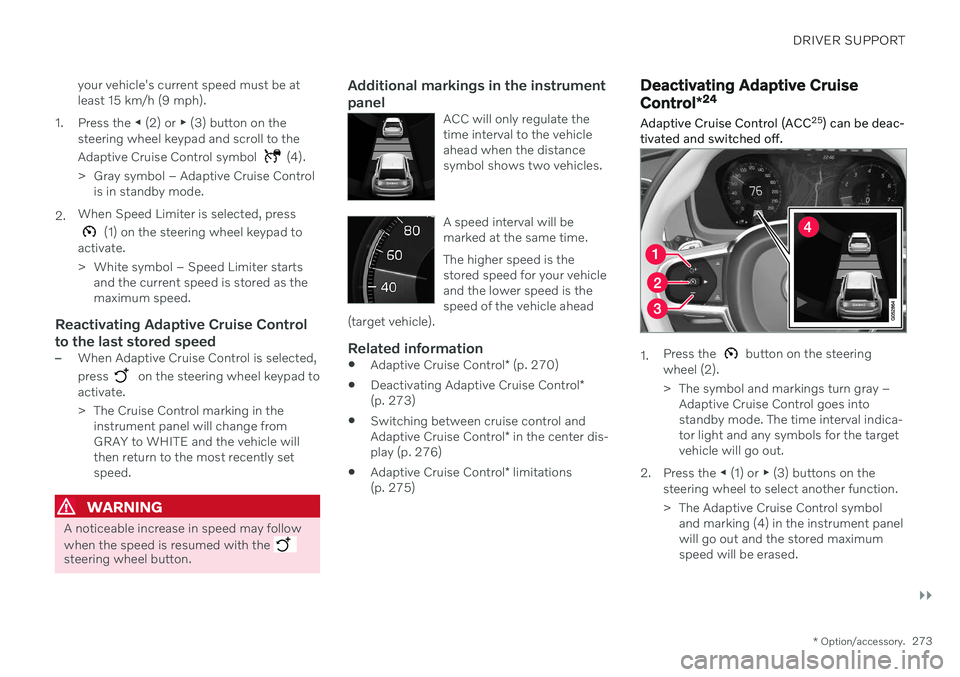
Deactivating Adaptive Cruise Control *24
Adaptive Cruise Control (ACC 25
) can be deac-
tivated and switched off.
1. Press the button on the steering
wheel (2).
> The symbol and markings turn gray – Adaptive Cruise Control goes into standby mode. The time interval indica-tor light and any symbols for the targetvehicle will go out.
2. Press the ◀ (1) or ▶ (3) buttons on the
steering wheel to select another function.
> The Adaptive Cruise Control symbol and marking (4) in the instrument panel will go out and the stored maximumspeed will be erased.
Page 281 of 657

DRIVER SUPPORT
}}
* Option/accessory.279
Pilot Assist*37
Pilot Assist can help the driver keep the vehi- cle in the current traffic lane by providingsteering assistance and maintaining an evenspeed and a set time interval to the vehicleahead.
How Pilot Assist worksThe Pilot Assist function is primarily intended for use on highways and other major roadswhere it can help provide a more comfortableand relaxing driving experience.
The camera/radar sensor monitors the distance to the vehicle ahead and detects lane markings.
Camera and radar sensor
Distance monitor
Lane marker line monitors The driver sets the desired speed and distance to the vehicle ahead. Pilot Assist monitors thedistance to the vehicle ahead and the trafficlane's side markers using the camera andradar sensor. The system maintains the settime interval to the vehicle ahead by automati-cally adjusting your vehicle's speed and keepsyour vehicle in its lane by providing steeringassistance. If the Curve Speed Assist (CSA)
* function is
activated, it may also affect the vehicle's speed. Pilot Assist's steering assistance is based on monitoring the direction of the vehicle aheadand the traffic lane's side marker lines. Thedriver can override Pilot Assist's steering rec-ommendations at any time and steer inanother direction, e.g. to change lanes or avoidobstacles on the road. If the camera/radar sensor cannot detect the lane's side marker lines or if Pilot Assist isunable for some other reason to clearly inter-pret the lane, Pilot Assist will temporarilydeactivate steering assistance until it can onceagain interpret the lane markings. However,the speed and distance warnings will remainactive. The driver will be alerted by slightvibrations in the steering wheel that the func-tion has been temporarily deactivated.
WARNING
Pilot Assist is deactivated automatically and resumes working without prior notice.
The color of the steering wheel symbol indicates thecurrent status of steeringassistance: • GREEN indicates that steering assistance is active
• GRAY (as shown in illustration) indicates thatsteering assistance is deactivated.
37 Depending on market, this function can be either standard or optional.
Page 284 of 657

||
DRIVER SUPPORT
* Option/accessory.
282
Instrument panel
Speed indicators.
Set speed
Speed of the vehicle ahead
The current speed of your vehicle
Related information
Pilot Assist
* (p. 279)
Selecting and activating Pilot Assist *39
Pilot Assist must first be selected and then activated before it can regulate speed anddistance and provide steering assistance.
To start Pilot Assist: The driver's seat belt must be buckled and the driver's door must be closed.
There must be a vehicle ahead (targetvehicle) within a reasonable distance or your vehicle's current speed must be atleast 15 km/h (9 mph).
1. Press the ◀ (1) or ▶ (3) button on the
steering wheel keypad and scroll to the Pilot Assist symbol
(4).
> Gray symbol – Pilot Assist is in standby mode.
2. When Pilot Assist is selected, press
(2) on the steering wheel keypad to acti- vate.
> White symbol – Pilot Assist starts and
the current speed is stored as the maxi- mum speed.
Reactivating Pilot Assist to the last stored speed
–When Pilot Assist is selected, press on the steering wheel keypad to activate.
> The Cruise Control marking in theinstrument panel will change from GRAY to WHITE and the vehicle willthen return to the most recently setspeed.
WARNING
A noticeable increase in speed may follow when the speed is resumed with the
steering wheel button.
39Depending on market, this function can be either standard or optional.
Page 285 of 657

DRIVER SUPPORT
* Option/accessory.283
NOTE
Note that the Pilot Assist function only works when the driver's hands are on thesteering wheel.
Additional markings in the instrument panel
Pilot Assist will only regulate the time interval to the vehi-cle ahead when the distancesymbol shows a vehicle (1)over the steering wheel sym-bol.
Pilot Assist's steering assistance is only activewhen the steering wheel symbol (2) changesfrom GRAY to GREEN.
A speed interval will be marked at the same time. The higher speed is the stored speed for your vehicleand the lower speed is thespeed of the vehicle ahead
(target vehicle).
Related information
Pilot Assist
* (p. 279)
Deactivating Pilot Assist
* (p. 283)
Pilot Assist
* limitations (p. 285)
Deactivating Pilot Assist *40
Pilot Assist can be deactivated and switched off.
1. Press the button on the steering
wheel (2).
> The symbol and markings turn gray – Pilot Assist goes into standby mode. The time interval indicator light and anysymbols for the target vehicle will goout.
2. Press the ◀ (1) or ▶ (3) buttons on the
steering wheel to select another function.
> The Pilot Assist symbol and marking (4) in the instrument panel will go out and the stored maximum speed will beerased.
WARNING
With Pilot Assist in standby mode, the driver must intervene and steer andregulate both speed and distance tothe vehicle ahead.
If the vehicle comes too close to a vehi-cle ahead when Pilot Assist is instandby mode, the driver is insteadwarned of the short distance by the Distance Alert
* function.
Related information
Adaptive Cruise Control
* (p. 270)
Selecting and activating Adaptive CruiseControl
* (p. 272)
Switching between cruise control andAdaptive Cruise Control
* in the center dis-
play (p. 276)
Adaptive Cruise Control
* limitations
(p. 275)
Temporarily deactivating steering assis-tance with Pilot Assist
* (p. 285)
40
Depending on market, this function can be either standard or optional.
Page 292 of 657

||
DRIVER SUPPORT
* Option/accessory.
290
WARNING
When driver support follows another vehi- cle at speeds over approx. 30 km/h
(20 mph) and changes target vehicle –from a moving vehicle to a stationary one –driver support will ignore the stationary
vehicle and instead accelerate to the storedspeed. The driver must then intervene and apply the brakes.
Automatic standby mode when switching targets
Driver support disengages and goes into standby mode if:
your vehicle's speed goes under 5 km/h(3 mph) and driver support cannot deter-mine if the target vehicle is stationary or ifit is another object, e.g. a speed bump.
your vehicle's speed goes under 5 km/h(3 mph) and the vehicle ahead turns sothat driver support no longer has a vehicleto follow.
Related information
Driver support systems (p. 260)
Adaptive Cruise Control
* (p. 270)
Pilot Assist
* (p. 279)
Adjusting set speed for driver support
It is possible to adjust set speeds for the Adaptive Cruise Control * and Pilot Assist *
functions.
: Increases the set speed.
: Reduces the set speed.
Set speed.
–Change a set speed by pressing the
(1) or (2) buttons briefly or by pressing
and holding them:
Brief
press: Each press changes the
speed in +/- 5 km/h (+/- 5 mph) incre- ments.
Press
and hold: Release the button
when the set speed indicator (3) hasmoved to the desired speed.
NOTE
For vehicles without Adaptive Cruise Con- trol *, speed instead increases by +/- 1km/h
(+/- 1 mph) each time the button is pressed.
The most recently set speed will be stored.
If speed is increased by depressing the accel- erator pedal while pressing the
(1) button
on the steering wheel, the vehicle's speed when the button is pressed will be stored as the set speed. Temporarily increasing speed using the accel- erator pedal, e.g. when passing another vehi-cle, will not affect the setting. The vehicle willreturn to the set speed when the acceleratorpedal is released.
Page 338 of 657

DRIVER SUPPORT
* Option/accessory.
336
Driver Alert Control limitations
Driver Alert Control (DAC) functionality may be reduced in certain situations.
In certain situations, the system may provide a warning even if it has not detected a change indriving behavior, e.g.: in strong crosswinds
on grooved road surfaces.
WARNING
In certain cases, driving behavior might not be affected despite the driver's fatigue – when using the Pilot Assist
* function –
resulting in the driver not getting a warning from DAC. It is therefore very important to always stop and take a break at the slightest signof fatigue, regardless of whether the func-tion has issued a warning or not.
NOTE
The function uses the vehicle's camera and radar sensor, which has certain generallimitations.
Related information
Driver Alert Control (p. 334)
Camera/radar sensor limitations (p. 301)
Lane Keeping Aid
Lane Keeping Aid (LKA 88
) is designed to
actively steer the vehicle on freeways, high- ways and other major roads to help the driverreduce the risk of the vehicle unintentionallyveering out of the lane.
Lake Keeping Aid steers the vehicle back into the lane and/or alerts the driver using vibra-tions in the steering wheel. Lane Keeping Aid is active at speeds between 65–200 km/h (40–125 mph) on roads withclearly visible traffic lane marker lines. On narrow roads, the function may be unavail- able and go into standby mode. The functionwill become available again when the roadbecomes sufficiently wide.
A camera monitors the road/traffic lane's marker lines.
Lane Keeping Aid steers the vehicle back into its lane.
88 Lane Keeping Aid