door lock VOLVO S60 TWIN ENGINE 2020 Owner's Manual
[x] Cancel search | Manufacturer: VOLVO, Model Year: 2020, Model line: S60 TWIN ENGINE, Model: VOLVO S60 TWIN ENGINE 2020Pages: 657, PDF Size: 13.6 MB
Page 234 of 657

KEY, LOCKS AND ALARM
* Option/accessory.
232
Remote key
The remote key is used to lock and unlock doors and the trunk lid. The remote key mustbe in the vehicle in order to start the engine.
Remote key 3
and button-less key (Key Tag) *.
The remote key is not physically used to start the ignition because the vehicle is standard-equipped with keyless start (Passive Start).The key only needs to be in the front section ofthe passenger compartment. For vehicles equipped with keyless locking and unlocking (Passive Entry) *, the engine can
be started with the key anywhere in the vehi- cle. A smaller, lighter and button-less key (KeyTag) is also provided. The remote keys can be linked to different driver profiles to store personal settings in thevehicle.
Remote key buttons
The remote key has four buttons, one on the left side and three on the right.
Locking - Press once to lock the doors,
trunk lid and fuel filler door and arm the alarm. Press and hold to close all windows.
Unlocking - Press once to unlock the
doors and trunk lid and disarm the alarm. Press and hold to open all windows at the same time. This total airing function canbe used to e.g. quickly air out the vehiclein hot weather.
Trunk lid - Press to unlock and disarm
the trunk lid only. Pressing and holding will open the trunk lid mechanically due to the preloaded springs.
Panic alarm - Used to attract attention in
emergency situations. Press and hold the button for at least 3 seconds or presstwice within 3 seconds to activate theturn signals and horn. To deactivate, waitat least 5 seconds and press the buttonagain. If no action is taken, the panic alarmwill deactivate automatically after 3minutes.
WARNING
If anyone is left in the vehicle, make sure that power to the power windows and pan- oramic roof * is cut off by always taking the
remote key with you when you leave the vehicle.
3 The illustration is generic - details may vary according to vehicle model.
Page 236 of 657

||
KEY, LOCKS AND ALARM
* Option/accessory.
234
Related information
Starting the vehicle (p. 392)
Locking and unlocking using the remote key (p. 234)
Remote key range (p. 235)
Replacing the remote key's battery(p. 236)
Detachable key blade (p. 242)
Electronic immobilizer (p. 244)
Linking a remote key to a driver profile(p. 135)
Locking and unlocking using the remote key
All doors and the trunk lid can be locked and unlocked simultaneously using the buttonson the remote key.
Locking with remote key
The illustration is generic - details may vary accord- ing to vehicle model.
–Press the button on the remote key to
lock the vehicle.
To activate the locking sequence, the driver's door must be closed 5
. If any of the other doors
or the trunk lid are open, they will be locked and the alarm will be armed once they areclosed.
NOTE
Be aware of the risk of locking the remote key in the vehicle. If the remote key or key tag is left in the vehicle, it will be deactivated whenthe vehicle is locked and the alarm setusing another valid key. The key will bereactivated when the vehicle isunlocked.
If the remote key or Red Key is left inthe vehicle, it will be deactivated evenif the vehicle is locked using Volvo OnCall, and will be reactivated when thevehicle is unlocked using Volvo On Callor another valid key.
Locking when the trunk lid is open
NOTE
If the vehicle is locked and the trunk lid is still open, make sure that the remote key isnot left in the trunk when the trunk lid is closed and the entire vehicle is locked 6
.
Unlocking with remote key
–Press the button on the remote key to
unlock the vehicle.
5 If the vehicle is equipped with keyless locking/unlocking *, all side doors must be closed.
6 If the vehicle is equipped with keyless locking/unlocking and the key is detected inside the vehicle, the trunk lid will not lock when it is closed. *
Page 237 of 657

KEY, LOCKS AND ALARM
}}
* Option/accessory.235
Automatic relockingIf none of the doors or trunk lid are opened within two minutes after being unlocked, theywill automatically relock. This function reducesthe risk of inadvertently leaving the vehicleunlocked.
Remote key not working
NOTE
Move closer to the vehicle and try to unlock it again.
If the remote key is not working to lock or unlock the vehicle, its battery may be dis-charged. Use the detachable key blade tolock/unlock the driver's door instead.
Related information
Settings for remote and inside door unlock(p. 235)
Remote key (p. 232)
Replacing the remote key's battery(p. 236)
Locking and unlocking with detachablekey blade (p. 243)
Settings for remote and inside door unlock Several different sequences are available for remote unlocking.
To change this setting: 1.
Tap
Settings in the center display's Top
view.
2. Tap
My CarLockingRemote and
Interior Unlock.
3. Select alternative:
All Doors – unlocks all doors at the
same time.
Single Door – unlocks the driver's
door. Press the remote key unlock but- ton twice to unlock all doors.
The settings made here also affect centrallocking using the inside door handle.
Related information
Locking and unlocking using the remotekey (p. 234)
Locking and unlocking from inside thevehicle (p. 250)
Remote key range
In order to function correctly, the remote key must be within a certain distance from thevehicle.
Manual useThe remote key's functions for e.g. locking and unlocking, which are activated by pressing
or , have a range of approx. 20 meters
(65 feet) from the vehicle. If the vehicle's locks do not react, move closer and try again.
Keyless * use
The shaded areas around the vehicle illustrate the range of the system's antennas.
For keyless use, a remote key or the Key Tag must be within the shaded areas shown in theillustration, i.e. a semicircle with a radius of
Page 238 of 657

||
KEY, LOCKS AND ALARM
* Option/accessory.
236 approx. 1.5 meter (5 feet) along the sides of the vehicle or approx. 1 meter (3 feet) from thetrunk lid.
NOTE
The functions of the remote control key can be disrupted by ambient radio waves,buildings, topographical conditions, etc.The vehicle can always be locked/unlockedusing the key blade.
If the remote key is removed from the vehicle
If the remote key is removed from the vehicle while the engine is run- ning, the warning message
Vehicle
key not found Removed from
vehicle will be displayed in the instrument
panel and an audible signal will sound when the last door is closed.
The message will disappear when the key is returned to the vehicle and the O button on
the right-side steering wheel keypad ispressed or when the last door is closed again.
Related information
Remote key (p. 232)
Antenna locations for the start and locksystem (p. 249)
Keyless and touch-sensitive surfaces
*
(p. 246)
Replacing the remote key's battery
The battery in the remote key must be replaced when it is discharged.
NOTE
All batteries have a limited service life and must eventually be replaced (does notapply for Key Tag). The battery's service lifevaries depending on how often thevehicle/key is used.
The remote key battery should be replaced if
the information symbol illuminates and the message
Vehicle key bat. low is dis-
played in the instrument panel
the locks do not react after several attempts to lock or unlock the vehicleusing the remote key within approx.20 meter (65 feet) from the vehicle.
NOTE
Move closer to the vehicle and try to unlock it again.
The battery in the smaller key without but- tons 7
(the Key Tag) cannot be replaced. A new key can be ordered from an authorized Volvo workshop.
CAUTION
An end-of-life Key Tag must be turned in to an authorized Volvo workshop. The keymust be deleted from the vehicle becauseit can still be used to start the vehicle viabackup start.
Opening the key and replacing the battery
Hold the remote key with the front side
(with the Volvo logo) facing up and move the button on the key ring section to theright. Slide the front cover slightly upward.
The cover will loosen and can be
removed from the key.
Page 244 of 657
KEY, LOCKS AND ALARM
* Option/accessory.
242
Detachable key blade
The remote key contains a detachable metal key blade that can be used to activate a num-ber of functions and preform certain actions.
A Volvo workshop can provide you with the key blade's unique code, which is recom-mended in case you need to order a new keyblade.
Using the detachable key bladeThe detachable key blade can be used to
manually open the left-side front door ifcentral locking cannot be activated withthe remote key
emergency lock all doors
activate/deactivate the rear door mechani-cal child safety locks
The button-less key 8
does not have a detacha-
ble key blade. If needed, use the standardremote key's detachable key blade.
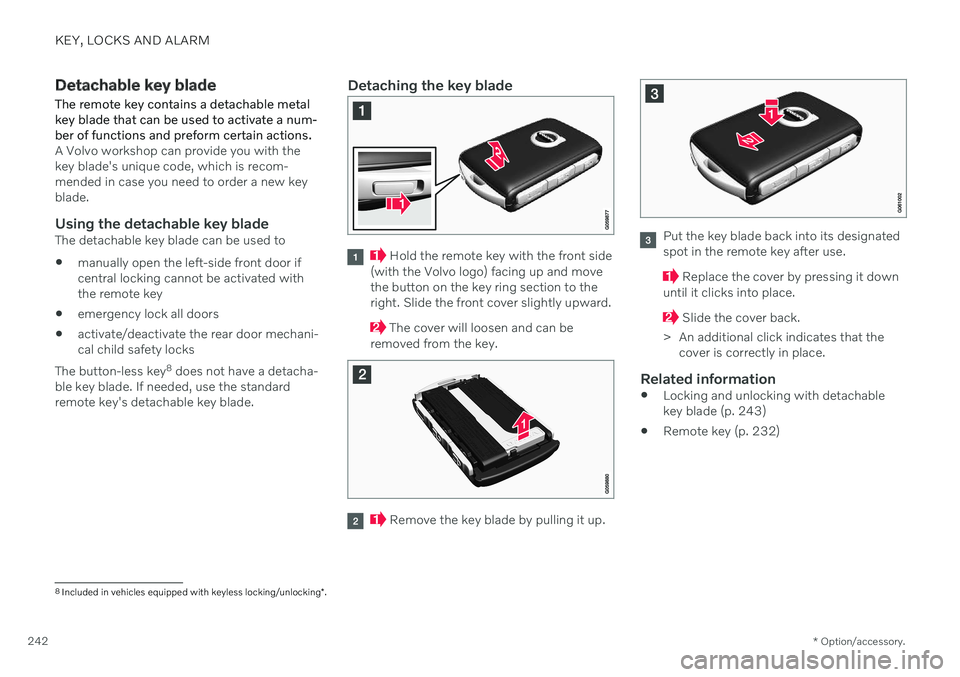
Detaching the key blade
Hold the remote key with the front side
(with the Volvo logo) facing up and move the button on the key ring section to theright. Slide the front cover slightly upward.
The cover will loosen and can be
removed from the key.
Remove the key blade by pulling it up.
Put the key blade back into its designated spot in the remote key after use.
Replace the cover by pressing it down
until it clicks into place.
Slide the cover back.
> An additional click indicates that the cover is correctly in place.
Related information
Locking and unlocking with detachable key blade (p. 243)
Remote key (p. 232)
8
Included in vehicles equipped with keyless locking/unlocking *.
Page 245 of 657

KEY, LOCKS AND ALARM
}}
243
Locking and unlocking with detachable key blade
The detachable key blade can be used to unlock the vehicle from the outside, e.g. if thebattery in the remote key is discharged.
Unlocking
Pull the front left-hand door handle to its end position to access the lock cylinder.
Put the key in the lock cylinder.
Turn the key clockwise 45 degrees so that the key blade is pointing straight rear-ward.
Turn the key blade back 45 degrees to its original position. Remove the key from thelock cylinder and release the handle sothat it returns to its original positionagainst the vehicle.
5. Pull the door handle. > The door will open. Lock the door in the same way, but turn thekey 45 degrees counterclockwise in step (3).
Disarming the alarm and starting the vehicle
NOTE
When the door is unlocked using the detachable key blade and then opened, thealarm will be triggered.
Location of the backup key reader in the cup holder.
Turn off the alarm by:
1. Place the remote control key on the key
symbol in the backup reader in the bottom of the cup holder in the tunnel console.
2. Turn the start knob clockwise and release it.
> The alarm signal will stop and the alarmwill switch off.
LockingThe vehicle can also be locked using the remote key's detachable key blade, e.g. ifeither the vehicle's or remote key's batteriesare discharged. The left-hand front door can be locked by inserting the detachable key into the door'slock cylinder. This is the only door with a lock cylinder. The other doors have lock mechanisms in the sideof the door that must be pushed in using thekey blade. The door will then be lockedmechanically and cannot be opened from theoutside. The doors can still be opened from inside.
Manual door lock. This is not the child lock.
Page 246 of 657

||
KEY, LOCKS AND ALARM
244
–Remove the detachable key blade from the remote key. Insert the key blade intothe opening for the lock mechanism andpush the key in as far as possible, about12 mm (0.5 in).
The door can be opened from both the outside and the inside.
The door cannot be opened from the out- side. To return to position A, open the doorusing the inside door handle.
The doors can also be unlocked by pressingthe unlock button on the remote key or thecentral lock button in the driver's door.
NOTE
The door's lock controls only lock that specific door, not all doors simultane-ously.
A manually locked rear door with anactivated manual or electric childsafety lock cannot be opened fromeither the outside or inside of the vehi-cle. A rear door locked in this way canonly be unlocked using the remote keyor the central unlocking button.
Related information
Starting the vehicle (p. 392)
Detachable key blade (p. 242)
Arming and disarming the alarm (p. 257)
Replacing the remote key's battery (p. 236)
Remote key (p. 232)
Electronic immobilizer The electronic immobilizer is a start inhibitor that helps prevent the vehicle from beingstarted by an unauthorized person.
The vehicle can only be started with the right remote key. The following instrument panel error mes- sages are related to the electronic immobil-izer:
Symbol Message Meaning
Vehicle key not found See Owner'smanualRemote key not recognized dur-ing start. Placethe remote keyon the key sym-bol in the cupholder and try tostart the vehicleagain.
Remote immobilizer with tracking system 9
The vehicle is equipped with a system that makes it possible to track and locate the vehi-cle and to remotely activate the immobilizer toprevent the vehicle from being started. Con-tact your nearest Volvo retailer for more infor-mation and assistance activating the system.
Page 248 of 657

||
KEY, LOCKS AND ALARM
* Option/accessory.
246 This device complies with part 15 of the FCC rules. Operation is subject to the followingtwo conditions: (1) This device may not cause harmful interfer- ence, and (2) this device must accept any interference received, including interference that maycause undesired operation. Any changes or modification not expressly approved by the party responsible for compli-ance could void the user's authority to operatethis equipment. Canada-IC:3659A-VO3134This device complies with Industry Canada license-exempt RSS standards. Operation issubject to the following two conditions: (1) This device may not cause harmful interfer- ence, and (2) this device must accept anyinterference received, including interferencethat may cause undesired operation.
Related information
Remote key (p. 232)
Keyless and touch-sensitive surfaces
*
With the keyless locking and unlocking func- tion, the remote key only needs to be withinrange, e.g. in a pocket or bag. The vehicle canthen be locked or unlocked by touching thepressure-sensitive surface on the door han-dle.
Pressure-sensitive surfaces
Door handle
There are indentations on the outside of the outer door handles for locking, and pressure-sensitive surfaces on the inside of the handlesfor unlocking.
Pressure-sensitive indentation for locking
Pressure-sensitive surface for unlocking
NOTE
It is important that only one pressure-sen- sitive surface is activated at a time. If thehandle is grasped at the same time as thelock area is pressed, there is a risk thatdouble commands may be sent. This maycause the requested action (locking/unlocking) to be delayed or not performedat all.
Trunk lid handle
The trunk lid handle has a rubberized pressure plate that can only be used for unlocking.
NOTE
Please be aware that the system could be activated in a car wash if the remote key iswithin range.
Page 249 of 657
KEY, LOCKS AND ALARM
}}
* Option/accessory.247
Related information
Keyless locking and unlocking
* (p. 247)
Keyless trunk lid unlock
* (p. 249)
Keyless locking and unlocking *
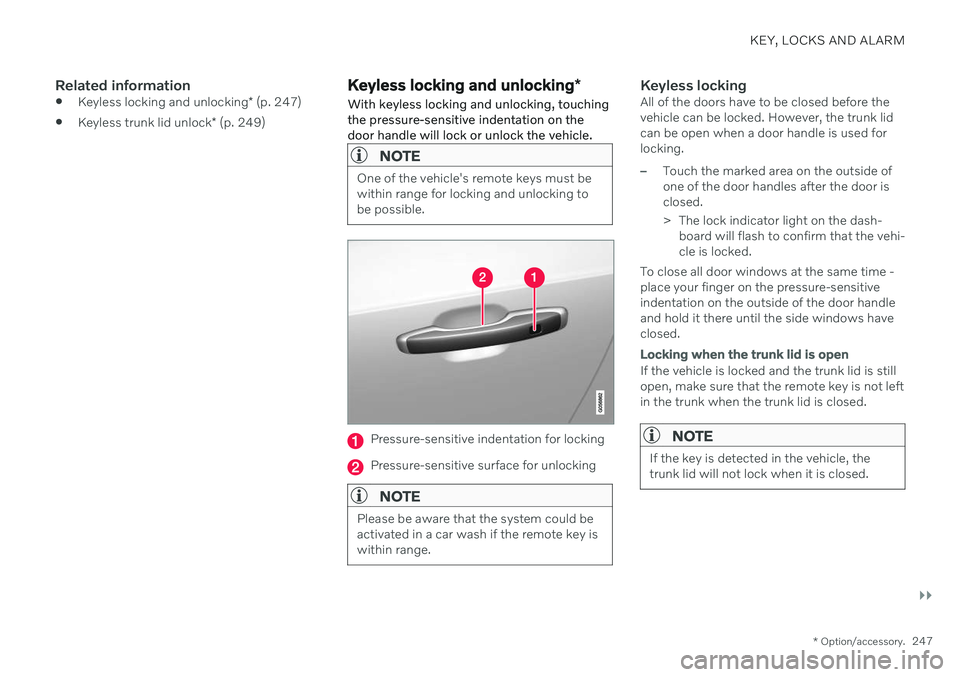
With keyless locking and unlocking, touching the pressure-sensitive indentation on thedoor handle will lock or unlock the vehicle.
NOTE
One of the vehicle's remote keys must be within range for locking and unlocking tobe possible.
Pressure-sensitive indentation for locking
Pressure-sensitive surface for unlocking
NOTE
Please be aware that the system could be activated in a car wash if the remote key iswithin range.
Keyless lockingAll of the doors have to be closed before the vehicle can be locked. However, the trunk lidcan be open when a door handle is used forlocking.
–Touch the marked area on the outside of one of the door handles after the door isclosed.
> The lock indicator light on the dash- board will flash to confirm that the vehi- cle is locked.
To close all door windows at the same time -place your finger on the pressure-sensitiveindentation on the outside of the door handleand hold it there until the side windows haveclosed.
Locking when the trunk lid is open
If the vehicle is locked and the trunk lid is still open, make sure that the remote key is not leftin the trunk when the trunk lid is closed.
NOTE
If the key is detected in the vehicle, the trunk lid will not lock when it is closed.
Page 250 of 657
||
KEY, LOCKS AND ALARM
* Option/accessory.
248
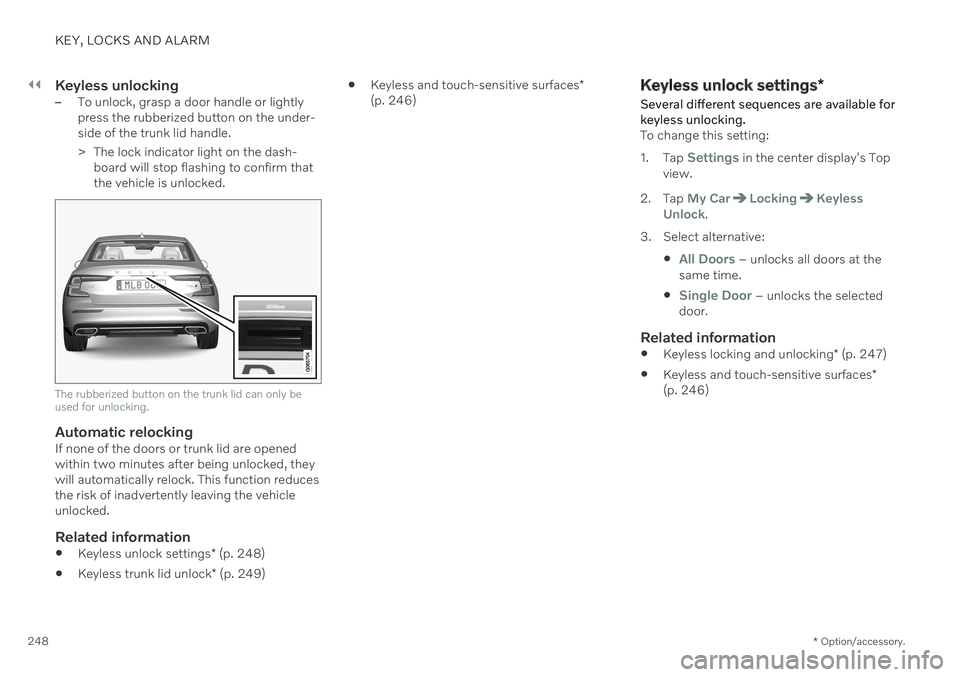
Keyless unlocking–To unlock, grasp a door handle or lightly press the rubberized button on the under-side of the trunk lid handle.
> The lock indicator light on the dash-
board will stop flashing to confirm that the vehicle is unlocked.
The rubberized button on the trunk lid can only be used for unlocking.
Automatic relockingIf none of the doors or trunk lid are opened within two minutes after being unlocked, theywill automatically relock. This function reducesthe risk of inadvertently leaving the vehicleunlocked.
Related information
Keyless unlock settings
* (p. 248)
Keyless trunk lid unlock
* (p. 249)
Keyless and touch-sensitive surfaces
*
(p. 246)
Keyless unlock settings *
Several different sequences are available for keyless unlocking.
To change this setting: 1. Tap
Settings in the center display's Top
view.
2. Tap
My CarLockingKeyless
Unlock.
3. Select alternative:
All Doors – unlocks all doors at the
same time.
Single Door – unlocks the selected
door.
Related information
Keyless locking and unlocking
* (p. 247)
Keyless and touch-sensitive surfaces
*
(p. 246)