door lock VOLVO S60 TWIN ENGINE 2020 Service Manual
[x] Cancel search | Manufacturer: VOLVO, Model Year: 2020, Model line: S60 TWIN ENGINE, Model: VOLVO S60 TWIN ENGINE 2020Pages: 657, PDF Size: 13.6 MB
Page 286 of 657

DRIVER SUPPORT
* Option/accessory.
284
Pilot Assist *41
standby mode
Pilot Assist can be deactivated and put in standby mode. This may happen automati-cally or be due to driver intervention.
Standby mode means that the function is selected in the instrument panel but not acti-vated. In standby mode, Pilot Assist will notregulate the speed or distance to the vehicleahead or provide steering assistance.
Standby mode due to action by the
driver
Pilot Assist will be deactivated and put instandby mode if any of the following occurs:
The brakes are applied.
The gear selector is moved to
N.
A turn signal is used for more than1 minute.
The vehicle is driven faster than the setspeed for more than 1 minute.
Automatic standby modePilot Assist is dependent on other systems, such as Electronic Stability Control (ESC 42
). If
any of these other systems stops working, Pilot Assist will be automatically deactivated.
WARNING
With automatic standby mode, the driver is warned by an acoustic signal and a mes-sage on the instrument panel.
The driver must then regulate vehicle speed, apply the brakes if necessary,and maintain a safe distance to othervehicles.
Adaptive Cruise Control may go into standbymode if, e.g.: the driver opens the door.
the brake temperature is high.
the driver's hands are not on the steering wheel.
the parking brake is applied.
the engine speed (rpm) is too low/high.
the driver unbuckles the seat belt.
one or more of the wheels lose traction.
the camera/radar sensor is covered by snow or heavy rain (the camera lens/radarwaves are blocked).
your vehicle's speed goes under 5 km/h(3 mph) and Pilot Assist cannot determineif the vehicle ahead is stationary or if it isanother object, e.g. a speed bump.
your vehicle's speed goes under 5 km/h(3 mph) and the vehicle ahead turns sothat Pilot Assist no longer has a vehicle tofollow.
Related information
Pilot Assist
* (p. 279)
Selecting and activating Pilot Assist
*
(p. 282)
Deactivating Pilot Assist
* (p. 283)
Pilot Assist
* limitations (p. 285)
41
Depending on market, this function can be either standard or optional.
42 Electronic Stability Control
Page 384 of 657

||
HYBRID INFORMATION
3822. The charging cable handle will lock into
place and charging will begin within 5 seconds. When charging starts, thegreen LED light in the charging socket willbegin to flash. The approximate remainingcharging time or the charging status willbe displayed in the instrument panel. Charging may be temporarily interrupted if the vehicle is unlocked:
and a door is open
‒ charging will
restart within a few minutes.
if no door is opened
‒ the vehicle will
automatically relock. Charging willresume after 1 minute.
CAUTION
Never detach the charging cable from the 120/240 V outlet (AC, alternating current)while charging is in progress – the120/240 V outlet could be damaged insuch circumstances. Always interruptcharging first and then disconnect thecharging cable – first from the vehicle'scharging socket and then from the120/240 V outlet.
During charging, condensation from the air conditioning may form under the vehicle. Thisis normal and is caused by the hybrid batterycooling.
Related information
Charging the hybrid battery (p. 375)
Opening and closing the charging socketcover (p. 380)
Charging status in the vehicle's chargingsocket (p. 382)
Charging status in the instrument panel(p. 384)
Charging status in the charging cable's charging module (p. 383)
Stopping hybrid battery charging (p. 386)
Charging status in the vehicle's charging socket
The charging status is indicated by an LED light in the charging socket.
Location of the LED indicator light in the vehicle's charging socket.
The LED indicator light shows the current charge status during charging. If the LED indi-cator light is not illuminated, check to makesure the cable is securely connected in thewall outlet and in the outlet in the vehicle. Awhite, red or yellow light illuminates when thepassenger compartment lighting is activatedand will remain illuminated for a short timeafter the passenger compartment lighting hasgone out.
Page 385 of 657

HYBRID INFORMATION
383
LED indicator light's colorMeaning
White Courtesy light. Yellow Wait modeA
– waiting for
charging to start.
Flashing green Charging is in progress B
.
Green Charging completed C
.
Red Malfunction.
A E.g. after a door has been opened or if the charging cable handle is not locked in place.
B The more slowly the light flashes, the closer the battery is tobeing fully charged.
C The light will go out after a short time.
Related information
Charging the hybrid battery (p. 375)
Charging status in the instrument panel (p. 384)
Charging status in the charging cable'scharging module (p. 383)
Stopping hybrid battery charging (p. 386)
Charging status in the charging cable's charging module
The red and blue lights in the charging mod- ule indicate the status of ongoing and com-pleted charging.
Charge module: 1. Red warning light, 2. Blue status indicator
When the charge module is initially plugged into a wall outlet, the red warning light willflash once to indicate that a startup safetycheck has been performed. When the safetycheck has been completed, the blue statusindicator will glow steadily and the red warn-ing light will be off. The charger is now readyto be used. If the red warning light continuesto flash or glows steadily, a fault has beendetected and the charger will not deliverpower to the vehicle. Contact a Volvo retaileror a certified Volvo service technician. When the charging cable is connected to thevehicle's charging socket, the blue light willflash once. Charging cable connected to the vehicle's charging socket:
Indicator light's color
Meaning
Flashing blue Charging is in progress. Thelight flashes about onceevery other second.
Solid blue Charging completed. This will also be indicated in theinstrument panel.
Related information
Charging the hybrid battery (p. 375)
Charging status in the vehicle's charging socket (p. 382)
Charging status in the instrument panel(p. 384)
Stopping hybrid battery charging (p. 386)
Page 387 of 657

HYBRID INFORMATION
385
NOTE
If the instrument panel is not used, it will go dark after a period of time. To reactivatethe display: depress the brake pedal,
open one of the doors, or
put the ignition in mode
I by turning
the START knob clockwise and then
releasing.
Related information
Charging the hybrid battery (p. 375)
Twin Engine symbols and messages in the instrument panel (p. 388)
Charging status in the vehicle's chargingsocket (p. 382)
Charging status in the charging cable'scharging module (p. 383)
Stopping hybrid battery charging (p. 386)
Page 388 of 657

HYBRID INFORMATION
* Option/accessory.
386
Stopping hybrid battery charging To stop charging of the hybrid battery, unlock the vehicle, unplug the charging cable fromthe vehicle's charging socket and thenunplug the cable from the 120/240 V outlet(alternating current).
CAUTION
Before the charging cable is removed from the vehicle's charging socket, the vehiclemust be unlocked using the unlock buttonon the remote key. This must be done evenif the vehicle's doors are already unlocked.If the vehicle is not unlocked using theunlock button, the charging cable or sys-tem may be damaged.
NOTE
Always unlock the vehicle so that charging is cut off before the connection to the120/240 V outlet (AC, alternating current)is disconnected. Note that the chargingcable must be disconnected from the vehi-cle's charging socket before it is discon-nected from the 120/240 V outlet, partlyto prevent damage to the system and partyto prevent unintentional interruption ofcharging.
Unlock the vehicle with the remote key. Charging will stop.
Press the lock button on the charging cable's handle. The handle will bereleased/unlocked. Unplug the cable fromthe vehicle's charging socket and closethe charger door.
Unplug the cable from the 120/240 V out- let. Stow the charging cable in the storage compartment on the right side of thetrunk.
Charging cable automatically locksIf the charging cable cannot be removed fromthe charging socket, it will automatically lockinto place again after unlocking to maximizecharging and range and to enable precondi-tioning before driving. The charging cable canbe removed again if the vehicle is unlockedusing the remote key. For vehicles with Passive Entry *, the handle can be used to lock
and unlock.
Related information
Opening and closing the charging socket cover (p. 380)
Charge cable (p. 377)
Page 398 of 657

||
STARTING AND DRIVING
396
Mode FunctionsII The headlights illuminate.
Warning/indicator lights illumi- nate for 5 seconds.
A number of other systems areactivated. However, seat andrear window heating can onlybe activated when the engineis running.
This ignition mode uses a lot ofcurrent from the battery andshould be avoided wheneverpossible!
A Also activated when the door is opened.
Related information
Starting the vehicle (p. 392)
Adjusting the steering wheel (p. 195)
Jump starting using another battery (p. 434)
Selecting ignition mode (p. 396)
Selecting ignition mode
The vehicle's ignition can be put in various modes (levels) to make different functionsavailable.
Selecting an ignition mode
Start knob in the tunnel console.
Ignition mode 0
– Unlock the vehicle and
keep the remote key in the passenger compartment.
NOTE
To set level I or II without engine start –
do not depress the brake pedal (or clutch
pedal for vehicles with manual transmis- sion) when selecting this ignition mode.
Ignition mode I
– Turn the start knob
clockwise and release it. The control will automatically return to the original posi- tion.
Ignition mode II
– Turn the start knob
clockwise and hold it there forapprox. 5 seconds. Release the knob,which will automatically return to its origi-nal position.
Back to ignition mode 0
– To return to
ignition mode 0 from modes I and II, turn
the start knob clockwise and release it.The control will automatically return to theoriginal position.
Related information
Starting the vehicle (p. 392)
Switching off the vehicle (p. 394)
Ignition modes (p. 395)
Adjusting the steering wheel (p. 195)
Jump starting using another battery(p. 434)
Page 410 of 657

||
STARTING AND DRIVING
408
Gear selector positions
Park - P
Gear selector and P position overview
Park is activated using the P button located
next to the gear selector. In P mode, the transmission is mechanically
locked.Select P when the vehicle is parked or when
starting the engine. The vehicle must be sta- tionary when Park is selected. To move to another gear from Park, the brake pedal must be depressed and the ignition inmode II.
When parking – apply the parking brake before shifting to Park.
WARNING
Always apply the parking brake when park- ing on an incline. Selecting a gear or put-ting the automatic transmission in P may
not be sufficient to keep the vehicle sta-tionary in all situations.
NOTE
The gear selector must be in position P in
order to lock the vehicle and set the alarm.
Help functions The system will automatically shift to P
if the ignition is switched off while
D or R
is selected.
if the driver unbuckles the seat belt and opens the driver's door while the vehicle isrunning with the gear selector in a gearother than
P.
To park a vehicle with an unbuckled seat beltand open door – end P mode by shifting to R
or D again.
The system will not automatically shift to P if
the ignition is switched off while the gearselector is in the neutral position (N). This is tomake it possible to wash the vehicle in anautomatic car wash in which the vehicle ispulled forward on rolling wheels.
Reverse - R
Select R when backing up. The vehicle must
be stationary when Reverse is selected.
Neutral - N
No gear is selected and the engine can be started. Apply the parking brake if the vehicleis stationary with the gear selector in N.
To move the gear selector from N to another
gear, the brake pedal must be depressed andthe ignition in mode II.
D drive mode
D is the normal driving gear position. The
transmission shifts up or down automatically depending on acceleration and speed. The vehicle must be stationary when the gear selector is moved from R to D.
Page 429 of 657

STARTING AND DRIVING
}}
427
Related information
Recovery (p. 442)
Opening/closing the fuel filler door
A button on the instrument panel is used to unlock the fuel filler door.
An arrow next to the fuel pump symbol in the instru-ment panel indicates the sideof the vehicle on which thefuel filler door is located.
1. Press the button on the dashboard.
> Pressure equalization in the fuel tankcauses a slight delay before the fuel filler door opens. The message
Preparing for refuel Fuel lid will be
unlocked when ready will appear in
the instrument panel. When the system is ready, the message
Fuel tank Ready
for refueling will be shown. If the gas-
oline engine is activated when the but- ton is pressed, it will usually be deacti-vated and the vehicle will switch toelectric propulsion.
Page 431 of 657

STARTING AND DRIVING
}}
429
4. Avoid overfilling the tank. Do not press the
handle on the filler nozzle again after it has initially stopped pumping.
> The fuel tank is now filled.
NOTE
An over-full tank may overflow in hot weather.
CAUTION
Avoid spilling gasoline during refueling. In addition to causing damage to the environ-ment, gasolines containing alcohol cancause damage to painted surfaces, whichmay not be covered under the New VehicleLimited Warranty.
Refueling from a fuel containerWhen filling from a fuel container, use the fun- nel provided in a foam block under the floorhatch in the cargo compartment.
1. Open the fuel filler door.
2. Insert the funnel into the fuel filler pipe'sopening. There are two flaps just inside the fuel filler pipe and the tube section ofthe funnel must push both of these flapsopen before fuel can be added.
WARNING
California Proposition 65 Operating, servicing and maintaining a pas- senger vehicle can expose you to chemi-cals including engine exhaust, carbon mon-oxide, phthalates, and lead, which areknown to the State of California to causecancer and birth defects or other reproduc-tive harm. To minimize exposure, avoidbreathing exhaust, do not idle the engineexcept as necessary, service your vehicle ina well ventilated area and wear gloves orwash your hands frequently when servicingyour vehicle. For more information go towww.P65Warnings.ca.gov/passenger-vehicle.
Related information
Opening/closing the fuel filler door (p. 427)
Fuel (p. 429)
Fuel
Volvo recommends the use of detergent gas- oline to control engine deposits.
Deposit control gasoline (gasoline with detergent additives)
Detergent gasoline is effective in keeping injectors and intake valves clean. Consistentuse of deposit control gasolines will helpensure good driveability and fuel economy. Ifyou are not sure whether the gasoline containsdeposit control additives, check with the serv-ice station operator.
NOTE
Volvo recommends not using external fuel injector cleaning systems, e.g. do not adddetergent additives to gasoline before orafter refueling.
Unleaded fuelAll Volvo vehicles have a three-way catalytic converter and must only use unleaded gaso-line. US and Canadian regulations require thatpumps delivering unleaded gasoline arelabeled "UNLEADED". Only the nozzles ofthese pumps will fit in your vehicle's fuel fillerinlet. It is unlawful to dispense leaded fuel intoa vehicle labeled "unleaded gasoline only".Leaded gasoline damages the three-way cata-lytic converter and the heated oxygen sensor
Page 444 of 657
||
STARTING AND DRIVING
* Option/accessory.
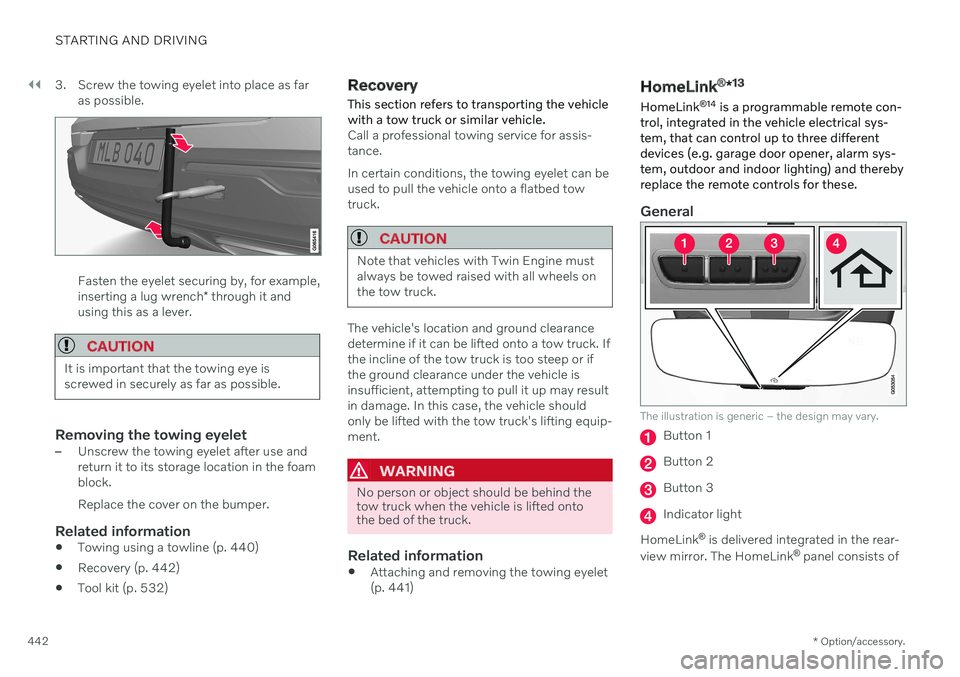
442 3. Screw the towing eyelet into place as far
as possible.
Fasten the eyelet securing by, for example, inserting a lug wrench * through it and
using this as a lever.
CAUTION
It is important that the towing eye is screwed in securely as far as possible.
Removing the towing eyelet–Unscrew the towing eyelet after use and return it to its storage location in the foamblock. Replace the cover on the bumper.
Related information
Towing using a towline (p. 440)
Recovery (p. 442)
Tool kit (p. 532)
Recovery
This section refers to transporting the vehicle with a tow truck or similar vehicle.
Call a professional towing service for assis- tance. In certain conditions, the towing eyelet can be used to pull the vehicle onto a flatbed towtruck.
CAUTION
Note that vehicles with Twin Engine must always be towed raised with all wheels onthe tow truck.
The vehicle's location and ground clearance determine if it can be lifted onto a tow truck. Ifthe incline of the tow truck is too steep or ifthe ground clearance under the vehicle isinsufficient, attempting to pull it up may resultin damage. In this case, the vehicle shouldonly be lifted with the tow truck's lifting equip-ment.
WARNING
No person or object should be behind the tow truck when the vehicle is lifted ontothe bed of the truck.
Related information
Attaching and removing the towing eyelet (p. 441)
HomeLink ®
*13
HomeLink ®
14
is a programmable remote con-
trol, integrated in the vehicle electrical sys- tem, that can control up to three differentdevices (e.g. garage door opener, alarm sys-tem, outdoor and indoor lighting) and therebyreplace the remote controls for these.
General
The illustration is generic – the design may vary.
Button 1
Button 2
Button 3
Indicator light
HomeLink ®
is delivered integrated in the rear-
view mirror. The HomeLink ®
panel consists of