light VOLVO S80 2007 Workshop Manual
[x] Cancel search | Manufacturer: VOLVO, Model Year: 2007, Model line: S80, Model: VOLVO S80 2007Pages: 251, PDF Size: 5.7 MB
Page 141 of 251
Cruise control should not be used in heavy traffic or when driving on wet or slippery roads. Cruise control may not
maintain set speed on steep downgrades.
144 04 Comfort and driving pleasure
Adaptive Cruise Control-ACC
Introduction
Adaptive Cruise Control (ACC) is an optional system designed to assist the driver by maintaining a set speed or a set
distance to the vehicle ahead. It is primarily intended for use on long straight roads in steady traffic, such as on
highways and other main roads.
WARNING
Do not use the adaptive cruise control system in demanding driving conditions such as city traffic, winding roads,
at intersections, on slippery surfaces, in poor visibility, heavy rain, etc.
Maintenance of cruise control components must only be performed by an authorized Volvo workshop.
WARNING
Adaptive cruise control cannot cover all driving situations and traffic, weather and road conditions. The Function
section provides information about limitations that the driver must be aware of before using the adaptive cruise
control.
This system is designed to be a supplementary driving aid. It is not, however, intended to replace the driver's
attention and judgement. The driver is responsible for maintaining a safe distance and speed and must intervene if
adaptive cruise control does not maintain a suitable speed or suitable distance.
Function
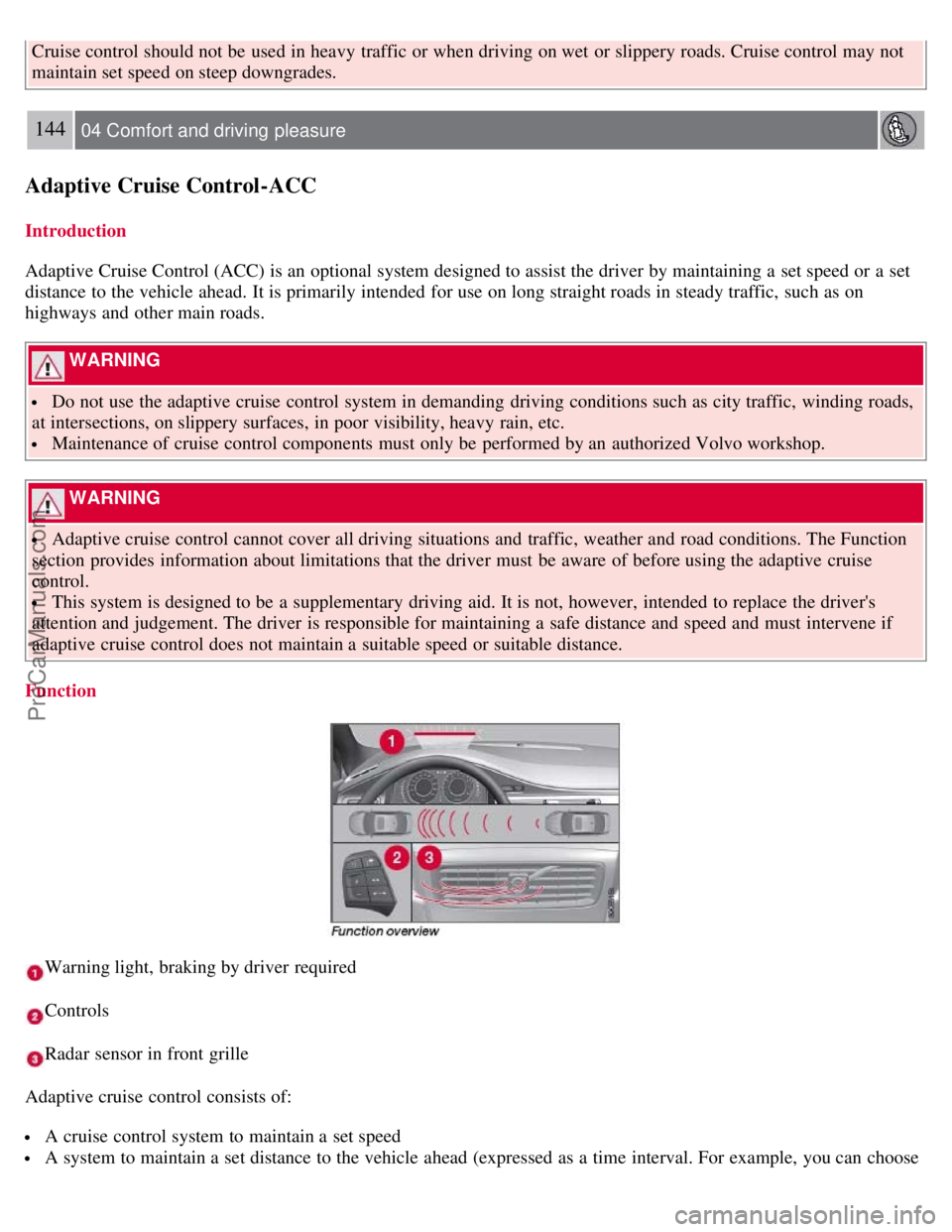
Warning light, braking by driver required
Controls
Radar sensor in front grille
Adaptive cruise control consists of:
A cruise control system to maintain a set speed
A system to maintain a set distance to the vehicle ahead (expressed as a time interval. For example, you can choose
ProCarManuals.com
Page 142 of 251
to remain approximately 2 seconds behind the vehicle ahead).
145 04 Comfort and driving pleasure
Adaptive Cruise Control-ACC
WARNING
Adaptive cruise control is not a collision avoidance system. The driver is always responsible for applying the
brakes if the system does not detect another vehicle.
Adaptive cruise control does not react to slow moving or stationary vehicles.
The distance to the vehicle ahead (in the same lane) is measured by a radar sensor. Your vehicle's speed is regulated by
acceleration and braking. The brakes may emit a sound when they are being modulated by the adaptive cruise control
system. This is normal.
WARNING
The brake pedal moves when the adaptive cruise control system modulates the brakes. Do not rest your foot under
the brake pedal.
The adaptive cruise control system is designed to follow the vehicle ahead of you in the same lane, at a set time
interval.
If the radar sensor has not detected a vehicle ahead, the system will then attempt to maintain the set speed. This is also
the case if the speed of the vehicle ahead exceeds the speed that you have set.
The adaptive cruise control system is designed to smoothly regulate speed. However, the driver must apply the brakes
in situations that require immediate braking. This applies when there are great differences in speed between vehicles,
or if the vehicle ahead brakes suddenly.
WARNING
Due to limitations in the radar sensor, braking may occur unexpectedly or not at all, see page 146
.
Adaptive cruise control can only be activated at speeds above 20 mph (30 km/h). If speed falls below 20 mph (30
km/h) or if engine speed (rpm) becomes too low, adaptive cruise control disengages and will no longer modulate the
brakes. In situations when adaptive cruise control cannot be activated Cruise Control Unavailable is shown in the
display, see page 149
.
WARNING
When adaptive cruise control disengages, the brakes will not be modulated automatically. The driver must assume
full control over the vehicle.
Warning light -driver braking required
Adaptive cruise control has a braking capacity that is equivalent to approximately 30% of the vehicle's total braking
capacity. In situations requiring more brake force than ACC can provide, if the driver does not apply the brakes, an
audible signal will sound and a red warning light will illuminate in the windshield.
ProCarManuals.com
Page 143 of 251
NOTE
The red warning light may be difficult to see in strong sunlight or when sunglasses are being worn.
WARNING
Cruise control only warns of vehicles detected by the radar sensor, see page 146
. In some cases there may be no
warning or the warning may be delayed. The driver should always apply the brakes when necessary.
Automatic deactivation
Adaptive cruise control is linked to other systems such as the stability and traction control system (DSTC). If any of
these systems are not functioning properly, adaptive cruise control is automatically deactivated.
In the event of automatic deactivation a signal will sound and the message Cruise Control Canceled is shown in the
display. The
146 04 Comfort and driving pleasure
Adaptive Cruise Control-ACC
driver must then intervene and adapt the vehicle's speed to the surrounding traffic. Automatic deactivation may be
caused if:
the vehicle's speed falls below 20 mph (30 km/h)
the wheels lose traction or if the anti-lock brake system is activated
brake temperature is high
engine speed (rpm) is too low
the radar sensor is obstructed by, for example, wet snow or rain.
The radar sensor and its limitations
The radar sensor is used both by the adaptive cruise control and the collision warning system. It is designed to detect
vehicles or larger vehicles driving in the same direction as your vehicle. The radar sensor does not detect pedestrians,
or oncoming, slow or stationary vehicles and objects. Warnings are not given and the brakes are not applied in such
cases.
WARNING
Accessories or other objects must not be installed in front of the grille.
Modification of the radar sensor could make its use illegal.
The radar sensor's capacity to detect vehicles ahead is impeded:
if the radar sensor is obstructed and cannot detect other vehicles, for example in heavy rain, or if snow or other
objects are obscuring the radar sensor.
NOTE
Keep the area in front of the radar sensor clean.
ProCarManuals.com
Page 148 of 251
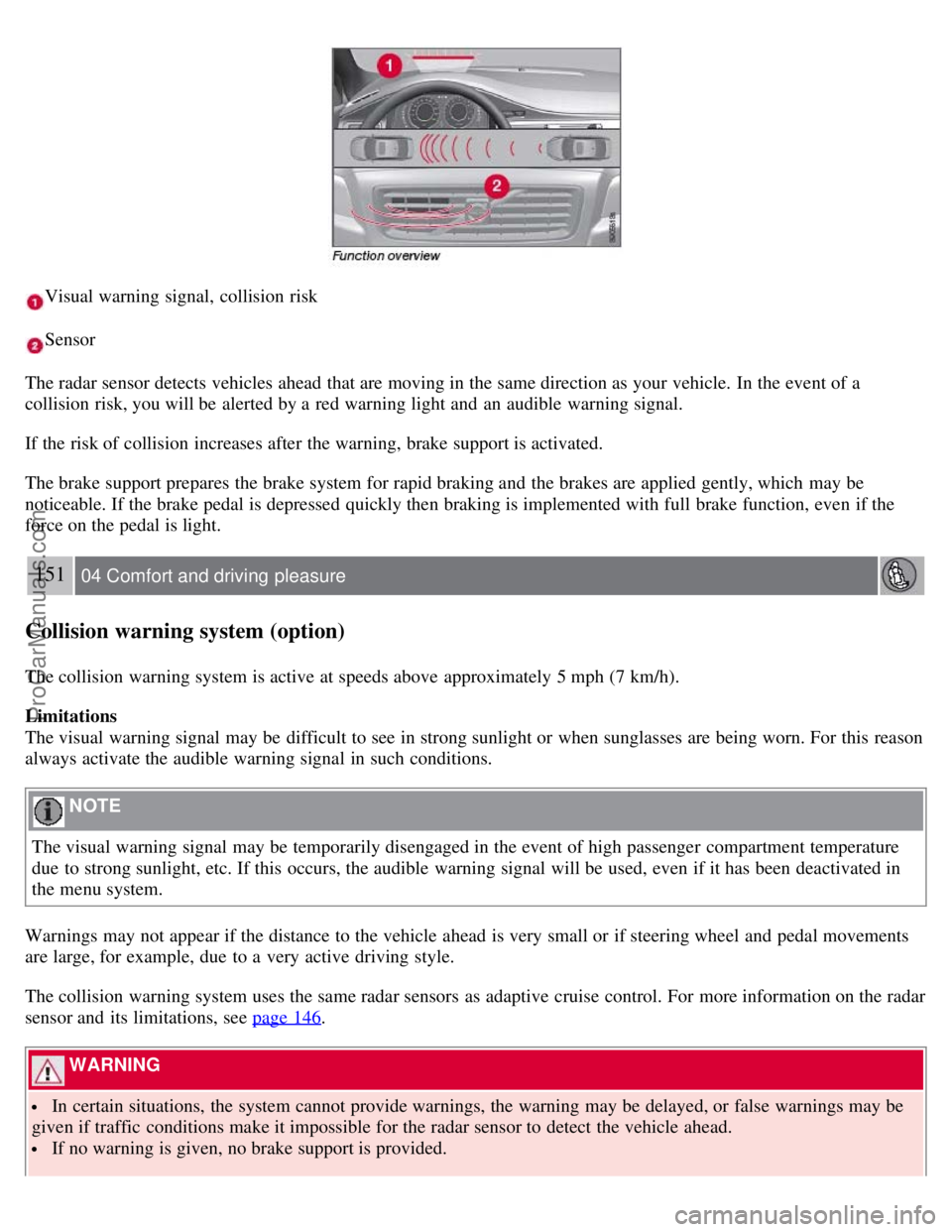
Visual warning signal, collision risk
Sensor
The radar sensor detects vehicles ahead that are moving in the same direction as your vehicle. In the event of a
collision risk, you will be alerted by a red warning light and an audible warning signal.
If the risk of collision increases after the warning, brake support is activated.
The brake support prepares the brake system for rapid braking and the brakes are applied gently, which may be
noticeable. If the brake pedal is depressed quickly then braking is implemented with full brake function, even if the
force on the pedal is light.
151 04 Comfort and driving pleasure
Collision warning system (option)
The collision warning system is active at speeds above approximately 5 mph (7 km/h).
Limitations
The visual warning signal may be difficult to see in strong sunlight or when sunglasses are being worn. For this reason
always activate the audible warning signal in such conditions.
NOTE
The visual warning signal may be temporarily disengaged in the event of high passenger compartment temperature
due to strong sunlight, etc. If this occurs, the audible warning signal will be used, even if it has been deactivated in
the menu system.
Warnings may not appear if the distance to the vehicle ahead is very small or if steering wheel and pedal movements
are large, for example, due to a very active driving style.
The collision warning system uses the same radar sensors as adaptive cruise control. For more information on the radar
sensor and its limitations, see page 146
.
WARNING
In certain situations, the system cannot provide warnings, the warning may be delayed, or false warnings may be
given if traffic conditions make it impossible for the radar sensor to detect the vehicle ahead.
If no warning is given, no brake support is provided.
ProCarManuals.com
Page 149 of 251
A delayed warning means that brake support will also be delayed.
The false warnings may be in the form of both audio and visual signals.
NOTE
The number of false warnings can be limited by reducing the warning distance. See the section "Set warning
distance."
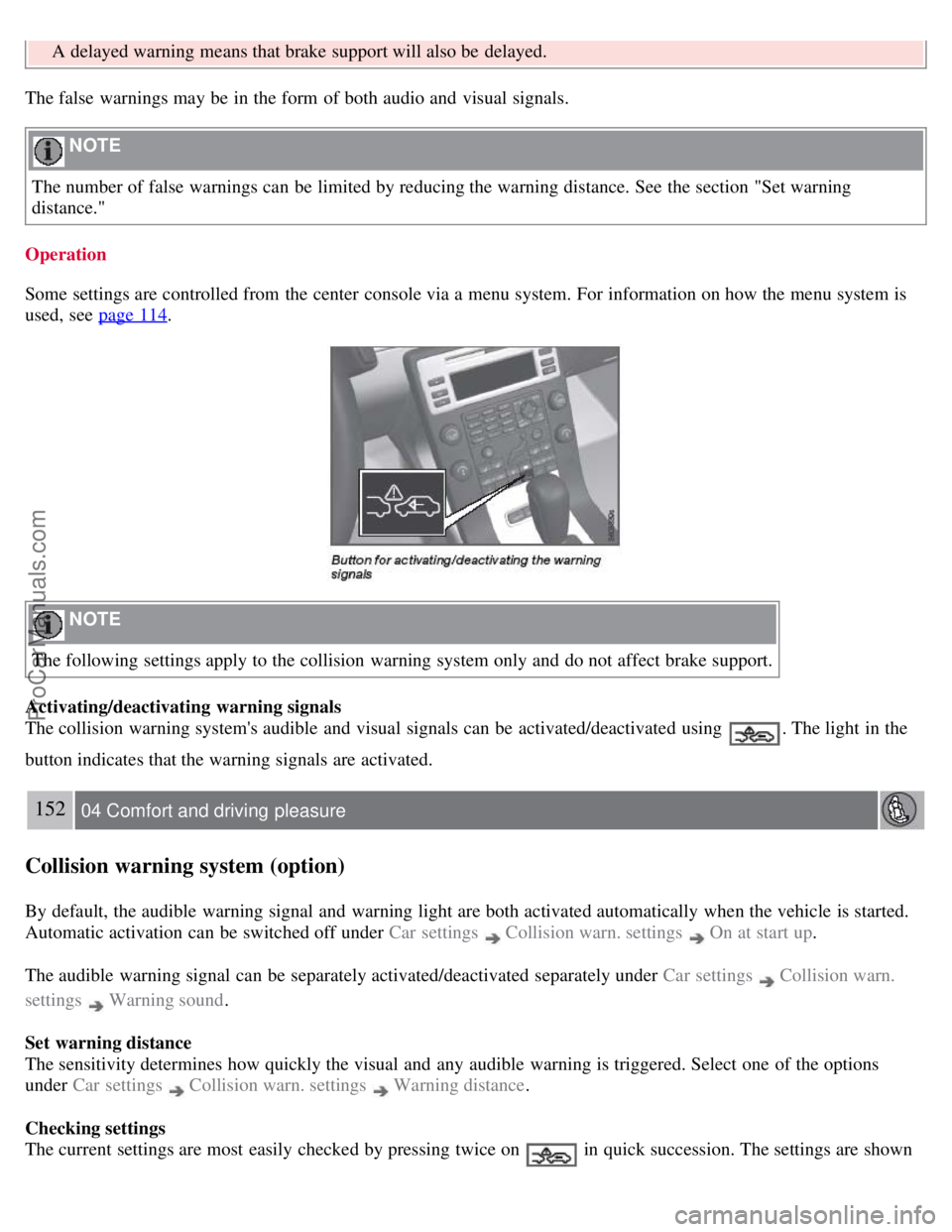
Operation
Some settings are controlled from the center console via a menu system. For information on how the menu system is
used, see page 114
.
NOTE
The following settings apply to the collision warning system only and do not affect brake support.
Activating/deactivating warning signals
The collision warning system's audible and visual signals can be activated/deactivated using
. The light in the
button indicates that the warning signals are activated.
152 04 Comfort and driving pleasure
Collision warning system (option)
By default, the audible warning signal and warning light are both activated automatically when the vehicle is started.
Automatic activation can be switched off under Car settings
Collision warn. settings On at start up.
The audible warning signal can be separately activated/deactivated separately under Car settings
Collision warn.
settings
Warning sound .
Set warning distance
The sensitivity determines how quickly the visual and any audible warning is triggered. Select one of the options
under Car settings
Collision warn. settings Warning distance .
Checking settings
The current settings are most easily checked by pressing twice on
in quick succession. The settings are shown
ProCarManuals.com
Page 150 of 251
in the display.
Messages on the display
Clean the radar sensor in the grille - The collision warning system is temporarily disengaged. The message is shown
temporarily if for example slush has collected in front of the radar sensor.
Collision warn. Service required - The collision warning system is disengaged. Contact an authorized Volvo workshop
if the message remains.
153 04 Comfort and driving pleasure
Park assist (option)
Introduction
The park assist system(s) are designed to assist you when driving into parking spaces, garages, etc. They utilize
ultrasound sensors located in the bumpers to measure the distance to a vehicle or other object, or a person who may be
close to the front or rear of the vehicle.
WARNING
These systems are designed to be a supplementary aid when parking the vehicle. They are not, however, intended to
replace the driver's attention and judgement.
Function
The system is activated automatically when the vehicle is started. The indicator light in the button in the center console
illuminates. The text Park Assist ON is shown in the center console display if reverse gear is selected or if the front
sensors detect an object.
The front park assist system is active from the time the engine is started until the vehicle exceeds a speed of
approximately 10 mph (15 km/h). It is also active when the vehicle is backing up.
Rear park assist is active when the engine is running and reverse gear has been selected.
An intermittent audio signal becomes audible when your vehicle approaches an object. The frequency of the signal
increases as you come closer to the object in front of or behind the vehicle. If the volume of another audio source from
the audio system is high, this will be automatically lowered.
The tone becomes constant at a distance of approximately 1 ft (30 cm). If there are objects within this distance both
behind and in front of the vehicle, the signal alternates between front and rear speakers.
Rear park assist
ProCarManuals.com
Page 151 of 251
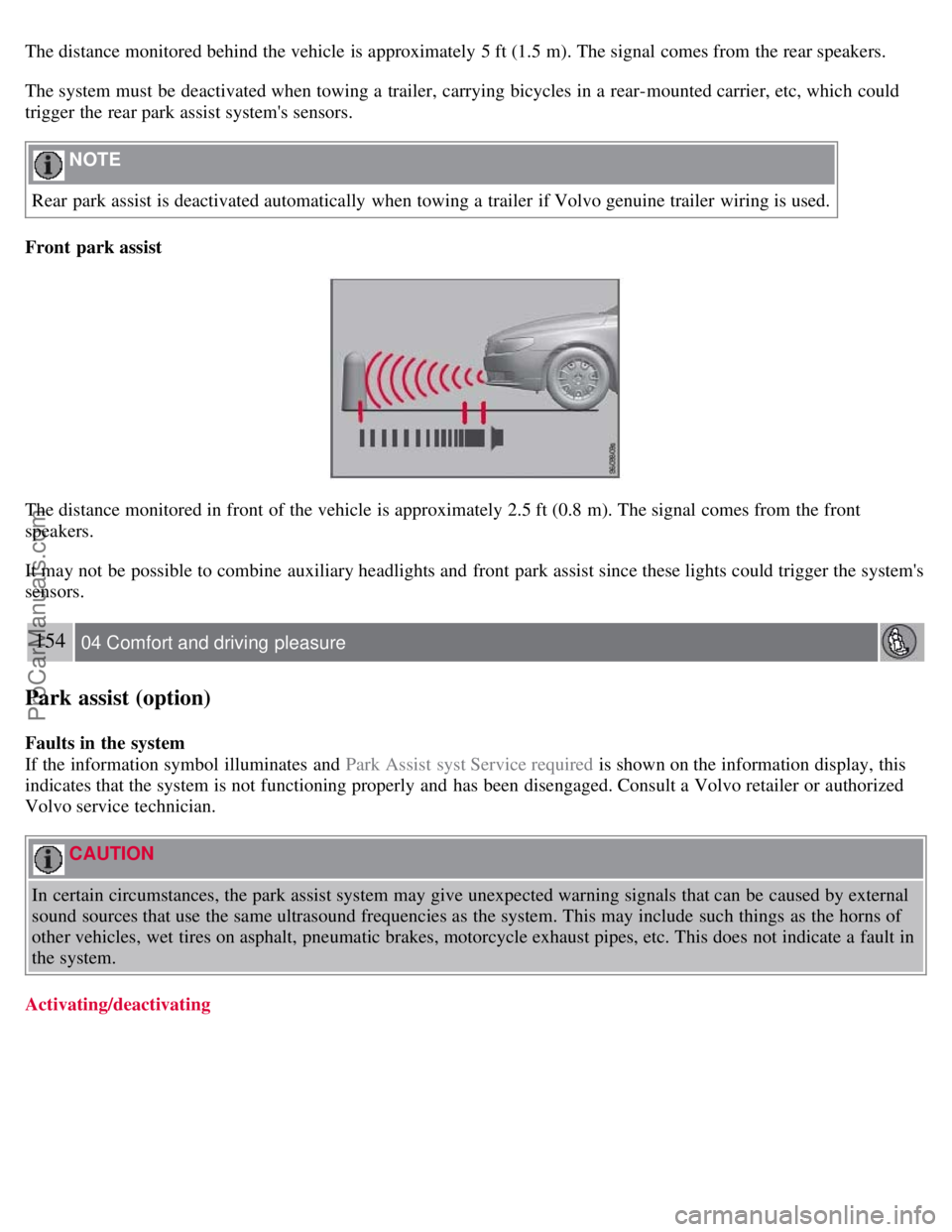
The distance monitored behind the vehicle is approximately 5 ft (1.5 m). The signal comes from the rear speakers.
The system must be deactivated when towing a trailer, carrying bicycles in a rear-mounted carrier, etc, which could
trigger the rear park assist system's sensors.
NOTE
Rear park assist is deactivated automatically when towing a trailer if Volvo genuine trailer wiring is used.
Front park assist
The distance monitored in front of the vehicle is approximately 2.5 ft (0.8 m). The signal comes from the front
speakers.
It may not be possible to combine auxiliary headlights and front park assist since these lights could trigger the system's
sensors.
154 04 Comfort and driving pleasure
Park assist (option)
Faults in the system
If the information symbol illuminates and Park Assist syst Service required is shown on the information display, this
indicates that the system is not functioning properly and has been disengaged. Consult a Volvo retailer or authorized
Volvo service technician.
CAUTION
In certain circumstances, the park assist system may give unexpected warning signals that can be caused by external
sound sources that use the same ultrasound frequencies as the system. This may include such things as the horns of
other vehicles, wet tires on asphalt, pneumatic brakes, motorcycle exhaust pipes, etc. This does not indicate a fault in
the system.
Activating/deactivating
ProCarManuals.com
Page 152 of 251
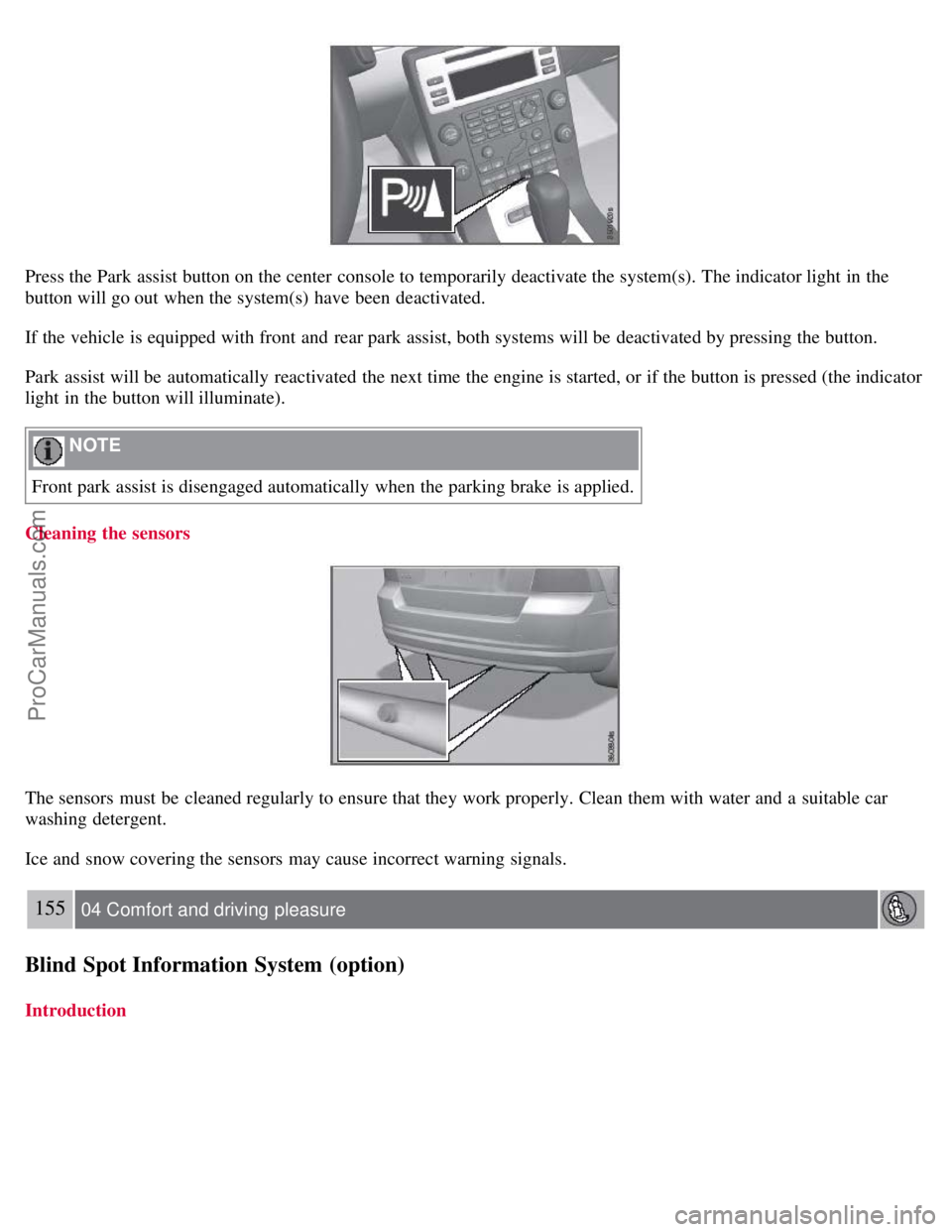
Press the Park assist button on the center console to temporarily deactivate the system(s). The indicator light in the
button will go out when the system(s) have been deactivated.
If the vehicle is equipped with front and rear park assist, both systems will be deactivated by pressing the button.
Park assist will be automatically reactivated the next time the engine is started, or if the button is pressed (the indicator
light in the button will illuminate).
NOTE
Front park assist is disengaged automatically when the parking brake is applied.
Cleaning the sensors
The sensors must be cleaned regularly to ensure that they work properly. Clean them with water and a suitable car
washing detergent.
Ice and snow covering the sensors may cause incorrect warning signals.
155 04 Comfort and driving pleasure
Blind Spot Information System (option)
Introduction
ProCarManuals.com
Page 153 of 251
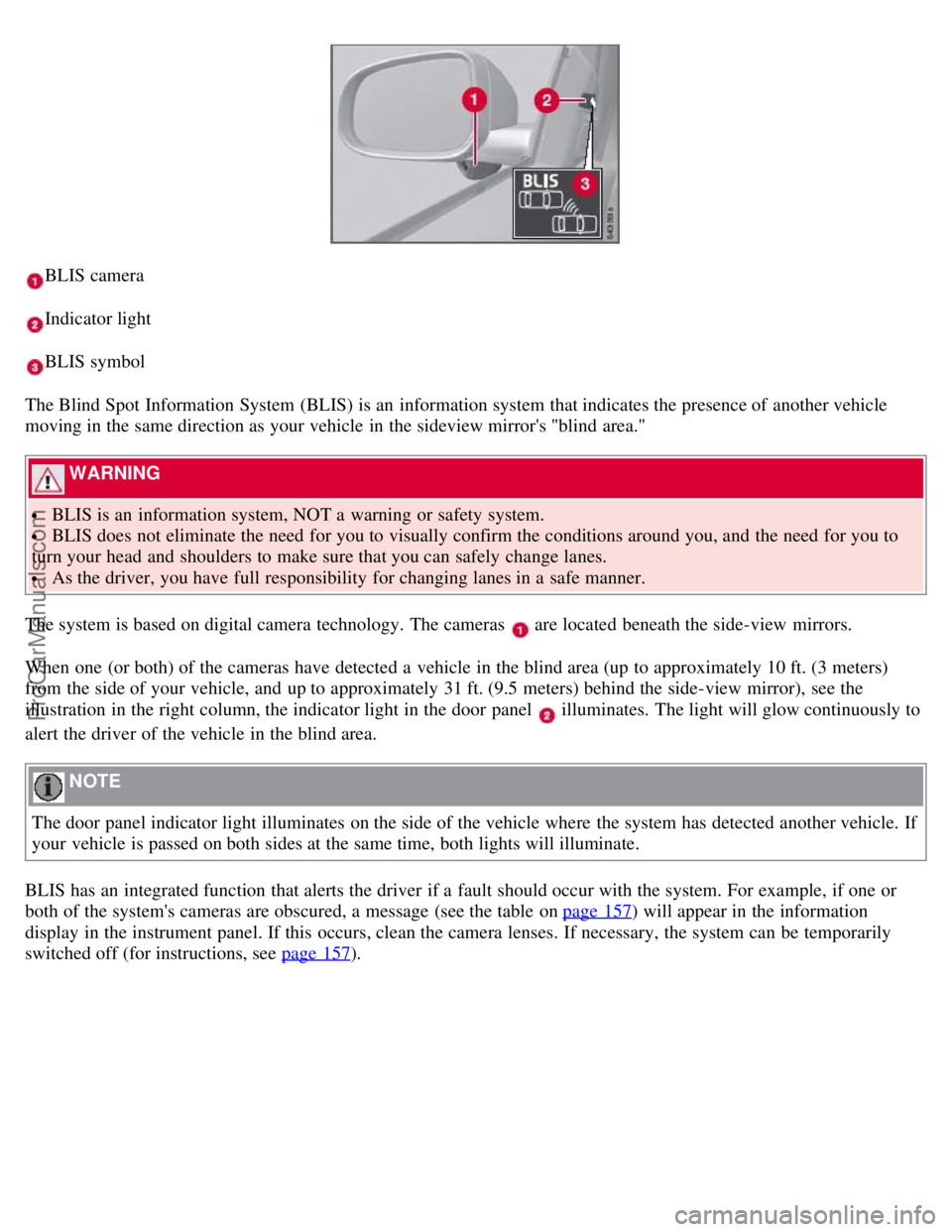
BLIS camera
Indicator light
BLIS symbol
The Blind Spot Information System (BLIS) is an information system that indicates the presence of another vehicle
moving in the same direction as your vehicle in the sideview mirror's "blind area."
WARNING
BLIS is an information system, NOT a warning or safety system.
BLIS does not eliminate the need for you to visually confirm the conditions around you, and the need for you to
turn your head and shoulders to make sure that you can safely change lanes.
As the driver, you have full responsibility for changing lanes in a safe manner.
The system is based on digital camera technology. The cameras
are located beneath the side-view mirrors.
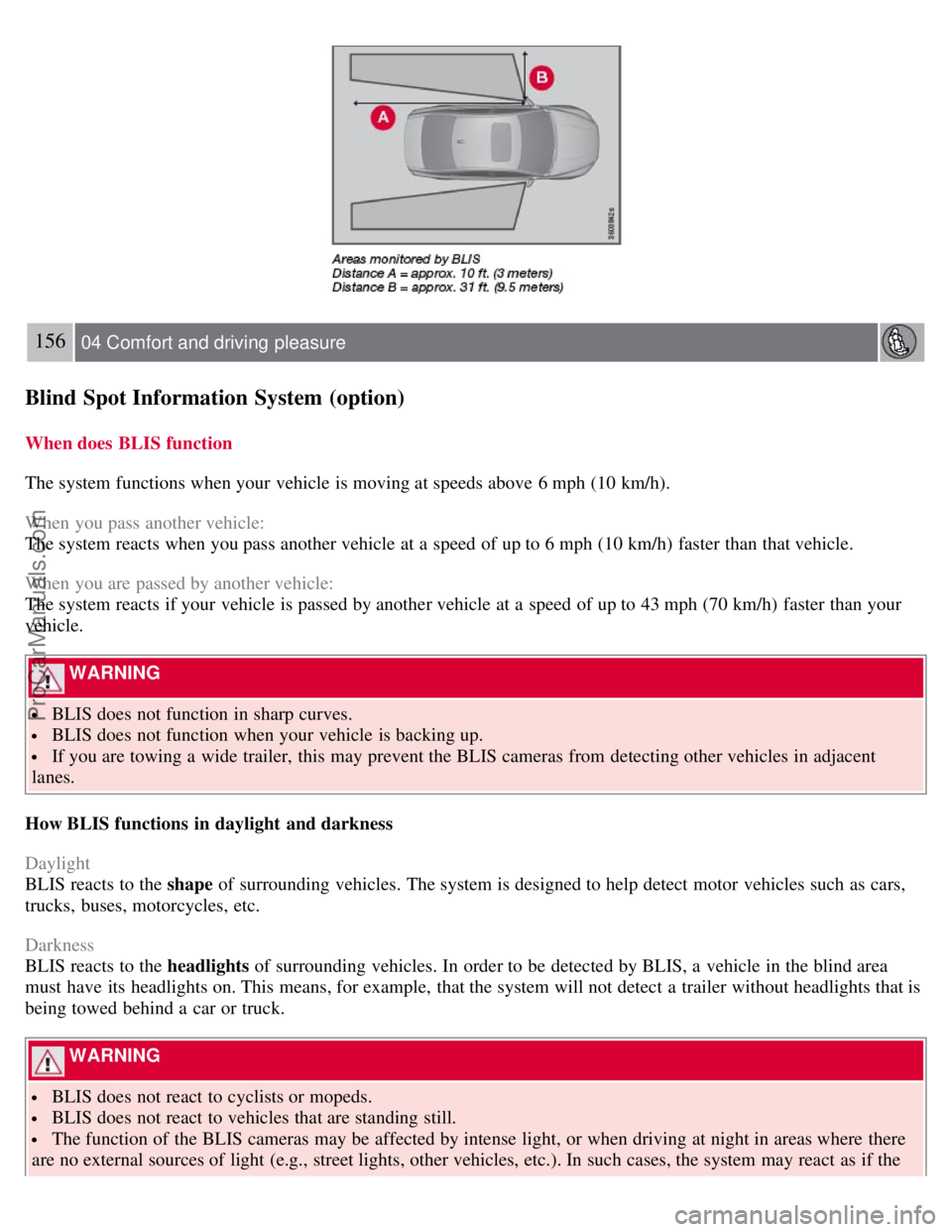
When one (or both) of the cameras have detected a vehicle in the blind area (up to approximately 10 ft. (3 meters)
from the side of your vehicle, and up to approximately 31 ft. (9.5 meters) behind the side-view mirror), see the
illustration in the right column, the indicator light in the door panel
illuminates. The light will glow continuously to
alert the driver of the vehicle in the blind area.
NOTE
The door panel indicator light illuminates on the side of the vehicle where the system has detected another vehicle. If
your vehicle is passed on both sides at the same time, both lights will illuminate.
BLIS has an integrated function that alerts the driver if a fault should occur with the system. For example, if one or
both of the system's cameras are obscured, a message (see the table on page 157
) will appear in the information
display in the instrument panel. If this occurs, clean the camera lenses. If necessary, the system can be temporarily
switched off (for instructions, see page 157
).
ProCarManuals.com
Page 154 of 251
156 04 Comfort and driving pleasure
Blind Spot Information System (option)
When does BLIS function
The system functions when your vehicle is moving at speeds above 6 mph (10 km/h).
When you pass another vehicle:
The system reacts when you pass another vehicle at a speed of up to 6 mph (10 km/h) faster than that vehicle.
When you are passed by another vehicle:
The system reacts if your vehicle is passed by another vehicle at a speed of up to 43 mph (70 km/h) faster than your
vehicle.
WARNING
BLIS does not function in sharp curves.
BLIS does not function when your vehicle is backing up.
If you are towing a wide trailer, this may prevent the BLIS cameras from detecting other vehicles in adjacent
lanes.
How BLIS functions in daylight and darkness
Daylight
BLIS reacts to the shape of surrounding vehicles. The system is designed to help detect motor vehicles such as cars,
trucks, buses, motorcycles, etc.
Darkness
BLIS reacts to the headlights of surrounding vehicles. In order to be detected by BLIS, a vehicle in the blind area
must have its headlights on. This means, for example, that the system will not detect a trailer without headlights that is
being towed behind a car or truck.
WARNING
BLIS does not react to cyclists or mopeds.
BLIS does not react to vehicles that are standing still.
The function of the BLIS cameras may be affected by intense light, or when driving at night in areas where there
are no external sources of light (e.g., street lights, other vehicles, etc.). In such cases, the system may react as if the
ProCarManuals.com