buttons VOLVO S80 2007 Owners Manual
[x] Cancel search | Manufacturer: VOLVO, Model Year: 2007, Model line: S80, Model: VOLVO S80 2007Pages: 251, PDF Size: 5.7 MB
Page 43 of 251
Replacing the battery in the remote key
The batteries should be replaced if:
The information symbol illuminates and Replace car key battery is shown in the display and/or
if the locks do not react after several attempts to unlock or lock the vehicle.
NOTE
The remote key's range is normally approximately 60 ft (20 m) from the vehicle.
See page 55
for information on replacing the battery.
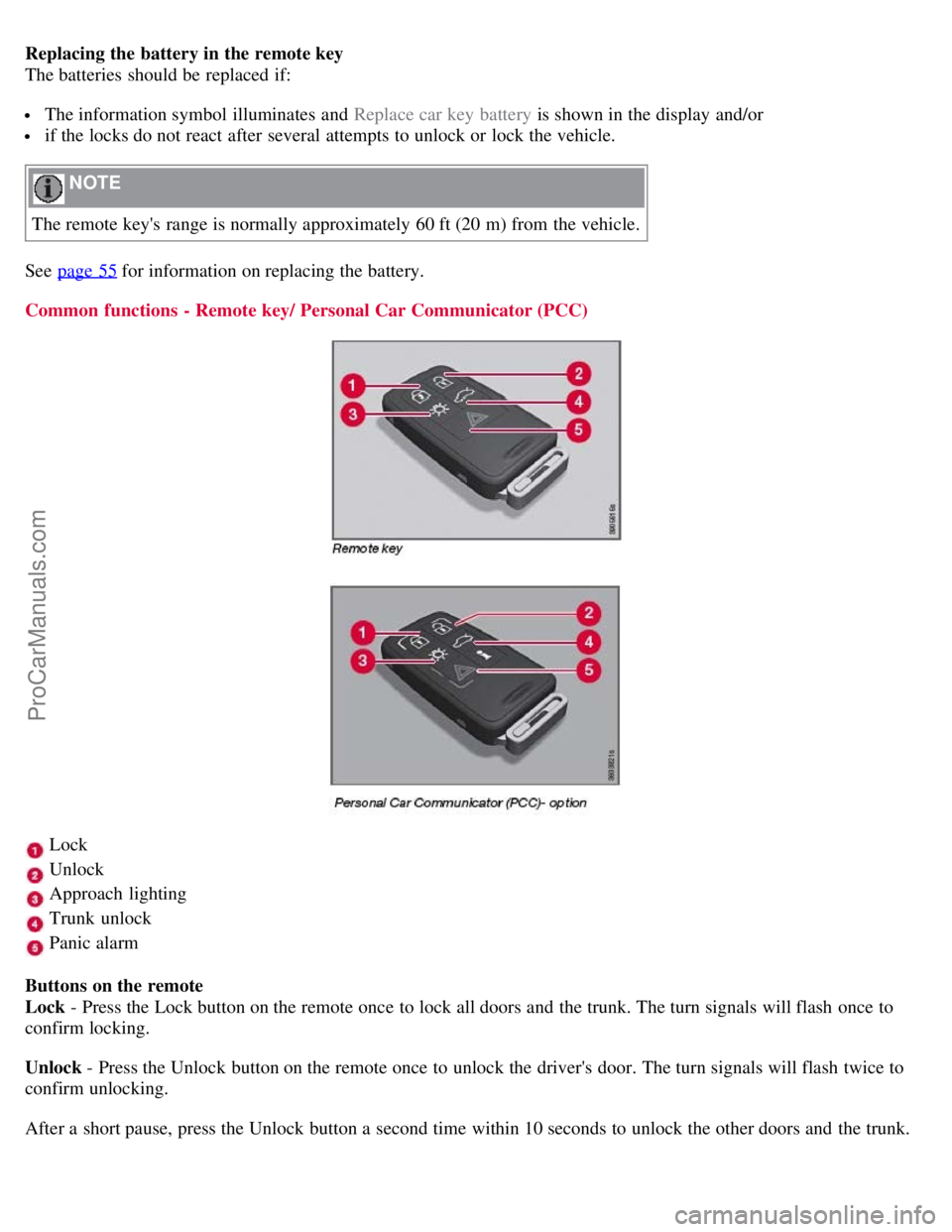
Common functions - Remote key/ Personal Car Communicator (PCC)
Lock
Unlock
Approach lighting
Trunk unlock
Panic alarm
Buttons on the remote
Lock - Press the Lock button on the remote once to lock all doors and the trunk. The turn signals will flash once to
confirm locking.
Unlock - Press the Unlock button on the remote once to unlock the driver's door. The turn signals will flash twice to
confirm unlocking.
After a short pause, press the Unlock button a second time within 10 seconds to unlock the other doors and the trunk.
ProCarManuals.com
Page 45 of 251
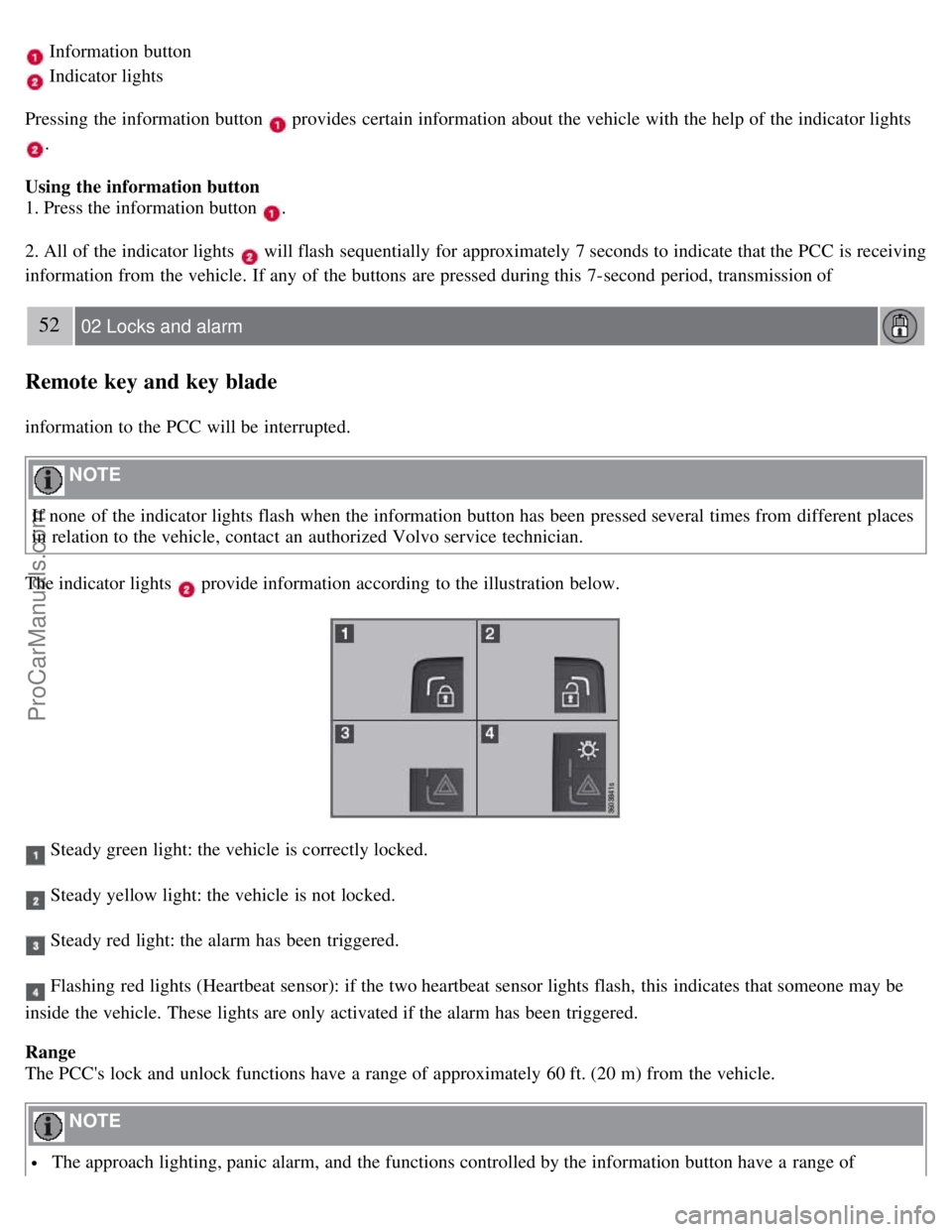
Information button
Indicator lights
Pressing the information button
provides certain information about the vehicle with the help of the indicator lights
.
Using the information button
1. Press the information button
.
2. All of the indicator lights
will flash sequentially for approximately 7 seconds to indicate that the PCC is receiving
information from the vehicle. If any of the buttons are pressed during this 7-second period, transmission of
52 02 Locks and alarm
Remote key and key blade
information to the PCC will be interrupted.
NOTE
If none of the indicator lights flash when the information button has been pressed several times from different places
in relation to the vehicle, contact an authorized Volvo service technician.
The indicator lights
provide information according to the illustration below.
Steady green light: the vehicle is correctly locked.
Steady yellow light: the vehicle is not locked.
Steady red light: the alarm has been triggered.
Flashing red lights (Heartbeat sensor): if the two heartbeat sensor lights flash, this indicates that someone may be
inside the vehicle. These lights are only activated if the alarm has been triggered.
Range
The PCC's lock and unlock functions have a range of approximately 60 ft. (20 m) from the vehicle.
NOTE
The approach lighting, panic alarm, and the functions controlled by the information button have a range of
ProCarManuals.com
Page 49 of 251
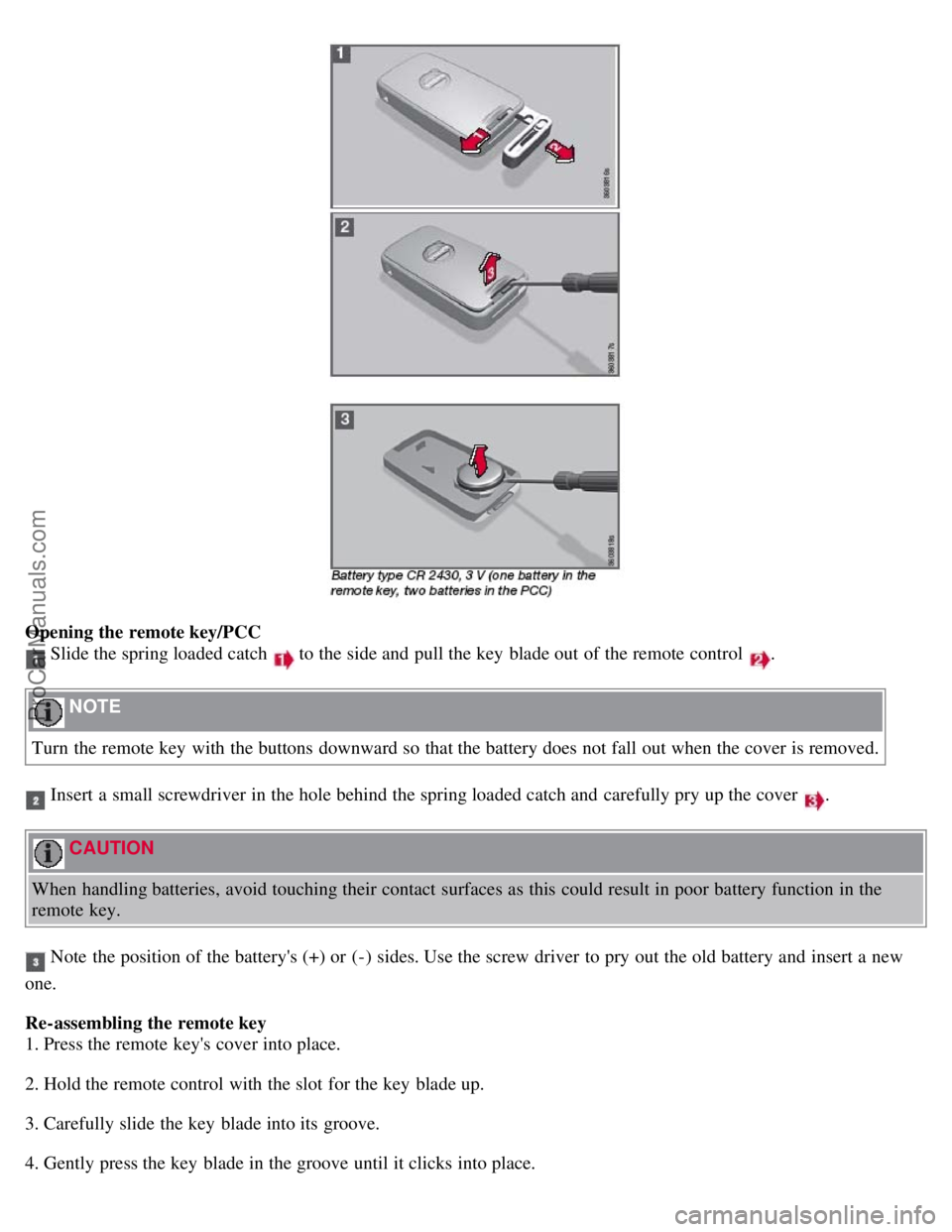
Opening the remote key/PCC
Slide the spring loaded catch to the side and pull the key blade out of the remote control .
NOTE
Turn the remote key with the buttons downward so that the battery does not fall out when the cover is removed.
Insert a small screwdriver in the hole behind the spring loaded catch and carefully pry up the cover .
CAUTION
When handling batteries, avoid touching their contact surfaces as this could result in poor battery function in the
remote key.
Note the position of the battery's (+) or (-) sides. Use the screw driver to pry out the old battery and insert a new
one.
Re-assembling the remote key
1. Press the remote key's cover into place.
2. Hold the remote control with the slot for the key blade up.
3. Carefully slide the key blade into its groove.
4. Gently press the key blade in the groove until it clicks into place.
ProCarManuals.com
Page 50 of 251
Old batteries should be properly recycled.
56 02 Locks and alarm
Keyless drive
Keyless drive (models with Personal Car Communicator only)
Keyless locking and unlocking
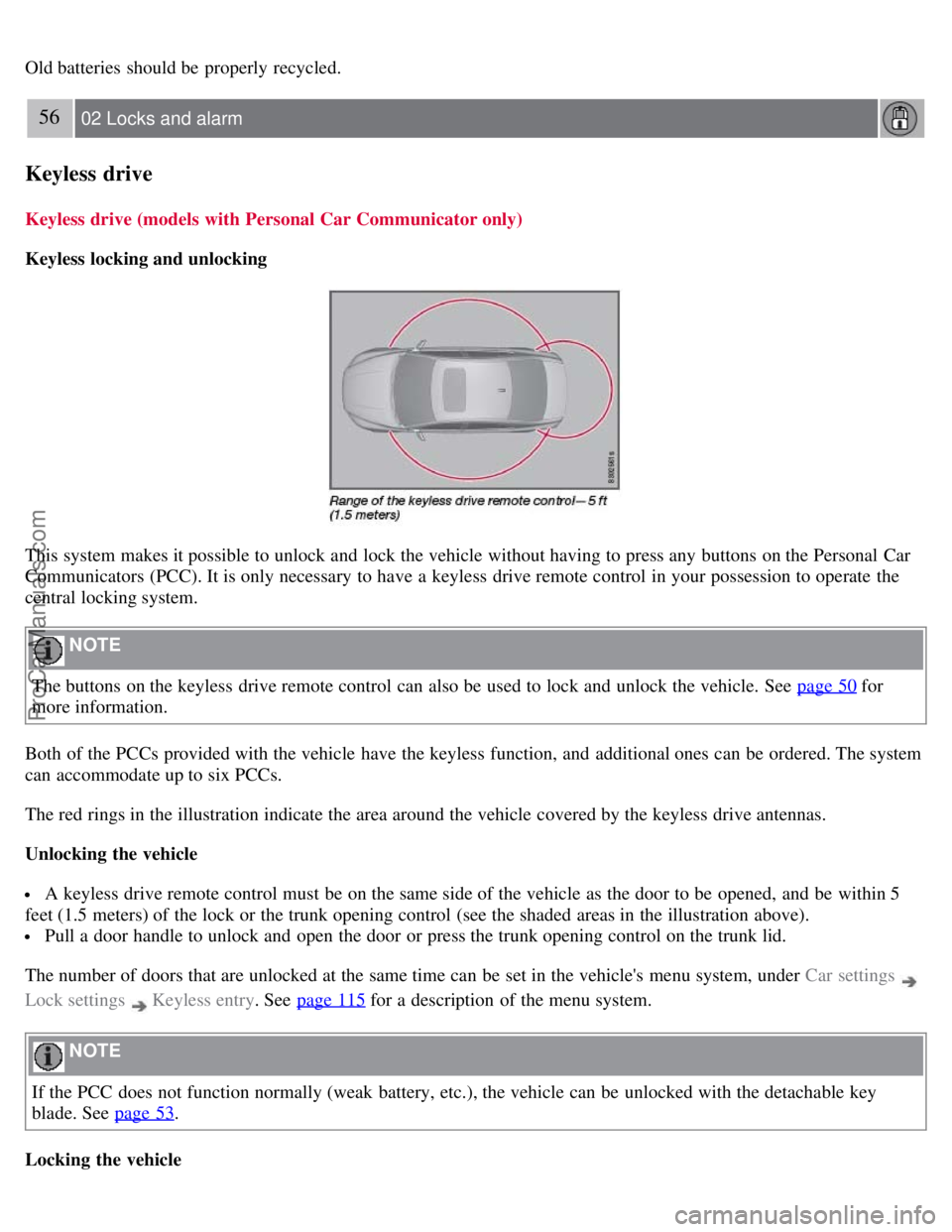
This system makes it possible to unlock and lock the vehicle without having to press any buttons on the Personal Car
Communicators (PCC). It is only necessary to have a keyless drive remote control in your possession to operate the
central locking system.
NOTE
The buttons on the keyless drive remote control can also be used to lock and unlock the vehicle. See page 50
for
more information.
Both of the PCCs provided with the vehicle have the keyless function, and additional ones can be ordered. The system
can accommodate up to six PCCs.
The red rings in the illustration indicate the area around the vehicle covered by the keyless drive antennas.
Unlocking the vehicle
A keyless drive remote control must be on the same side of the vehicle as the door to be opened, and be within 5
feet (1.5 meters) of the lock or the trunk opening control (see the shaded areas in the illustration above).
Pull a door handle to unlock and open the door or press the trunk opening control on the trunk lid.
The number of doors that are unlocked at the same time can be set in the vehicle's menu system, under Car settings
Lock settings Keyless entry . See page 115 for a description of the menu system.
NOTE
If the PCC does not function normally (weak battery, etc.), the vehicle can be unlocked with the detachable key
blade. See page 53
.
Locking the vehicle
ProCarManuals.com
Page 53 of 251
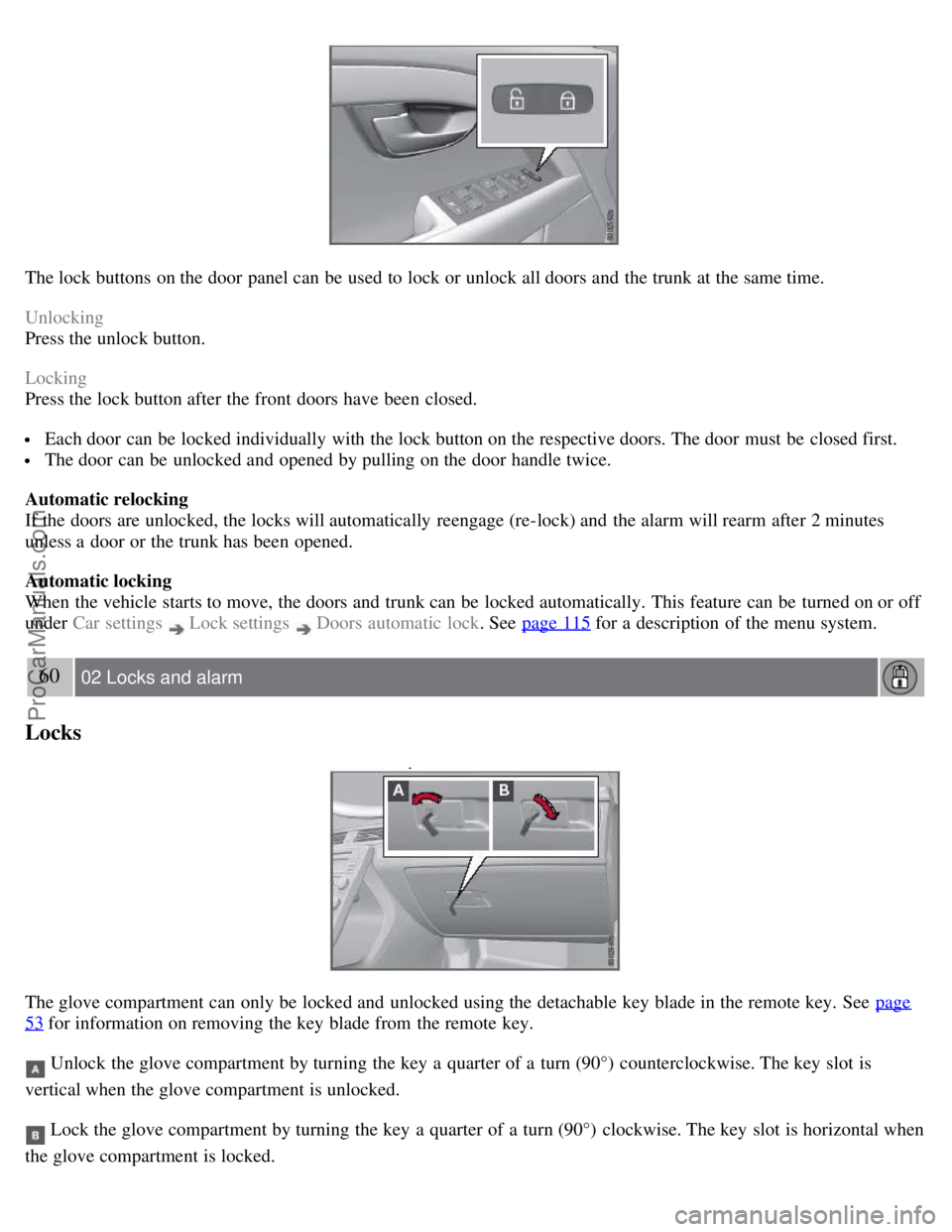
The lock buttons on the door panel can be used to lock or unlock all doors and the trunk at the same time.
Unlocking
Press the unlock button.
Locking
Press the lock button after the front doors have been closed.
Each door can be locked individually with the lock button on the respective doors. The door must be closed first.
The door can be unlocked and opened by pulling on the door handle twice.
Automatic relocking
If the doors are unlocked, the locks will automatically reengage (re-lock) and the alarm will rearm after 2 minutes
unless a door or the trunk has been opened.
Automatic locking
When the vehicle starts to move, the doors and trunk can be locked automatically. This feature can be turned on or off
under Car settings
Lock settings Doors automatic lock . See page 115 for a description of the menu system.
60 02 Locks and alarm
Locks
The glove compartment can only be locked and unlocked using the detachable key blade in the remote key. See page
53 for information on removing the key blade from the remote key.
Unlock the glove compartment by turning the key a quarter of a turn (90°) counterclockwise. The key slot is
vertical when the glove compartment is unlocked.
Lock the glove compartment by turning the key a quarter of a turn (90°) clockwise. The key slot is horizontal when
the glove compartment is locked.
ProCarManuals.com
Page 70 of 251
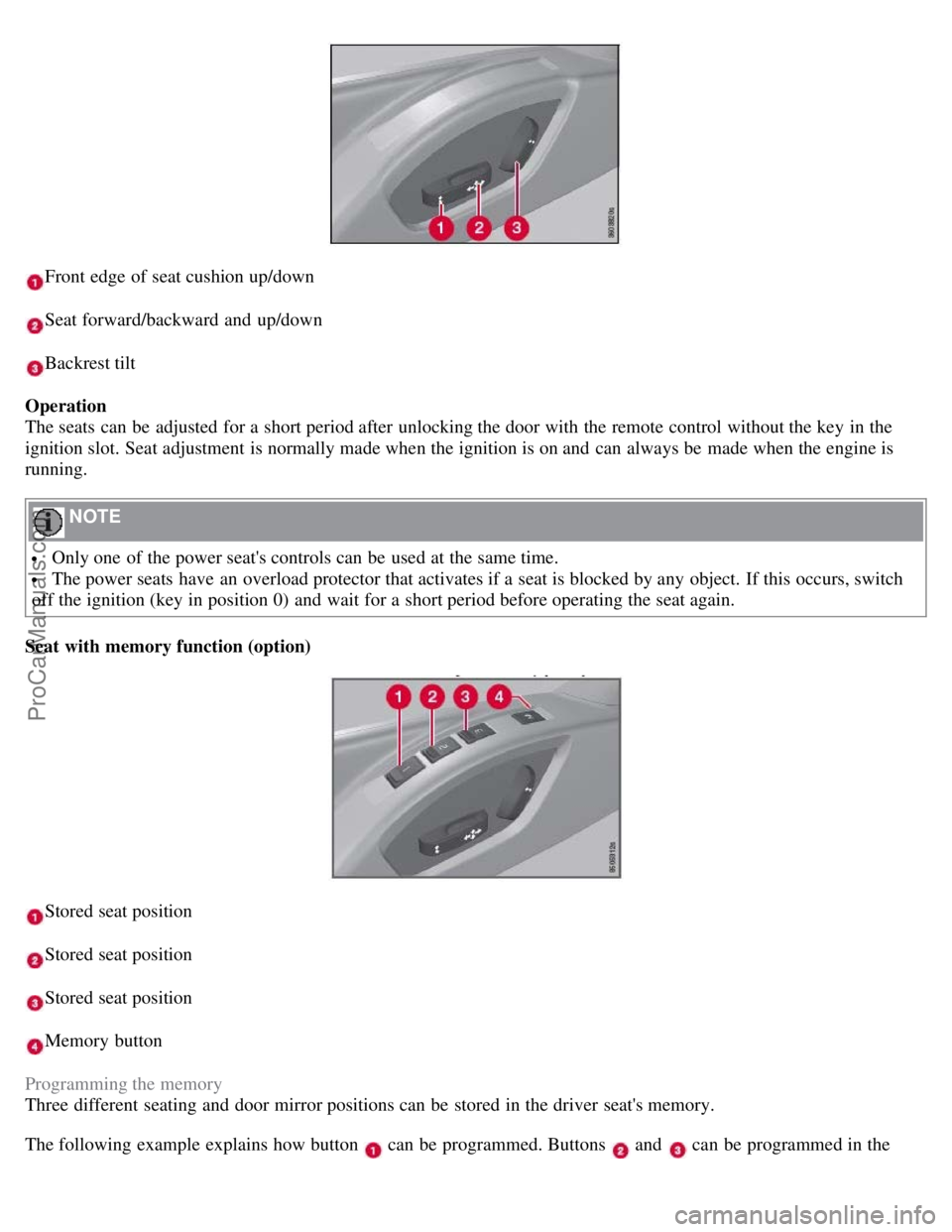
Front edge of seat cushion up/down
Seat forward/backward and up/down
Backrest tilt
Operation
The seats can be adjusted for a short period after unlocking the door with the remote control without the key in the
ignition slot. Seat adjustment is normally made when the ignition is on and can always be made when the engine is
running.
NOTE
Only one of the power seat's controls can be used at the same time.
The power seats have an overload protector that activates if a seat is blocked by any object. If this occurs, switch
off the ignition (key in position 0) and wait for a short period before operating the seat again.
Seat with memory function (option)
Stored seat position
Stored seat position
Stored seat position
Memory button
Programming the memory
Three different seating and door mirror positions can be stored in the driver seat's memory.
The following example explains how button
can be programmed. Buttons and can be programmed in the
ProCarManuals.com
Page 72 of 251
If the seat accidentally begins to move, press one of the buttons to stop the seat.
WARNING
Because the driver's seat can be adjusted with the ignition off, children should never be left unattended in the
vehicle.
Movement of the seat can be STOPPED at any time by pressing any button on the power seat control panel.
Do not adjust the seat while driving. The seat should be adjusted so that the brake pedal can be depressed fully. In
addition, position the seat as far rearward as comfort and control allow.
The seat rails on the floor must not be obstructed in any way when the seat is in motion.
Heated/ventilated seats (option)
See page 121
.
80 03 Your driving environment
Seats
Rear seats
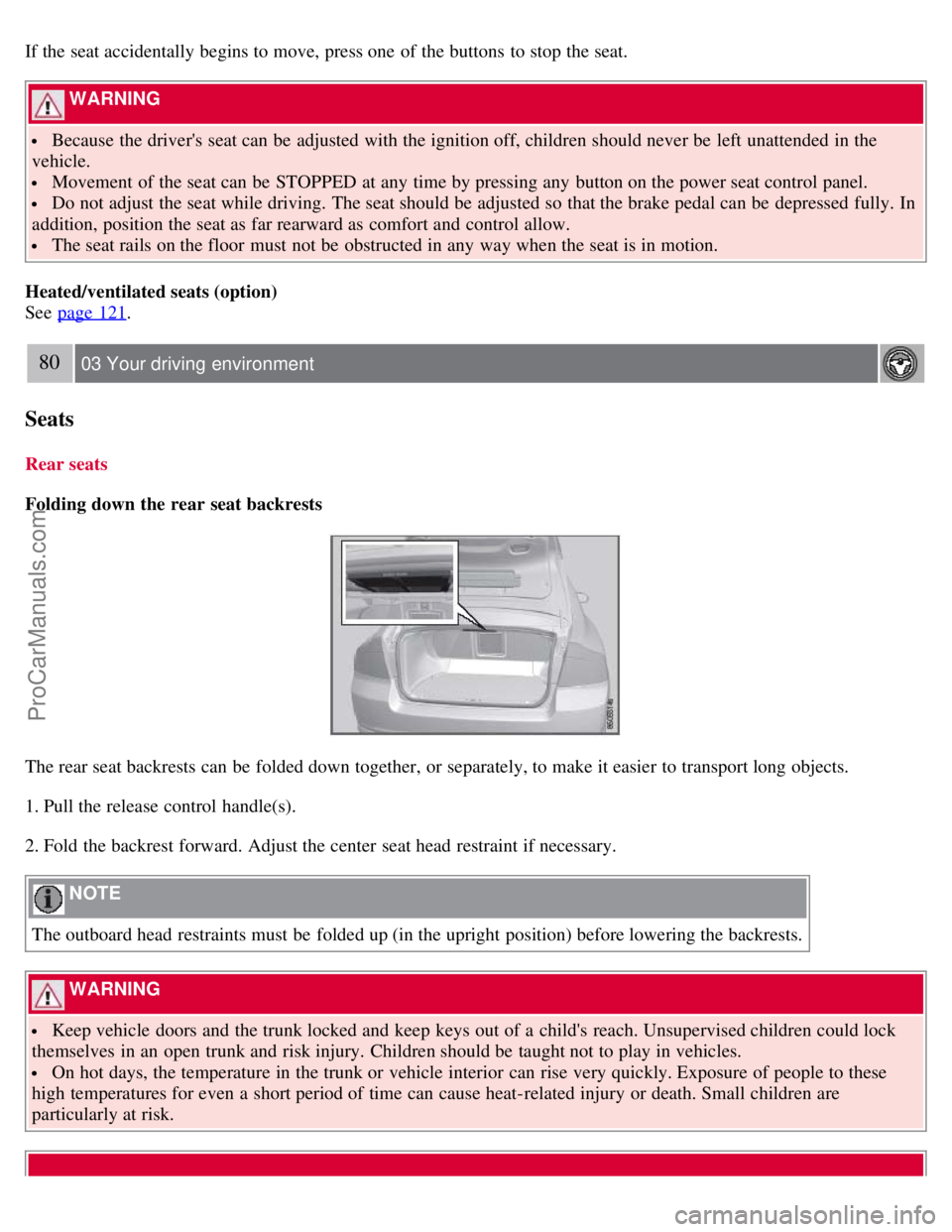
Folding down the rear seat backrests
The rear seat backrests can be folded down together, or separately, to make it easier to transport long objects.
1. Pull the release control handle(s).
2. Fold the backrest forward. Adjust the center seat head restraint if necessary.
NOTE
The outboard head restraints must be folded up (in the upright position) before lowering the backrests.
WARNING
Keep vehicle doors and the trunk locked and keep keys out of a child's reach. Unsupervised children could lock
themselves in an open trunk and risk injury. Children should be taught not to play in vehicles.
On hot days, the temperature in the trunk or vehicle interior can rise very quickly. Exposure of people to these
high temperatures for even a short period of time can cause heat-related injury or death. Small children are
particularly at risk.
ProCarManuals.com
Page 81 of 251
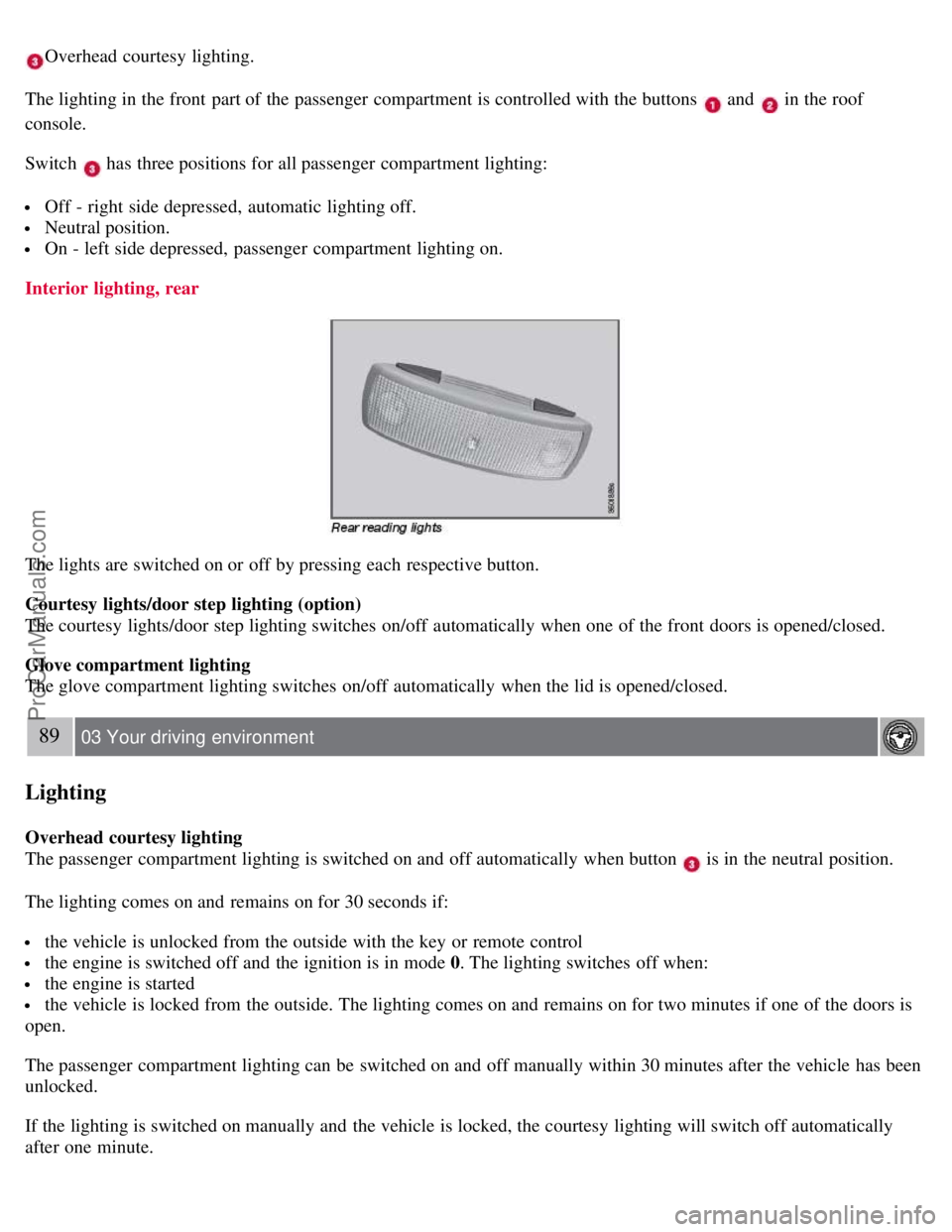
Overhead courtesy lighting.
The lighting in the front part of the passenger compartment is controlled with the buttons
and in the roof
console.
Switch
has three positions for all passenger compartment lighting:
Off - right side depressed, automatic lighting off.
Neutral position.
On - left side depressed, passenger compartment lighting on.
Interior lighting, rear
The lights are switched on or off by pressing each respective button.
Courtesy lights/door step lighting (option)
The courtesy lights/door step lighting switches on/off automatically when one of the front doors is opened/closed.
Glove compartment lighting
The glove compartment lighting switches on/off automatically when the lid is opened/closed.
89 03 Your driving environment
Lighting
Overhead courtesy lighting
The passenger compartment lighting is switched on and off automatically when button
is in the neutral position.
The lighting comes on and remains on for 30 seconds if:
the vehicle is unlocked from the outside with the key or remote control
the engine is switched off and the ignition is in mode 0. The lighting switches off when:
the engine is started
the vehicle is locked from the outside. The lighting comes on and remains on for two minutes if one of the doors is
open.
The passenger compartment lighting can be switched on and off manually within 30 minutes after the vehicle has been
unlocked.
If the lighting is switched on manually and the vehicle is locked, the courtesy lighting will switch off automatically
after one minute.
ProCarManuals.com
Page 85 of 251
using two alternatives:
Low/high beam headlights on
The headlights will be washed the first time the windshield is washed. Thereafter, the headlights will only be washed
once for every five times the windshield is washed within a 10-minute period.
Parking lights on
Optional Active Bi -Xenon headlights will be washed once for every five times the windshield is washed. Normal
halogen headlights will not be washed.
CAUTION
Use ample washer fluid when washing the windshield. The windshield should be thoroughly wet when the wipers
are in operation.
NOTE
One headlight is washed at a time.
92 03 Your driving environment
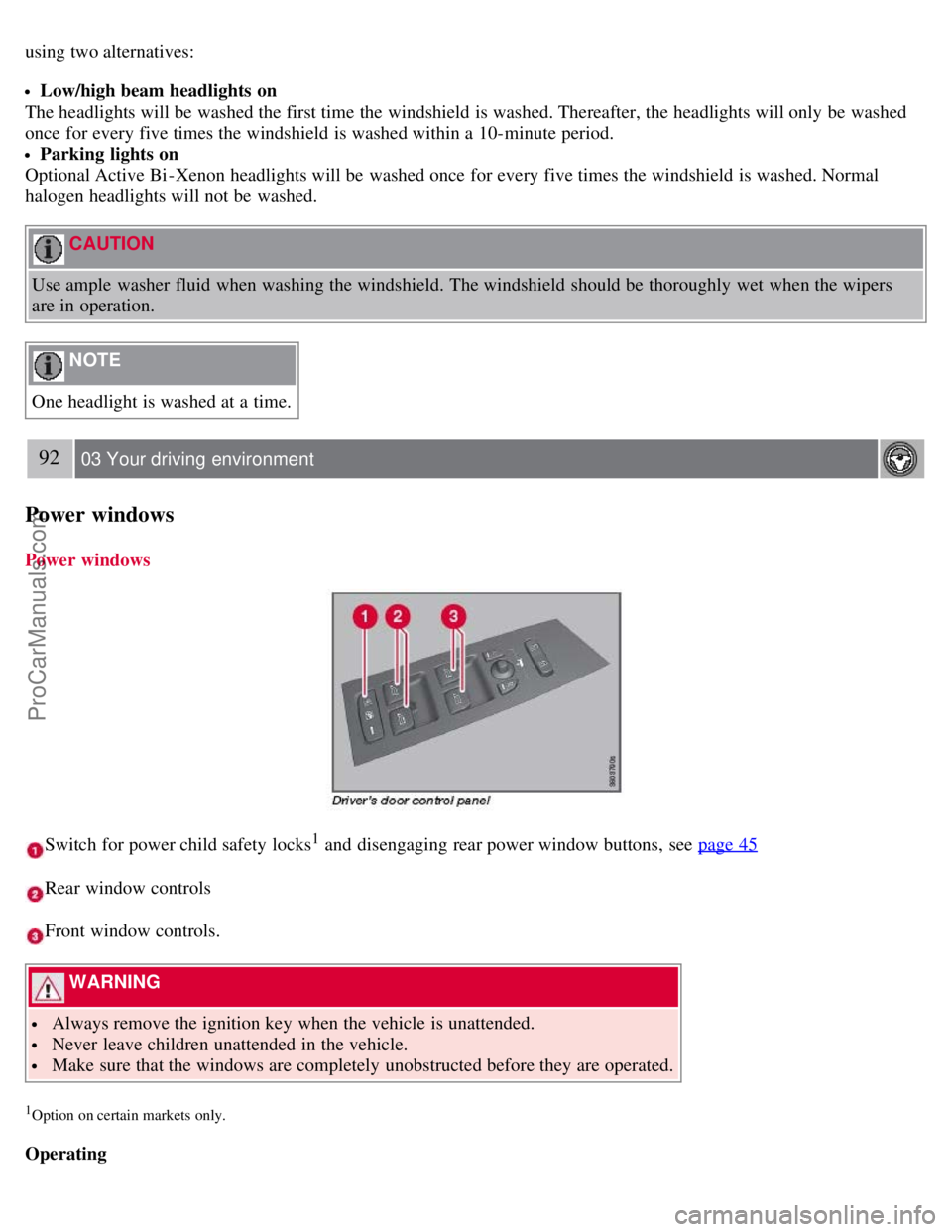
Power windows
Power windows
Switch for power child safety locks1 and disengaging rear power window buttons, see page 45
Rear window controls
Front window controls.
WARNING
Always remove the ignition key when the vehicle is unattended.
Never leave children unattended in the vehicle.
Make sure that the windows are completely unobstructed before they are operated.
1Option on certain markets only.
Operating
ProCarManuals.com
Page 87 of 251
passenger compartment. The windshield and side windows have laminated glass.
Water and dirt repellent glass
The front side windows are treated with a coating that improves the view in difficult weather conditions.
94 03 Your driving environment
Mirrors
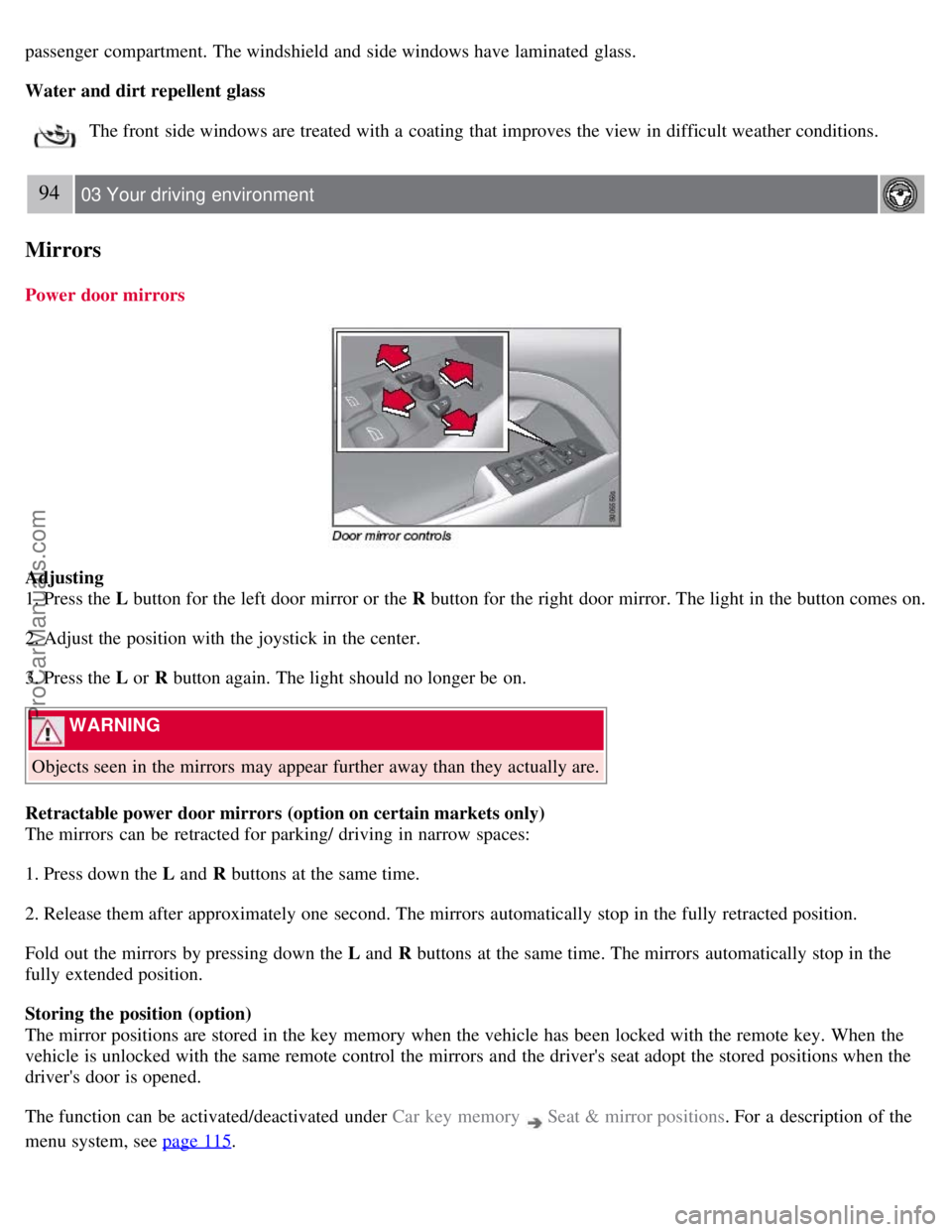
Power door mirrors
Adjusting
1. Press the L button for the left door mirror or the R button for the right door mirror. The light in the button comes on.
2. Adjust the position with the joystick in the center.
3. Press the L or R button again. The light should no longer be on.
WARNING
Objects seen in the mirrors may appear further away than they actually are.
Retractable power door mirrors (option on certain markets only)
The mirrors can be retracted for parking/ driving in narrow spaces:
1. Press down the L and R buttons at the same time.
2. Release them after approximately one second. The mirrors automatically stop in the fully retracted position.
Fold out the mirrors by pressing down the L and R buttons at the same time. The mirrors automatically stop in the
fully extended position.
Storing the position (option)
The mirror positions are stored in the key memory when the vehicle has been locked with the remote key. When the
vehicle is unlocked with the same remote control the mirrors and the driver's seat adopt the stored positions when the
driver's door is opened.
The function can be activated/deactivated under Car key memory
Seat & mirror positions . For a description of the
menu system, see page 115
.
ProCarManuals.com