center console VOLVO S80 2007 Owners Manual
[x] Cancel search | Manufacturer: VOLVO, Model Year: 2007, Model line: S80, Model: VOLVO S80 2007Pages: 251, PDF Size: 5.7 MB
Page 18 of 251
1-800-458-1552
In Canada
Volvo Cars of Canada Corp.
National Customer Service
175 Gordon Baker Road
North York, Ontario M2H 2N7
1-800-663-8255
23 01 Safety
Safety in the passenger compartment
WARNING
No objects that add to the total weight on the seat should be placed on the front passenger's seat. If a child is
seated in the front passenger's seat with any additional weight, this extra weight could cause the OWS system to
enable the airbag, which might cause it to deploy in the event of a collision, thereby injuring the child.
The seat belt should never be wrapped around an object on the front passenger's seat. This could interfere with the
OWS system's function.
The front passenger's seat belt should never be used in a way that exerts more pressure on the passenger than
normal. This could increase the pressure exerted on the weight sensor by a child, and could result in the airbag being
enabled, which might cause it to deploy in the event of a collision, thereby injuring the child.
WARNING
Keep the following points in mind with respect to the OWS system. Failure to follow these instructions could
adversely affect the system's function and result in serious injury to the occupant of the front passenger's seat:
The full weight of the front seat passenger should always be on the seat cushion. The passenger should never lift
him/herself off the seat cushion using the armrest in the door or the center console, by pressing the feet on the floor,
by sitting on the edge of the seat cushion, or by pressing against the backrest in a way that reduces pressure on the
seat cushion. This could cause OWS to disable the front, passenger's side airbag.
Do not place any type of object on the front passenger's seat in such a way that jamming, pressing, or squeezing
occurs between the object and the front seat, other than as a direct result of the correct use of the ALR/ELR seat belt
(see page 31
).
No objects should be placed under the front passenger's seat. This could interfere with the OWS system's function.
24 01 Safety
Safety in the passenger compartment
Side impact protection (SIPS) airbags
ProCarManuals.com
Page 77 of 251
The use of daytime running lights is mandatory in Canada.
Continuous high beams cannot be activated when the headlight switch is in position or . High beam
flash will function in these positions.
High beam flash
Move the lever toward the steering wheel to position
. The high beams come on until the lever is released.
High/low beam headlights
Continuous high beams
Set the ignition to mode II.
With the light switch in position
, pull the turn signal lever toward the steering wheel to position to toggle
between high and low beams (this also applies on models equipped with the optional Active Bi -Xenon headlights).
The
symbol illuminates in the instrument panel to indicate that the high beams are on.
85 03 Your driving environment
Lighting
NOTE
Active Bi -Xenon headlights (option): Turn the headlight switch to position
to activate a daylight sensor, which
automatically switches the low beams on or off, depending on ambient light conditions. When driving in daylight,
the headlights will switch off and the daytime running lights will come on. In darkness, the daytime running lights
will switch off and the Active Bi -Xenon headlights will switch on.
Active Bi -Xenon Lights (ABL)-option
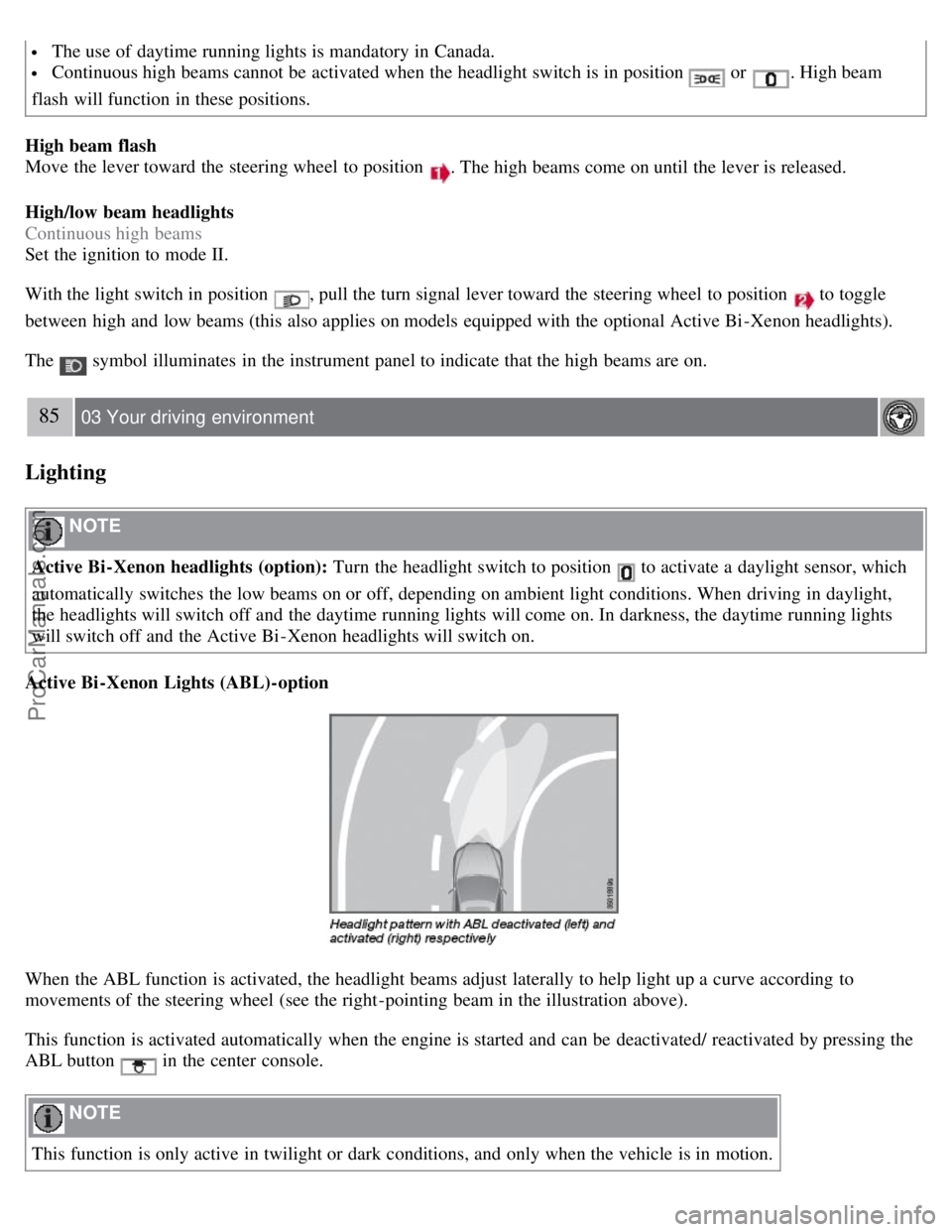
When the ABL function is activated, the headlight beams adjust laterally to help light up a curve according to
movements of the steering wheel (see the right-pointing beam in the illustration above).
This function is activated automatically when the engine is started and can be deactivated/ reactivated by pressing the
ABL button
in the center console.
NOTE
This function is only active in twilight or dark conditions, and only when the vehicle is in motion.
ProCarManuals.com
Page 100 of 251
position so that the vehicle can be moved1.
Lift away the rubber mat on the floor of the storage compartment behind the center console and open the hatch.
Insert the key blade into the opening as far as possible. Press the key blade down and keep it held down. Move the
gear selector from the P position. For information on the key blade, see page 48
.
All Wheel Drive - AWD
2
Your Volvo can be equipped with permanent All Wheel Drive, which means that power is distributed automatically
between the front and rear wheels. Under normal driving conditions, most of the engine's power is directed to the front
wheels. However, if there is any tendency for the front wheels to spin, an electronically controlled coupling distributes
power to the wheels that have the best traction.
1If the battery is dead, the optional electric parking brake cannot be applied or released. Connect an auxiliary battery if the battery voltage is too
low, see page 104
.
2Standard on certain models.
107 03 Your driving environment
Brakes
Brake system
The brake system is a hydraulic system consisting of two separate brake circuits. If a problem should occur in one of
these circuits, it is still possible to stop the vehicle with the other brake circuit.
If the brake pedal must be depressed farther than normal and requires greater foot pressure, the stopping distance will
be longer.
A warning light in the instrument panel will light up to warn the driver that a fault has occurred.
If this light comes on while driving or braking, stop immediately and check the brake fluid level in the reservoir.
NOTE
Press the brake pedal hard and maintain pressure on the pedal - do not pump the brakes.
WARNING
If the fluid level is below the MIN mark in the reservoir or if a brake system message is shown in the information
display: DO NOT DRIVE. Have the vehicle towed to a trained and qualified Volvo service technician and have the
brake system inspected.
Power brakes function only when the engine is running
The power brakes utilize vacuum pressure which is only created when the engine is running. Never let the vehicle roll
to a stop with the engine switched off.
If the power brakes are not working, the brake pedal must be pressed approximately five times harder than usual to
make up for the lack of power assistance. This can happen for example when towing your vehicle or if the engine is
switched off when the vehicle is rolling. The brake pedal feels harder than usual.
ProCarManuals.com
Page 107 of 251
2 0 0 7
VOLVO S80
112 04 Comfort and driving pleasure
Menus and messages 114
Climate system118
Audio system125
Trip computer136
Compass137
Stability system139
Active chassis system-Four C141
Cruise control142
Adaptive Cruise Control-ACC144
Collision warning system (option)150
Park assist (option)153
Blind Spot Information System (option)155
Passenger compartment convenience158
Bluetooth hands-free (option)162
113 04 Comfort and driving pleasure
114 04 Comfort and driving pleasure
Menus and messages
Center console
Certain functions are controlled from the center console via the menu system or from the optional keypad in the
steering wheel. Each function is described under its respective section.
The current menu level is shown at the top right of display in the center console.
Center console controls
ProCarManuals.com
Page 108 of 251
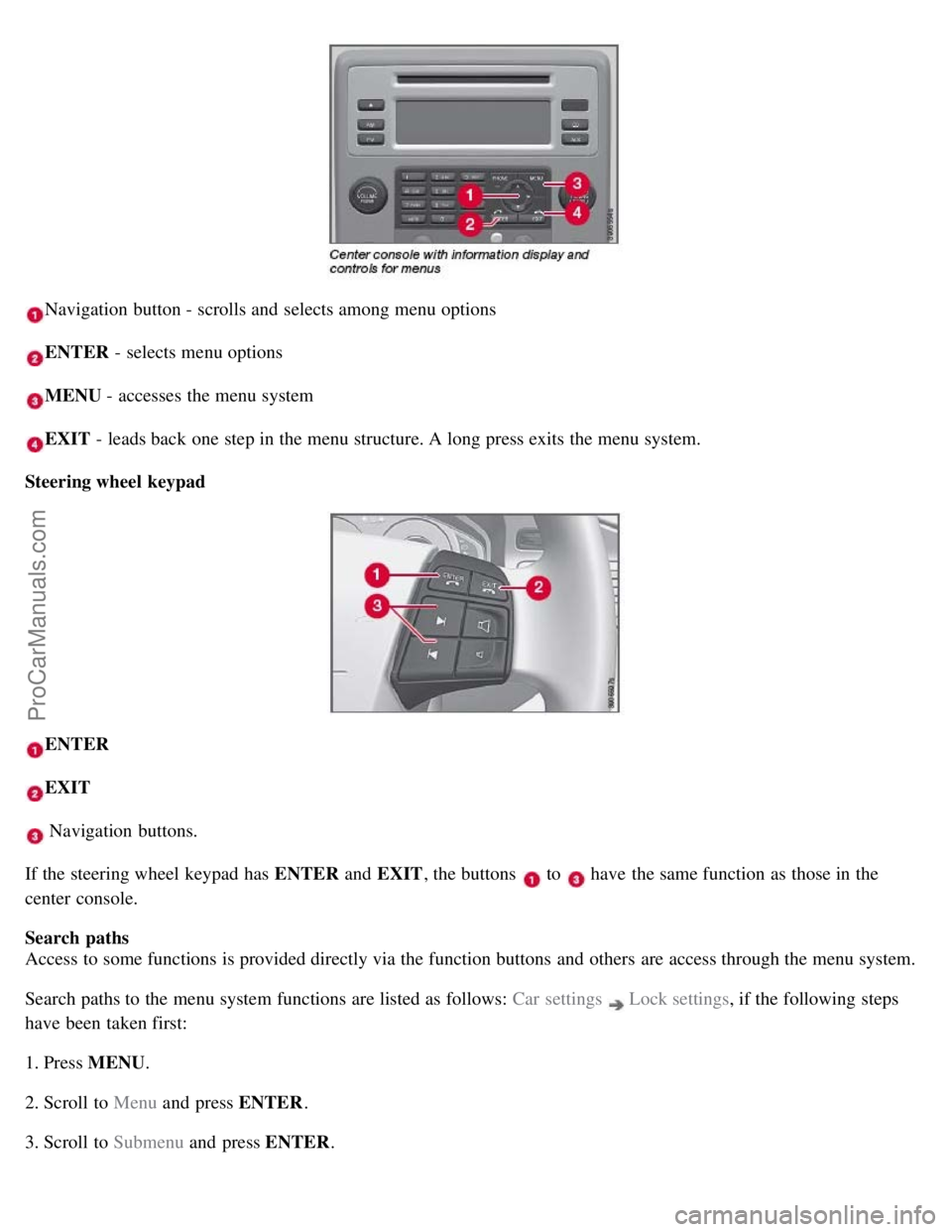
Navigation button - scrolls and selects among menu options
ENTER - selects menu options
MENU - accesses the menu system
EXIT - leads back one step in the menu structure. A long press exits the menu system.
Steering wheel keypad
ENTER
EXIT
Navigation buttons.
If the steering wheel keypad has ENTER and EXIT, the buttons
to have the same function as those in the
center console.
Search paths
Access to some functions is provided directly via the function buttons and others are access through the menu system.
Search paths to the menu system functions are listed as follows: Car settings
Lock settings , if the following steps
have been taken first:
1. Press MENU .
2. Scroll to Menu and press ENTER .
3. Scroll to Submenu and press ENTER.
ProCarManuals.com
Page 120 of 251
Climate system
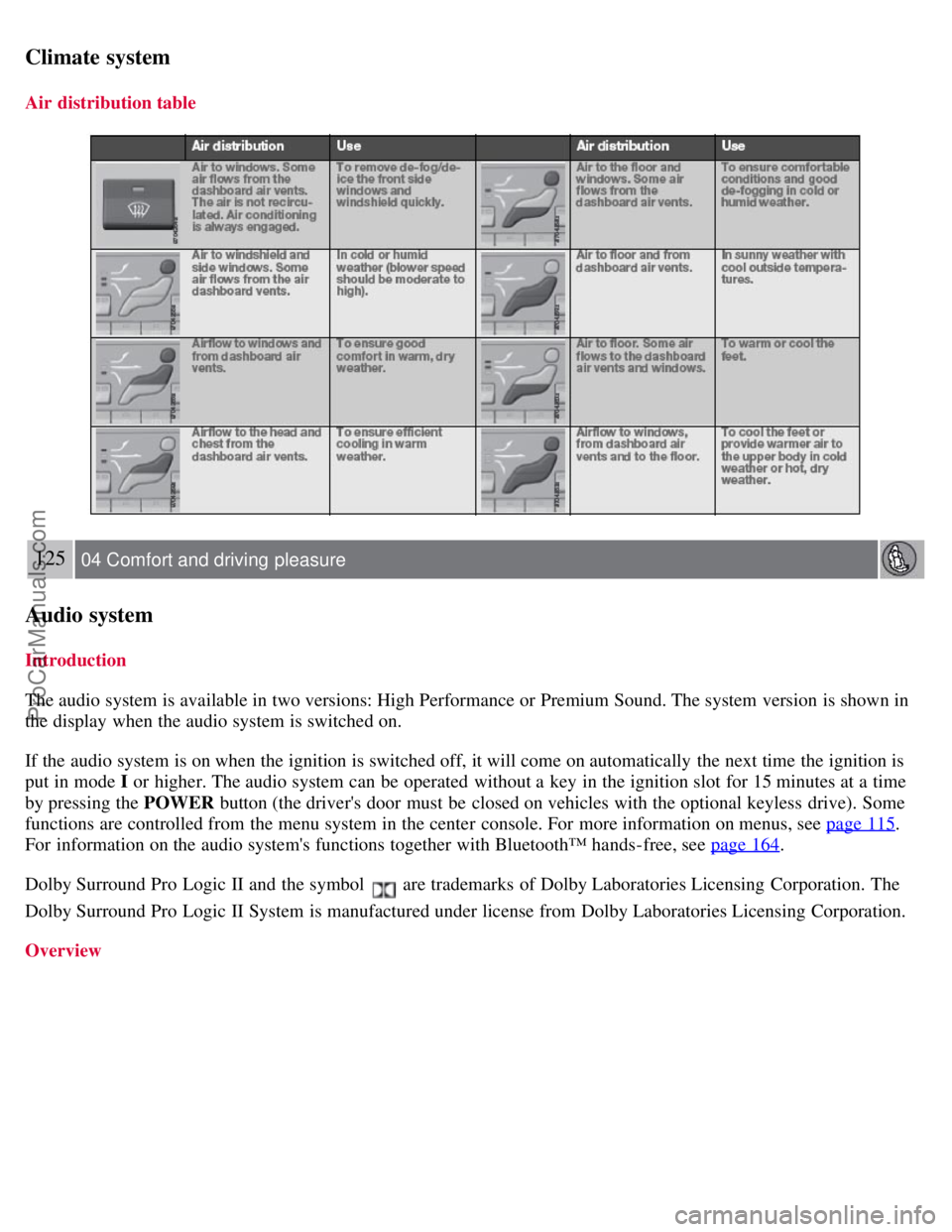
Air distribution table
125 04 Comfort and driving pleasure
Audio system
Introduction
The audio system is available in two versions: High Performance or Premium Sound. The system version is shown in
the display when the audio system is switched on.
If the audio system is on when the ignition is switched off, it will come on automatically the next time the ignition is
put in mode I or higher. The audio system can be operated without a key in the ignition slot for 15 minutes at a time
by pressing the POWER button (the driver's door must be closed on vehicles with the optional keyless drive). Some
functions are controlled from the menu system in the center console. For more information on menus, see page 115
.
For information on the audio system's functions together with Bluetooth™ hands-free, see page 164
.
Dolby Surround Pro Logic II and the symbol
are trademarks of Dolby Laboratories Licensing Corporation. The
Dolby Surround Pro Logic II System is manufactured under license from Dolby Laboratories Licensing Corporation.
Overview
ProCarManuals.com
Page 121 of 251
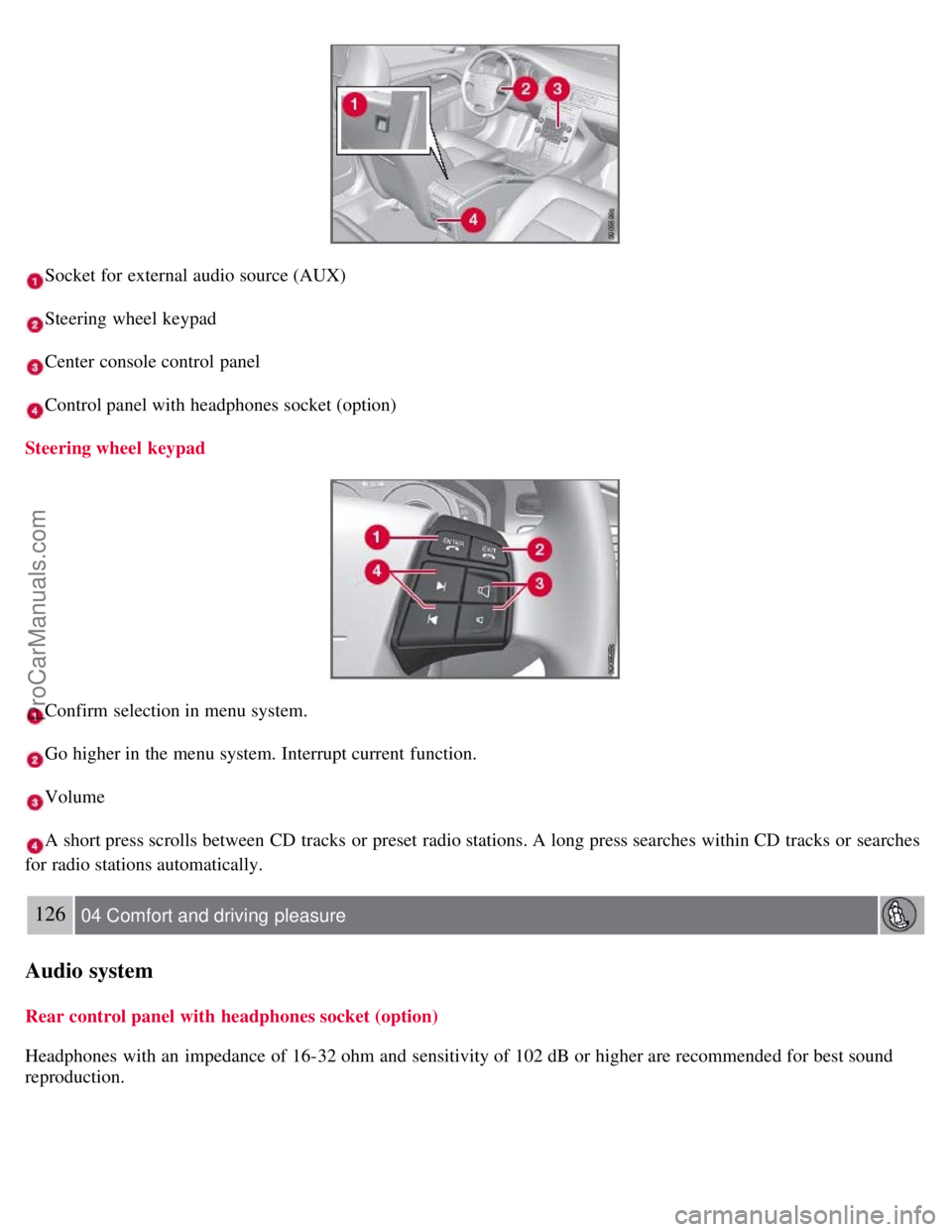
Socket for external audio source (AUX)
Steering wheel keypad
Center console control panel
Control panel with headphones socket (option)
Steering wheel keypad
Confirm selection in menu system.
Go higher in the menu system. Interrupt current function.
Volume
A short press scrolls between CD tracks or preset radio stations. A long press searches within CD tracks or searches
for radio stations automatically.
126 04 Comfort and driving pleasure
Audio system
Rear control panel with headphones socket (option)
Headphones with an impedance of 16-32 ohm and sensitivity of 102 dB or higher are recommended for best sound
reproduction.
ProCarManuals.com
Page 122 of 251
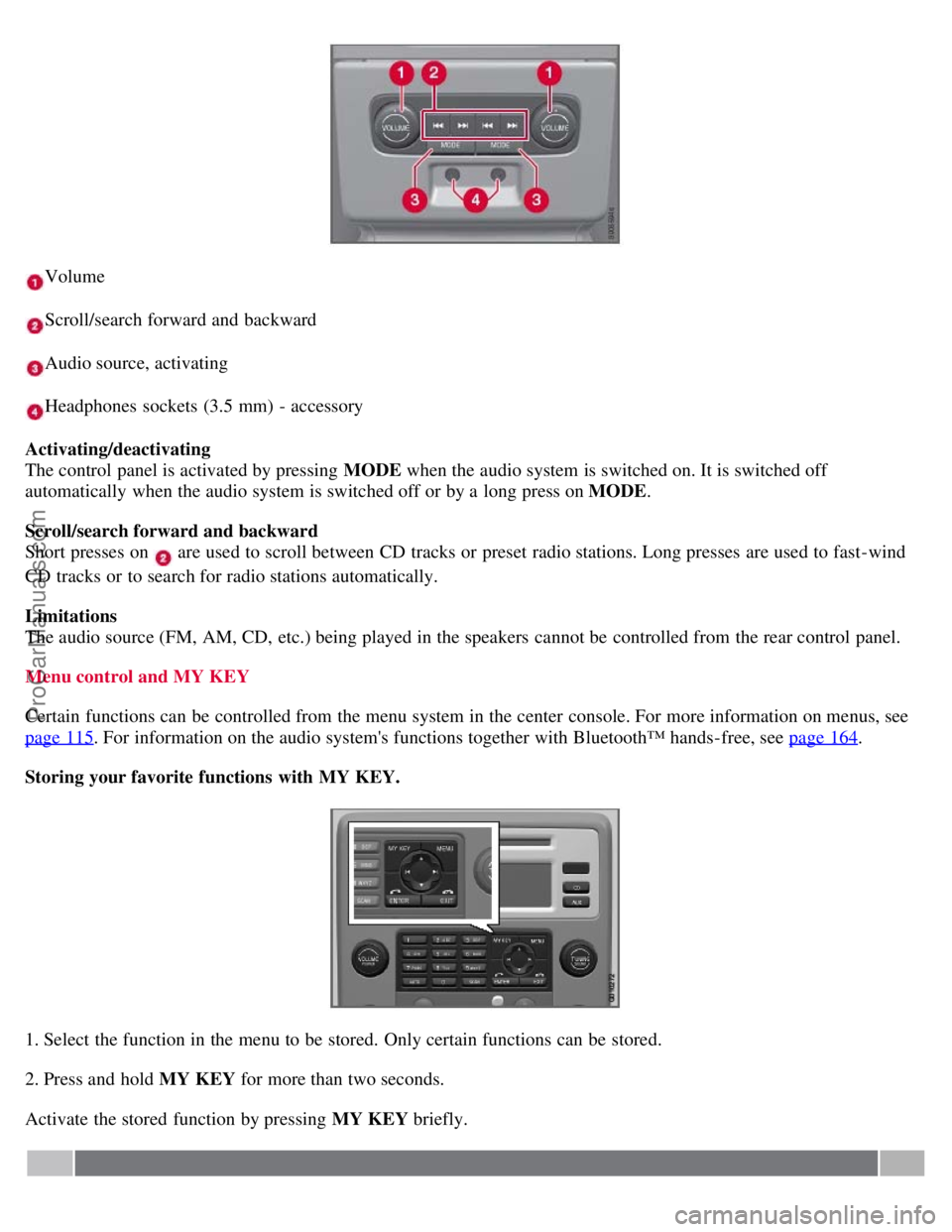
Volume
Scroll/search forward and backward
Audio source, activating
Headphones sockets (3.5 mm) - accessory
Activating/deactivating
The control panel is activated by pressing MODE when the audio system is switched on. It is switched off
automatically when the audio system is switched off or by a long press on MODE .
Scroll/search forward and backward
Short presses on
are used to scroll between CD tracks or preset radio stations. Long presses are used to fast -wind
CD tracks or to search for radio stations automatically.
Limitations
The audio source (FM, AM, CD, etc.) being played in the speakers cannot be controlled from the rear control panel.
Menu control and MY KEY
Certain functions can be controlled from the menu system in the center console. For more information on menus, see
page 115
. For information on the audio system's functions together with Bluetooth™ hands-free, see page 164.
Storing your favorite functions with MY KEY.
1. Select the function in the menu to be stored. Only certain functions can be stored.
2. Press and hold MY KEY for more than two seconds.
Activate the stored function by pressing MY KEY briefly.
ProCarManuals.com
Page 138 of 251
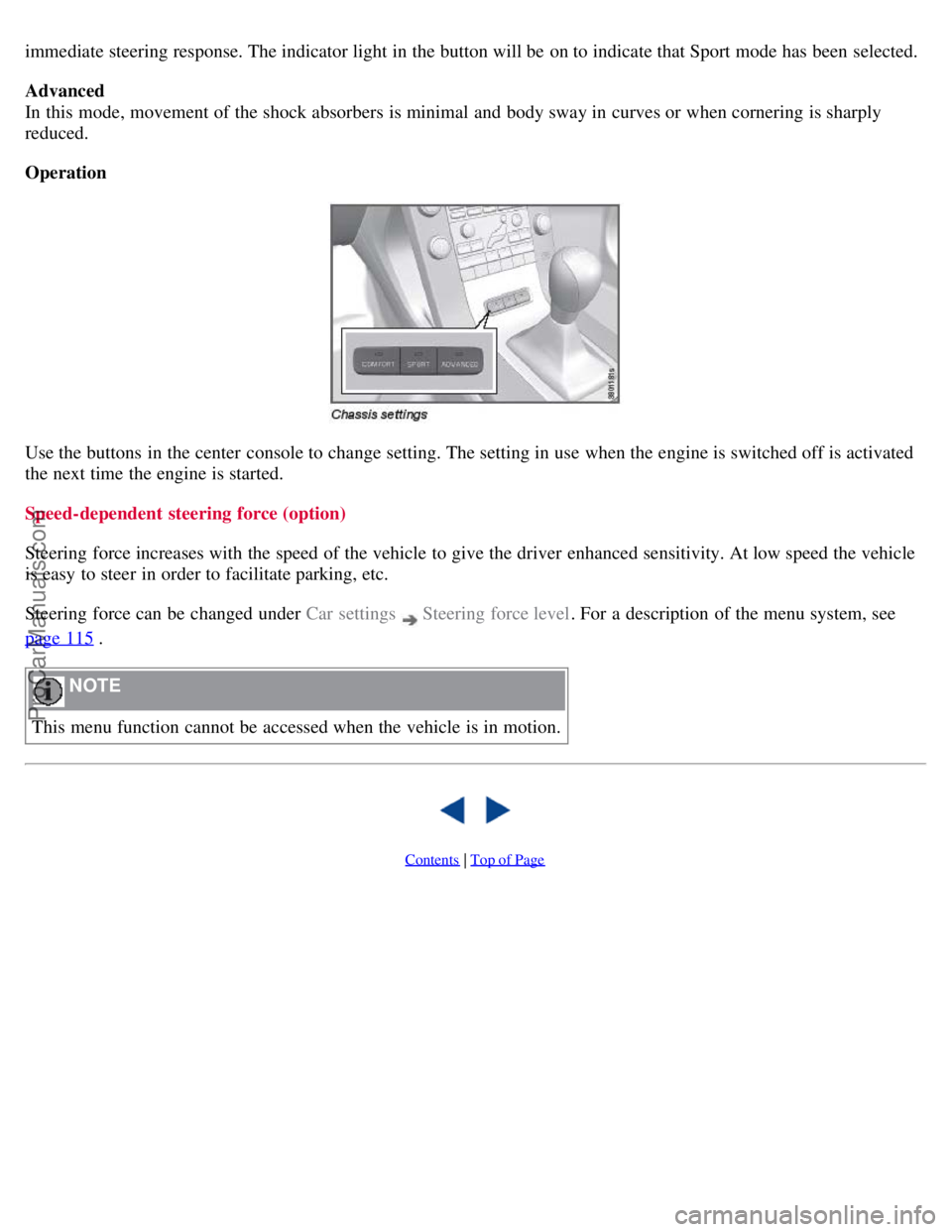
immediate steering response. The indicator light in the button will be on to indicate that Sport mode has been selected.
Advanced
In this mode, movement of the shock absorbers is minimal and body sway in curves or when cornering is sharply
reduced.
Operation
Use the buttons in the center console to change setting. The setting in use when the engine is switched off is activated
the next time the engine is started.
Speed-dependent steering force (option)
Steering force increases with the speed of the vehicle to give the driver enhanced sensitivity. At low speed the vehicle
is easy to steer in order to facilitate parking, etc.
Steering force can be changed under Car settings
Steering force level. For a description of the menu system, see
page 115
.
NOTE
This menu function cannot be accessed when the vehicle is in motion.
Contents | Top of Page
ProCarManuals.com
Page 149 of 251
A delayed warning means that brake support will also be delayed.
The false warnings may be in the form of both audio and visual signals.
NOTE
The number of false warnings can be limited by reducing the warning distance. See the section "Set warning
distance."
Operation
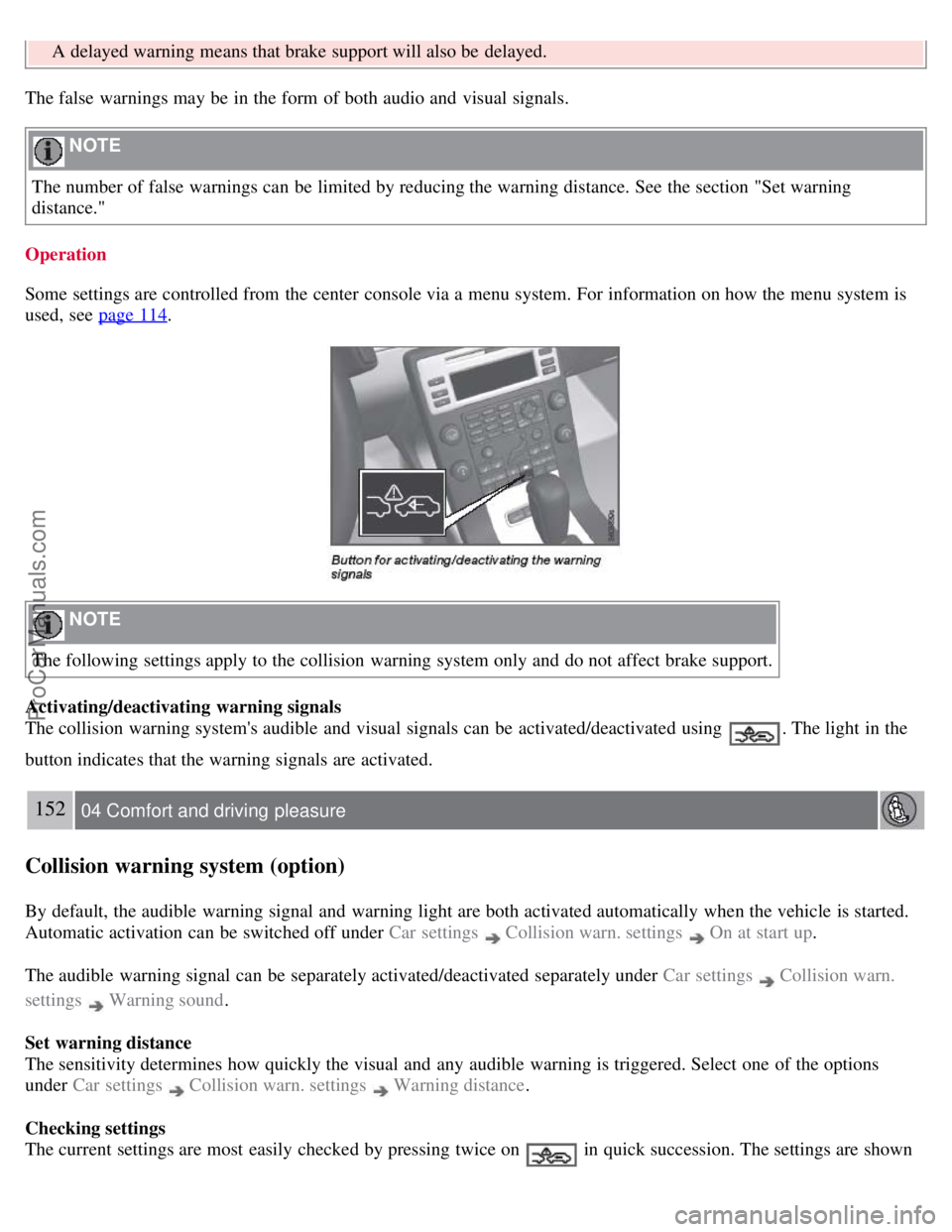
Some settings are controlled from the center console via a menu system. For information on how the menu system is
used, see page 114
.
NOTE
The following settings apply to the collision warning system only and do not affect brake support.
Activating/deactivating warning signals
The collision warning system's audible and visual signals can be activated/deactivated using
. The light in the
button indicates that the warning signals are activated.
152 04 Comfort and driving pleasure
Collision warning system (option)
By default, the audible warning signal and warning light are both activated automatically when the vehicle is started.
Automatic activation can be switched off under Car settings
Collision warn. settings On at start up.
The audible warning signal can be separately activated/deactivated separately under Car settings
Collision warn.
settings
Warning sound .
Set warning distance
The sensitivity determines how quickly the visual and any audible warning is triggered. Select one of the options
under Car settings
Collision warn. settings Warning distance .
Checking settings
The current settings are most easily checked by pressing twice on
in quick succession. The settings are shown
ProCarManuals.com