change time VOLVO S80 2007 Owners Manual
[x] Cancel search | Manufacturer: VOLVO, Model Year: 2007, Model line: S80, Model: VOLVO S80 2007Pages: 251, PDF Size: 5.7 MB
Page 4 of 251
6 Introduction
Important information
Points to keep in mind
Before you operate your vehicle for the first time, please familiarize yourself with the information in chapter 3.
Information contained in the balance of the manual is extremely useful and should be read after operating the
vehicle for the first time.
The manual is structured so that it can be used for reference. For this reason, it should be kept in the vehicle for
ready access.
Do not export your Volvo to another country before investigating that country's applicable safety and emission
control requirements. In some cases it may be difficult or impossible to comply with these requirements. Modifications
to the emission control system(s) may render your Volvo not certifiable for legal operation in the U.S., Canada and
other countries.
All information, illustrations and specifications contained in this manual are based on the latest product information
available at the time of publication. This information is subject to change without prior notice. Please note that some
vehicles may be equipped differently, depending on special legal requirements. Optional equipment described in this
manual may not be available in all markets.
Volvo reserves the right to make model changes at any time, or to change specifications or design without notice
and without incurring obligation
WARNING
If your vehicle is involved in an accident, unseen damage may affect its drivability and safety.
Vehicle event data (Black box)
Your vehicle's driving and safety systems employ computers that monitor, and share with each other, information about
your vehicle's operation. One or more of these computers may store what they monitor, either during normal vehicle
operation or in a crash or near-crash event. Stored information may be read and used by:
Volvo Car Corporation
service and repair facilities
law enforcement or government agencies
others who may assert a legal right to know, or who obtain your consent to know such information.
7 Introduction
Important warnings
Driver distraction
A driver has a responsibility to do everything possible to ensure his or her own safety and the safety of passengers in
the vehicle and others sharing the roadway. Avoiding distractions is part of that responsibility.
Driver distraction results from driver activities that are not directly related to controlling the vehicle in the driving
environment. Your new Volvo is, or can be, equipped with many feature-rich entertainment and communication
systems. These include hands-free cellular telephones, navigation systems, and multipurpose audio systems. You may
also own other portable electronic devices for your own convenience. When used properly and safely, they enrich the
ProCarManuals.com
Page 44 of 251
This function can be changed so that all doors unlock at the same time under Car settings lock settings Doors,
unlock. See page 115 for a description of the menu system.
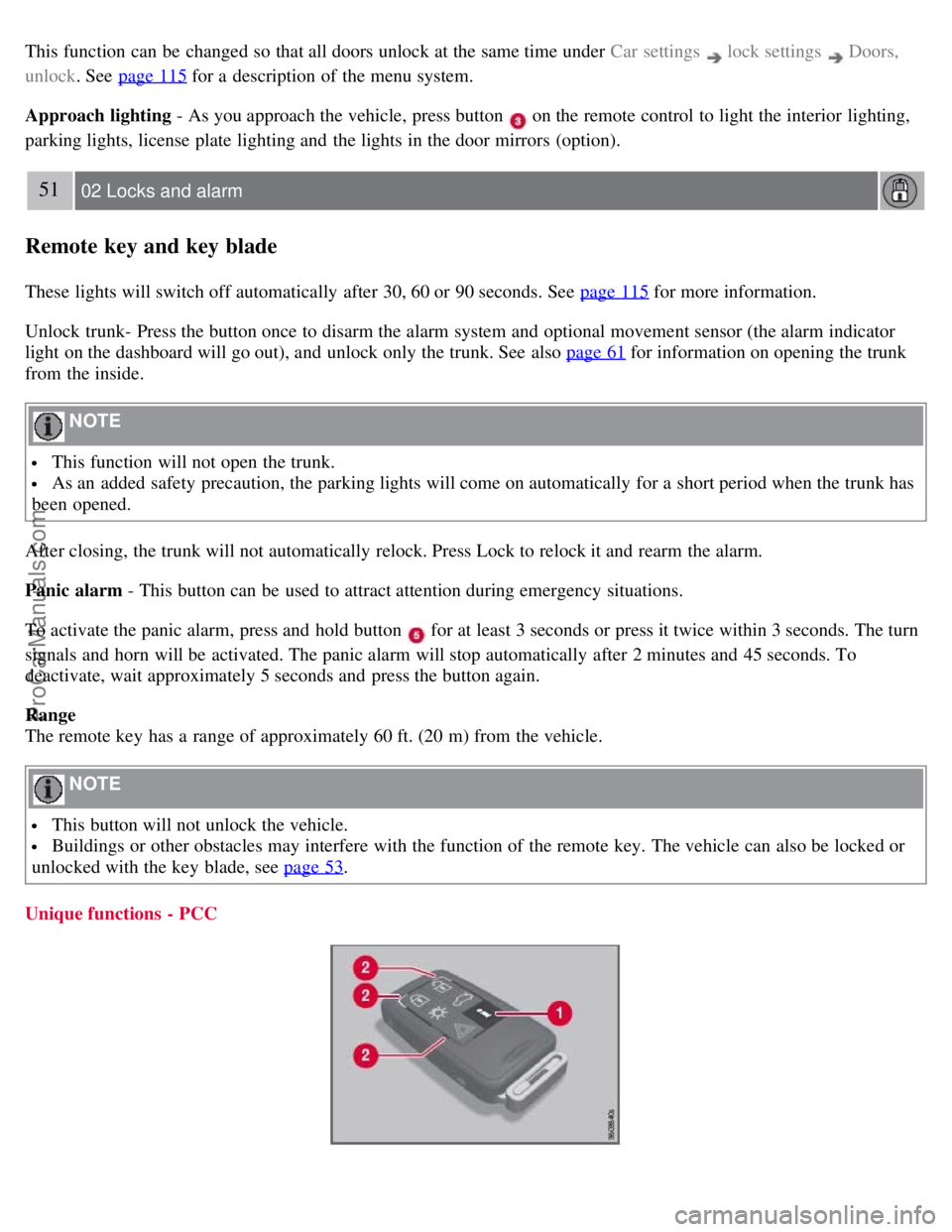
Approach lighting - As you approach the vehicle, press button
on the remote control to light the interior lighting,
parking lights, license plate lighting and the lights in the door mirrors (option).
51 02 Locks and alarm
Remote key and key blade
These lights will switch off automatically after 30, 60 or 90 seconds. See page 115 for more information.
Unlock trunk- Press the button once to disarm the alarm system and optional movement sensor (the alarm indicator
light on the dashboard will go out), and unlock only the trunk. See also page 61
for information on opening the trunk
from the inside.
NOTE
This function will not open the trunk.
As an added safety precaution, the parking lights will come on automatically for a short period when the trunk has
been opened.
After closing, the trunk will not automatically relock. Press Lock to relock it and rearm the alarm.
Panic alarm - This button can be used to attract attention during emergency situations.
To activate the panic alarm, press and hold button
for at least 3 seconds or press it twice within 3 seconds. The turn
signals and horn will be activated. The panic alarm will stop automatically after 2 minutes and 45 seconds. To
deactivate, wait approximately 5 seconds and press the button again.
Range
The remote key has a range of approximately 60 ft. (20 m) from the vehicle.
NOTE
This button will not unlock the vehicle.
Buildings or other obstacles may interfere with the function of the remote key. The vehicle can also be locked or
unlocked with the key blade, see page 53
.
Unique functions - PCC
ProCarManuals.com
Page 52 of 251
device may not cause harmful interference, and (2) this device must accept interference received, including
interference that may cause undesired operation.
CAUTION
Changes or modifications not expressly approved by the manufacturer could void the user's authority to operate the
equipment.
Siemens VDO
5WK48891
Tested To Comply With FCC Standards
For Automobile Use
58 02 Locks and alarm
Keyless drive
Canada - IC:267T- 5WK48952, 267T- 5WK48964, 267T-5WK48891
NOTE
This device complies with RSS -210 of Industry Canada. Operation is subject to the following two conditions: (1)
This device may not cause harmful interference, and (2) this device must accept interference received, including
interference that may cause undesired operation.
CAUTION
Changes or modifications not expressly approved by the manufacturer could void the user's authority to operate the
equipment.
59 02 Locks and alarm
Locks
Locking and unlocking the vehicle
From outside the vehicle
The remote key locks all of the doors and the trunk at the same time.
The first press on the unlock button unlocks the driver's door first, and a second press unlocks the other doors and the
trunk (see also page 50
).
NOTE
The vehicle cannot be locked if a door is open.
From inside the vehicle
ProCarManuals.com
Page 63 of 251
technician as soon as possible.
A malfunction indicator (CHECK ENGINE) light may have many causes. Sometimes, you may not notice a change in
your car's behavior. Even so, an uncorrected condition could hurt fuel economy, emission controls, and drivability.
Extended driving without correcting the cause could even damage other components in your vehicle.
Canadian models are equipped with this symbol:
Anti-lock Brake System (ABS) warning light
If the warning light comes on, there may be a malfunction in the ABS system (the standard braking system will still
function). Check the system by:
1. Stopping in a safe place and switching off the ignition.
72 03 Your driving environment
Instruments and controls
2. Restart the engine.
3. If the warning light goes off, no further action is required.
If the warning light remains on, the vehicle should be driven to a trained and qualified Volvo service technician for
inspection. See page 107
for additional information.
Canadian models are equipped with this symbol:
Rear fog light
This symbol indicates that the rear fog light (located in the driver's side tail light cluster) is on.
Stability system
This indicator symbol flashes when the DSTC (Dynamic Stability and Traction Control system) is actively working to
stabilize the vehicle. See page 139
for more detailed information.
Tire pressure monitoring system (TPMS) - option
This symbol illuminates to indicate that tire pressure in one or more tires is low. See page 223
for detailed information.
Low fuel level
When this light comes on, there are approximately 2.1 US gallons (8 liters) of fuel remaining in the tank.
Information symbol
The information symbol illuminates and a text message is displayed if a fault is detected in one of the vehicle's
systems. The message can be erased and the symbol can be turned off by pressing the READ button (see page 116
for
information) or this will take place automatically after a short time (the length of time varies, depending on the
function affected).
The information symbol may also illuminate together with other symbols.
High beam indicator
This symbol illuminates when the high beam headlights are on, or if the high beam flash function is used.
ProCarManuals.com
Page 114 of 251
Menu settings
The default settings for three of the climate system's functions can be changed in the menu system, see page 115:
Blower speed in automatic mode, see page 122.
Recirculation timer for passenger compartment air, see page 122.
Automatic rear window defrosting, see page 95.
The functions can also be returned to factory settings in the menu system.
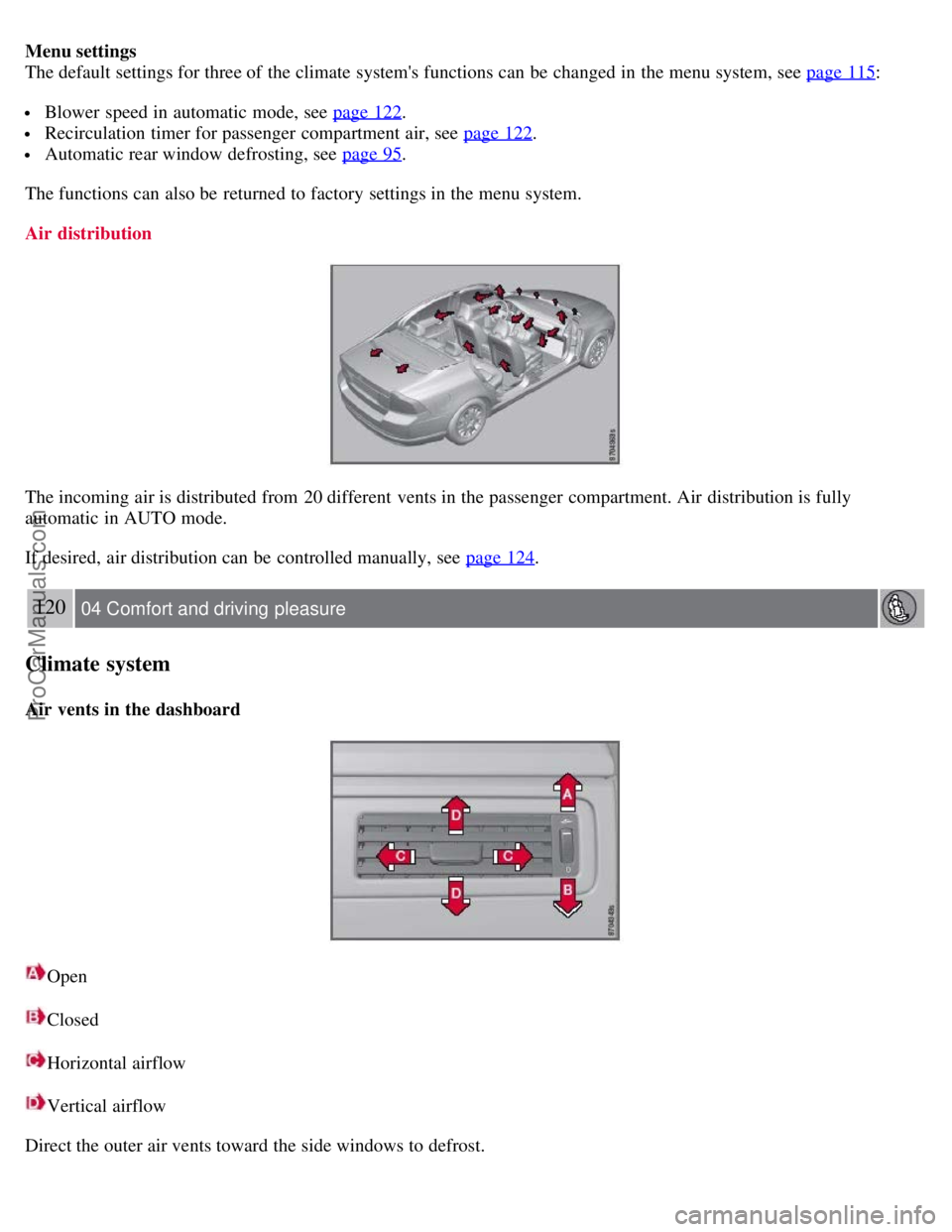
Air distribution
The incoming air is distributed from 20 different vents in the passenger compartment. Air distribution is fully
automatic in AUTO mode.
If desired, air distribution can be controlled manually, see page 124
.
120 04 Comfort and driving pleasure
Climate system
Air vents in the dashboard
Open
Closed
Horizontal airflow
Vertical airflow
Direct the outer air vents toward the side windows to defrost.
ProCarManuals.com
Page 125 of 251
Scan CD
Playing a CD (CD player1)
If a music CD is in the player when CD is pressed, it will be played automatically. Otherwise, insert a disc and press
CD .
1Certain markets only.
Playing a CD (CD changer)
If a CD position with a music CD is already selected when CD is pressed, it will be played automatically. Otherwise
select a disc with the number buttons 1-6 or
/ on the navigation button.
Insert a CD (CD changer)
1. Select an empty position with the number buttons 1-6 or
/ on the navigation button.
An empty position is marked on the display. The text Insert disc shows that a new disc can be inserted. The CD
changer can hold up to six CDs.
2. Insert a CD in the CD changer slot.
Disc eject
For reasons of traffic safety, an ejected CD must be removed within 12 seconds or it will be automatically drawn back
into the slot and the CD player will enter pause mode. Press the CD button to restart the disc.
Eject individual discs by pressing the eject button.
Eject all discs with a long press on the eject button. The entire magazine is emptied disc by disc.
NOTE
The Eject all function can only be used while the vehicle is at a standstill and will be cancelled if the vehicle begins
to move.
Pause
When the audio system volume is turned off completely, the CD player will pause and will resume playing when the
volume is turned up again.
Sound files
In addition to playing normal music CDs, the CD player/changer can also play discs containing files in mp3 or wma
format.
NOTE
Some copy protected sound files may not be read by the player.
When a CD containing sound files is inserted into the player the disc's directory structure is scanned before the CD
begins playing. The length of time that this takes depends on the quality of the disc.
129 04 Comfort and driving pleasure
Audio system
ProCarManuals.com
Page 132 of 251
Temp. unskip all ch.
This function will temporarily unskip all channels and make them available for selection. The channels remain on the
skip list and will again be skipped the next time the ignition is switched on.
Channel lock
Access to specific channels can be restricted (locked). A locked channel will not provide audio, song titles, or artist
information.
NOTE
All channels are initially unlocked.
Locking a channel:
1. Select Sirius ID in the menu and select LOCK OPTIONS and press ENTER.
2. Select CHANNEL LOCK LIST and press ENTER
3. Enter the channel access code
1 and press ENTER .
4. Select a category in the list and press ENTER .
5. Lock channels in the list presented by pressing ENTER or right arrow.
The channel is now locked and a checked box will be displayed to indicate this. It will be necessary to enter the
channel access code
1 in order to listen to a locked channel.
Unlocking a channel
A channel's access code
1 is required to unlock a channel.
Unlock all channels
This permanently removes all channels from the locked list and makes them available for selection.
Temp. unlock all ch.
This function will temporarily unlock all channels and make them available for selection. The channels remain on the
locked list and will again be locked the next time the ignition is switched on.
1The default code is 0000. If you have changed the code and forgotten it, see the section "If you have forgotten the access code."
135 04 Comfort and driving pleasure
Audio system
CHANGE CODE
This function makes it possible to change the channel access code. The default code is 0000.
To change the code:
1. Select CHANGE CODE and press ENTER.
2. Enter the current code and press ENTER .
3. Enter the new code and press ENTER .
ProCarManuals.com
Page 138 of 251
immediate steering response. The indicator light in the button will be on to indicate that Sport mode has been selected.
Advanced
In this mode, movement of the shock absorbers is minimal and body sway in curves or when cornering is sharply
reduced.
Operation
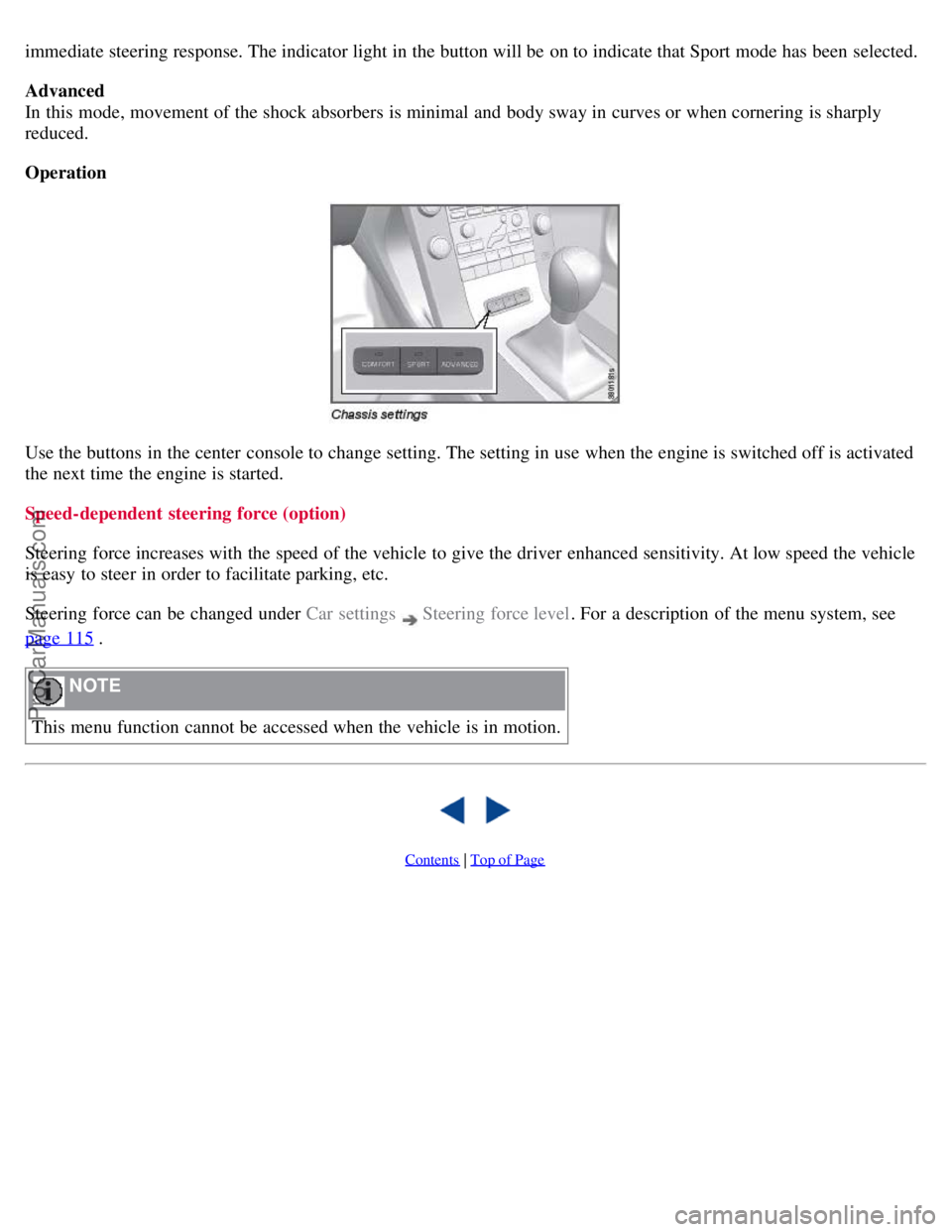
Use the buttons in the center console to change setting. The setting in use when the engine is switched off is activated
the next time the engine is started.
Speed-dependent steering force (option)
Steering force increases with the speed of the vehicle to give the driver enhanced sensitivity. At low speed the vehicle
is easy to steer in order to facilitate parking, etc.
Steering force can be changed under Car settings
Steering force level. For a description of the menu system, see
page 115
.
NOTE
This menu function cannot be accessed when the vehicle is in motion.
Contents | Top of Page
ProCarManuals.com
Page 153 of 251
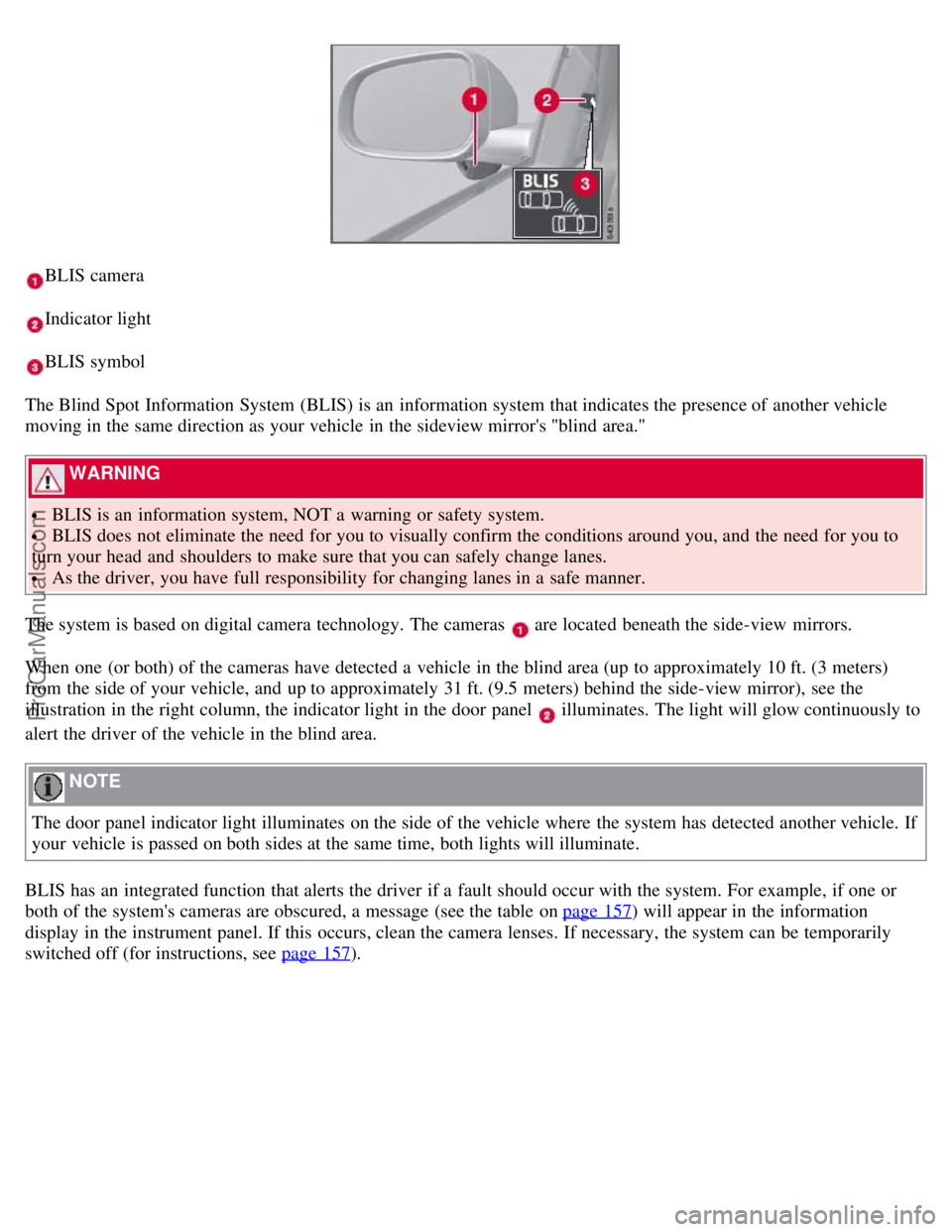
BLIS camera
Indicator light
BLIS symbol
The Blind Spot Information System (BLIS) is an information system that indicates the presence of another vehicle
moving in the same direction as your vehicle in the sideview mirror's "blind area."
WARNING
BLIS is an information system, NOT a warning or safety system.
BLIS does not eliminate the need for you to visually confirm the conditions around you, and the need for you to
turn your head and shoulders to make sure that you can safely change lanes.
As the driver, you have full responsibility for changing lanes in a safe manner.
The system is based on digital camera technology. The cameras
are located beneath the side-view mirrors.
When one (or both) of the cameras have detected a vehicle in the blind area (up to approximately 10 ft. (3 meters)
from the side of your vehicle, and up to approximately 31 ft. (9.5 meters) behind the side-view mirror), see the
illustration in the right column, the indicator light in the door panel
illuminates. The light will glow continuously to
alert the driver of the vehicle in the blind area.
NOTE
The door panel indicator light illuminates on the side of the vehicle where the system has detected another vehicle. If
your vehicle is passed on both sides at the same time, both lights will illuminate.
BLIS has an integrated function that alerts the driver if a fault should occur with the system. For example, if one or
both of the system's cameras are obscured, a message (see the table on page 157
) will appear in the information
display in the instrument panel. If this occurs, clean the camera lenses. If necessary, the system can be temporarily
switched off (for instructions, see page 157
).
ProCarManuals.com
Page 163 of 251
The connected cell phone's ring signal is not deactivated when one of the hands-free system's integrated signals is
used.
In order to select the connected phone's ring signal
1, go to Phone settings Sounds and volume Ring signals
Use mobile phone signal .
IDIS
In certain active driving situations, IDIS (Intelligent Driver Information System) can delay or refuse ring signals from
incoming calls, which is intended to help reduce driver distraction. IDIS can be deactivated under Phone settings
IDIS .
NOTE
Only the ring signal from the audio system's speakers is controlled by IDIS. The cell phone's ring signal is not
affected and must be deactivated manually.
1Not supported by all cell phones.
More on registering and connecting
A maximum of five cell phones can be registered. Registration is performed one time per phone. Phones can be
deregistered under Bluetooth
Remove phone . After a registration the phone no longer needs to be visible/detectable.
A maximum of one cell phone can be connected at a time.
Automatic connection
When the hands-free function is active and the most recently connected cell phone is in range, it is connected
automatically. When the audio system searches for the most recently connected phone, its name is shown in the
display. To change over to manual connection of another phone, or to stop the search, press EXIT .
Manual connection
If you want to connect a cell phone other than the most recently connected one, or to change the connected cell phone,
proceed as follows:
1. Set the audio system in phone mode.
2. Press PHONE and select one of the phones in the list.
The connection can also be made via the menu system under Bluetooth
Connect phone or Change phone .
Phone book
In order to use the phone book, the text PHONE must be shown at the top of the display and the
symbol must be
visible.
The audio system stores a copy of the phone book from each registered cell phone. The phone book is copied
automatically to the audio system at each connection. Deactivate the function under Phone settings
Synchronize
phone book. Searching for contacts is only performed in the connected cell phone's phone book.
NOTE
If the cell phone does not support copying of the phone book, List is empty is shown when copying is finished.
ProCarManuals.com