change wheel VOLVO S80 2007 Owners Manual
[x] Cancel search | Manufacturer: VOLVO, Model Year: 2007, Model line: S80, Model: VOLVO S80 2007Pages: 251, PDF Size: 5.7 MB
Page 110 of 251
Audio settings
Main menu Bluetooth cell phone
Bluetooth (option)
Change phone
Remove phone
1The menu option for audio settings is available in all audio sources.
116 04 Comfort and driving pleasure
Menus and messages
Main instrument panel
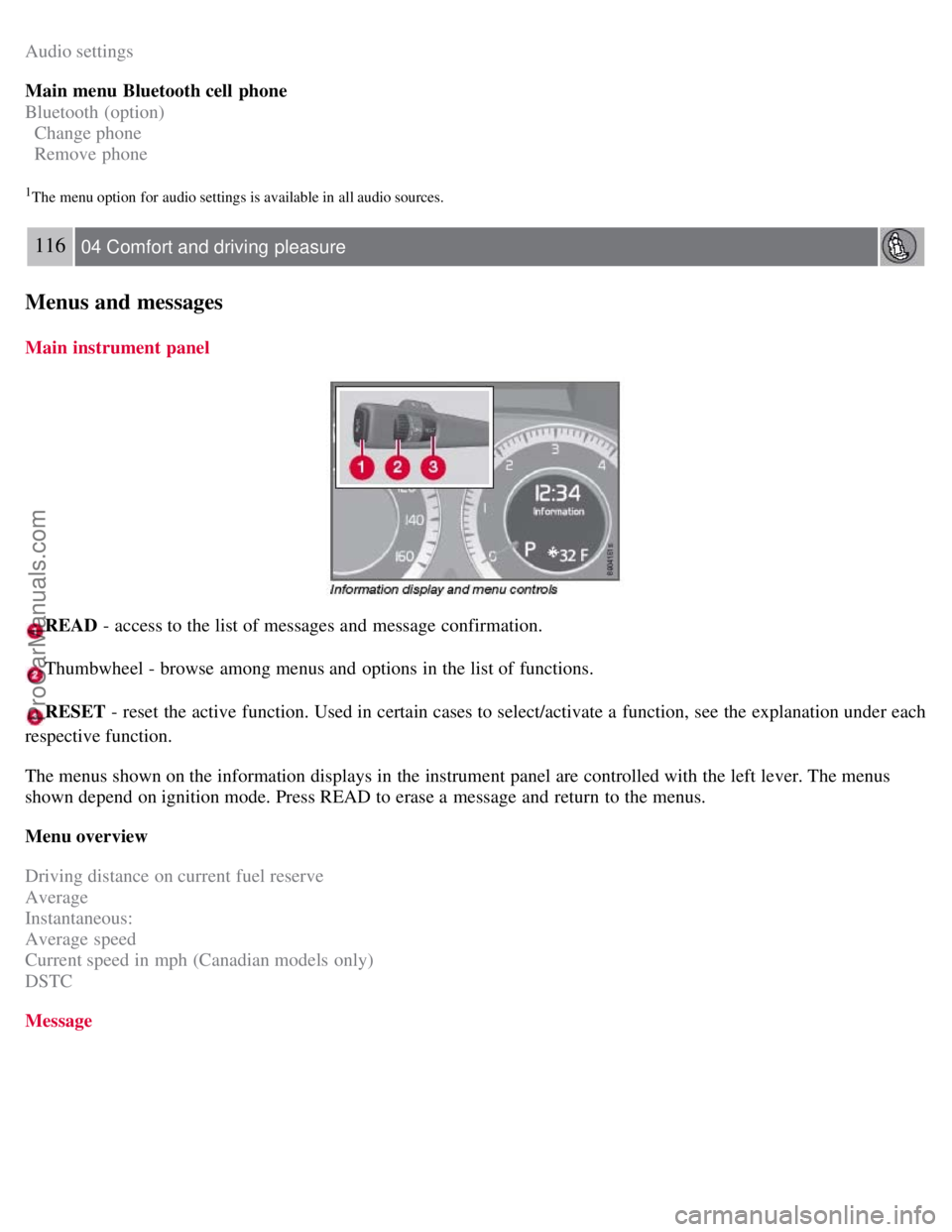
READ - access to the list of messages and message confirmation.
Thumbwheel - browse among menus and options in the list of functions.
RESET - reset the active function. Used in certain cases to select/activate a function, see the explanation under each
respective function.
The menus shown on the information displays in the instrument panel are controlled with the left lever. The menus
shown depend on ignition mode. Press READ to erase a message and return to the menus.
Menu overview
Driving distance on current fuel reserve
Average
Instantaneous:
Average speed
Current speed in mph (Canadian models only)
DSTC
Message
ProCarManuals.com
Page 126 of 251
Navigating the disc and playing tracks
If a disc containing sound files is inside the CD player, press ENTER to display the disc's directory structure. The
directory structure is navigated in the same way as the audio system's menu structure. Sound files have the symbol and
directories have the
symbol. Press ENTER to play a selected folder or a file.
When the music file has been played, the player will continue to play the rest of the files in the current folder. When
all of the files in the folder have been played, the player will automatically go to the next folder and play the files in it.
Fast-forward/change CD tracks and sound files
Short presses
/ on the navigation button are used to scroll between CD tracks/ sound files. Long presses are
used to search within CD tracks/sound files. TUNING (or the steering wheel keypad) can also be used for this
purpose.
Scan CD
This function plays the first ten seconds of each CD track/sound file. Press SCAN to activate. Interrupt with EXIT or
SCAN to continue playing the current CD track/ sound file.
Random
This function plays the tracks in random order (shuffle). The random CD tracks/sound files can be scrolled through in
the normal way.
NOTE
It is only possible to scroll between random CD tracks on the current disc.
Different messages are displayed depending on which random function has been selected:
RANDOM means that the tracks from only one music CD are played
RND ALL means that all tracks on all music CDs in the optional CD changer are played.
RANDOM FOLDER means that the sound files in a directory on the current CD are played.
CD player
If a normal music CD is being played, activate/deactivate under Random .
If a disc with sound files is being played, activate/deactivate under Random
Folder .
CD changer
If a normal music CD is being played under Random
Single disc or Random All discs. The option All discs only
applies to the music CDs in the changer.
If a CD with sound files is being played, activate/ deactivate instead under Random
Folder . If you select another
CD the function is deactivated.
Disc text
If title information is stored on a music CD it can be shown on the display
1. Activate/deactivate in CD mode under CD
settings
Disc text.
1Only applies to CD changer.
130 04 Comfort and driving pleasure
Audio system
ProCarManuals.com
Page 133 of 251
4. Confirm the new code and press ENTER.
If an incorrect code is entered, the text WRONG CODE! is displayed.
If you have forgotten the access code:
1. Select SIRIUS ID in the Sirius settings menu and press ENTER .
2. Press and hold the ENTER button for 2 seconds.
3. The current code will be displayed. Your Volvo retailer can also provide you with assistance.
SIRIUS ID
This function displays the 12-digit Sirius activation ID.
136 04 Comfort and driving pleasure
Trip computer
Introduction
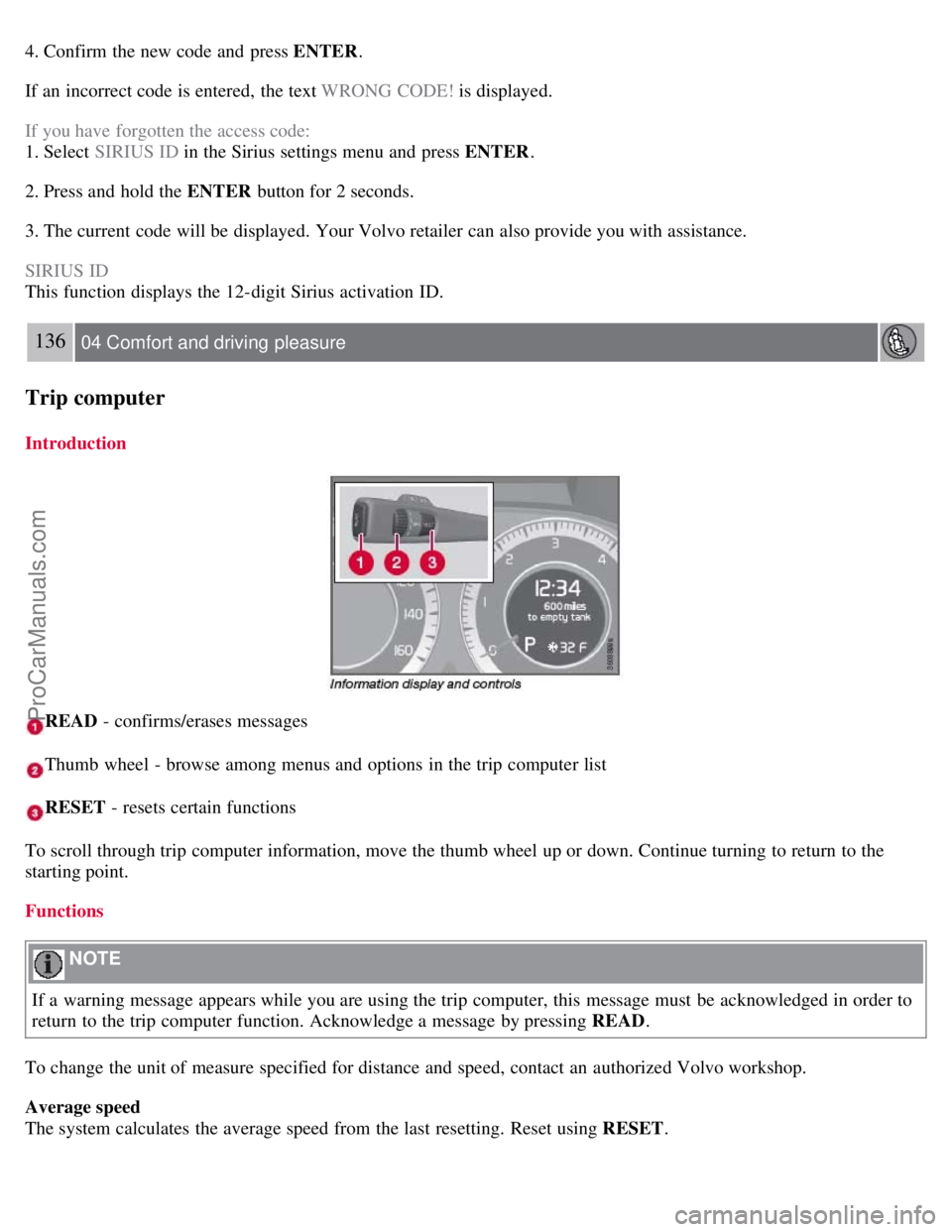
READ - confirms/erases messages
Thumb wheel - browse among menus and options in the trip computer list
RESET - resets certain functions
To scroll through trip computer information, move the thumb wheel up or down. Continue turning to return to the
starting point.
Functions
NOTE
If a warning message appears while you are using the trip computer, this message must be acknowledged in order to
return to the trip computer function. Acknowledge a message by pressing READ .
To change the unit of measure specified for distance and speed, contact an authorized Volvo workshop.
Average speed
The system calculates the average speed from the last resetting. Reset using RESET .
ProCarManuals.com
Page 161 of 251
2. Activate the hands-free function with PHONE.
The menu option Add phone is shown in the display. If one or more cell phones have already been registered, these
phones will also be displayed.
3. Select Add phone .
The audio system searches for cell phones in the vicinity. The search takes approximately 30 seconds. The cell phones
detected are specified with their respective Bluetooth™ name in the display. The hands-free function's device name
( My Car ) is shown in the cell phone's display.
4. Choose one of the cell phones in the audio system display.
5. Enter the number series shown in the audio system display via the cell phone keypad.
The cell phone is registered and connected automatically to the audio system while the text Synchronizing is shown in
the display. For more information on how cell phones are registered, see page 165
.
When the connection is established the symbol
is shown and the cell phone Bluetooth™ name is shown in the
display. The cell phone can now be controlled from the audio system and the steering wheel keypad.
To call
1. Make sure that the text PHONE is shown at the top of the display and that the
symbol is visible.
2. Dial the number or use the phone book, see page 165
.
3. Press ENTER .
The call can be interrupted with EXIT .
Disconnect and connect cell phone
Automatic disconnection takes place if the cell phone moves out of the audio system's range. When the cell phone
returns within range it is connected automatically. For more information on connection, see page 165
.
Manual disconnection takes place by deactivating the hands-free function with one long press on PHONE . The hands-
free function is also deactivated when the engine is switched off or when a door is opened
1.
When the cell phone has been disconnected an ongoing call can be continued with the cell phone's built-in
microphone and speaker.
1Only Keyless Drive
NOTE
Some cell phones require that the changeover from hands-free is confirmed from the phone's keypad.
164 04 Comfort and driving pleasure
Bluetooth hands-free (option)
Making and receiving calls
ProCarManuals.com
Page 164 of 251
If the phone book contains a caller's contact information, this is shown in the display.
Searching for entries in phone book The easiest way to search in the phone book is with long presses on the keys 2 to
9. This starts a search in the phone book based on the key's first letter.
The phone book can also be reached with
on the navigation button or with on the steering wheel keypad.
166 04 Comfort and driving pleasure
Bluetooth hands-free (option)
The search can also be performed from the phone book's Search menu under Phone book Search:
1. Enter the first few letters of the entry and press ENTER , or simply press ENTER.
2. Scroll to an entry and press ENTER to call.
Voice recognition
If the cell phone supports voice dialing, this function can be used by holding in ENTER .
Voice mailbox
The number to your voice mailbox can be changed in Phone settings
Voice mail number . If no number has been
stored, this menu can be accessed by an extended press on 1. Use the stored number by pressing 1 for several seconds.
Call lists
The call lists are copied to the hands-free function at each new connection and are then updated during the connection.
Press ENTER to show the last dialled. Other call lists are available under Call list .
NOTE
Certain cell phones show a list of the last dialled calls in reverse order.
Entering text
Input text using the keypad in the center console. Press once for the key's first character, twice for the second
character, etc. Continue pressing for more characters, see the table below.
A short press on EXIT deletes an entered characters. One long press on EXIT clears all entered characters.
/ on
the navigation button scrolls between the characters.
ProCarManuals.com
Page 169 of 251
Have a word with a trained and qualified Volvo service technician if you intend to drive in countries where it may
be difficult to obtain the correct fuel.
Consider your destination. If you will be driving through an area where snow or ice are likely to occur, consider
snow tires.
Cold weather precautions
If you wish to check your vehicle before the approach of cold weather, the following advice is worth noting:
Make sure that the engine coolant contains 50 percent antifreeze. Any other mixture will reduce freeze protection.
This gives protection against freezing down to - 31°F (-35°C). The use of "recycled" antifreeze is not approved by
Volvo. Different types of antifreeze must not be mixed.
Volvo recommends using only genuine Volvo antifreeze in your vehicle's radiator.
Try to keep the fuel tank well filled - this helps prevent the formation of condensation in the tank. In addition, in
extremely cold weather conditions it is worthwhile to add fuel line de -icer before refueling.
The viscosity of the engine oil is important. Oil with low viscosity (thinner oil) improves cold-weather starting as
well as decreasing fuel consumption while the engine is warming up. For winter use, 5W -30 oil, particularly the
synthetic type, is recommended. Be sure to use good quality oil but do not use cold-weather oil for hard driving or in
warm weather. See page 246
for more information on engine oil.
NOTE
Synthetic oil is not used when the oil is changed at the normal maintenance intervals except at owner request and at
additional charge.
The load placed on the battery is greater during the winter since the windshield wipers, lighting, etc. are used more
often. Moreover, the capacity of the battery decreases as the temperature drops. In very cold weather, a poorly charged
battery can freeze and be damaged. It is therefore advisable to check the state of charge more frequently and spray an
anti-rust oil on the battery posts.
Volvo recommends the use of snow tires on all four wheels for winter driving. See the information on page 231.
To prevent the washer fluid reservoir from freezing, add washer solvents containing antifreeze. This is important
since dirt is often splashed on the windshield during winter driving, requiring the frequent use of the washers and
wipers. Volvo Washer Solvent should be diluted as follows: Down to 14° F (-10° C): 1 part washer solvent and 4 parts
water Down to 5° F (- 15° C): 1 part washer solvent and 3 parts
173 05 During your trip
Driving recommendations
water Down to 0° F (-18° C): 1 part washer solvent and 2 parts water Down to -18° F (-28° C): 1 part washer solvent
and 1 part water.
Use Volvo Teflon Lock Spray in the locks.
Avoid using de -icing sprays as they can cause damage to the locks.
174 05 During your trip
Refueling
Fuel requirements
Deposit control gasoline (detergent additives)
ProCarManuals.com
Page 213 of 251
You should replace the spare tire when you replace the other road tires due to the aging of the spare.
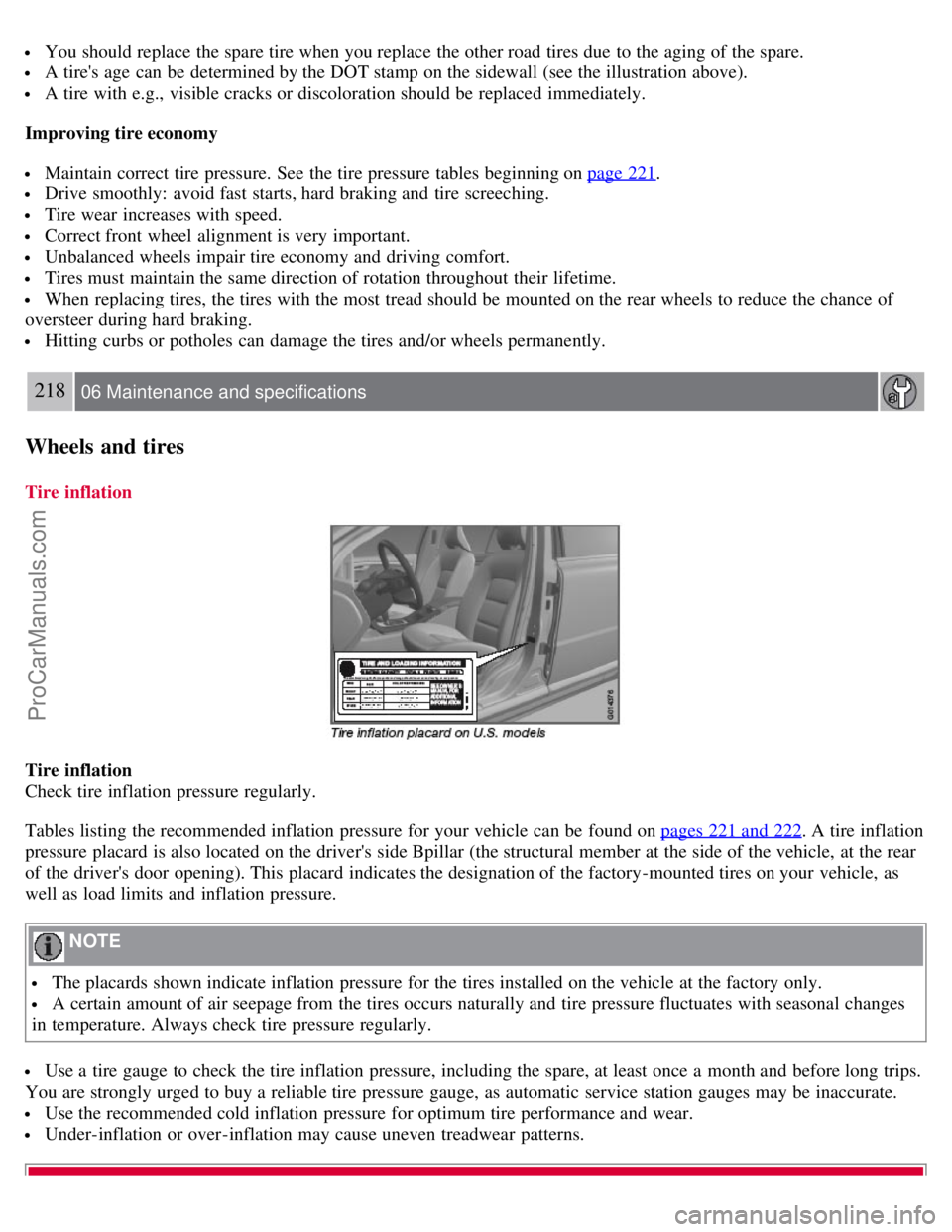
A tire's age can be determined by the DOT stamp on the sidewall (see the illustration above).
A tire with e.g., visible cracks or discoloration should be replaced immediately.
Improving tire economy
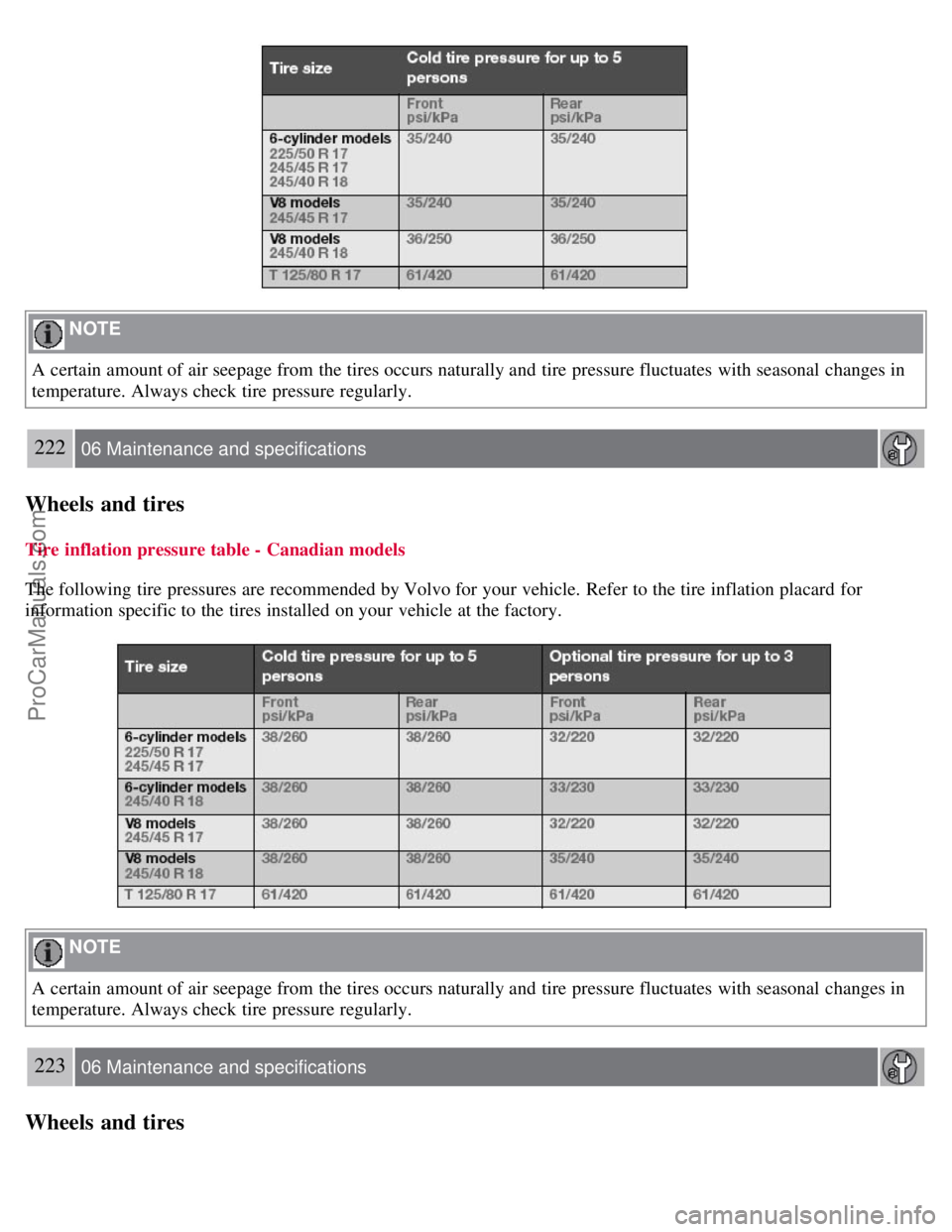
Maintain correct tire pressure. See the tire pressure tables beginning on page 221.
Drive smoothly: avoid fast starts, hard braking and tire screeching.
Tire wear increases with speed.
Correct front wheel alignment is very important.
Unbalanced wheels impair tire economy and driving comfort.
Tires must maintain the same direction of rotation throughout their lifetime.
When replacing tires, the tires with the most tread should be mounted on the rear wheels to reduce the chance of
oversteer during hard braking.
Hitting curbs or potholes can damage the tires and/or wheels permanently.
218 06 Maintenance and specifications
Wheels and tires
Tire inflation
Tire inflation
Check tire inflation pressure regularly.
Tables listing the recommended inflation pressure for your vehicle can be found on pages 221 and 222
. A tire inflation
pressure placard is also located on the driver's side Bpillar (the structural member at the side of the vehicle, at the rear
of the driver's door opening). This placard indicates the designation of the factory-mounted tires on your vehicle, as
well as load limits and inflation pressure.
NOTE
The placards shown indicate inflation pressure for the tires installed on the vehicle at the factory only.
A certain amount of air seepage from the tires occurs naturally and tire pressure fluctuates with seasonal changes
in temperature. Always check tire pressure regularly.
Use a tire gauge to check the tire inflation pressure, including the spare, at least once a month and before long trips.
You are strongly urged to buy a reliable tire pressure gauge, as automatic service station gauges may be inaccurate.
Use the recommended cold inflation pressure for optimum tire performance and wear.
Under-inflation or over-inflation may cause uneven treadwear patterns.
ProCarManuals.com
Page 214 of 251
WARNING
Under-inflation is the most common cause of tire failure and may result in severe tire cracking, tread separation,
or "blowout," with unexpected loss of vehicle control and increased risk of injury.
Under-inflated tires reduce the load carrying capacity of your vehicle.
When weather temperature changes occur, tire inflation pressures also change. A 10- degree temperature drop causes a
corresponding drop of 1 psi (7 kPa) in inflation pressure. Check your tire pressures frequently and adjust them to the
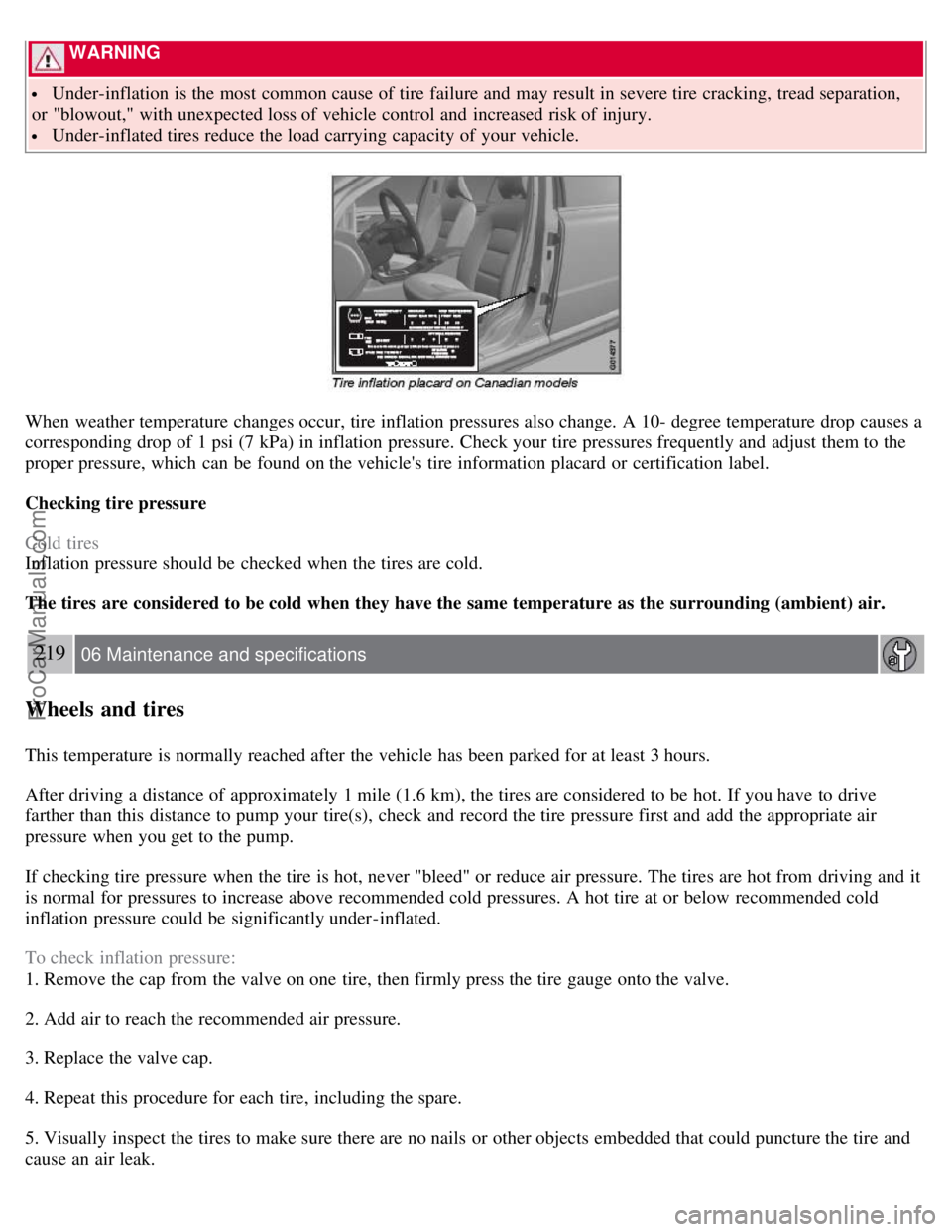
proper pressure, which can be found on the vehicle's tire information placard or certification label.
Checking tire pressure
Cold tires
Inflation pressure should be checked when the tires are cold.
The tires are considered to be cold when they have the same temperature as the surrounding (ambient) air.
219 06 Maintenance and specifications
Wheels and tires
This temperature is normally reached after the vehicle has been parked for at least 3 hours.
After driving a distance of approximately 1 mile (1.6 km), the tires are considered to be hot. If you have to drive
farther than this distance to pump your tire(s), check and record the tire pressure first and add the appropriate air
pressure when you get to the pump.
If checking tire pressure when the tire is hot, never "bleed" or reduce air pressure. The tires are hot from driving and it
is normal for pressures to increase above recommended cold pressures. A hot tire at or below recommended cold
inflation pressure could be significantly under-inflated.
To check inflation pressure:
1. Remove the cap from the valve on one tire, then firmly press the tire gauge onto the valve.
2. Add air to reach the recommended air pressure.
3. Replace the valve cap.
4. Repeat this procedure for each tire, including the spare.
5. Visually inspect the tires to make sure there are no nails or other objects embedded that could puncture the tire and
cause an air leak.
ProCarManuals.com
Page 216 of 251
NOTE
A certain amount of air seepage from the tires occurs naturally and tire pressure fluctuates with seasonal changes in
temperature. Always check tire pressure regularly.
222 06 Maintenance and specifications
Wheels and tires
Tire inflation pressure table - Canadian models
The following tire pressures are recommended by Volvo for your vehicle. Refer to the tire inflation placard for
information specific to the tires installed on your vehicle at the factory.
NOTE
A certain amount of air seepage from the tires occurs naturally and tire pressure fluctuates with seasonal changes in
temperature. Always check tire pressure regularly.
223 06 Maintenance and specifications
Wheels and tires
ProCarManuals.com
Page 218 of 251
NOTE
TPMS indicates low tire pressure but does not replace normal tire maintenance. For information on correct tire
pressure, please refer to the tables beginning on page 221
, or consult your Volvo retailer.
The tire pressure warning light will not identify which tire is under-inflated. Be sure to check all four tires.
A certain amount of air seepage from the tires occurs naturally and tire pressure fluctuates with seasonal changes
in temperature. Always check tire pressure regularly.
Erasing warning messages
When a low tire pressure warning message has been displayed, and the tire pressure warning light has come on:
1. Use a tire pressure gauge to check the inflation pressure of all four tires.
2. Re-inflate the tire(s) to the correct pressure (consult the tire pressure placard or the tables beginning on page 221
).
3. In certain cases, it may be necessary to drive the vehicle for several minutes at a speed of 20 mph (30 km/h) or
faster. This will erase the warning text and the warning light will go out.
WARNING
Incorrect inflation pressure could lead to tire failure, resulting in a loss of control of the vehicle.
Changing wheels with TPMS
Please note the following when changing or replacing the factory installed TPMS wheels/tires on the vehicle:
Only the factory-mounted wheels are equipped with TPMS sensors in the valves.
If the vehicle is equipped with a temporary spare tire, this tire does not have a TPMS sensor.
If wheels without TPMS sensors are mounted on the vehicle, TIRE PRESS SYST SERVICE REQUIRED will be
displayed each time the vehicle is driven above 25 mph (40 km/h) for 10 minutes or more.
Once TPMS sensors are properly installed, the warning message should not reappear. If the message is still
displayed, drive the vehicle for several minutes at a speed of 20 mph (30 km/h) or faster to erase the message.
Volvo recommends that TPMS sensors be fitted on all wheels used on the vehicle. Volvo does not recommend
moving sensors back and forth between sets of wheels.
NOTE
If you change to tires with a different recommended inflation pressure, the TPMS system must be recalibrated to
these tires. This must be done by an authorized Volvo retailer or workshop.
If a tire is changed, or if the TPMS sensor is moved to another wheel, the sensor's seal, nut, and valve core should
be replaced.
When installing TPMS sensors, the vehicle must be parked for at least 15 minutes with the ignition off. if the
vehicle is driven within 15 minutes, a TPMS error message will be displayed.
CAUTION
When inflating tires with TPMS valves, press the pump's mouthpiece straight onto the valve to help avoid bending or
otherwise damaging the valve.
225 06 Maintenance and specifications
Wheels and tires
ProCarManuals.com