light VOLVO S80 2008 User Guide
[x] Cancel search | Manufacturer: VOLVO, Model Year: 2008, Model line: S80, Model: VOLVO S80 2008Pages: 275, PDF Size: 7.17 MB
Page 51 of 275
The batteries should be replaced if:
The information symbol illuminates and Replace car key battery is shown in the display and/or
if the locks do not react after several attempts to unlock or lock the vehicle.
NOTE
The remote key's range is normally approximately 60 ft (20 m) from the vehicle.
See page 59
for information on replacing the battery.
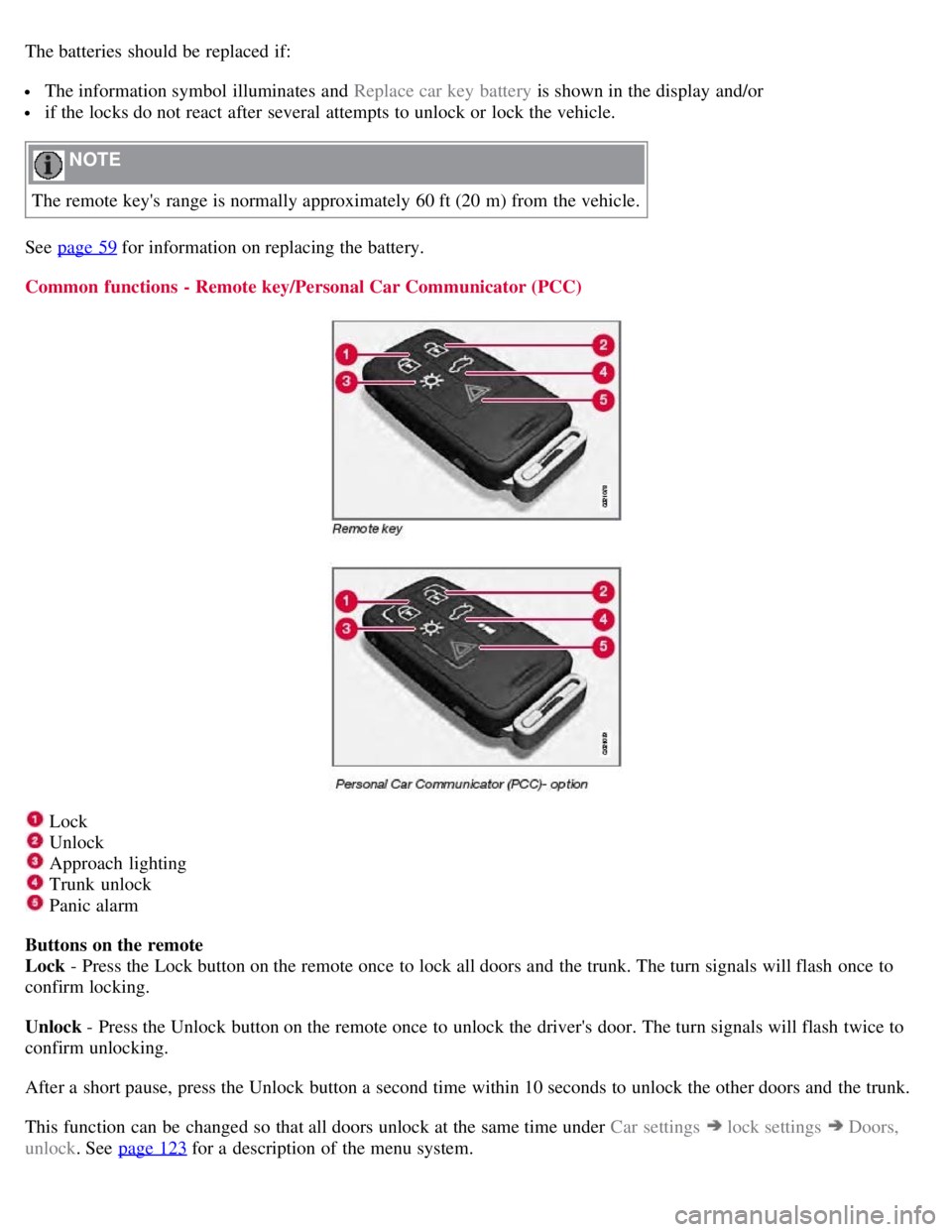
Common functions - Remote key/Personal Car Communicator (PCC)
Lock
Unlock
Approach lighting
Trunk unlock
Panic alarm
Buttons on the remote
Lock - Press the Lock button on the remote once to lock all doors and the trunk. The turn signals will flash once to
confirm locking.
Unlock - Press the Unlock button on the remote once to unlock the driver's door. The turn signals will flash twice to
confirm unlocking.
After a short pause, press the Unlock button a second time within 10 seconds to unlock the other doors and the trunk.
This function can be changed so that all doors unlock at the same time under Car settings
lock settings Doors,
unlock . See page 123
for a description of the menu system.
Page 52 of 275
Approach lighting - As you approach the vehicle, press button on the remote control to light the interior lighting,
parking lights, license plate lighting and the lights in the door mirrors (option).
55 02 Locks and alarm
Remote key and key blade
These lights will switch off automatically after 30, 60 or 90 seconds. See page 123 for more information.
Unlock/open trunk
Press once: This unlocks but does not open the trunk. If the trunk is not opened within two minutes it will
automatically relock and the alarm will be rearmed.
Press twice: This both unlocks the trunk and pops it open several inches.
NOTE
Any excess weight (snow, etc.) on the trunk lid may prevent it from opening.
Press the button once to disarm the alarm system and optional movement sensor (the alarm indicator light on the
dashboard will go out), and unlock only the trunk. See also page 65
for information on opening the trunk from the
inside.
NOTE
As an added safety precaution, the parking lights will come on automatically for a short period when the trunk has
been opened.
After closing, the trunk will not automatically relock. Press Lock to relock it and rearm the alarm.
Panic alarm - This button can be used to attract attention during emergency situations.
To activate the panic alarm, press and hold button
for at least 3 seconds or press it twice within 3 seconds. The turn
signals and horn will be activated. The panic alarm will stop automatically after 2 minutes and 45 seconds.
To deactivate, wait approximately 5 seconds and press the button again.
Range
The remote key has a range of approximately 60 ft. (20 m) from the vehicle.
NOTE
This button will not unlock the vehicle.
Buildings or other obstacles may interfere with the function of the remote key. The vehicle can also be locked or
unlocked with the key blade, see page 57
.
Functions - PCC
Page 53 of 275
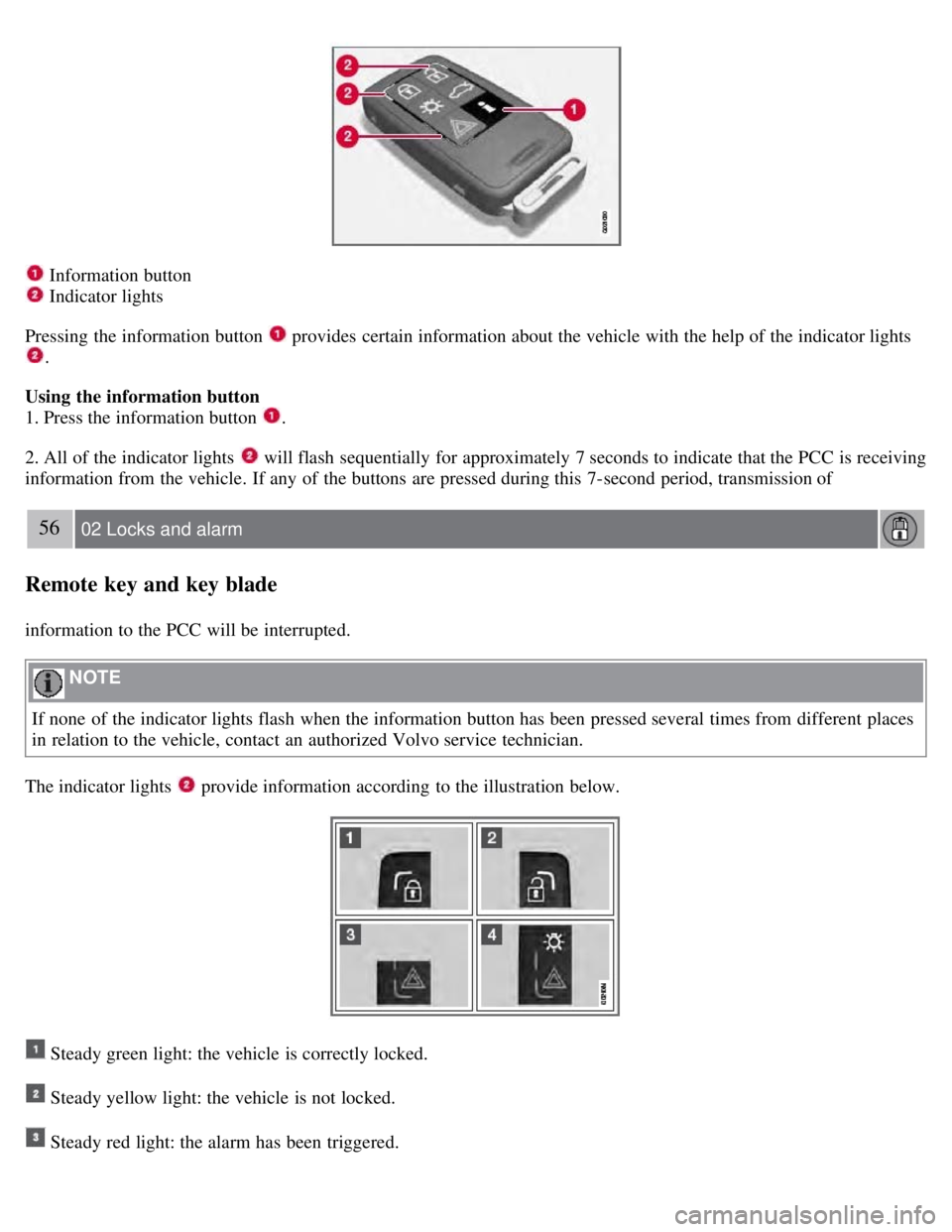
Information button
Indicator lights
Pressing the information button
provides certain information about the vehicle with the help of the indicator lights
.
Using the information button
1. Press the information button
.
2. All of the indicator lights
will flash sequentially for approximately 7 seconds to indicate that the PCC is receiving
information from the vehicle. If any of the buttons are pressed during this 7-second period, transmission of
56 02 Locks and alarm
Remote key and key blade
information to the PCC will be interrupted.
NOTE
If none of the indicator lights flash when the information button has been pressed several times from different places
in relation to the vehicle, contact an authorized Volvo service technician.
The indicator lights
provide information according to the illustration below.
Steady green light: the vehicle is correctly locked.
Steady yellow light: the vehicle is not locked.
Steady red light: the alarm has been triggered.
Page 54 of 275
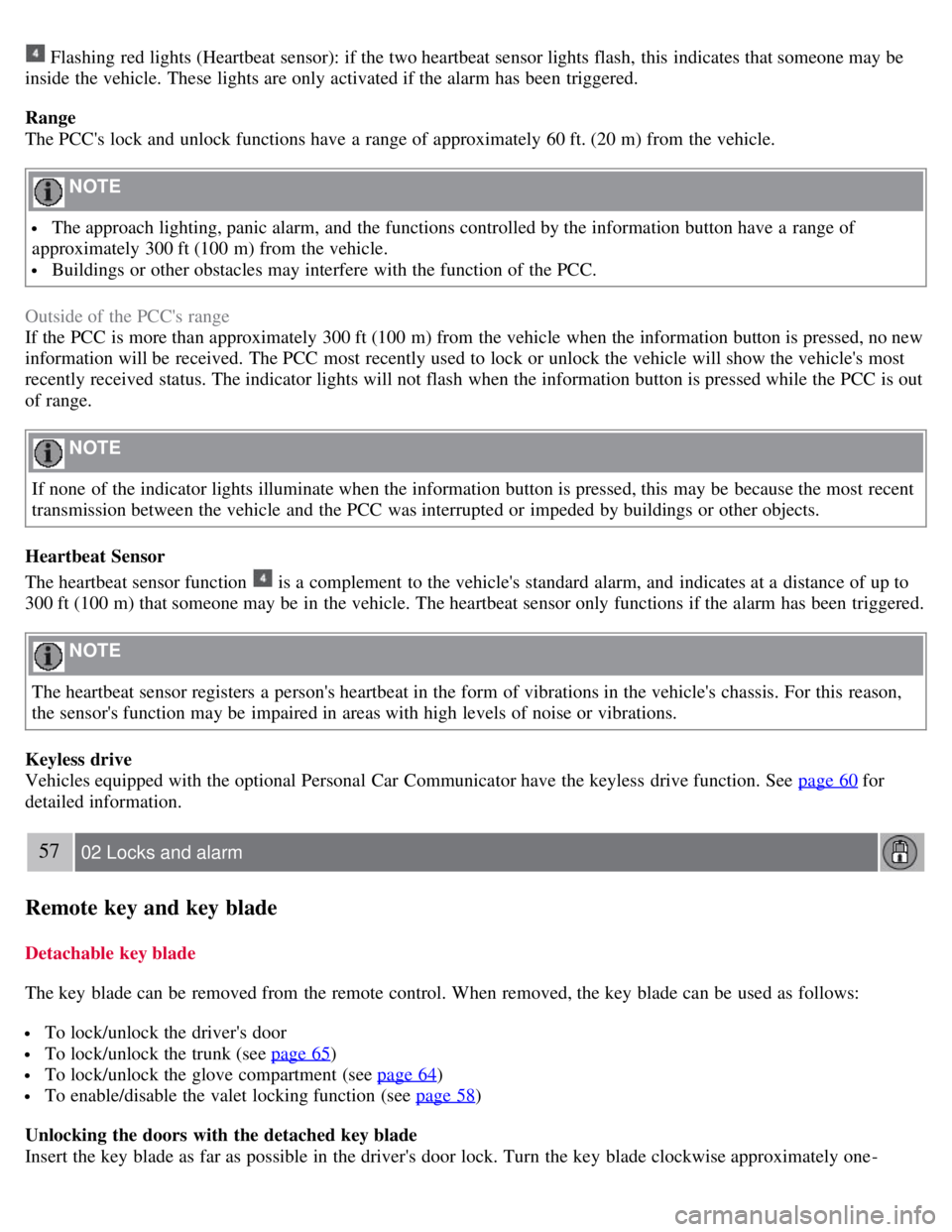
Flashing red lights (Heartbeat sensor): if the two heartbeat sensor lights flash, this indicates that someone may be
inside the vehicle. These lights are only activated if the alarm has been triggered.
Range
The PCC's lock and unlock functions have a range of approximately 60 ft. (20 m) from the vehicle.
NOTE
The approach lighting, panic alarm, and the functions controlled by the information button have a range of
approximately 300 ft (100 m) from the vehicle.
Buildings or other obstacles may interfere with the function of the PCC.
Outside of the PCC's range
If the PCC is more than approximately 300 ft (100 m) from the vehicle when the information button is pressed, no new
information will be received. The PCC most recently used to lock or unlock the vehicle will show the vehicle's most
recently received status. The indicator lights will not flash when the information button is pressed while the PCC is out
of range.
NOTE
If none of the indicator lights illuminate when the information button is pressed, this may be because the most recent
transmission between the vehicle and the PCC was interrupted or impeded by buildings or other objects.
Heartbeat Sensor
The heartbeat sensor function
is a complement to the vehicle's standard alarm, and indicates at a distance of up to
300 ft (100 m) that someone may be in the vehicle. The heartbeat sensor only functions if the alarm has been triggered.
NOTE
The heartbeat sensor registers a person's heartbeat in the form of vibrations in the vehicle's chassis. For this reason,
the sensor's function may be impaired in areas with high levels of noise or vibrations.
Keyless drive
Vehicles equipped with the optional Personal Car Communicator have the keyless drive function. See page 60
for
detailed information.
57 02 Locks and alarm
Remote key and key blade
Detachable key blade
The key blade can be removed from the remote control. When removed, the key blade can be used as follows:
To lock/unlock the driver's door
To lock/unlock the trunk (see page 65)
To lock/unlock the glove compartment (see page 64)
To enable/disable the valet locking function (see page 58)
Unlocking the doors with the detached key blade
Insert the key blade as far as possible in the driver's door lock. Turn the key blade clockwise approximately one -
Page 63 of 275
Lock the glove compartment by turning the key a quarter of a turn (90°) clockwise. The key slot is horizontal when
the glove compartment is locked.
Locking/unlocking the trunk
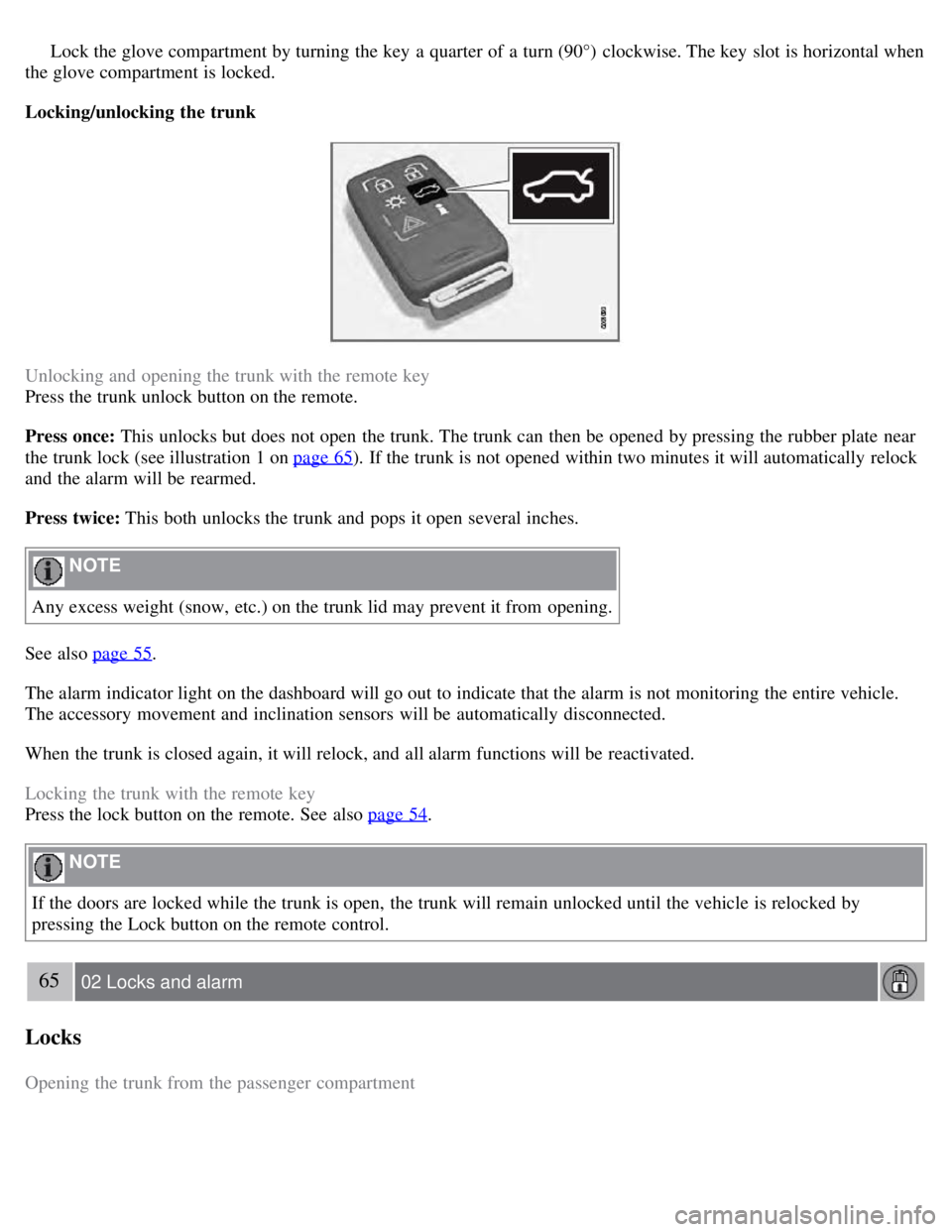
Unlocking and opening the trunk with the remote key
Press the trunk unlock button on the remote.
Press once: This unlocks but does not open the trunk. The trunk can then be opened by pressing the rubber plate near
the trunk lock (see illustration 1 on page 65
). If the trunk is not opened within two minutes it will automatically relock
and the alarm will be rearmed.
Press twice: This both unlocks the trunk and pops it open several inches.
NOTE
Any excess weight (snow, etc.) on the trunk lid may prevent it from opening.
See also page 55
.
The alarm indicator light on the dashboard will go out to indicate that the alarm is not monitoring the entire vehicle.
The accessory movement and inclination sensors will be automatically disconnected.
When the trunk is closed again, it will relock, and all alarm functions will be reactivated.
Locking the trunk with the remote key
Press the lock button on the remote. See also page 54
.
NOTE
If the doors are locked while the trunk is open, the trunk will remain unlocked until the vehicle is relocked by
pressing the Lock button on the remote control.
65 02 Locks and alarm
Locks
Opening the trunk from the passenger compartment
Page 64 of 275
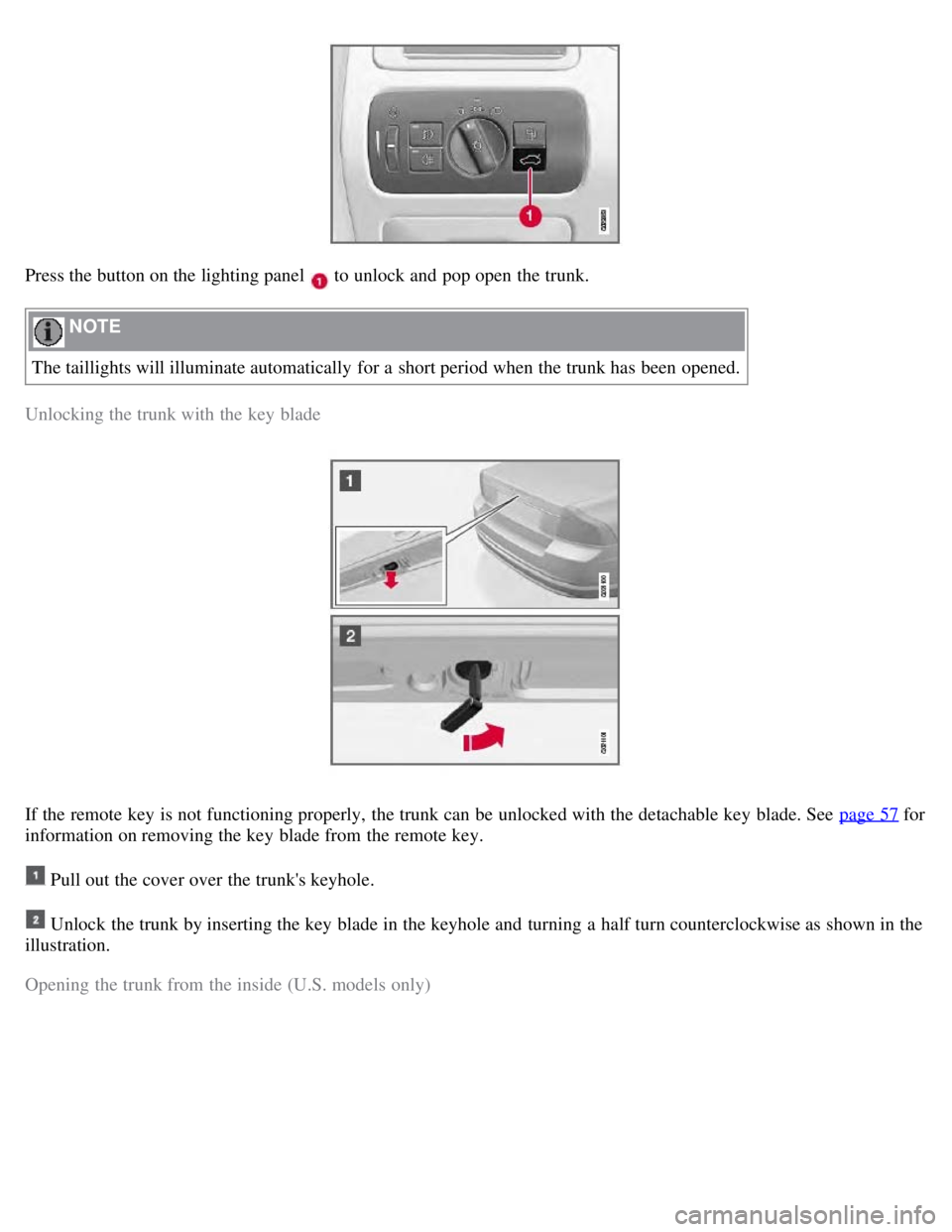
Press the button on the lighting panel to unlock and pop open the trunk.
NOTE
The taillights will illuminate automatically for a short period when the trunk has been opened.
Unlocking the trunk with the key blade
If the remote key is not functioning properly, the trunk can be unlocked with the detachable key blade. See page 57 for
information on removing the key blade from the remote key.
Pull out the cover over the trunk's keyhole.
Unlock the trunk by inserting the key blade in the keyhole and turning a half turn counterclockwise as shown in the
illustration.
Opening the trunk from the inside (U.S. models only)
Page 66 of 275

Volvo service technician.
NOTE
Do not attempt to repair any of the components in the alarm system yourself. This could affect the insurance policy
on the vehicle.
The alarm indicator light
The status of the alarm system is indicated by the indicator light on the dashboard (see illustration):
Indicator light off - the alarm is not armed
The indicator light flashes at one -second intervals - the alarm is armed
The indicator light flashes rapidly before the remote key is inserted in the ignition slot - the alarm has been
triggered.
Arming the alarm
Press the Lock button on the remote key. One long flash of the turn signals will confirm that the alarm is armed.
Alarm confirmation settings can be changed under Car settings
Lock settings Keyless entry . See page 123 for a
description of the menu system.
USA FCC ID: MAYDA 5823(3)
This device complies with part 15 of the FCC rules. Operation is subject to the following conditions: (1) This device
may not cause harmful interference, and (2) this device must accept any interference received, including interference
that may cause undesired operation.
Canada IC: 4405A-DA 5823(3)
Movement sensor DA5823 by Dynex Operation is subject to the following conditions: (1) this device may not cause
interference, and (2) this device must accept any interference, including interference that may cause undesired
operation of the device.
68 02 Locks and alarm
Alarm
Disarming the alarm
Page 69 of 275
2 0 0 8
VOLVO S80
70 03 Your driving environment
Instruments and controls 72
Ignition modes80
Seats82
Steering wheel87
Lighting89
Wipers and washers95
Power windows97
Mirrors99
Power moonroof101
HomeLink® Universal Transceiver103
Starting the engine107
Transmission110
Brakes113
Parking brake115
71 03 Your driving environment
72 03 Your driving environment
Instruments and controls
Instrument overview
Page 72 of 275
Indicator and warning symbols
High beam and turn signal indicators
Function check
All indicator and warning symbols light up in ignition mode II or when the engine is started. When the engine has
started, all the symbols should go out except the parking brake symbol, which only goes out when the brake is
disengaged.
If the engine does not start or if the function check is carried out in ignition mode II , all symbols go out after 5
seconds except the
75 03 Your driving environment
Instruments and controls
symbol for faults in the vehicle's emissions system and the symbol for low oil pressure.
Certain symbols may not have their functions illustrated, depending on the vehicle's equipment.
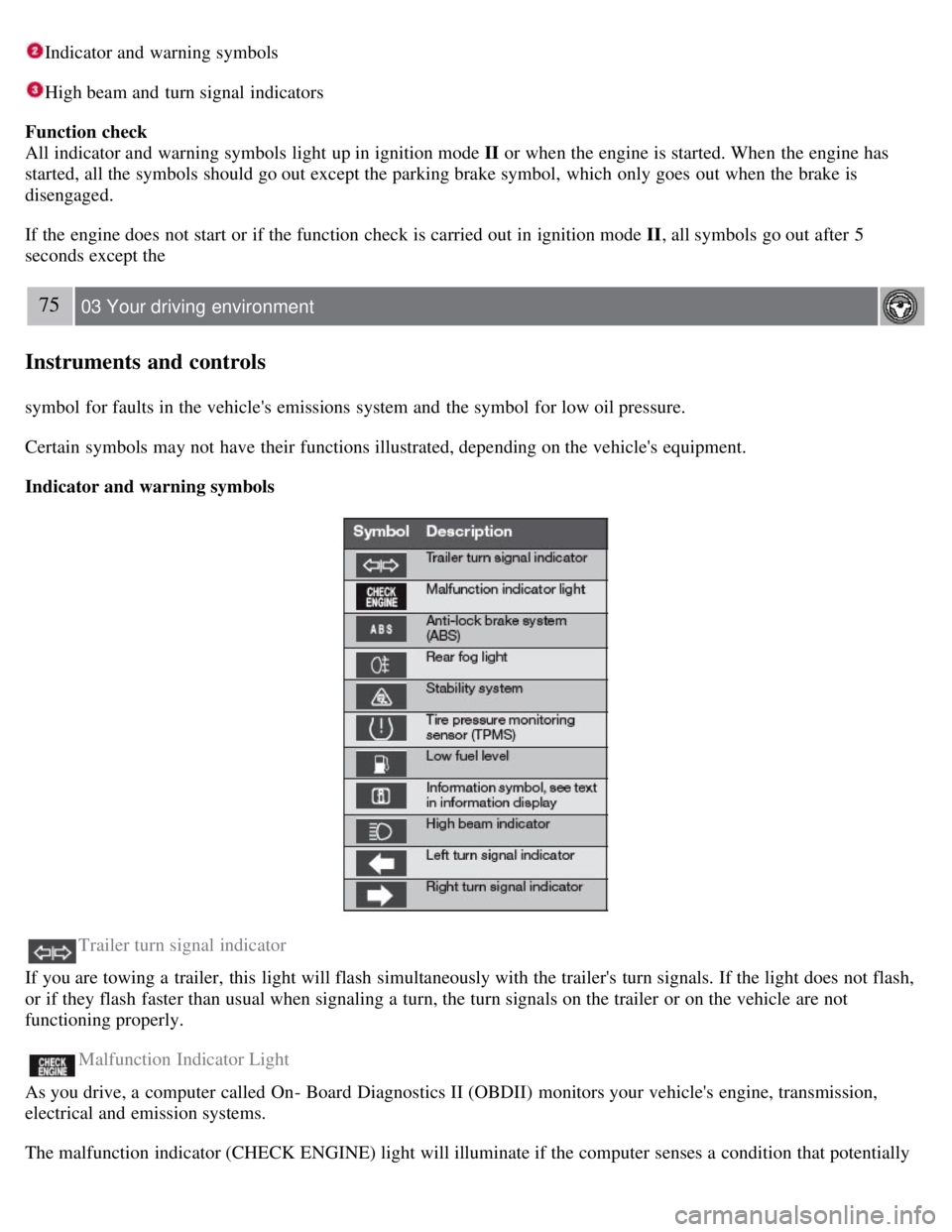
Indicator and warning symbols
Trailer turn signal indicator
If you are towing a trailer, this light will flash simultaneously with the trailer's turn signals. If the light does not flash,
or if they flash faster than usual when signaling a turn, the turn signals on the trailer or on the vehicle are not
functioning properly.
Malfunction Indicator Light
As you drive, a computer called On- Board Diagnostics II (OBDII) monitors your vehicle's engine, transmission,
electrical and emission systems.
The malfunction indicator (CHECK ENGINE) light will illuminate if the computer senses a condition that potentially
Page 73 of 275
may need correcting. When this happens, please have your vehicle checked by a trained and qualified Volvo service
technician as soon as possible.
A malfunction indicator (CHECK ENGINE) light may have many causes. Sometimes, you may not notice a change in
your car's behavior. Even so, an uncorrected condition could hurt fuel economy, emission controls, and drivability.
Extended driving without correcting the cause could even damage other components in your vehicle.
Canadian models are equipped with this symbol:
Anti-lock Brake System (ABS) warning light
If the warning light comes on, there may be a malfunction in the ABS system (the standard braking system will still
function). Check the system by:
1. Stopping in a safe place and switching off the ignition.
76 03 Your driving environment
Instruments and controls
2. Restart the engine.
3. If the warning light goes off, no further action is required.
If the warning light remains on, the vehicle should be driven to a trained and qualified Volvo service technician for
inspection. See page 113
for additional information.
Canadian models are equipped with this symbol:
Rear fog light
This symbol indicates that the rear fog light (located in the driver's side tail light cluster) is on.
Stability system
This indicator symbol flashes when the DSTC (Dynamic Stability and Traction Control system) is actively working to
stabilize the vehicle. See page 151
for more detailed information.
Tire pressure monitoring system (TPMS) - option
This symbol illuminates to indicate that tire pressure in one or more tires is low. See page 242
for detailed information.
Low fuel level
When this light comes on, there are approximately 2.1 US gallons (8 liters) of fuel remaining in the tank.
Information symbol
The information symbol illuminates and a text message is displayed if a fault is detected in one of the vehicle's
systems. The message can be erased and the symbol can be turned off by pressing the READ button (see page 124
for
information) or this will take place automatically after a short time (the length of time varies, depending on the
function affected).
The information symbol may also illuminate together with other symbols.
High beam indicator