light VOLVO S80 2008 Workshop Manual
[x] Cancel search | Manufacturer: VOLVO, Model Year: 2008, Model line: S80, Model: VOLVO S80 2008Pages: 275, PDF Size: 7.17 MB
Page 129 of 275
The function automatically regulates cooling, heating, blower speed, recirculation, and air distribution to maintain the
chosen temperature. If you select one or more manual functions, the other functions continue to be controlled
automatically. The air quality sensor is engaged and all manual settings are switched off when AUTO is pressed. The
display shows AUTO CLIMATE.
Blower speed in automatic mode can be set under Climate settings
Automatic blower adjust . Choose between Low,
Normal or High.
NOTE
Selecting the lowest blower speed may increases the risk of fog forming on the windows.
For a description of the menu system, see page 123
.
Temperature control
The temperatures on the driver and passenger sides can be set independently. When the vehicle is started, the most
recent setting is resumed.
NOTE
Heating or cooling cannot be speeded up by selecting a higher/lower temperature than the actual temperature
required.
A/C - ON/OFF
The air conditioning is controlled automatically by the system when the ON light is on. This cools/heats and
dehumidifies the incoming air. When the OFF light is on, the air conditioning is always disengaged. Other functions
are still controlled automatically. When defroster is selected, the air conditioning system is set for maximum blower
speed and dehumidification.
131 04 Comfort and driving pleasure
Climate system
Defroster
This function defrosts/deices the windshield and front side windows. The indicator light in the defroster button lights
when the function is active.
Blower speed increases automatically and the air conditioning will switch on (if not already on and if the passenger
compartment blower is not turned off) to dehumidify the air in the passenger compartment. Air conditioning can be
switched off by pressing the AC button.
Recirculation will not function while defrost is engaged.
The climate system will return to its previous settings when the defroster function is switched off.
Page 130 of 275
Recirculation/air quality system
Recirculation
This function can be used to shut out exhaust fumes, smoke, etc from the passenger compartment. The air in the
passenger compartment is then recirculated, i.e., no air from outside the car is taken into the car when this function is
activated. The indicator light in the button will illuminate when recirculation is selected.
If the air in the car recirculates for too long, there is a risk of condensation forming on the insides of the windows,
especially in winter.
Timer
The timer function minimizes the risk of fogging, or stale air when the recirculation function is selected by
automatically switching off the function after a certain length of time, depending on the ambient temperature.
Activate/deactivate the function under Climate control settings
Recirculation timer .
For a description of the menu system, see page 123
.
NOTE
When Defroster is selected, recirculation is always deactivated.
Interior Air Quality System -IAQS (option)
This system consists of a multifilter and an air quality sensor. The filter helps remove gases and particles from the
incoming air, thereby reducing the amounts of odors and contaminants entering the vehicle. The air quality sensor
detects increased levels of contaminants in the outside air. When the air quality sensor detects contaminated outside
air, the air intake closes and the air inside the passenger compartment is recirculated, i.e., no outside air enters the
vehicle. The filter also cleans recirculated passenger compartment air. When the AUTO button is depressed the air
quality sensor is always engaged.
Activating the air quality sensor
Switch between the three functions by pressing the button repeatedly.
The left orange light comes on - the air quality sensor is disengaged.
The center green light comes on - recirculation not engaged, providing it is not required for cooling in hot weather.
The right orange light comes on - recirculation is engaged.
132 04 Comfort and driving pleasure
Climate system
NOTE
The air quality sensor should always be engaged in order to obtain the best air in the passenger compartment.
Recirculation is limited in cold weather to avoid fogging.
If the insides of the windows start fogging, disengage the air quality sensor. Use the defroster function to increase
airflow to the front, side, and rear windows.
Page 150 of 275
Active chassis system-Four C
Active chassis (Four C)-option
Active chassis, Four-C (Continuously Controlled Chassis Concept), regulates the characteristics of the shock absorbers
so that the car's driving characteristics can be adjusted. There are three settings: Comfort, Sport and Advanced.
Comfort
Comfort mode offers a somewhat softer ride and the transmission shifts gears at lower rpm. This mode is particularly
suitable for long-distance highway driving. The indicator light in the button will be on when this mode is selected.
Sport
In this mode, the vehicle's body sway is reduced during cornering and steering response is more immediate. The
transmission shifts up at higher rpm for sportier driving. The indicator light in the button will be on to indicate that
Sport mode has been selected.
Advanced
In this mode, body sway in curves is minimal and steering response is very direct. Gear shifting is done at high rpm in
each gear for dynamic and active driving.
Operation
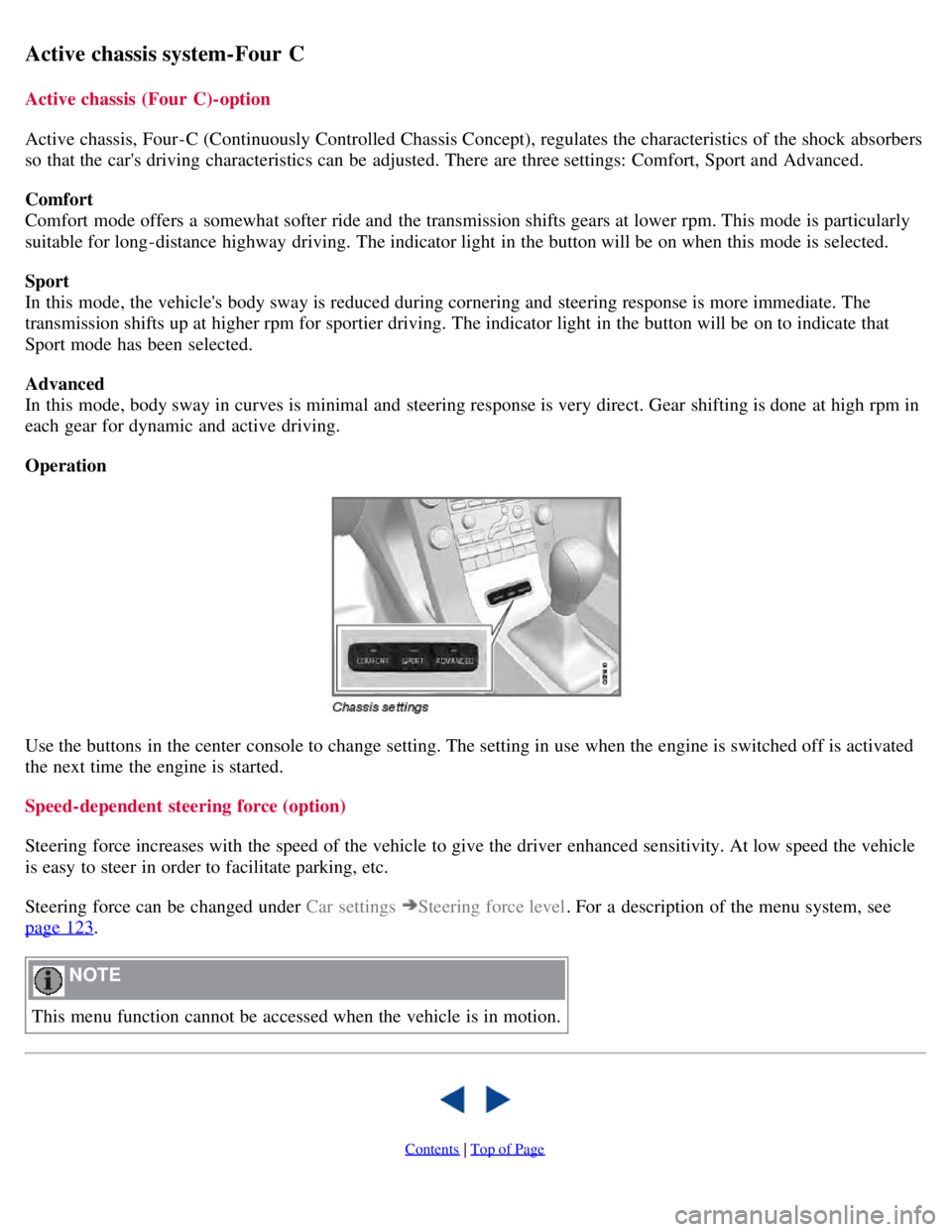
Use the buttons in the center console to change setting. The setting in use when the engine is switched off is activated
the next time the engine is started.
Speed-dependent steering force (option)
Steering force increases with the speed of the vehicle to give the driver enhanced sensitivity. At low speed the vehicle
is easy to steer in order to facilitate parking, etc.
Steering force can be changed under Car settings
Steering force level. For a description of the menu system, see
page 123
.
NOTE
This menu function cannot be accessed when the vehicle is in motion.
Contents | Top of Page
Page 153 of 275
maintain set speed on steep downgrades.
156 04 Comfort and driving pleasure
Adaptive Cruise Control-ACC
Introduction
Adaptive Cruise Control (ACC) is an optional system designed to assist the driver by maintaining a set speed or a set
distance to the vehicle ahead. It is primarily intended for use on long straight roads in steady traffic, such as on
highways and other main roads.
WARNING
Do not use the adaptive cruise control system in demanding driving conditions such as city traffic, winding roads,
at intersections, on slippery surfaces, in poor visibility, heavy rain, etc.
Maintenance of cruise control components must only be performed by an authorized Volvo workshop.
WARNING
Adaptive cruise control cannot cover all driving situations and traffic, weather and road conditions. The Function
section provides information about limitations that the driver must be aware of before using the adaptive cruise
control.
This system is designed to be a supplementary driving aid. It is not, however, intended to replace the driver's
attention and judgement. The driver is responsible for maintaining a safe distance and speed and must intervene if
adaptive cruise control does not maintain a suitable speed or suitable distance.
Function
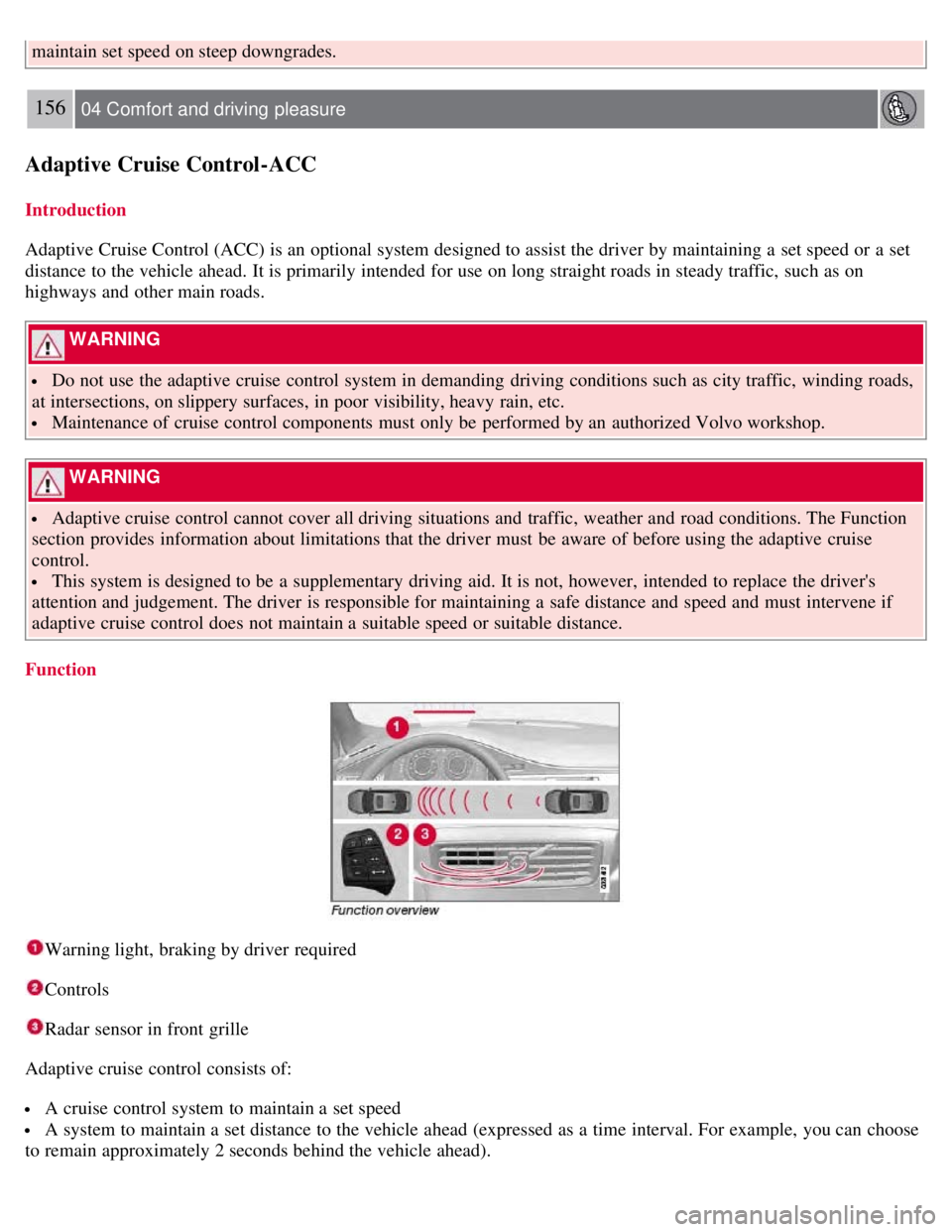
Warning light, braking by driver required
Controls
Radar sensor in front grille
Adaptive cruise control consists of:
A cruise control system to maintain a set speed
A system to maintain a set distance to the vehicle ahead (expressed as a time interval. For example, you can choose
to remain approximately 2 seconds behind the vehicle ahead).
Page 154 of 275
157 04 Comfort and driving pleasure
Adaptive Cruise Control-ACC
WARNING
Adaptive cruise control is not a collision avoidance system. The driver is always responsible for applying the
brakes if the system does not detect another vehicle.
Adaptive cruise control does not react to slow moving or stationary vehicles.
The distance to the vehicle ahead (in the same lane) is measured by a radar sensor. Your vehicle's speed is regulated by
acceleration and braking. The brakes may emit a sound when they are being modulated by the adaptive cruise control
system. This is normal.
WARNING
The brake pedal moves when the adaptive cruise control system modulates the brakes. Do not rest your foot under
the brake pedal.
The adaptive cruise control system is designed to follow the vehicle ahead of you in the same lane, at a set time
interval.
If the radar sensor has not detected a vehicle ahead, the system will then attempt to maintain the set speed. This is also
the case if the speed of the vehicle ahead exceeds the speed that you have set.
The adaptive cruise control system is designed to smoothly regulate speed. However, the driver must apply the brakes
in situations that require immediate braking. This applies when there are great differences in speed between vehicles,
or if the vehicle ahead brakes suddenly.
WARNING
Due to limitations in the radar sensor, braking may occur unexpectedly or not at all, see page 160
.
Adaptive cruise control can only be activated at speeds above 20 mph (30 km/h). If speed falls below 20 mph (30
km/h) or if engine speed (rpm) becomes too low, adaptive cruise control disengages and will no longer modulate the
brakes. In situations when adaptive cruise control cannot be activated Cruise Control Unavailable is shown in the
display, see page 166
.
WARNING
When adaptive cruise control disengages, the brakes will not be modulated automatically. The driver must assume
full control over the vehicle.
Warning light -driver braking required
Adaptive cruise control has a braking capacity that is equivalent to approximately 30% of the vehicle's total braking
capacity. In situations requiring more brake force than ACC can provide, if the driver does not apply the brakes, an
audible signal will sound and a red warning light will illuminate in the windshield to alert the driver to react.
NOTE
Page 155 of 275
Strong sunlight, reflections, extreme light contrasts, the use of sunglasses, or if the driver is not looking straight
ahead may make the visual warning signal in the windshield difficult to see.
WARNING
Cruise control only warns of vehicles detected by the radar sensor, see page 160
. In some cases there may be no
warning or the warning may be delayed. The driver should always apply the brakes when necessary.
158 04 Comfort and driving pleasure
Adaptive Cruise Control-ACC
Operation
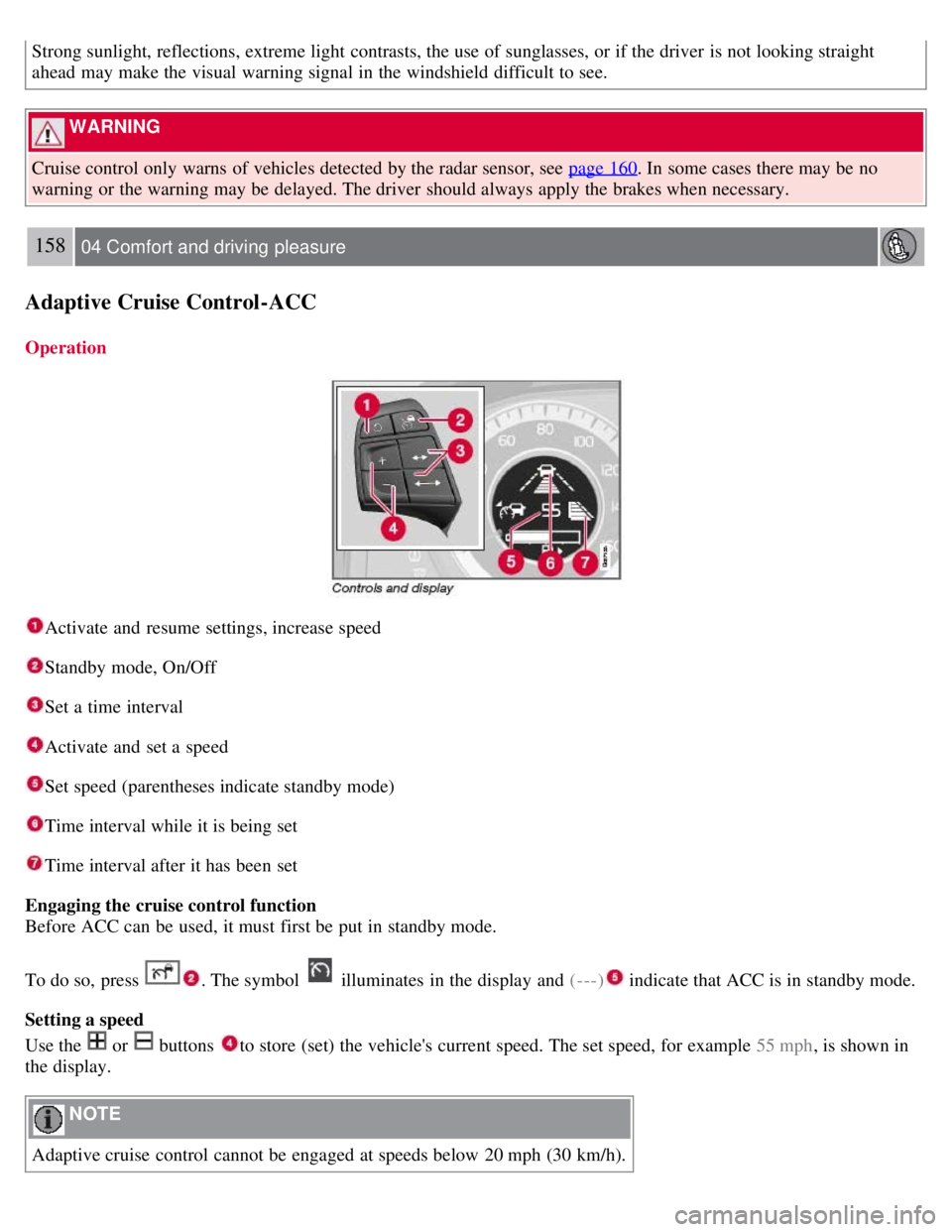
Activate and resume settings, increase speed
Standby mode, On/Off
Set a time interval
Activate and set a speed
Set speed (parentheses indicate standby mode)
Time interval while it is being set
Time interval after it has been set
Engaging the cruise control function
Before ACC can be used, it must first be put in standby mode.
To do so, press
. The symbol illuminates in the display and (---) indicate that ACC is in standby mode.
Setting a speed
Use the
or buttons to store (set) the vehicle's current speed. The set speed, for example 55 mph , is shown in
the display.
NOTE
Adaptive cruise control cannot be engaged at speeds below 20 mph (30 km/h).
Page 156 of 275
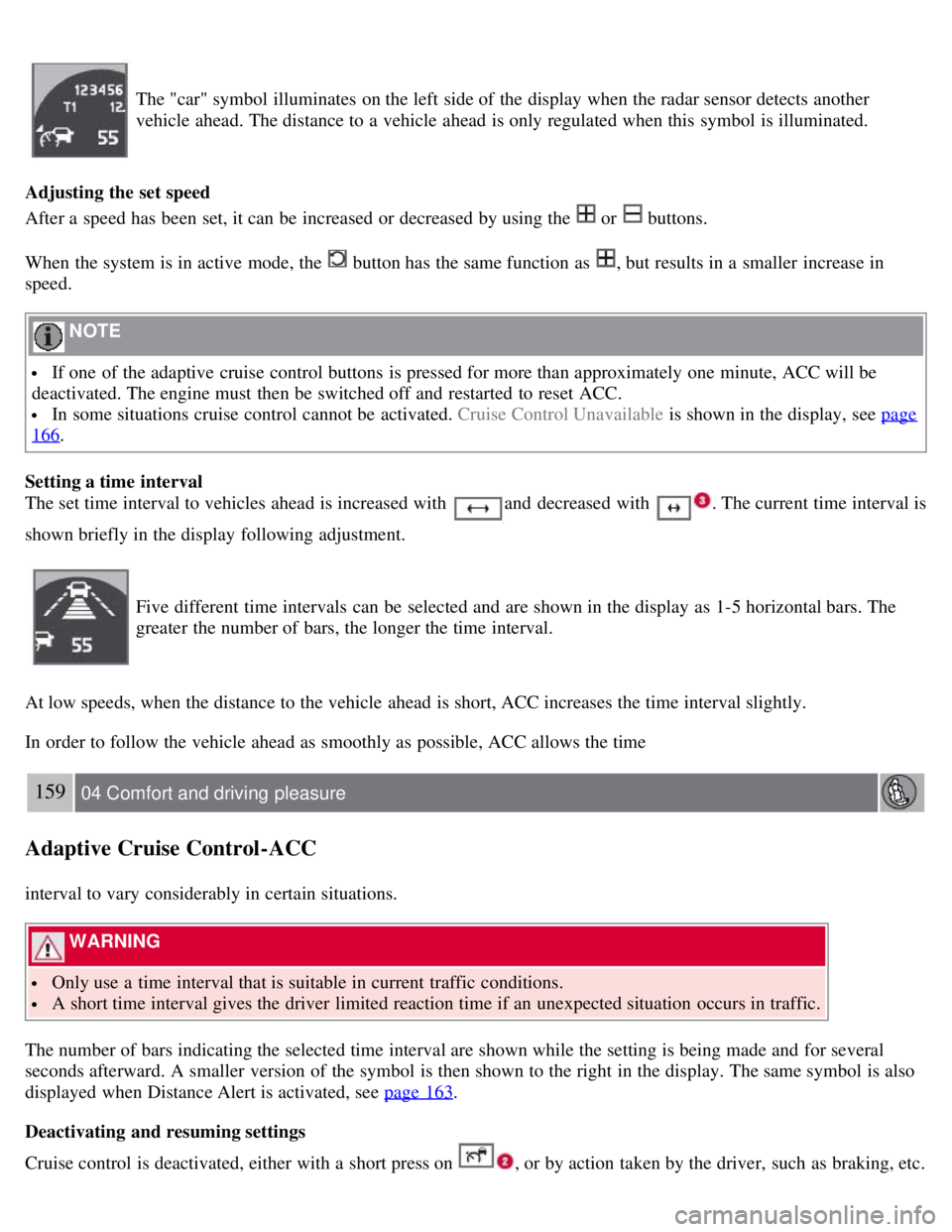
The "car" symbol illuminates on the left side of the display when the radar sensor detects another
vehicle ahead. The distance to a vehicle ahead is only regulated when this symbol is illuminated.
Adjusting the set speed
After a speed has been set, it can be increased or decreased by using the
or buttons.
When the system is in active mode, the
button has the same function as , but results in a smaller increase in
speed.
NOTE
If one of the adaptive cruise control buttons is pressed for more than approximately one minute, ACC will be
deactivated. The engine must then be switched off and restarted to reset ACC.
In some situations cruise control cannot be activated. Cruise Control Unavailable is shown in the display, see page
166.
Setting a time interval
The set time interval to vehicles ahead is increased with
and decreased with . The current time interval is
shown briefly in the display following adjustment.
Five different time intervals can be selected and are shown in the display as 1-5 horizontal bars. The
greater the number of bars, the longer the time interval.
At low speeds, when the distance to the vehicle ahead is short, ACC increases the time interval slightly.
In order to follow the vehicle ahead as smoothly as possible, ACC allows the time
159 04 Comfort and driving pleasure
Adaptive Cruise Control-ACC
interval to vary considerably in certain situations.
WARNING
Only use a time interval that is suitable in current traffic conditions.
A short time interval gives the driver limited reaction time if an unexpected situation occurs in traffic.
The number of bars indicating the selected time interval are shown while the setting is being made and for several
seconds afterward. A smaller version of the symbol is then shown to the right in the display. The same symbol is also
displayed when Distance Alert is activated, see page 163
.
Deactivating and resuming settings
Cruise control is deactivated, either with a short press on , or by action taken by the driver, such as braking, etc.
Page 160 of 275
163 04 Comfort and driving pleasure
Distance Alert
Introduction
Distance Alert is part of Adaptive Cruise Control and is a function that provides information about the time interval to
the vehicle ahead.
Time interval information is only given for a vehicle that is driving ahead of your vehicle, in the same lane, and in the
same direction. No information is provided for vehicles driving toward you, moving very slowly, or at a standstill.
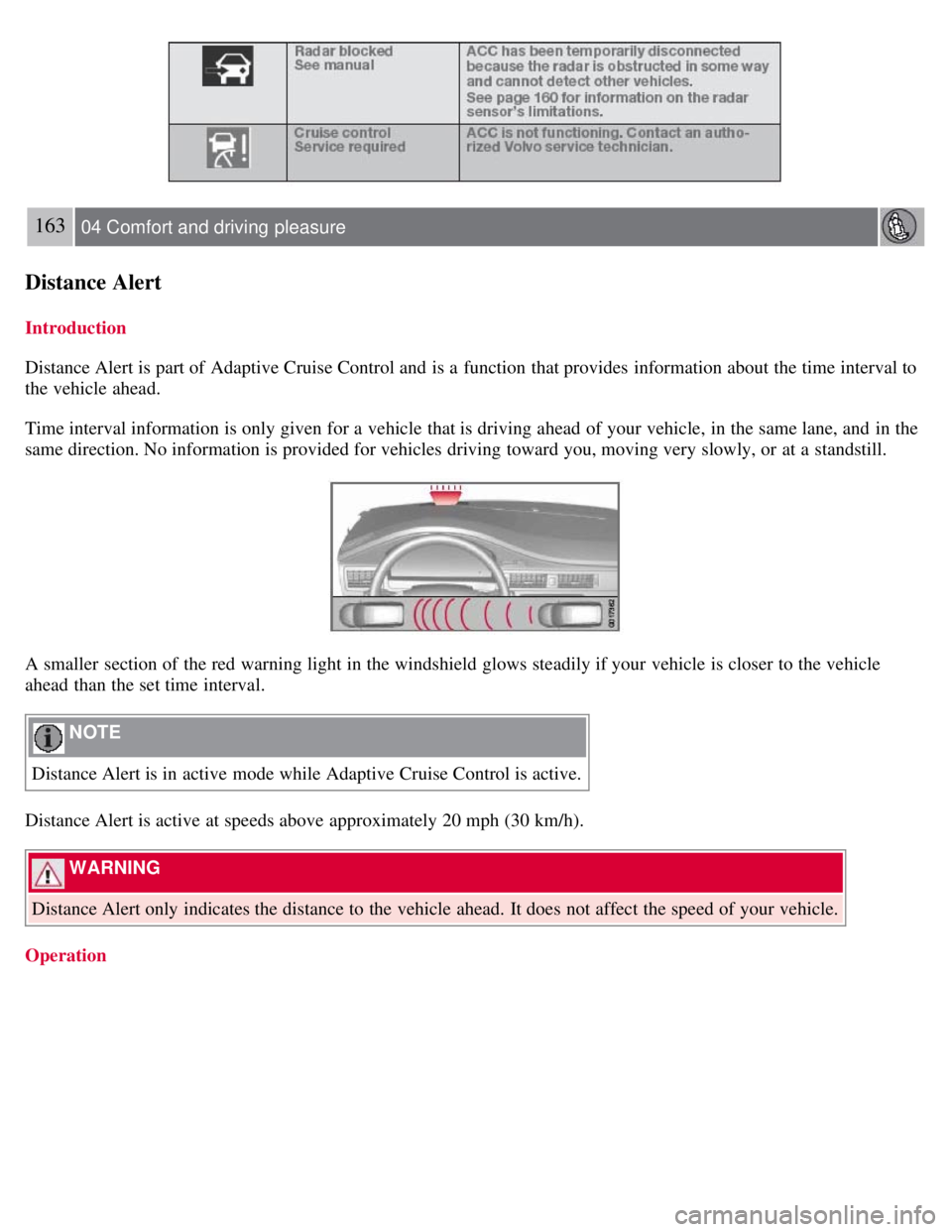
A smaller section of the red warning light in the windshield glows steadily if your vehicle is closer to the vehicle
ahead than the set time interval.
NOTE
Distance Alert is in active mode while Adaptive Cruise Control is active.
Distance Alert is active at speeds above approximately 20 mph (30 km/h).
WARNING
Distance Alert only indicates the distance to the vehicle ahead. It does not affect the speed of your vehicle.
Operation
Page 161 of 275
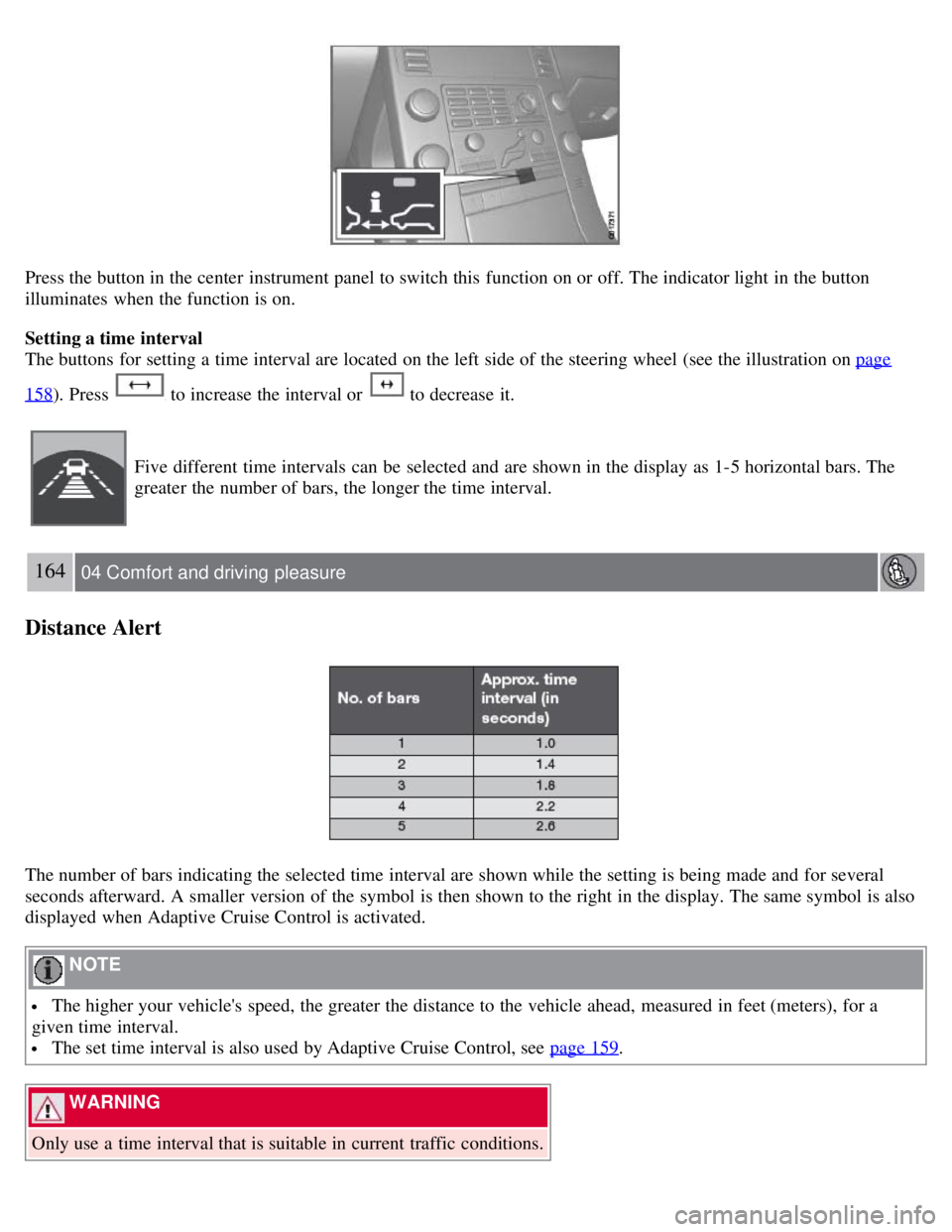
Press the button in the center instrument panel to switch this function on or off. The indicator light in the button
illuminates when the function is on.
Setting a time interval
The buttons for setting a time interval are located on the left side of the steering wheel (see the illustration on page
158). Press to increase the interval or to decrease it.
Five different time intervals can be selected and are shown in the display as 1-5 horizontal bars. The
greater the number of bars, the longer the time interval.
164 04 Comfort and driving pleasure
Distance Alert
The number of bars indicating the selected time interval are shown while the setting is being made and for several
seconds afterward. A smaller version of the symbol is then shown to the right in the display. The same symbol is also
displayed when Adaptive Cruise Control is activated.
NOTE
The higher your vehicle's speed, the greater the distance to the vehicle ahead, measured in feet (meters), for a
given time interval.
The set time interval is also used by Adaptive Cruise Control, see page 159.
WARNING
Only use a time interval that is suitable in current traffic conditions.
Page 162 of 275
Limitations
The Distance Alert function uses the same radar sensor used by Adaptive Cruise Control and the Collision Warning
system. See page 160
for more information on the radar sensor's limitations.
NOTE
Strong sunlight, reflections, extreme light contrasts, the use of sunglasses, or if the driver is not looking straight
ahead may make the visual warning signal in the windshield difficult to see.
WARNING
Bad weather or winding roads may affect the radar sensor's capacity to detect vehicles ahead.
The size of the vehicle ahead, such as a motorcycle, may also make it difficult to detect. This may result in the
warning light illuminating at a shorter distance than the one that has been set, or that the light will not come on at all.
165 04 Comfort and driving pleasure
Distance Alert
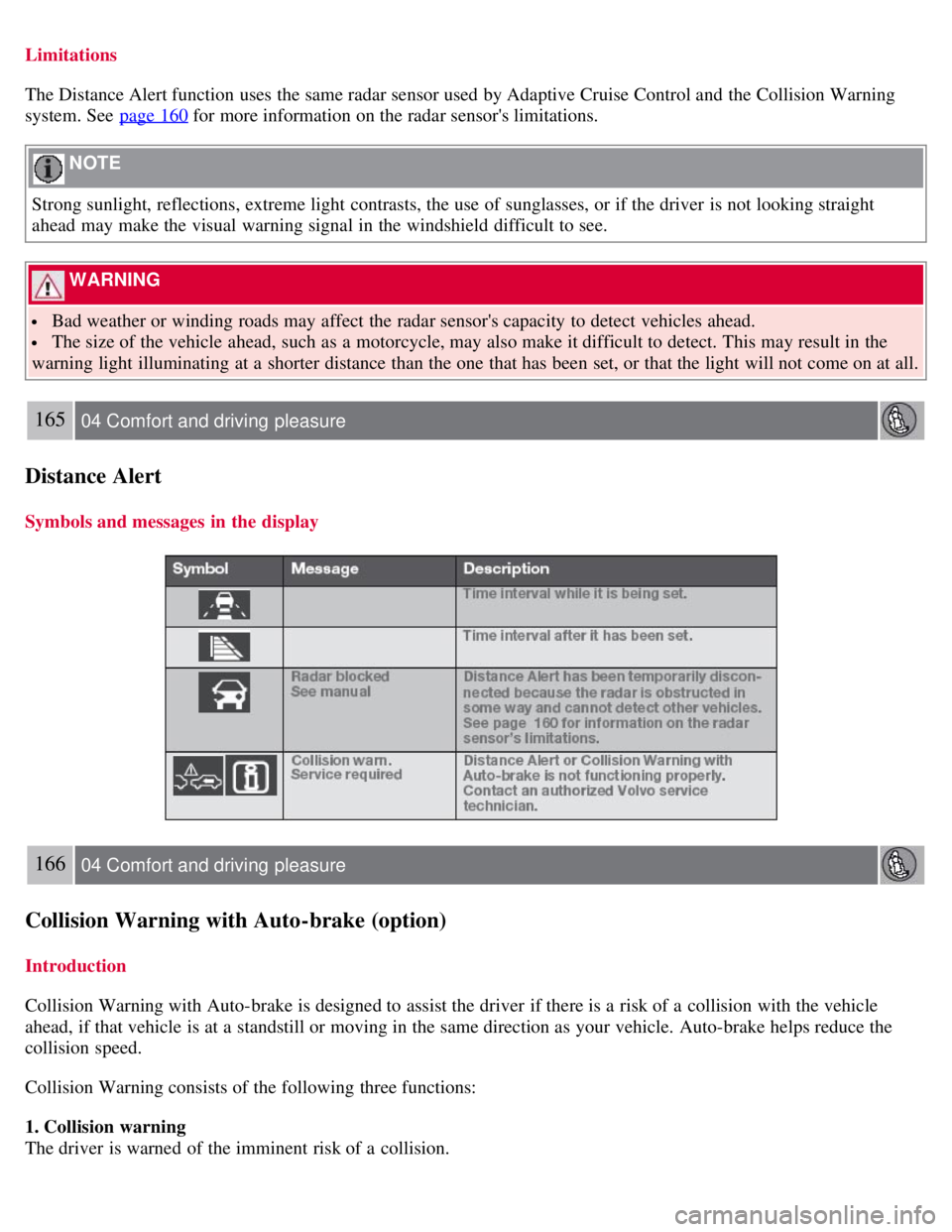
Symbols and messages in the display
166 04 Comfort and driving pleasure
Collision Warning with Auto-brake (option)
Introduction
Collision Warning with Auto-brake is designed to assist the driver if there is a risk of a collision with the vehicle
ahead, if that vehicle is at a standstill or moving in the same direction as your vehicle. Auto-brake helps reduce the
collision speed.
Collision Warning consists of the following three functions:
1. Collision warning
The driver is warned of the imminent risk of a collision.