steering wheel VOLVO S80 2008 User Guide
[x] Cancel search | Manufacturer: VOLVO, Model Year: 2008, Model line: S80, Model: VOLVO S80 2008Pages: 275, PDF Size: 7.17 MB
Page 92 of 275
The passenger compartment lighting can be switched on and off manually within 30 minutes after the vehicle has been
unlocked.
If the lighting is switched on manually and the vehicle is locked, the courtesy lighting will switch off automatically
after one minute.
Home safe lighting
When you leave your vehicle at night, you can make use of the home safe lighting function to illuminate the area in
front of the vehicle.
1. Remove the key from the ignition slot.
2. Pull the direction indicator lever as far as possible towards the steering wheel and release it.
3. Exit the vehicle and lock the doors.
The headlights, parking lights, turn signals, lights in the door mirrors, license plate lights, and footwell lighting will
illuminate and remain on for 30
1, 60 or 90 seconds. The time interval can be set under Car settingsLight settings
Home safe lighting. For a description of the menu system, see page 123.
1Factory setting
Approach lighting
Approach lighting is activated by pressing the approach light button on the remote key (see the illustration on page 54
).
When the function has been activated, the parking lights, indicator lights, door mirror lights, license plate lighting,
dome lighting and door step lighting come on.
The time interval for this lighting can be set under Car settings
Light settings Approach lighting . For a description
of the menu system, see page 123
.
Contents | Top of Page
Page 94 of 275
The wipers will make an extra sweep each time the thumb wheel is adjusted upward.
When the rain sensor is activated, the symbol
will illuminate in the instrument panel.
Activating and setting the sensitivity
When activating the rain sensor, the vehicle must be running or in ignition mode II and the windshield wiper lever
must be in position 0 or in the single sweep position.
Activate the rain sensor by pressing the button
. The windshield wipers will make one sweep.
Press the lever up for the wipers to make an extra sweep. The rain sensor returns to active mode when the stalk is
released back to position 0.
Deactivating
Deactivate the rain sensor by pressing the button
or press the lever down to another wiper position.
The rain sensor is automatically deactivated when the key is removed from the ignition slot or five minutes after the
ignition has been switched off.
CAUTION
Use ample washer fluid when washing the windshield. The windshield should be thoroughly wet when the wipers
are in operation.
Before using the wipers, ice and snow should be removed from the windshield. Be sure the wiper blades are not
frozen in place.
96 03 Your driving environment
Wipers and washers
Windshield washing
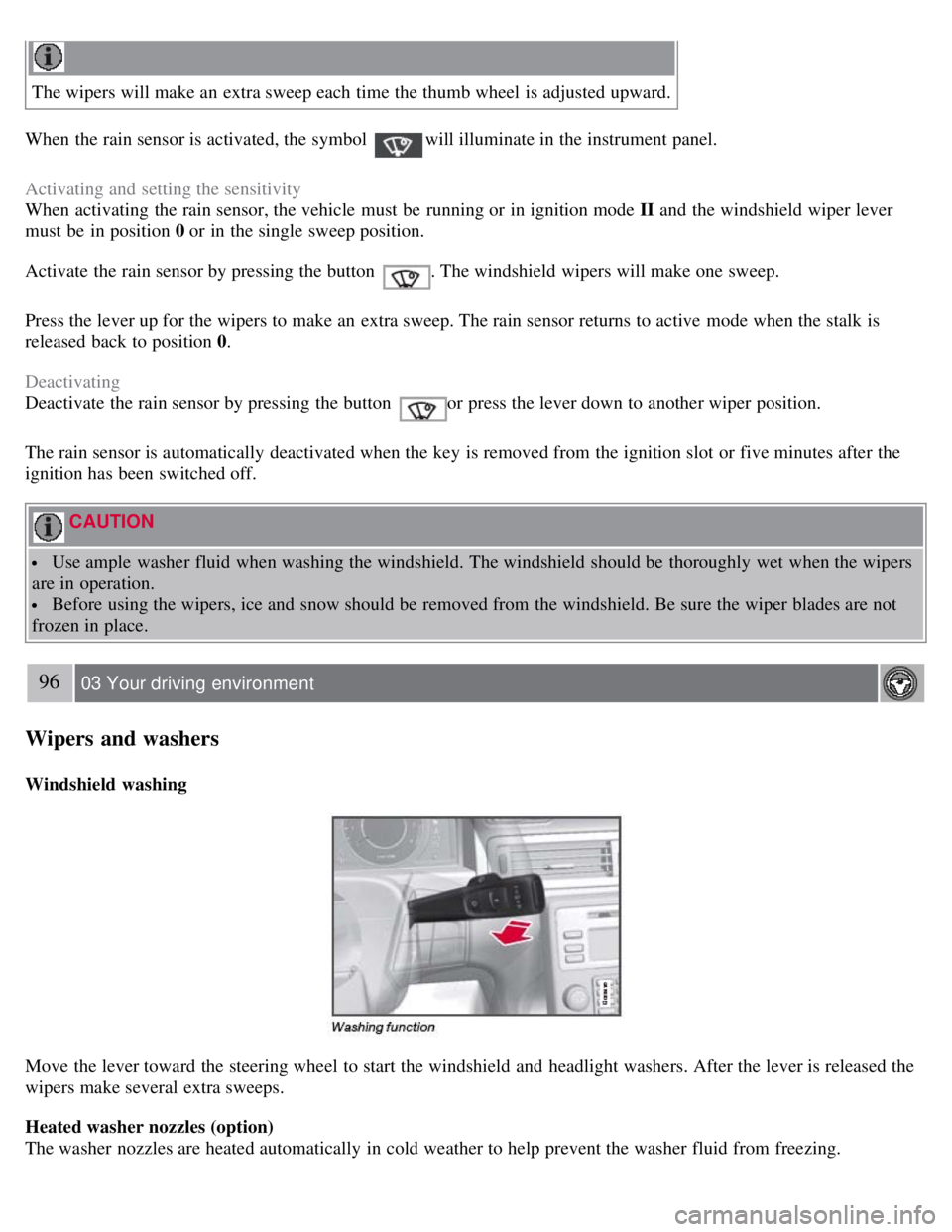
Move the lever toward the steering wheel to start the windshield and headlight washers. After the lever is released the
wipers make several extra sweeps.
Heated washer nozzles (option)
The washer nozzles are heated automatically in cold weather to help prevent the washer fluid from freezing.
Page 105 of 275
107 03 Your driving environment
Starting the engine
Starting the engine
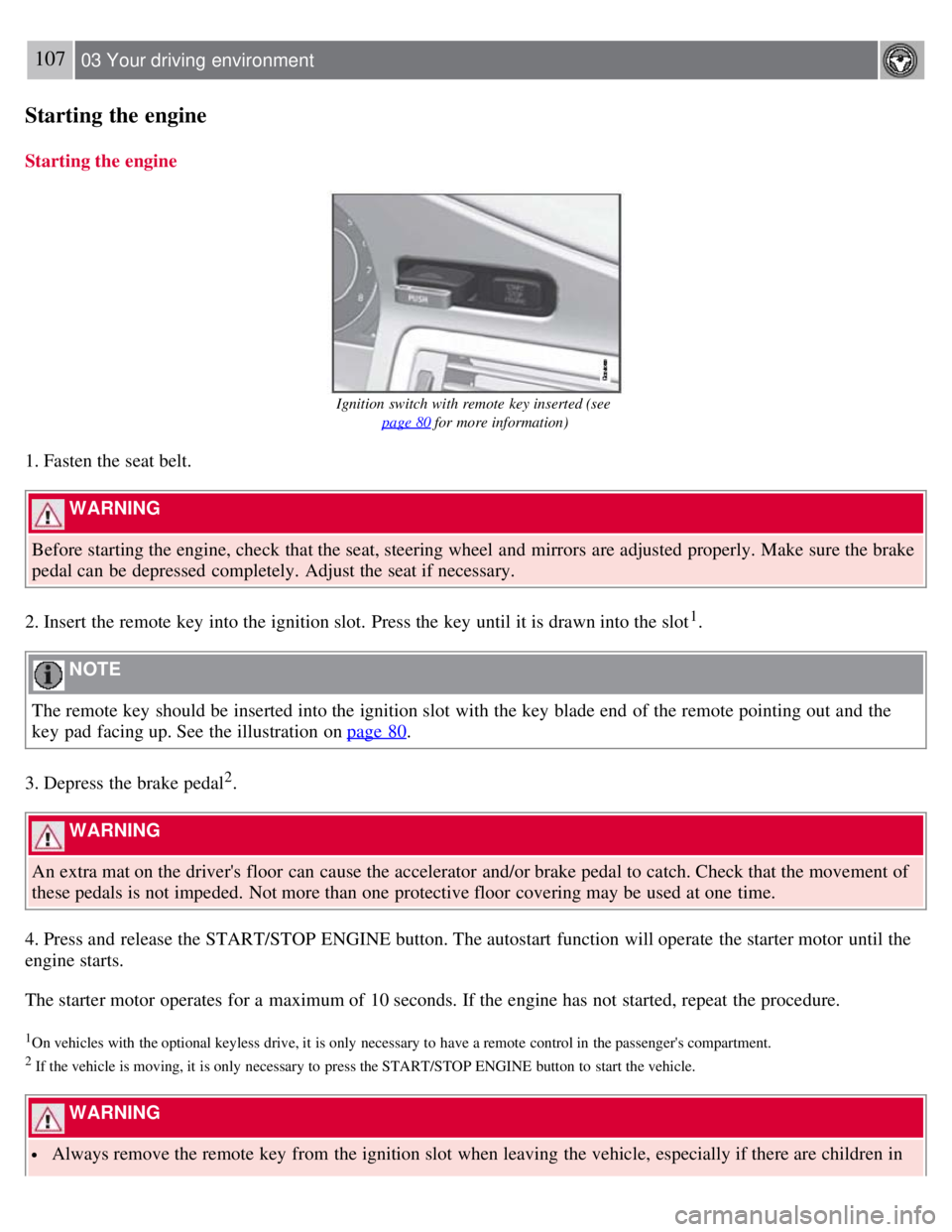
Ignition switch with remote key inserted (see page 80
for more information)
1. Fasten the seat belt.
WARNING
Before starting the engine, check that the seat, steering wheel and mirrors are adjusted properly. Make sure the brake
pedal can be depressed completely. Adjust the seat if necessary.
2. Insert the remote key into the ignition slot. Press the key until it is drawn into the slot
1.
NOTE
The remote key should be inserted into the ignition slot with the key blade end of the remote pointing out and the
key pad facing up. See the illustration on page 80
.
3. Depress the brake pedal
2.
WARNING
An extra mat on the driver's floor can cause the accelerator and/or brake pedal to catch. Check that the movement of
these pedals is not impeded. Not more than one protective floor covering may be used at one time.
4. Press and release the START/STOP ENGINE button. The autostart function will operate the starter motor until the
engine starts.
The starter motor operates for a maximum of 10 seconds. If the engine has not started, repeat the procedure.
1On vehicles with the optional keyless drive, it is only necessary to have a remote control in the passenger's compartment.
2 If the vehicle is moving, it is only necessary to press the START/STOP ENGINE button to start the vehicle.
WARNING
Always remove the remote key from the ignition slot when leaving the vehicle, especially if there are children in
Page 106 of 275
the vehicle.
Never remove the remote key from the ignition slot while driving or when the vehicle is being towed. The
steering lock could otherwise be activated, making it impossible to steer the vehicle. Never remove the remote key
with keyless drive function (option) from the vehicle while driving or during towing.
Always place the gear selector in Park and apply the parking brake before leaving the vehicle. Never leave the
vehicle unattended with the engine running.
Always open garage doors fully before starting the engine inside a garage to ensure adequate ventilation. The
exhaust gases contain carbon monoxide, which is invisible and odorless but very poisonous.
108 03 Your driving environment
Starting the engine
NOTE
The idling speed can be noticeably higher than normal during cold starts. This is to enable emission control system
can reach normal operating temperature as quickly as possible, which helps reduce exhaust emissions
1.
Keylock: Your vehicle is equipped with a keylock system. When the engine is switched off, the gear selector must
be in the Park position before the key can be removed
2 from the ignition slot.
1If the gear selector is in the D or R positions and the car is not moving, engine speed (rpm) will be lower and it will take longer for the engine to
reach normal operating temperature.
2Does not apply to vehicles with the optional keyless drive.
CAUTION
When starting in cold weather, the automatic transmission may shift up at slightly higher engine speeds than
normal until the automatic transmission fluid reaches normal operating temperature.
Do not race a cold engine immediately after starting. Oil flow may not reach some lubrication points fast enough
to prevent engine damage.
The engine should be idling when you move the gear selector. Never accelerate until after you feel the
transmission engage. Accelerating immediately after selecting a gear will cause harsh engagement and premature
transmission wear.
Selecting P or N when idling at a standstill for prolonged periods of time will help prevent overheating of the
automatic transmission fluid.
Keyless drive (option)
Follow steps 3-4 for starting the engine.
NOTE
For the vehicle to start, one of the vehicle's remote keys must be in the passenger compartment.
Steering wheel lock
The steering wheel lock is deactivated when the remote key is inserted into the ignition slot
1 and activated when the
remote key is removed from the ignition slot.
Always take the remote key or keyless drive remote when leaving the vehicle to help reduce the risk of theft.
1 On vehicles with the optional keyless drive, the steering lock is deactivated when the start button is pressed for the first time (assuming that a
Page 118 of 275
2 0 0 8
VOLVO S80
120 04 Comfort and driving pleasure
Menus and messages 122
Climate system126
Audio system134
Trip computer147
Compass149
Stability system151
Active chassis system-Four C153
Cruise control154
Adaptive Cruise Control-ACC156
Distance Alert163
Collision Warning with Auto-brake (option)166
Driver Alert System -option171
Park assist (option)176
Blind Spot Information System (option)179
Passenger compartment convenience183
121 04 Comfort and driving pleasure
122 04 Comfort and driving pleasure
Menus and messages
Center console
Certain functions are controlled from the center console via the menu system or from the optional keypad in the
steering wheel. Each function is described under its respective section.
The current menu level is shown at the top right of display in the center console.
Page 119 of 275
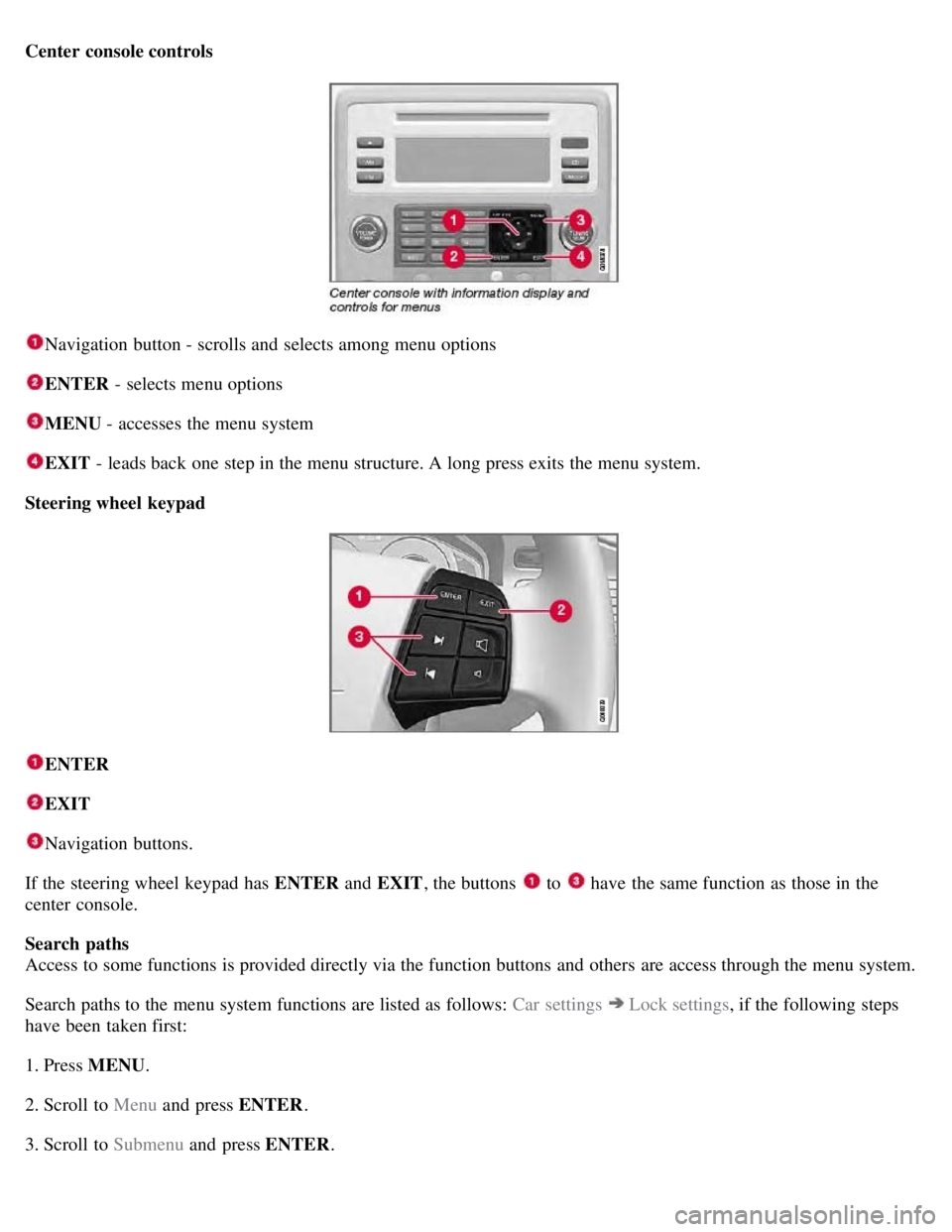
Center console controls
Navigation button - scrolls and selects among menu options
ENTER - selects menu options
MENU - accesses the menu system
EXIT - leads back one step in the menu structure. A long press exits the menu system.
Steering wheel keypad
ENTER
EXIT
Navigation buttons.
If the steering wheel keypad has ENTER and EXIT, the buttons
to have the same function as those in the
center console.
Search paths
Access to some functions is provided directly via the function buttons and others are access through the menu system.
Search paths to the menu system functions are listed as follows: Car settings
Lock settings , if the following steps
have been taken first:
1. Press MENU .
2. Scroll to Menu and press ENTER .
3. Scroll to Submenu and press ENTER.
Page 132 of 275
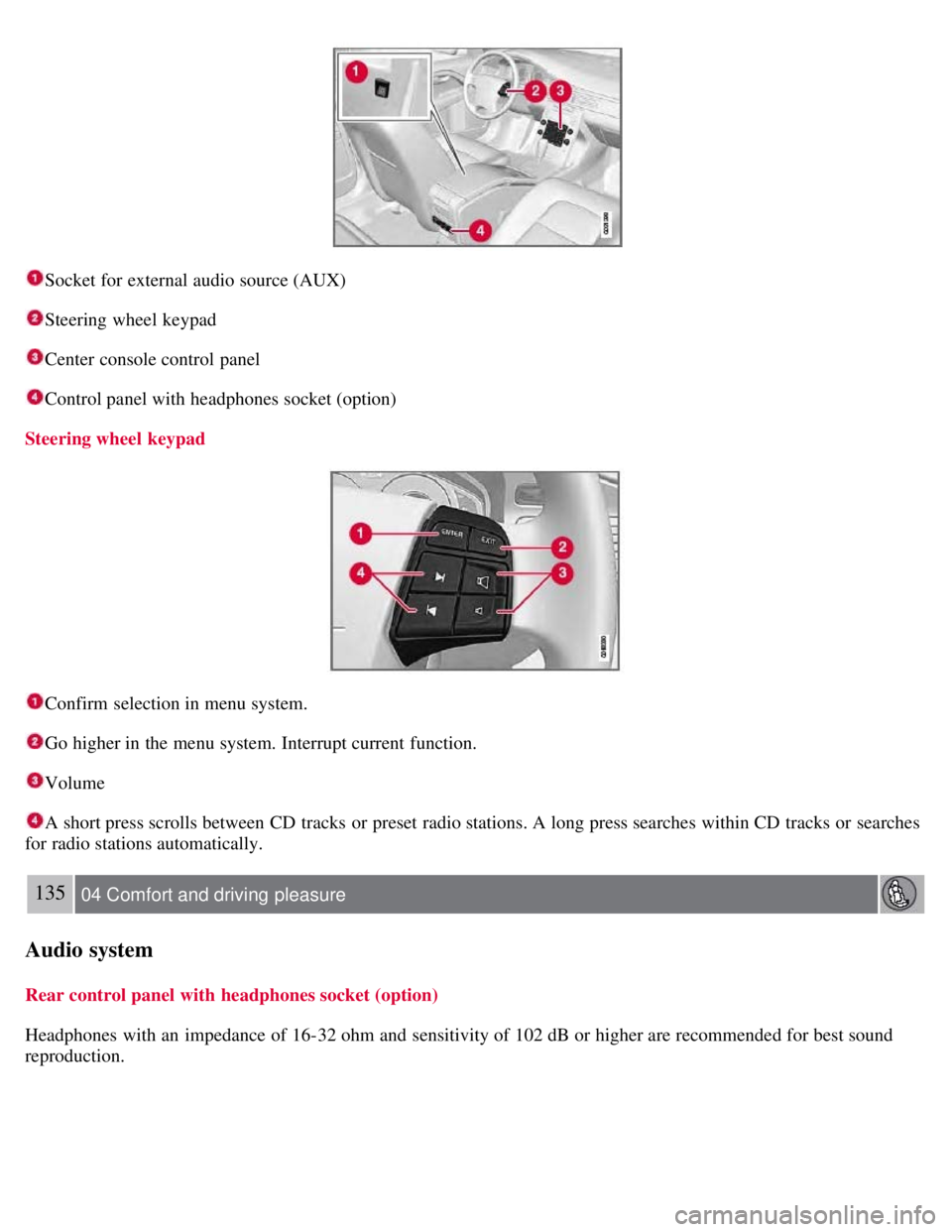
Socket for external audio source (AUX)
Steering wheel keypad
Center console control panel
Control panel with headphones socket (option)
Steering wheel keypad
Confirm selection in menu system.
Go higher in the menu system. Interrupt current function.
Volume
A short press scrolls between CD tracks or preset radio stations. A long press searches within CD tracks or searches
for radio stations automatically.
135 04 Comfort and driving pleasure
Audio system
Rear control panel with headphones socket (option)
Headphones with an impedance of 16-32 ohm and sensitivity of 102 dB or higher are recommended for best sound
reproduction.
Page 138 of 275
Fast-forward/change CD tracks and sound files
Short presses
/ on the navigation button are used to scroll between CD tracks/sound files. Long presses are used
to search within CD tracks/sound files. TUNING (or the steering wheel keypad) can also be used for this purpose.
Scan CD
This function plays the first ten seconds of each CD track/sound file. Press SCAN to activate. Interrupt with EXIT or
SCAN to continue playing the current CD track/sound file.
Random
This function plays the tracks in random order (shuffle). The random CD tracks/sound files can be scrolled through in
the normal way.
NOTE
It is only possible to scroll between random CD tracks on the current disc.
Different messages are displayed depending on which random function has been selected:
RANDOM means that the tracks from only one music CD are played
RND ALL means that all tracks on all music CDs in the optional CD changer are played.
RANDOM FOLDER means that the sound files in a directory on the current CD are played.
CD player
If a normal music CD is being played, activate/deactivate under Random .
If a disc with sound files is being played, activate/deactivate under Random
Folder .
140 04 Comfort and driving pleasure
Audio system
CD changer
If a normal music CD is being played under Random
Single disc or Random All discs. The option All discs only
applies to the music CDs in the changer.
If a CD with sound files is being played, activate/deactivate instead under Random
Folder . If you select another CD
the function is deactivated.
Disc text
If title information is stored on a music CD it can be shown on the display
1. Activate/deactivate in CD mode under CD
settings
Disc text.
1Only applies to the CD changer.
141 04 Comfort and driving pleasure
Audio system
Radio functions
Page 161 of 275
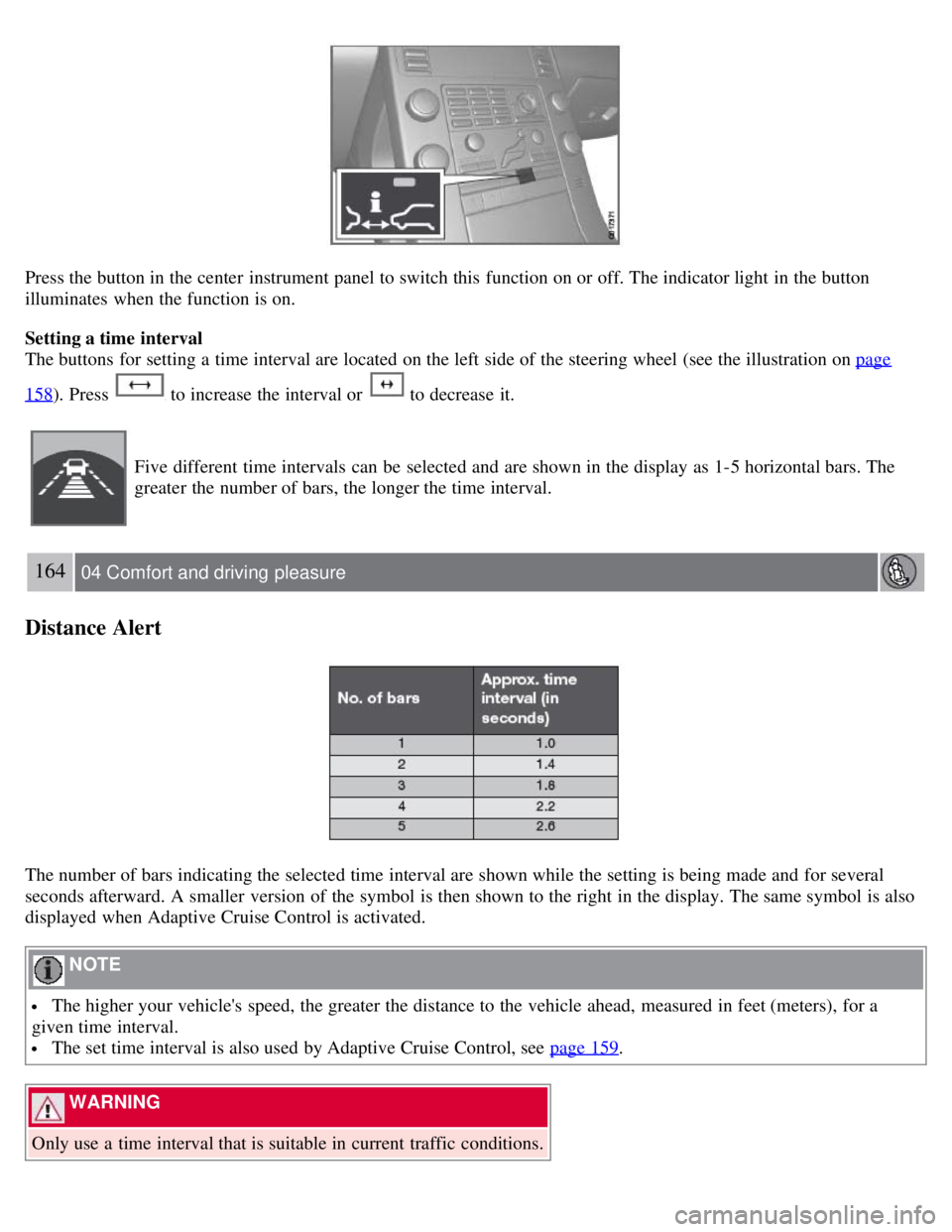
Press the button in the center instrument panel to switch this function on or off. The indicator light in the button
illuminates when the function is on.
Setting a time interval
The buttons for setting a time interval are located on the left side of the steering wheel (see the illustration on page
158). Press to increase the interval or to decrease it.
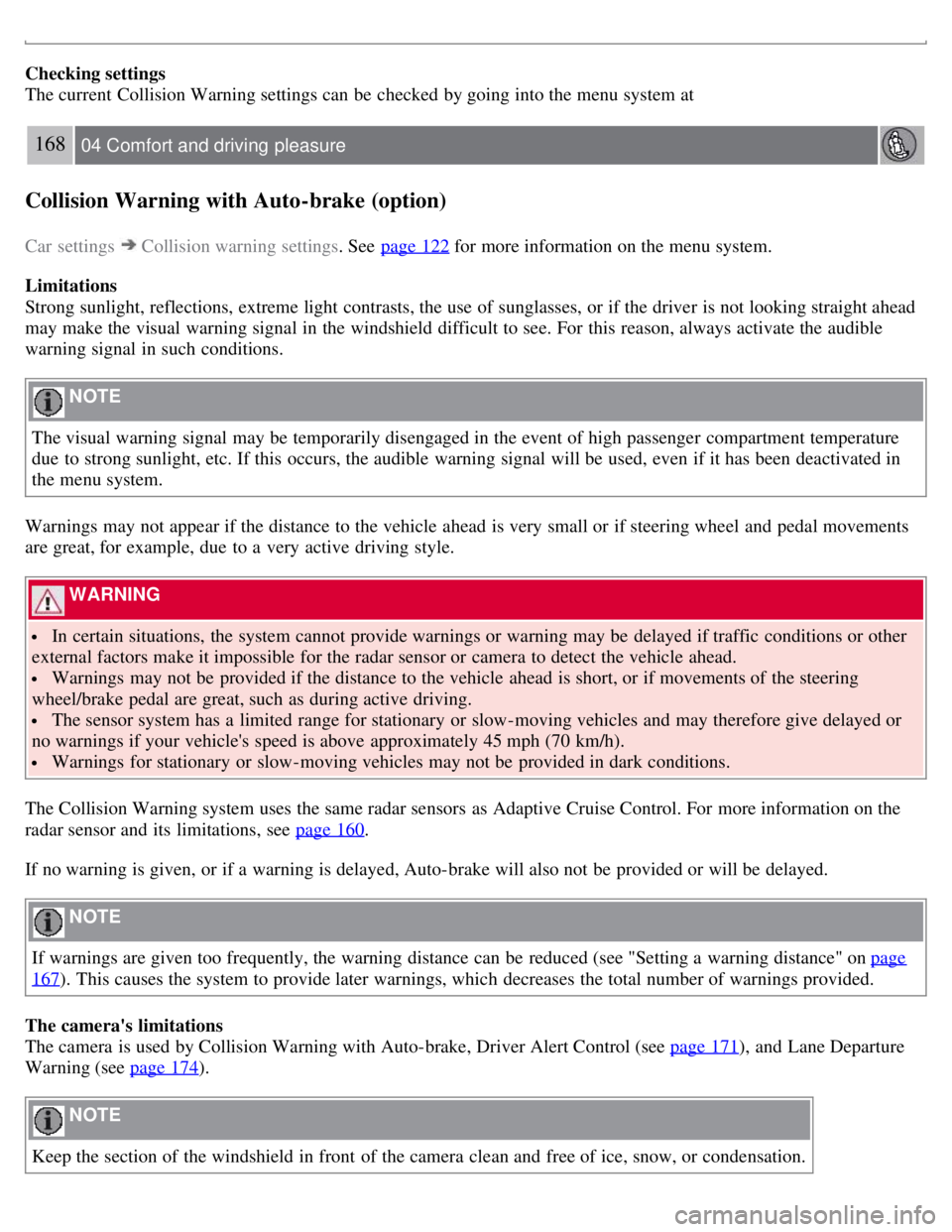
Five different time intervals can be selected and are shown in the display as 1-5 horizontal bars. The
greater the number of bars, the longer the time interval.
164 04 Comfort and driving pleasure
Distance Alert
The number of bars indicating the selected time interval are shown while the setting is being made and for several
seconds afterward. A smaller version of the symbol is then shown to the right in the display. The same symbol is also
displayed when Adaptive Cruise Control is activated.
NOTE
The higher your vehicle's speed, the greater the distance to the vehicle ahead, measured in feet (meters), for a
given time interval.
The set time interval is also used by Adaptive Cruise Control, see page 159.
WARNING
Only use a time interval that is suitable in current traffic conditions.
Page 165 of 275
Checking settings
The current Collision Warning settings can be checked by going into the menu system at
168 04 Comfort and driving pleasure
Collision Warning with Auto-brake (option)
Car settings Collision warning settings. See page 122 for more information on the menu system.
Limitations
Strong sunlight, reflections, extreme light contrasts, the use of sunglasses, or if the driver is not looking straight ahead
may make the visual warning signal in the windshield difficult to see. For this reason, always activate the audible
warning signal in such conditions.
NOTE
The visual warning signal may be temporarily disengaged in the event of high passenger compartment temperature
due to strong sunlight, etc. If this occurs, the audible warning signal will be used, even if it has been deactivated in
the menu system.
Warnings may not appear if the distance to the vehicle ahead is very small or if steering wheel and pedal movements
are great, for example, due to a very active driving style.
WARNING
In certain situations, the system cannot provide warnings or warning may be delayed if traffic conditions or other
external factors make it impossible for the radar sensor or camera to detect the vehicle ahead.
Warnings may not be provided if the distance to the vehicle ahead is short, or if movements of the steering
wheel/brake pedal are great, such as during active driving.
The sensor system has a limited range for stationary or slow-moving vehicles and may therefore give delayed or
no warnings if your vehicle's speed is above approximately 45 mph (70 km/h).
Warnings for stationary or slow-moving vehicles may not be provided in dark conditions.
The Collision Warning system uses the same radar sensors as Adaptive Cruise Control. For more information on the
radar sensor and its limitations, see page 160
.
If no warning is given, or if a warning is delayed, Auto-brake will also not be provided or will be delayed.
NOTE
If warnings are given too frequently, the warning distance can be reduced (see "Setting a warning distance" on page
167). This causes the system to provide later warnings, which decreases the total number of warnings provided.
The camera's limitations
The camera is used by Collision Warning with Auto-brake, Driver Alert Control (see page 171
), and Lane Departure
Warning (see page 174
).
NOTE
Keep the section of the windshield in front of the camera clean and free of ice, snow, or condensation.