audio VOLVO S80 2008 Owner's Manual
[x] Cancel search | Manufacturer: VOLVO, Model Year: 2008, Model line: S80, Model: VOLVO S80 2008Pages: 275, PDF Size: 7.17 MB
Page 143 of 275
3. Press ENTER to activate or deactivate the function.
NOTE
When the song has ended, the radio will remain tuned to the channel on which the song was played.
Radio text
The text that is displayed about the song that is currently playing can be changed. Use the AUTO button or the menu
to display the Artist, Title, Composer, or switch radio text off.
145 04 Comfort and driving pleasure
Audio system
Advanced settings
This menu function enables you to make settings on certain Sirius satellite radio functions. To access this menu:
1. Press MENU .
2. Scroll to the Sirius menu.
3. Select Advanced Sirius settings .
WARNING
Settings should be made when the vehicle is at a standstill.
The following settings can be made in the Sirius menu:
The list of saved songs can be displayed
Channel skip settings can be made
Channel lock settings can be made
The channel access code can be displayed or changed
Your Sirius ID can be displayed
Skip options
This function is used to remove a channel from the list of available channels.
Skipping a channel
1. Select CHANNEL SKIP LIST and press ENTER.
2. Select a category in the list and press ENTER .
3. Skip channels in the list presented by pressing ENTER or right arrow key.
Unskip all channels
This permanently removes all channels from the skip list and makes them available for selection.
Temp. unskip all ch.
This function will temporarily unskip all channels and make them available for selection. The channels remain on the
skip list and will again be skipped the next time the ignition is switched on.
Page 144 of 275
Channel lock
Access to specific channels can be restricted (locked). A locked channel will not provide audio, song titles, or artist
information.
NOTE
All channels are initially unlocked.
Locking a channel:
1. Select Sirius ID in the menu and select LOCK OPTIONS and press ENTER.
2. Select CHANNEL LOCK LIST and press ENTER
3. Enter the channel access code
1 and press ENTER .
4. Select a category in the list and press ENTER .
5. Lock channels in the list presented by pressing ENTER or right arrow.
The channel is now locked and a checked box will be displayed to indicate this. It will be necessary to enter the
channel access code
1 in order to listen to a locked channel.
Unlocking a channel
A channel's access code
1 is required to unlock a channel.
Unlock all channels
This permanently removes all channels from the locked list and makes them available for selection.
Temp. unlock all ch.
This function will temporarily unlock all channels and make them available for selection. The channels remain on the
locked list and will again be locked the next time the ignition is switched on.
1The default code is 0000. If you have changed the code and forgotten it, see the section "If you have forgotten the access code."
146 04 Comfort and driving pleasure
Audio system
CHANGE CODE
This function makes it possible to change the channel access code. The default code is 0000.
To change the code:
1. Select CHANGE CODE and press ENTER.
2. Enter the current code and press ENTER .
3. Enter the new code and press ENTER .
4. Confirm the new code and press ENTER .
If an incorrect code is entered, the text WRONG CODE! is displayed.
Page 172 of 275
This system is available in the rear bumper only, or in both the front and rear bumpers.
Park assist utilizes four ultrasound sensors in the bumper(s) to measure the distance to a vehicle, object, or a person
who may be close to the front or rear of your vehicle. An audible signal and symbols in the audio system's display
indicate the distance to the object.
WARNING
Park Assist is an information system, NOT a safety system. This system is designed to be a supplementary aid when
parking the vehicle. It is not, however, intended to replace the driver's attention and judgement.
Function
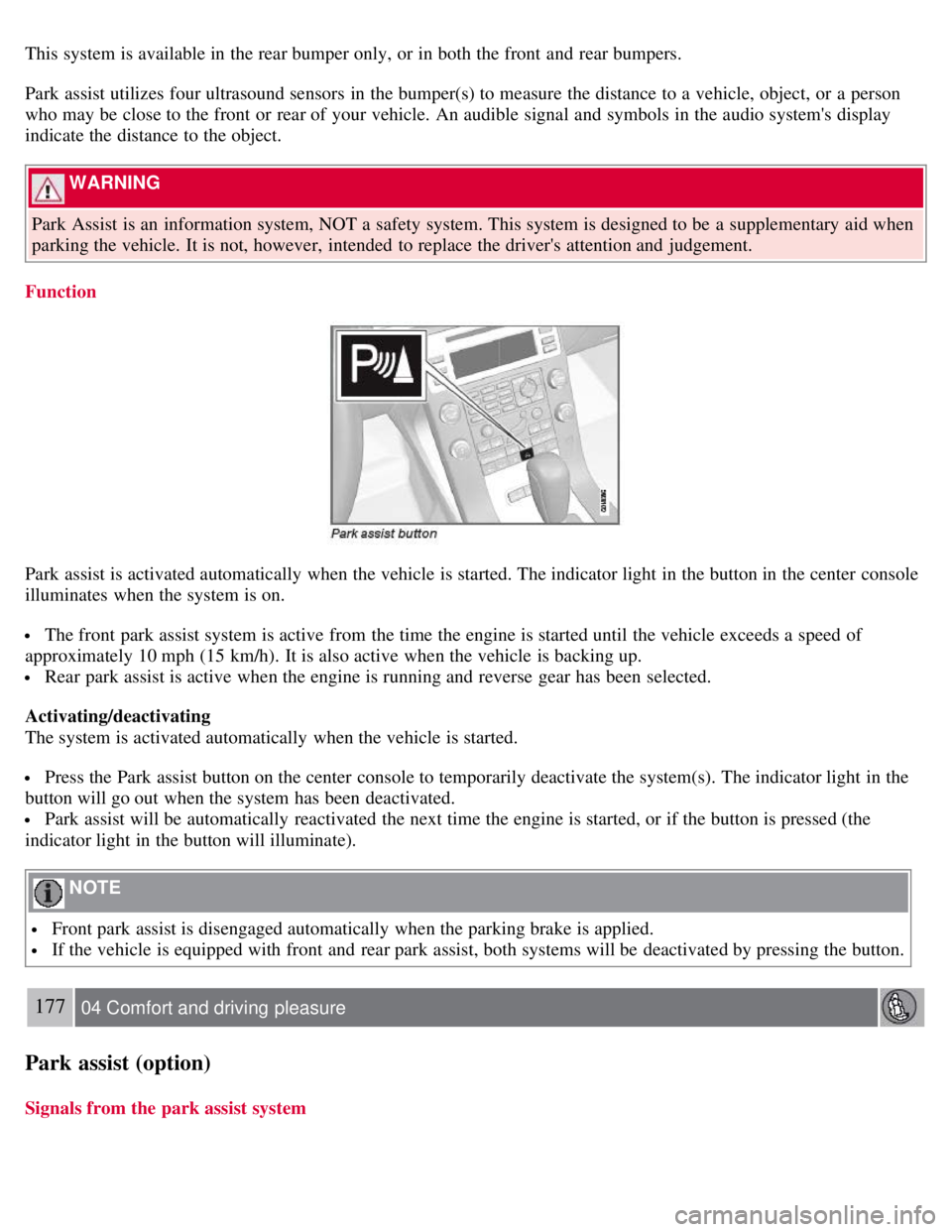
Park assist is activated automatically when the vehicle is started. The indicator light in the button in the center console
illuminates when the system is on.
The front park assist system is active from the time the engine is started until the vehicle exceeds a speed of
approximately 10 mph (15 km/h). It is also active when the vehicle is backing up.
Rear park assist is active when the engine is running and reverse gear has been selected.
Activating/deactivating
The system is activated automatically when the vehicle is started.
Press the Park assist button on the center console to temporarily deactivate the system(s). The indicator light in the
button will go out when the system has been deactivated.
Park assist will be automatically reactivated the next time the engine is started, or if the button is pressed (the
indicator light in the button will illuminate).
NOTE
Front park assist is disengaged automatically when the parking brake is applied.
If the vehicle is equipped with front and rear park assist, both systems will be deactivated by pressing the button.
177 04 Comfort and driving pleasure
Park assist (option)
Signals from the park assist system
Page 173 of 275
Visual indicator
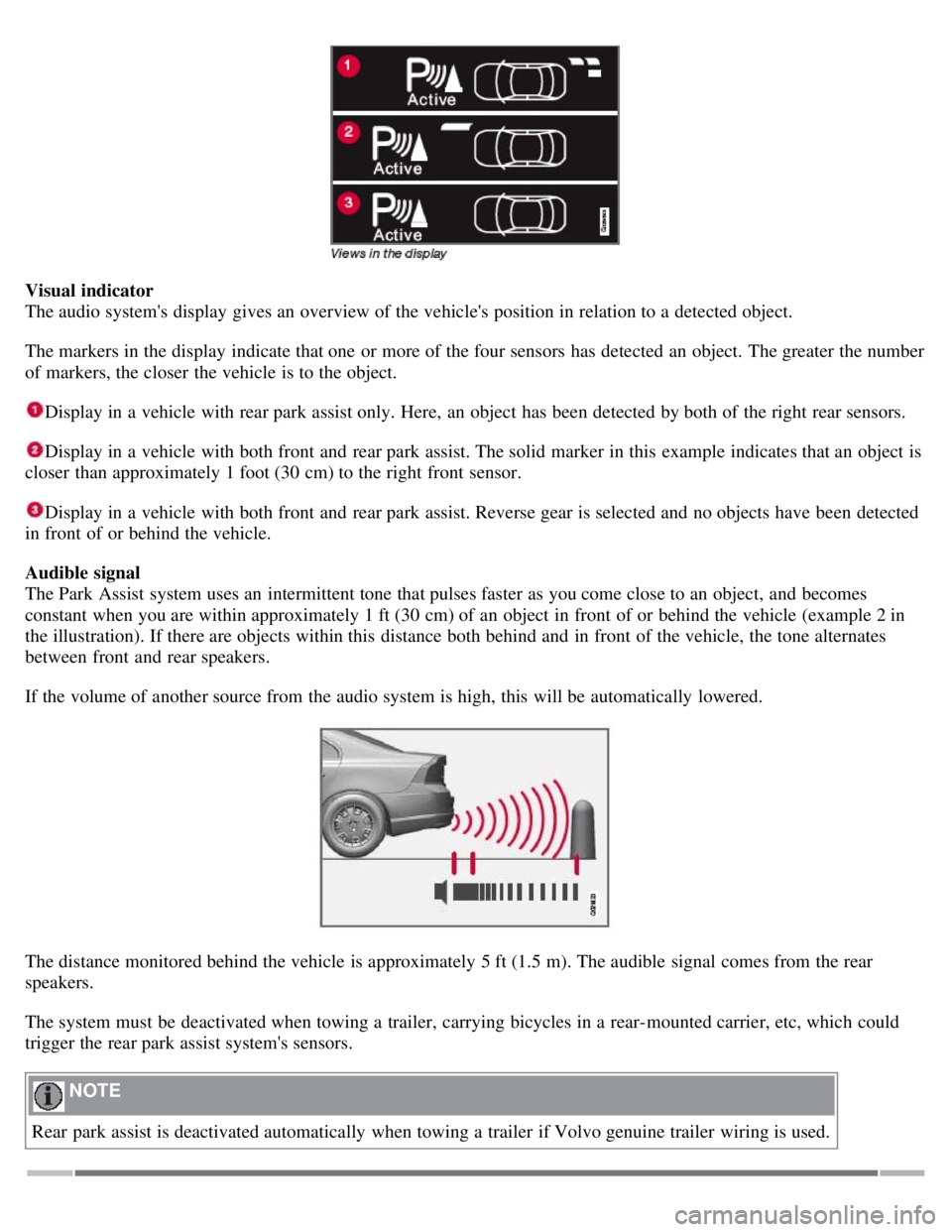
The audio system's display gives an overview of the vehicle's position in relation to a detected object.
The markers in the display indicate that one or more of the four sensors has detected an object. The greater the number
of markers, the closer the vehicle is to the object.
Display in a vehicle with rear park assist only. Here, an object has been detected by both of the right rear sensors.
Display in a vehicle with both front and rear park assist. The solid marker in this example indicates that an object is
closer than approximately 1 foot (30 cm) to the right front sensor.
Display in a vehicle with both front and rear park assist. Reverse gear is selected and no objects have been detected
in front of or behind the vehicle.
Audible signal
The Park Assist system uses an intermittent tone that pulses faster as you come close to an object, and becomes
constant when you are within approximately 1 ft (30 cm) of an object in front of or behind the vehicle (example 2 in
the illustration). If there are objects within this distance both behind and in front of the vehicle, the tone alternates
between front and rear speakers.
If the volume of another source from the audio system is high, this will be automatically lowered.
The distance monitored behind the vehicle is approximately 5 ft (1.5 m). The audible signal comes from the rear
speakers.
The system must be deactivated when towing a trailer, carrying bicycles in a rear-mounted carrier, etc, which could
trigger the rear park assist system's sensors.
NOTE
Rear park assist is deactivated automatically when towing a trailer if Volvo genuine trailer wiring is used.
Page 174 of 275
178 04 Comfort and driving pleasure
Park assist (option)
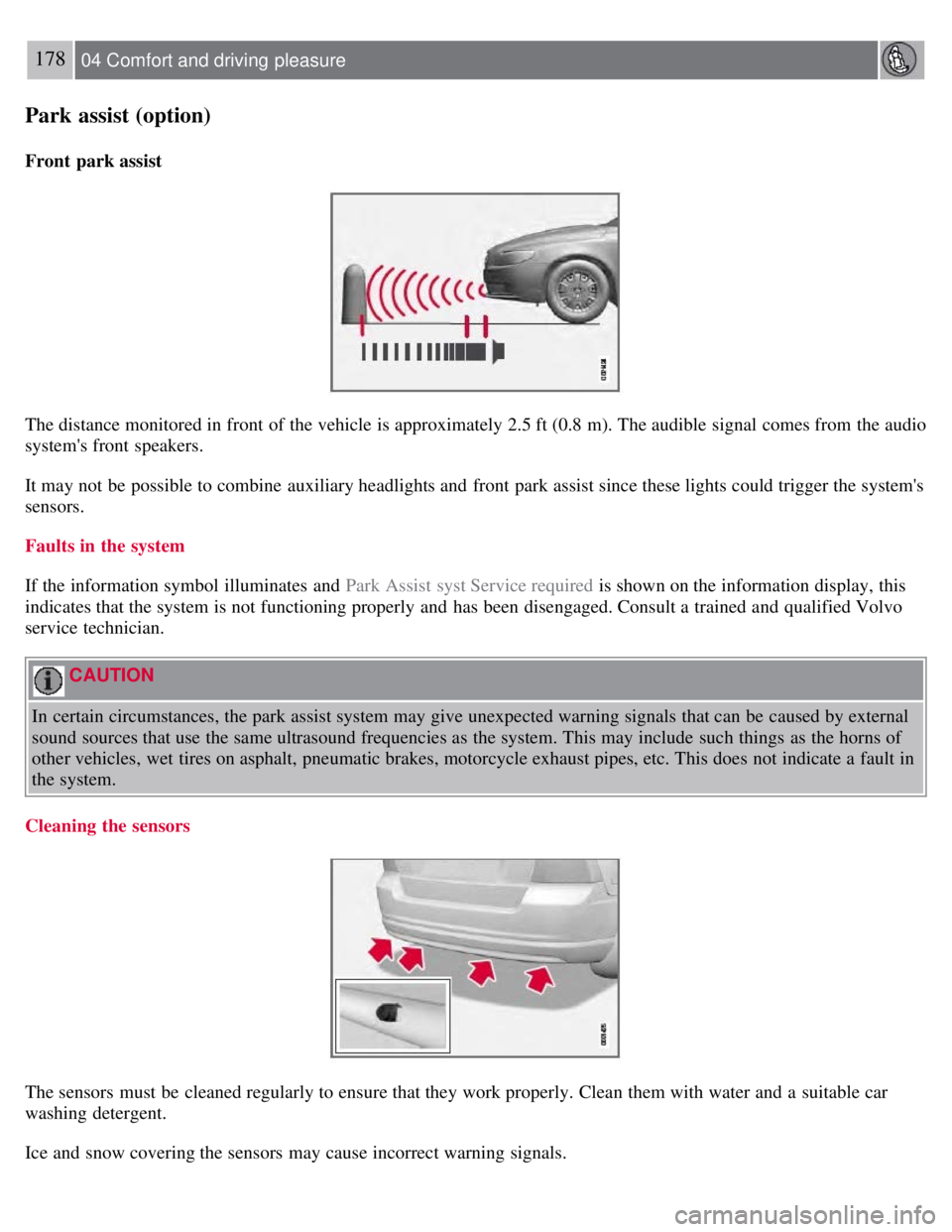
Front park assist
The distance monitored in front of the vehicle is approximately 2.5 ft (0.8 m). The audible signal comes from the audio
system's front speakers.
It may not be possible to combine auxiliary headlights and front park assist since these lights could trigger the system's
sensors.
Faults in the system
If the information symbol illuminates and Park Assist syst Service required is shown on the information display, this
indicates that the system is not functioning properly and has been disengaged. Consult a trained and qualified Volvo
service technician.
CAUTION
In certain circumstances, the park assist system may give unexpected warning signals that can be caused by external
sound sources that use the same ultrasound frequencies as the system. This may include such things as the horns of
other vehicles, wet tires on asphalt, pneumatic brakes, motorcycle exhaust pipes, etc. This does not indicate a fault in
the system.
Cleaning the sensors
The sensors must be cleaned regularly to ensure that they work properly. Clean them with water and a suitable car
washing detergent.
Ice and snow covering the sensors may cause incorrect warning signals.
Page 184 of 275
CAUTION
Engine damage will occur if water is drawn into the air cleaner.
If the vehicle is driven through water deeper than 9 in (25 cm), water may enter the differential and the
transmission. This reduces the oil's lubricating capacity and may shorten the service life of these components.
Do not allow the vehicle to stand in water up to the door sills longer than absolutely necessary. This could result
in electrical malfunctions.
If the engine has been stopped while the vehicle is in water, do not attempt to restart it. Have the vehicle towed
out of the water.
Engine and cooling system
Under special conditions, for example when driving in hilly terrain, extreme heat or with heavy loads, there is a risk
that the engine and cooling system will overheat. Proceed as follows to avoid overheating the engine.
Maintain a low speed when driving with a trailer up long, steep hills.
Do not turn the engine off immediately when stopping after a hard drive.
WARNING
The cooling fan may start or continue to operate (for up to 6 minutes) after the engine has been switched off.
Remove any auxiliary lights from in front of the grille when driving in hot weather conditions.
Do not exceed engine speeds of 4500 rpm if driving with a trailer in hilly terrain. The oil temperature could become
too high.
Conserving electrical current
Keep the following in mind to help minimize battery drain:
When the engine is not running, avoid using ignition mode II . Many electrical systems (the audio system, the
optional navigation system, power windows, etc) will function in ignition modes 0 and I . These modes reduce drain on
the battery.
Please keep in mind that using systems, accessories, etc., that consume a great deal of current when the engine is not
running could result in the battery being completely drained.
The optional 12 volt socket in the trunk provides electrical current even with the ignition switched off, which drains
the battery.
190 05 During your trip
Driving recommendations
Before a long distance trip
It is always worthwhile to have your vehicle checked by a trained and qualified Volvo service technician before
driving long distances. Your retailer will also be able to supply you with bulbs, fuses, spark plugs and wiper blades for
your use in the event that problems occur.
As a minimum, the following items should be checked before any long trip:
Check that engine runs smoothly and that fuel consumption is normal.
Check for fuel, oil, and fluid leakage
Have the transmission oil level checked.
Check condition of drive belts.
Check state of the battery's charge.
Page 264 of 275
2 0 0 8
VOLVO S80
278 Index
12-volt sockets 185
A
Accessory installation warning7
Active Bi -Xenon® headlights90
Active chassis system153
Active yaw control151
Adaptive cruise control156-159
Air conditioning130
Air distribution127
Air distribution table133
Air vents128
Airbags
disconnecting the front passenger's side 22-24
front19- 21
inflatable curtain27
side impact25
Alarm system 67-69
All Wheel Drive112
Anti-freeze190, 214
Anti-lock brake system113
warning light75
Approach lighting 54, 94
Audio system
audio functions 137
CD player/changer138, 138
menu control135
overview134
radio functions141
Sirius satellite radio143- 146
sound settings137
steering wheel keypad134
Auto-dim rearview mirror 100
Automatic locking63
Automatic locking retractor33
Automatic transmission
Page 272 of 275
fuel tank volume275
octane ratings193
Registering child restraints 44
Remote control52
approach lighting54
common functions54
immobilizer53
key blade52, 57-58
key memory53
locking the vehicle54
panic alarm55
Personal Car Communicator54- 56
replacing battery59
unlocking the trunk55
unlocking the vehicle54
valet locking58
Reporting safety defects 15
Roadside Assistance277
Roof loads200
S
Safety defects, reporting15
Safety, occupant14
Seat belts
Automatic locking retractor/Emergency locking retractor 33
buckling16
maintenance16
pretensioners16
reminder16
reminder warning light77
securing child restraint systems36, 38, 41
unbuckling16
use during pregnancy17
using16
Seats, front 82-83
Self supporting run flat tires244
Shiftlock override111
Side door mirrors99
Side impact airbags25
Side marker lights, changing bulbs219
Sirius satellite radio143-146
Ski hatch199
Snow chains250
Snow tires250
Sound settings, audio system137