display VOLVO S80 2008 Service Manual
[x] Cancel search | Manufacturer: VOLVO, Model Year: 2008, Model line: S80, Model: VOLVO S80 2008Pages: 275, PDF Size: 7.17 MB
Page 154 of 275
157 04 Comfort and driving pleasure
Adaptive Cruise Control-ACC
WARNING
Adaptive cruise control is not a collision avoidance system. The driver is always responsible for applying the
brakes if the system does not detect another vehicle.
Adaptive cruise control does not react to slow moving or stationary vehicles.
The distance to the vehicle ahead (in the same lane) is measured by a radar sensor. Your vehicle's speed is regulated by
acceleration and braking. The brakes may emit a sound when they are being modulated by the adaptive cruise control
system. This is normal.
WARNING
The brake pedal moves when the adaptive cruise control system modulates the brakes. Do not rest your foot under
the brake pedal.
The adaptive cruise control system is designed to follow the vehicle ahead of you in the same lane, at a set time
interval.
If the radar sensor has not detected a vehicle ahead, the system will then attempt to maintain the set speed. This is also
the case if the speed of the vehicle ahead exceeds the speed that you have set.
The adaptive cruise control system is designed to smoothly regulate speed. However, the driver must apply the brakes
in situations that require immediate braking. This applies when there are great differences in speed between vehicles,
or if the vehicle ahead brakes suddenly.
WARNING
Due to limitations in the radar sensor, braking may occur unexpectedly or not at all, see page 160
.
Adaptive cruise control can only be activated at speeds above 20 mph (30 km/h). If speed falls below 20 mph (30
km/h) or if engine speed (rpm) becomes too low, adaptive cruise control disengages and will no longer modulate the
brakes. In situations when adaptive cruise control cannot be activated Cruise Control Unavailable is shown in the
display, see page 166
.
WARNING
When adaptive cruise control disengages, the brakes will not be modulated automatically. The driver must assume
full control over the vehicle.
Warning light -driver braking required
Adaptive cruise control has a braking capacity that is equivalent to approximately 30% of the vehicle's total braking
capacity. In situations requiring more brake force than ACC can provide, if the driver does not apply the brakes, an
audible signal will sound and a red warning light will illuminate in the windshield to alert the driver to react.
NOTE
Page 155 of 275
Strong sunlight, reflections, extreme light contrasts, the use of sunglasses, or if the driver is not looking straight
ahead may make the visual warning signal in the windshield difficult to see.
WARNING
Cruise control only warns of vehicles detected by the radar sensor, see page 160
. In some cases there may be no
warning or the warning may be delayed. The driver should always apply the brakes when necessary.
158 04 Comfort and driving pleasure
Adaptive Cruise Control-ACC
Operation
Activate and resume settings, increase speed
Standby mode, On/Off
Set a time interval
Activate and set a speed
Set speed (parentheses indicate standby mode)
Time interval while it is being set
Time interval after it has been set
Engaging the cruise control function
Before ACC can be used, it must first be put in standby mode.
To do so, press
. The symbol illuminates in the display and (---) indicate that ACC is in standby mode.
Setting a speed
Use the
or buttons to store (set) the vehicle's current speed. The set speed, for example 55 mph , is shown in
the display.
NOTE
Adaptive cruise control cannot be engaged at speeds below 20 mph (30 km/h).
Page 156 of 275
The "car" symbol illuminates on the left side of the display when the radar sensor detects another
vehicle ahead. The distance to a vehicle ahead is only regulated when this symbol is illuminated.
Adjusting the set speed
After a speed has been set, it can be increased or decreased by using the
or buttons.
When the system is in active mode, the
button has the same function as , but results in a smaller increase in
speed.
NOTE
If one of the adaptive cruise control buttons is pressed for more than approximately one minute, ACC will be
deactivated. The engine must then be switched off and restarted to reset ACC.
In some situations cruise control cannot be activated. Cruise Control Unavailable is shown in the display, see page
166.
Setting a time interval
The set time interval to vehicles ahead is increased with
and decreased with . The current time interval is
shown briefly in the display following adjustment.
Five different time intervals can be selected and are shown in the display as 1-5 horizontal bars. The
greater the number of bars, the longer the time interval.
At low speeds, when the distance to the vehicle ahead is short, ACC increases the time interval slightly.
In order to follow the vehicle ahead as smoothly as possible, ACC allows the time
159 04 Comfort and driving pleasure
Adaptive Cruise Control-ACC
interval to vary considerably in certain situations.
WARNING
Only use a time interval that is suitable in current traffic conditions.
A short time interval gives the driver limited reaction time if an unexpected situation occurs in traffic.
The number of bars indicating the selected time interval are shown while the setting is being made and for several
seconds afterward. A smaller version of the symbol is then shown to the right in the display. The same symbol is also
displayed when Distance Alert is activated, see page 163
.
Deactivating and resuming settings
Cruise control is deactivated, either with a short press on , or by action taken by the driver, such as braking, etc.
Page 157 of 275
The set speed, for example 55 mph, is then shown in parentheses. Speed and time interval are resumed by pressing .
WARNING
There may be a significant increase in speed after the
button has been pressed.
A short press on
in standby mode or a long press in active mode deactivates ACC.
The set speed is then cleared and cannot be resumed.
When ACC is activated, the vehicle's speed increases by approximately 1 mph (1 km/h) each additional time
is
pressed.
Deactivation due to action by the driver
ACC is deactivated:
when the brakes are applied
if the gear selector is moved to N
if the accelerator pedal is depressed for an extended period.
NOTE
If the accelerator pedal is only depressed for a short time, such as when passing another vehicle, ACC is deactivated
temporarily and is reactivated when the pedal is released.
Automatic deactivation
Adaptive cruise control is linked to other systems such as ABS, the stability and traction control system (DSTC) and
the Distance Alert system. If any of these systems are not functioning properly, adaptive cruise control is automatically
deactivated.
In the event of automatic deactivation a signal will sound and the message Cruise Control Canceled is shown in the
display. The driver must then intervene and adapt the vehicle's speed to the surrounding traffic.
Automatic deactivation may be caused if:
the vehicle's speed falls below 20 mph (30 km/h)
the wheels lose traction or if the anti-lock brake system (ABS) is activated
brake temperature is high
engine speed (rpm) is too low
the radar sensor is obstructed by, for example, wet snow or rain.
160 04 Comfort and driving pleasure
Adaptive Cruise Control-ACC
The radar sensor and its limitations
The radar sensor is used by both Adaptive Cruise Control and the Collision Warning System with Auto-brake (see
page 166
). It is designed to detect cars or larger vehicles driving in the same direction as your vehicle.
WARNING
Page 158 of 275
Accessories or other objects must not be installed in front of the grille.
Modification of the radar sensor could make its use illegal.
The radar sensor's capacity to detect vehicles ahead is impeded:
if the radar sensor is obstructed and cannot detect other vehicles, for example in heavy rain, or if snow or other
objects are obscuring the radar sensor.
NOTE
Keep the area in front of the radar sensor clean.
if the speed of vehicles ahead is significantly different from your own speed.
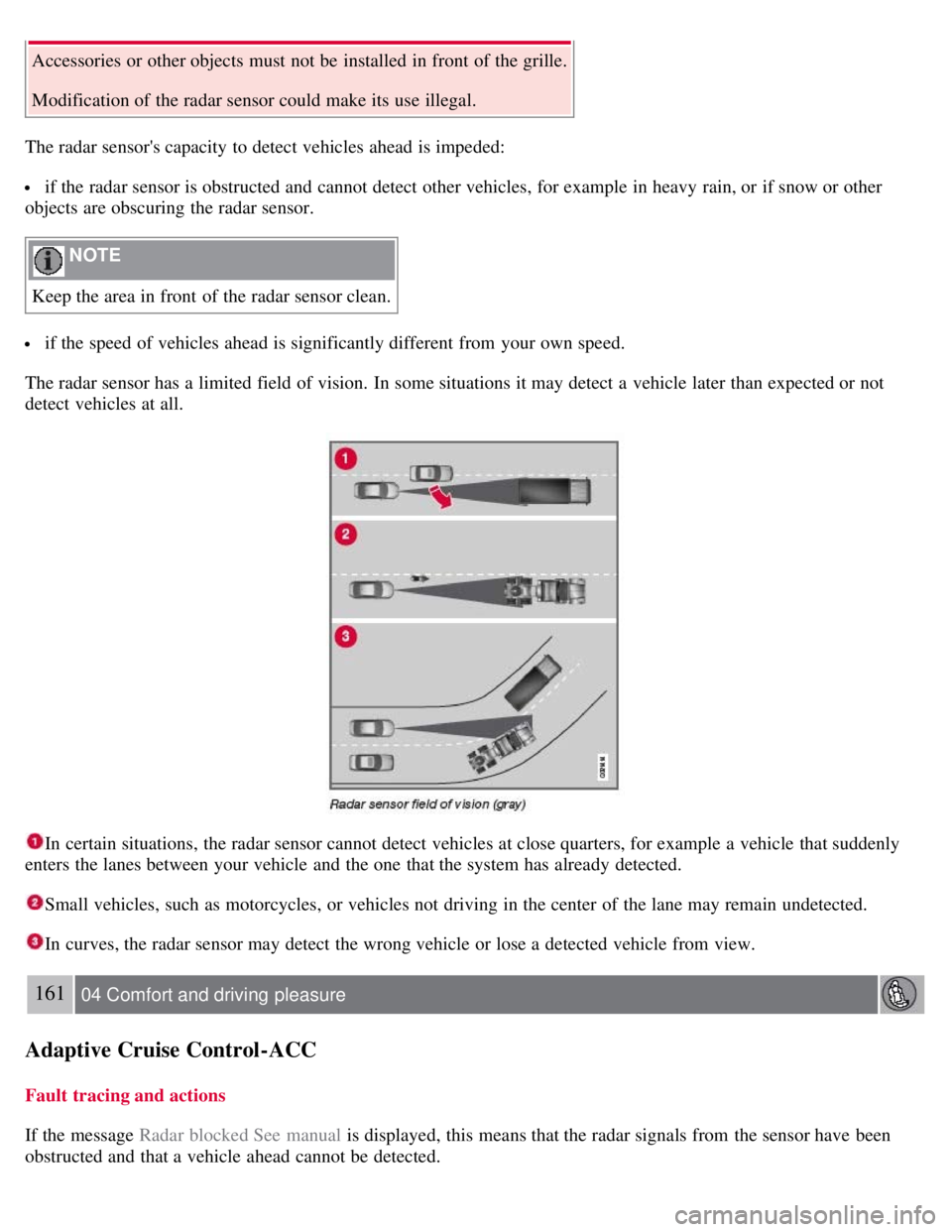
The radar sensor has a limited field of vision. In some situations it may detect a vehicle later than expected or not
detect vehicles at all.
In certain situations, the radar sensor cannot detect vehicles at close quarters, for example a vehicle that suddenly
enters the lanes between your vehicle and the one that the system has already detected.
Small vehicles, such as motorcycles, or vehicles not driving in the center of the lane may remain undetected.
In curves, the radar sensor may detect the wrong vehicle or lose a detected vehicle from view.
161 04 Comfort and driving pleasure
Adaptive Cruise Control-ACC
Fault tracing and actions
If the message Radar blocked See manual is displayed, this means that the radar signals from the sensor have been
obstructed and that a vehicle ahead cannot be detected.
Page 159 of 275
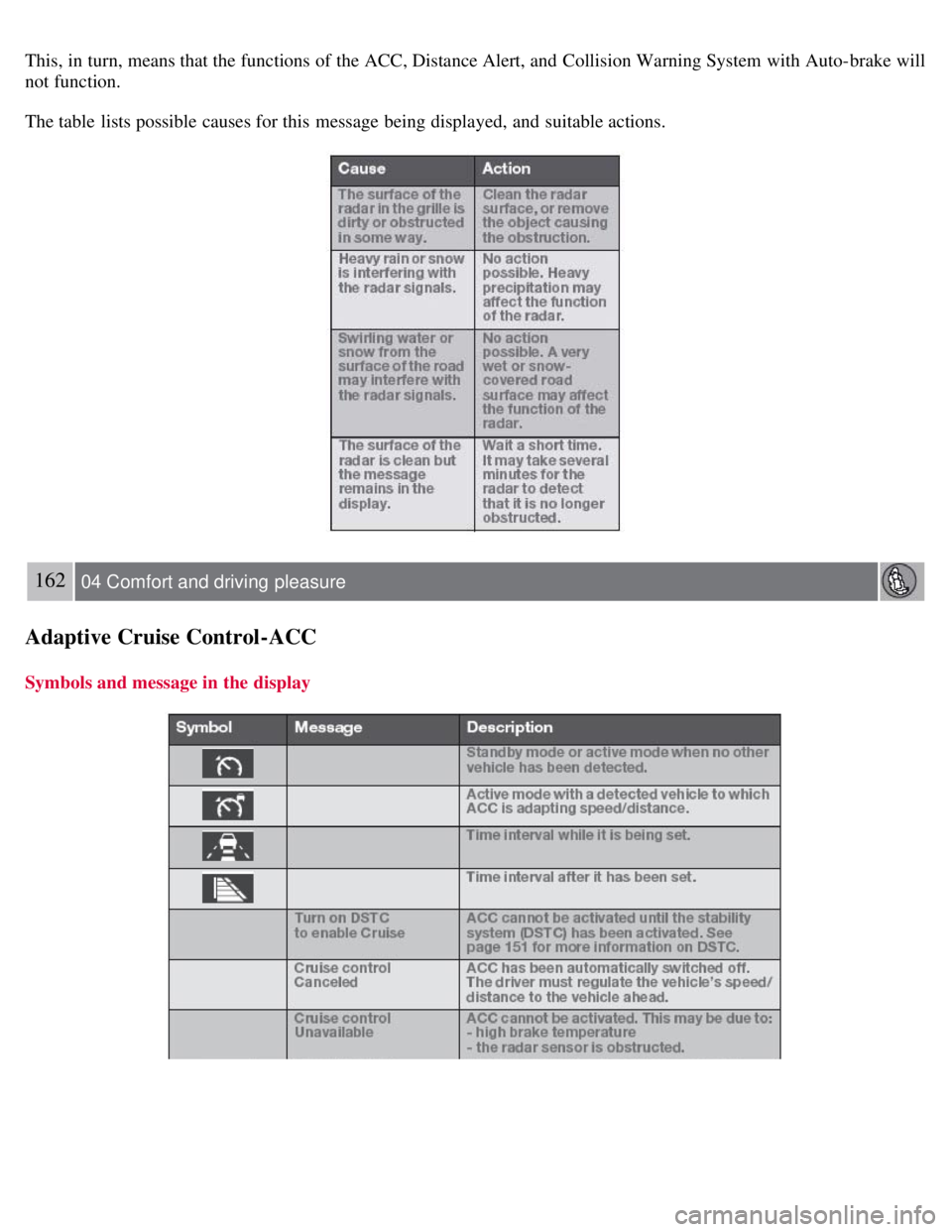
This, in turn, means that the functions of the ACC, Distance Alert, and Collision Warning System with Auto-brake will
not function.
The table lists possible causes for this message being displayed, and suitable actions.
162 04 Comfort and driving pleasure
Adaptive Cruise Control-ACC
Symbols and message in the display
Page 161 of 275
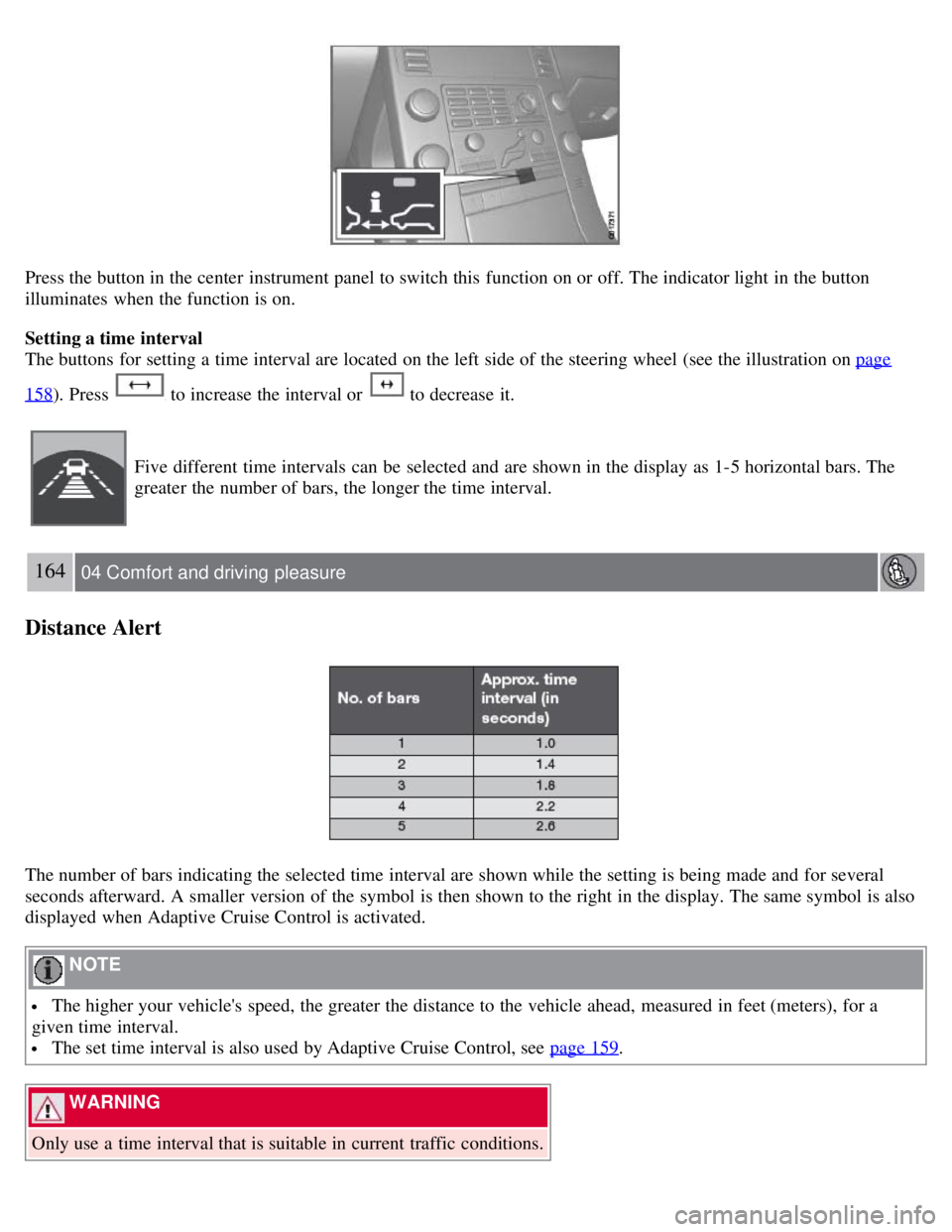
Press the button in the center instrument panel to switch this function on or off. The indicator light in the button
illuminates when the function is on.
Setting a time interval
The buttons for setting a time interval are located on the left side of the steering wheel (see the illustration on page
158). Press to increase the interval or to decrease it.
Five different time intervals can be selected and are shown in the display as 1-5 horizontal bars. The
greater the number of bars, the longer the time interval.
164 04 Comfort and driving pleasure
Distance Alert
The number of bars indicating the selected time interval are shown while the setting is being made and for several
seconds afterward. A smaller version of the symbol is then shown to the right in the display. The same symbol is also
displayed when Adaptive Cruise Control is activated.
NOTE
The higher your vehicle's speed, the greater the distance to the vehicle ahead, measured in feet (meters), for a
given time interval.
The set time interval is also used by Adaptive Cruise Control, see page 159.
WARNING
Only use a time interval that is suitable in current traffic conditions.
Page 162 of 275
Limitations
The Distance Alert function uses the same radar sensor used by Adaptive Cruise Control and the Collision Warning
system. See page 160
for more information on the radar sensor's limitations.
NOTE
Strong sunlight, reflections, extreme light contrasts, the use of sunglasses, or if the driver is not looking straight
ahead may make the visual warning signal in the windshield difficult to see.
WARNING
Bad weather or winding roads may affect the radar sensor's capacity to detect vehicles ahead.
The size of the vehicle ahead, such as a motorcycle, may also make it difficult to detect. This may result in the
warning light illuminating at a shorter distance than the one that has been set, or that the light will not come on at all.
165 04 Comfort and driving pleasure
Distance Alert
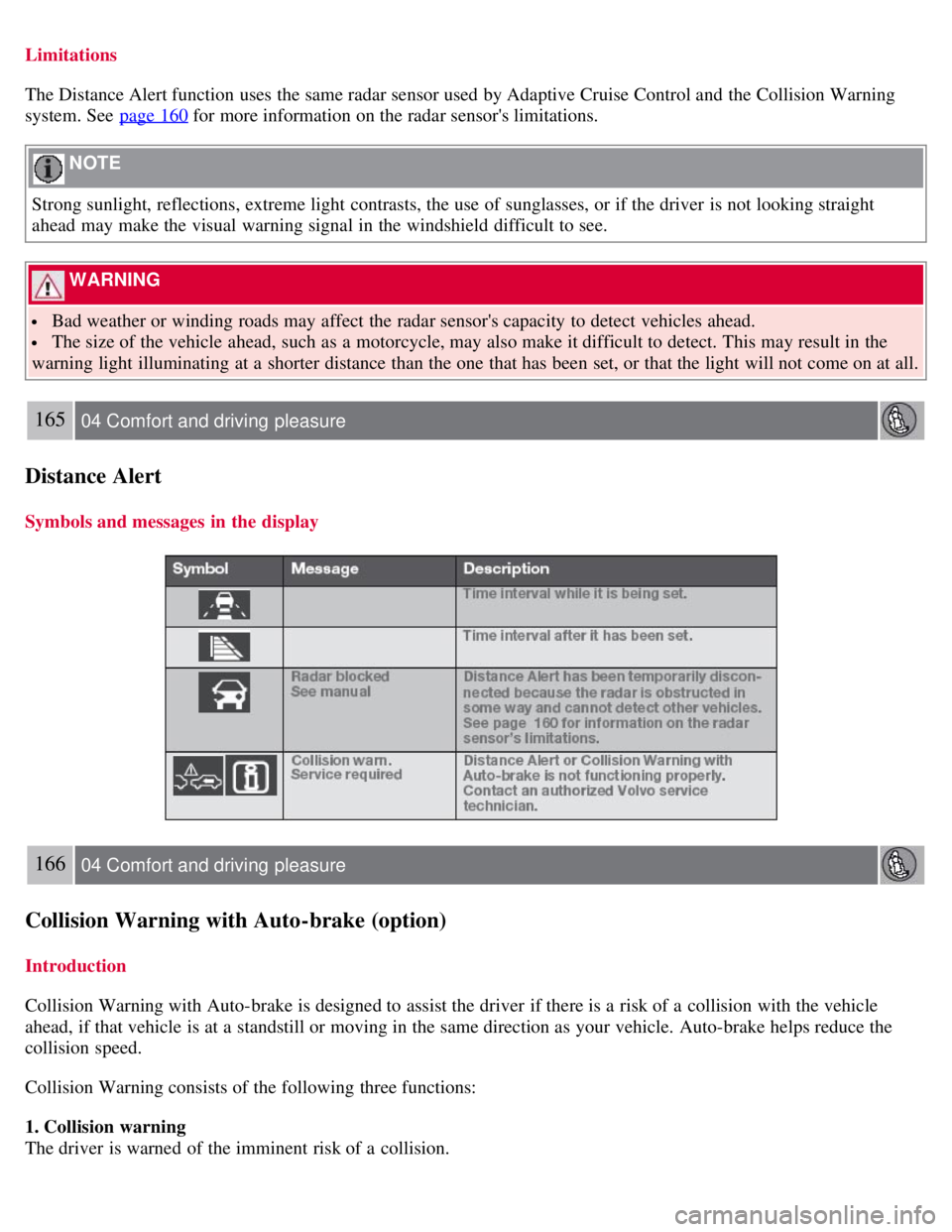
Symbols and messages in the display
166 04 Comfort and driving pleasure
Collision Warning with Auto-brake (option)
Introduction
Collision Warning with Auto-brake is designed to assist the driver if there is a risk of a collision with the vehicle
ahead, if that vehicle is at a standstill or moving in the same direction as your vehicle. Auto-brake helps reduce the
collision speed.
Collision Warning consists of the following three functions:
1. Collision warning
The driver is warned of the imminent risk of a collision.
Page 166 of 275
169 04 Comfort and driving pleasure
Collision Warning with Auto-brake (option)
WARNING
The camera has the same limitations as the human eye. In other words, its "vision is impaired" by adverse weather
conditions such as heavy snowfall, dense fog, etc. These conditions may reduce the function of systems that depend
on the camera or cause these systems to temporarily stop functioning.
Never place any objects, decals, etc., on the windshield in front of the camera. This could reduce or block the
camera's function, and could cause one or more of the systems that utilize the camera to stop functioning.
Strong sunlight, reflections from the road surface, a dirty road surface, or unclear lane marker lines may
drastically reduce the camera's capacity to detect the side of a lane or another vehicle.
Fault tracing and actions
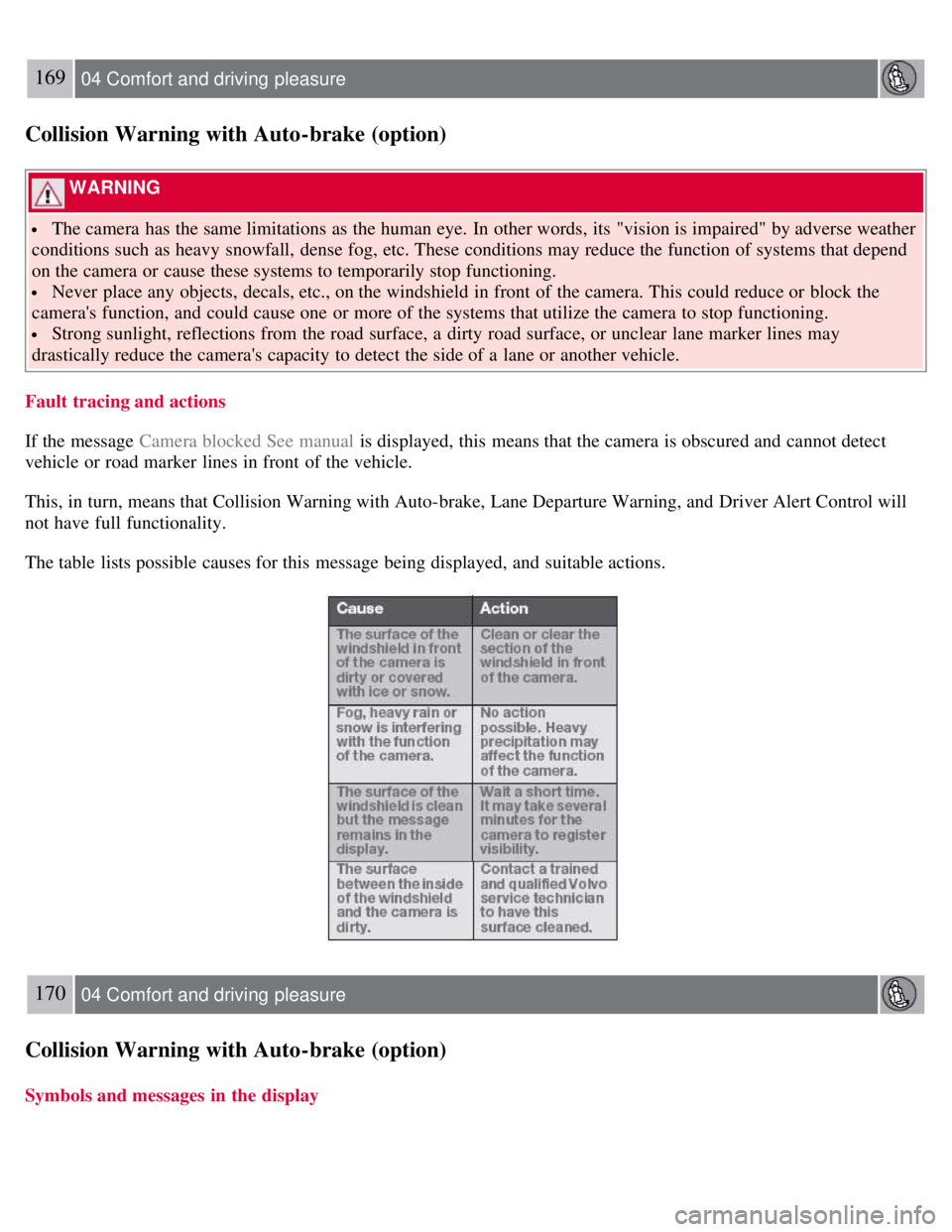
If the message Camera blocked See manual is displayed, this means that the camera is obscured and cannot detect
vehicle or road marker lines in front of the vehicle.
This, in turn, means that Collision Warning with Auto-brake, Lane Departure Warning, and Driver Alert Control will
not have full functionality.
The table lists possible causes for this message being displayed, and suitable actions.
170 04 Comfort and driving pleasure
Collision Warning with Auto-brake (option)
Symbols and messages in the display
Page 168 of 275
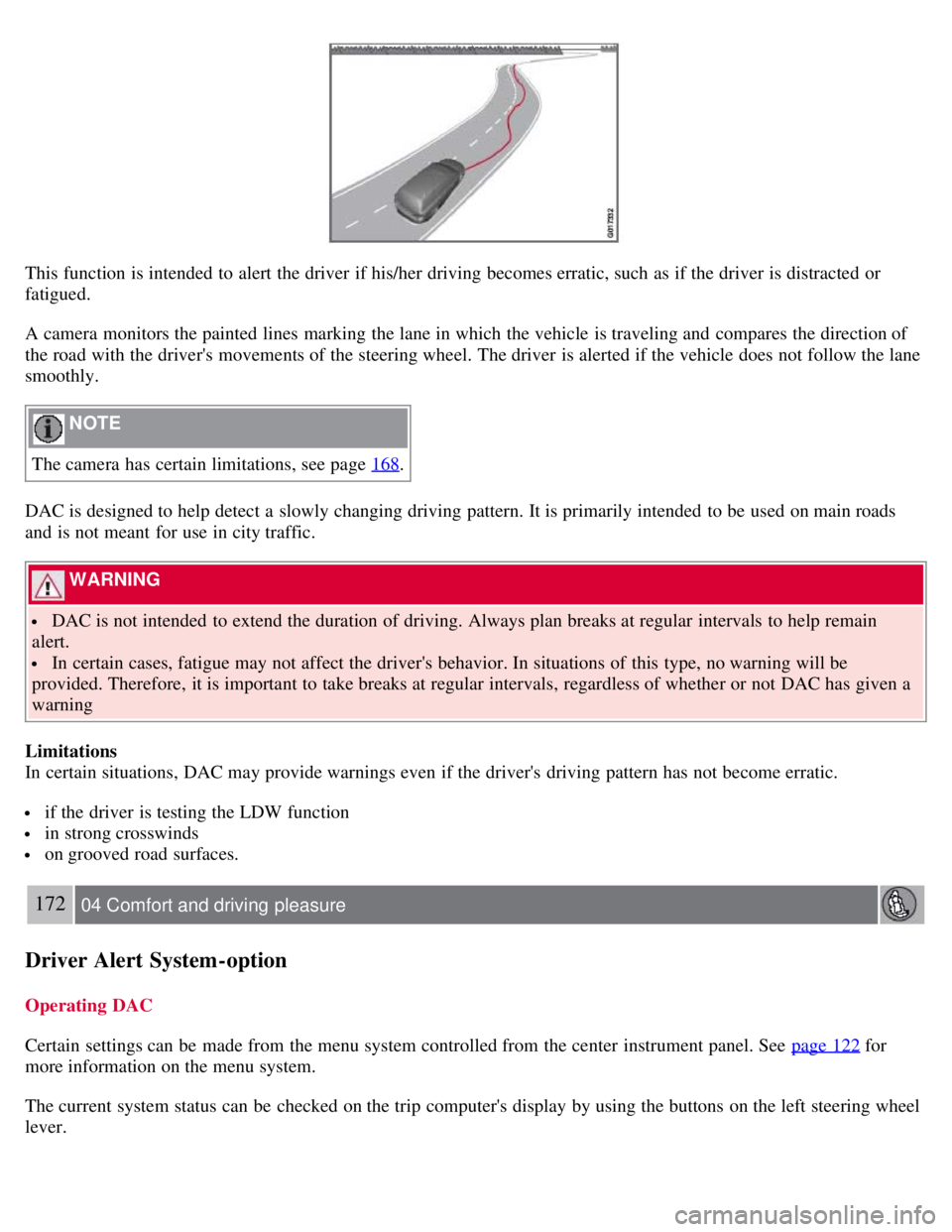
This function is intended to alert the driver if his/her driving becomes erratic, such as if the driver is distracted or
fatigued.
A camera monitors the painted lines marking the lane in which the vehicle is traveling and compares the direction of
the road with the driver's movements of the steering wheel. The driver is alerted if the vehicle does not follow the lane
smoothly.
NOTE
The camera has certain limitations, see page 168
.
DAC is designed to help detect a slowly changing driving pattern. It is primarily intended to be used on main roads
and is not meant for use in city traffic.
WARNING
DAC is not intended to extend the duration of driving. Always plan breaks at regular intervals to help remain
alert.
In certain cases, fatigue may not affect the driver's behavior. In situations of this type, no warning will be
provided. Therefore, it is important to take breaks at regular intervals, regardless of whether or not DAC has given a
warning
Limitations
In certain situations, DAC may provide warnings even if the driver's driving pattern has not become erratic.
if the driver is testing the LDW function
in strong crosswinds
on grooved road surfaces.
172 04 Comfort and driving pleasure
Driver Alert System -option
Operating DAC
Certain settings can be made from the menu system controlled from the center instrument panel. See page 122
for
more information on the menu system.
The current system status can be checked on the trip computer's display by using the buttons on the left steering wheel
lever.